Picture the most boring possible architecture. You have one DynamoDB table. Users put items in. Users read items out. Everything fits in one Lambda, one API Gateway, and a few IAM roles. Life is good.
Then product asks for one small thing.
"When a user upgrades their plan, can we also send a welcome email, update the CRM, recompute their entitlements, and warm the search index?"
You nod. You go back to your laptop. And suddenly your tidy little API handler grows four new responsibilities, every one of which can fail independently, and every one of which has to retry without double-sending the welcome email.
This is the moment most teams reinvent the same wheel. They add a queue. They write a fan-out service. They build a job scheduler. And eventually they end up with something that looks suspiciously like a change data capture pipeline taped to the side of their primary database.
DynamoDB Streams gives you that pipeline for free, baked into the table itself. Let's talk about what it actually is, when it earns its keep, and the traps you'll fall into the first time you wire it up.
What DynamoDB Streams Actually Is
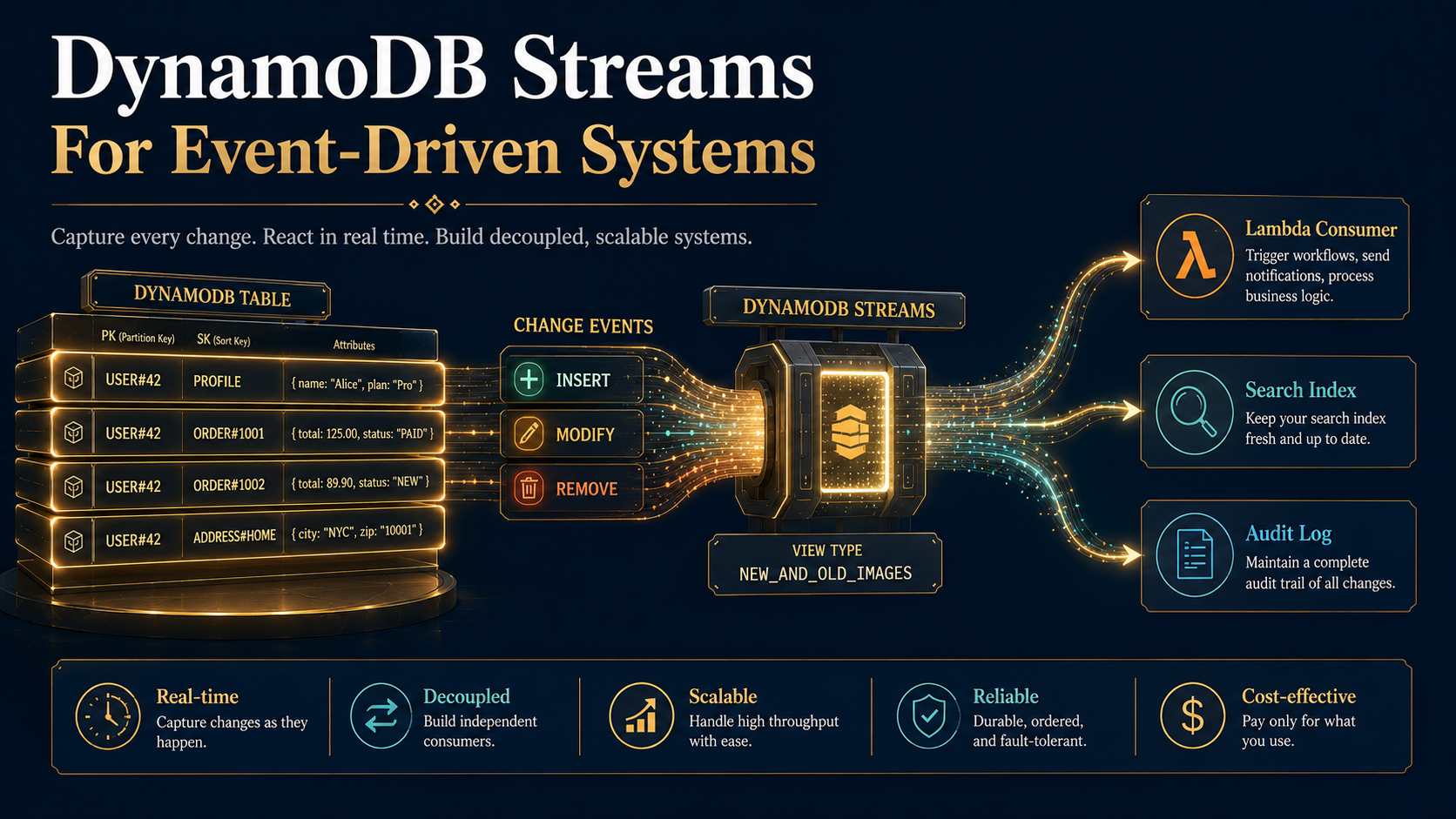
Strip away the marketing and DynamoDB Streams is one specific thing: an ordered, 24-hour log of every item-level change in your table. Insert a row, the stream gets a record. Modify a row, the stream gets a record. Delete a row, the stream gets a record. That's the entire feature.
The log is partitioned the same way the table is, which means changes to a single primary key are guaranteed to arrive in order. Changes across different keys may interleave however the database feels like.
You enable it per table, and you pick one of four view types when you turn it on:
KEYS_ONLY            → just the primary key of the changed item
NEW_IMAGE            → the item as it looks after the change
OLD_IMAGE            → the item as it looked before the change
NEW_AND_OLD_IMAGES   → both, so you can diff them
Pick NEW_AND_OLD_IMAGES and you can answer questions like "did the user's plan field actually change in this update, or did some other attribute change while plan stayed the same?". Pick KEYS_ONLY and you save bytes but pay for an extra read every time the consumer needs to know what the item looks like now.
A reasonable default is NEW_AND_OLD_IMAGES. The extra bytes are rarely the thing that matters, and downstream consumers will inevitably want to compare the before-and-after at some point. You will regret picking KEYS_ONLY more often than you'll regret picking the verbose option.
Records sit in the stream for 24 hours. If your consumer is down for longer than that, you lose them; there is no "rewind further" knob. This is the single most important number to memorise about DynamoDB Streams. Build alerting around it.
Lambda Is The Default Consumer
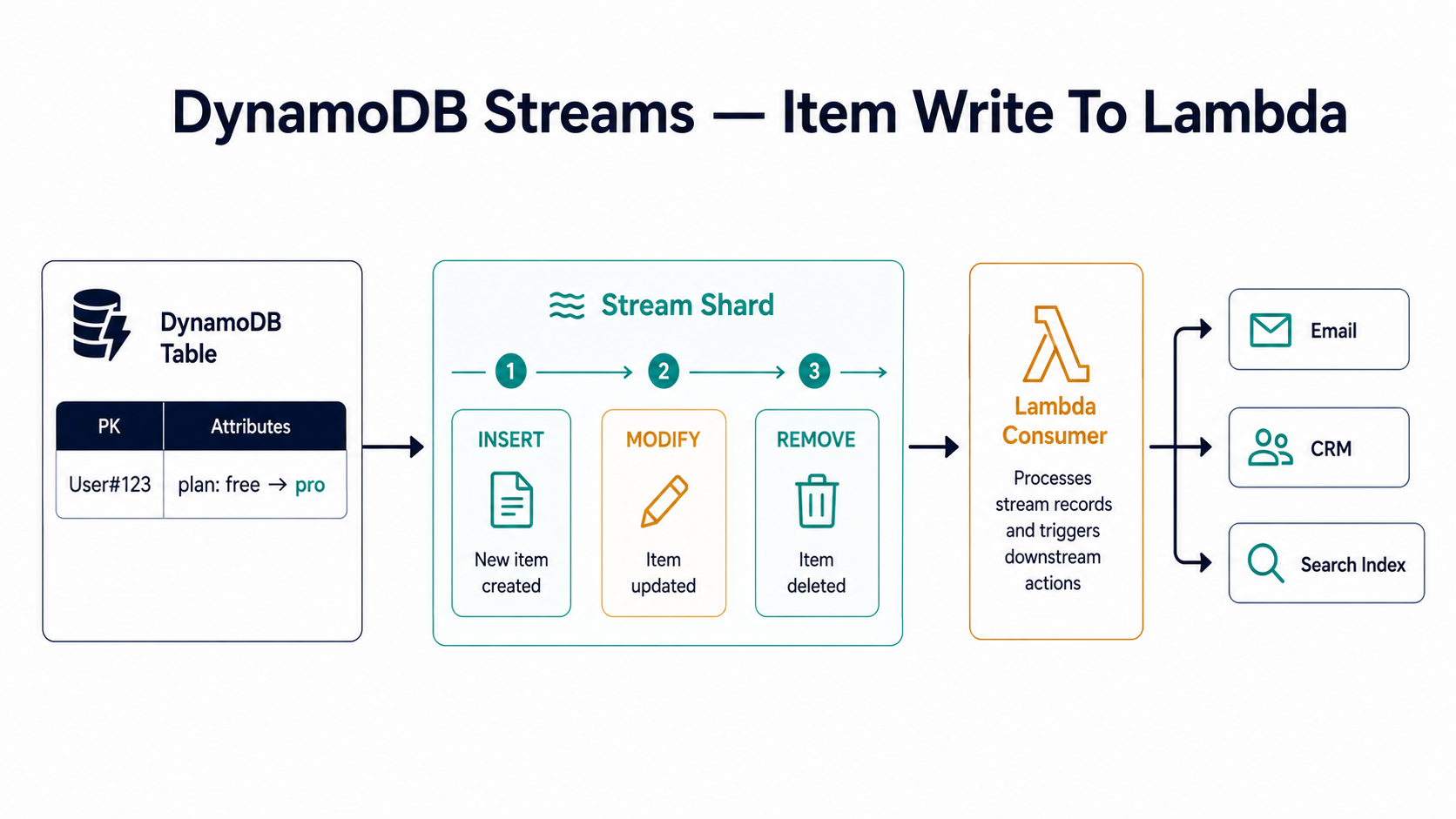
Technically you can read DynamoDB Streams with anything that speaks the Kinesis adapter. In practice, ninety-nine percent of the time the consumer is a Lambda function, and AWS makes that path the path of least resistance.
You point Lambda at the stream by creating an event source mapping. The mapping handles all the gnarly parts: tracking which records have been read, advancing the position, scaling up workers to match the number of shards, retrying batches that fail. You write a handler. AWS does the bookkeeping.
A bare-bones TypeScript handler looks like this:
import type { DynamoDBStreamEvent, DynamoDBStreamHandler } from "aws-lambda";
import { unmarshall } from "@aws-sdk/util-dynamodb";

export const handler: DynamoDBStreamHandler = async (event: DynamoDBStreamEvent) => {
  for (const record of event.Records) {
    const eventName = record.eventName; // INSERT | MODIFY | REMOVE

    const newImage = record.dynamodb?.NewImage
      ? unmarshall(record.dynamodb.NewImage as any)
      : undefined;

    const oldImage = record.dynamodb?.OldImage
      ? unmarshall(record.dynamodb.OldImage as any)
      : undefined;

    await route(eventName, oldImage, newImage);
  }
};
A few things deserve a callout. unmarshall is the AWS-provided helper that turns DynamoDB's wire format ({ S: "value" }, { N: "42" }, and friends) into plain JavaScript objects. If you find yourself writing record.dynamodb.NewImage.email.S by hand, stop. That's a maintenance bomb waiting for the day someone adds a nested map.
The handler receives a batch of records, not one at a time. By default Lambda will hand you up to 100 records per invocation, or up to 6 MB of payload, whichever comes first. You can tune that:
Events:
  StreamEvent:
    Type: DynamoDB
    Properties:
      Stream: !GetAtt UsersTable.StreamArn
      StartingPosition: LATEST
      BatchSize: 50
      MaximumBatchingWindowInSeconds: 2
      ParallelizationFactor: 4
      BisectBatchOnFunctionError: true
      MaximumRetryAttempts: 3
      MaximumRecordAgeInSeconds: 21600
      FunctionResponseTypes:
        - ReportBatchItemFailures
      DestinationConfig:
        OnFailure:
          Destination: !GetAtt DLQ.Arn
That's a small forest of knobs, and almost every one of them earns a footnote.
BatchSize controls upper bound per invocation. Smaller batches mean lower latency per record but more invocations. Larger batches mean cheaper per-record cost but bigger blast radius when one record poisons the batch.
MaximumBatchingWindowInSeconds is how long Lambda will sit and wait to fill the batch before invoking anyway. Set it to zero and Lambda fires as soon as anything arrives. Set it to a few seconds and you'll see fewer, fatter invocations.
ParallelizationFactor lets multiple Lambda invocations process the same shard concurrently, each operating on a non-overlapping subset of the partition key space. The catch: ordering is still guaranteed per key, but you lose ordering across keys within a shard. If your downstream logic depends on the order of events for different keys, leave this at 1.
BisectBatchOnFunctionError is the underrated star. When a batch fails, Lambda splits it in half and retries each half. Then splits the failed half. And so on, until it isolates the poison record. Without this, one bad record can hold up your entire pipeline.
MaximumRetryAttempts and MaximumRecordAgeInSeconds are the two ways to say "give up". Either you've retried this batch enough times, or the record has been waiting too long. Pick whichever bound matches your tolerance for staleness.
FunctionResponseTypes: ReportBatchItemFailures lets you tell Lambda which specific records in the batch failed, instead of failing the whole batch. We'll come back to this in a minute, and it changes how you write the handler.
DestinationConfig.OnFailure is where dead records go after retries are exhausted. Point it at an SQS queue or SNS topic and you have a real DLQ, not just lost data.
Change Capture Is The Killer Use Case
If you remember nothing else from this article, remember this: DynamoDB Streams turns your database into an event source, and that single property is what makes most downstream patterns work.
In a request-response system, side effects live in the API handler. A user upgrades their plan. The handler updates the row, sends the email, updates CRM, warms the index. Every side effect is a place the request can fail. Some succeed, some don't. Now you're either rolling back the database row or shipping with inconsistent state.
With change capture, the API handler does exactly one thing: it updates the row. The stream takes care of broadcasting that change, and every side effect becomes its own independently retryable consumer.
export async function upgrade(userId: string) {
  await db.update({ TableName: "Users", Key: { userId }, ... });
  await email.sendWelcome(userId);     // can fail
  await crm.syncUser(userId);          // can fail
  await search.warmIndex(userId);      // can fail
}
After:
export async function upgrade(userId: string) {
  await db.update({ TableName: "Users", Key: { userId }, ... });
}

// Three separate Lambdas listen to the stream and react to a plan change.
// If the email Lambda fails, it retries on its own. The other two are unaffected.
The second version is shorter and more reliable. The API handler now has one job and one failure mode. The fan-out is implicit and independently observable.
This is the thing people mean when they say "event-driven architecture" without sounding pretentious about it. You're not introducing events to be fashionable. You're using them because the alternative (chaining four side effects into one transaction) is genuinely worse.
The Idempotency Trap
Streams will deliver each record at least once. That phrase hides a multitude of sins. In practice it means: every record you process will probably arrive exactly once, but occasionally a record will arrive twice, and your handler has to be okay with that.
This bites hardest with side effects that aren't naturally idempotent. Sending an email. Charging a card. Posting to Slack. Calling a third-party webhook.
The cleanest fix is to anchor every effect to a deterministic key derived from the record itself, and store that key somewhere durable before performing the effect.
import { DynamoDBClient } from "@aws-sdk/client-dynamodb";
import { DynamoDBDocumentClient, PutCommand } from "@aws-sdk/lib-dynamodb";

const ddb = DynamoDBDocumentClient.from(new DynamoDBClient({}));

async function sendOnce(streamRecord: Record<string, unknown>, effectKey: string) {
  try {
    await ddb.send(new PutCommand({
      TableName: "EffectLedger",
      Item: { effectKey, processedAt: Date.now() },
      ConditionExpression: "attribute_not_exists(effectKey)",
    }));
  } catch (e: any) {
    if (e.name === "ConditionalCheckFailedException") {
      // Already done. Skip silently.
      return;
    }
    throw e;
  }

  await email.sendWelcome(streamRecord);
}
The conditional put gives you an atomic "claim this effect" operation. If the row already exists, someone (likely a prior delivery of the same record) already did the work. Skip it.
Choosing the right effectKey is the part you have to think about. The DynamoDB stream record gives you an eventID field, which is unique per record. That's a great starting point. But if you're listening to MODIFY events and you want one welcome email per plan upgrade, your effect key probably looks more like welcome-email:userId#plan-pro , because the same logical upgrade might arrive as more than one stream record if your code wrote to the row twice, and you only want to send the email once across all of them.
Partial Batch Failures Are Worth The Trouble
Earlier I mentioned ReportBatchItemFailures. Here's why it matters.
Without it, your handler either succeeds (the whole batch is acknowledged) or throws (the whole batch is retried). If record 73 out of 100 has a bug in it, records 0-72 get reprocessed. Idempotency saves you from doubled side effects, but it doesn't save you from doing the work twice.
With it, you tell Lambda exactly which records to retry.
export const handler = async (event: DynamoDBStreamEvent) => {
  const batchItemFailures: { itemIdentifier: string }[] = [];

  for (const record of event.Records) {
    try {
      await process(record);
    } catch (err) {
      batchItemFailures.push({ itemIdentifier: record.dynamodb!.SequenceNumber! });
    }
  }

  return { batchItemFailures };
};
Two things to know. First, the order of items in batchItemFailures does not matter to Lambda; it uses sequence numbers to identify which records to retry. Sorting them if you accumulated them out of order is harmless and makes debugging easier. Second, the moment one record fails, every record after it in the same shard waits behind it until the failed record either succeeds or gives up. That's by design: it preserves order per key. The trade-off is that one poisonous record can stall a whole partition. This is where MaximumRecordAgeInSeconds and the DLQ pull their weight.
What Async Workflows Actually Look Like
Most of the interesting patterns are some variation of "the stream is the source of truth, and Lambdas materialise other views of that truth."
A few that come up in nearly every system big enough to need them:
Search index sync. Whenever a record changes, push the new shape into Elasticsearch or OpenSearch. You don't try to write to both stores from the API. You write to DynamoDB and let the stream push the rest.
Audit log. Every change appends a row to an audit table or to S3. Compliance loves this pattern because the audit isn't something the application code has to remember to do: it's a structural property of the system.
Materialised aggregates. Counters, leaderboards, "items per category". You don't recompute on read. You react to each change in the stream and update the aggregate in place. The aggregate is eventually consistent, but it's also millisecond-cheap to read.
Webhook fan-out. Every change publishes to an EventBridge bus, which routes to internal subscribers, third-party webhooks, partner integrations. The stream-to-bus Lambda is small and focused; the routing rules live in EventBridge.
Read-model projection. Classic CQRS shape: the stream feeds a denormalised read model, possibly in another database (PostgreSQL, Redis, even a different DynamoDB table with a different key schema for query patterns the primary table can't serve).
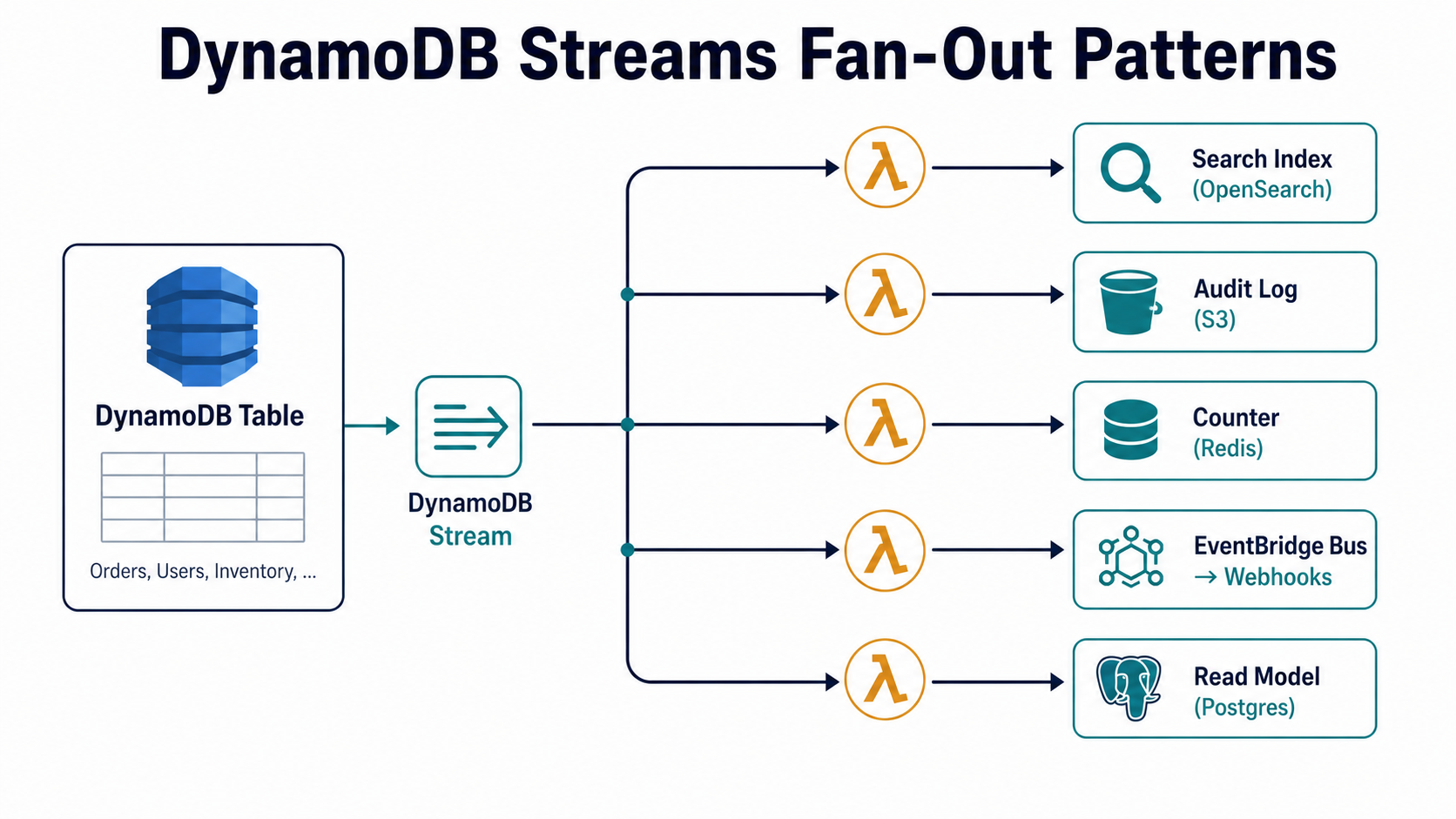
The shape repeats: stream out, Lambda transforms, downstream system gets a tidy projection of state. Your primary table stays narrow and write-optimised. Every read pattern that doesn't fit DynamoDB's key model lives somewhere else, sourced from the same stream.
EventBridge Pipes Is Often The Right Glue
If your Lambda's job is "read from the stream, transform a little, send to SQS/SNS/EventBridge", you probably don't need to write a Lambda at all. EventBridge Pipes is purpose-built for that shape. You declare the source (the DynamoDB Stream), an optional filter, an optional enrichment step (which can be a Lambda), and the target (SQS, SNS, EventBridge bus, Step Functions, API destination, and friends).
A pipe looks something like:
{
  "Source": "arn:aws:dynamodb:us-east-1:111122223333:table/Users/stream/2026-05-10T00:00:00.000",
  "SourceParameters": {
    "DynamoDBStreamParameters": {
      "StartingPosition": "LATEST",
      "BatchSize": 100
    },
    "FilterCriteria": {
      "Filters": [
        { "Pattern": "{\"eventName\":[\"MODIFY\"],\"dynamodb\":{\"NewImage\":{\"plan\":{\"S\":[\"pro\",\"enterprise\"]}}}}" }
      ]
    }
  },
  "Target": "arn:aws:events:us-east-1:111122223333:event-bus/billing-bus"
}
The filter is the part most people miss. It runs before your code, on AWS-managed infrastructure, and it drops records that don't match. Your downstream Lambda no longer wakes up for every INSERT and REMOVE just to ignore them. You pay for the records you care about, not the firehose.
If you're already using Lambda just to filter and forward, switching to a Pipe with a filter is one of the highest-leverage cleanups available.
When You Should Not Use DynamoDB Streams
Streams is the right tool a lot of the time, but it's not free of sharp edges.
Don't use it when you need replay older than 24 hours. That's the hard limit. If your downstream consumer might be offline for days, or you need to bootstrap a new consumer from history, you want Kinesis Data Streams (which can be configured for up to 365 days of retention) or you want to combine streams with periodic snapshots.
Don't use it for workflows, in the sense of long-running, multi-step business processes with branching, human approval, and saga compensation. Streams gives you reactions to changes; it does not give you orchestration. For workflows that span hours or days, Step Functions is the right primitive, with the stream feeding it at the entry point.
Don't use it when ordering across keys is critical. The stream guarantees order per primary key, not globally. If your consumer's correctness depends on seeing a users event before an accounts event that happens to refer to the same user, you need explicit sequencing somewhere, typically a small state machine that waits for both.
And don't use it as the only signal for things that are external-facing and contractual. If you publish a public webhook based purely on a stream record, and your stream goes down for a window, your customers will quietly miss events forever. Pair stream-driven workflows with a reconciliation job that periodically walks the table and re-emits any missed signals.
A Mental Model To Keep
The shortest version of all of this:
Your table is the source of truth. The stream is a 24-hour ordered log of every change to that truth. Lambdas are workers that subscribe to the log, do one focused job each, and stay idempotent on purpose. Every side effect lives in its own worker, retries on its own clock, dies in its own DLQ when it can't be saved.
That model scales surprisingly far. The first time you build it, it'll feel like overkill for the four side effects you have today. The fourth time you add a new downstream consumer in five minutes, without touching the API handler, without writing a queue, without redesigning the data model, and you'll quietly stop questioning whether it was worth the setup.