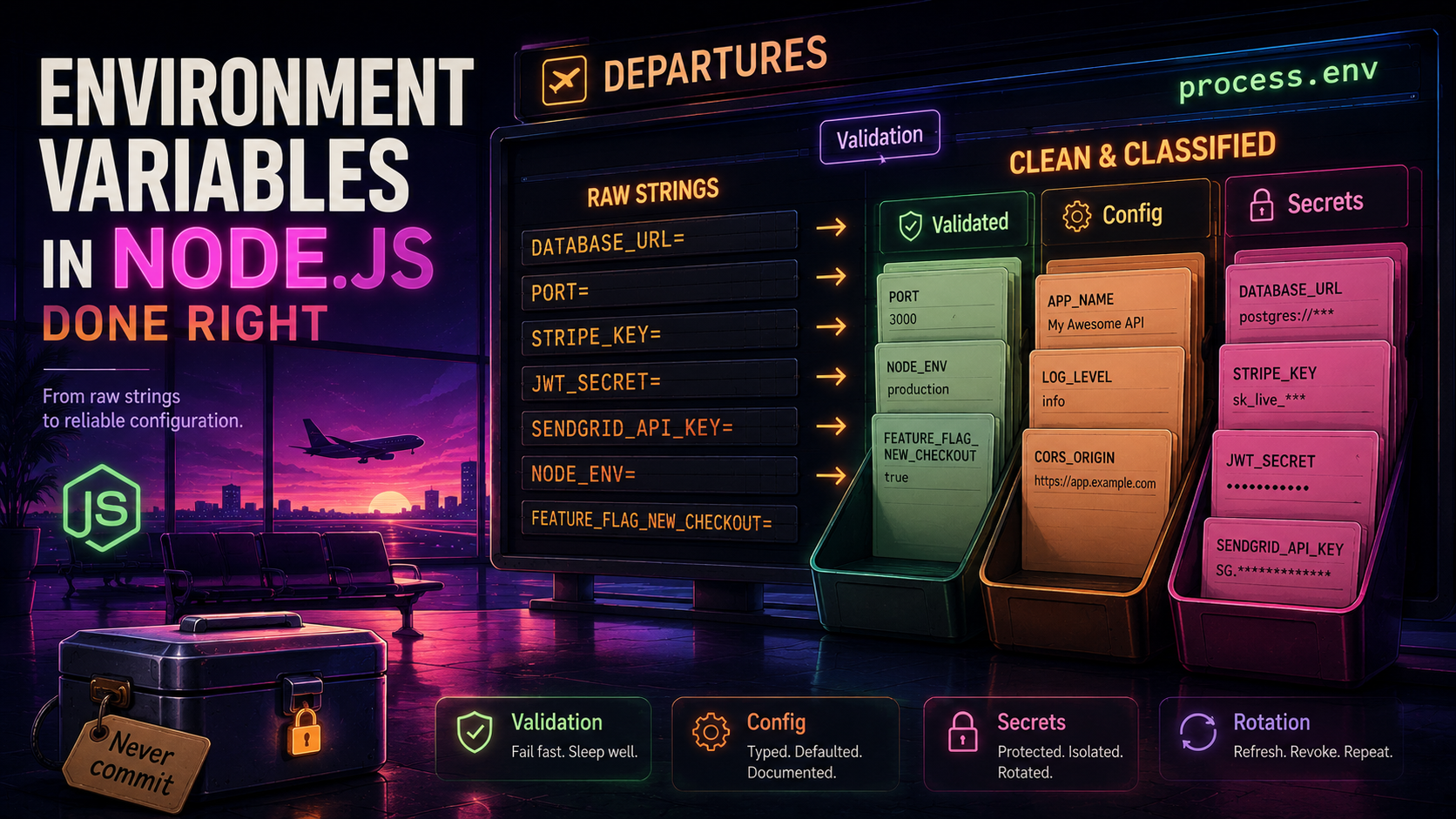
So you've got a Node app, a .env file, and the well-worn line require('dotenv').config() somewhere near the top of index.js. The tutorial said this is how environment variables work in Node, and for a weekend project that's true. The problem starts the moment that app gets a second environment, a second developer, or a single secret that actually matters.
Most "12-factor" advice stops at "use environment variables for config." That's the one-sentence version. The honest version has three parts - validate the values at boot, build a real configuration layer on top of them, and treat secrets as a separate category that never sits in the same file as your LOG_LEVEL. We're going to walk through all three, and by the end, process.env.WHATEVER should feel a little gross to you.
The Real Problem With process.env
process.env is a global, untyped, mutable string map. That's not a description, it's an indictment. Every entry is a string - process.env.PORT is "3000", not 3000. Every entry can be missing - read a key that isn't set and you get undefined. Every entry can be mutated by anything in the process - including a dependency you've never read. And TypeScript treats every key as string | undefined because that's literally what it is.
So the bug pattern writes itself. Somewhere deep in your codebase you have:
const pool = new Pool({ max: process.env.DB_POOL_SIZE });You set DB_POOL_SIZE=20 in production, ship it, and your pool size is the string "20". Whether that breaks depends on the library - pg is forgiving, others aren't, and the bug shows up the first time you have load. Or you forget to set the variable at all, and max is undefined, which the library silently treats as its default. Either way, you find out in production. The .env file lulls you into thinking the value exists, the wrong type, in the wrong place, and your tests didn't catch it because tests don't care about DB_POOL_SIZE.
The fix isn't more discipline. The fix is to never let an unvalidated, untyped env var reach your application code at all.
Validate Once, At Boot
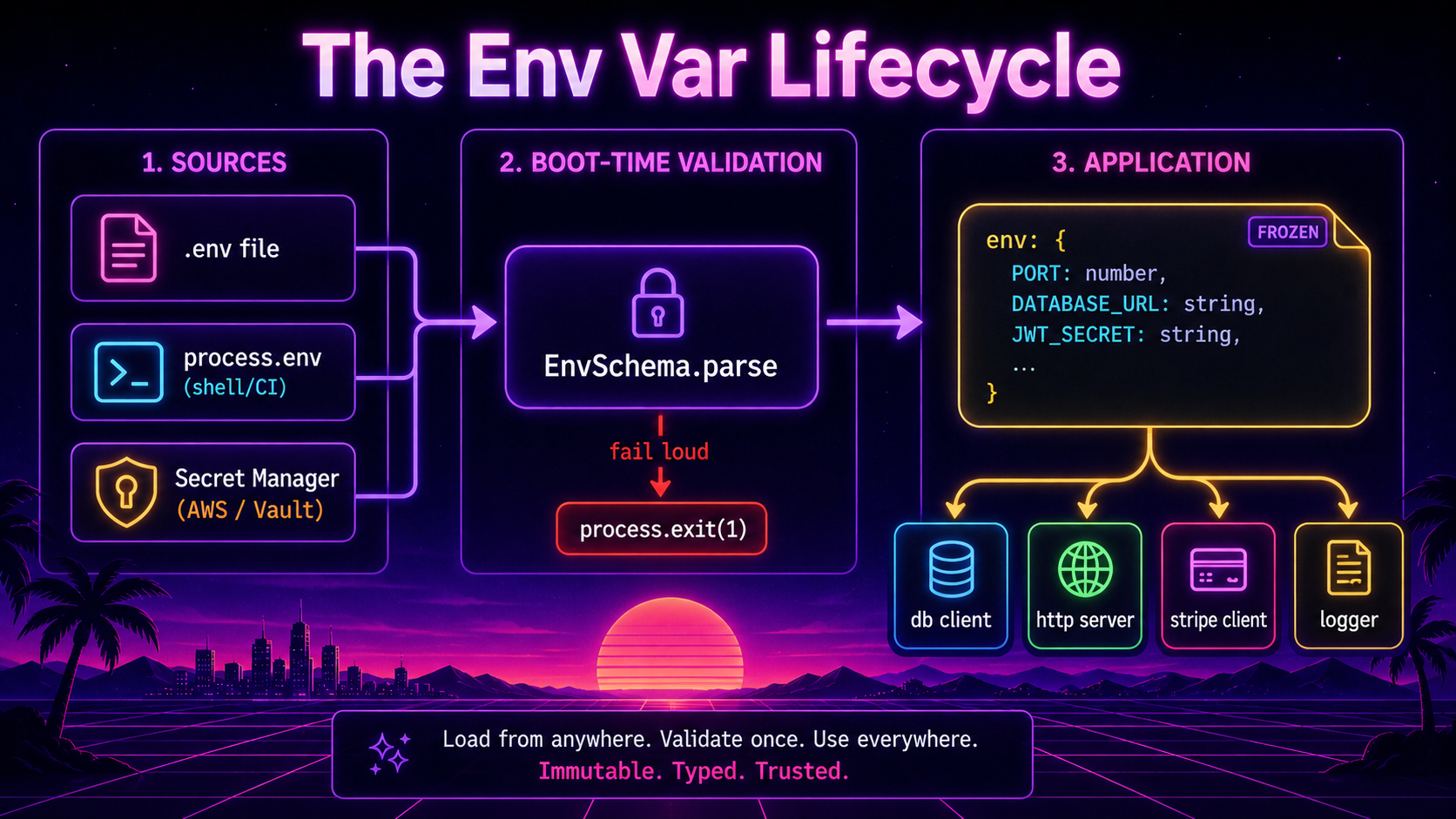
The pattern is one boot-time function that reads process.env, validates every variable your app expects, coerces them to the right types, fails loudly if anything is wrong, and returns one frozen, typed object. Nothing else in the app touches process.env directly.
The two libraries that do this well in the Node ecosystem are zod and envalid. Both are real, both are maintained. Pick whichever you already use elsewhere - there's no winner.
Here's the zod version, which is what you'd reach for if you already use zod for request validation:
import { z } from 'zod';

const EnvSchema = z.object({
  NODE_ENV: z.enum(['development', 'test', 'staging', 'production']),
  PORT: z.coerce.number().int().positive().default(3000),
  DATABASE_URL: z.string().url(),
  DB_POOL_SIZE: z.coerce.number().int().min(1).max(100).default(10),
  REDIS_URL: z.string().url().optional(),
  LOG_LEVEL: z.enum(['debug', 'info', 'warn', 'error']).default('info'),
  JWT_SECRET: z.string().min(32),
  STRIPE_API_KEY: z.string().startsWith('sk_'),
  FEATURE_NEW_CHECKOUT: z.coerce.boolean().default(false),
});

export type Env = z.infer<typeof EnvSchema>;

export const env: Env = (() => {
  const parsed = EnvSchema.safeParse(process.env);
  if (!parsed.success) {
    console.error('❌ Invalid environment configuration:');
    console.error(parsed.error.flatten().fieldErrors);
    process.exit(1);
  }
  return Object.freeze(parsed.data);
})();
Three things are doing a lot of work here, and they're worth naming.
z.coerce.number() and z.coerce.boolean() do the string-to-type conversion you'd otherwise have to remember to do at every call site. PORT becomes a real number, FEATURE_NEW_CHECKOUT becomes a real boolean. The coercion rules are sane - "true" and "1" are true, "false" and "0" are false, anything else fails validation.
The .min(32) on JWT_SECRET and the .startsWith('sk_') on STRIPE_API_KEY aren't decorative. A 12-character JWT_SECRET is the kind of mistake that survives code review because nobody looks at .env.local. Catching it at boot turns it from a future incident into a startup failure. Same with the Stripe key - if someone pastes a publishable pk_ key where the secret key should be, the app refuses to start.
Calling process.exit(1) if validation fails is the whole point. A misconfigured app that boots into a broken state is much worse than one that doesn't boot at all. Loud failures are easier to debug than quiet wrong behaviour.
The envalid version is shorter for the simple cases:
import { cleanEnv, str, num, port, url, bool, makeValidator } from 'envalid';

const stripeKey = makeValidator((s) => {
  if (!s.startsWith('sk_')) throw new Error('Expected a Stripe secret key (sk_...)');
  return s;
});

export const env = cleanEnv(process.env, {
  NODE_ENV: str({ choices: ['development', 'test', 'staging', 'production'] }),
  PORT: port({ default: 3000 }),
  DATABASE_URL: url(),
  DB_POOL_SIZE: num({ default: 10 }),
  REDIS_URL: url({ default: undefined }),
  LOG_LEVEL: str({ choices: ['debug', 'info', 'warn', 'error'], default: 'info' }),
  JWT_SECRET: str({ desc: 'Min 32 chars, used to sign access tokens' }),
  STRIPE_API_KEY: stripeKey(),
  FEATURE_NEW_CHECKOUT: bool({ default: false }),
});
cleanEnv exits the process on failure by default, prints a nice report of what's missing or wrong, and gives you back a typed object. It also has a small but useful party trick - if you read a key that isn't in the schema, it throws. So you can't accidentally introduce a new env var at a call site and forget to declare it at the top.
Configuration Is Not Just Env Vars
Once you have a validated env object, you've got the raw materials. But raw env vars are not the right shape for application code. Code shouldn't read env.DB_POOL_SIZE, it should read config.database.poolSize. The translation layer between the two is small, but it earns its keep.
A configuration module composes the validated env into the shape the rest of the app actually wants:
import { env } from './env';

export const config = Object.freeze({
  app: {
    env: env.NODE_ENV,
    isProduction: env.NODE_ENV === 'production',
    port: env.PORT,
    logLevel: env.LOG_LEVEL,
  },
  database: {
    url: env.DATABASE_URL,
    poolSize: env.DB_POOL_SIZE,
    statementTimeoutMs: env.NODE_ENV === 'production' ? 5_000 : 30_000,
  },
  redis: env.REDIS_URL ? { url: env.REDIS_URL } : null,
  auth: {
    jwtSecret: env.JWT_SECRET,
    accessTtl: '10m',
    refreshTtlDays: 30,
  },
  stripe: {
    apiKey: env.STRIPE_API_KEY,
    webhookTolerance: 300,
  },
  features: {
    newCheckout: env.FEATURE_NEW_CHECKOUT,
  },
} as const);

export type Config = typeof config;
A few things that look small but matter.
isProduction belongs here, computed once, instead of being scattered as env.NODE_ENV === 'production' checks across the codebase. Every if (env.NODE_ENV === 'production') is a chance to typo 'prod' instead. One computed boolean removes that whole class of bug.
statementTimeoutMs shows the real reason you want a config layer - derived values. The env var is NODE_ENV, but the application wants a number of milliseconds. The config layer is the right place to make that decision once. You also get to keep dev-only timeouts loose without polluting your .env files with environment-specific tuning.
accessTtl: '10m' and webhookTolerance: 300 are constants, not env vars. They live in code because they don't change per environment, and putting them in .env would just be obfuscating constants behind a misleading layer. The rule of thumb: env vars are for things that must differ per environment. Anything that doesn't is a code constant.
Once config exists, you import it everywhere instead of reaching for process.env or even the env object. The env validator is the loading dock; the config object is the warehouse the rest of the app shops from.
Secrets Are A Different Animal
Here is the line: a secret is anything where, if it leaked, you'd page someone. Database passwords, API keys, signing secrets, OAuth client secrets, encryption keys, webhook signing keys. A LOG_LEVEL is configuration. A JWT_SECRET is a secret. They live in process.env together because Node didn't give us a better channel - but you should treat them differently from the moment they're loaded.
Three rules cover most of the damage:
Never commit secrets to git. Every team thinks they don't need this rule. Every team is wrong about it eventually. Use .gitignore to keep .env* out of the repo, and check in a .env.example instead - same keys, blank or placeholder values, plus a one-line comment explaining where to get the real value. The example file becomes documentation: a new developer cloning the repo learns exactly which env vars exist and what they're for, without ever seeing a real secret.
Don't load secrets the same way as configuration. A flat .env file is fine for local development of non-sensitive config. For real environments, secrets come from a secret manager - AWS Secrets Manager, Google Secret Manager, HashiCorp Vault, or whatever your platform gives you. The pattern is the same regardless: at boot, the app calls the secret manager, fetches the secrets, places them into process.env, and then runs validation. Your validation schema doesn't need to know whether JWT_SECRET came from a .env file in dev or from Vault in prod - by the time it sees process.env, the values are already there.
import { SecretsManagerClient, GetSecretValueCommand }
  from '@aws-sdk/client-secrets-manager';

export async function loadSecretsIntoEnv(secretId: string): Promise<void> {
  if (process.env.NODE_ENV === 'development' || process.env.NODE_ENV === 'test') {
    return; // local dev reads .env directly
  }

  const client = new SecretsManagerClient({});
  const response = await client.send(new GetSecretValueCommand({ SecretId: secretId }));

  if (!response.SecretString) {
    throw new Error(`Secret ${secretId} has no SecretString`);
  }

  const secrets = JSON.parse(response.SecretString) as Record<string, string>;
  for (const [key, value] of Object.entries(secrets)) {
    if (process.env[key] === undefined) {
      process.env[key] = value;
    }
  }
}
Then your entry point becomes:
import { loadSecretsIntoEnv } from './config/load-secrets';

async function main() {
  await loadSecretsIntoEnv(process.env.SECRETS_BUNDLE_ID ?? 'app/prod');

  // Importing env runs validation. It MUST happen after secrets are loaded.
  const { env } = await import('./config/env');
  const { config } = await import('./config');

  const { startServer } = await import('./server');
  await startServer(config);
}

main().catch((err) => {
  console.error('Boot failed:', err);
  process.exit(1);
});
The dynamic imports are deliberate. If ./config/env is imported at the top of the file, its validation runs before loadSecretsIntoEnv finishes, and it'll fail because JWT_SECRET isn't in process.env yet. Loading secrets first, then triggering validation via the dynamic import, keeps the order correct.
Never log secrets. Sounds obvious, gets violated all the time. Two practical defences. First, when you log your config for debugging, use a redacting serializer instead of JSON.stringify(config):
const SECRET_KEYS = /secret|password|token|key|dsn|credential/i;

export function redactConfig(obj: unknown): unknown {
  if (obj === null || typeof obj !== 'object') return obj;
  if (Array.isArray(obj)) return obj.map(redactConfig);

  const out: Record<string, unknown> = {};
  for (const [k, v] of Object.entries(obj as Record<string, unknown>)) {
    out[k] = SECRET_KEYS.test(k) ? '[REDACTED]' : redactConfig(v);
  }
  return out;
}
Second, lean on your logger. pino supports a redact option that takes JSON paths and replaces them in every log line - redact: ['*.password', '*.jwtSecret', 'config.stripe.apiKey']. Set it once at logger setup, and even a careless logger.info({ config }, 'starting') won't leak. Set it; don't trust yourself to remember.
Local Development Without The Footguns
A .env file in development is fine - it's just a way to populate process.env before validation runs. The two libraries that do this are dotenv and Node's own built-in --env-file flag, which landed in Node 20.6.0 and is stable in current LTS. Both work; the built-in needs no dependency.
"dev": "node --watch -r dotenv/config src/index.ts""dev": "node --watch --env-file=.env src/index.ts"Pick one. The native flag has the advantage of zero dependencies; dotenv has the advantage of more options (multiple files, expansion, debug output). Both end with the same result - process.env populated before your code runs.
The bigger question is what goes in .env for development. The honest answer is: stuff that's safe to share with the team. Local Postgres connection strings, fake Stripe test keys, dev-only feature flags. Real production secrets do not belong in any file on a developer's laptop, even gitignored. If you need to test against a real third-party service, use that service's test/sandbox credentials. If you need real production data, you have a different problem that env vars don't solve.
Keep .env.example checked in and current. When someone adds a new required env var, they update .env.example in the same PR. Otherwise the next person who clones the repo discovers the requirement by failing to boot, then has to ask in Slack what STRIPE_WEBHOOK_SECRET should be set to. That's a small annoyance every time, and it adds up.
A Few Patterns Worth Stealing
A handful of small habits that pay off across many projects.
Per-environment files, loaded explicitly. dotenv and the native --env-file both let you point at any path. So .env.development, .env.test, and a CI job that uses NODE_ENV=test node --env-file=.env.test works cleanly. Avoid the dotenv-flow magic of stacking .env.local over .env.development over .env - it's clever, but the precedence is hard to reason about when something's wrong. Explicit single files are easier to debug.
Schema-derived .env.example. If you're using zod, you can generate .env.example from the schema instead of maintaining it by hand. A small script that walks the schema and emits KEY= lines (with the schema description as a comment) is 30 lines and removes drift forever. The same trick works in envalid by walking the validators object.
Strict typing for process.env itself. TypeScript types process.env as Record<string, string | undefined>, which is correct but unhelpful. If you absolutely must read process.env directly somewhere - say, in a build script that runs before your validator - augment the global type so you get autocompletion:
declare global {
  namespace NodeJS {
    interface ProcessEnv {
      NODE_ENV: 'development' | 'test' | 'staging' | 'production';
      PORT?: string;
      DATABASE_URL: string;
      // ...etc
    }
  }
}
export {};
This is a type-only claim - it doesn't validate anything at runtime, and the string | undefined reality still applies. Use it as a documentation aid, not a substitute for the boot-time validator.
Don't reach for env vars from inside libraries you ship. If you're publishing a package, never read process.env inside it. Take the value as a config option instead. A library that secretly reads MY_LIB_DEBUG is a library that surprises every user the moment they ship it next to another library that uses the same name.
What Done Right Looks Like
Pull this all together and the contract is clean. A src/config/env.ts module owns the only process.env.* reads in the codebase, validates everything your app needs, and exits the process if anything is wrong. A src/config/index.ts module composes those raw env values into a shaped, typed config object that the rest of the app imports. Secrets come from a secret manager in real environments and from a gitignored .env file locally - the validator doesn't care which. Logs never carry secret values because the logger redacts them centrally. New env vars get added in three places at once: the schema, the config object, and .env.example.
The result isn't fancy. It's just an app that fails fast when it's misconfigured, never ships with a broken default, and never embarrasses you in a security audit because someone logged the raw config object during incident response. That's the whole bar - and most "configure with environment variables" tutorials don't even hit it.
Now go grep your codebase for process.env. and see how many places it shows up. The number should be one.