The first lie a state-management library tells you is that you have a state-management problem. Most Vue applications don't. They have a state-location problem: the right value lives in the wrong place, and every other bug downstream is a symptom. A filter that doesn't survive a refresh. A modal that reopens after navigating back. A "stale data" bug that turns out to be a Pinia store holding values older than the API response.
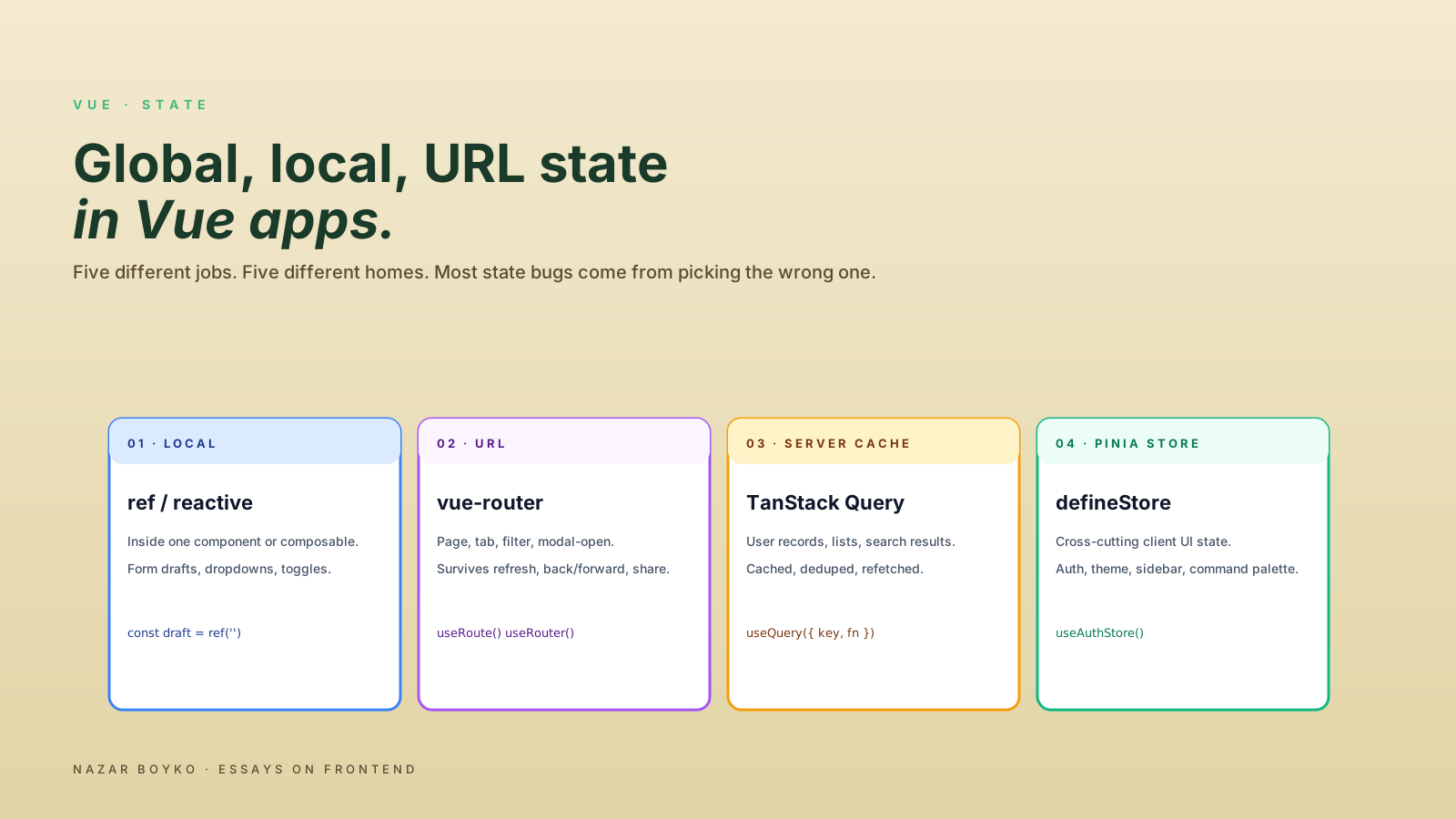
The fix isn't a bigger store or a smaller store. It's a clearer answer to the question "who owns this value, and how do users expect it to behave?" Vue gives you several places to put state, and each one has a job. Mixing them is how simple screens become haunted.
This piece is the decision tree I actually use. Five storage locations, the signals that tell you which one to reach for, and the patterns that hold up after a year of changes.
Local State Lives In The Component
The default place for any new value is ref or reactive inside the component that uses it. No store, no provide/inject, no URL syncing. Just a local reactive value that lives and dies with the component.
<script setup lang="ts">
import { ref } from 'vue'

const isEditing = ref(false)
const draft = ref('')
</script>
This is the right place for: form drafts before submission, "is this dropdown open" flags, hover states, focused indices, scroll positions, and most of the small interactivity that makes a component feel responsive.
The signals that tell you the value belongs here:
- Only this component (and its template) reads or writes it.
- The value should reset when the component unmounts.
- Other parts of the app don't need to know it exists.
If two siblings need the same value, you don't push it to a store yet. You lift it to the parent and pass it down via props and emits, or via provide / inject for deep trees:
<!-- parent -->
<script setup lang="ts">
import { ref, provide } from 'vue'

const selectedId = ref<string | null>(null)
provide('selectedId', selectedId)
</script>
provide and inject are reactive, type-friendly via InjectionKey<T>, and don't require a global store. The threshold for moving to a store is genuinely high — most "shared" state in a single feature is fine inside the feature's root component.
URL State Is The One Most Teams Underuse
If the user expects to refresh the page, share the URL, or hit back and return to the same view, the value belongs in the URL. Every time. Filters, tabs, search queries, page numbers, sort orders, the open/closed state of a permanent panel — these are all URL state, and putting them anywhere else costs you a feature.
Vue Router 4 gives you direct access via useRoute and useRouter:
import { useRoute, useRouter } from 'vue-router'
import { computed } from 'vue'

const route = useRoute()
const router = useRouter()

const status = computed({
  get: () => (route.query.status as string) ?? 'all',
  set: (value) => {
    router.replace({ query: { ...route.query, status: value || undefined } })
  },
})
That computed with a setter gives you a v-model-friendly handle on a query parameter. Bind it to a <select> and the filter updates the URL; navigate away and back, and the filter is still there.
The pattern that scales is to wrap this into a small composable:
import { computed, type Ref } from 'vue'
import { useRoute, useRouter } from 'vue-router'

export function useQueryParam(key: string, defaultValue = ''): Ref<string> {
  const route = useRoute()
  const router = useRouter()

  return computed({
    get: () => (route.query[key] as string) ?? defaultValue,
    set: (value) => {
      const next = { ...route.query }
      if (value && value !== defaultValue) next[key] = value
      else delete next[key]
      router.replace({ query: next })
    },
  })
}
VueUse offers useUrlSearchParams for the cases where Vue Router isn't in the picture, and the @vueuse/router integration adds useRouteQuery and useRouteHash if you want a thinner shorthand. Pick one approach per project and use it everywhere — the inconsistency is worse than either pattern alone.
The rule of thumb: if a teammate manually types the URL into a bug report, the relevant filters should already be in it.
Server State Is Not Application State
The third category, and the one that historically caused the most damage, is server state: data that lives on a backend and is cached on the client. User lists, dashboard metrics, the contents of an order. These are not the same kind of thing as isModalOpen, and putting them in the same store does both jobs poorly.
Server state has different requirements: caching, deduplication, retry on focus, stale-while-revalidate, request cancellation. A Pinia store can be made to do these things, but you'll be reimplementing TanStack Query from scratch.
import { useQuery } from '@tanstack/vue-query'
import { computed } from 'vue'

const userId = computed(() => route.params.id)

const { data: user, isLoading, error } = useQuery({
  queryKey: ['user', userId],
  queryFn: () => api.users.get(userId.value),
})
TanStack Query (@tanstack/vue-query) handles the cache, the deduplication, the retry policy, and the invalidation. Pinia Colada (@pinia/colada) is the Pinia-native answer with a similar shape, more recent, and a smaller surface. Either is the right home for "stuff fetched from the server." Neither belongs inside a Pinia store — they replace that responsibility, they don't share it.
The split that holds up:
- Server state → TanStack Query / Pinia Colada. Data the backend owns. Cached, refetched, invalidated.
- App state → Pinia. Things the app decides. The current theme, the open notifications, the auth user object.
- UI state → Local refs, lifted state, or URL state. Where the user is and what they're doing.
I have a separate piece on server state in Vue and why Pinia isn't always the answer — the short version is "if you're caching API responses inside defineStore, you're using the wrong tool."
Global State (Pinia) Should Be Rare And Intentional
A Pinia store is the right home for values that are genuinely cross-cutting: the auth user, feature flags, the theme, the current workspace, a global notification queue. The shape of a store with the setup-style API maps neatly to a composable, which is exactly the right mental model:
import { defineStore } from 'pinia'
import { ref, computed } from 'vue'

export const useAuthStore = defineStore('auth', () => {
  const user = ref<User | null>(null)
  const isAuthenticated = computed(() => user.value !== null)

  async function login(email: string, password: string) {
    user.value = await api.login(email, password)
  }

  function logout() {
    user.value = null
  }

  return { user, isAuthenticated, login, logout }
})
Inside a component, destructuring with storeToRefs keeps reactivity intact:
import { storeToRefs } from 'pinia'

const auth = useAuthStore()
const { user, isAuthenticated } = storeToRefs(auth)
const { login, logout } = auth // actions are not refs; destructure directly
A working test for "should this be in Pinia": is the value the answer to "what is true about the whole app right now?" The auth user passes. The current theme passes. The list of open modals could pass. "The selected row in this one table" almost never passes — that's URL state if it should survive refresh, local state otherwise.
The failure mode I've watched a dozen times: a feature ships with a small Pinia store for "convenience," then every component in the feature reaches into the store directly, then the feature can't be removed without grep-and-replace because the store is the de-facto API surface for an unrelated module. The store became the architecture.
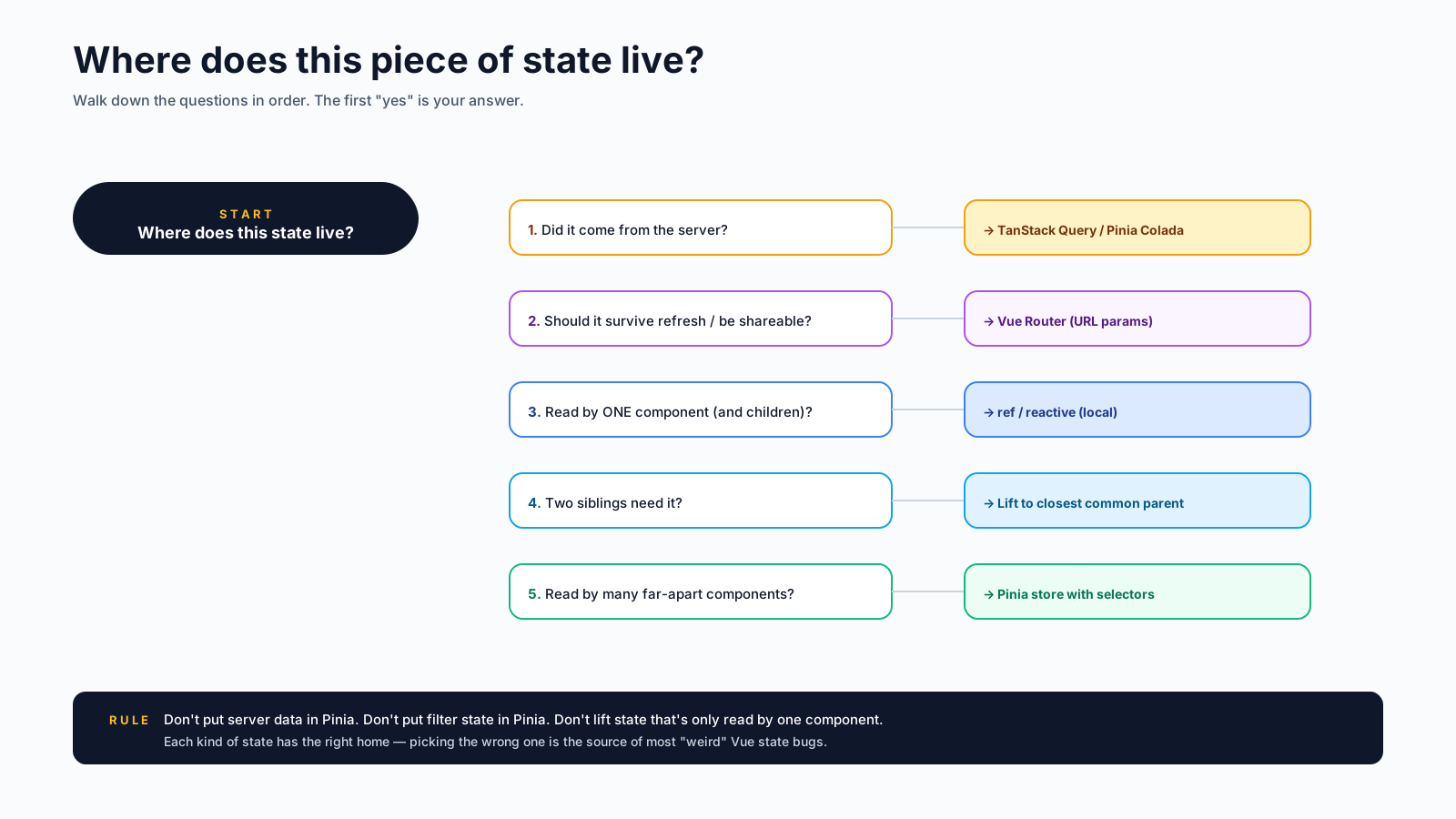
A Decision Tree You Can Actually Use
The questions, in order:
- Does the user expect to share the URL or refresh and return to the same view? → URL. Filters, tabs, search, pagination, the active record.
- Is the value fetched from the server? → Server-state library. TanStack Query, Pinia Colada, or
useFetchfor trivial cases. - Is the value the answer to "what's true about the whole app right now?" → Pinia. Auth, theme, feature flags, workspace.
- Is the value shared by a few sibling components in one feature? → Lift to the closest common parent. Use
provide/injectif the tree is deep. - Is the value scoped to a single component's interactions? → Local
reforreactive.
If a value answers "yes" to two questions, the higher one wins. URL state beats local state because it's also persistence. Server state beats Pinia because it's also caching with eviction. The reverse — putting URL state into Pinia, putting server state into Pinia, putting local state into Pinia — is how Pinia stores grow until they're the largest file in the codebase and nobody can delete a single property.
A Worked Example
Imagine an "orders" page with filters, search, sorting, pagination, a row selection, and a side panel with details for the selected row.
- Filters, search, sort, page → URL. Users share the URL with teammates; refresh returns the same view.
- The list of orders → Server state via
useQuery, keyed on the URL parameters. - Row selection (which row's details panel is open) → URL. Users navigate away and come back; the panel should reopen.
- The details for the selected row → Server state via a separate
useQuerykeyed on the selection. - The auth user → Pinia.
- The "are you sure?" confirmation modal → Local
refin the component that shows it.
Every value has one home. Adding a feature means deciding which storage location is the answer, not negotiating with three different systems at once. That's the win — not fewer lines of code, but a smaller blast radius for every change.
A One-Sentence Mental Model
State-location is the architecture; the libraries are the implementation. Decide where each value belongs based on who owns it and how users expect it to behave, and the question of "which library do we use" mostly answers itself.