The first version of a "design system" inside a Vue codebase usually looks like a components/ui folder with Button.vue, Card.vue, Input.vue, and a Figma file that occasionally agrees with the code. That works for a quarter or two. Then a second product ships, a third theme is requested, a marketing site needs the same buttons in a different framework, and the seams start to show.
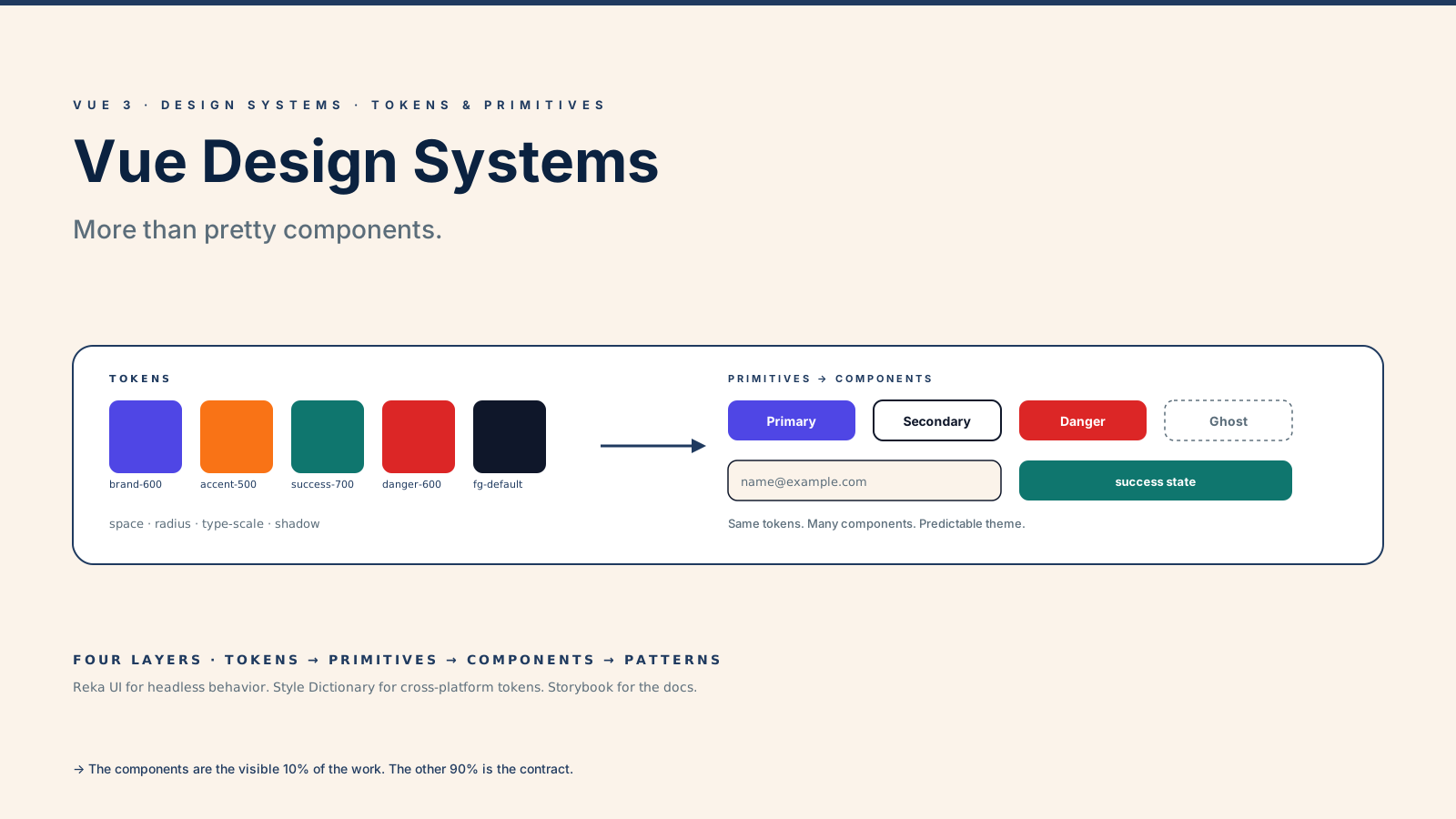
A real design system is the contract between design and engineering. The components are the most visible artifact, but the interesting work is underneath: tokens, primitives, patterns, theming, documentation, and the rules that decide what gets a variant and what stays out. Get those right and the components are almost a side effect. Get those wrong and you end up with thirty buttons that look slightly different on every page.
This article walks through what actually matters when you build a Vue 3 design system in 2025 — the layers, the libraries that earn their keep, and the small set of decisions that determine whether the system scales or stalls.
Tokens Are The Foundation, Not The Decoration
A token is a named decision. --color-brand-600, --space-3, --radius-md, --font-size-body. A component never references a raw hex code or a pixel value; it references a token. That's the rule that makes theming, dark mode, and rebrands tractable instead of grep-and-pray exercises.
CSS custom properties are the right substrate for runtime tokens because they cascade, they update without a rebuild, and they pair naturally with <html data-theme="dark"> style theming.
:root {
  --color-bg: #ffffff;
  --color-fg: #0f172a;
  --color-brand-600: #4f46e5;
  --space-3: 12px;
  --radius-md: 8px;
}

[data-theme="dark"] {
  --color-bg: #0f172a;
  --color-fg: #e2e8f0;
}
For larger systems with iOS, Android, web, and email targets, Style Dictionary is the boring industry pick: you write tokens once in JSON, it generates platform-specific outputs (CSS variables, Swift, Kotlin, JSON). The Vue side consumes the generated .css like any other stylesheet.
The trap is treating tokens as a synonym for "every value in Figma." A token earns its name when it represents a decision you might want to change consistently — brand color, spacing rhythm, type scale. A one-off shadow on a single component does not need a token; it needs a comment.
Primitives, Components, Patterns — The Three Layers
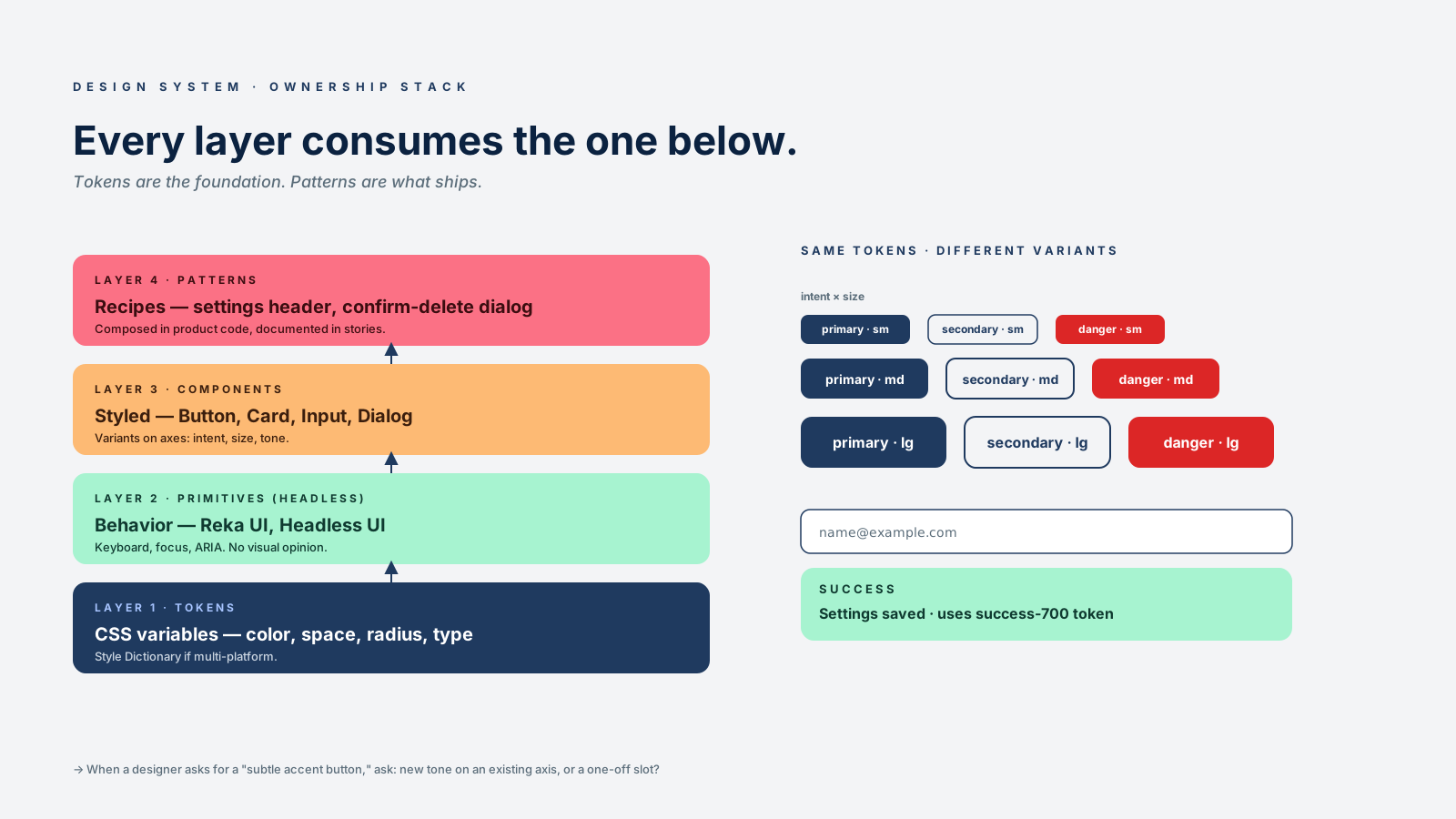
A useful mental model splits the system into three layers, each with a different audience.
- Primitives are the headless behavior layer.
Button,Combobox,Dialog,Tooltip,Tabs,Menu. They handle keyboard, focus, ARIA, and state. They have no opinion about visuals. - Components are the styled layer. They consume primitives, apply tokens, and expose a small set of variants —
intent,size,tone. They are what product engineers import. - Patterns are compositions of components that solve a recurring problem. A "settings page header" or a "destructive confirm dialog" or a "checkout form layout." They live in the docs as code recipes, not as exported components.
For the primitives layer, Reka UI (the actively maintained continuation of Radix Vue) is the library I default to. It gives you accessible, composable headless primitives and lets you keep full control over the styling. Headless UI for Vue is the smaller alternative if you only need a handful of primitives.
The styled layer is yours. That's where you spend most of the build time and where the brand lives.
Variants Need Rules, Not Just Names
Every "Button" component eventually grows variants — primary, secondary, danger, ghost, link, icon-only, large, small. Without a rule, you get fifteen of them, three of which are nearly identical, and product engineers have to ask in Slack which one to use.
The rule I follow: variants exist on axes, and a new variant has to fit on an existing axis or earn the right to a new one.
// src/components/ui/Button/button.variants.ts
export const buttonVariants = {
  intent: ['primary', 'secondary', 'danger', 'ghost'] as const,
  size: ['sm', 'md', 'lg'] as const,
} as const

export type ButtonIntent = typeof buttonVariants.intent[number]
export type ButtonSize = typeof buttonVariants.size[number]<!-- src/components/ui/Button/Button.vue -->
<script setup lang="ts">
import type { ButtonIntent, ButtonSize } from './button.variants'
defineProps<{
intent?: ButtonIntent
size?: ButtonSize
disabled?: boolean
}>()
</script>
<template>
<button
type="button"
class="ui-btn"
:data-intent="intent ?? 'primary'"
:data-size="size ?? 'md'"
:disabled="disabled"
>
<slot />
</button>
</template>
<style scoped>
.ui-btn { background: var(--color-brand-600); color: #fff; }
.ui-btn[data-intent='secondary'] { background: transparent; color: var(--color-fg); border: 1px solid var(--color-fg); }
.ui-btn[data-intent='danger'] { background: var(--color-danger-600); }
.ui-btn[data-intent='ghost'] { background: transparent; color: var(--color-fg); }
.ui-btn[data-size='sm'] { padding: 4px 8px; font-size: 13px; }
.ui-btn[data-size='lg'] { padding: 12px 20px; font-size: 16px; }
</style>Two axes, twelve possible buttons, a variant table that fits on one screen. The TypeScript union types mean a typo in intent="primry" is a build error, not a runtime "why is the button transparent" bug.
When a designer asks for a "subtle accent button," the right answer is usually "is that a new tone on the existing intent axis, or a one-off?" If it's one-off, it's a slot or a custom prop on that screen, not a permanent variant.
Slots Are Vue's Superpower For System Design
Vue slots beat React's children for design-system work because they're typed, named, and scoped. A <Card> that exposes header, default, and footer slots is more flexible than fifteen headerLeft, headerRight, headerActions props.
<!-- Card.vue -->
<template>
  <article class="ui-card">
    <header v-if="$slots.header" class="ui-card__header">
      <slot name="header" />
    </header>
    <div class="ui-card__body"><slot /></div>
    <footer v-if="$slots.footer" class="ui-card__footer">
      <slot name="footer" />
    </footer>
  </article>
</template>
Scoped slots take it further — the component exposes internal state to the consumer, so a <DataTable> can let the caller render a row however they want without bloating the props API. This is where Vue components feel genuinely composable instead of just configurable.
The caveat is documenting the contract. A slot that accepts "anything" is also a slot that accepts the wrong thing. Use defineSlots<{...}>() (Vue 3.3+) to type slot props and surface the contract in the IDE.
Storybook Is Where The System Becomes Real
Components nobody can find don't get reused. Storybook (or Histoire, the Vue-native alternative) is the artifact that makes a design system visible — every variant, every state, every interaction, in isolation.
Each component gets:
- A canonical story per variant (
primary,secondary,dangerforButton). - States stories — loading, disabled, error, empty.
- An "edge cases" story for the awkward content (very long text, very short text, RTL).
- An MDX page documenting when to use the component, when not to, and what tokens it consumes.
I don't ship a design system without stories. They double as visual regression tests (Chromatic, Percy, or a self-hosted Playwright snapshot suite), as the QA artifact that designers review, and as the documentation that engineers actually open.
Theming And Dark Mode Are A Token Problem
If your tokens are CSS variables, theming is mostly free. Set data-theme="dark" on <html>, redefine the variables in a [data-theme="dark"] selector, done. The components don't change. Even per-product theming (white-label, brand variants) is a matter of swapping the token sheet.
For the Vue side of the toggle, useColorMode from VueUse handles preference detection, persistence, and the system-preference fallback in a single composable:
import { useColorMode } from '@vueuse/core'

const mode = useColorMode({
  attribute: 'data-theme',
  modes: { light: 'light', dark: 'dark', sepia: 'sepia' },
})
That's the whole theming layer if your tokens are clean. If your components reference raw colors instead of tokens, no amount of useColorMode will save you.
A One-Sentence Mental Model
A Vue design system is a stack — tokens at the bottom, primitives, components, then patterns at the top — where every layer consumes the one below it, and the components you ship are the visible 10% of the work. Get the tokens, the variant rules, and the documentation right, and the components are easy. Skip those, and you're building a folder of buttons that looks like a design system and behaves like a maintenance tax.