So, you've shipped your first Go service to production. You wrote the code, you wrote the tests, you wrote a Dockerfile that starts with FROM golang:1.22, and your CI happily built and pushed an image. Then you opened your registry and saw it: 1.2 GB.
For a 12 MB binary.
If you've been there, you already know the feeling - that mix of "this can't be right" and "wait, what's even in there?" The good news is the fix isn't complicated. The better news is that while you're fixing it, you can make the image meaningfully more secure too. Smaller and safer turn out to be the same direction in Go.
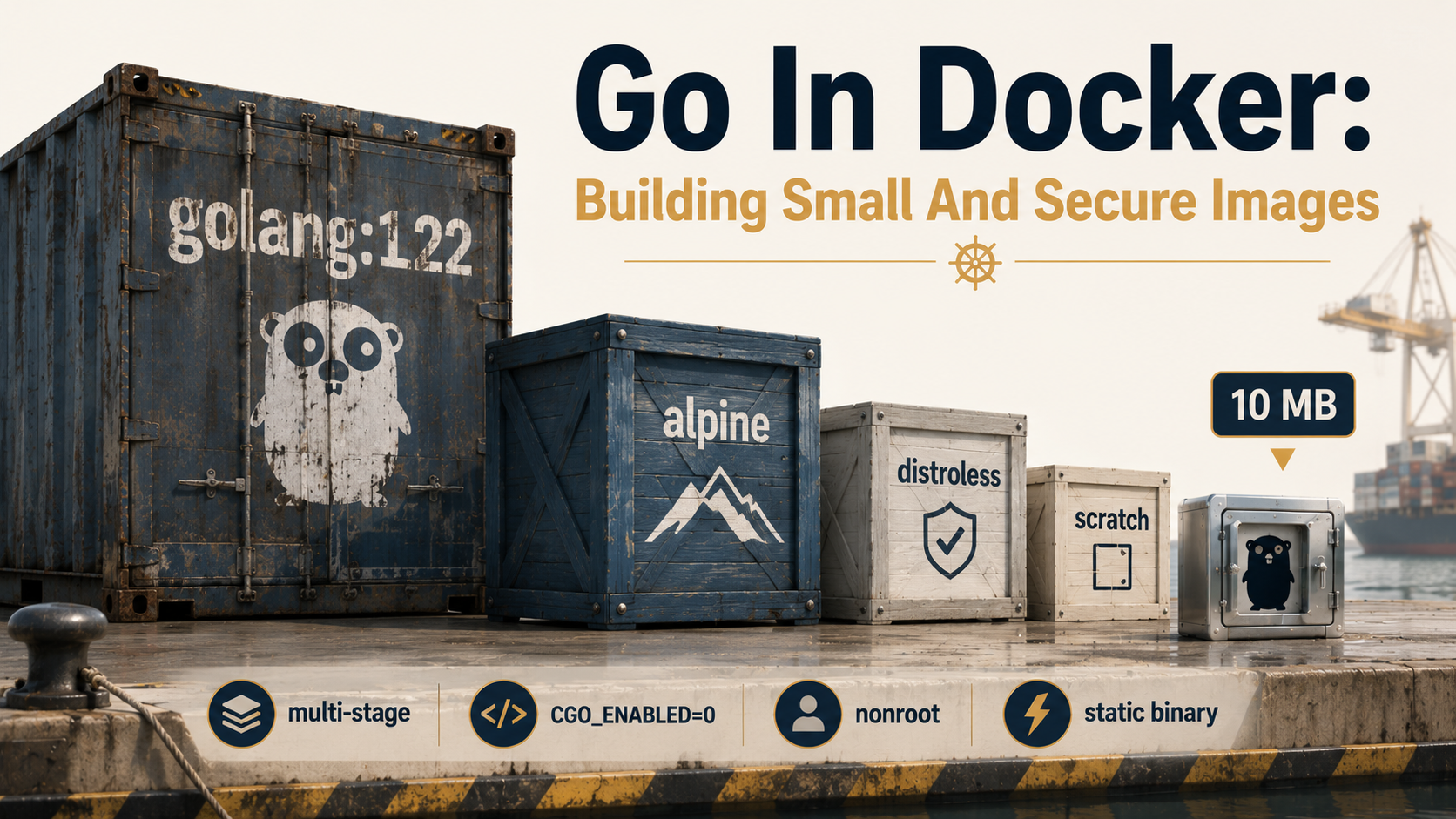
This piece is the long version of that fix. We'll start from the naive single-stage Dockerfile, walk through why it's huge, build up multi-stage, talk about static binaries and what CGO_ENABLED actually does, then look at distroless and scratch - what's really inside each one, when to pick which, and how to harden the result. By the end you'll have a Dockerfile pattern that produces ~10 MB images, runs as non-root, has no shell to exploit, and is reproducible across machines.
Let's start with what's actually in that 1.2 GB.
Why your Go image is 1.2 GB
Open the golang:1.22 base image and look around. It's based on Debian. It contains:
- The full Go toolchain (compiler, linker, standard library sources): ~500 MB
- A C toolchain (
gcc,binutils, headers): ~200 MB git,curl,make,bash,coreutils,ssh: another ~200 MB- The Debian base layer with package manager,
/var/cache, locales: ~100 MB - Your code and the binary it produced: ~12 MB
You needed every one of those tools at build time. You need exactly zero of them at run time. Your binary is a self-contained executable. Once it's built, the compiler is dead weight.
The base golang image is designed for one job: building Go code. It's not designed to run it. Treating it as a runtime image is the same as shipping your laptop with the app.
# This is the version that makes your registry sad.
FROM golang:1.22

WORKDIR /app
COPY . .
RUN go build -o /server ./cmd/server

CMD ["/server"]
That image is 1.2 GB. The /server binary inside it is 12 MB. You're shipping 99% padding. Every pull, every redeploy, every node that scales up - they all download a gigabyte of unused compiler.
It also has a less obvious problem. Every one of those tools is attack surface. If something gets RCE in your Go service, an attacker landing inside that container has bash, curl, wget, git, a C compiler, and apt to play with. They can pull down whatever they want, compile it on the fly, and pivot. A clean container would give them a binary, a few files, and nothing else.
Smaller image, smaller attack surface. Same work. Let's do it.
Multi-stage builds: the one move that gets you 95% of the way
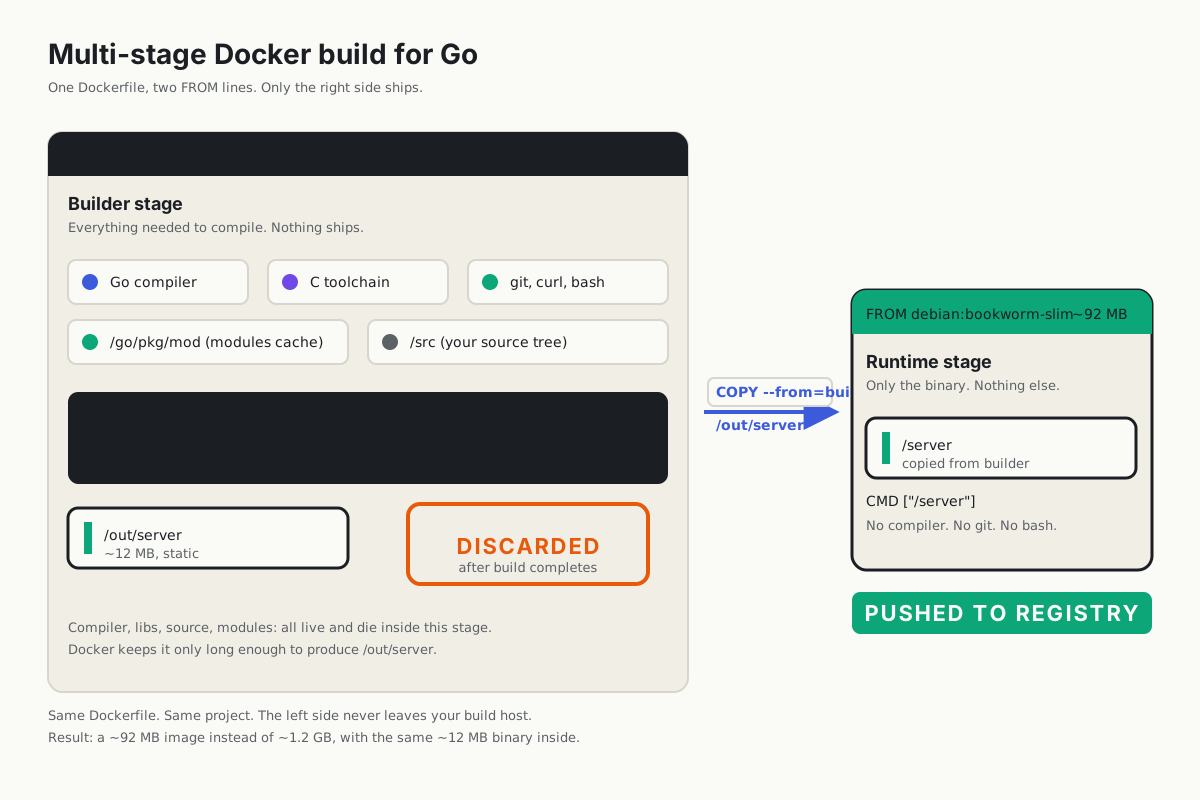
Multi-stage builds are the answer. The idea is laughably simple: use one image to build the binary, then copy only the binary into a second, tiny image that does nothing but run it.
Each FROM in a Dockerfile starts a new stage. You can name them with AS <name> and copy files between them with COPY --from=<name>.
# Stage 1 — build
FROM golang:1.22 AS builder

WORKDIR /src

# Copy go.mod/go.sum first so layer cache survives source changes.
COPY go.mod go.sum ./
RUN go mod download

# Now the rest.
COPY . .
RUN go build -o /out/server ./cmd/server

# Stage 2 — runtime
FROM debian:bookworm-slim
COPY --from=builder /out/server /server
CMD ["/server"]
That's it. The golang:1.22 stage is still 1.2 GB during the build, but Docker discards it once the second stage finishes. What gets pushed to your registry is just the second stage: ~80 MB of slim Debian plus your 12 MB binary.
You went from 1.2 GB to ~92 MB by typing seven extra lines. That's a 13× reduction.
The COPY go.mod go.sum / RUN go mod download split is a deliberate caching move. Docker caches each layer based on the inputs that produced it. If you copy your whole source tree before downloading modules, every code change invalidates the module cache and you re-download everything. Splitting them means modules are only re-downloaded when go.mod or go.sum actually change. On a project with 200 dependencies, that turns a 90-second rebuild into a 5-second rebuild.
Static binaries and the truth about CGO_ENABLED
Here's the thing nobody tells you up front: by default, Go binaries on Linux are not fully static.
If your code (or any of your dependencies) imports the standard net or os/user packages, the Go toolchain may decide to link against the system's C library (glibc) using a feature called cgo. When that happens, your "Go binary" actually depends on libc.so and a couple of resolver shims being present at runtime. Run that binary inside a scratch image - which has no libc - and it will exit with no such file or directory, even though the file is right there. (The error refers to the missing dynamic loader, not the binary itself. Fun debugging session.)
You can prove it on your own machine:
$ go build -o server ./cmd/server
$ ldd server
    linux-vdso.so.1 (0x00007fff...)
    libpthread.so.0 => /lib/x86_64-linux-gnu/libpthread.so.0
    libc.so.6 => /lib/x86_64-linux-gnu/libc.so.6
    /lib64/ld-linux-x86-64.so.2 ...
That ldd output is the dependency list. If you see anything other than "not a dynamic executable", you have a dynamically linked binary.
The fix is CGO_ENABLED=0. It tells the Go toolchain to refuse to use cgo, which forces the standard library to use its pure-Go implementations of DNS resolution, user lookup, and so on.
$ CGO_ENABLED=0 go build -o server ./cmd/server
$ ldd server
    not a dynamic executable
Now the binary is fully self-contained. It's a single ELF file with everything it needs baked in. You can drop it into an empty container and it just runs.
While we're tuning the build, two more flags earn their keep:
CGO_ENABLED=0 go build \
  -trimpath \
  -ldflags="-s -w" \
-o server ./cmd/server-trimpathremoves the absolute paths to your source files from the binary. Without it, your binary contains strings like/home/runner/work/myproject/cmd/server/main.go- both a privacy leak and a reproducibility-killer (the binary depends on the build machine's home directory).-ldflags="-s -w"strips the symbol table (-s) and DWARF debug info (-w). On a typical Go service this shrinks the binary by 25-30%. The cost is that stack traces lose function names and you can't attachgdbcleanly. For production builds where you have remote logging and don'tgdbinto running containers, that's a fine trade. Keep them on for development.
Let's wire that into the Dockerfile:
FROM golang:1.22 AS builder

WORKDIR /src
COPY go.mod go.sum ./
RUN go mod download
COPY . .

RUN CGO_ENABLED=0 GOOS=linux go build \
    -trimpath \
    -ldflags="-s -w" \
    -o /out/server ./cmd/server

FROM debian:bookworm-slim
COPY --from=builder /out/server /server
CMD ["/server"]
The image is still ~80 MB because debian:bookworm-slim is fat. But the binary inside it is now fully static - meaning we can swap that runtime image for something dramatically smaller.
Scratch: the smallest possible image
scratch is a special base image in Docker. It contains literally nothing. No files. No shell. No /etc/passwd. No ls, no cat, no sh. Just an empty filesystem and your CMD.
FROM golang:1.22 AS builder
WORKDIR /src
COPY go.mod go.sum ./
RUN go mod download
COPY . .
RUN CGO_ENABLED=0 go build -trimpath -ldflags="-s -w" -o /out/server ./cmd/server

FROM scratch
COPY --from=builder /out/server /server
ENTRYPOINT ["/server"]
Build that and you get an image that is exactly the size of your binary. ~12 MB. No layers of OS underneath. Nothing else.
That's beautiful. It's also where you find out what your binary was secretly relying on.
The two things that bite people first:
1. TLS won't work without CA certificates. Your binary tries to make an HTTPS request, and you get x509: certificate signed by unknown authority. That's because the Go runtime looks up trusted root CAs from a small set of well-known paths on disk (/etc/ssl/certs/ca-certificates.crt, etc.). In scratch, none of them exist. You have to copy them in.
FROM scratch
COPY --from=builder /etc/ssl/certs/ca-certificates.crt /etc/ssl/certs/
COPY --from=builder /out/server /server
ENTRYPOINT ["/server"]
2. There's no /tmp directory. Some libraries assume one exists for scratch files (os.CreateTemp will return an error). If you need it, you have to create it explicitly - and Docker doesn't let you RUN mkdir in a scratch image because there's no shell. You have to add it from the build stage:
RUN mkdir /tmp-empty && chmod 1777 /tmp-empty
# In the final stage:
COPY --from=builder /tmp-empty /tmp
You'll also notice timezone data is missing if your code uses time.LoadLocation("Europe/Berlin"). You need /usr/share/zoneinfo/, copied from the builder. And user lookup (os/user) returns errors because there's no /etc/passwd.
At this point you might be thinking: I'm rebuilding a tiny operating system inside my Dockerfile, one missing file at a time. That's exactly the right reaction. Which brings us to distroless.
Distroless: the sweet spot most production Go services should live in
Distroless images (gcr.io/distroless/*) are maintained by Google. The name is slightly misleading - they're not "no distro," they're "a distro stripped down to the absolute minimum needed to run a specific class of program."
The relevant ones for Go:
gcr.io/distroless/static-debian12- for fully static binaries (the one you want for Go withCGO_ENABLED=0). About 2 MB.gcr.io/distroless/base-debian12- adds glibc,libssl,libcrypto. Use this if you have cgo dependencies. About 20 MB.
Distroless static ships with exactly the things scratch was missing for a typical service:
/etc/ssl/certs/ca-certificates.crt(TLS works out of the box)/etc/passwdand/etc/groupwith anonrootuser (UID/GID 65532)/etc/nsswitch.conf(so Go's pure-Go DNS resolver behaves the way the standard library expects)/tmp(an empty world-writable dir)tzdata(sotime.LoadLocationworks)
What it doesn't ship: a shell, apt, curl, wget, ls, cat, bash, package manager, init system. Anything an attacker could use after popping your service is gone.
Here's the Dockerfile that 80% of Go services should be running in production:
FROM golang:1.22 AS builder

WORKDIR /src
COPY go.mod go.sum ./
RUN go mod download

COPY . .
RUN CGO_ENABLED=0 GOOS=linux go build \
    -trimpath \
    -ldflags="-s -w" \
    -o /out/server ./cmd/server

FROM gcr.io/distroless/static-debian12:nonroot

COPY --from=builder /out/server /server

USER nonroot:nonroot
ENTRYPOINT ["/server"]
That image is ~14 MB. It runs as a non-root user by default. It has no shell to spawn. It has no package manager to install attacker tools with. TLS works. DNS works. Time zones work. And the binary inside is reproducible if you also pin your toolchain version.
We started at 1.2 GB. We're at 14 MB. That's a roughly 85× reduction with maybe 20 lines of Dockerfile total.
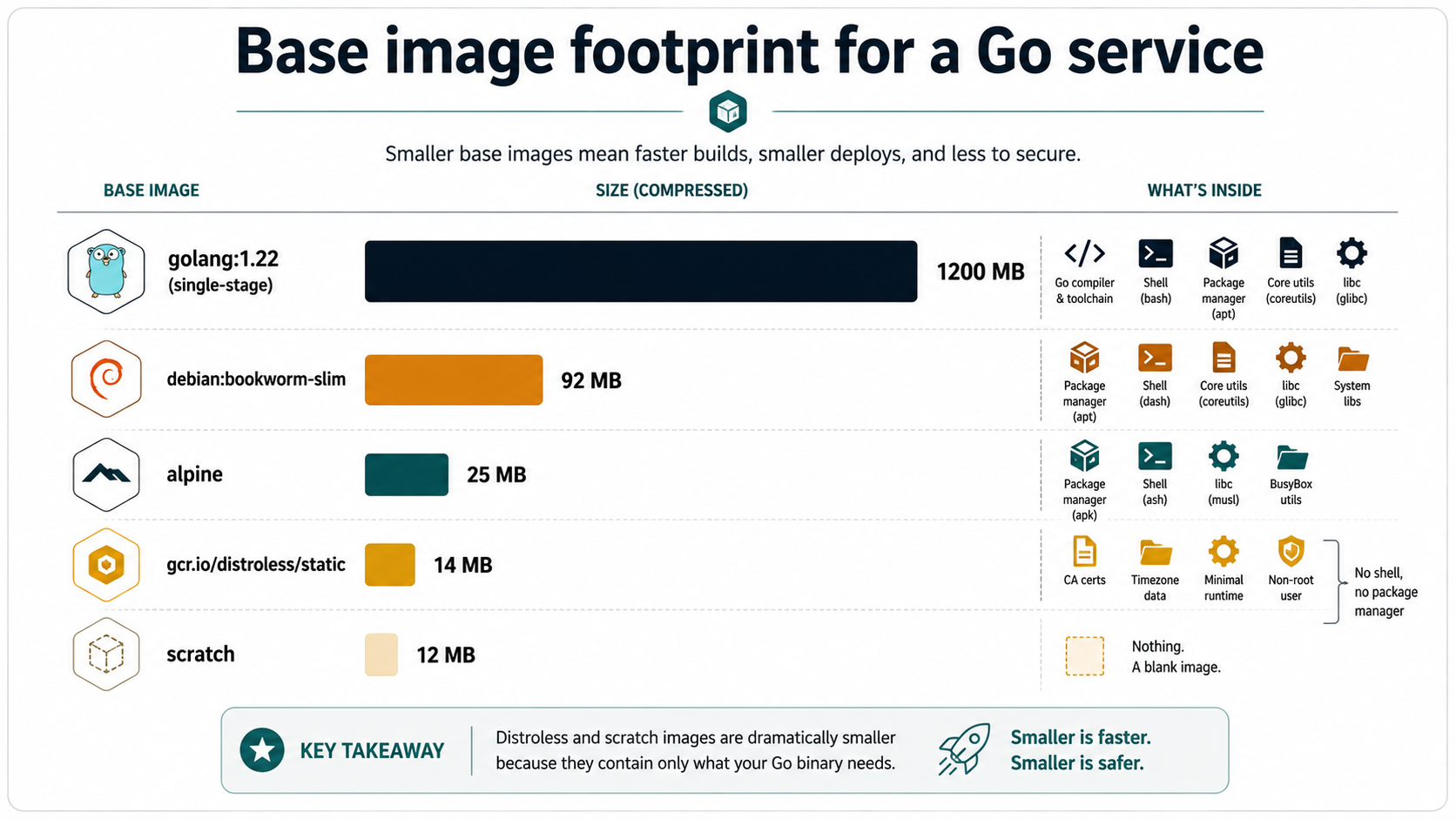
gcr.io/distroless/static versus Alpine. Let's settle it.
Alpine, distroless, scratch - when to use which
This is the table you wish someone had put in front of you:
| Base | Size | Has shell | Has libc | Best for |
|---|---|---|---|---|
golang:1.22 |
~1200 MB | yes | glibc | Builder stage only - never runtime |
debian:bookworm-slim |
~80 MB | yes | glibc | Cgo binaries that need a real glibc + you want shell access for debugging |
alpine:3.20 |
~7 MB + your binary | yes (ash) |
musl | Static binaries when you genuinely want shell access in the container |
gcr.io/distroless/base-debian12 |
~20 MB | no | glibc | Cgo binaries (production) |
gcr.io/distroless/static-debian12 |
~2 MB + your binary | no | none | Pure-Go static binaries (production) - the default for most services |
scratch |
0 bytes | no | none | When you want to know exactly what's in your image and are willing to copy in CA certs / /tmp / tzdata yourself |
The Alpine pitch - "tiny, runs static binaries, has a shell" - sounds great until you actually use it. Two things bite people:
1. Alpine uses musl libc, not glibc. If you have cgo dependencies compiled against glibc, they'll fail at runtime in mysterious ways. (You can use CC=musl-gcc and rebuild against musl, but at that point you're paying real engineering tax for what was supposed to be a small image.) For pure static Go binaries, this doesn't matter - the binary doesn't link against any libc.
2. Alpine's pure-Go DNS resolver disagreement. Alpine's /etc/nsswitch.conf is missing by default, and that subtly changes the way Go's resolver behaves on certain Kubernetes setups. You can fix it (RUN echo "hosts: files dns" > /etc/nsswitch.conf), but it's an extra knob you didn't sign up for.
Distroless static fixes both: it's smaller than Alpine, and it ships the right resolver config. The only thing you lose is the shell - and in production, that's a good thing, not a bad one. You shouldn't be kubectl execing into a Go service with sh to debug it. That's what logs and pprof and OpenTelemetry are for.
Use scratch only if you want the exact 12 MB and you're prepared to handle CA certs and /tmp yourself. Use distroless for everything else. Use Alpine if you have a specific reason - usually "I need to ship a small image and I want a shell for an emergency wget."
Hardening: the security knobs beyond the base image
A small image isn't automatically a secure image. Here are the things worth turning on once you're on distroless or scratch.
Run as a non-root user
Distroless images include a nonroot user (UID/GID 65532) for exactly this reason. The official tag for it is :nonroot:
FROM gcr.io/distroless/static-debian12:nonroot
COPY --from=builder /out/server /server
USER nonroot:nonroot
ENTRYPOINT ["/server"]
If your service binds to port 80 or 443, this will fail - non-root users can't bind to ports below 1024 by default. The right fix is to bind to a high port (8080, 8443) inside the container and let your load balancer or Service handle the port mapping. Don't run as root just to bind to 80.
Read-only root filesystem
In Kubernetes, set:
securityContext:
  readOnlyRootFilesystem: true
  runAsNonRoot: true
  runAsUser: 65532
  allowPrivilegeEscalation: false
  capabilities:
    drop:
      - ALL
A read-only root filesystem means an attacker who pops your service can't modify the binary, drop a webshell, or write files anywhere except mounted volumes. The cost is that any code which writes to disk needs an explicit emptyDir or tmpfs volume mounted at the right path. For a Go service that mostly logs to stdout, the cost is zero.
Drop all Linux capabilities
capabilities: drop: [ALL] is the kernel-level equivalent. By default, containers get a small set of Linux capabilities (the kernel features that historically required root). For a Go service that talks HTTP, you need none of them. Drop them all. Add back only what you specifically need - and you almost never need any.
Don't bake secrets into the image
This sounds obvious until you see how often it happens. Don't COPY .env /app/.env. Don't ENV API_KEY=... in the Dockerfile. Anyone who can pull the image can docker history it and read every layer including environment variables. Use real secret management - Kubernetes secrets mounted as env vars, Vault, AWS Secrets Manager, whichever your platform offers.
Pin your base images by digest
FROM gcr.io/distroless/static-debian12:nonroot resolves to whatever the maintainers tagged most recently. Last week it might have pointed at a different image. For reproducible builds, pin by digest:
FROM gcr.io/distroless/static-debian12@sha256:42d8b35f0a5...:nonrootThat's a mouthful. Most teams use a tool like Renovate or Dependabot to keep digests up to date in PRs, so you get the security updates without losing reproducibility.
A reproducible, production-ready Dockerfile
Putting it all together, here's what a hardened Go Dockerfile looks like in 2026. This is the version I'd reach for as a starting point on a new service.
# syntax=docker/dockerfile:1.7

# --- Stage 1: build ---
FROM golang:1.22 AS builder

WORKDIR /src

# Cache the module download as its own layer.
COPY go.mod go.sum ./
RUN --mount=type=cache,target=/go/pkg/mod \
    go mod download

# Now copy the source and build.
COPY . .

# CGO disabled produces a fully static binary — required for distroless/static.
# -trimpath strips local filesystem paths from the binary.
# -ldflags="-s -w" strips the symbol table and DWARF debug info (~25% smaller).
# Build cache mount speeds up rebuilds.
RUN --mount=type=cache,target=/root/.cache/go-build \
    --mount=type=cache,target=/go/pkg/mod \
    CGO_ENABLED=0 GOOS=linux go build \
        -trimpath \
        -ldflags="-s -w" \
        -o /out/server \
        ./cmd/server

# --- Stage 2: runtime ---
FROM gcr.io/distroless/static-debian12:nonroot

# The distroless static image already has CA certs, /etc/passwd with a
# nonroot user, /tmp, and tzdata. We don't need to add anything except
# our binary.
COPY --from=builder /out/server /server

# Run as the prebuilt nonroot user (UID/GID 65532).
USER nonroot:nonroot

# Expose for documentation only — has no runtime effect.
EXPOSE 8080

ENTRYPOINT ["/server"]
A few notes on the production-grade bits:
# syntax=docker/dockerfile:1.7enables BuildKit features like cache mounts. You almost certainly want this.--mount=type=cache,target=/go/pkg/modandtarget=/root/.cache/go-buildare BuildKit cache mounts. They persist across builds even when the layer is rebuilt, which makes module downloads and incremental compilation much faster in CI.- The
nonroottag of distroless is the same image as the default tag, just withUSER 65532:65532already set. SpecifyingUSER nonroot:nonrootagain is belt-and-braces - it makes the intent obvious in the Dockerfile and protects you if someone changes the base image tag later. EXPOSE 8080is purely documentation. It doesn't actually open the port at runtime - that's-por your Kubernetes Service. But it tells anyone reading the file what port to expect.
Build it:
$ docker build -t myservice:latest .
$ docker images myservice:latest
REPOSITORY   TAG       IMAGE ID       CREATED         SIZE
myservice    latest    7f8a2b3c4d5e   2 minutes ago   14.3MB
14 MB. Non-root. No shell. TLS works. DNS works. Reproducible if you pin the base by digest. That's the deal.
The two-line scan that catches the most common mistakes
Once you've got a small image, two commands are worth running in CI to make sure it stays small and safe:
# Show every layer and its size — catches "I accidentally added 200 MB" early.
docker history myservice:latest

# Scan for known CVEs in the binary and base layers.
trivy image myservice:latest
docker history is your first line of defence against accidental bloat. If a layer suddenly shows 80 MB and you didn't expect it, find out why before you ship.
trivy (or grype, or whatever your platform offers) scans the contents for known vulnerabilities. With distroless, you're starting from "almost nothing to scan" and the report is usually short. With a fatter base, you might find that the alpine version you pinned three months ago has a high-severity CVE in libssl. Knowing about it is the first half of fixing it.
Both belong in CI. Neither is hard to add. The combination catches the majority of "we shipped a bad image" incidents you'd otherwise see in the wild.
The whole arc - from 1.2 GB to 14 MB, from "ships a compiler" to "ships nothing but a binary" - comes down to one idea: build and run are different jobs, and they want different images. Once you internalise that, multi-stage, static binaries, and distroless are the natural mechanics. The size shrinks, the attack surface shrinks, and the deploys get faster. It's one of the few cases in software where doing the right thing makes the wrong things harder to do.
Your golang:1.22 runtime container will not be missed.