The Deploy That Loses Requests
You ship a tiny change. CI is green. The pod rolls. Two minutes later you see a spike of 502s, a payment in pending that was already charged, and a queue job that retried three times before succeeding.
Nothing in the code is wrong. The bug is in how the process exited.
Most Node.js services start fine. Far fewer of them stop on purpose. Without a graceful shutdown, a SIGTERM from your orchestrator lands like an unplugged power strip — open sockets get reset, in-flight DB transactions die mid-statement, and any worker that was halfway through a job leaves it in an awkward state for the next consumer to clean up.
It's not a glamorous topic, but graceful shutdown is one of the cheapest reliability wins you'll ever ship.
What "Graceful" Actually Means
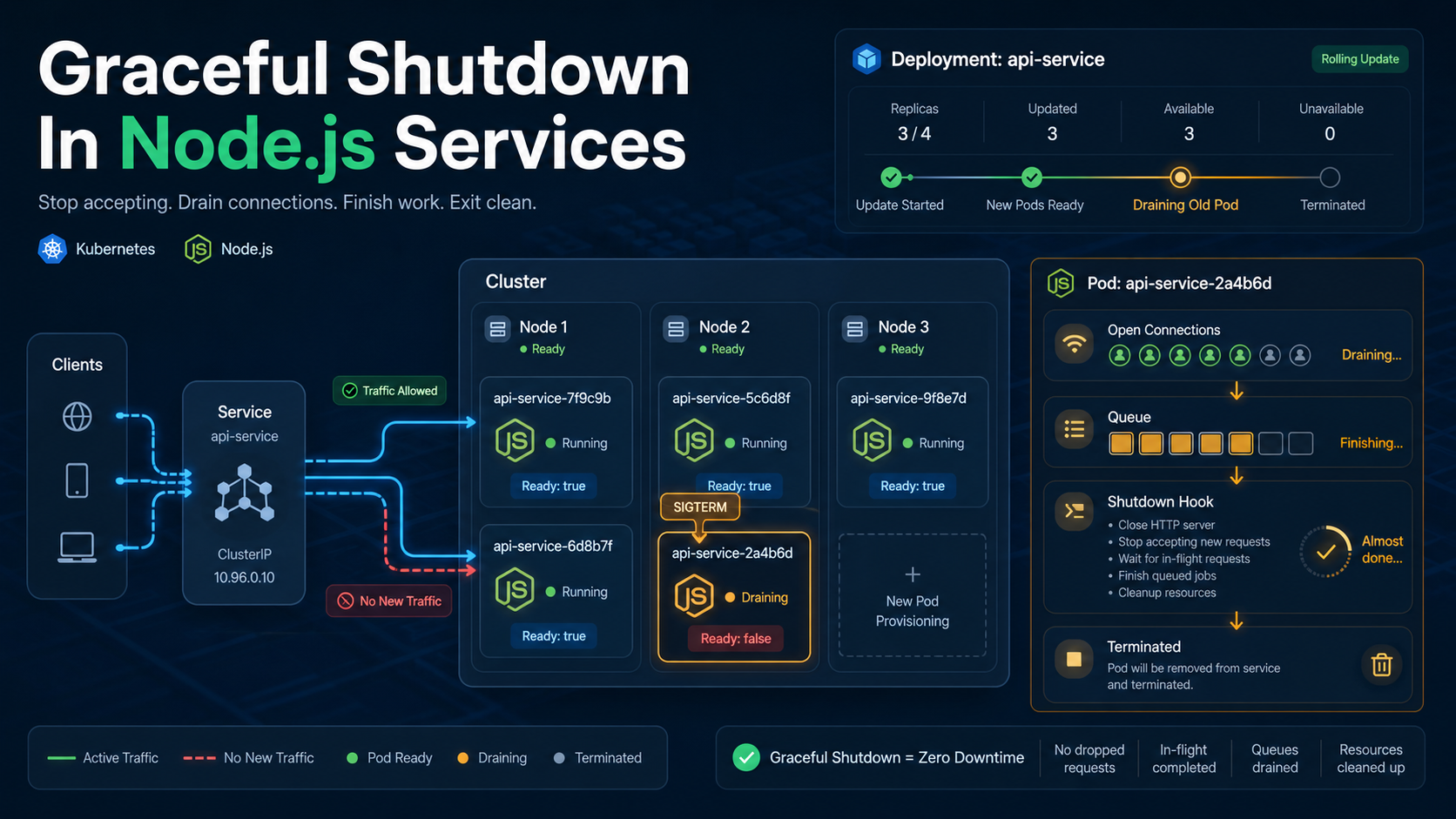
A graceful shutdown is a small, ordered dance:
- Stop accepting new work. Close the HTTP listener so the load balancer stops routing to you. Pause queue consumers so Redis stops handing you new jobs.
- Finish what you already started. Let in-flight requests respond. Let running jobs finish or hand them back to the queue.
- Release shared resources. Close DB pools, Redis clients, and file handles so connections don't linger on the other side.
- Exit on time. If something hangs, kill the process before the orchestrator does it for you.
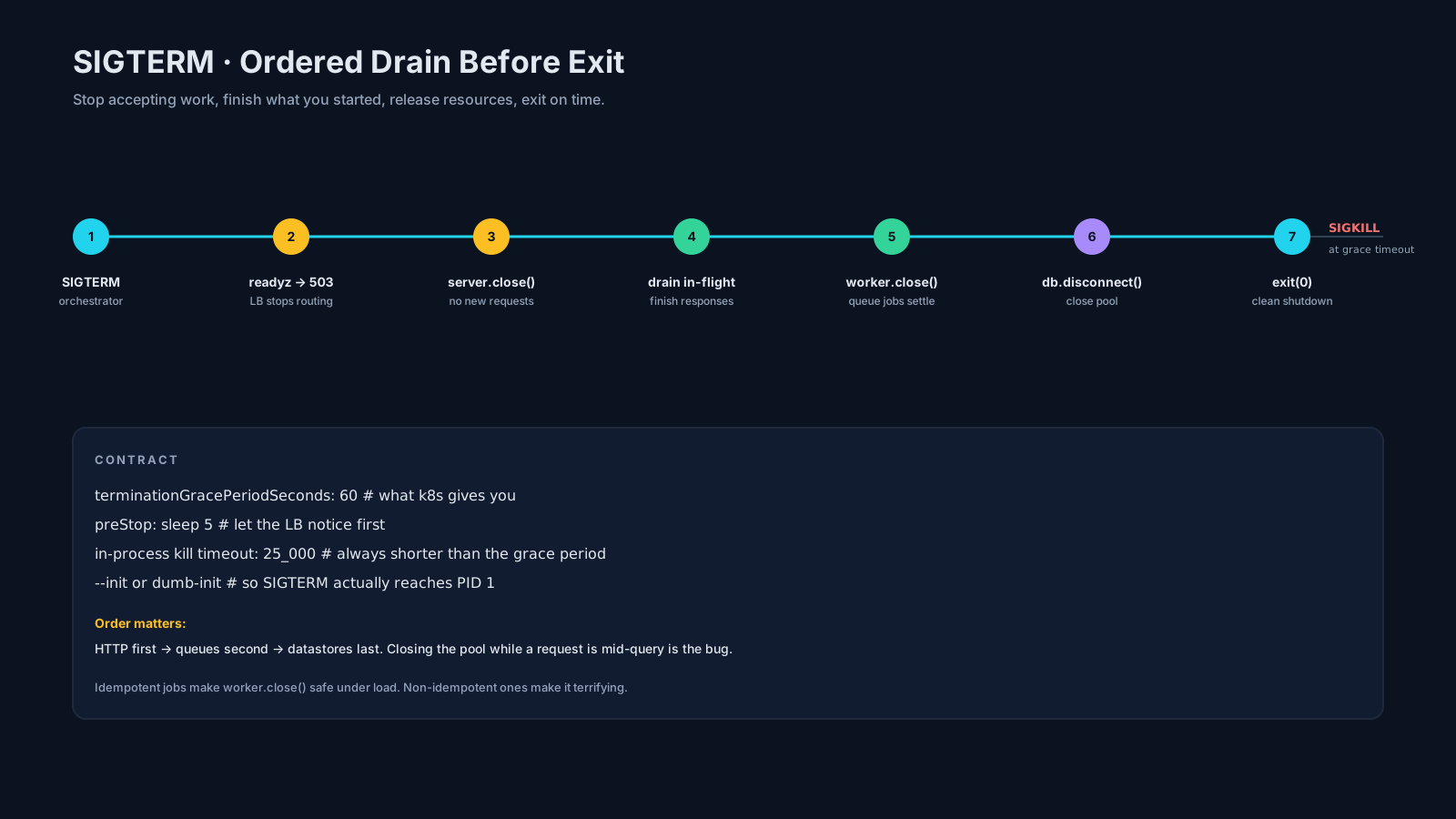
The order matters. Closing the DB pool while a request is mid-query is exactly the bug you were trying to avoid.
A Minimal Shutdown Handler
Here's the shape of one I'd actually use in production. Node 18+ gives server.close() a Promise-friendly callback, but I usually still wrap it.
import http from 'node:http';
import { app } from './app';
import { db } from './db';
import { queue } from './queue';
import { logger } from './logger';

const server = http.createServer(app);
server.listen(3000, () => logger.info('http listening on 3000'));

let shuttingDown = false;

async function shutdown(signal: string) {
  if (shuttingDown) return;
  shuttingDown = true;
  logger.info({ signal }, 'shutdown: starting');

  const killTimer = setTimeout(() => {
    logger.error('shutdown: timeout, forcing exit');
    process.exit(1);
  }, 25_000).unref();

  try {
    await new Promise<void>((resolve, reject) =>
      server.close((err) => (err ? reject(err) : resolve())),
    );
    logger.info('shutdown: http drained');

    await queue.close();
    logger.info('shutdown: queue consumers stopped');

    await db.$disconnect();
    logger.info('shutdown: db pool closed');

    clearTimeout(killTimer);
    process.exit(0);
  } catch (err) {
    logger.error({ err }, 'shutdown: error');
    process.exit(1);
  }
}

process.on('SIGTERM', () => shutdown('SIGTERM'));
process.on('SIGINT', () => shutdown('SIGINT'));
A few things worth pointing out. The shuttingDown flag matters because Kubernetes will sometimes send SIGTERM twice. The timer uses .unref() so it doesn't keep the process alive on its own. And the kill timeout (25s here) needs to be shorter than your orchestrator's grace period — more on that below.
Health Checks Lie During Shutdown
Most services expose /healthz or /readyz. While shutting down, your readiness probe should immediately return non-200 so the load balancer stops sending you new requests. Your liveness probe should keep returning 200 until the very end, so Kubernetes doesn't decide to SIGKILL you for being unhealthy.
let ready = true;

app.get('/readyz', (_req, res) => res.status(ready ? 200 : 503).end());
app.get('/healthz', (_req, res) => res.status(200).end());

process.on('SIGTERM', () => { ready = false; /* then run shutdown() */ });
The cheap trick: flip ready to false the moment SIGTERM arrives, and add a short delay (1–2s) before you actually call server.close(). That gives the LB time to notice and stop routing. You'd be surprised how many "intermittent 502s on deploy" tickets are solved by exactly those two seconds.
Draining Queue Workers Is The Tricky Part
HTTP requests are short. Queue jobs aren't. A BullMQ worker processing a 30-second video transcode will not finish before your kill timeout — and that's fine, as long as it gives the job back cleanly.
import { Worker } from 'bullmq';

const worker = new Worker('emails', handler, { connection });

async function shutdown() {
  // Stop pulling new jobs but let in-flight ones finish.
  await worker.close();
  // worker.close() resolves once the current job is done or after force=true.
}
worker.close() waits for the current job to finish. If you can't afford to wait that long, BullMQ will move the job back to wait state on the next consumer's reclaim — but only if you set sensible lockDuration and stalledInterval values on the queue. Idempotent jobs make this safe; non-idempotent jobs make it terrifying.
The Kubernetes Side Of The Contract
Graceful shutdown is a two-sided handshake. Your code drains; the orchestrator gives you time to drain. Default terminationGracePeriodSeconds in Kubernetes is 30 seconds, which is rarely enough for real workloads.
spec:
  terminationGracePeriodSeconds: 60
  containers:
    - name: api
      image: my-api:1.4.2
      lifecycle:
        preStop:
          exec:
            command: ["/bin/sh", "-c", "sleep 5"]
Two things are happening here. The preStop hook runs before SIGTERM, sleeping 5 seconds so the load balancer has a chance to remove the pod from rotation. Then SIGTERM lands, your handler runs, and you have up to 60 seconds total before SIGKILL.
Pick your in-process kill timeout to be a few seconds shorter than terminationGracePeriodSeconds. If Kubernetes kills you, you don't get to log why.
Common Mistakes I Keep Seeing
A few patterns I run into in code reviews:
- Listening for SIGINT only. Containers send SIGTERM. SIGINT is what your terminal sends with Ctrl+C. Handle both.
- Calling
process.exit(0)immediately inside the handler. That kills in-flight requests. The whole point is to wait first. - Closing the DB pool before HTTP drains. Now your last few requests crash trying to query a closed pool. Close in the right order: HTTP, then queues, then data stores.
- No timeout at all. A stuck DB connection or a misbehaving third-party HTTP call will keep your process alive forever. SIGKILL eventually wins, but only after your alerts fire.
- Forgetting Docker PID 1. If you run
nodeas PID 1 and don't have init forwarding signals, SIGTERM may never reach you. Use--initon the container ordumb-initas the entrypoint. - Not testing it.
kill -TERM <pid>against a local instance with traffic running takes 30 seconds and surfaces every bug in this article.
A One-Sentence Mental Model
Graceful shutdown is the boring contract between your process, your load balancer, and your orchestrator: stop taking new work, finish what you started, hang up the phone politely, and exit before someone slams the door for you.