Tool calling is where LLM apps stop being chatbots and start becoming software systems. A model that only writes text can be useful — a model that can call tools can do real work: search documents, create tickets, send emails, update records, run tests, query databases, summarize pull requests, call internal APIs. That power is useful, and it's also dangerous if you design it casually.
A bad tool interface can let the model call the wrong API, pass unsafe input, retry a non-idempotent action, leak data, run too long, or fail silently. So tool calling needs normal backend engineering discipline — schemas, validation, permissions, timeouts, retries, idempotency, audit logs, and safe failure behavior. The model can request an action; your application has to decide whether that action is allowed.
A Tool Is A Contract
A tool should be treated like an API endpoint. It has a name, a purpose, an input schema, validation rules, permissions, side effects, timeout behavior, retry behavior, logging, and error handling — every property an internal HTTP endpoint would have.
A weak tool definition looks like this:
def run_action(action: str, data: dict) -> dict:
    ...
That's too vague — the model can request almost anything, and your application has no surface to validate against. A better tool is narrow:
def create_support_ticket(
    customer_id: int,
    title: str,
    description: str,
    priority: str,
) -> dict:
    ...
Now the tool has a specific job. Even better, define a schema that pins down the shape:
from pydantic import BaseModel, Field
from typing import Literal


class CreateSupportTicketInput(BaseModel):
    customer_id: int = Field(gt=0)
    title: str = Field(min_length=5, max_length=120)
    description: str = Field(min_length=20, max_length=4000)
    priority: Literal["low", "medium", "high"]


def create_support_ticket(input_data: CreateSupportTicketInput) -> dict:
    ...
The schema protects your system from malformed input, and it also helps the model understand how to call the tool correctly. Both halves matter — if the schema is loose, the model produces loose calls.
Tool Schemas Should Be Boring And Precise
Good schemas are boring — and that's a compliment. A bad schema looks like this:
{
  "data": "anything"
}
A good one is specific:
{
  "customer_id": 123,
  "title": "Customer cannot access subscription",
  "description": "Customer reports that payment succeeded but subscription is inactive.",
  "priority": "high"
}
Even better, document constraints inline so the model can see them:
{
  "name": "create_support_ticket",
  "description": "Create an internal support ticket. Does not contact the customer.",
  "input_schema": {
    "type": "object",
    "required": ["customer_id", "title", "description", "priority"],
    "properties": {
      "customer_id": {
        "type": "integer",
        "minimum": 1
      },
      "title": {
        "type": "string",
        "minLength": 5,
        "maxLength": 120
      },
      "description": {
        "type": "string",
        "minLength": 20,
        "maxLength": 4000
      },
      "priority": {
        "type": "string",
        "enum": ["low", "medium", "high"]
      }
    }
  }
}
Avoid open-ended input whenever possible. Don't let the model pass raw SQL, arbitrary shell commands, or unrestricted URLs unless you have a very strong sandbox and review process — these are the shapes that turn a tool call into an attack vector.
Validate Inputs Twice
The model may produce invalid arguments. Users may also try to influence tool arguments through prompt injection. So validate inputs before executing the tool — ideally before and during.
def tool_create_refund(user: User, payload: dict) -> dict:
    input_data = CreateRefundInput.model_validate(payload)

    if not user.has_role("billing_admin"):
        raise PermissionError("User cannot create refunds.")

    if input_data.amount_cents <= 0:
        raise ValueError("Refund amount must be positive.")

    if input_data.amount_cents > 50000:
        raise ValueError("Refund requires manual approval.")

    return refund_service.create_refund(
        order_id=input_data.order_id,
        amount_cents=input_data.amount_cents,
        reason=input_data.reason,
    )
The defense-in-depth shape:
Before model request? Sometimes.
Before tool execution? Always.
Inside business service? Also yes.
Three layers cost almost nothing and turn a single missed check into a non-event.
Permissions Are Not Optional
A tool should know who is calling it. The bare version:
def read_customer_notes(customer_id: int) -> str:
    return database.get_notes(customer_id)
The version that doesn't ship a privilege escalation:
def read_customer_notes(current_user: User, customer_id: int) -> str:
    if not current_user.can_view_customer(customer_id):
        raise PermissionError("Access denied.")

    return database.get_notes(customer_id)
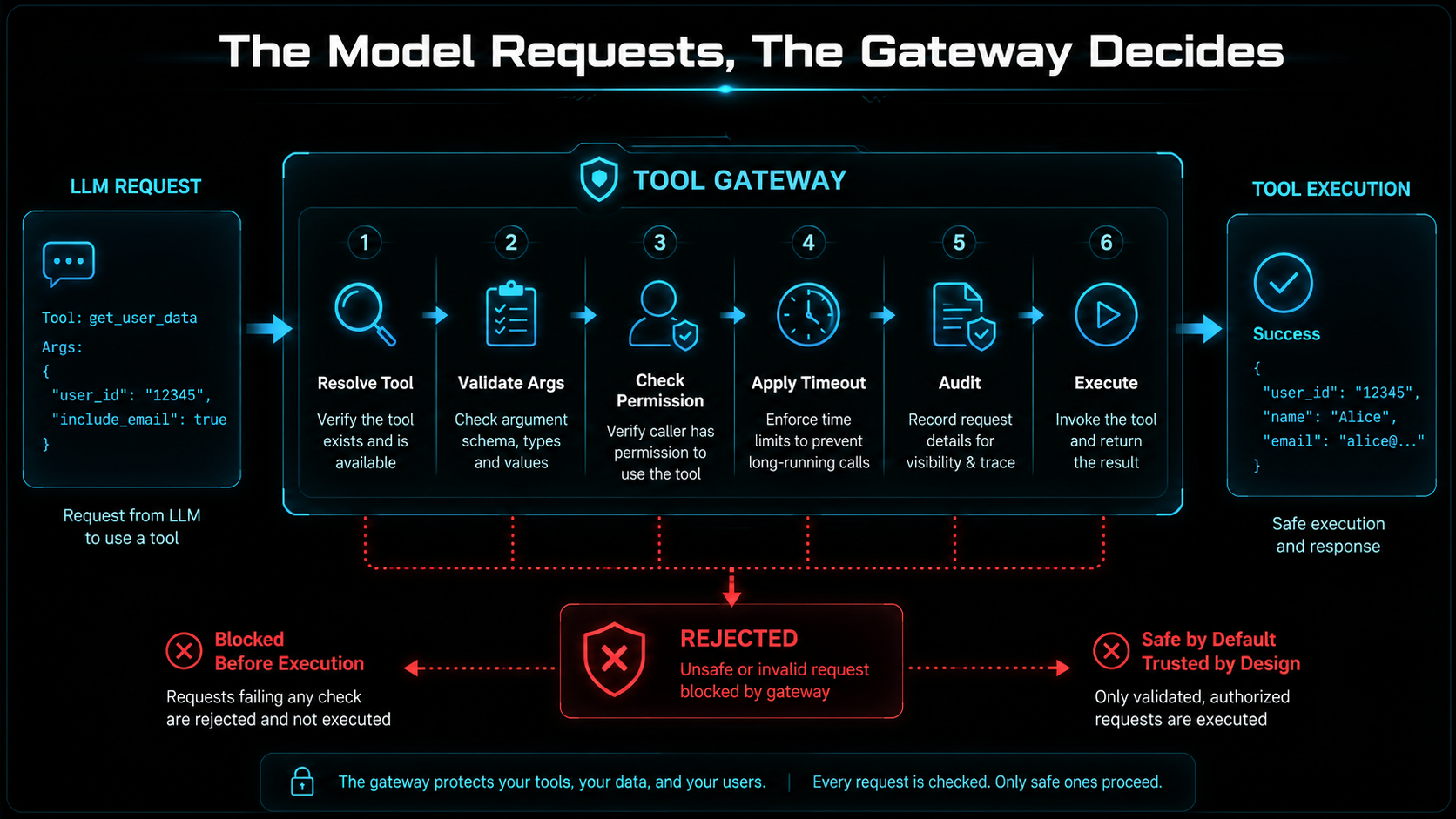
The LLM should never be the source of truth for permissions. Don't ask the model "is this user allowed to access this customer?" — ask your application. The model can request, the backend decides.
Tool Gateway Pattern
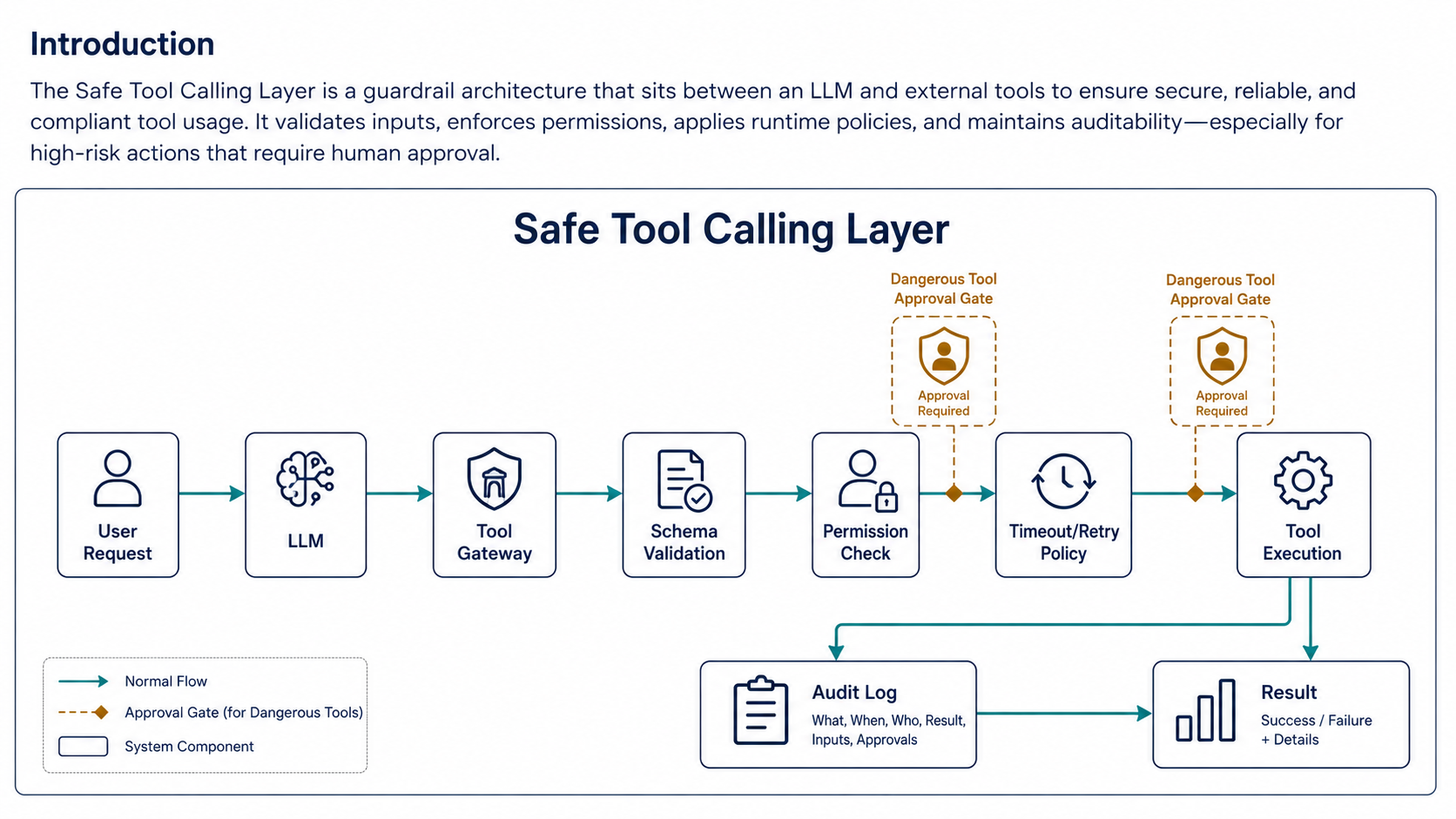
A tool gateway centralizes safety. Instead of scattering checks across each tool function, a gateway runs the same checks for every call:
class ToolGateway:
    def __init__(self, current_user: User):
        self.current_user = current_user

    def call(self, tool_name: str, arguments: dict) -> dict:
        self.audit_requested(tool_name, arguments)

        tool = self.resolve_tool(tool_name)

        validated_arguments = tool.validate(arguments)

        if not tool.is_allowed(self.current_user, validated_arguments):
            self.audit_denied(tool_name, validated_arguments)
            raise PermissionError("Tool call denied.")

        result = tool.execute(validated_arguments)

        self.audit_completed(tool_name, validated_arguments, result)

        return result
This keeps logic out of random tool functions, and it gives you one place for authorization, argument validation, audit logs, rate limits, timeouts, approval gates, and error handling. When you need to harden the system later, there's exactly one file to change.
Timeouts Prevent Stuck Agents
Every tool needs a timeout. Without timeouts, one bad API call can freeze the entire agent workflow.
import httpx


def fetch_runbook(url: str) -> str:
    with httpx.Client(timeout=5.0) as client:
        response = client.get(url)
        response.raise_for_status()
        return response.text[:20000]
For long-running tools, switch to a job pattern — kick off async, hand back a job id, and expose a separate status tool:
def start_static_analysis(repo_id: int) -> dict:
    job = queue.dispatch("static_analysis", {"repo_id": repo_id})

    return {
        "job_id": job.id,
        "status": "started"
    }


def get_job_status(job_id: str) -> dict:
    return queue.get_status(job_id)
Don't make the model wait forever. The agent's context window is finite, and a 90-second tool call eats it.
Retries Need Idempotency
Retries are useful for temporary failures, but they're dangerous when the tool has side effects. The split:
Safe to retry:
- search documents
- read file
- get job status
- fetch issue details

Risky to retry:
- send email
- charge card
- create refund
- update customer record
- create support ticket
If a side-effecting tool can be retried, it needs idempotency:
class CreateRefundInput(BaseModel):
    order_id: int
    amount_cents: int
    reason: str
    idempotency_key: str


def create_refund(input_data: CreateRefundInput) -> dict:
    existing = refund_repository.find_by_idempotency_key(
        input_data.idempotency_key
    )

    if existing:
        return {
            "refund_id": existing.id,
            "status": "already_created"
        }

    refund = refund_service.create_refund(
        order_id=input_data.order_id,
        amount_cents=input_data.amount_cents,
        reason=input_data.reason,
        idempotency_key=input_data.idempotency_key,
    )

    return {
        "refund_id": refund.id,
        "status": "created"
    }
The model should not invent a random idempotency key after a failure — it has no memory of what it tried before. The application creates stable keys based on the workflow:
idempotency_key = f"refund:{order_id}:{request_id}"Same workflow, same key, every time.
Safe Failure Behavior
Tools should fail safely. The bad pattern hides failure:
def update_user_status(user_id: int, status: str) -> dict:
    try:
        database.update_user(user_id, {"status": status})
        return {"ok": True}
    except Exception:
        return {"ok": True}
This pretends success on every failure, which is the worst possible behavior — the agent thinks the work is done, the database thinks it isn't. The good pattern reports back honestly:
def update_user_status(user_id: int, status: str) -> dict:
    try:
        database.update_user(user_id, {"status": status})
        return {"ok": True}
    except DatabaseTimeoutError as error:
        return {
            "ok": False,
            "error_type": "database_timeout",
            "message": "Status was not updated. Retry may be safe.",
        }
    except Exception:
        return {
            "ok": False,
            "error_type": "unknown_error",
            "message": "Status was not updated. Human review required.",
        }
The tool result should tell the agent what happened. It should not pretend success — and it should distinguish between "retry may be safe" and "human review required" so the agent (or the human reading the trace) can pick the right next step.
Audit Logs
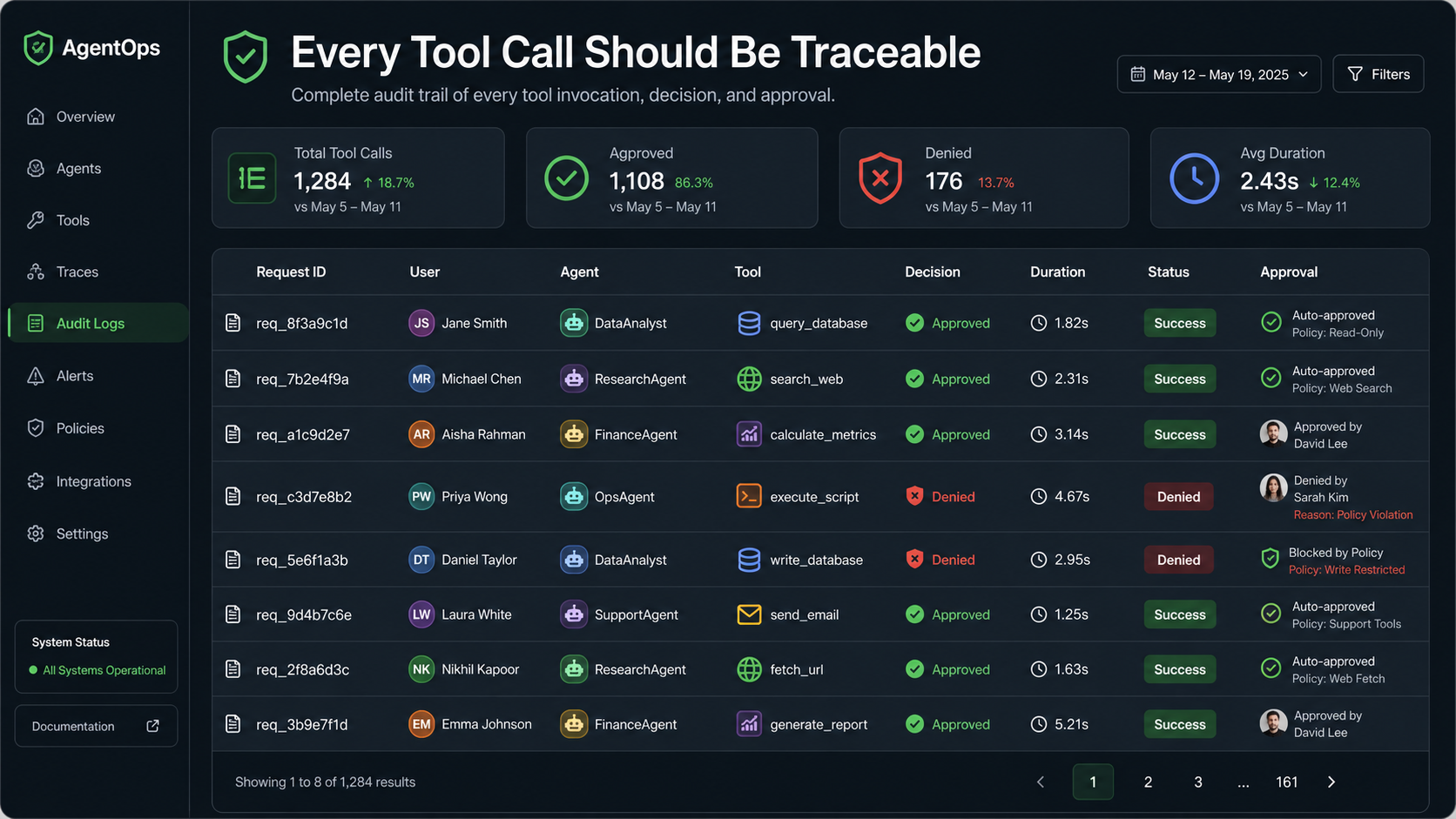
Tool calls should be auditable. The set of fields worth logging: who requested the action, which model/agent requested it, tool name, arguments after sanitization, permission decision, result status, duration, approval status, and correlation/request ID.
{
  "event": "llm_tool_call",
  "request_id": "req_123",
  "user_id": 481,
  "agent": "support_assistant",
  "tool": "create_support_ticket",
  "arguments": {
    "customer_id": 9921,
    "priority": "high"
  },
  "decision": "allowed",
  "duration_ms": 420,
  "status": "success"
}
Don't log secrets — redact sensitive arguments before logging. The audit log should be enough to reconstruct what happened, not enough to leak credentials.
Human Approval Gates
Some tools should require approval — the ones whose blast radius justifies a second pair of eyes:
- send email
- refund payment
- edit production config
- create pull request
- delete data
- update customer account
- run migration
- call external webhook
The approval object carries the context the human needs to decide:
{
  "tool": "refund_payment",
  "risk": "high",
  "reason": "Customer was double charged",
  "amount_cents": 4999,
  "requires_role": "billing_admin"
}
The pattern is short and powerful:
AI creates draft.
Human approves execution.
The model can prepare the action carefully, gather evidence, and present a recommendation. A human clicks approve. That arrangement gets you 80% of the speed win with almost none of the risk.
Practical Tool Design Checklist
Use this when designing a new tool — every "no" is a defect to fix:
Does the tool have one clear purpose?
Is the input schema strict?
Are all arguments validated?
Does it check user permissions?
Does it have a timeout?
Are retries safe?
Is it idempotent if it has side effects?
Does it log sanitized audit events?
Does it fail safely?
Does it require approval for risky actions?
Can it be tested without the model?
Final Thoughts
Tool calling is not just an LLM feature — it's an application architecture problem. The model is unpredictable compared to normal code, so the surrounding system must be predictable. Use narrow tools, validate inputs, check permissions, add timeouts, make retries idempotent, log everything, fail safely, require approval for risky actions.
A good tool layer makes your LLM app more useful. A safe tool layer makes it possible to trust.