You ship a Nuxt page. It looks fine in dev. Then you push to production, open the deployed URL, and the console lights up with Hydration mismatch warnings — sometimes followed by a flash where the markup rearranges itself, sometimes followed by a very confusing bug report from a user.
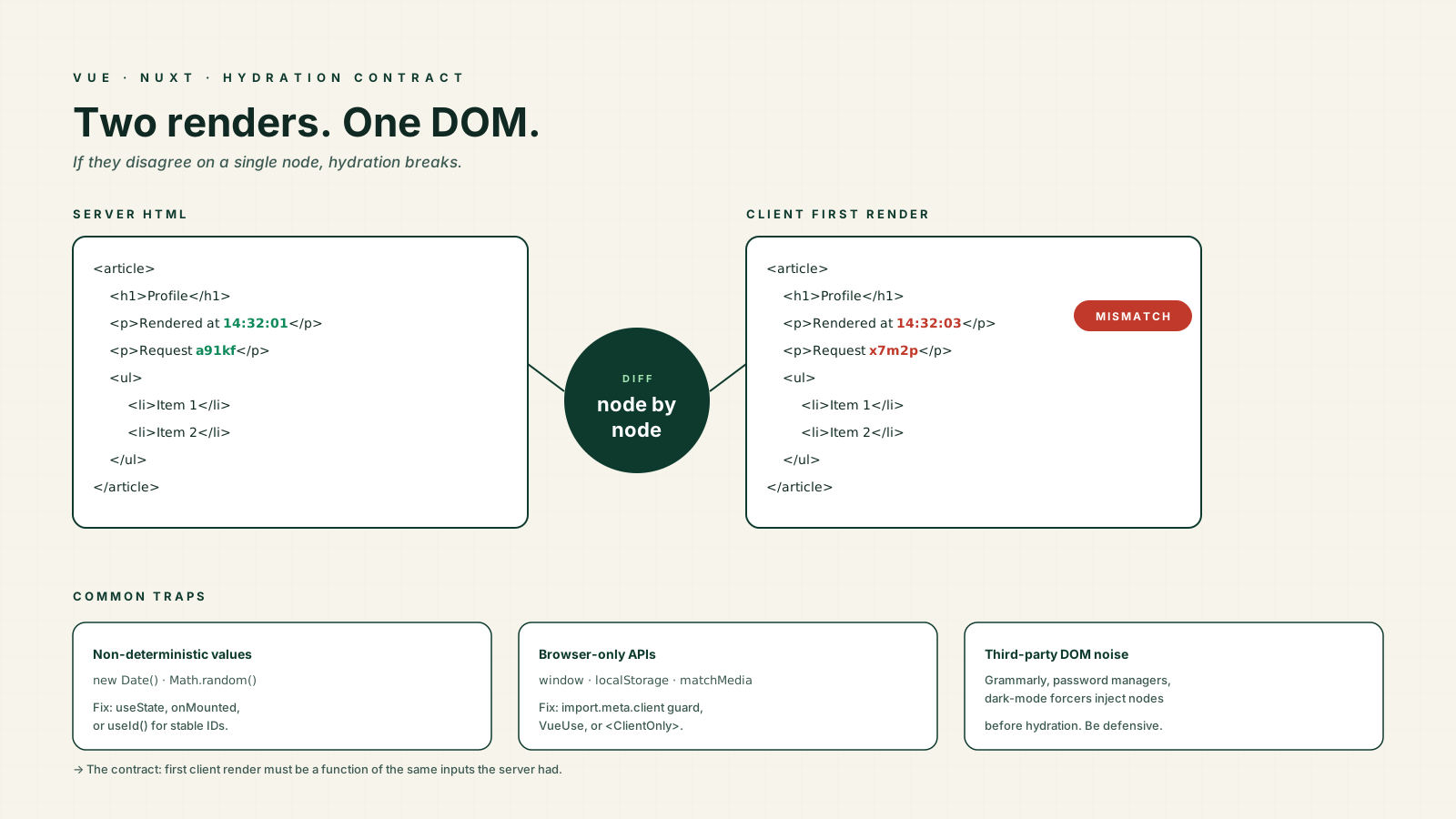
Hydration is one of those topics that feels mystical until you understand the contract. The contract is simple: the HTML the server sent has to match the HTML the client would produce on first render. Every hydration bug is a violation of that contract. Once you internalize that, the fixes stop feeling random.
This article walks through what hydration actually does, the categories of mismatch you will hit in real Nuxt apps, and the specific tools Vue gives you to keep the two renders in sync.
What Hydration Actually Is
When Nuxt renders a page on the server, it produces HTML and a snapshot of the initial reactive state. The browser receives both. Vue then runs your component tree on the client, and instead of rebuilding the DOM, it walks the existing nodes and attaches reactivity to them — event listeners, refs, watchers, the whole machinery.
That walk assumes the client tree shape matches the server tree shape, node for node. If the client renders a different element, a different attribute, a different text node, or even a different number of children, Vue cannot trust the existing DOM. In production it logs a warning and patches the difference. In dev it logs a louder warning. Either way you have a bug, because the user briefly saw something the server wanted to show, then it changed.
The mental model that keeps me sane: the first client render must be a function of the same inputs the server had. Not the URL plus current time. Not the URL plus a random ID. Not the URL plus localStorage. Just the URL plus whatever data your server fetched. Anything that varies between the two passes is a mismatch waiting to happen.
Date And Random Values Are The Classic Trap
These are the textbook hydration bugs because they look so innocent.
<script setup lang="ts">
const renderedAt = new Date().toLocaleTimeString()
const requestId = Math.random().toString(36).slice(2)
</script>

<template>
  <p>Page rendered at {{ renderedAt }}</p>
  <p>Request: {{ requestId }}</p>
</template>
The server runs this code at, say, 14:32:01 with one random seed. The client runs it at 14:32:03 with a different seed. The text nodes do not match, and Vue complains.
The fix depends on intent. If you genuinely need the server's timestamp, capture it in a state container that is serialized as part of the payload — useState in Nuxt does exactly this, freezing the value on the server and replaying it on the client. If you need the client's clock, defer the render to after mount:
<script setup lang="ts">
import { ref, onMounted } from 'vue'

const renderedAt = ref<string | null>(null)
onMounted(() => {
  renderedAt.value = new Date().toLocaleTimeString()
})
</script>

<template>
  <p v-if="renderedAt">Page rendered at {{ renderedAt }}</p>
</template>
The server renders nothing, the client renders nothing on the first pass, and then onMounted fills in the value. No mismatch, because both sides agree on the empty initial state.
For stable IDs that must exist on both sides (label/input pairing, ARIA), use Vue 3.5's useId(). It returns a deterministic ID that is identical on the server and the client, which is exactly what you want for a11y attributes and exactly what Math.random is not.
Browser-Only APIs And import.meta.client
The other big bucket of mismatches is code that reads window, document, localStorage, navigator, or matchMedia during render. On the server those are undefined, so either the code crashes or you wrap it in a typeof window !== 'undefined' check that quietly produces different output on the two sides.
In Nuxt 3, the cleaner switch is import.meta.client (and import.meta.server). They are statically analyzable, tree-shakable, and replace the older process.client / process.server flags.
const prefersDark = ref(false)

onMounted(() => {
  if (import.meta.client) {
    prefersDark.value = window.matchMedia('(prefers-color-scheme: dark)').matches
  }
})
Even better, use VueUse — useMediaQuery, useStorage, useEventListener, and friends already handle the SSR-safe initial state. They return a sensible default on the server and update on the client after mount, which keeps the first render deterministic.
<ClientOnly> Is The Escape Hatch You Will Use
Some components genuinely cannot render on the server. A drag-and-drop board built on a library that touches window. A canvas chart. An iframe-based embed. A widget whose initial state is "whatever is in localStorage."
Wrap them in <ClientOnly> and Nuxt skips them on the server, then mounts them on the client after hydration:
<template>
  <ClientOnly>
    <RichTextEditor v-model="body" />
    <template #fallback>
      <div class="editor-skeleton" aria-hidden="true" />
    </template>
  </ClientOnly>
</template>
The #fallback slot is the nice detail — it lets you render placeholder markup on the server so the layout does not jump when the real component mounts. Without a fallback you get a brief gap, which on slow devices can look like a broken page.
<ClientOnly> is not free. It moves work from server to client and delays interactivity for that subtree, so reach for it when you have to, not as a default. If only the initial value is browser-specific, prefer onMounted to set the value after mount; you keep the SSR shape and just patch in the client-specific data.
Browser Extensions Will Lie To You
This one wastes a surprising amount of time. You ship a clean app, the staging environment is fine, then a user reports a hydration warning that you cannot reproduce. You look at the diff Vue logged and there is a <style> tag or an extra attribute on <body> that you did not write.
That is a browser extension — Grammarly, password managers, dark-mode forcers, ad blockers — injecting nodes into the DOM before Vue gets to walk it. The server's HTML is correct, the client's first render is correct, but the DOM the client found has been mutated by a third party.
You cannot fully prevent this, but you can be defensive. Avoid relying on the exact attribute set of <body> and <html>. Set known attributes via useHead rather than templating them. When the warning is genuinely from an extension and not your code, accept that production logs will have noise; the app still works because Vue patches over the difference.
useState Vs A Naked ref In Nuxt
A subtler hydration bug: a top-level ref declared in <script setup> is not shared between the server render and the client. Nuxt serializes the result of useState, useFetch, useAsyncData, and similar composables into the payload, but a plain ref outside those is just a local variable that runs twice — once on the server, once on the client — with no guarantee of equality.
// Wrong — count is initialized independently on server and client.
// If the initializer reads anything non-deterministic, you get a mismatch.
const count = ref(Math.floor(Math.random() * 100))

// Right — useState serializes the value, the client reads it from the payload.
const count = useState('count', () => Math.floor(Math.random() * 100))
The rule: any state that needs to be the same on both sides goes through useState or one of the data composables. A plain ref is fine for state that is set after mount, never fine for state computed from non-deterministic inputs at module load.
Read The Warning Carefully
Vue's hydration warning in dev mode tells you exactly what differed: the component, the parent chain, the expected node, and the received node. Read it like a stack trace. The common shapes:
Hydration text mismatch— a text node differs. Almost always a date, number formatting, or locale issue.Hydration node mismatch— element type or structure differs. Usually av-ifreading a browser-only value, or conditional rendering that runs differently on server and client.Hydration attribute mismatch— an attribute differs on the same element. Oftenclassorstyleset by a media query orlocalStorage.Hydration children mismatch— the number or order of children differs. Usually a list whose source was sorted with a non-deterministic comparator, or filtered with a client-only predicate.
Vue 3.4+ improved these messages significantly; older 3.x versions gave you a single line and a guess. If you are stuck on a Vue 2 SSR app, upgrade — the diagnostics alone are worth it.
Lazy Hydration Changes The Calculus
Vue 3.5 shipped lazy hydration strategies that hydrate components on idle, on visibility, on interaction, or on a media query rather than eagerly on page load. The Vue-core API is the hydrate option of defineAsyncComponent:
import { defineAsyncComponent, hydrateOnVisible } from 'vue'

const HeavyChart = defineAsyncComponent({
  loader: () => import('./HeavyChart.vue'),
  hydrate: hydrateOnVisible(),
})
Nuxt 3.12+ goes further and exposes the same strategies as hydrate-on-* attributes on the auto-imported Lazy* component prefix — <LazyHeavyChart hydrate-on-visible /> is the Nuxt-flavoured equivalent.
This does not fix mismatches — the rendered shape still has to match — but it cuts the cost of hydration on heavy below-the-fold content. Use it for things like dashboards, comment threads, and analytics widgets. Do not use it for above-the-fold interactive controls; the user will tap something and nothing will happen until hydration runs.
A One-Sentence Mental Model
A hydration mismatch is the framework telling you that the first client render was a function of inputs the server did not have — fix it by making the first render deterministic, deferring the variable parts to onMounted, or wrapping the genuinely client-only parts in <ClientOnly>. Once you stop trying to make non-deterministic code render the same on both sides, the warnings go away.