So, you've shipped a few things on AWS.
Maybe a few Lambda functions. An RDS instance. A bucket or two. A pipeline that almost works. And somewhere along the way, you opened the IAM console, saw a wall of acronyms - policies, roles, principals, trust relationships, boundaries - closed the tab, and went back to writing real code.
Then someone on the team paged you because a new microservice "just needs S3 access". You clicked through, attached AmazonS3FullAccess, and the ticket closed.
Crazy, right? That one click probably did more damage to your security posture than the next six weeks of feature work will repair.
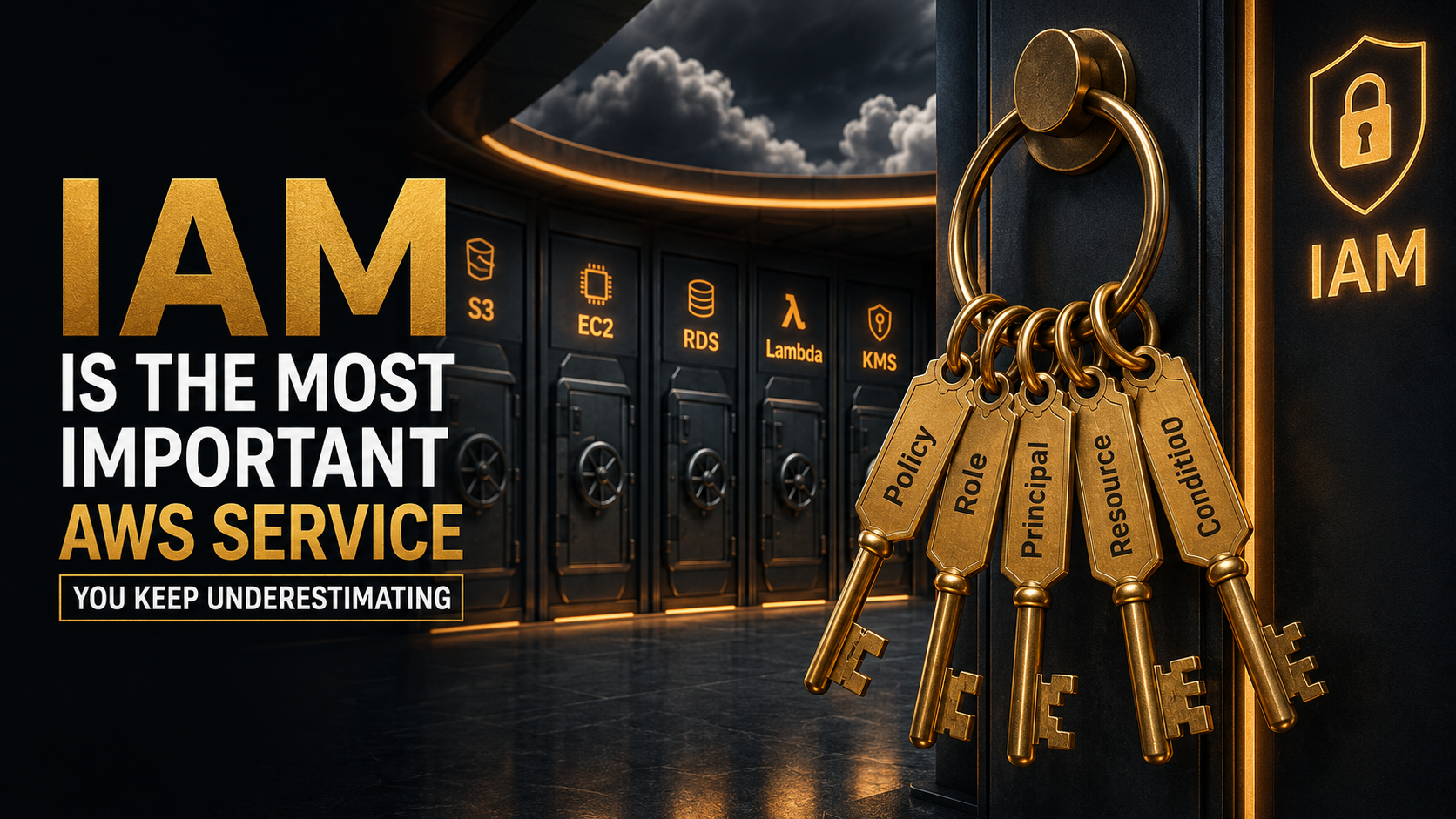
IAM is the most important AWS service. Not the most fun. Not the most discussed at conferences. But the one that decides whether your other services live or die. Every API call to every AWS service - every S3 read, every Lambda invocation, every DynamoDB write - goes through IAM first. If IAM says no, nothing else matters. If IAM says yes too easily, nothing else matters either, just in the other direction.
Let's break it down.
Why IAM Outranks Everything Else
Most AWS services solve a problem you can describe in one sentence. S3 stores objects. EC2 runs VMs. SQS holds messages. Lambda runs functions.
IAM solves a different problem: who is allowed to do what, to which thing, under which conditions. That sentence is the entire control plane of your cloud. Get it wrong and a leaked access key turns into a ransomware incident. Get it right and a compromised function is contained to the four API calls you allowed.
The reason engineers underestimate IAM is that it doesn't look like infrastructure. There's no instance to SSH into. No dashboard with traffic graphs. No CPU to watch. It's just JSON. Quiet, declarative, easy to copy-paste from Stack Overflow without reading.
That's the trap. The JSON is the infrastructure. A single character - a * where a specific ARN should be - is the difference between "this Lambda can read one bucket" and "this Lambda can ransack your entire account".
The Anatomy Of A Policy
An IAM policy is a JSON document. That's it. It says which actions are allowed or denied on which resources, optionally under which conditions, and optionally for which principals.
Here's the smallest policy that does something useful:
{
  "Version": "2012-10-17",
  "Statement": [
    {
      "Effect": "Allow",
      "Action": "s3:GetObject",
      "Resource": "arn:aws:s3:::reports-bucket/*"
    }
  ]
}
Four moving parts. Let's name them.
Version is the policy language version. There are only two values that have ever existed (2008-10-17 and 2012-10-17), and you should always use 2012-10-17. Anyone telling you otherwise is reading a tutorial from before the iPhone 5.
Effect is Allow or Deny. That's the whole vocabulary.
Action is what someone is trying to do - s3:GetObject, ec2:RunInstances, dynamodb:Query. Each AWS service defines its own action namespace. Wildcards are legal (s3:*, s3:Get*) and that's where most of the damage in this world comes from.
Resource is what they're trying to do it to - an ARN. Wildcards are legal here too (* meaning every resource of every type), and that's where the rest of the damage comes from.
Most real policies add a fifth element:
{
  "Version": "2012-10-17",
  "Statement": [
    {
      "Effect": "Allow",
      "Action": "s3:GetObject",
      "Resource": "arn:aws:s3:::reports-bucket/*",
      "Condition": {
        "StringEquals": {
          "aws:SourceVpc": "vpc-0a1b2c3d4e5f"
        }
      }
    }
  ]
}
Condition is the part that turns IAM from a permissions list into a policy engine. It lets you say things like "only from this VPC", "only with MFA in the last hour", "only if the request has this tag", "only if TLS 1.2 or higher". Conditions are how you take a coarse "Allow S3 reads" and shape it into "Allow S3 reads, but only from our infrastructure, only over TLS, only on objects tagged for this team".
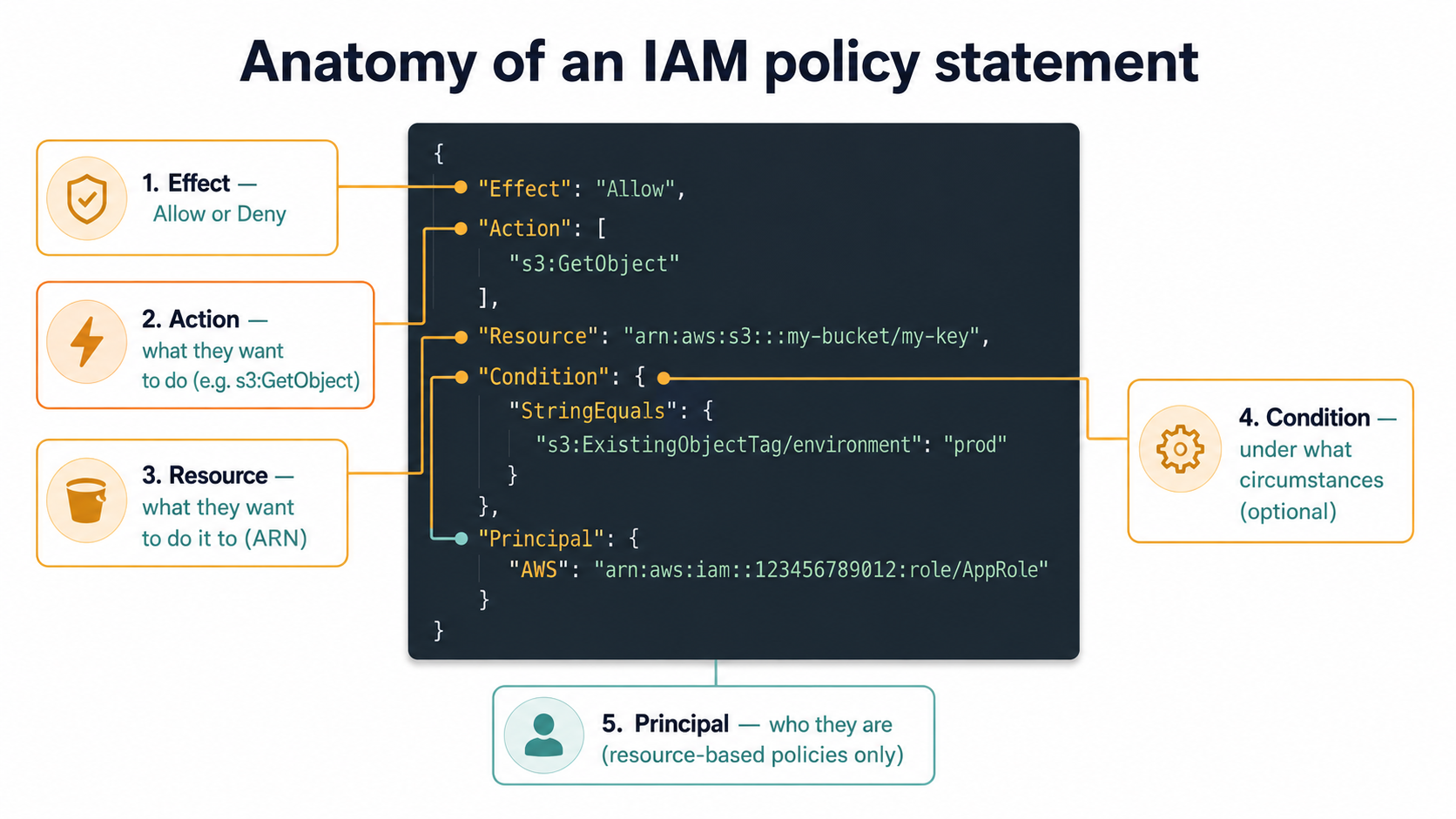
There are two more elements worth knowing about. Principal appears in resource-based policies (more on those in a minute) and says who the policy is about - "Principal": { "AWS": "arn:aws:iam::123456789012:role/PipelineRole" }. And the negatives: NotAction, NotResource, NotPrincipal. They're as dangerous as they sound - "allow every action except these few" is almost never what you want, because the moment AWS launches a new service, your NotAction policy quietly grants permissions on it. Use the positive forms unless you have a very specific reason not to.
Identities, Policies, And The Two Sides Of Every Decision
IAM has three kinds of identity: users, groups, and roles. And it has two big buckets of policy: identity-based (attached to an identity) and resource-based (attached to a thing).
A user is a long-lived identity, usually for a human. It has a password, optionally MFA, optionally access keys. In a modern AWS account, the answer to "should I create an IAM user?" is almost always "no" - federate humans through SSO instead, and let workloads use roles. But users exist, you'll inherit them, and they obey the same policy rules as everything else.
A group is a bucket of users. Groups don't authenticate. They exist purely so you can attach a policy once and have it apply to multiple users. Groups can't be principals - you can't write a resource policy that says "allow this group". You allow the users via the group's attached policies.
A role is the interesting one. A role is an identity with no permanent credentials. Something - a service, a user, another account, a federated identity - assumes the role, and AWS hands out short-lived credentials (an access key, a secret key, and a session token) that expire on a timer. When the credentials expire, you call sts:AssumeRole again and get a fresh set.
Roles are how you avoid the "long-lived access key on a server" pattern, which is the single largest source of leaked AWS credentials on GitHub. An EC2 instance with an instance profile, a Lambda function with an execution role, an ECS task with a task role - none of them have hard-coded keys. They all assume a role and rotate the credentials silently.
{
  "Version": "2012-10-17",
  "Statement": [
    {
      "Effect": "Allow",
      "Principal": {
        "Service": "lambda.amazonaws.com"
      },
      "Action": "sts:AssumeRole"
    }
  ]
}
That's a trust policy. Every role has two things: a trust policy (who is allowed to assume this role) and one or more permission policies (what the role is allowed to do once assumed). It's easy to confuse them because they look identical - same JSON shape, same elements. The trust policy is the door. The permission policy is what's inside the room.
Identity-Based vs. Resource-Based Policies
This is where new IAM users get tripped up.
An identity-based policy is attached to a user, group, or role. It says "this identity can do these actions on these resources."
A resource-based policy is attached to the resource itself - an S3 bucket policy, an SQS queue policy, a KMS key policy, a Lambda function policy. It says "these principals can do these actions on me."
Most services support only identity-based policies. A few - and they're the important ones - support both. S3, SQS, SNS, Lambda, KMS, ECR, Secrets Manager, API Gateway. When a service supports both, every request gets evaluated against both sides. The principal needs to be allowed by their own policy and by the resource's policy. (KMS is the exception - for KMS, the key policy is mandatory and identity-based policies alone aren't enough.)
This dual evaluation is how cross-account access works. Account A's role has s3:GetObject on arn:aws:s3:::bucket-in-B/*. Account B's bucket policy says "Principal": { "AWS": "arn:aws:iam::A:role/PipelineRole" }, "Effect": "Allow", "Action": "s3:GetObject". Both sides agree, the call succeeds. If either side is silent, the call fails.
The Real Evaluation Order
The thing AWS docs phrase carefully and IAM courses underplay: deny wins.
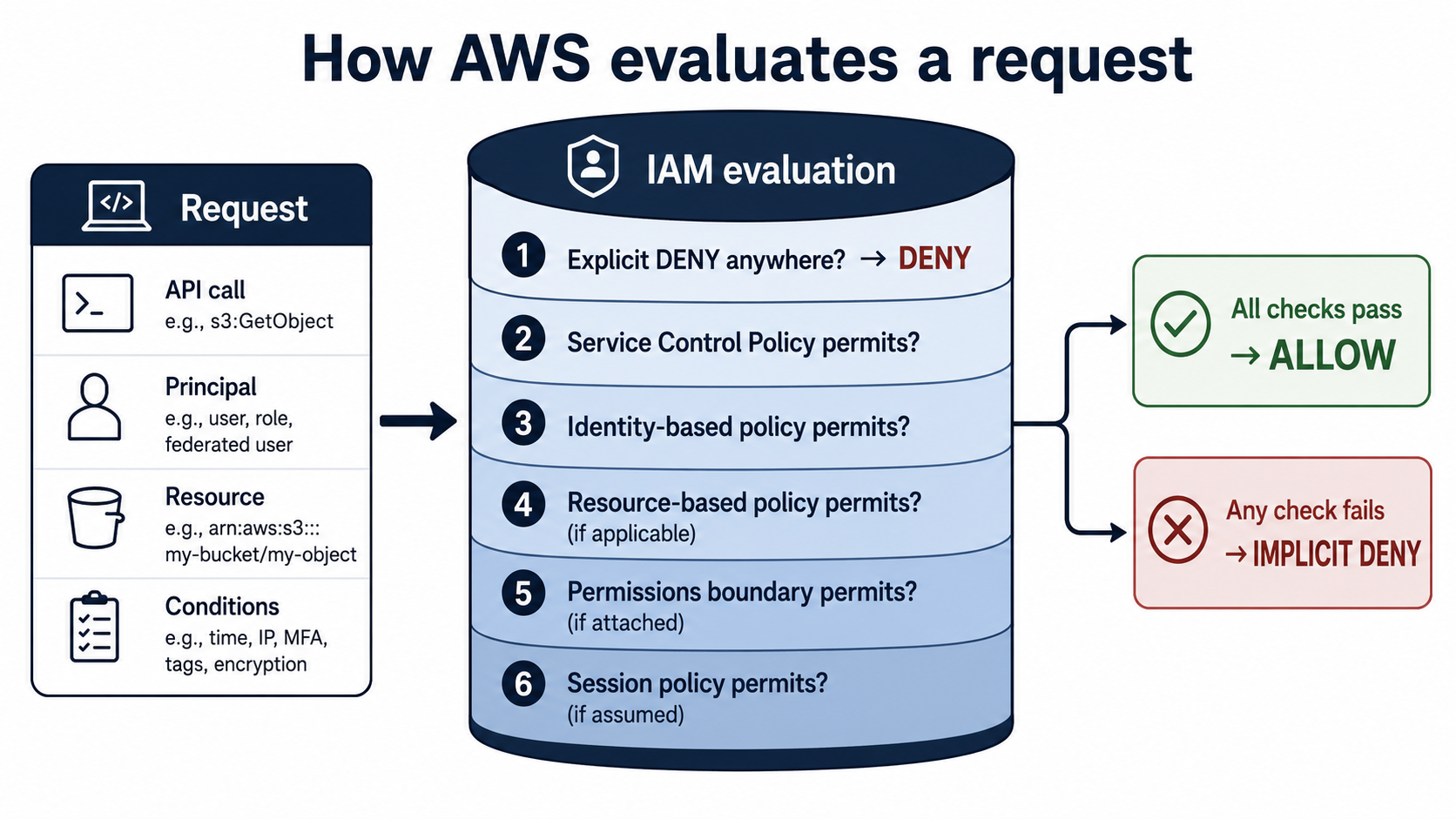
When you make an API call, AWS evaluates every policy that touches the request - your identity-based policies, the resource policy if there is one, your permissions boundary, any Service Control Policies on the org, any session policies. The decision rule is:
- Is there an explicit deny anywhere? If yes, denied. Game over. No combination of allows from anywhere else overrides it.
- Is there an explicit allow that matches, and nothing else blocks it? If yes, allowed.
- Otherwise - implicit deny.
That third rule is the one you want tattooed somewhere. IAM is deny-by-default. Saying nothing is the same as saying no. The policies in your account are not subtracting from a default "everything allowed" - they're building up from a default "nothing allowed". The whole system is allowlist-based.
This is why an empty IAM role with no attached policies can't do anything. Not even list its own metadata. The role exists, the trust policy lets you assume it, the credentials are valid - and every API call comes back AccessDenied until you attach a policy that grants something.
Least Privilege, In Reality
Every IAM training in the world tells you to follow the principle of least privilege. Almost no one does. Let's talk about why, and what it actually looks like.
The textbook version: grant only the permissions needed to do the job, scoped to only the resources involved, only under the conditions that make sense. In production, this means:
- Not
s3:*. Maybes3:GetObject,s3:PutObject,s3:ListBucket. - Not
Resource: "*". Maybearn:aws:s3:::reports-bucket-prod,arn:aws:s3:::reports-bucket-prod/*. - Not "any time, from anywhere". Maybe
aws:SourceVpc,aws:RequestedRegion,aws:SecureTransport.
The reason teams don't do this is real, not lazy. When you're shipping a new service, you don't know yet which API calls it'll need. You attach AmazonS3FullAccess, get the thing working, promise yourself you'll tighten it later, and then you never do, because tightening it means going through every code path and either reading logs or testing every error case to confirm nothing breaks.
The pattern that works is the opposite. Start with nothing, watch what fails, allow exactly what was attempted.
Two AWS tools make this practical, and most teams don't use either:
IAM Access Analyzer's policy generation watches the actions a role actually performs over a window of time (via CloudTrail) and generates a tight policy from that observed behavior. You give it a role and a time window, it gives you a policy template that grants only what was used.
CloudTrail event analysis. Every IAM-relevant API call is logged. Querying CloudTrail for eventSource and eventName for a specific role over the last 30 days tells you exactly what that role did. Anything you didn't see, you don't need to allow.
The other half of least privilege is resource scoping, which gets less attention but matters more in blast-radius terms. Compare:
{
  "Effect": "Allow",
  "Action": "s3:GetObject",
  "Resource": "*"
}{
"Effect": "Allow",
"Action": "s3:GetObject",
"Resource": [
"arn:aws:s3:::reports-prod/team-finance/*",
"arn:aws:s3:::reports-prod/team-analytics/*"
]
}Same action. Wildly different blast radius. The first one, in the hands of a compromised function, exfiltrates every object in every bucket in your account. The second one, in the same hands, exfiltrates two folders.
Conditions add the third dimension:
{
  "Effect": "Allow",
  "Action": "s3:GetObject",
  "Resource": "arn:aws:s3:::reports-prod/team-finance/*",
  "Condition": {
    "Bool": { "aws:SecureTransport": "true" },
    "StringEquals": { "aws:SourceVpc": "vpc-0a1b2c3d4e5f" },
    "StringEqualsIfExists": { "aws:PrincipalTag/department": "finance" }
  }
}
That policy reads "the principal can get this object, only over TLS, only from our VPC, and only if the principal is tagged as belonging to the finance department." Three independent guards. Any one of them being absent or wrong, the request is denied.
Tags Are Quietly Powerful
ABAC - attribute-based access control - is the underused half of IAM. Instead of writing a policy per team or per environment, you tag your resources and your principals, then write one policy that says "principals with project=X can access resources with project=X".
{
  "Effect": "Allow",
  "Action": ["s3:GetObject", "s3:PutObject"],
  "Resource": "arn:aws:s3:::project-data/*",
  "Condition": {
    "StringEquals": {
      "aws:ResourceTag/project": "${aws:PrincipalTag/project}"
    }
  }
}
That policy doesn't care which project. It cares that the project tag on the resource matches the project tag on the principal. New project? Don't write a new policy. Tag the bucket. Tag the role. Done.
This is the kind of design that turns IAM from a wall of per-service policies into a small set of generic rules. The trade-off is rigor - your tagging has to be enforced (use SCPs to require certain tags on resource creation, use IAM conditions to require tags on role creation) or the whole scheme collapses.
Permissions Boundaries - The Safety Net For Delegating IAM
Here's a scenario. You have a platform team and ten product teams. Each product team needs to create their own IAM roles for their own services - they know which permissions their app needs, and bottlenecking every new role through the platform team kills velocity.
So you let them create roles. But now any product engineer who can create a role can, in theory, create a role with AdministratorAccess and assume it. You've handed out the keys to the kingdom while trying to delegate the keys to one room.
This is what permissions boundaries exist for.
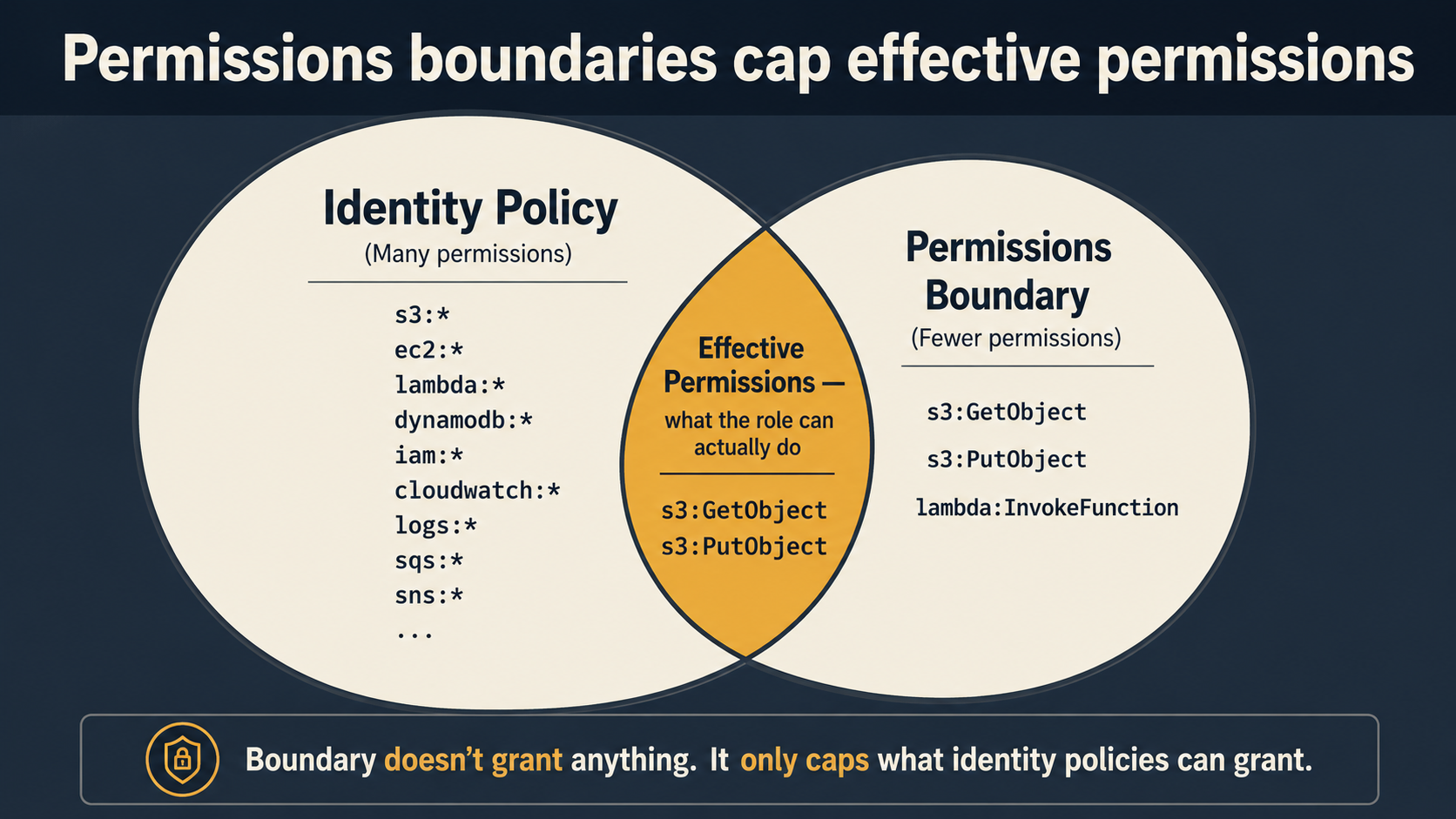
A permissions boundary is a policy you attach to an identity (a user or a role) that caps the maximum permissions that identity's other policies can grant. It doesn't grant anything on its own. It draws a ceiling.
The math is: effective permissions = identity policies ∩ permissions boundary.
If a role's identity policy allows s3:* and ec2:*, but its permissions boundary allows only s3:GetObject and s3:PutObject, the role can do exactly two things - get and put S3 objects. The boundary clipped the rest.
The clever part: you can also use the boundary as a constraint on role creation itself. You give product engineers an identity policy that says "you can create IAM roles, but only if those roles have permissions boundary X attached." Now no matter what wild policies a product engineer writes for their own service roles, the boundary X caps what those roles can actually do.
{
  "Version": "2012-10-17",
  "Statement": [
    {
      "Sid": "AllowCreatingRolesOnlyWithBoundary",
      "Effect": "Allow",
      "Action": "iam:CreateRole",
      "Resource": "arn:aws:iam::123456789012:role/team-*",
      "Condition": {
        "StringEquals": {
          "iam:PermissionsBoundary":
            "arn:aws:iam::123456789012:policy/TeamWorkloadBoundary"
        }
      }
    },
    {
      "Sid": "ForceBoundaryOnAttachedPolicies",
      "Effect": "Allow",
      "Action": "iam:AttachRolePolicy",
      "Resource": "arn:aws:iam::123456789012:role/team-*",
      "Condition": {
        "StringEquals": {
          "iam:PermissionsBoundary":
            "arn:aws:iam::123456789012:policy/TeamWorkloadBoundary"
        }
      }
    }
  ]
}
Read it as: "create whatever role you want, name it team-*, attach whatever permission policy you want - as long as the resulting role carries TeamWorkloadBoundary as its permissions boundary." You've delegated IAM management without delegating the keys to the kingdom.
The hierarchy from biggest hammer to smallest:
- Service Control Policies (SCPs) - set at the AWS Organizations level, cap what any identity in an account can do, including the account root. You can't
s3:DeleteBucketif the org's SCP forbids it. SCPs are how a security team prevents whole categories of action without touching every account's IAM. - Permissions boundaries - cap what an identity-based policy can effectively grant to a specific identity.
- Identity-based policies - what an identity can do, within those caps.
- Session policies - passed to
sts:AssumeRolewhen you assume a role, and they further narrow the resulting session's permissions. Useful for "I'm assuming this role but only for the next five minutes and only to read these three files."
Most teams don't reach for boundaries or SCPs because the first two years on AWS, you don't need them. The moment you scale past one team and one account, you need both.
A Few Things Nobody Tells You
After enough time around IAM, the small details start adding up to most of the operational pain.
Role names are case-sensitive in some contexts and not others. A trust policy referencing arn:aws:iam::123:role/MyRole will not match a role created as myrole. CloudFormation will let you create both. Don't.
IAM is eventually consistent. When you create a role, the role exists. When you attach a policy, the policy is attached. The propagation of that change to every AWS region's authorization layer can take a few seconds - sometimes longer. If your CI pipeline creates a role and immediately tries to assume it, you'll see intermittent AccessDenied for the first minute or so. Retry with backoff or sleep briefly.
iam:PassRole is the permission that bites you. When a service creates something that runs as a role - a Lambda, an ECS task, an EC2 instance - the caller needs iam:PassRole on that role. Forgetting to scope iam:PassRole is how engineers end up with the equivalent of admin: anyone who can pass any role can effectively assume those roles' permissions by spinning up a Lambda that does whatever they want. Scope iam:PassRole tightly with conditions like iam:PassedToService.
Inline policies are convenient and a maintenance hazard. Inline policies live attached to a single identity and don't have ARNs. They're invisible in lists of managed policies, easy to forget about, and impossible to share. Use managed policies (customer-managed, not AWS-managed) for everything except the smallest one-offs.
AWS managed policies are starting points, not destinations. AmazonS3FullAccess, AmazonEC2FullAccess, and the rest of the *FullAccess family are catalog policies - convenient for getting started, never appropriate for production. They're maintained by AWS, they expand to include new actions when services release new APIs, and they grant on Resource: "*". Take a copy, tighten it, ship the tightened version.
The console doesn't tell you everything. A role's "effective permissions" in the IAM console shows you the attached policies, but it doesn't trace SCPs, permissions boundaries, or resource policies. To see what a principal can actually do, use the IAM Policy Simulator or aws iam simulate-principal-policy from the CLI - they evaluate the full stack the same way a real request would be evaluated.
How To Get Better At This
You don't get good at IAM by reading more docs. You get good at it by writing a lot of tight policies, breaking things, reading the deny message, and fixing the policy.
A few habits that compound:
When you're about to attach *FullAccess, stop. Open CloudTrail or the AWS-provided IAM Access Analyzer policy generation, give it a week of activity, and write the tight version. The first time it'll take you an hour. The third time, ten minutes. The tenth time, it's reflex.
When you write a new policy, read it out loud as a sentence. "This role can put any object in any bucket in this account, with no conditions." If the sentence makes you uncomfortable, the policy is wrong.
When you inherit an existing IAM setup, grep for "Resource": "*" and "Action": "*" and treat each match as a finding. Most will turn out to be fine; some will turn out to be the reason your last security review went badly.
When you can't figure out why an API call is being denied, reach for the simulator before reaching for Stack Overflow. It evaluates the same logic the real authorization layer does, including resource policies and boundaries, and tells you exactly which statement allowed or denied.
IAM is the boring service that runs the whole platform. The teams that spend a quiet week with it once a quarter spend the rest of the year not worrying about leaked credentials, lateral movement, or the next "how did this happen" postmortem. It's worth the week.