Have you ever added an index, deployed the migration, refreshed the page, and expected the database to suddenly become a race car?
Then nothing improved.
Or worse, writes got slower and the query still scanned half the table. Fun little production lesson, right?
Indexes are one of the most useful database tools you have, but they're not magic. They're data structures with rules, costs, and trade-offs. When you understand how databases actually use them, performance work becomes much less mysterious.
An Index Is A Shortcut, Not A Spell
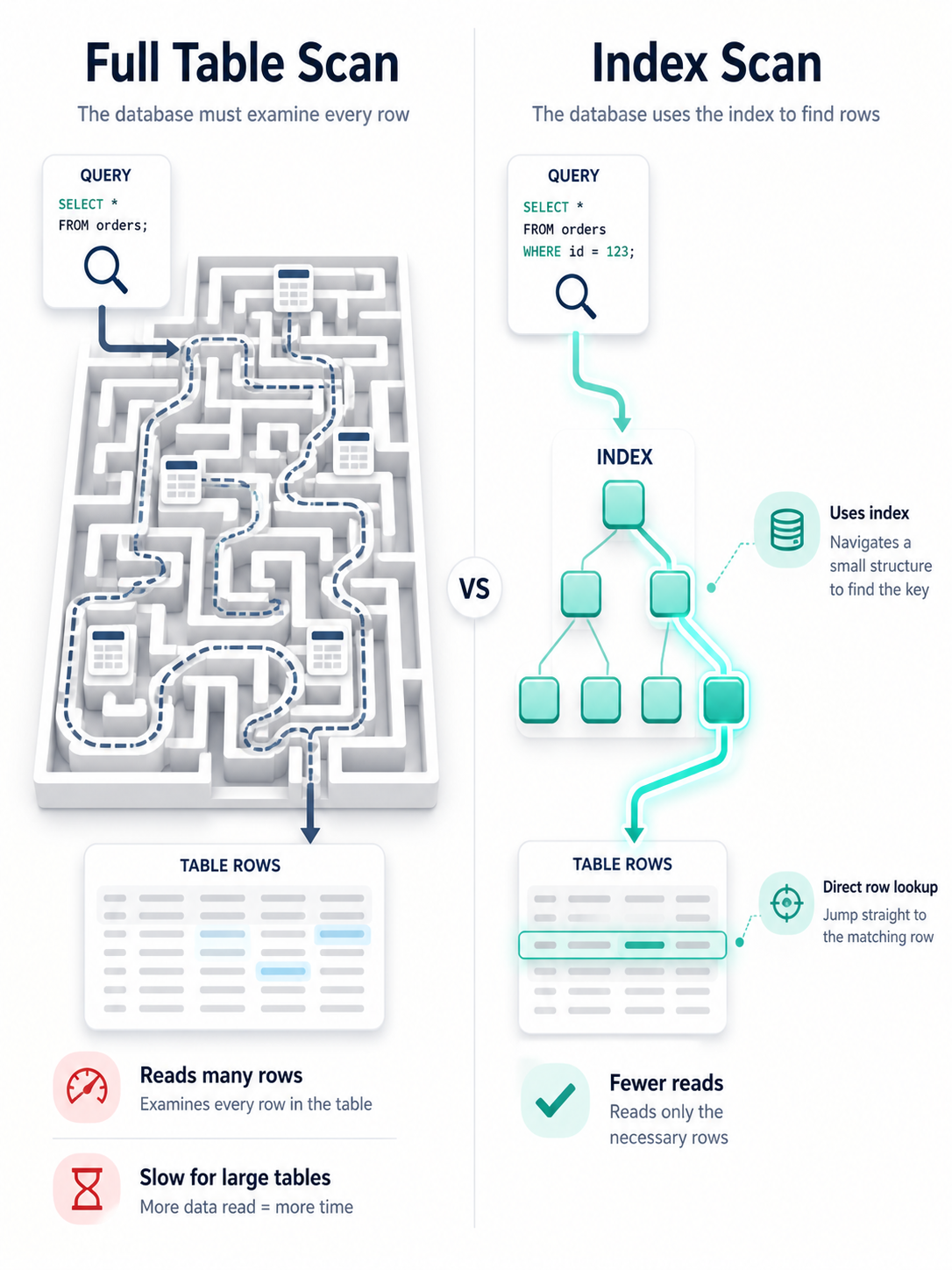
A database index is a separate structure that helps the database find rows without scanning the whole table.
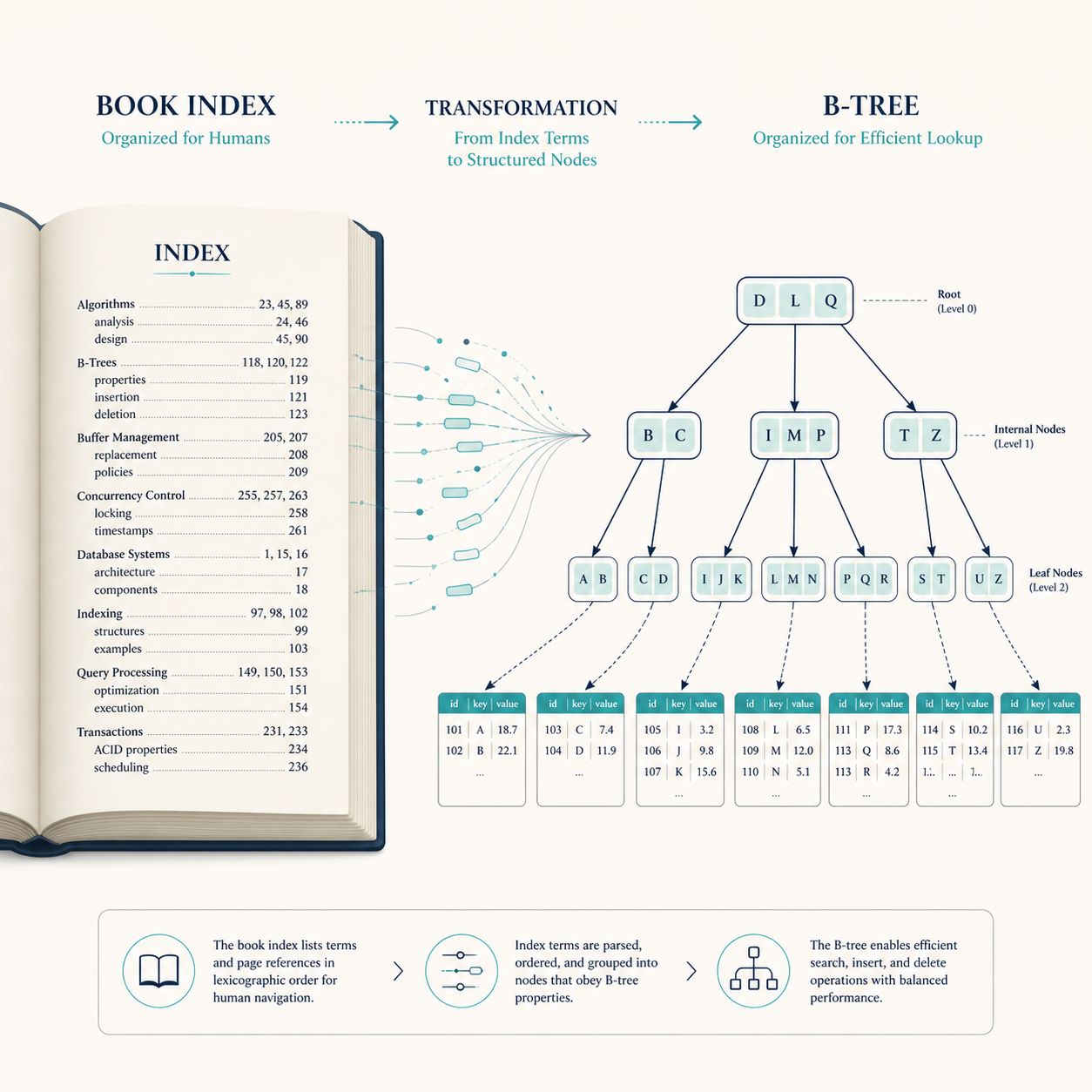
The classic analogy is a book index. If you want to find every mention of "transactions" in a 600-page database book, you don't read every page. You look in the index, find the page numbers, and jump directly there.
That's the happy path.
But if the index says the word appears on 420 pages, the shortcut becomes much less useful. That's where selectivity enters the story.
What An Index Usually Helps With
- Filtering. Queries with
WHEREclauses can use indexes to find matching rows faster. - Joining. Foreign keys and join columns often benefit from indexes.
- Sorting. Some
ORDER BYoperations can use index order instead of sorting from scratch. - Uniqueness. Unique indexes enforce business rules at the database level.
- Range scans. Queries like
created_at >= ?can use ordered indexes effectively.
An index helps when it lets the database skip work. If it doesn't skip much work, the database may ignore it.
Most Relational Indexes Are B-Tree Based
Many common relational database indexes use a B-tree or B-tree-like structure.
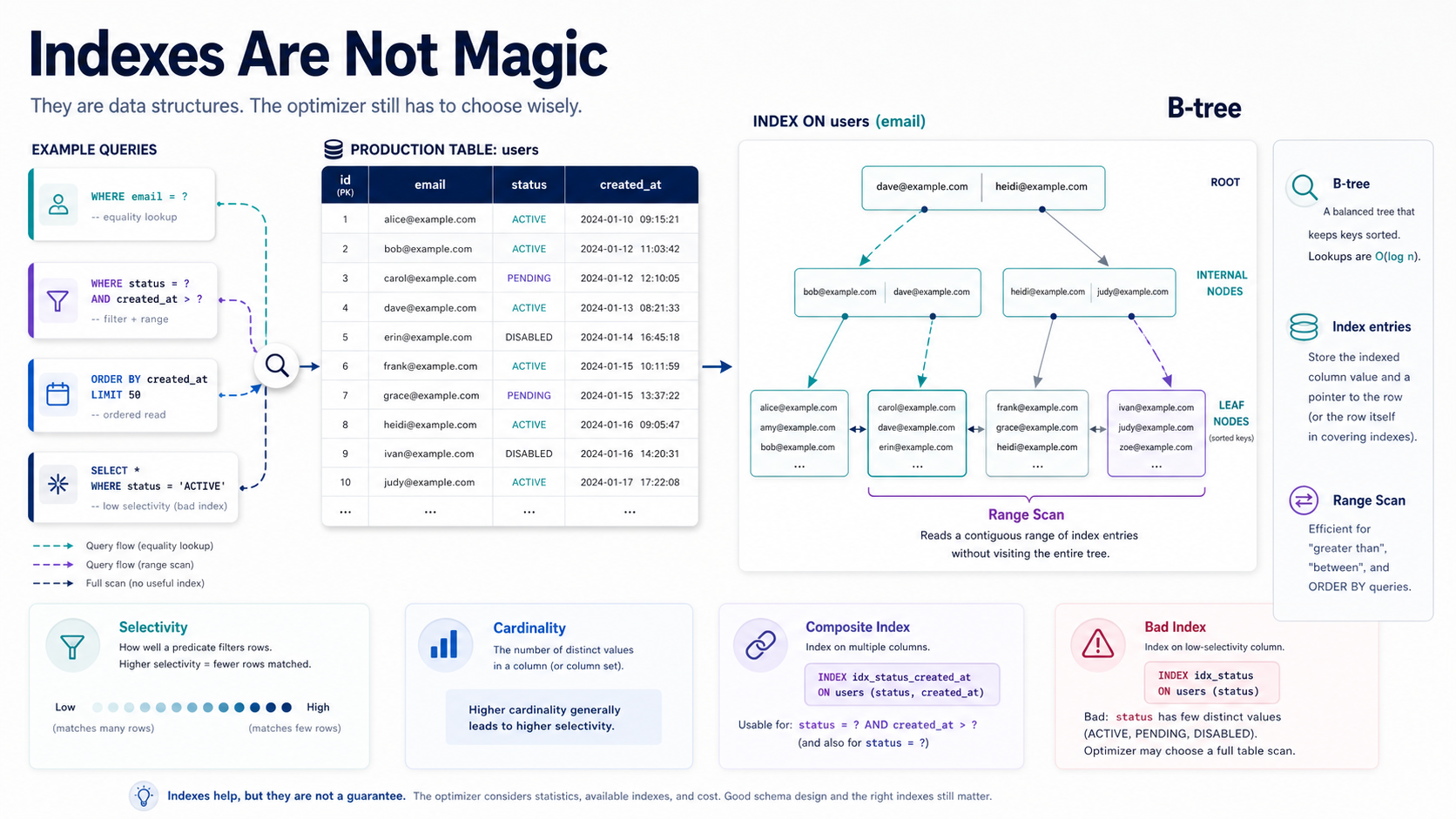
You don't need to memorize database internals to use indexes well, but the mental model helps. A B-tree keeps values sorted and balanced so the database can navigate quickly from a root node to the matching range of values.
Think of it like a very organized library shelf. You don't inspect every book. You use the labeled sections, then the shelf, then the title order.
Why Sorted Order Matters
Because B-tree indexes are ordered, they are good at:
- Exact lookups.
WHERE email = ? - Range lookups.
WHERE created_at BETWEEN ? AND ? - Prefix matching.
WHERE name LIKE 'Naz%' - Ordered reads.
ORDER BY created_at DESCwhen the index supports that access pattern.
They are usually not good at searches that destroy the left side of the value, like this:
SELECT *
FROM users
WHERE LOWER(email) = 'nazar@example.com';
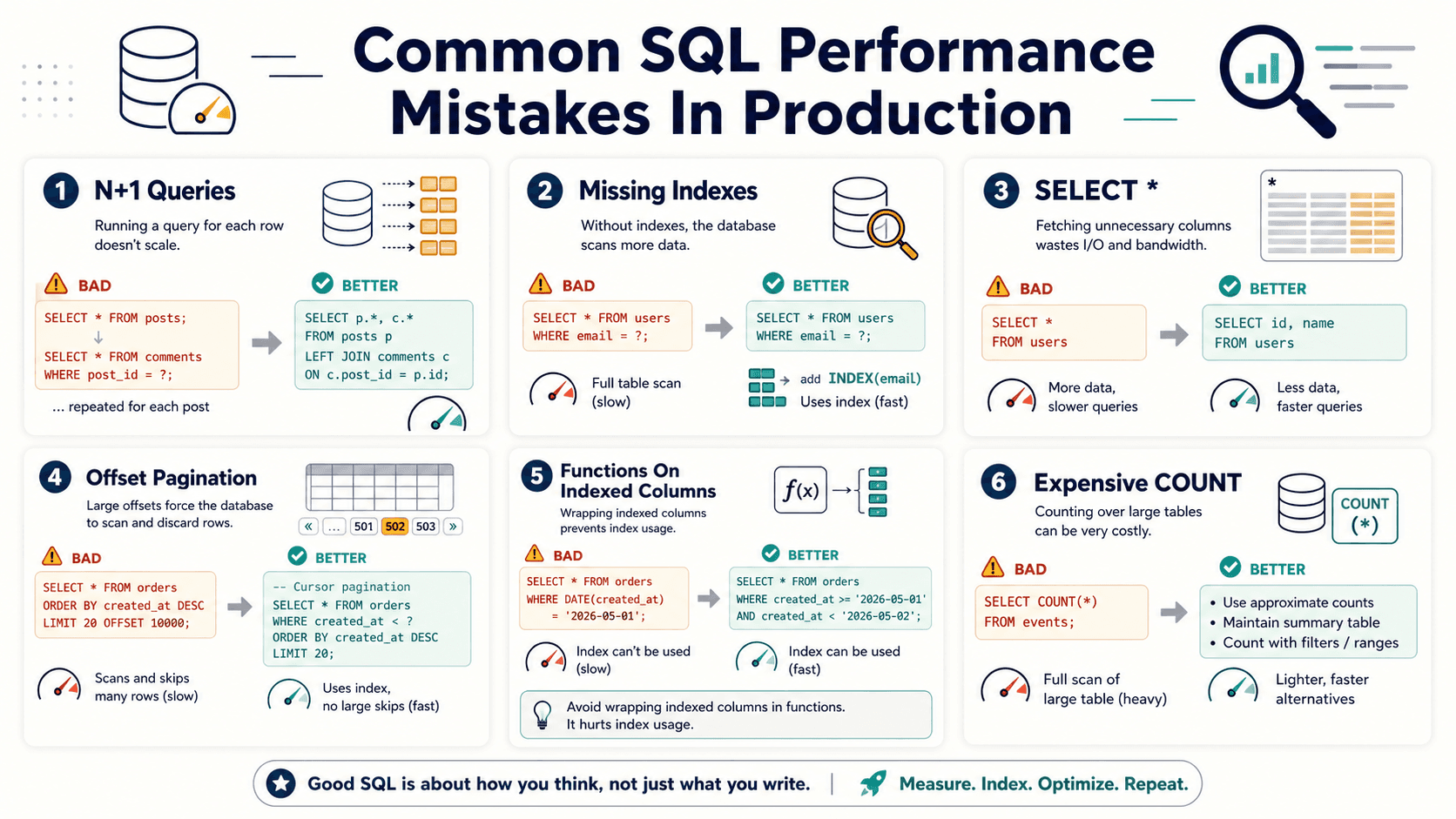
If the index is on email, the function can prevent the database from using that plain index efficiently. A better approach is often to normalize the value before storage or use an expression/function index when your database supports it.
Selectivity Decides Whether The Index Is Worth It
Selectivity means how well a column narrows down the result set.
A unique email column has high selectivity. A boolean is_active column has low selectivity. If half the table has is_active = 1, the index may not help much because the database still has to read many rows.
An index on a low-cardinality column is like a parking sign that says "cars this way" in a parking lot full of cars. Technically true. Not very helpful.
Better And Worse Index Candidates
- Good:
email. Usually unique or close to unique. - Good:
user_id. Often useful for ownership lookups and joins. - Good:
created_at. Useful for recent activity and range queries. - Maybe:
status. Useful only when distribution and query patterns make it selective enough. - Usually weak alone:
is_deleted. Low selectivity unless paired with another column.
The key phrase is "query patterns." You don't index columns because they exist. You index access paths.
Composite Indexes Depend On Column Order
A composite index includes multiple columns. This is where many developers get surprised.
The order of columns matters because the database can use the index from left to right.
Think of a phone book sorted by last name, then first name. It's great if you know the last name. It's less useful if you only know the first name.
A Useful Composite Index
Suppose your application often loads recent orders for one customer:
SELECT id, total, status, created_at
FROM orders
WHERE customer_id = 42
ORDER BY created_at DESC
LIMIT 20;
A good index might be:
CREATE INDEX idx_orders_customer_created
ON orders (customer_id, created_at DESC);
This works because the database can first narrow by customer_id, then read rows in created_at order.
A Less Useful Order
This index may be worse for the same query:
CREATE INDEX idx_orders_created_customer
ON orders (created_at DESC, customer_id);
It starts with time, not customer. That may help different queries, but it doesn't match this one as naturally.
Bad Indexes Have A Cost
Indexes speed up reads by adding extra structures. But those structures must be maintained.
Every insert, update, and delete may need to update indexes. More indexes can mean slower writes, more storage, more memory pressure, and more optimizer choices.
An index is like adding another checklist to every warehouse shipment. It helps later when you need to find the package, but someone has to fill it out every time.
Signs You May Have Bad Indexes
- Unused indexes. They consume write cost and storage without helping queries.
- Duplicate indexes. Two indexes may cover nearly the same access path.
- Low-selectivity single-column indexes. They look useful but rarely reduce work enough.
- Overlapping composite indexes. You may be maintaining more index structures than necessary.
- Indexes added without measuring. Guessing is not tuning.
The database doesn't reward index hoarding.
Use EXPLAIN Before You Guess
EXPLAIN shows how the database plans to run a query.
Different databases show different details, but the core goal is the same: understand whether the database uses an index, scans rows, sorts data, or joins tables inefficiently.
Here's the habit you want:
EXPLAIN
SELECT id, total, status
FROM orders
WHERE customer_id = 42
ORDER BY created_at DESC
LIMIT 20;
You don't tune from vibes. You tune from query plans, timings, row counts, and production-like data.
Common Index Problems
- Indexing every foreign key but ignoring real filters. Joins matter, but so do
WHEREandORDER BYpatterns. - Using functions on indexed columns. The database may not use the plain index efficiently.
- Ignoring column order in composite indexes. Left-to-right access matters.
- Indexing low-selectivity columns alone. Boolean and tiny enum columns are often weak by themselves.
- Testing on tiny local data. A query that is fine on 500 rows may crawl on 50 million.
Indexes are production tools. Test them with production-shaped data.
Pro Tips
- Start from slow queries, not table schemas. Add indexes to solve measured access problems.
- Design composite indexes around query shape. Match equality filters, ranges, and sorting deliberately.
- Watch write-heavy tables. Too many indexes can hurt ingestion and updates.
- Use covering indexes carefully. They can help, but don't turn every query into a 12-column index monster.
- Review indexes over time. Application behavior changes, and old indexes become dead weight.
Final Tips
I used to think "missing index" was the default answer to every slow query. Sometimes it is. Sometimes the real issue is query shape, bad pagination, low selectivity, or asking the database to do work in the worst possible order.
Indexes are powerful because they're specific. They help when they match how your application actually reads data.
So don't sprinkle indexes like seasoning. Read the query plan, understand the access path, and make the database skip the right work. Good luck tuning 👊