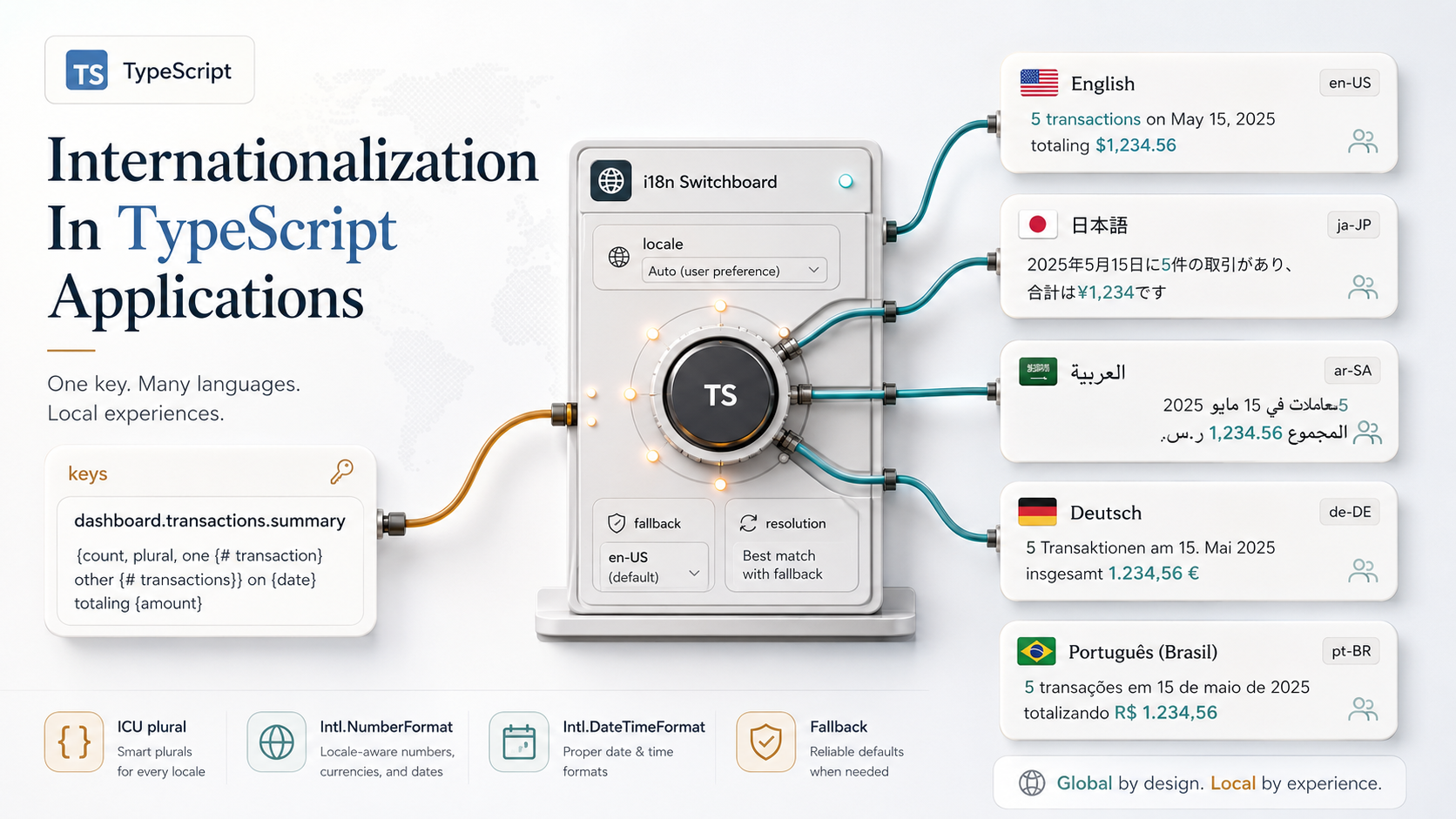
Internationalization looks like a one-week task right up until you actually try it.
You start with a tidy plan. Pull strings out of components, drop them in a JSON file, swap them at runtime. Easy.
Then a product manager asks how plurals work in Russian. Then a designer wants the date to say "yesterday at 3:42 PM" in English and "вчора о 15:42" in Ukrainian. Then a customer in Riyadh opens the app and the entire layout flips, half the strings overflow, and the "5 items left" counter reads as a riddle.
Suddenly the one-week task is six weeks, the JSON file is a graveyard of stale keys, and nobody on the team is sure which strings are actually used anywhere.
The thing about i18n is that TypeScript can carry a surprising amount of this weight. Not all of it (language is messy, and no type system fixes that), but enough that translation keys stop being free-form strings, plural rules stop being copy-pasted if (count === 1), and your formatter calls stop drifting between files.
Let's walk through how to set that up so the app stays readable and the strings stay trustworthy.
What "Internationalization" Actually Covers
Before any library choice, it helps to name the work.
There's translation: swapping one piece of text for another in the user's language. Most people start here, and most people stop here.
There's plurals and gender: the same sentence taking different shapes based on a number or a subject. English has two plural forms, Polish has four, Arabic has six. You can't fake this with if (count === 1).
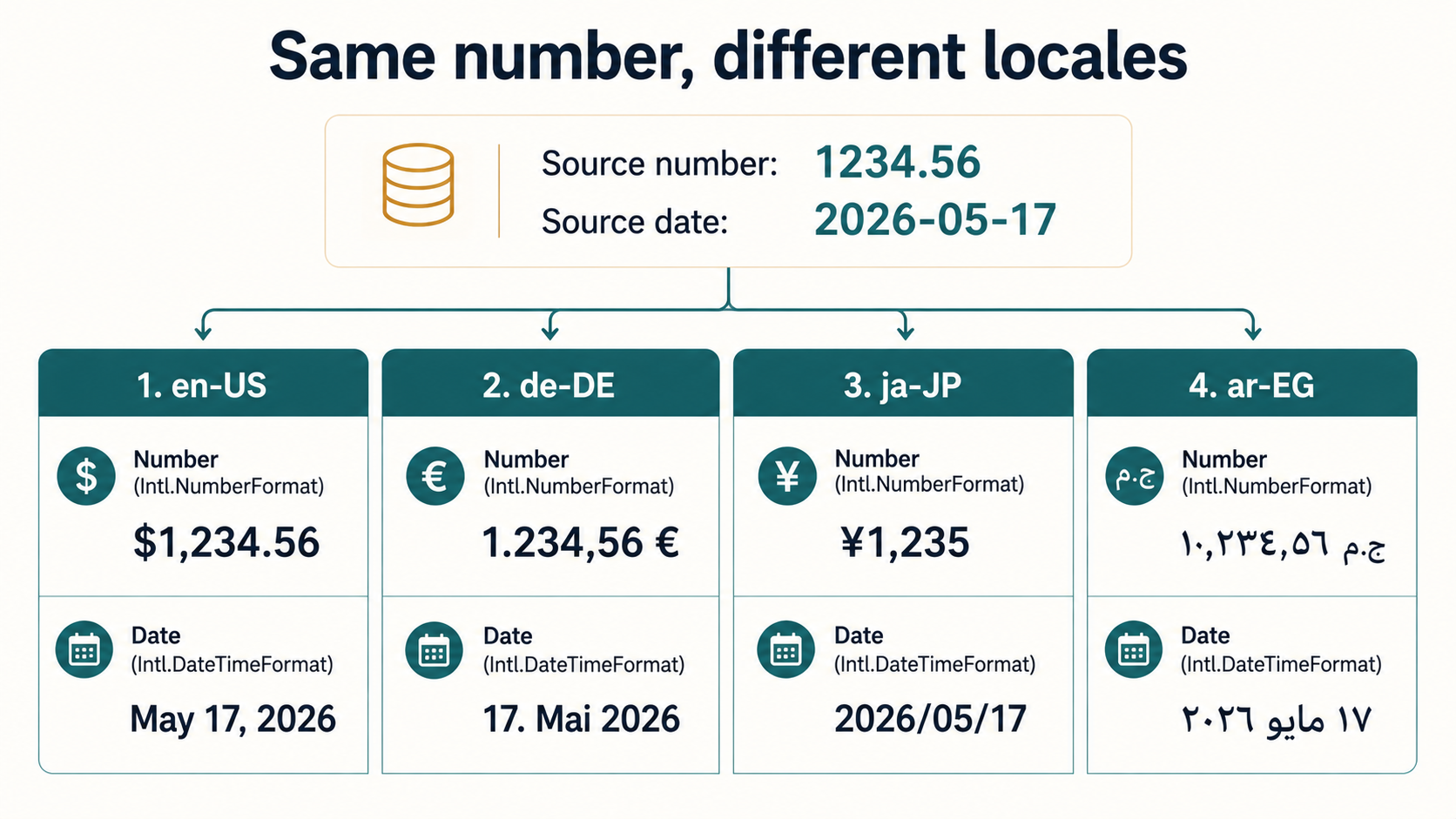
There's formatting: dates, numbers, currencies, lists, relative times. "1,234.56" in en-US, "1.234,56" in de-DE, "१,२३४.५६" in hi-IN with Devanagari digits. The browser already knows how to do this; you just have to ask.
There's layout and direction: Arabic, Hebrew, and Persian flow right-to-left. CSS handles most of it with dir="rtl" and logical properties, but every assumption you bake into the design has to survive a mirror flip.
There's locale negotiation: figuring out which language to show. Browser headers, user preference, URL prefix, cookie, fallback chain. There's no single correct answer, just trade-offs.
And there's the string lifecycle: extracting keys from code, syncing them to a translation platform, getting them back, detecting stale ones. Boring, but it's the part that decides whether the system rots after six months.
Each of these wants slightly different tools. The good news: TypeScript can hold them together.
Pick A Library, Then Bend It
The TypeScript i18n landscape settled into a handful of solid options. Three worth knowing:
i18next is the workhorse. Big ecosystem, plugins for everything, frameworks include React, Vue, Angular, Next.js. Format strings use its own syntax or ICU via a plugin. If you want maximum flexibility and you don't mind reading docs, this is the safe pick.
FormatJS (the engine behind react-intl, @formatjs/intl) is the ICU-first option. Every message is an ICU MessageFormat string, which means pluralization, gender, selection, and nested formatting are all baked into the message itself. Big in the React world.
next-intl and Lingui are the modern entrants. next-intl is purpose-built for the Next.js App Router and gets the server-component story right. Lingui leans into compile-time extraction with macros that turn JSX into message catalogs.
Whatever you pick, two things matter more than the library:
- The message format. ICU MessageFormat is the closest thing to a standard. If you can use it, use it. Translators understand it, tools support it, and it travels between libraries.
- The key strategy. Whether you use natural-English keys (
"Sign in") or namespaced keys (auth.signIn.cta) decides how messy your codebase looks in six months.
I'll show examples with both i18next and FormatJS-style messages, because the type-safety patterns translate across libraries. The point is the shape, not the import.
Translation Keys, Made Type-Safe
The default i18n setup is a t() function that takes a string. That string can be anything. Misspell it once and you ship "Sgin in" with no warning.
TypeScript can fix this if you let it own the catalog.
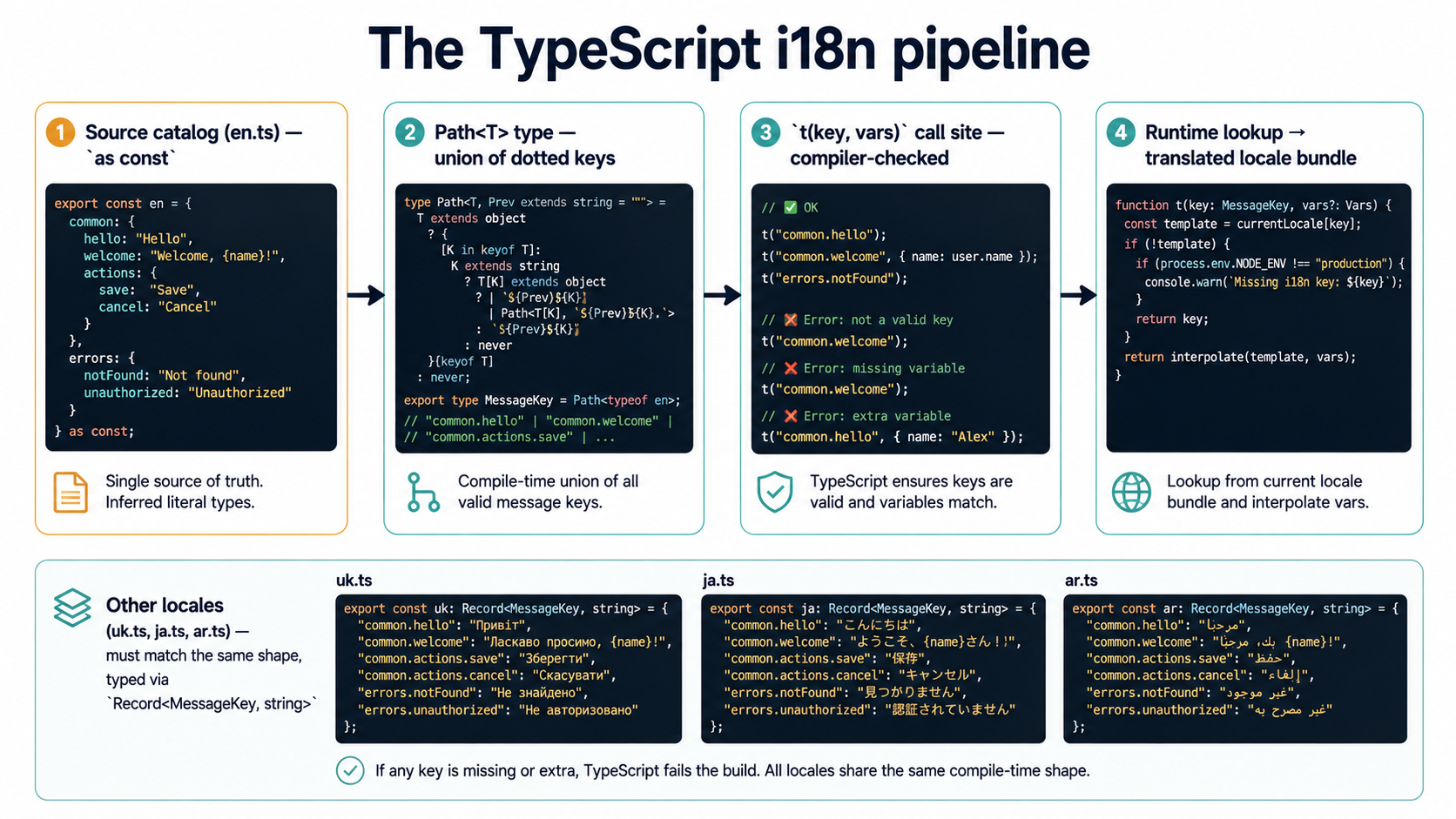
The trick is making your source-of-truth translation file the authoritative type. Start with a single resource bundle, marked as const so TypeScript reads the literal shape:
export const en = {
  auth: {
    signIn: {
      title: "Sign in",
      emailLabel: "Email address",
      submit: "Continue",
    },
    signOut: "Sign out",
  },
  inbox: {
    empty: "Nothing here yet.",
    unreadCount: "{count, plural, =0 {No new messages} one {# new message} other {# new messages}}",
  },
} as const;
The as const is doing the work. Without it, TypeScript widens every string to string and you've lost the path information. With it, the whole object becomes a readonly tree of literal types.
Now flatten that tree into a union of dotted paths:
import type { en } from "./locales/en";

type Path<T, P extends string = ""> = {
  [K in keyof T & string]: T[K] extends Record<string, unknown>
    ? Path<T[K], `${P}${P extends "" ? "" : "."}${K}`>
    : `${P}${P extends "" ? "" : "."}${K}`;
}[keyof T & string];

export type MessageKey = Path<typeof en>;
// → "auth.signIn.title" | "auth.signIn.emailLabel" | "auth.signIn.submit"
//   | "auth.signOut" | "inbox.empty" | "inbox.unreadCount"
That union is your safety net. Wire it into your t() function and the compiler becomes a spell-checker for translation keys:
import type { MessageKey } from "./types";

export function t(key: MessageKey, vars?: Record<string, unknown>): string {
  // delegate to whichever i18n runtime you're using
  return lookupAndFormat(key, vars);
}

t("auth.signIn.submit");       // ✅
t("auth.singIn.submit");       // ❌ Argument of type ... is not assignable
t("inbox.unreadCount", { count: 3 }); // ✅
Once this is in place, refactors get easier. Rename a key in en.ts, every call site that used the old name lights up red. Delete a key, every dead usage shows up immediately. There's no separate "find unused translations" script. TypeScript already knows.
A couple of warnings before you scale this up.
First, the recursive Path type can get heavy. For catalogs with thousands of keys, it slows down the compiler noticeably. If you feel the IDE lag, switch to code-generation: run a small script during build that reads en.ts and emits a flat union to types.generated.ts. Same safety, no runtime cost, no editor latency.
Second, this assumes English is canonical and other locales are translations of it. If your app is "Ukrainian-first, English second," flip the import. The shape of the source-of-truth catalog defines the available keys; other locales fill them in.
Plurals Are Not An if Statement
The first time you write "You have 1 message" / "You have N messages", the temptation is to inline it:
const text = count === 1 ? "You have 1 message" : `You have ${count} messages`;That works in English. It also works in German, French, Spanish, and a few others. It collapses the moment you hit a language with a richer plural system.
Russian, for instance, has four plural forms: one (1, 21, 31), few (2-4, 22-24), many (0, 5-20, 25-30), and other for fractional values like 1.5. Polish uses the same four, with other covering decimals there too. Arabic has six: zero, one, two, few, many, other. The categories aren't translated. They're defined by CLDR (the Unicode Common Locale Data Repository) and are part of the language itself.
The right move is to let the message format handle it. The two practical options are ICU MessageFormat and the browser's built-in Intl.PluralRules.
ICU MessageFormat looks like this:
{count, plural,
  =0 {No new messages}
  one {# new message}
  few {# new messages}
  many {# new messages}
  other {# new messages}
}
The =0 is an explicit match for zero (useful for "No items" copy that shouldn't read as "0 items"). one, few, many, other are CLDR plural categories. The # is replaced by the formatted number. The translator gets one message, fills in the forms their language actually has, and the runtime picks the right one.
Both i18next (with the ICU plugin) and FormatJS speak this format natively. The TypeScript-side call is the same: you pass the variable and trust the message:
import { useTranslations } from "next-intl";

export function InboxBadge({ count }: { count: number }) {
  const t = useTranslations("inbox");
  return <span>{t("unreadCount", { count })}</span>;
}
The component doesn't know anything about plurals. It passes a number, it gets a string. The Russian, Polish, and Arabic versions of unreadCount define their own forms in their own catalog. When you change languages, the right form appears.
If you're working in a place where ICU isn't an option (say you're stuck with a legacy bundle format), you can still get correct plurals with Intl.PluralRules:
const rules = new Intl.PluralRules("ru-RU");

const pick = (count: number, forms: Partial<Record<Intl.LDMLPluralRule, string>>) => {
  const category = rules.select(count);
  return (forms[category] ?? forms.other ?? "").replace("#", String(count));
};

pick(1,  { one: "# сообщение", few: "# сообщения", many: "# сообщений" }); // "1 сообщение"
pick(3,  { one: "# сообщение", few: "# сообщения", many: "# сообщений" }); // "3 сообщения"
pick(11, { one: "# сообщение", few: "# сообщения", many: "# сообщений" }); // "11 сообщений"
This is the engine ICU MessageFormat is built on. You're just calling it directly. The trade-off is that your catalog is no longer a flat string per key: each plural-bearing message becomes an object. That's harder for some translation tools to swallow.
A note for the over-eager: don't add plural forms your locale doesn't use. English has one and other. That's it. A Russian translator will laugh at an English message that lists all five forms "just to be safe." Match the language.
Dates, Numbers, And Money
Intl is the most underused part of the platform. Every modern browser and Node.js version ships with Intl.DateTimeFormat, Intl.NumberFormat, Intl.RelativeTimeFormat, Intl.ListFormat, and Intl.Collator. No library required.
A small helper module keeps the call sites clean:
export const formatDate = (
  date: Date | number,
  locale: string,
  options: Intl.DateTimeFormatOptions = { dateStyle: "medium" },
) => new Intl.DateTimeFormat(locale, options).format(date);

export const formatMoney = (
  amount: number,
  locale: string,
  currency: string,
) =>
  new Intl.NumberFormat(locale, {
    style: "currency",
    currency,
  }).format(amount);

export const formatRelative = (
  diffSeconds: number,
  locale: string,
) => {
  const rtf = new Intl.RelativeTimeFormat(locale, { numeric: "auto" });
  const abs = Math.abs(diffSeconds);
  if (abs < 60)    return rtf.format(Math.round(diffSeconds), "second");
  if (abs < 3600)  return rtf.format(Math.round(diffSeconds / 60), "minute");
  if (abs < 86400) return rtf.format(Math.round(diffSeconds / 3600), "hour");
  return rtf.format(Math.round(diffSeconds / 86400), "day");
};
Now the rest of the app stops touching Intl directly:
formatDate(new Date(), "en-US");
// → "May 17, 2026"

formatDate(new Date(), "uk-UA");
// → "17 трав. 2026 р."

formatDate(new Date(), "ja-JP");
// → "2026/05/17"

formatMoney(1234.5, "en-US", "USD");  // → "$1,234.50"
formatMoney(1234.5, "de-DE", "EUR");  // → "1.234,50 €"
formatMoney(1234.5, "ja-JP", "JPY");  // → "¥1,235"

formatRelative(-3600, "en-US");       // → "1 hour ago"
formatRelative(-3600, "uk-UA");       // → "1 годину тому"
A few things worth knowing.
Intl.NumberFormat for currency picks fraction digits automatically. JPY has zero fractional digits, USD has two, KWD has three. You don't have to special-case it. Pass style: "currency" and currency, and the formatter knows.
Intl.RelativeTimeFormat with numeric: "auto" returns "yesterday" instead of "1 day ago" when the locale has a special form for it. Set it to "always" if you want the numeric version consistently.
Intl.DateTimeFormat is sensitive to the order in which options are passed and to the hour12 flag. Be explicit. The default behavior changes between Node versions occasionally, and "looks fine in dev" doesn't survive a Node bump.
One thing it can't do: handle time zones the way most apps need. Intl.DateTimeFormat takes a timeZone option, but it formats display, not arithmetic. For "what is 9am tomorrow in São Paulo," you still need Temporal (when it lands) or a library like date-fns-tz or Luxon. Format and arithmetic are separate problems.
RTL Is A Whole Conversation
Right-to-left support is the one piece of i18n that lives mostly outside your TypeScript code, but it eats hours of debugging if you forget about it.
Three concrete things to do early:
Set dir on <html> based on the active locale. React frameworks usually have a helper; in plain Next.js it's a one-liner in the root layout:
const RTL_LOCALES = new Set(["ar", "he", "fa", "ur"]);

export default function RootLayout({
  children,
  params,
}: {
  children: React.ReactNode;
  params: { locale: string };
}) {
  const dir = RTL_LOCALES.has(params.locale.split("-")[0]) ? "rtl" : "ltr";
  return (
    <html lang={params.locale} dir={dir}>
      <body>{children}</body>
    </html>
  );
}
Replace directional CSS with logical properties. margin-left becomes margin-inline-start. padding-right becomes padding-inline-end. left: 0 becomes inset-inline-start: 0. The browser handles the flip automatically. Tailwind has logical-property utilities built in since v3.3, so ms-4 / me-4 / ps-4 / pe-4 flip automatically in place of ml-4 / mr-4 / pl-4 / pr-4.
Test with a long pseudo-translation. i18next-pseudo and similar tools wrap your English strings in accent marks and lengthen them by 30-40%, simulating both German and Cyrillic-length text. If your UI survives [!!!Ŝíĝń íń tô yôúř àççôúńt!!!] without overflow, you're in better shape than most apps.
Loading Strategies: Bundle Or Lazy?
Where the translations live at runtime matters more than people think.
Bundle them with the app. Simplest. Every locale ships in the JS bundle. Switching languages is instant. Bundle size grows linearly with locale count. Fine for two or three languages, painful for twenty.
Load on demand. Split each locale into its own chunk. Fetch when the user picks a language. Slightly more setup, much better for apps with many locales. Most modern setups (next-intl, react-i18next with backend plugins) handle this with a few lines of config.
Server-render the chosen locale, hydrate with that locale only. This is where the Next.js App Router shines. Server components read the locale, fetch only that bundle, render the HTML, and the client never sees the other languages. With next-intl:
import { getRequestConfig } from "next-intl/server";
import { hasLocale } from "next-intl";
import { routing } from "./routing";

export default getRequestConfig(async ({ requestLocale }) => {
  const requested = await requestLocale;
  const locale = hasLocale(routing.locales, requested)
    ? requested
    : routing.defaultLocale;

  return {
    locale,
    messages: (await import(`./locales/${locale}.json`)).default,
  };
});
The dynamic import is the bit that matters. Webpack/Turbopack picks it up and splits per locale automatically. Add a 20th language, no other code changes, the previous 19 don't get any heavier.
For larger catalogs, split by feature too. The auth flow loads auth.json. The dashboard loads dashboard.json. The settings page loads settings.json. Most users never see most strings; there's no reason to ship them.
Locale Negotiation
Picking the right locale is more annoying than it looks. The signals you have are:
- The
Accept-Languageheader from the browser. - A user preference, if they're logged in.
- A locale segment in the URL (
/en/...,/uk/...). - A cookie from a previous visit.
- Geolocation (rarely useful; users travel).
A practical priority order: explicit URL > saved user preference > cookie > Accept-Language > default. If the resolved locale isn't supported, fall back to the closest match (e.g., en-AU falls back to en; pt-BR falls back to pt or to en, depending on what you ship).
The Intl.Locale API and Intl.getCanonicalLocales help with the normalization:
const requested = ["en-US,en;q=0.9", "fr;q=0.8"]; // from Accept-Language, parsed
const supported = ["en", "uk", "ja", "ar"];

function negotiate(requested: string[], supported: string[]): string {
  for (const raw of requested) {
    const tag = new Intl.Locale(raw);
    if (supported.includes(tag.baseName)) return tag.baseName;
    if (supported.includes(tag.language)) return tag.language;
  }
  return supported[0];
}
For anything more sophisticated (Q-values from Accept-Language, region fallback chains, script-aware matching), reach for @formatjs/intl-localematcher. It implements the BCP 47 lookup algorithm so you don't have to.
Keep The Catalog Honest
A translation file rots faster than any other file in the codebase.
Strings get added in code without being committed to the catalog. Strings get removed from code but stay in the catalog. Translators sit waiting for new keys they don't know about. PMs sit waiting for translations of keys that no longer exist.
Three habits keep the system healthy.
Generate the type union at build time. Run a small script that reads en.ts (or whichever you've chosen as source) and emits types.generated.ts with the flat union of keys. Run it on prebuild and as a git hook. The compiler will catch any code that references a missing key.
Extract from source, don't write the catalog by hand. FormatJS has formatjs extract. Lingui has its macros. i18next has i18next-parser. Pick one. The point is that the catalog is derived from your code, not maintained alongside it. Manual catalogs drift.
Detect unused keys. Most extractors can also tell you which keys exist in the catalog but aren't referenced anywhere. Run that check in CI. Either delete the key or add it to an // i18n-ignore list with a comment explaining why it's kept (legal copy that's only used dynamically, for instance).
"i18n:extract": "formatjs extract 'src/**/*.{ts,tsx}' --out-file src/i18n/source.json --format simple",
"i18n:validate": "node scripts/i18n-validate.js",
"prebuild": "npm run i18n:extract && npm run i18n:validate"
What i18n-validate.js does is unglamorous: it reads the source catalog, reads each locale catalog, and reports missing keys, extra keys, and any key whose ICU template has different placeholders across locales (a translator dropping {count} is a real bug that won't show up at runtime until somebody triggers that exact message).
Testing The Untranslatable
You can't unit-test that a Japanese translator picked the right word. You can test almost everything else.
Type tests catch missing keys. tsc --noEmit in CI catches every t("typo.key") before it ships.
Snapshot tests catch unintentional copy changes. Render a screen, capture the rendered strings, alarm if they change without a corresponding catalog update.
Format tests catch broken plurals. For each plural-bearing message, render it with 0, 1, 2, 5, 11, 21 and assert the output is non-empty and contains the count. This is the catch for "the Russian translator only filled in one and other."
Visual regression catches RTL bugs. Run the test suite once with LOCALE=en-US, once with LOCALE=ar-EG, diff the screenshots. The flips that aren't supposed to flip jump out.
None of these prove translations are good. They prove translations are wired up correctly. That's all type systems can do in this corner.
The Quiet Win
The reason TypeScript i18n is worth setting up properly is that it changes who has to think about which problem.
The compiler thinks about whether keys exist. The runtime thinks about which locale to fetch. ICU thinks about plural forms. Intl thinks about how to format the date. The translator thinks about the language. The PM thinks about the feature.
When the wiring is right, nobody has to think about all of it at once. The app just speaks the user's language, in their plural rules, with their thousand separator, in the direction their script reads. And you didn't have to special-case a single locale to make it happen.
That's the bar to aim for. Not "internationalized," whatever that means. Just: the right string, in the right shape, in the right direction, every time.