You open a pull request to fix one line of business logic, and the diff shows fourteen files changed. Half of them are pure whitespace. Someone's editor re-formatted the codebase on save, somebody else's linter auto-fixed quote styles, and the actual change you wanted to review is buried somewhere in the middle.
This is what life looks like when a team can't decide whether Prettier or ESLint owns the formatting. Or worse, when they both think they do and quietly disagree.
The fix isn't to pick one and ditch the other. They're not competing tools. They do completely different jobs, and once you see where the line actually runs, the noise in your pull requests gets dramatically quieter.
They Solve Different Problems
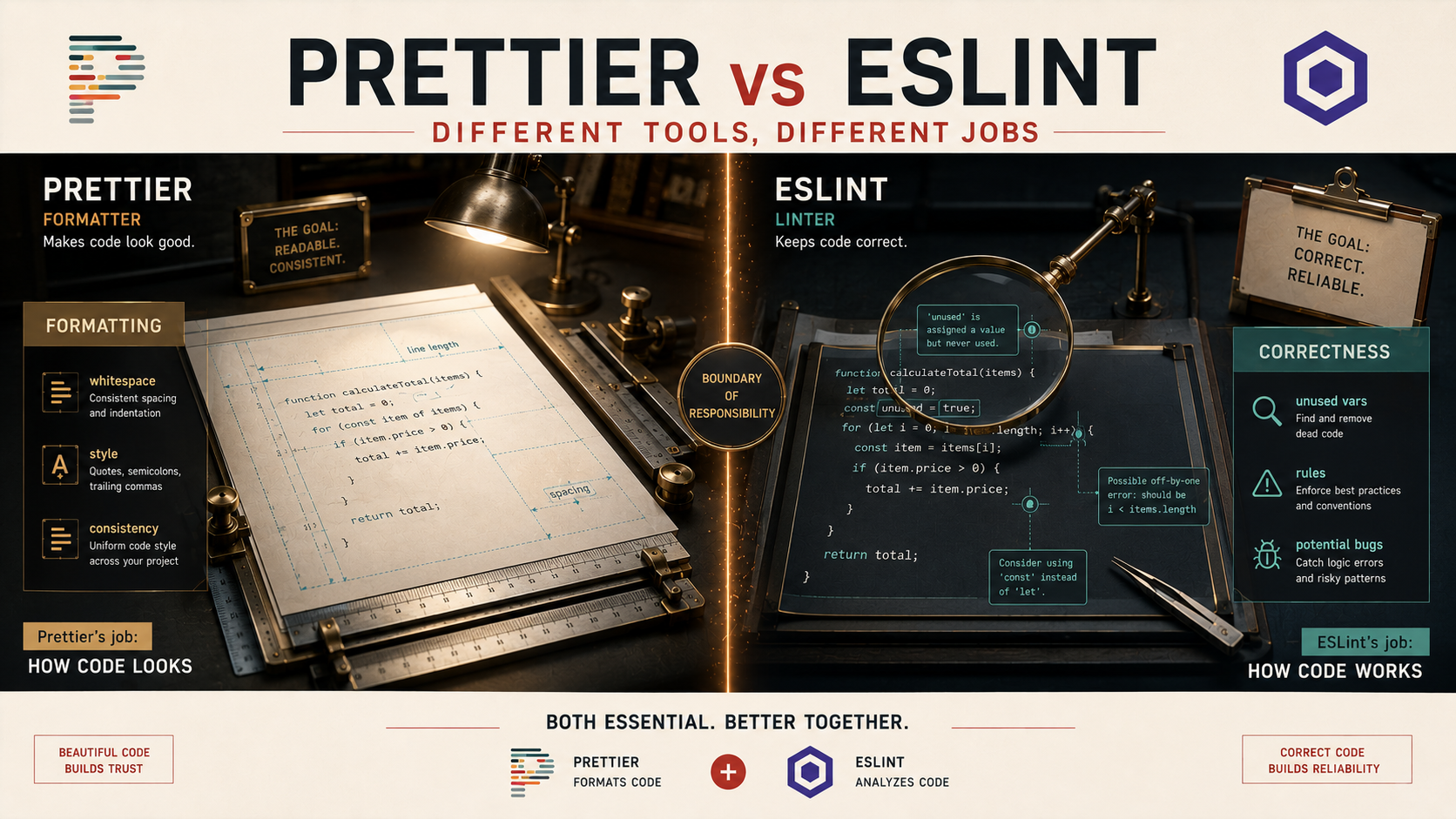
Prettier is an opinionated code formatter. You hand it a file, it rewrites the whitespace, line breaks, quote style, trailing commas, and semicolons into one consistent shape. It doesn't care whether your code works. It doesn't care whether you imported something you never used. It only cares what your code looks like.
ESLint is a static analyzer. It reads your code, builds an abstract syntax tree, and checks it against a set of rules: no-unused-vars, no-undef, eqeqeq, no-floating-promises, react-hooks/exhaustive-deps, and hundreds of others depending on which plugins you pull in. ESLint is the tool that tells you "you forgot to await this promise" or "this dependency array is missing a value." It catches real bugs.
The confusion comes from a feature both tools share: they can both auto-fix things. Run prettier --write and it reformats. Run eslint --fix and it can also reformat, at least the parts of ESLint that were historically about style. That overlap is the whole reason teams end up at war with their own tooling.
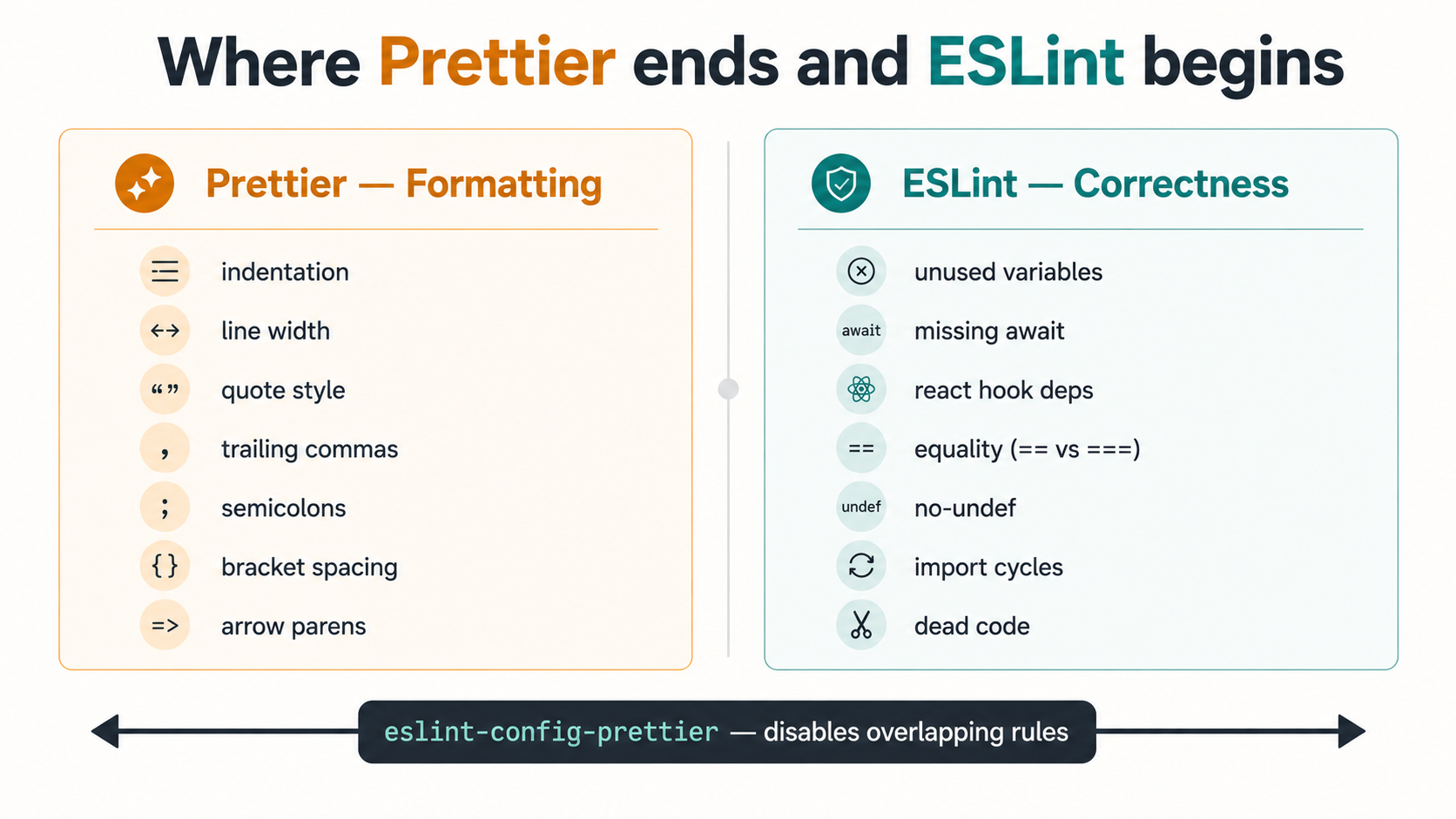
Here's the rule of thumb that keeps it simple: if a change is invisible at runtime (quote style, indentation, trailing commas, line wrapping), that's Prettier's job. If a change would alter the meaning of the program or flag a real mistake (unused variables, missing return types, accidental ==, ungrouped React hook dependencies), that's ESLint's job.
What Prettier Actually Does
Prettier reads your file, throws away your formatting, and prints it back out using its own rules. That's the whole pitch. You don't argue about tabs vs spaces, you don't argue about whether long objects should break across multiple lines. Prettier decides. The number of knobs is tiny on purpose. printWidth, tabWidth, useTabs, semi, singleQuote, trailingComma, bracketSpacing, arrowParens. That's most of it.
module.exports = {
  printWidth: 100,
  singleQuote: true,
  trailingComma: 'all',
  arrowParens: 'always',
};
Run it on a single file and the diff looks like this:
- const user={name:"jane",age:30,email:"jane@example.com",roles:["admin","editor","reader"]};
+ const user = {
+   name: 'jane',
+   age: 30,
+   email: 'jane@example.com',
+   roles: ['admin', 'editor', 'reader'],
+ };
No bugs were caught. No logic was inspected. The code does exactly the same thing it did before. It just looks the same as every other file in the project now.
That last part is the actual value. Prettier's job is to remove formatting as a topic of conversation. Once it's running, code review comments shift away from "can you put a space after the comma" and toward whether the function actually does what the ticket asks. That's the win, not the formatting itself, but the silence around it.
What ESLint Actually Does
ESLint is a different animal. It's a rules engine that walks the AST of your code and runs each rule against every node. Some rules are universal (no-undef, no-unused-vars), some come from plugins for specific frameworks (react-hooks/rules-of-hooks, @typescript-eslint/no-floating-promises, import/no-cycle), and some you write yourself.
The output is a list of problems, each with a severity, a rule name, and usually a fix suggestion.
src/api/user.ts
  12:7   error    'token' is never reassigned. Use 'const' instead    prefer-const
  18:3   warning  Missing return type on function                     @typescript-eslint/explicit-function-return-type
  23:5   error    Floating promise must be awaited                    @typescript-eslint/no-floating-promises
  31:10  error    React Hook useEffect has a missing dependency       react-hooks/exhaustive-deps
Those are not formatting issues. They're real bugs and code quality concerns. A missed await can break your error handling. A stale dependency in useEffect can cause subtle state mismatches that only show up under load. An import cycle can break tree-shaking and cause silent module loading order surprises.
You can't get that from a formatter. Prettier will happily reformat broken code into beautifully-indented broken code. ESLint is the layer that actually understands what the code means.
Why The Old "ESLint Also Formats" Story Caused So Much Pain
For years, ESLint shipped with stylistic rules: indent, quotes, semi, comma-dangle, all the things Prettier now handles. Teams adopted ESLint first (it predates Prettier), so a lot of older configs had every formatting concern wired up as ESLint rules. Then Prettier came along, did the same job better, and you suddenly had two tools fighting over the same lines.
The symptom was familiar: you'd run prettier --write, get a clean file, then run eslint --fix, and watch ESLint undo half of what Prettier just did. Or the opposite. Pre-commit hooks would loop. CI would fail on the same file two ways at once.
The ecosystem eventually drew the line. ESLint deprecated its formatting rules and moved them to a separate package (@stylistic/eslint-plugin) for teams that explicitly want lint-time style rules. The recommended split now is clear: Prettier owns formatting; ESLint owns correctness. They don't overlap, they don't fight, and the tools cooperate instead of competing.
The bridge is a small package called eslint-config-prettier. You add it to the end of your ESLint config and it turns off any remaining ESLint rules that would conflict with Prettier. Whatever stylistic rules might sneak in from a shared config, this package silences them. After that, the two tools are running in their own lanes.
A Sane Setup For A Real Project
Here's what a working configuration looks like for a TypeScript project today, using ESLint's flat config format.
import js from '@eslint/js';
import tseslint from 'typescript-eslint';
import reactHooks from 'eslint-plugin-react-hooks';
import prettier from 'eslint-config-prettier';

export default [
  js.configs.recommended,
  ...tseslint.configs.recommended,
  {
    plugins: { 'react-hooks': reactHooks },
    rules: {
      'react-hooks/rules-of-hooks': 'error',
      'react-hooks/exhaustive-deps': 'warn',
      '@typescript-eslint/no-floating-promises': 'error',
      '@typescript-eslint/no-unused-vars': ['error', { argsIgnorePattern: '^_' }],
    },
  },
  prettier, // must come last
];{
"printWidth": 100,
"singleQuote": true,
"trailingComma": "all",
"arrowParens": "always"
}{
"scripts": {
"format": "prettier --write .",
"format:check": "prettier --check .",
"lint": "eslint .",
"lint:fix": "eslint . --fix"
}
}The order in the ESLint config is the part people miss. eslint-config-prettier has to come last so its rule-disabling takes effect after every other config has loaded. If you put it in the middle, a later plugin can re-enable a stylistic rule and you're back to fighting.
The scripts are deliberately separate. npm run format is for "make this file look right." npm run lint is for "tell me if I broke anything." You run them at different times for different reasons, and they don't step on each other's toes.
Running Them Together In Pre-Commit And CI
You usually want both running before a commit, but only on the files that changed. That's what lint-staged is for.
{
  "lint-staged": {
    "*.{ts,tsx,js,jsx}": [
      "prettier --write",
      "eslint --fix"
    ],
    "*.{json,md,css}": [
      "prettier --write"
    ]
  }
}
The order matters. Prettier runs first and reshapes the whitespace. Then ESLint runs on the already-formatted file and applies any auto-fixes it can. By the time the file is committed, it's both well-formed and free of auto-fixable lint problems.
In CI you want the opposite of --write and --fix. You don't want CI rewriting people's branches. You want it to fail loudly when something slipped past the pre-commit hook.
- run: npm run format:check
- run: npm run lint
prettier --check returns a non-zero exit code if any file would be reformatted. eslint . returns non-zero if any rule fails at the error level. Together they're a small, fast safety net that catches anything a developer skipped locally.
The Team Consistency Angle
The non-obvious reason this split matters has nothing to do with code style. It's about where your team spends its energy.
When formatting is automated and uniform, code review stops being about taste. Nobody comments "can you align these arguments" because Prettier did it the same way for everyone before the file ever hit the PR. Nobody argues whether semicolons or trailing commas are "better" because the config decided once, three years ago, and nobody has cared since. Pull request conversations move up the stack. They end up being about logic, naming, error handling, and architecture. The stuff that actually matters.
Then ESLint catches the boring-but-dangerous mistakes (missed awaits, stale React hook dependencies, accidentally shadowed variables) before they reach review. The human reviewer is left with the questions a machine can't answer. Is this the right abstraction? Does this handle the failure case the ticket described? Is this test actually testing the thing?
That's the payoff. You're not running two tools because you like configuring tools. You're running them because together they take an entire category of comments off your reviewers' plate.
A Few Cases Where People Still Get Confused
A handful of edge cases trip teams up even after the split is clear.
"My team wants stricter formatting than Prettier offers." That's a fair preference, and you have two options. Either accept that Prettier is opinionated by design and the lack of knobs is the feature, or use @stylistic/eslint-plugin for the specific extra rules you care about, but be honest that you're adding a second formatting source and accept the maintenance cost. Most teams who think they need stricter formatting just need to stop arguing and let Prettier win.
"Prettier broke my file." It didn't. It moved your code around and now you can see something you missed: a logic mistake that was hidden by clever indentation, or a comment that was in the wrong place. Prettier is sometimes useful as a debugging tool just because it strips visual sleight-of-hand. The fix is to look at what changed semantically, not to disable the formatter.
"ESLint and Prettier disagree on a line." That means eslint-config-prettier isn't loaded, or it's not last in your config array. Add it and check the order. The two tools cannot disagree once that package is in place because it explicitly disables every overlapping rule.
"Should I commit the auto-fixed result?" Yes. The whole point is that the file in the repo looks the same whether you ran the formatter or your coworker did. Don't auto-fix in CI and commit on the developer's behalf, which breaks attribution and confuses everyone, but do enforce the result with a check.
Pick Tools By Their Job
Most tool wars on engineering teams come from treating two tools as competitors when they were never solving the same problem. Prettier and ESLint are the cleanest example of this. One reshapes whitespace; the other reads your code and tells you what's wrong with it. They run in series, they cooperate through one tiny bridge package, and once they're set up, you don't think about either of them again until somebody opens a new project and forgets to wire them in.
The next time a teammate says "we should just pick one," the answer is no. We should run both, and put each of them on the job it actually does.