You've shipped your app.
Or rather, you wrote a Dockerfile, opened a pull request, and a platform engineer merged something into a folder called k8s/ that nobody on your team has read end-to-end. There's a deployment.yaml, a service.yaml, an ingress.yaml, and a configmap.yaml, and you've learned the one trick of bumping the image tag to push a release. Everything else is a black box that, occasionally, breaks at 3am for reasons that involve words like evicted, CrashLoopBackOff, and 503 from the ingress.
Here's the thing - you don't need to learn Kubernetes the way an SRE does. You're not running the cluster. You're not tuning the scheduler. You're not picking between Cilium and Calico for the CNI. But you also can't keep treating those four YAML files as decoration, because the day your app misbehaves, the layer that's breaking is almost always one you could have understood in a weekend.
Kubernetes, from the application developer's seat, is a layered abstraction. Each layer solves one problem, hides some complexity, and exposes a new vocabulary. If you learn the layers in order - what each one is, what it isn't, and the one or two ways developers get it wrong - the YAML stops looking like incantation and starts looking like configuration.
Let's walk up the stack.
The mental model: it's a layer cake, not a religion
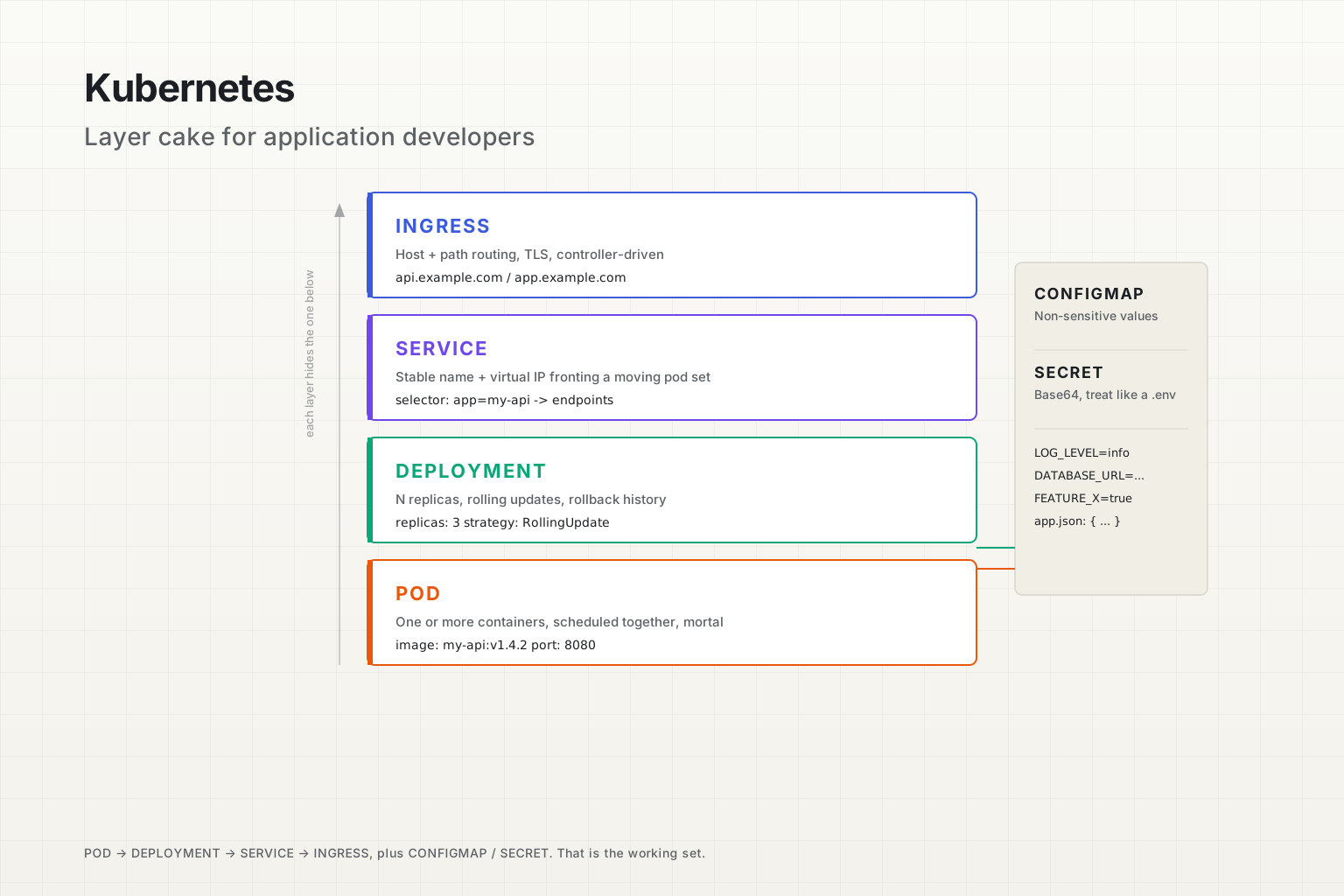
Before any YAML, the model. Kubernetes has roughly a hundred resource types. You will, as an application developer, deal with about six of them on a normal week: Pod, Deployment, Service, Ingress, ConfigMap, Secret. Maybe a Job or a CronJob. Possibly an HPA. That's it.
Each of those six exists because the one underneath it wasn't enough on its own. The order matters:
- A Pod runs your container. But pods die.
- A Deployment keeps a chosen number of pods running, and rolls them over when you change them. But pods get new IPs each time they restart.
- A Service gives a stable name and IP that fronts a moving set of pods. But services are only reachable from inside the cluster.
- An Ingress exposes services to the outside world over HTTP, with hostnames and paths. But ingress alone has no idea what to inject into your container.
- A ConfigMap and a Secret hold the values your app reads - env vars, config files, credentials - without baking them into the image.
That's the whole picture for most apps. Once you've internalised that each step solves the problem the previous step left behind, the YAML is no longer a mystery. It's a stack of small, focused decisions.
Pods: the smallest thing you actually ship
A pod is the smallest deployable unit in Kubernetes. Note the word: unit, not container. A pod is one or more containers that share a network namespace, sometimes a volume, and a lifecycle. They are scheduled together, they live and die together, and they can talk to each other over localhost.
For most application work, one pod equals one main container. You write a pod that runs your-api:v1.4.2, it listens on port 8080, and that's it. The "multi-container pod" pattern exists, but you should reach for it only when two processes need to be glued together with shared local state - a log shipper that reads files from disk, a service mesh sidecar that intercepts traffic, an init container that runs migrations before the main container starts. If you're tempted to put two unrelated services into one pod because it's convenient, don't. They'll scale together, they'll die together, and they'll fight for the same CPU.
A bare pod manifest looks like this:
apiVersion: v1
kind: Pod
metadata:
  name: my-api
  labels:
    app: my-api
spec:
  containers:
    - name: api
      image: my-api:v1.4.2
      ports:
        - containerPort: 8080
      env:
        - name: LOG_LEVEL
          value: info
You almost never write pods directly. The reason is short: pods are mortal. When a pod dies - because the node it's on rebooted, because the kubelet evicted it for memory pressure, because someone ran kubectl delete pod - nothing brings it back. It just stays dead. The pod was an instance, not a recipe.
There's also the IP address problem. Each pod gets its own cluster-internal IP, and that IP is allocated fresh every time the pod starts. The new pod with the same name and same role has a different IP than the old one. Anything that hardcoded the IP - or even just cached a DNS lookup that resolved to it - is now broken.
So we wrap pods in something that owns the lifecycle. That something is the Deployment.
What a pod's lifecycle actually looks like
The phases are short and worth memorising, because every weird pod issue you'll debug shows up as a transition between two of them:
Pending- the pod has been created in the API server, but it isn't running yet. Usually it's waiting for the scheduler to find a node with enough room, or waiting for an image to pull, or stuck on a volume that hasn't attached.Running- at least one container is up. The pod has been assigned to a node and the containers have started.Succeeded- all containers exited with code 0 and won't restart. Common for Jobs, rare for long-running apps.Failed- at least one container exited non-zero and the restart policy says "stop trying".CrashLoopBackOff- not strictly a phase, but you'll see it. The container keeps starting and crashing, and kubelet is backing off exponentially before each restart. This is almost always a config bug or a missing dependency, not a Kubernetes issue.
When something looks wrong, kubectl describe pod my-api-7c9d-abc12 is the most useful command in your toolbox. It shows the events the scheduler and kubelet attached to the pod, in order. FailedScheduling, ImagePullBackOff, Liveness probe failed - those events are the actual error message. The pod's logs are the application's error message; the pod's events are Kubernetes' error message. You want both.
Deployments: how you stop babysitting pods
A Deployment is the answer to "I want N copies of this pod, and I want them to come back if they die, and I want a controlled way to change the image without taking the service down."
You write a Deployment, and underneath it Kubernetes creates a ReplicaSet, and the ReplicaSet creates the pods. You don't need to think about the ReplicaSet most days - it's an implementation detail of how Deployments do rolling updates - but it's there in kubectl get rs and you'll see it eventually.
A deployment manifest:
apiVersion: apps/v1
kind: Deployment
metadata:
  name: my-api
  labels:
    app: my-api
spec:
  replicas: 3
  selector:
    matchLabels:
      app: my-api
  template:
    metadata:
      labels:
        app: my-api
    spec:
      containers:
        - name: api
          image: my-api:v1.4.2
          ports:
            - containerPort: 8080
          readinessProbe:
            httpGet:
              path: /healthz
              port: 8080
            initialDelaySeconds: 5
            periodSeconds: 10
          livenessProbe:
            httpGet:
              path: /healthz
              port: 8080
            initialDelaySeconds: 15
            periodSeconds: 20
A lot is happening in that file. Let's pull out the pieces that matter for an application developer.
Replicas. The number of pod instances you want running. The Deployment controller will create or delete pods until the actual count matches the desired count. Setting it to 3 doesn't mean "exactly 3 forever" - it means "the controller's job is to make it 3 whenever it isn't 3".
Selector and template labels. This is a stumbling block that confuses everyone the first time. The Deployment uses spec.selector.matchLabels to find the pods it owns, and spec.template.metadata.labels to label the pods it creates. These two must agree - if your selector says app: my-api but your template labels say app: api, the Deployment will create pods it can't see, then create more, then more, and you'll have a runaway pod factory. The kube-apiserver actually rejects most variants of this now, but the principle stands: selector → template labels, must match.
Probes. Application developers consistently get this wrong, so it's worth slowing down. Kubernetes has three probes:
- Liveness probe answers "is this container still alive enough to keep running, or should I restart it?". If it fails, the container is killed and restarted. Set this to a cheap, internal check - a process-is-up check, not a deep dependency check.
- Readiness probe answers "should this pod receive traffic right now?". If it fails, the pod is removed from the Service's endpoint list, but it isn't restarted. This is the right place to check that you've connected to the database and finished any warm-up.
- Startup probe (less commonly used) answers "has this container finished its slow start yet?". While the startup probe is running, the liveness probe is disabled. Use it when your app legitimately needs 30+ seconds to come up.
The classic bug: developers wire the liveness probe to a deep /health endpoint that pings every downstream dependency. The database has a hiccup, every pod's liveness probe fails, Kubernetes kills every pod in your Deployment, and you've turned a 30-second database blip into a full outage. Liveness probes should be lightweight and local. Readiness probes are where you check downstream health.
How a rolling update actually works
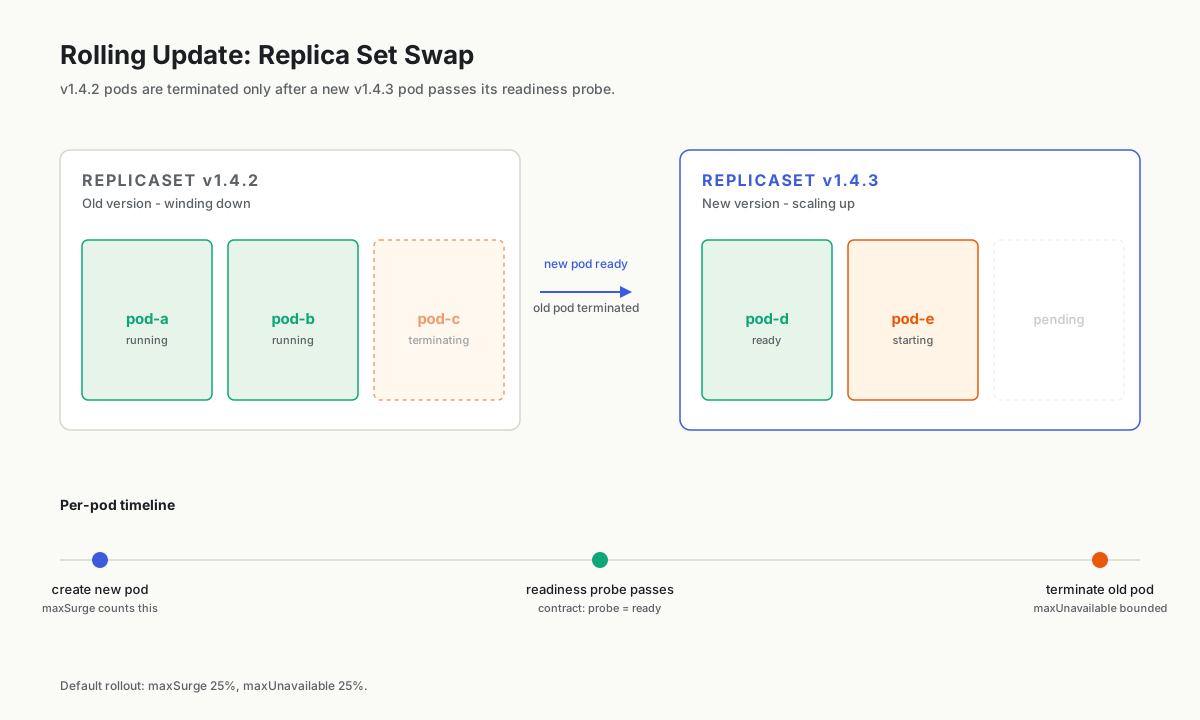
When you change the image in your Deployment - say from my-api:v1.4.2 to my-api:v1.4.3 - the Deployment doesn't replace the pods all at once. By default, it does a rolling update:
- It creates a new ReplicaSet for
v1.4.3and starts adding pods to it. - It waits for each new pod's readiness probe to pass.
- Once a new pod is ready, it terminates one old pod from the
v1.4.2ReplicaSet. - Repeat until all pods are on
v1.4.3and the old ReplicaSet is at zero.
How fast or how cautious that rollout is depends on two knobs under spec.strategy.rollingUpdate: maxSurge (how many extra pods are allowed beyond replicas during the rollout) and maxUnavailable (how many pods are allowed to be missing from the desired count at any moment). The defaults are 25% for each, which is fine for most services.
The thing to remember: readiness probes are what make rolling updates safe. If your readiness probe always returns 200 the instant the container starts, the rollout will replace pods that aren't actually ready to serve traffic yet, and the rollout will hand traffic to broken pods one at a time. The probe is the contract.
Want to see what happened during a rollout? kubectl rollout status deployment/my-api while it's running, and kubectl rollout history deployment/my-api afterwards. If a release goes bad, kubectl rollout undo deployment/my-api rolls back to the previous ReplicaSet. The information is sitting right there; most teams just never look at it until they're already on fire.
Services: the stable address problem
Pods get new IPs every time they restart. The pod you talked to yesterday is not the pod you'll talk to tomorrow, even if it has the same name and the same image. So how does another service in the cluster reliably reach your API?
A Service is the answer. It's a stable, cluster-internal name and virtual IP that fronts a dynamic set of pods, chosen by label selector.
apiVersion: v1
kind: Service
metadata:
  name: my-api
spec:
  type: ClusterIP
  selector:
    app: my-api
  ports:
    - name: http
      port: 80
      targetPort: 8080
That manifest creates a Service called my-api. Inside the cluster, any pod can reach it at http://my-api (in the same namespace) or http://my-api.production.svc.cluster.local (fully qualified). The Service forwards traffic on port 80 to port 8080 on any pod with the label app: my-api.
Note what just happened. You did not list pod IPs. You did not configure DNS by hand. You said "anything with this label", and the Service controller now watches the pod set, updates an Endpoints (or EndpointSlice) object behind the scenes, and load-balances new connections across whatever pods are currently ready. When a pod dies, it's removed. When a new one passes its readiness probe, it's added.
This is one of the genuinely good ideas in Kubernetes. The thing you talk to is the role, not the instance.
The Service types you'll actually use
There are four Service types, and they're often presented as if you need to learn all of them. You mostly don't.
- ClusterIP is the default and the one you'll use 90% of the time. The Service is only reachable from inside the cluster. Internal microservices talk to each other this way.
- NodePort exposes the Service on a static port on every node's IP. Useful for development and for cluster-internal-but-exposed-to-VPC scenarios. You probably won't use this in production for application-facing traffic.
- LoadBalancer asks your cloud provider (AWS, GCP, Azure) to provision an external load balancer that points at the Service. This is one of the older ways to expose a single service to the internet. Today it's mostly used under an ingress controller, not by application developers directly.
- ExternalName is a CNAME alias to a DNS name outside the cluster -
my-apiin-cluster resolves tolegacy-api.example.comoutside. Useful for migration phases. Rare day-to-day.
For an application developer running a microservice inside a cluster, almost everything is ClusterIP. Outside traffic enters through an ingress (next section), and the ingress routes to your ClusterIP service.
Headless services and when you actually want pod IPs
There's one Service variant worth knowing about: a headless service, created by setting clusterIP: None. Instead of giving you one virtual IP, the DNS lookup for the Service returns the IPs of all the matching pods directly. You'd use this when your app does its own client-side load balancing (gRPC clients are a common example), or when you're talking to a StatefulSet where each pod has a stable identity (a database with replicated members, a message broker).
If you're writing a normal HTTP API, ignore this. The default Service load balancing - round-robin connection distribution at the kube-proxy layer - is the right thing for almost every web workload.
Ingress: routing traffic from the world
A Service is reachable inside the cluster. Ingress is what lets the outside world hit it over HTTP, with hostnames and paths and TLS.
Here's the most important conceptual move: an Ingress resource doesn't actually serve traffic. It's a configuration object. The thing that serves traffic is an Ingress Controller - a deployment of nginx, Traefik, HAProxy, AWS ALB, or whatever your cluster operators chose - running inside the cluster, watching Ingress resources, and reconfiguring itself to match.
This trips up everyone the first time. You apply an Ingress manifest and nothing happens. Or you apply one and the controller logs a warning you didn't expect. Or you can't figure out why path-based routing isn't working. The answer is usually: there's a piece of software you didn't know about, doing exactly what you told it to do, and you need to read its docs and not the generic Kubernetes ingress docs.
That said, the Ingress resource itself is small:
apiVersion: networking.k8s.io/v1
kind: Ingress
metadata:
  name: my-api
  annotations:
    nginx.ingress.kubernetes.io/rewrite-target: /
spec:
  ingressClassName: nginx
  rules:
    - host: api.example.com
      http:
        paths:
          - path: /
            pathType: Prefix
            backend:
              service:
                name: my-api
                port:
                  number: 80
  tls:
    - hosts:
        - api.example.com
      secretName: api-example-com-tls
Three things to notice. First, ingressClassName: nginx tells Kubernetes which controller should handle this Ingress. A cluster can run multiple controllers - an internal one and an external one, for example - and the class field picks. Second, the routing rules are familiar: host, path, backend service. Third, the TLS section references a Secret by name (api-example-com-tls) that holds a certificate and key. Cert-manager is the popular component that issues and renews those secrets automatically from Let's Encrypt, but it's a separate piece of software, not a built-in.
The annotations field is also where things get controller-specific fast. The example uses nginx.ingress.kubernetes.io/rewrite-target, which only the nginx ingress controller understands. AWS ALB Ingress Controller has its own annotation namespace. Traefik has yet another. If you're copy-pasting Ingress annotations from a blog post, check that they match the controller you're actually running. This is the source of probably half of "ingress isn't working" tickets in real teams.
There's also a newer API called the Gateway API (gateway.networking.k8s.io) that's gradually replacing Ingress for advanced routing. It separates infrastructure concerns (Gateway, GatewayClass) from app routing (HTTPRoute, TCPRoute). If your platform team is moving to it, you'll write HTTPRoutes instead of Ingresses, but the mental model is the same: app developer declares routes, controller reconciles.
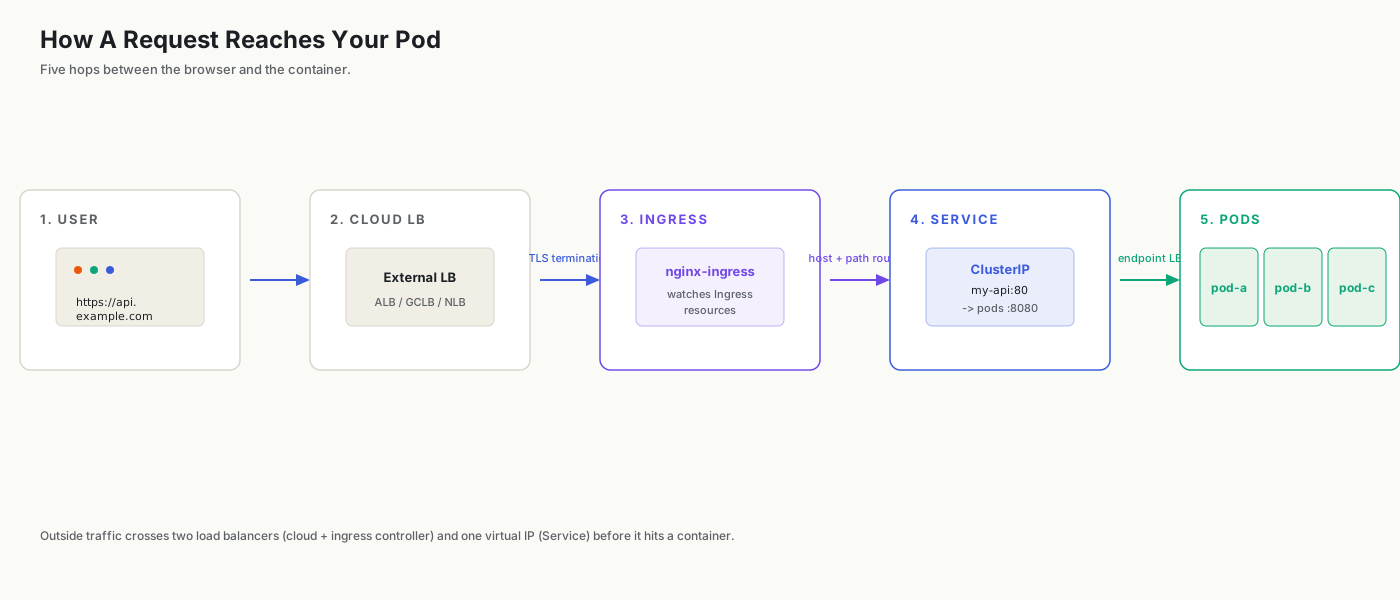
For a single API on one hostname, ingress is straightforward. The interesting cases are when one ingress fronts many services - /api goes to one Service, /auth to another, /admin to a third - and when you want canary rollouts, weight-based traffic splitting, or header-based routing. All of those are possible, but they depend on which controller you're running. The Ingress spec only covers host+path routing; everything else is annotations or, increasingly, Gateway API.
ConfigMaps and Secrets: the 12-factor part
Your app needs configuration. The database URL, the log level, a feature flag, an API key, a JSON file the app reads at boot. The Kubernetes-native way to get that into your container without baking it into the image is a ConfigMap (for non-sensitive values) or a Secret (for sensitive ones).
A ConfigMap is just a key-value store, scoped to a namespace:
apiVersion: v1
kind: ConfigMap
metadata:
  name: my-api-config
data:
  LOG_LEVEL: info
  FEATURE_NEW_CHECKOUT: "true"
  app-config.json: |
    {
      "timeout_ms": 5000,
      "retries": 3
    }
You can consume that in your pod in two ways: as environment variables, or as files mounted into the container.
spec:
  containers:
    - name: api
      image: my-api:v1.4.2
      envFrom:
        - configMapRef:
            name: my-api-config
      volumeMounts:
        - name: app-config
          mountPath: /etc/my-api
  volumes:
    - name: app-config
      configMap:
        name: my-api-config
        items:
          - key: app-config.json
            path: app-config.json
envFrom pulls every key in the ConfigMap into the container as an env var. The volume mount makes specific keys appear as files on disk - in this case, /etc/my-api/app-config.json.
The choice between env vars and mounted files isn't arbitrary:
- Env vars are static for the lifetime of the container. If you update the ConfigMap, the container's env vars don't change until the pod restarts. They're also limited in size, and they leak into anywhere your app dumps its environment (crash reports, debug logs).
- Mounted files do update at runtime when the ConfigMap changes - kubelet writes the new content to the file within a minute or so. If your app re-reads the file (or has a SIGHUP-style reload), you get hot reconfiguration without a restart.
Most teams use env vars by default and reach for mounted files when they need either large config (a full JSON or YAML) or dynamic reload. Both are fine.
Secrets are not actually encrypted
Secrets look like ConfigMaps with one difference: the values are base64-encoded in the manifest, and Kubernetes treats them as sensitive (some tooling masks them in logs, some RBAC rules are stricter). But by default, base64 is not encryption. Anyone with read access to Secrets in a namespace can decode them with one command.
There are two things you should know about this:
- By default, Secrets are stored in etcd as plain bytes. If you want encryption at rest, the cluster operator has to configure etcd with an encryption provider. Ask your platform team whether they did.
- For secrets that need to be real secrets - database passwords, API keys for production third-party services - most teams use an external secrets manager (HashiCorp Vault, AWS Secrets Manager, GCP Secret Manager) and a tool that syncs them into Kubernetes Secrets, often the External Secrets Operator. The Secret in the cluster is then a short-lived projection of the real thing.
For an application developer, the practical rule: treat a Secret like you'd treat a .env file. Don't commit it to a public repo, don't paste its decoded contents into Slack, but don't pretend it's a hardware HSM either.
The reload problem
Here's a footgun that bites teams every quarter: you update a ConfigMap, then wonder why your app didn't pick up the change.
If the ConfigMap is consumed as environment variables, nothing happens until the pods restart. Updating the ConfigMap does not trigger a rollout. You either delete the pods (and let the Deployment recreate them), or you do a noop change to the Deployment to trigger a rolling update.
If the ConfigMap is consumed as a mounted file, kubelet eventually syncs the new content into the file (usually within 60 seconds), but your application still has to re-read the file. If your code reads the config once at startup and caches it, you're not getting the new value until restart, regardless of what's on disk.
The fix is a workflow choice, not a Kubernetes feature. Either:
- Treat ConfigMap changes as deploys and roll the Deployment. (Many teams hash the ConfigMap contents and stash the hash in a Deployment annotation, so any change forces a rollout.)
- Or design the app to re-read its config on a signal or a timer, and use mounted files.
Pick one and stick to it. Mixing the two - env-var config that you expect to hot-reload - is where the bugs live.
The kubectl commands you'll actually use daily
You don't need to memorise kubectl's full surface. There are about ten commands that cover 95% of application-developer work, and most of them are some form of look at what's happening.
# Where are my pods? Which ones are ready?
kubectl get pods -l app=my-api

# Detailed status of one pod, including events
kubectl describe pod my-api-7c9d-abc12

# Tail the application logs
kubectl logs -f my-api-7c9d-abc12

# Previous container's logs (if it crashed and was restarted)
kubectl logs my-api-7c9d-abc12 --previous

# Logs across all pods of a deployment
kubectl logs -l app=my-api --tail=100 -f

# Get a shell inside a running container
kubectl exec -it my-api-7c9d-abc12 -- /bin/sh

# Forward a pod's port to your laptop for local testing
kubectl port-forward svc/my-api 8080:80

# What changed in the last few minutes in this namespace?
kubectl get events --sort-by=.lastTimestamp

# Status of a rolling update
kubectl rollout status deployment/my-api

# Roll back to the previous version
kubectl rollout undo deployment/my-api
The unsung hero on that list is kubectl get events --sort-by=.lastTimestamp. When something in the cluster is misbehaving and the pod logs aren't telling you anything, the events - scheduler decisions, kubelet actions, controller reconciliations - usually are. Read them.
One more habit worth forming: alias kubectl to k, and learn the -l flag for label selectors. k get pods -l app=my-api,env=prod is a hundred times more useful than typing pod names by hand.
The mental model, recapped
If you're going to remember one thing from this whole layer cake, remember the question each layer answers:
- Pod - "what runs?". One or more containers, scheduled together.
- Deployment - "how many, and how do they roll?". Replicas, rolling updates, rollback history.
- Service - "what's the stable address?". A name and IP that load-balances across the live pods.
- Ingress - "how does the outside world reach us?". Hostnames, paths, TLS, routed by a controller you didn't install yourself.
- ConfigMap / Secret - "what values does the app read?". Env vars or mounted files; one updates on restart, the other can update at runtime if your app cares to look.
Each layer exists because the one below it left a problem unsolved, and each layer hides its complexity behind a label selector or a name. Once you see the pattern - every Kubernetes resource is either an object that runs something, or a controller watching other objects and trying to make reality match them - the rest of the platform stops feeling like ceremony.
You won't have to know everything. You'll know enough to read your team's YAML, debug your own pod when it won't start, and ask sharper questions of the platform team when something stranger is happening. That's the whole goal. Leave the CNI plugins and the etcd tuning to the people who chose that life - and ship your app.