You've shipped a pod.
You wrote a Deployment, you set some resource numbers because the linter wouldn't shut up about it, you copied the same cpu: 100m, memory: 128Mi block you've used on every service since 2019, and it works. Until the day the pod gets evicted in the middle of the night. Or it gets OOMKilled while CPU is sitting at 12%. Or the scheduler refuses to place a new replica even though the cluster looks half-empty.
Resource requests and limits are the most copy-pasted, least-understood numbers in a Kubernetes manifest. Half the teams I've worked with treat them as decoration. The other half treat them as hard guarantees. Neither view survives contact with production.
The real story is more interesting. Requests aren't promises, they're hints to the scheduler. Limits aren't safety nets, they're enforcement mechanisms that behave completely differently for CPU than for memory. And the gap between request and limit is the whole game: it's where bin-packing efficiency lives, where noisy-neighbor problems hide, and where most surprise pod kills come from.
Let's walk through what's actually happening when you set those numbers, what the kernel and the kubelet do with them, and why the same value that's safe for CPU can get your pod killed when it's for memory.
The two numbers, and the gap between them
A container spec can carry up to four numbers, a request and a limit, each for CPU and memory:
resources:
  requests:
    cpu: "250m"
    memory: "256Mi"
  limits:
    cpu: "500m"
    memory: "512Mi"
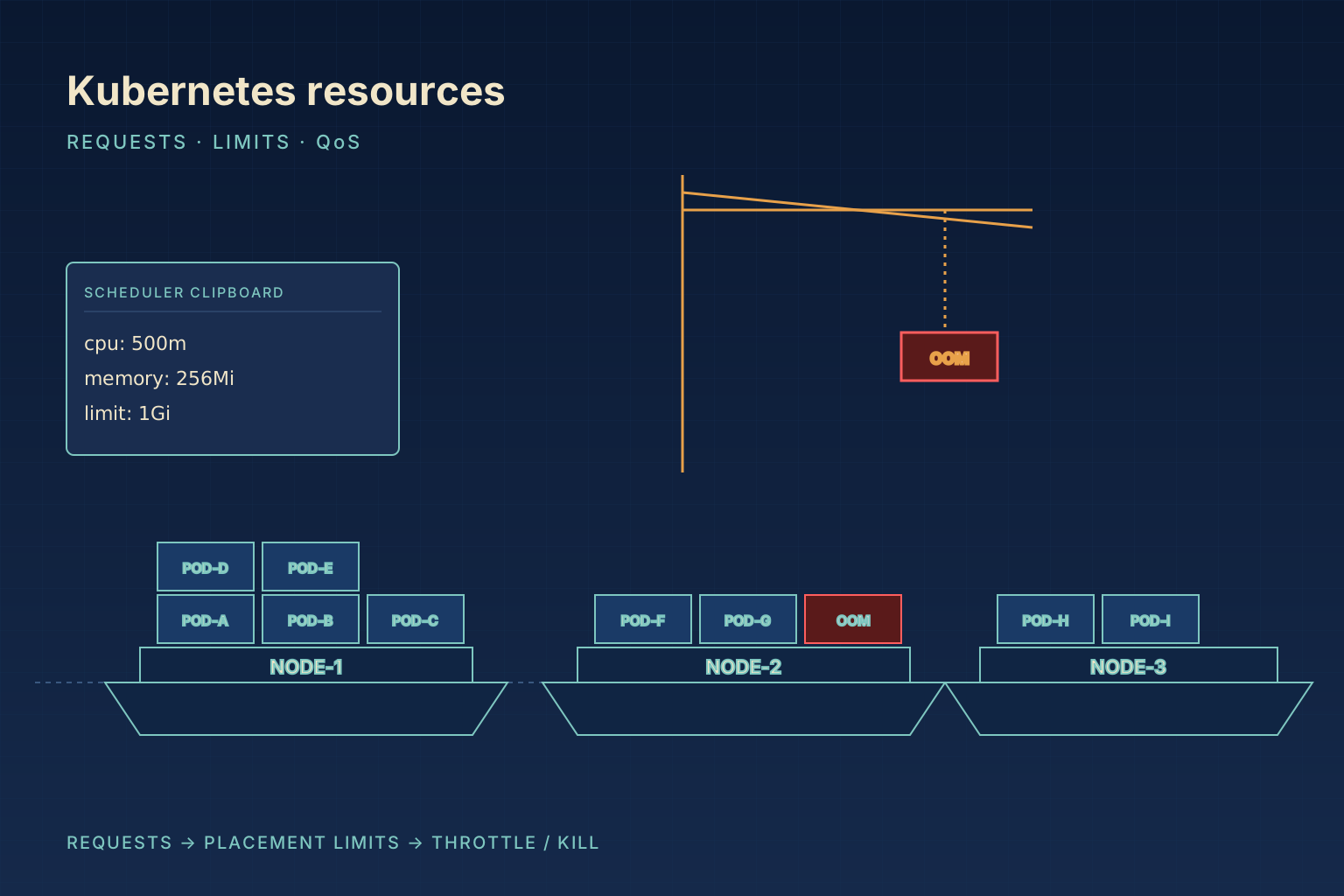
The request is what the scheduler uses to decide where this pod can run. The limit is what the kubelet and the Linux kernel use to enforce a ceiling at runtime. They serve different audiences and they get applied at different times.
When you submit a pod, the Kubernetes scheduler looks at every node and asks one question: does this node have enough unrequested capacity to fit this pod's requests? Not its actual usage. Not its limits. Its requests. If you request cpu: 250m and a node has 750m left in its requestable pool, the pod fits. The fact that the pod might actually use 50m most of the time is irrelevant at scheduling time, and so is the fact that you've set a limit of 2000m. The scheduler is doing bin-packing on request numbers, and that's it.
Once the pod is placed and starts running, the limits take over. The kubelet hands those numbers to the container runtime, which translates them into Linux cgroup settings. From that moment on, the kernel is enforcing the limit and the scheduler is no longer in the picture. The request just becomes a historical fact: it's what got the pod onto this node.
The gap between request and limit is where most of the interesting behavior lives. If request equals limit, you've told the cluster "this container needs exactly this much, no more, no less." If the limit is much larger than the request, you've said "this container usually needs this little but might burst up to this much, and please pack the node assuming the smaller number." Both are valid, both have trade-offs, and the right ratio depends entirely on what kind of workload you're running. We'll get to that.
Requests drive the scheduler, and nothing else
Here's the most common mental error: people assume requests are a reservation. They're not. They're a commitment to the scheduler that this container will probably need at least this much, used to decide placement. Once the pod is running, nothing about the request is enforced. Your container can use less than its request all day. It can also use more, sometimes a lot more, until the limit kicks in.
The scheduler maintains a running tally per node: node.allocatable - sum(requests of all pods on this node). That number is the only thing it cares about when placing your pod. If you request cpu: 100m and your container actually averages 400m, the scheduler still places new pods based on the 100m number. That can over-commit the node, which is sometimes what you want (better packing) and sometimes the source of mysterious slowdowns when everyone bursts at once.
You can see exactly what the scheduler sees:
kubectl describe node ip-10-0-1-23In the output you'll find a table that looks like this:
Allocated resources:
  Resource           Requests      Limits
  cpu                3450m (86%)   8200m (205%)
  memory             5.2Gi (65%)   12Gi (150%)
The CPU and memory percentages on the request side are what the scheduler is bin-packing against. When that number hits 100%, no new pods will be placed on this node regardless of how much actual CPU is sitting idle. The percentages on the limit side being over 100% is normal, it just means the node is over-committed and would not survive every container hitting its ceiling at once.
That's the most important thing to internalize: the scheduler is a bin-packer, not a guarantor. A node with cpu: 86% requested can still feel completely empty at the OS level. A node with cpu: 30% requested might be the slowest one in the cluster because three pods on it are constantly bursting up to their limits.
CPU and memory are not the same resource
You set them with the same syntax, side by side, so it's easy to think of them as two flavors of the same thing. They are completely different at runtime, and the difference is the single most important thing to understand about Kubernetes resource management.
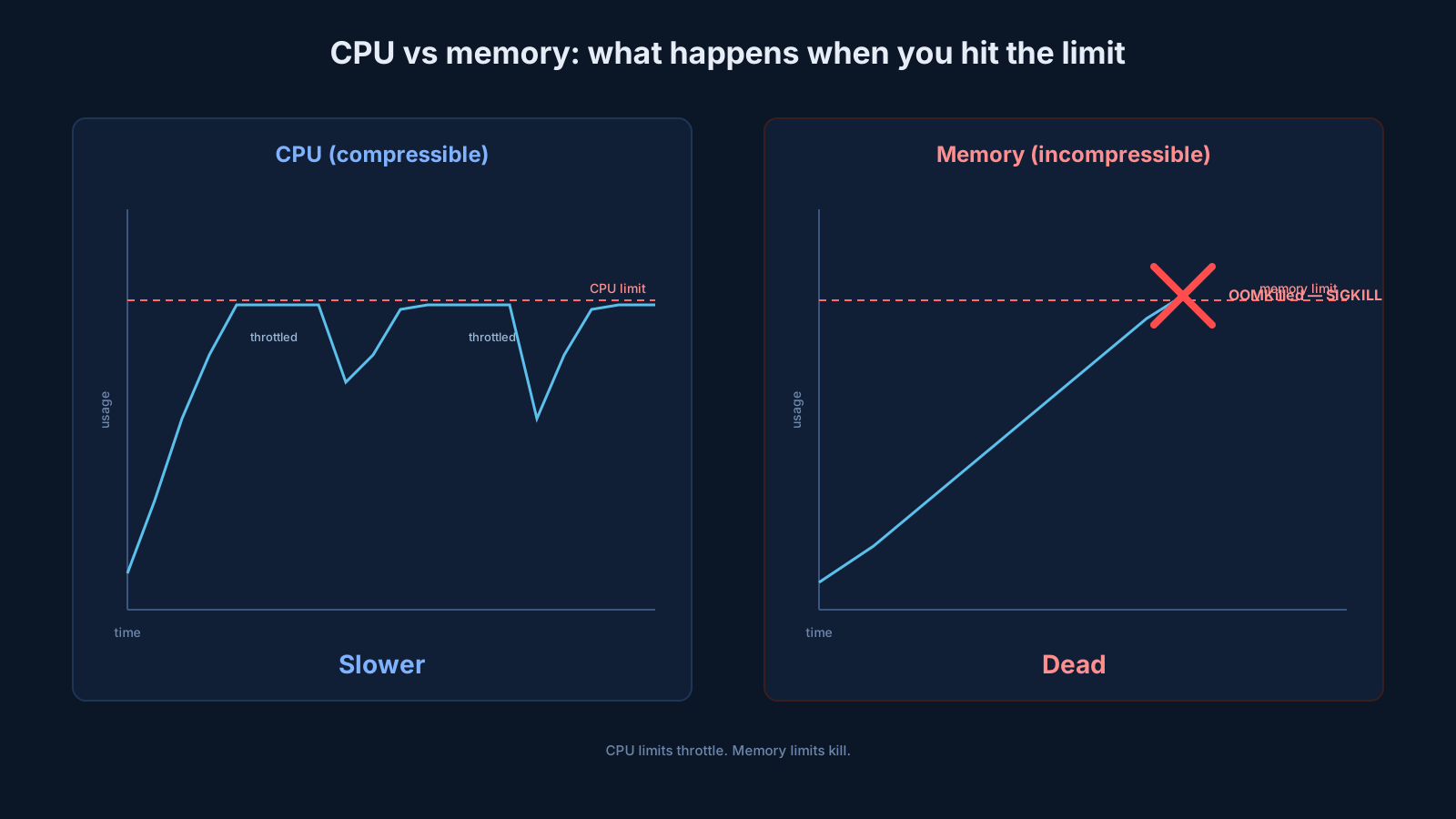
CPU is what the kernel calls a compressible resource. If you ask for more than you're allowed, the kernel makes you wait. Your process keeps running, it just runs more slowly. There's no crash, no eviction, no log line, your code just spends time in throttled state instead of executing. The CPU limit in Kubernetes is implemented with the Linux Completely Fair Scheduler's bandwidth controller (CFS quota), which gives your container a budget of CPU time per period (default: 100ms) and pauses it when the budget runs out.
Memory is incompressible. There is no "throttle" for memory, you either have the page or you don't. If your container tries to allocate beyond its limit, the kernel doesn't slow it down. It kills it. The Linux OOM killer wakes up, picks the offending process (almost always the one in your container), and sends it SIGKILL. No grace period, no chance to clean up. Your container goes into OOMKilled state and the pod restarts according to its restart policy.
This asymmetry is everything. It changes how you should think about every number you set:
- Setting CPU too low: your app gets slow. You'll see it in latency metrics, but the pod stays up.
- Setting memory too low: your app gets killed. You'll see it in
kubectl get eventsasOOMKilled, and you'll spend the morning trying to figure out which allocation pushed it over. - Setting CPU too high: you waste capacity (the scheduler reserves what you don't use) but nothing breaks.
- Setting memory too high: same waste, no breakage.
The practical takeaway is that the cost of overestimating is much lower than the cost of underestimating, and the asymmetry is much steeper for memory than for CPU. Be tight on CPU if you want, but leave headroom on memory.
How CPU throttling actually works (and why it sometimes hurts you)
CPU limits use CFS bandwidth control. Every 100ms (one CFS period), your container gets a CPU-time budget equal to its limit. A limit of cpu: 500m translates to 50ms of CPU time per 100ms period across all cores. If your container uses up that 50ms in the first 20ms of the period, say, on a multi-core machine where 5 threads each grab 10ms, the kernel pauses every thread of your container until the next 100ms tick. Then the budget refills and you can run again.
Most of the time this is invisible. Your average CPU usage is well under the limit, so you never burn the whole budget in a single period. But latency-sensitive workloads can run into a nasty corner: an app whose average CPU usage is 20% of its limit can still get throttled badly because of bursts that exceed the limit within a single 100ms window. You can be using 1/5 of your "allowed" CPU and still spending 30% of your time waiting on a throttling signal.
You can check whether this is happening to a specific pod:
kubectl exec -it my-pod -- cat /sys/fs/cgroup/cpu.statYou'll see something like:
usage_usec 4823145000
user_usec 4102345000
system_usec 720800000
nr_periods 45821
nr_throttled 1247
throttled_usec 8923000
nr_throttled is the count of CFS periods in which your container was throttled. throttled_usec is the total microseconds spent in throttled state. If nr_throttled / nr_periods is more than a couple of percent and you care about tail latency, you have a throttling problem regardless of what your CPU usage chart looks like.
The cure is usually to raise the limit (or remove it entirely for trusted workloads, more on that in a moment), not to "tune" your application. CFS throttling at the kernel level cannot be reasoned around in application code.
There's a long-running debate in the Kubernetes community about whether CPU limits should be used at all. The argument against them: they introduce throttling latency without any of the protection that memory limits give you. If your node has spare CPU, you'd usually rather let a bursty workload use it than throttle for no reason. The argument for them: without limits, a misbehaving pod can monopolize a node's CPU and starve everything else co-scheduled with it. The middle path most teams settle on is "limits on untrusted or noisy workloads, no limits on latency-sensitive ones you trust." Decide per service, not per cluster.
OOM kills, the bluntest tool in the kernel
Memory limits don't throttle. They don't degrade. They kill.
Here's what actually happens when a container exceeds its memory limit. The kernel checks memory accounting on every page allocation. When the cgroup's memory usage hits the limit, the kernel triggers the OOM killer scoped to that cgroup. The OOM killer looks at every process in the cgroup, scores each one (basically: how much memory is it using, what's its oom_score_adj), and picks one to kill. The chosen process gets SIGKILL immediately, no SIGTERM, no shutdown hooks, no buffered logs flushed. Just gone.
In your pod's events you'll see:
Last State:     Terminated
  Reason:       OOMKilled
  Exit Code:    137
  Started:      Sun, 17 May 2026 02:14:32 +0000
  Finished:     Sun, 17 May 2026 03:48:11 +0000
Exit code 137 is the universal signature of "your process got SIGKILL'd because of memory." (Specifically: 128 + signal number, where SIGKILL is 9.) Whenever you see 137, the question is not whether the kernel killed it, it did, but what pushed memory over the line.
The trap with memory limits is that the limit doesn't include just your application's heap. It includes everything your container's cgroup is charged for:
- Heap allocations in your process.
- Stack memory across all threads.
- The page cache for files your process reads (this is huge for IO-heavy workloads).
- Memory-mapped files (including shared libraries your runtime loaded).
- TCP socket buffers for active connections.
- Anonymous mmaps used by allocators like jemalloc.
That last one explains a class of "but my Go pprof says I'm using 200MB, why was I killed at 512MB" bugs. Pprof reports Go heap. The cgroup is accounting for the Go runtime's reserved-but-uncommitted memory, the goroutine stacks, the network buffers, and the page cache from any file your process touched. None of those show up in a heap dump.
For Java workloads the most common gotcha is forgetting that the JVM's -Xmx controls only the heap, not the total RSS. A JVM with -Xmx512m can comfortably use 800-900 MB of total RSS once you add metaspace, code cache, direct buffers, thread stacks, and Native Memory Tracking overhead. If your container limit is 512Mi, you'll be OOMKilled the moment any of that crosses the line, and your heap won't even be full. This is why Java Lambdas, Java on Kubernetes, and Java on any constrained container regularly need limits set 50-100% above the heap size, not equal to it.
The diagnostic flow when you see an OOMKilled event:
# 1. Confirm it was the kernel, not your app
kubectl describe pod my-pod | grep -A 3 "Last State"

# 2. Look at the kubelet logs on the node, sometimes there's more context
kubectl get events --field-selector reason=OOMKilling

# 3. If you have memory metrics in Prometheus, look at the trajectory
#    leading up to the kill, sudden spike vs gradual climb tells you
#    whether it's a leak or a single bad allocation
The fix is almost never "set the limit higher and hope." It's "find what's actually using memory, measure it under realistic load, and pick a limit that includes a reasonable buffer above peak." For long-lived services with leaks, raising the limit just delays the kill, it doesn't prevent it.
QoS classes: the schedule for who dies first
Kubernetes assigns every pod a Quality of Service class based on its requests and limits. You don't set this directly, it's derived from the numbers you write. There are three classes:
Guaranteed: every container in the pod has both CPU and memory request and limit set, and request equals limit for both. The pod is treated as the most precious thing on the node. It will be the last one evicted under memory pressure.
Burstable: at least one container has a request or limit set, but the pod doesn't qualify as Guaranteed. This is the most common class for normal application workloads. These pods can burst above their request but get killed before Guaranteed pods if the node runs out of memory.
BestEffort: no requests or limits set on any container. The pod is dessert. It gets whatever is left on the node, and it's the first to be evicted when things get tight. Use this only for genuinely interruptible work (one-off scripts, throw-away tools).
You can see a pod's class with:
kubectl get pod my-pod -o jsonpath='{.status.qosClass}'When a node is under memory pressure, actual physical memory pressure, not "this pod hit its limit" but "this whole node is running out of RAM", the kubelet starts evicting pods to reclaim memory. The eviction order goes:
- BestEffort pods first.
- Burstable pods that are using more than their request.
- Burstable pods within their request.
- Guaranteed pods last.
This is node-level eviction, distinct from the per-cgroup OOM kill we just discussed. A Guaranteed pod can still be OOMKilled if its own container exceeds its own memory limit. QoS class only protects you from being collateral damage when the kubelet has to reclaim memory from a struggling node.
The practical implication: if you care about a workload, give it explicit, realistic requests and limits. Don't leave it as BestEffort because "we don't really know how much it uses." That just means it's the first to die.
Sizing requests and limits without guessing
Most teams set resource numbers by copying them from another service or asking the team lead. That's how you end up with every service requesting 100m CPU regardless of whether it's a low-traffic admin tool or a hot data processing path. Let's talk about how to actually pick numbers.
The honest answer is: measure, don't guess. Specifically, measure under realistic production-like load, look at the distribution (not the average), and pick numbers that fit the distribution with appropriate margin.
The easiest entry point is kubectl top:
kubectl top pods --containersPOD NAME CPU(cores) MEMORY(bytes)
api-server-7d5b9c-xj2k4 api 342m 287Mi
api-server-7d5b9c-xj2k4 sidecar 18m 42Mi
worker-558c4f-w9c8z worker 1240m 612MiThat's the current snapshot. For sizing decisions you need history, not snapshots, which means metrics-server alone isn't enough. You need a Prometheus + Grafana stack, or whatever your cluster's observability tooling is, capable of plotting container_cpu_usage_seconds_total and container_memory_working_set_bytes over time.
The two numbers that matter for sizing:
- CPU: pick the request near your typical sustained usage (p50 or p75 of a typical day's traffic), and set the limit at peak burst plus a comfortable margin. The exact ratio depends on how bursty the workload is. A web API serving smooth traffic might have request = limit. A batch processor with periodic spikes might want a limit 3-4x the request.
- Memory: pick the limit at peak observed usage (under realistic load, including any cache warming) plus 25-50% buffer. Pick the request anywhere from "equal to the limit" to "near typical usage" depending on how much you care about scheduling guarantees vs bin-packing efficiency.
For workloads where you genuinely can't predict resource use ahead of time, the Vertical Pod Autoscaler (VPA) running in "recommendation mode" is a useful tool, it watches actual usage and tells you what it thinks the requests should be, without changing them automatically. You then take its recommendations as input, not gospel.
A few practical patterns worth knowing:
# Latency-sensitive web API:
# - request = limit on memory (Guaranteed for memory)
# - small request, no limit on CPU (avoid throttling)
resources:
  requests:
    cpu: "100m"
    memory: "512Mi"
  limits:
memory: "512Mi"# Bursty batch worker:
# - generous burst headroom on CPU
# - tight memory limit because we know the working set
resources:
requests:
cpu: "200m"
memory: "1Gi"
limits:
cpu: "2000m"
memory: "1Gi"# Short-lived job that runs once:
# - moderate request to make sure it gets scheduled
# - no limit because we'd rather it finish than throttle
resources:
requests:
cpu: "500m"
memory: "256Mi"There is no universal right answer. The numbers depend on your traffic, your runtime, your latency budget, and how much you trust your own observability.
Common mistakes to stop making
A handful of patterns show up over and over in clusters that hit production trouble. They're worth flagging by name.
The default-template trap. Every service in the org ships with the same requests: { cpu: 100m, memory: 128Mi } because that's what the Helm chart template has had for three years. None of them have been measured. Half of them are wildly under-requesting and getting throttled or evicted; the other half are over-requesting and wasting capacity. The fix is to measure each service and treat the template as a starting point, not a destination.
Setting request = limit on CPU when you don't need to. This is the Guaranteed-class shortcut. It works, but it pessimizes scheduling, you're telling the cluster to reserve your peak burst, not your typical usage. Unless you specifically need Guaranteed QoS (or you're hitting CPU throttling problems), it's usually better to leave CPU limits looser.
Setting only limits without requests. The Kubernetes admission flow will helpfully copy your limit value into the request slot if you only set the limit. That's how teams end up accidentally creating Guaranteed-class pods with way more reserved capacity than they meant. Always set requests explicitly.
Treating memory limits as a safety net. They're not. A memory limit doesn't catch a leak gracefully, it triggers an OOMKill. If your service has a memory leak, raising the limit just delays the kill and burns more cluster resources before it happens. Fix the leak.
Ignoring init containers. A pod's effective request is max(sum(regular container requests), max(init container requests)). A small init container with a forgotten cpu: 2 request will reserve 2 cores from the scheduler even though the regular containers only need a few hundred millicores. Check init containers when you're investigating "why does this pod take so much space."
Not setting limits on sidecars. Logging sidecars, service mesh proxies, and observability agents are sneaky. Each one is a few hundred megs and a few hundred millicores. Multiply by every pod in the cluster and you've allocated a meaningful chunk of capacity to infrastructure you barely think about. Audit sidecar resources the same way you audit application resources.
Forgetting about the requests-to-allocatable gap. A node with 8 vCPUs doesn't have cpu: 8000m allocatable. The kubelet reserves a slice for itself, system daemons reserve more, and what you actually get is closer to 7500m. Same for memory. If your sizing math assumes the node's full advertised capacity, you'll over-pack and hit eviction storms when reality doesn't match.
The mental model worth keeping
Every Kubernetes resource decision comes down to a few sentences:
The scheduler bins pods onto nodes based on requests. Requests are not enforced at runtime, they're only used for placement. Limits are enforced by the kernel: CPU limits cause throttling, memory limits cause OOM kills. CPU is forgiving, memory is brutal. QoS class determines who gets evicted when the node itself runs out of room, but it does not protect a container from its own memory limit.
Pick requests from observed typical usage. Pick CPU limits loose (or skip them) for trusted, latency-sensitive workloads. Pick memory limits tight, but with a real buffer above measured peak. Treat the template you copied from another service as a starting hypothesis, not a finished answer.
The reason most teams have flaky production behavior on Kubernetes isn't that the platform is mysterious. It's that the four numbers in resources: have been treated as boilerplate instead of as the most important decision in the manifest. Once you've internalized what each of them does, and especially how CPU and memory differ, the surprise pod kills mostly stop being surprising.