So you've shipped a new version. The pipeline goes green. The rollout starts. For the next thirty seconds your users see a smattering of 502s, a few requests that hang and then time out, and the on-call dashboard lights up with "service degraded". Then it settles. By the time anyone looks, the metrics are back to normal and the alerts have auto-resolved. You shrug. Cold starts, you say. They happen.
Then it happens on the next deploy too. And the one after. Somebody finally gets around to looking and discovers that your pods are reporting themselves "ready" the instant the container process starts - long before the app has loaded its config, connected to the database, warmed its caches, or finished compiling its JIT. Kubernetes is doing exactly what you told it to do: as soon as a pod says it's ready, the Service starts sending it traffic. The pod isn't lying - you just never gave it a way to tell the truth.
This is what readiness and liveness probes are for, and it's wild how many production clusters run with the defaults (which is: no probes at all) or with probes that are subtly worse than no probes. Let's break down what each one actually does, when each one fires, the failure modes that bite people the second they ship them, and how to configure them so deploys stop hurting.
What the Probes Actually Do
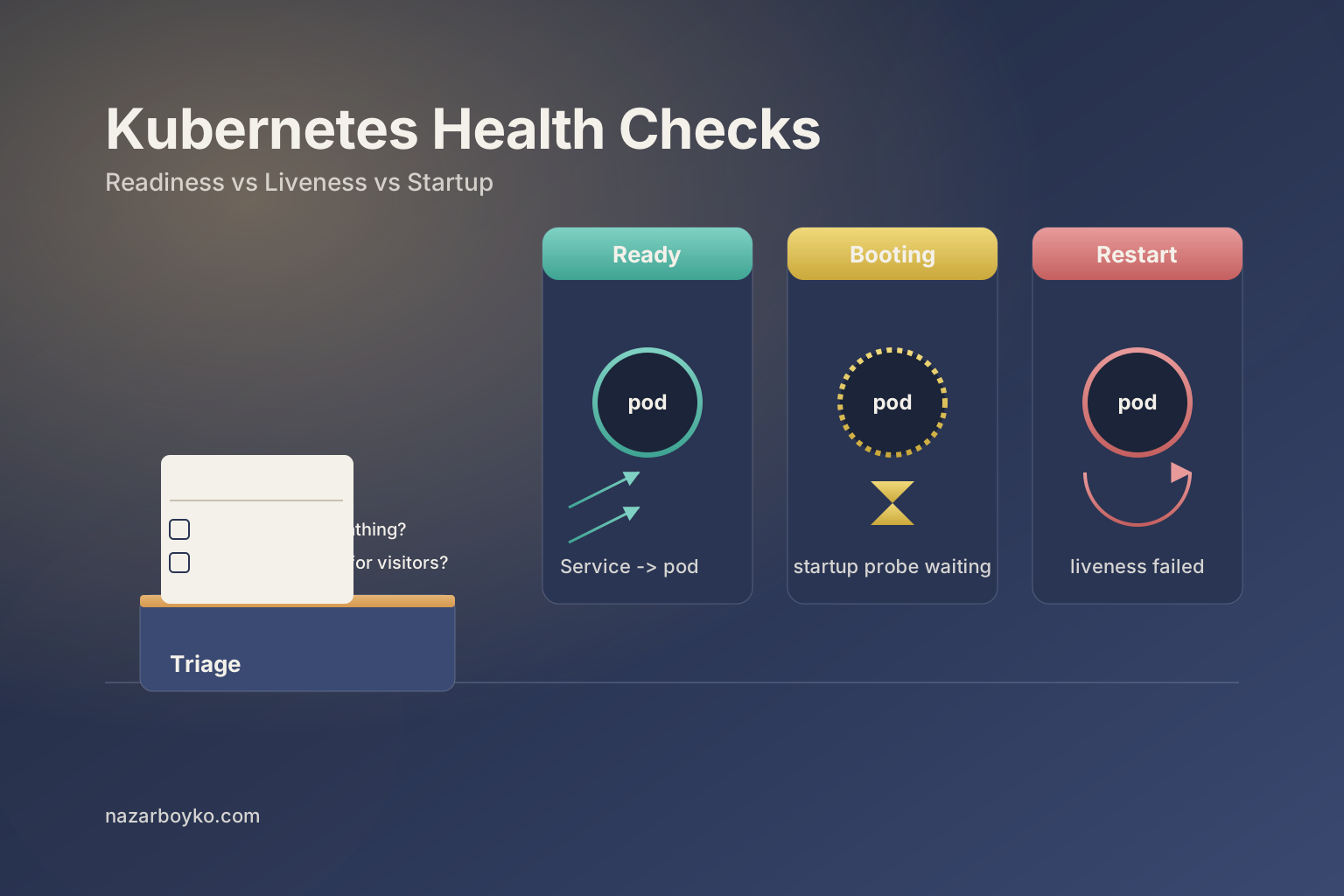
Every container in a pod can have up to three probes attached: a liveness probe, a readiness probe, and a startup probe. The kubelet - the agent that runs on every node and manages the containers on that node - runs these probes against your container on a schedule you specify, and reacts based on the result.
The reactions are different, and that's the whole point:
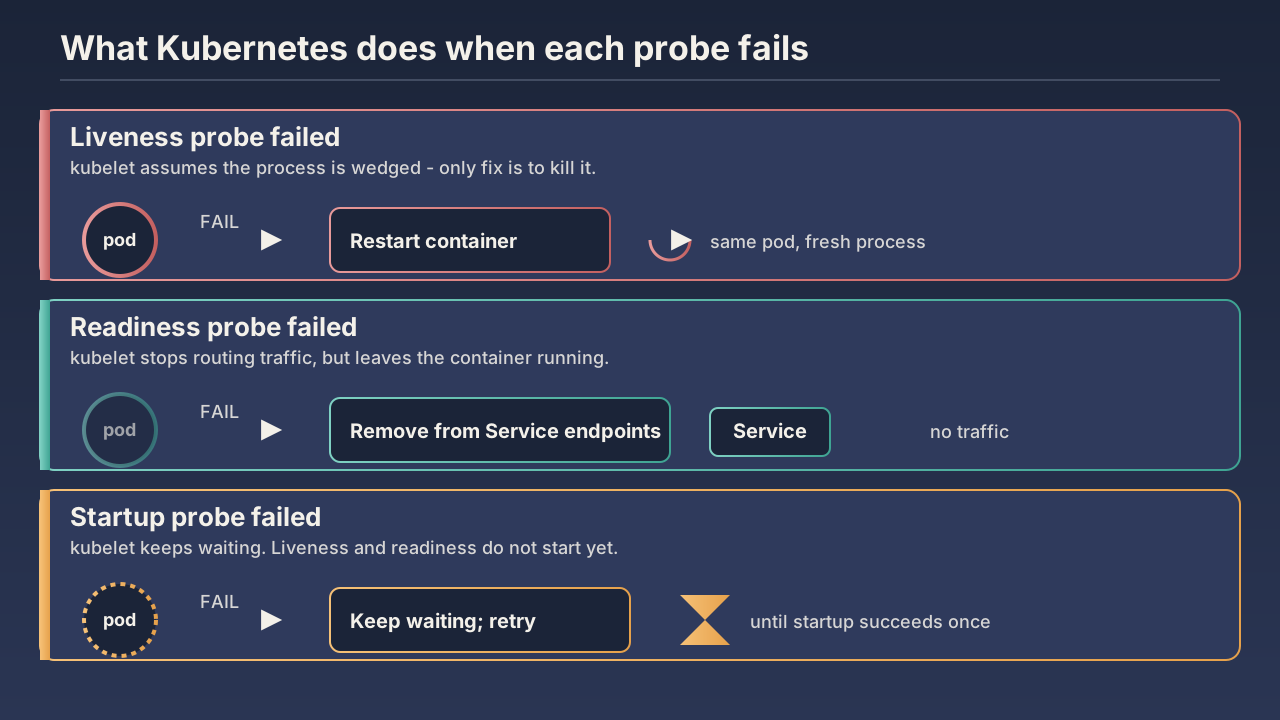
- Liveness probe fails → the kubelet restarts the container. It assumes the process is alive but wedged - deadlocked, stuck in a GC pause that never ends, hung on a syscall it can't recover from. A restart is the cure.
- Readiness probe fails → the kubelet removes the pod from the Service's endpoints. The container keeps running, untouched. It just stops receiving traffic until it reports ready again. Kubernetes assumes the app is fine but temporarily can't serve requests - maybe it's reconnecting to a downstream, maybe it's draining a backlog, maybe it just started and isn't warm yet.
- Startup probe fails → the kubelet keeps waiting. Once it succeeds (once), liveness and readiness checks begin. Until then, neither of them runs. This is the probe people forget exists, and it's the one that solves the "my Java app takes 90 seconds to boot and liveness keeps killing it" problem.
That difference in reactions is the only thing that distinguishes the probes. They use the same probe handlers, the same configuration knobs, the same syntax. What changes is what Kubernetes does when one fails.
The Wedged-vs-Busy Distinction
The simplest mental model is this: liveness asks "is this process wedged?" and readiness asks "is this process busy?".
A wedged process is a process that will not recover on its own. A deadlock between two goroutines. A JVM that's spent the last 40 seconds in a stop-the-world GC and is going to spend the next 40 there too. A worker that's caught in an infinite retry loop against a dependency that's never coming back. The only way out is to kill it and restart it. That's a liveness failure.
A busy process is a process that's behaving normally but isn't in a state to serve requests right now. It's still starting up. It's reconnecting to its database after a brief outage. It's flushing a buffer before it can accept the next batch. It's running a planned circuit-breaker after seeing too many errors downstream. Killing it would make things worse - you'd lose all the in-flight work it was about to recover. Taking it out of the load balancer until it stabilises is exactly what you want. That's a readiness failure.
If you get this distinction wrong, you get one of the two failure modes everyone eventually hits, and both of them are loud.
Failure Mode #1: The Restart Loop
Here's the recipe. Your app needs to talk to Postgres. You wire up your liveness probe to hit /health, and inside /health you run a SELECT 1 against the database. Makes sense, you think. If we can't talk to the database, we're not healthy.
Then Postgres has a 30-second blip - failover, a long-running query holding a lock, a network partition in the cloud provider's AZ. Every pod's /health endpoint starts returning 500. The kubelet sees three failures in a row from each pod's liveness probe and restarts all of them. They come back up. The database is still degraded. They restart again. And again. Now you've turned a 30-second downstream blip into a multi-minute outage of your own service, plus you've burned all your warm caches, dropped every in-flight request, and made the database situation worse because all your pods are reconnecting at once and creating a thundering herd.
The fix is to be ruthless about what the liveness probe checks. Liveness should only check things that a restart would fix. Can the process accept a TCP connection on its port? Does its main loop respond? Is its internal queue moving? If the answer is yes, the process is alive - even if downstream dependencies are sick. Downstream dependency health belongs in your readiness probe (which will take you out of the load balancer until the dependency comes back, without killing your process) or in your circuit breaker (which will fast-fail upstream callers without killing your process either).
A safe liveness handler usually looks like this:
// Liveness: are we still alive?
// Returns 200 if and only if the main loop is still ticking.
// Does NOT check the database, downstream APIs, or any external dependency.
mux.HandleFunc("/livez", func(w http.ResponseWriter, r *http.Request) {
    if time.Since(lastHeartbeat.Load().(time.Time)) > 30*time.Second {
        http.Error(w, "main loop stalled", http.StatusServiceUnavailable)
        return
    }
    w.WriteHeader(http.StatusOK)
})
The lastHeartbeat value is updated by your main worker loop on every iteration. If it stops being updated, that's what a restart will fix. Nothing else.
Failure Mode #2: The Pinned-Shut Readiness
The opposite mistake. You make your readiness probe so loose that it tells Kubernetes the pod is ready the moment the HTTP server is listening - before the app has done anything useful. The first wave of real traffic arrives, the pod tries to serve it, half the requests fail because the config isn't loaded yet or the connection pool isn't warm or the JIT hasn't done its thing.
The reverse failure is making readiness so strict it can never recover. You make /ready return 200 only when the database is reachable, the cache is reachable, three downstream APIs are reachable, and the message queue has under 100 backlog items. One of those conditions flips. The pod is marked not-ready. Traffic drains to the other pods. Now those pods have more load, and their condition flips. Now the whole service is not-ready. Now nobody is serving traffic and you have a self-inflicted total outage caused by a backlog metric flipping by one.
The rule for readiness is the inverse of the rule for liveness: readiness should reflect whether this specific pod can usefully serve a request right now, and nothing about whether the world at large is healthy. Connection pool initialised? Yes. In-process cache loaded enough to not stampede the database on every request? Yes. Currently mid-restart of a worker thread that handles half of the routes? No, return not-ready. Downstream APIs partly down? Doesn't matter for readiness - you can still respond, you'll just propagate the downstream error to your caller, and that's a job for your circuit breaker, not for the load balancer.
A safe readiness handler looks more like this:
// Readiness: should this pod receive traffic right now?
// Includes things that ARE this pod's problem.
// Does NOT include "is the rest of the system healthy".
mux.HandleFunc("/readyz", func(w http.ResponseWriter, r *http.Request) {
    if !configLoaded.Load() {
        http.Error(w, "config not loaded", http.StatusServiceUnavailable)
        return
    }
    if !poolReady.Load() {
        http.Error(w, "db pool not ready", http.StatusServiceUnavailable)
        return
    }
    if shuttingDown.Load() {
        http.Error(w, "shutting down", http.StatusServiceUnavailable)
        return
    }
    w.WriteHeader(http.StatusOK)
})
Note the shuttingDown check. When a pod gets a SIGTERM (because of a rolling deploy, a scale-down, an eviction), you want it to immediately start failing readiness so the Service stops sending it new traffic - even before the process actually exits. That's what gives you a clean drain. Without it, the load balancer keeps sending requests right up until the moment the container dies, which is exactly the source of those mystery 502s on every deploy.
The Startup Probe Is Not Optional Anymore
For most apps, initialDelaySeconds on the liveness probe is enough to handle boot. You set it to 10 seconds, your app boots in 6 seconds, and the first liveness check runs after you're already up. Fine.
But if you've ever shipped a JVM app, a .NET app with a big startup-time DI graph to resolve, a Python app loading a 2GB model into memory, or a Node service whose first request has to compile half the codebase, you know this isn't always true. Sometimes boot takes 60 seconds. Sometimes 90. Sometimes it's bimodal - usually 30 seconds, occasionally 180. And the moment your liveness probe wakes up before boot finishes, it fails, the kubelet restarts the container, and you're in a boot-restart loop that never converges.
You could solve this by setting initialDelaySeconds: 180 on the liveness probe. But now you've also told the kubelet to ignore the pod for the first 3 minutes after a real crash, which is the opposite of what you wanted.
The startup probe is the right answer. It's the probe that runs first and only once (well, until it succeeds), and the kubelet doesn't start the liveness or readiness probes until the startup probe has passed at least once. You give it a generous timeout - much more generous than the liveness probe - and it lets your app take however long it needs to boot without the liveness probe firing in the meantime.
startupProbe:
  httpGet:
    path: /healthz
    port: 8080
  failureThreshold: 30
  periodSeconds: 10
  # Tolerates a boot of up to 300 seconds (30 * 10s) before giving up.

livenessProbe:
  httpGet:
    path: /livez
    port: 8080
  periodSeconds: 10
  failureThreshold: 3
  # Once started, fail in ~30s if the main loop wedges.

readinessProbe:
  httpGet:
    path: /readyz
    port: 8080
  periodSeconds: 5
  failureThreshold: 2
That failureThreshold: 30 with periodSeconds: 10 is the trick. The startup probe will tolerate up to 5 minutes of boot before declaring failure. Once it passes once, it stops running, and your tight 30-second liveness window takes over. Slow boot is handled. Fast detection of post-boot wedge is preserved. Both wins.
The Probe Types: httpGet, tcpSocket, exec, grpc
A probe handler is what the kubelet actually executes. There are four kinds and they all attach to any of the three probes:
# HTTP GET — most common. Probe passes if it gets a 200–399 back.
livenessProbe:
  httpGet:
    path: /livez
    port: 8080
    httpHeaders:
      - name: X-Probe-Source
        value: kubelet

# TCP socket — pass if the kubelet can open a TCP connection to the port.
# Fine for "is the listener bound", useless for "is the app actually working".
livenessProbe:
  tcpSocket:
    port: 5432

# Exec — run a command inside the container. Pass if exit code is 0.
# Heaviest of the four — forks a process every probe interval.
livenessProbe:
  exec:
    command: ["/bin/sh", "-c", "pg_isready -U postgres"]

# gRPC — the kubelet calls the standard gRPC health-checking protocol.
# Requires your service to implement grpc.health.v1.Health.
# Stable since Kubernetes 1.27.
livenessProbe:
  grpc:
    port: 9000
    service: my-service
httpGet is the right choice 90% of the time for HTTP services. It's cheap, it tests the same code path that real requests use, and it gives you a useful response body in kubectl describe pod when it fails. tcpSocket looks attractive for things like databases or gRPC services but is genuinely misleading - the listener can be bound while the process is wedged behind it. exec is your fallback when you have no HTTP surface at all, but be aware that it forks a shell on every probe interval, which adds up on a node with hundreds of pods. grpc is what you want for gRPC services, and you should use it instead of exec + grpc_health_probe now that it's stable.
The Knobs That Actually Matter
Each probe has the same set of timing knobs, and the defaults are almost never what you want.
livenessProbe:
  httpGet:
    path: /livez
    port: 8080
  initialDelaySeconds: 0      # Don't use this — use startupProbe instead.
  periodSeconds: 10           # How often to probe. Default is 10.
  timeoutSeconds: 1           # How long until a probe is considered failed. Default is 1.
  successThreshold: 1         # For liveness/startup, this MUST be 1. For readiness it can be higher.
  failureThreshold: 3         # How many consecutive failures before action.
periodSeconds and failureThreshold together determine your detection latency. The defaults - every 10 seconds, three failures - mean the kubelet takes a minimum of 30 seconds to notice a problem. If your SLO is 99.9% uptime over a minute, that's a long time. If your traffic is moderate, that's probably fine. Don't crank them lower just because lower numbers feel better - every probe is a request your container has to serve, and on a busy node with hundreds of pods, the cumulative probe load adds up.
timeoutSeconds: 1 is the default, and it's a problem for any app that occasionally has a 1.2-second GC pause or a momentary latency spike. A probe that times out is treated as a probe that failed. If your readiness probe times out under load because your app is busy serving real traffic, the kubelet will pull you out of the load balancer at exactly the worst moment, which makes the remaining pods more loaded, which makes them time out too. Bump it to 3 or 5 unless you have a strong reason not to.
successThreshold for liveness and startup probes is fixed at 1 - Kubernetes will reject anything else. For readiness, you can raise it: a successThreshold: 2 means a pod has to pass two consecutive readiness checks before it's added back to the Service endpoints. This is genuinely useful for apps that flap - without it, a pod that's bouncing between ready and not-ready will get traffic on every recovery and immediately fail again.
What Probes Should Actually Check
The number-one mistake is making probes check too much. The number-two mistake is making them check too little. Here's a useful checklist of what belongs where.
In the liveness probe, check only things a restart would fix:
- The main event loop is still ticking (heartbeat counter advanced in the last N seconds).
- The HTTP server is still accepting connections (which is what a successful
httpGetalready proves). - No deadlock detected on the critical mutex (only if you actually have deadlock detection - most apps don't).
Do not, in the liveness probe, check:
- Database reachability.
- External API reachability.
- Queue or cache reachability.
- Disk space (a restart won't fix that - alert on it separately).
- Memory pressure (the OOM killer will handle this; you don't want liveness to race it).
In the readiness probe, check things that affect this pod's ability to serve right now:
- Config has finished loading.
- Connection pool to the database has at least one usable connection (not every connection - just can we get one).
- In-process cache has finished its initial warm.
- The pod is not currently in shutdown.
- Optional: critical downstream dependencies are reachable, if the pod genuinely can't serve any useful request without them.
Do not, in the readiness probe, check:
- "Is the entire system healthy" - this turns one downstream blip into a total outage.
- Whether downstream APIs return data the way you expect - that's a job for circuit breakers and integration tests, not for the load balancer.
In the startup probe, check just enough to confirm the boot is done:
- The HTTP server is listening.
- The config has loaded.
- The connection pool has finished its initial connect.
That's it. Once it passes, it stops running.
A Real-World Example: All Three Together
Here's a deployment for a Go HTTP service that talks to Postgres and a downstream payments API. Boot is normally 5 seconds, occasionally 30 if the JIT/cache warm-up takes a slow path.
apiVersion: apps/v1
kind: Deployment
metadata:
  name: orders-api
spec:
  replicas: 4
  selector:
    matchLabels:
      app: orders-api
  template:
    metadata:
      labels:
        app: orders-api
    spec:
      terminationGracePeriodSeconds: 30
      containers:
        - name: orders-api
          image: registry.example.com/orders-api:1.42.0
          ports:
            - containerPort: 8080
          startupProbe:
            httpGet:
              path: /healthz
              port: 8080
            periodSeconds: 5
            failureThreshold: 12   # tolerates 60s of boot
          livenessProbe:
            httpGet:
              path: /livez
              port: 8080
            periodSeconds: 10
            timeoutSeconds: 3
            failureThreshold: 3
          readinessProbe:
            httpGet:
              path: /readyz
              port: 8080
            periodSeconds: 5
            timeoutSeconds: 3
            failureThreshold: 2
            successThreshold: 1
          lifecycle:
            preStop:
              exec:
                command: ["/bin/sh", "-c", "sleep 5"]
Three things in there are worth pointing at separately.
terminationGracePeriodSeconds: 30 is the budget the kubelet gives the container to finish in-flight work after SIGTERM. If your app drains in 10 seconds, this is fine. If your slowest request is 25 seconds, you need a longer grace period.
The preStop hook with sleep 5 is a small but powerful trick. The order of operations on a pod shutdown is: kubelet sends SIGTERM, kubelet also updates the endpoints to remove this pod from the Service - but the endpoint update is eventually consistent, and on a busy cluster it can take a few seconds to propagate to every kube-proxy on every node. During those few seconds, the pod is SIGTERM'd but still receiving traffic. The preStop hook delays the SIGTERM by 5 seconds, giving the endpoint removal time to propagate. Combined with a shuttingDown flag in your readiness handler, this is what makes deploys actually zero-downtime instead of almost zero-downtime.
And the readiness probe runs every 5 seconds with a failureThreshold: 2, which means a pod that's struggling will be removed from the Service in about 10 seconds - fast enough to actually protect users from a sick pod, slow enough that a single timeout doesn't flap.
A Note on Probes For Things That Aren't HTTP Services
Everything above assumed an HTTP service, because that's most of what gets deployed. But the same logic applies to other workloads - you just have to think harder about what "wedged" and "busy" mean for that workload.
For a worker that pulls jobs off a queue, liveness is "did the worker pull or process a job in the last N minutes?" You can implement this by having the worker write a heartbeat file every loop iteration, and have your liveness probe exec a tiny script that checks the file's mtime:
livenessProbe:
  exec:
    command:
      - /bin/sh
      - -c
      - test $(($(date +%s) - $(stat -c %Y /tmp/heartbeat))) -lt 120
  periodSeconds: 30
  failureThreshold: 2
For a database container (which you shouldn't be running in Kubernetes if you have any choice, but people do), liveness is "is the database process accepting connections" - which is exactly what pg_isready or mysqladmin ping is for. Readiness for a primary is usually the same; readiness for a replica should include "is replication lag below some threshold so we shouldn't route reads here".
For a stateful, sharded service where one pod owns a specific shard, readiness might include "have I finished claiming my shard from the previous owner". This is the kind of thing that's load-bearing in things like Cassandra or Elasticsearch operators, and you'd be surprised how often a misconfigured probe is the root cause of "why does my cluster never come back from a rolling restart".
How to Actually Tell If Your Probes Are Working
Three things to look at, in order of usefulness.
kubectl describe pod <pod-name> shows you the events the kubelet has emitted for that pod, including every probe failure with the response code and body. This is the single most useful command for debugging probes. If your probes are failing and you don't know why, this is the first thing to look at. It will say something like "Readiness probe failed: HTTP probe failed with statuscode: 503" and include the response body.
kubectl get events --field-selector reason=Unhealthy across the namespace shows you everything that's failing probes right now. Useful when you want to know "is this just my pod or is this every pod".
Your own metrics. Every serious service should export a counter for probe requests received, broken down by probe type and result. If you suddenly see your readiness counter spiking and your error rate climbing at the same time, you have a feedback loop and the readiness probe is contributing to it. If the readiness counter is steady but the liveness counter is spiking, the kubelet is restarting your pods and you should find out why before they restart again.
The Mental Model To Walk Away With
Liveness is about the process. Readiness is about traffic. Startup is about boot.
Liveness fails → kubelet restarts the container, so only check things a restart would fix.
Readiness fails → kubelet pulls the pod from the Service endpoints, so only check things that are this specific pod's problem right now.
Startup fails → kubelet keeps waiting, so use this instead of long initialDelaySeconds to handle slow boots.
The defaults - no probes - mean Kubernetes will route traffic to your pod the instant the container starts and never restart it no matter how wedged it gets. That's almost never what you want. Even bare-minimum probes that just confirm the HTTP server is listening will catch the common "the process crashed and PID 1 is still up but doing nothing" failure modes, and a properly-tuned set of three probes will eliminate the deploy-time 502s, the cascading outage caused by a downstream blip, and the restart loops caused by a database that's having a bad day.
Most bad deployments aren't caused by bad code. They're caused by the cluster believing something about your pod that isn't true. Probes are how you keep the cluster honest.