The pitch is unbeatable.
You write a function. You upload it. AWS handles servers, scaling, patching, capacity planning, load balancing. You pay per millisecond. If nobody calls your function, you pay nothing.
That's a real value proposition. Lambda has been quietly running a huge chunk of production traffic for over a decade, and for the right workloads it genuinely is the cheapest, simplest way to ship code.
But there's a version of the pitch nobody puts on a slide: Lambda doesn't remove operational complexity, it relocates it. The servers go away. The constraints don't. They show up in new shapes: cold starts you can't fully eliminate, a 15-minute hard ceiling on every invocation, database pools that can be exhausted in a single traffic spike, and an observability story that punishes anyone who reaches for console.log the way they would in a long-running service.
This article is the honest tour of those trade-offs. Not "Lambda is bad." Lambda is great when it fits. Just the things you need to know before your first production incident, regardless of whether you're writing your handler in Node, Python, Go, Java, or .NET.
The execution model in one paragraph
Before any of the trade-offs make sense, you need the picture of what's happening when your function runs.
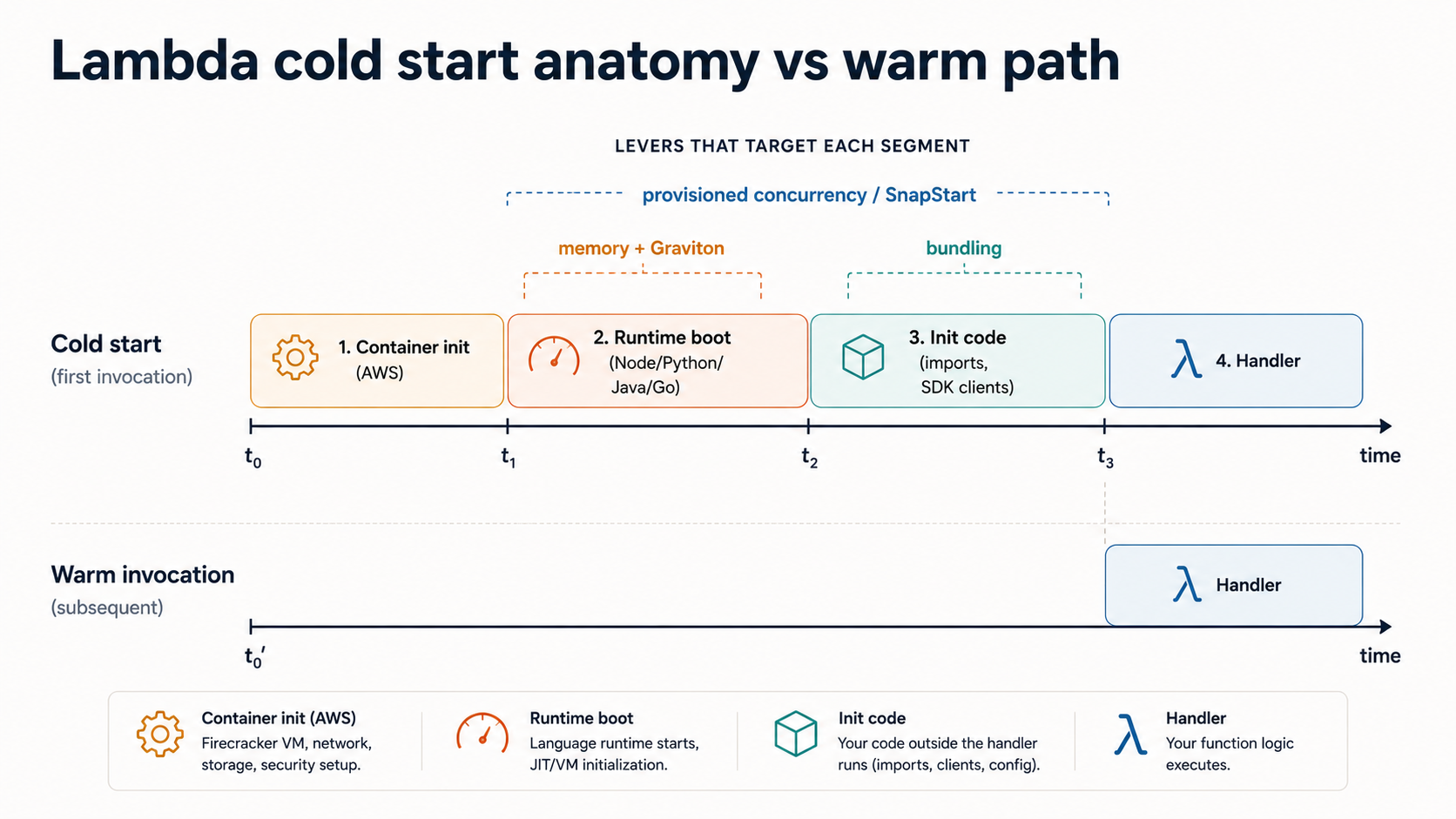
A Lambda invocation lives inside an execution environment, a short-lived sandbox AWS spins up specifically for your function. The first time a request hits a brand new environment, Lambda goes through an INIT phase: download your deployment package, start the language runtime, run your initialization code (everything above the handler function). Then it runs the INVOKE phase, your actual handler. If another request arrives while that environment is still alive, it skips INIT entirely and goes straight to INVOKE. That second-and-later case is a warm invocation. The first one is a cold start.
Each environment handles one request at a time. If 50 requests arrive concurrently, Lambda spins up 50 environments. Each one is, for the duration of that traffic, your own personal little container with its own initialization, its own connections, its own everything.
Hold that picture. Every trade-off below is a consequence of it.
Cold starts: not the boogeyman, not free either
People talk about cold starts like they're either catastrophic or solved. Both are wrong.
A cold start is the cost of the INIT phase. The breakdown roughly looks like this:
Cold start = container init + runtime boot + your init codeContainer init is AWS's piece: milliseconds, you don't control it. Runtime boot depends on the language: Node and Python start in 100-200ms, Go is similar, Java and .NET historically started much slower (often 1-3 seconds before tuning). Your init code is whatever you wrote outside the handler: imports, SDK clients, DB drivers, framework bootstrapping.
The most common mistake is assuming "cold starts are bad" without measuring which slice is actually slow for your function. A bloated Node project with hundreds of require calls will spend most of its cold start on module loading, not runtime boot. A small Python function importing boto3 and nothing else might cold-start in 250ms total.
The levers you actually have, in rough order of impact:
The first is bundling. For Node and Python, the size and shape of your code directly determines INIT time. A bundled, tree-shaken Node handler can cold start three to four times faster than the same handler with an un-pruned node_modules. Tools like esbuild for TypeScript or mangum + python -m zipapp for Python make this tractable.
The second is memory size. Lambda's CPU scales linearly with memory: a 1769 MB function gets a full vCPU, a 256 MB function gets a fraction. Bumping memory often speeds up cold starts and warm invocations enough that the per-millisecond cost goes down, not up. The official tuning tool is aws-lambda-power-tuning, and it's worth running against any latency-sensitive function.
The third is Graviton (arm64). Switching to ARM is usually ~20% cheaper and frequently faster. The catch is that any native dependency in your package has to ship an arm64 build, which has historically tripped up Python projects with C extensions. Always test before flipping the switch.
The fourth, and most aggressive, is provisioned concurrency. You tell Lambda "keep N environments warm at all times" and AWS pre-runs the INIT phase. Warm requests skip cold starts entirely. The trade-off is that you pay for those warm environments by the hour whether they handle traffic or not. Provisioned concurrency is roughly small EC2 instances with extra steps, billing-wise. Use it for known-spiky traffic patterns where the cold start is genuinely user-visible, not as a blanket fix.
The fifth, if you're on Java, Python, or .NET, is SnapStart. AWS takes a snapshot of your initialized environment and resumes it on cold start instead of running INIT from scratch. For Java functions, SnapStart can cut cold starts by 90%+. It's the single biggest improvement in years. Node.js does not currently have SnapStart. If you're writing Java Lambdas and you're not using SnapStart, you're leaving multi-second savings on the table.
Here's the thing to internalize: you cannot get cold starts to zero unless you pay for provisioned concurrency. Even SnapStart-resumed environments add some latency. If you have a synchronous user-facing endpoint with a hard p99 budget under 100ms, Lambda might be the wrong tool, or you'll be paying for provisioned concurrency anyway, at which point the math against an always-on container deserves a fresh look.
The 15-minute hard ceiling and what it really means
Every Lambda invocation has a configurable timeout. The maximum is 900 seconds, 15 minutes. You cannot raise it. There is no enterprise tier. If your function hasn't returned in 15 minutes, Lambda kills it.
That's the headline number, but the operational ceiling is often lower because of whatever sits in front of Lambda:
- API Gateway REST API: 29 second integration timeout. If your Lambda runs longer, the client gets a 504 even though Lambda happily keeps executing in the background.
- API Gateway HTTP API: 30 second integration timeout.
- Application Load Balancer: configurable up to 4000 seconds, but the default is 60. ALB-fronted Lambdas have the most generous synchronous budget.
- Function URL: 15 minutes, matching the underlying Lambda limit.
The implications stack up fast. If you've ever written a synchronous handler that calls a third-party API which occasionally takes 45 seconds, your API Gateway client sees a 504 before your Lambda even decides to time out. Worse, your function keeps running, keeps billing, and eventually completes successfully, except nobody got the answer.
The way to think about Lambda timeouts is not "long jobs are forbidden" but "long jobs must be asynchronous". A long-running job belongs on one of these patterns:
Caller → SQS queue → Lambda worker → DynamoDB result table → Caller pollsor
Caller → Step Functions state machine → multiple Lambdas chained → final stateStep Functions deserves its own paragraph. It's AWS's workflow orchestrator, and once you have anything that looks like "do A, then B, then if C try D, retry on failure", it's almost always the right tool over a giant single Lambda that tries to do everything in one invocation. Each step is a separate Lambda, each has its own 15-minute budget, and the overall workflow can run for up to a year. That ceiling is genuinely high enough that you'll never hit it.
The other trap is the timeout-vs-retry interaction. Lambdas invoked asynchronously (S3 events, EventBridge, SNS) have built-in retry behavior: typically 2 retries on failure with exponential backoff. A Lambda that times out is a failure, and the same payload gets retried. If your function is doing something non-idempotent (sending an email, charging a card, writing a row without a unique key), a single slow invocation can become a triple-charged customer. Idempotency is not optional. Either use the AWS Lambda Powertools idempotency utility (Python, Node, Java, .NET all have versions) or roll your own with a conditional write to DynamoDB.
Database connections: the spike that takes down your database
This is the trade-off that surprises people the most, and it's worth understanding precisely.
A traditional long-running backend opens a small pool of connections to your database (say, 20) and reuses them across thousands of concurrent requests. The connection pool is the abstraction that lets one process handle high concurrency without exhausting database resources.
Lambda doesn't have that abstraction. Each execution environment handles one request at a time. If your function opens a connection at module scope (the right call for warm reuse) and your traffic spikes to 500 concurrent requests, Lambda spins up 500 environments, each of which opens its own connection. Your Postgres instance, which caps out around a few hundred connections by default, is now under a denial-of-service attack from your own service.
You'll see this in the logs as FATAL: remaining connection slots are reserved or too many clients already. Your function will start failing not because the DB is slow, but because it has refused to talk to you.
There are three legitimate fixes:
RDS Proxy is AWS's purpose-built answer. It sits between Lambda and your RDS/Aurora instance, multiplexing many short-lived Lambda connections onto a small persistent pool to the actual database. It also handles credential rotation via Secrets Manager. RDS Proxy adds latency (single-digit milliseconds typically) and a per-vCPU hourly cost, but for any Lambda doing meaningful traffic against RDS it's the default.
import boto3
import psycopg2

# Connect to RDS Proxy endpoint, not the DB directly.
# Module-scope: created once per cold start, reused across warm invocations.
conn = psycopg2.connect(
    host="my-proxy.proxy-abc123.us-east-1.rds.amazonaws.com",
    user="app_user",
    dbname="app",
    sslmode="require",
)

def handler(event, context):
    with conn.cursor() as cur:
        cur.execute("SELECT id, email FROM users WHERE id = %s", (event["user_id"],))
        return cur.fetchone()
HTTP-based databases sidestep the problem entirely. Neon, PlanetScale, Supabase, Upstash, DynamoDB: they all expose HTTP-style APIs with no persistent socket. Each Lambda invocation makes a stateless HTTP request, the database handles concurrency on its end, you never think about pools. For greenfield serverless designs, this is increasingly the default.
Reserved or provisioned concurrency as a connection cap. If you can't move databases and can't justify RDS Proxy, you can set a reserved concurrency limit on the function that's lower than your DB's connection ceiling. Lambda will throttle invocations rather than spin up more environments. This is a real lever but a brittle one: you're trading errors-under-load for one specific kind of error, not actually fixing the underlying problem.
One more thing on this. Reusing a connection at module scope is the right pattern, but be careful with what "module scope" means for your runtime. In Node, top-level const db = ... survives across warm invocations. In Python the equivalent is module-level code outside the handler function. In Java, an instance field on the handler class. Get this wrong and you're opening a fresh connection per invocation, which on top of the pool exhaustion problem also adds 50-200ms to every warm request. There is no second prize for closing the connection at the end of the handler. Let it live, let it be reused.
Observability: where Lambda quietly takes the most operational tax
The pitch is that you don't need to operate anything. The reality is that you need a different operational mindset, and the tools you reach for in a long-running service either don't work or work badly.
Start with logs. By default, Lambda pipes stdout/stderr to CloudWatch Logs. That works, in the sense that something exists when you go look. It does not work in the sense that anyone wants to use it. CloudWatch Logs is fine for a handful of functions; once you have dozens, you're searching across log groups with limited query languages, paying per GB ingested, and storing logs by default forever.
A few habits make this less painful:
The first is structured logging from day one. Don't write console.log("user " + user.id + " did the thing"). Write a JSON line.
import { Logger } from '@aws-lambda-powertools/logger';

const logger = new Logger({ serviceName: 'orders-api' });

export const handler = async (event: OrderEvent) => {
  logger.appendKeys({ orderId: event.orderId, userId: event.userId });
  logger.info('Processing order');
  try {
    const result = await processOrder(event);
    logger.info('Order processed', { status: result.status });
    return result;
  } catch (err) {
    logger.error('Order failed', { err });
    throw err;
  }
};
CloudWatch Logs Insights can query JSON fields directly. Every log line is now filterable on orderId, userId, status. Without this, you're grepping unstructured text and praying.
The second is knowing about Lambda Powertools. AWS publishes a set of libraries for Python, Node, Java, and .NET that wrap structured logging, metrics, tracing, idempotency, and parameter management with sensible defaults. It is not a framework; you import the pieces you want. If you're starting a new Lambda, install Powertools before you write the handler. The patterns it pushes you toward (correlation IDs, sampled debug logs, EMF metrics, traced subsegments) are the patterns you'd eventually invent anyway. Save the time.
The third is traces, not just logs. console.log tells you what one function did. It cannot tell you that the slow request you're debugging spent 80ms in Lambda, 200ms waiting on DynamoDB, and 1.4s on a downstream HTTP call. For that you need distributed tracing. AWS X-Ray is the native option: turn it on in the function config, the Powertools tracer auto-instruments common SDKs, and you get a flame graph per request. There are also third-party options (Datadog, Honeycomb, Lumigo) that work well, often by layering an extension into the Lambda runtime. Without traces, every "Lambda is slow" investigation starts with "I have no idea where the time went."
The fourth is metrics that aren't latency. By default Lambda gives you Duration, Invocations, Errors, Throttles, ConcurrentExecutions, and a few others. The two most under-loved are IteratorAge (for stream-triggered Lambdas, tells you how stale your data is) and DeadLetterErrors (silent until something blows up). Set up alarms on these. The default Lambda dashboard will not.
The fifth, and this is the one that bites teams six months in, is the cost of CloudWatch Logs at scale. CloudWatch ingestion is around $0.50 per GB at the time of writing, and Lambda chatters a lot. Set log retention on every function (default is "Never expire", which is a bill in waiting). Consider routing high-volume logs to S3 via Firehose if you're moving real volume. Drop debug logs in production unless they're sampled. The compute bill for Lambda can be cheaper than the logging bill if you're not careful, and you won't notice until somebody flags it in the monthly review.
A few more things that surprise people
VPC Lambdas used to be slow. They aren't anymore. For years, putting a Lambda inside a VPC added 10+ seconds to cold starts because AWS attached an Elastic Network Interface (ENI) per environment. That hasn't been true since 2019. VPC networking is now Hyperplane-backed and the cold start penalty is negligible. The cost penalty is real though: VPC Lambdas typically reach out to the public internet via a NAT Gateway, and NAT Gateways are billed per GB processed plus per hour. A chatty Lambda making lots of outbound calls through a NAT can quietly become more expensive than the Lambda itself.
Lambda is not zero-cost when idle, exactly. Yes, you pay nothing for invocations you don't make. But provisioned concurrency, reserved concurrency above the account default, RDS Proxy, NAT Gateway, and CloudWatch Logs storage all bill 24/7 regardless of whether your function ran today. "Pay nothing when idle" is a property of the compute, not of the architecture.
The 6 MB request/response limit is real. Synchronous invocations cap payloads at 6 MB; asynchronous invocations cap at 1 MB (raised from 256 KB in late 2025). Returning a large response from a Lambda (generated PDF, big query result, image) silently fails at that boundary. The right pattern is to write to S3 and return a presigned URL.
Cold starts only happen on environment creation, not on every invocation. This trips up people testing locally: they invoke their function repeatedly and see warm latency every time, then deploy and get paged because production has spiky traffic that constantly creates new environments. A small load test that ramps concurrent invocations is the only way to see real cold-start behavior.
When Lambda is the right answer
Lambda shines when:
- Traffic is spiky or unpredictable. Webhook receivers, scheduled jobs, occasional batch processors, anything where idle time dominates active time.
- The workload is event-driven. S3 uploads, SQS messages, DynamoDB streams, EventBridge events: Lambda integrates cleanly with the rest of AWS, and the alternative would be a poller you'd have to write yourself.
- The team is small and doesn't want to operate infrastructure. Two engineers shipping a product can run a Lambda + DynamoDB + API Gateway stack indefinitely without an SRE function. That's a real superpower.
- Bursty parallelism is the point. Need to process 10,000 images in parallel? Fan out via SQS and let Lambda scale to thousands of concurrent invocations within minutes. There is no faster way to get that capacity.
It's the wrong tool when you need single-digit-millisecond p99 latency, when you're running sustained high-utilization traffic where the per-invocation pricing stops looking cheap, when your workload is long-running CPU work that doesn't fit in 15 minutes, or when you've outgrown the operational simplicity and started rebuilding a service mesh in Step Functions and SQS queues just to glue your Lambdas together.
The honest mental model is that Lambda is a very good compute primitive for an event-driven AWS architecture. It is not a general-purpose application server, and treating it like one will surprise you. The trade-offs are not hidden because AWS is hiding them; they're hidden because the pitch is so clean that they're easy not to ask about until the first production incident.
Read the docs, set up X-Ray on day one, structure your logs from the first deploy, put RDS Proxy in front of anything talking to Postgres, and respect the 15-minute ceiling as the architectural constraint it is. Do that, and Lambda will quietly carry production traffic for years.
Don't do it, and you'll learn each lesson the same way the rest of us did: at 2am, on a call, watching ConcurrentExecutions climb while the database goes dark.