
The first version always works. You wire up a table component, drop in 200 rows of mock data, and everything renders in a single tick. Sorting is instant. The filter input is a one-liner. You ship it.
Then a real customer attaches their export. 47,000 rows. The browser hangs for eight seconds. Scroll stutters. The filter input now fires a re-render that paints every visible cell three times. Someone opens DevTools and the flame chart looks like a forest fire.
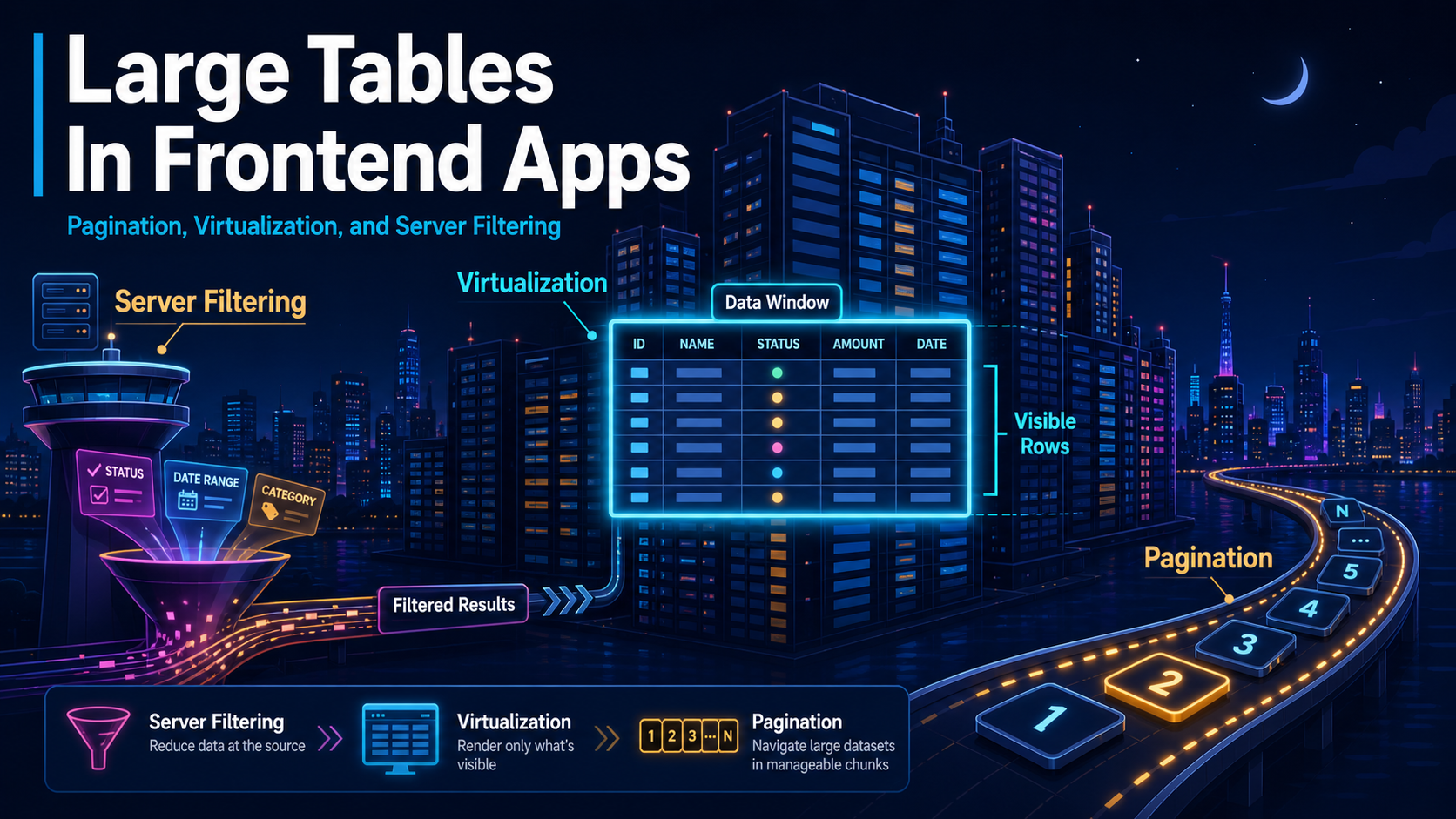
That moment is when "it's just a table" stops being true. Past a few thousand rows, a table becomes a small architecture problem dressed up as a UI component, and the answers come from three places at once: how many rows actually live in the DOM, how the data is paged in, and where the filtering happens.
The DOM Is The Bottleneck, Not React
If you render 50,000 <tr> elements, it does not matter how clever your framework is. The browser still has to lay out, paint, and event-route every single node. React can hand the DOM a perfectly minimal diff and the page will still feel like wading through wet cement.
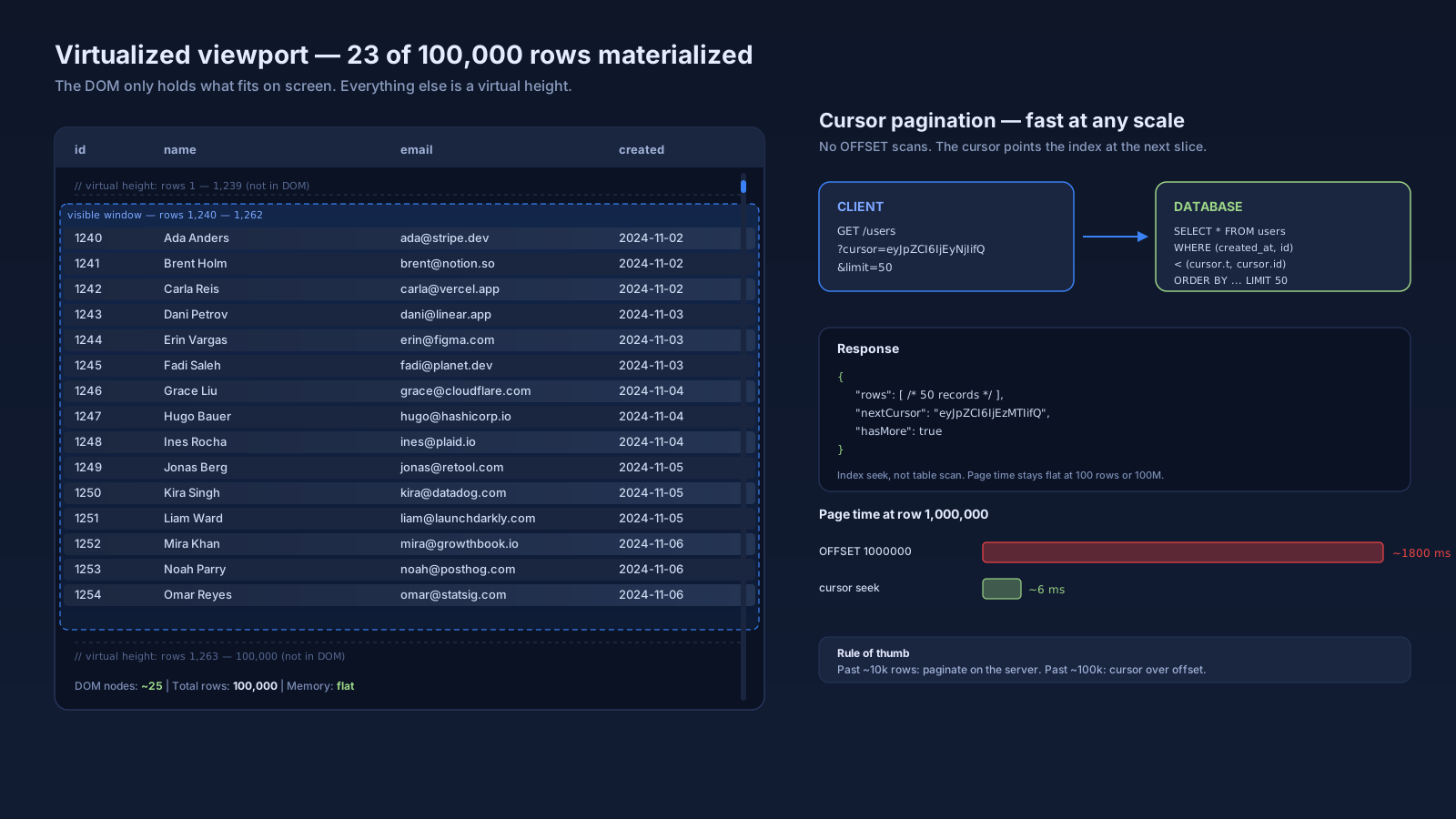
The fix is to stop pretending all the rows exist. Virtualization keeps a small window of rows (usually 20 to 50) physically in the DOM and recycles them as the user scrolls. The full list lives in JavaScript memory; only the visible slice plus a small overscan is rendered.
In the React world there are three libraries worth knowing:
- TanStack Virtual. Headless, framework-agnostic, the modern default. You bring your own scroll container and markup; it tells you which items to render at which offsets.
- react-virtuoso. Higher-level, opinionated, handles variable row heights well, includes infinite scroll out of the box.
- react-window. The veteran. Smaller API surface, fixed heights, still totally valid for simple cases.
The mental model is the same across all three: you have a viewport (say, 600px tall), each row is roughly 40px, you can fit 15 rows on screen, you render maybe 25 to cover overscan, and the scroll position fakes the height of the missing 49,975 rows with a spacer. Scroll feels native because the DOM never gets larger than the viewport demands.
Pick The Table Layer Separately From The Virtualization
A common mistake: assuming the table library and the virtualization are one product. They are not. You usually want to choose them on different axes.
For the table layer itself:
- TanStack Table v8. Headless, fully typed, framework-agnostic core. You write your own markup. Best when your design system is opinionated and you want sorting, filtering, grouping, and column visibility logic without inheriting somebody else's CSS.
- AG Grid. Enterprise feature set, built-in virtualization, pivoting, server-side row model. The community edition is free; advanced features sit behind a paid license. Right pick when you need spreadsheet-like behavior and the budget exists.
- Material React Table. Sits on top of TanStack Table v8 and Material UI. Saves you the markup work if you're already on MUI.
- Mantine DataTable. Lighter alternative inside the Mantine ecosystem. Pleasant defaults, less ceremony than AG Grid.
The reason TanStack Table keeps winning on greenfield work is that it is just a state-management library for tabular data. You can pair it with TanStack Virtual, your own design system, and your own server adapter, and the whole thing is maybe 200 lines of code that you actually understand.
Server-Side Pagination Past 10,000 Rows
Once the dataset crosses about 10k rows, shipping the whole array to the client stops making sense. You're paying for bandwidth, memory, and JSON parse time on data the user will never look at. Past 100k rows it becomes actively hostile to anyone on a slow connection.
The defaults to choose between:
- Offset pagination.
?offset=2000&limit=50. Easy to implement. Works fine up to a few hundred thousand rows. Falls apart on very large tables because the database still has to scan the offset rows it's about to throw away. - Cursor pagination.
?cursor=eyJpZCI6IjQyIn0&limit=50. The cursor encodes "the last id and sort key you saw," and the next page isWHERE (created_at, id) < (cursor.created_at, cursor.id). Stays fast at any size because the index does the work. The price is that you cannot jump to "page 47" — you can only go forward and back one window at a time.
For internal admin tools with up to ~50k rows, offset is fine and gives you a familiar pager UI. For user-facing infinite scroll feeds, anything analytics-shaped, or tables that genuinely have millions of rows, cursor is the move. The window between those two cases is where most teams overthink it.
Filtering Belongs Where The Data Lives
The third leg of the stool is filtering. If the data is on the client, filter on the client. If the data is on the server, filter on the server. The mistake is doing it in the wrong place and not noticing.
Client-side filtering against a 100k array works, but it has costs people forget:
- The filter runs on every keystroke. Without debouncing, you re-iterate 100k items 6 times a second.
- Every filter re-render invalidates memoized rows. If your row components are not stable, you get a paint storm.
- The data has to be in memory in the first place — see the pagination point above.
Server-side filtering pushes the work to the database, which is where it should be anyway. The database has indexes. JavaScript arrays do not. A WHERE name ILIKE '%foo%' against a column with a trigram index is faster than array.filter will ever be.
The pattern that works across providers:
type TableQuery = {
  cursor?: string;
  pageSize: number;
  sort: { column: "createdAt" | "name"; dir: "asc" | "desc" };
  filters: { column: string; op: "eq" | "ilike" | "gt"; value: string }[];
};
Encode that into URL search params, send to your API, let the database respond. The client only ever holds the current page in memory. Sorting and filtering both feel instant because the user does not perceive a 60ms server roundtrip the way they perceive a 600ms client-side iteration.
Where Things Quietly Go Wrong
The bugs in large-table code tend to be the same handful, repeated:
- Row keys aren't stable. Using array index as the React key during virtualization makes recycled rows flash content from their previous occupant. Use the row's actual id.
- Variable row heights without a measurer. TanStack Virtual and Virtuoso both support measuring; if you skip it, your scroll bar lies and the user can't find their place.
- Filter inputs aren't debounced. Every keystroke fires a network request or a full re-filter. Wait 250 to 400 ms before acting; that's the sweet spot where the user feels the lag is "instant" but the system gets one request per phrase, not per character.
- Sticky headers and rendering both live in the same scroll container. Pin the header outside the virtualized region or use
position: stickyon the row container, not the row. - Selection state lives in the virtualized rows. A row that scrolls out of view should not lose its selected state. Keep selection in a
Setindexed by row id, on the parent. - The "select all" checkbox lies. It only selects loaded rows. Either be explicit ("Select all 23 visible") or implement server-side bulk select with a
wherepredicate.
None of these are exotic. They show up the second a real user has more than a screen of data.
A Practical Stack For Most Projects
If you're building a real internal tool or an admin dashboard right now, the choice that holds up is roughly:
- TanStack Table v8 for state — column defs, sorting, filtering metadata, row models.
- TanStack Virtual for the viewport — telling you which rows to render.
- Cursor pagination on the server, exposed as
nextCursorin the response. - Server-side filtering and sorting for anything past about 5k rows; client-side below that is fine.
- A dedicated
useTableQuery()hook that owns the query state, syncs it to the URL, and hands the resultingTableQueryto your data fetcher.
That stack is boring. Boring is the goal. The team can read it, the tests are obvious, and the next person to add a column doesn't have to understand the entire data layer.
The instinct to drag in AG Grid because "we might need pivot tables one day" is usually wrong. Most product tables are list views with sort, filter, and pagination. Build for that case, and reach for the heavy enterprise grid when an actual feature requires it.
A One-Sentence Mental Model
A large table is three problems pretending to be one — the DOM only renders the rows the user can see, the server only ships the page the user is on, and the filtering happens wherever the data already lives.






