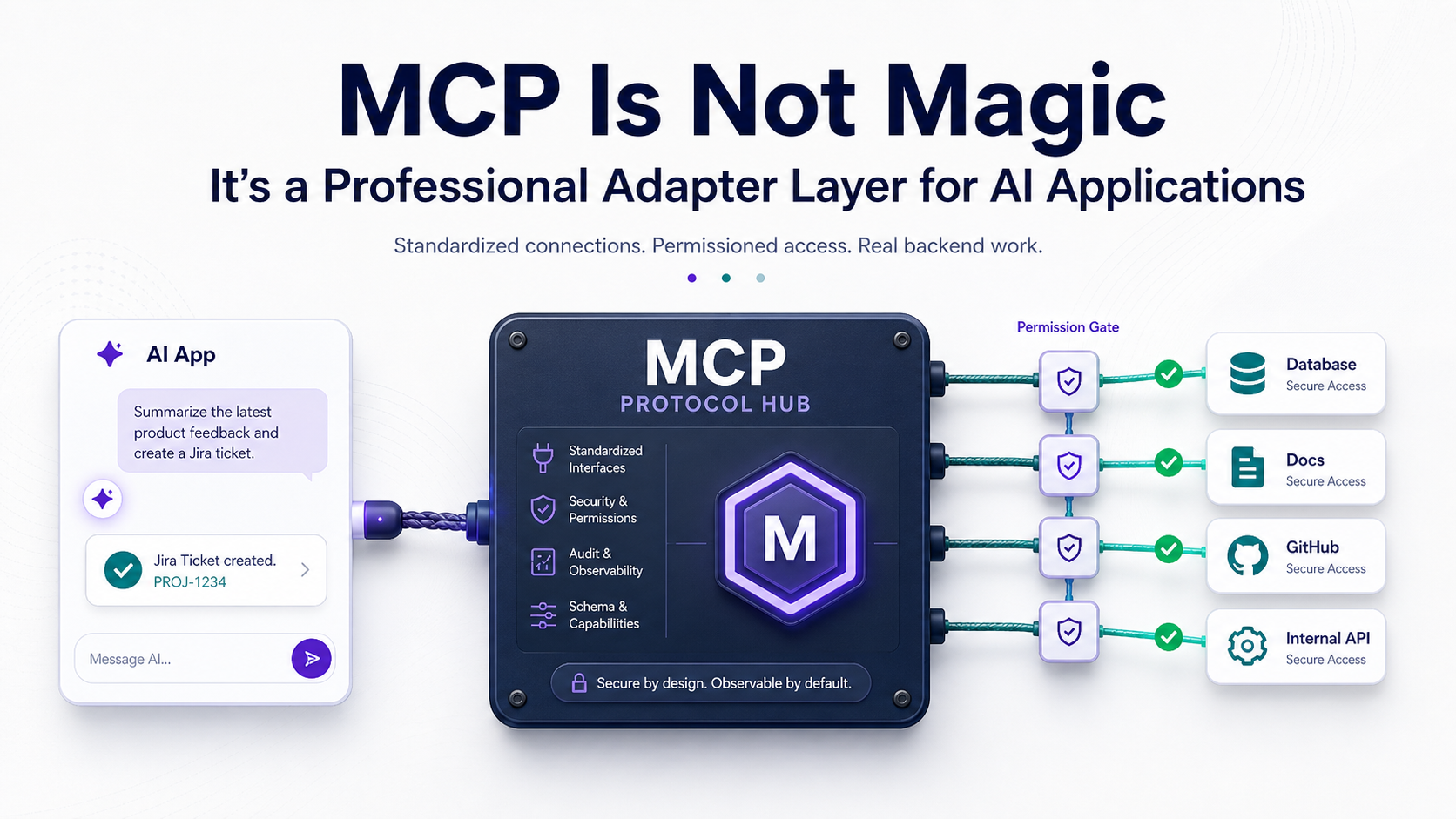
So, you've probably heard people talk about MCP like it's the missing piece for AI tooling.
Some describe it like USB-C for AI. That's a useful mental shortcut, but backend engineers usually need a bit more than a slogan. You want to know what runs where, what talks to what, what permissions exist, and how this affects real systems.
Model Context Protocol, or MCP, is a protocol for connecting AI clients to external tools, data sources, and workflows in a standardized way. The big idea is simple: instead of every AI app inventing a custom integration format, MCP gives clients and servers a shared contract.
The Problem MCP Is Trying To Solve
Before MCP-style integration, every AI tool connection was usually custom.
One app had its own plugin format. Another had its own function-calling wrapper. Another used a private SDK. Another embedded context directly into prompts. That works for demos, but it doesn't scale nicely across teams and tools.
It's like every appliance in your house needing a different wall outlet. Eventually you spend more time hunting adapters than using the machine.
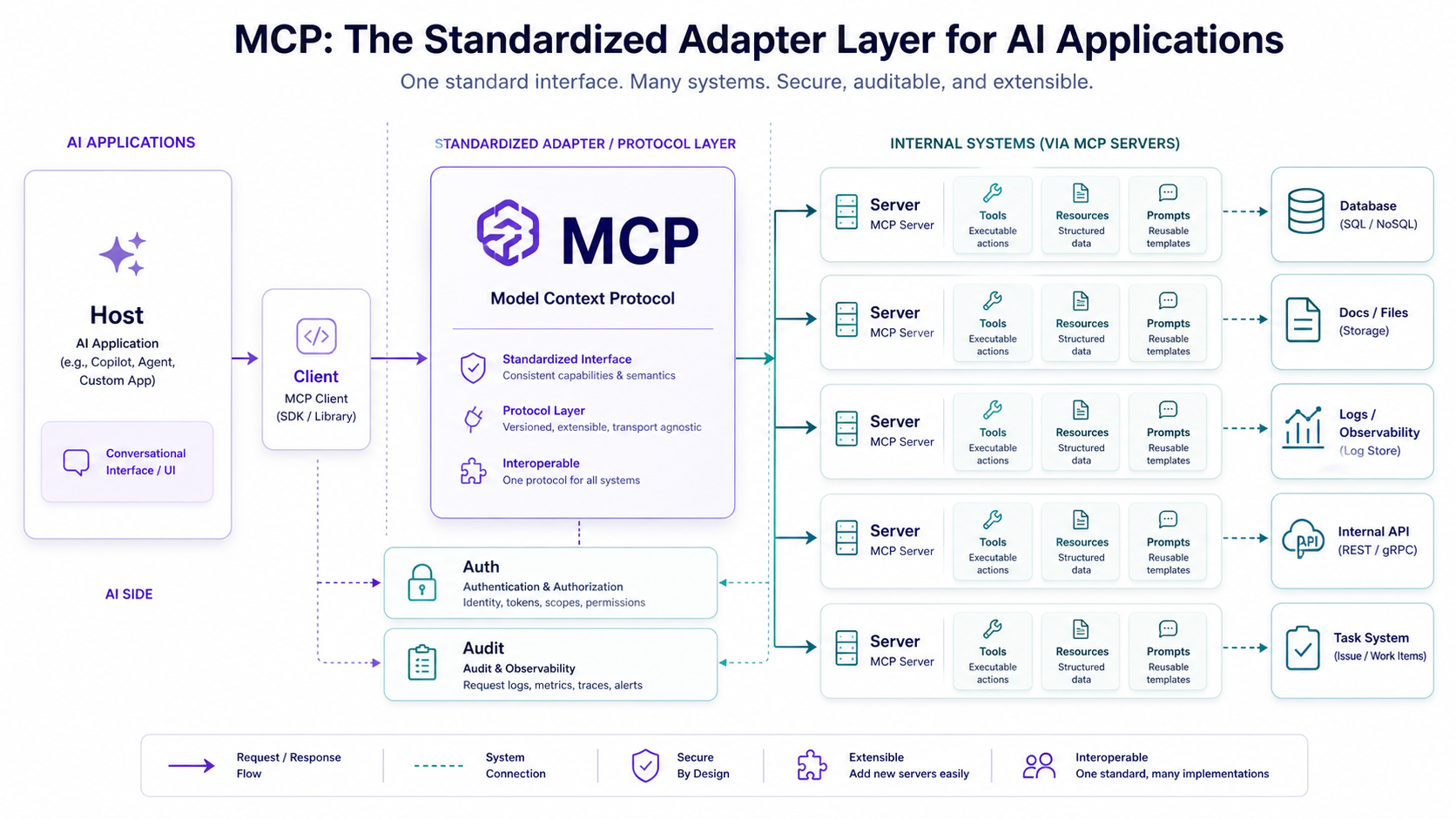
MCP standardizes the adapter layer between AI systems and external capabilities.
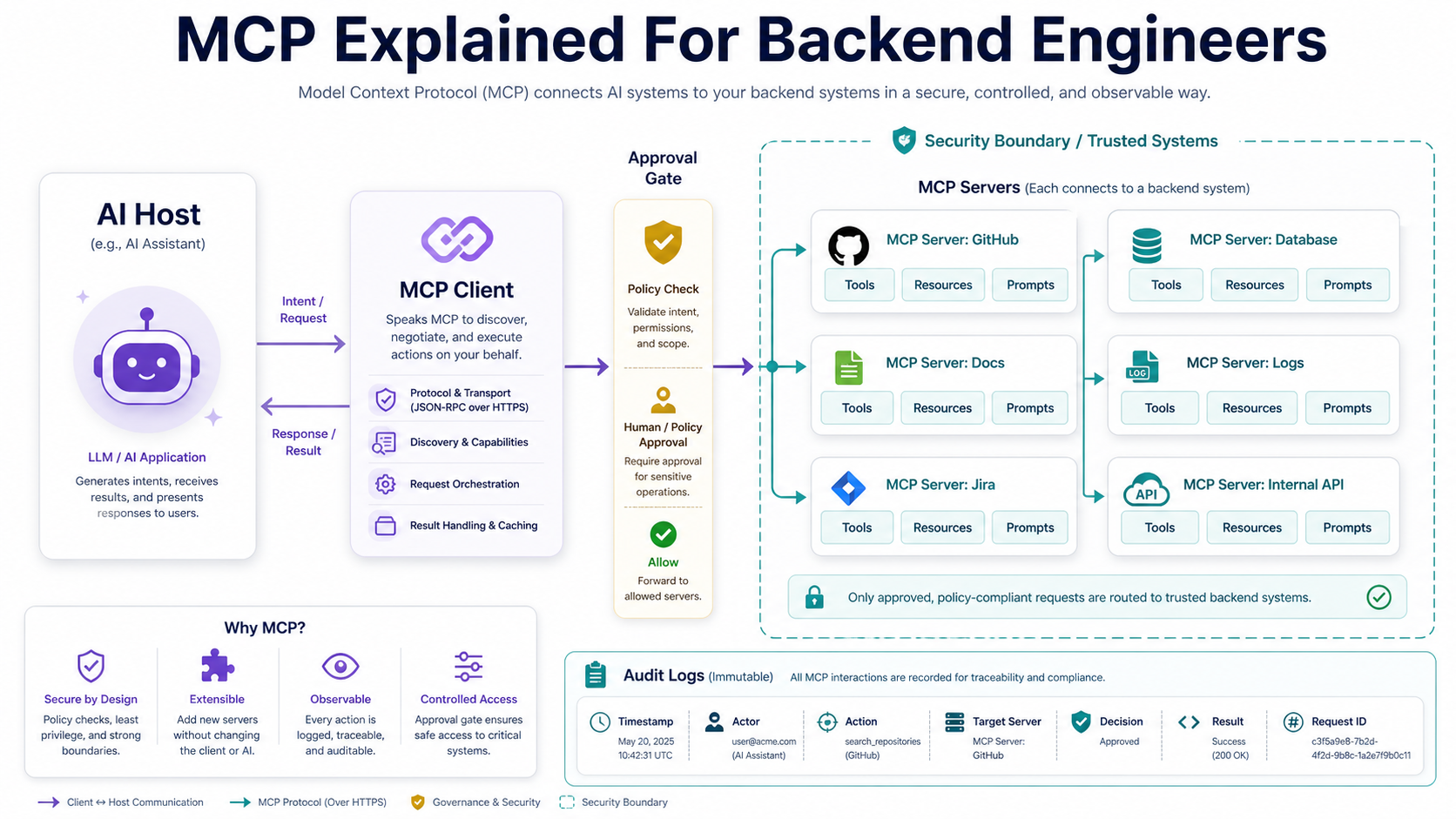
The Main Roles
- MCP host. The AI application the user interacts with, such as an assistant or coding tool.
- MCP client. The component inside the host that connects to MCP servers.
- MCP server. A process that exposes tools, resources, or prompts to the client.
- Tools. Callable actions the model can request, like searching tickets or querying a service.
- Resources. Context or data the model can read, like files, docs, records, or schemas.
- Prompts. Reusable templates or workflows exposed by the server.
For a backend engineer, the MCP server is probably the most interesting part because that's where your systems become safely available to AI clients.
Tools Are Actions The Model Can Ask To Run
A tool is a callable function exposed by an MCP server.
For example, a server might expose tools like search_orders, get_customer, create_support_summary, or find_recent_errors.
The model doesn't directly connect to your database. It asks the MCP client to call a specific tool, and the server runs controlled code.
That's a critical distinction. Tools are not raw access. Tools are designed access.
A Backend-Style Tool Contract
In simplified pseudo-code, a tool might look like this:
server.tool('get_order_status', {
  orderId: z.string(),
}, async ({ orderId }) => {
  const order = await orders.findByPublicId(orderId);

  return {
    orderId: order.publicId,
    status: order.status,
    updatedAt: order.updatedAt,
  };
});
The useful part is the boundary. The tool accepts a specific input and returns a controlled output.
Resources Are Context, Not Actions
Resources give the model access to data or context.
A resource might represent a file, a database schema, an API description, a log stream, a document, or a business object. The model can use that information to answer better or decide which tool to call next.
Think of resources like read-only shelves in a library. The model can inspect the material, but reading a book is not the same as changing the inventory system.
Resource Examples
- Project documentation. Architecture decisions, runbooks, onboarding guides.
- Code context. Files, dependency maps, package metadata.
- Database metadata. Table schemas, safe sample rows, migration history.
- Operational context. Recent errors, deploy markers, service health.
- Business records. Customer, subscription, invoice, or order summaries.
The best resource design gives enough context to help the model while avoiding unnecessary sensitive data.
Prompts Are Reusable Workflows
MCP also supports prompts, which are reusable prompt templates or workflows exposed by the server.
That may sound less exciting than tools, but it's very practical. A backend team can define approved workflows like "summarize incident," "review migration risk," or "prepare release notes from merged PRs."
A prompt is like a recipe card. It doesn't cook the meal by itself, but it standardizes how the work starts.
Useful Prompt Ideas
- Incident summary. Pull logs, timeline, affected services, and mitigation notes.
- Database migration review. Check lock risk, table size, rollback plan, and index impact.
- Pull request explanation. Summarize files changed, risk areas, and tests.
- Customer support context. Gather safe account details and recent events.
- Security review checklist. Inspect auth, input validation, data access, and secrets.
Prompts help teams encode repeatable thinking, not just repeatable actions.
MCP Is Not A Security Shortcut
This part matters: MCP standardizes connection patterns, but it does not magically make integrations safe.
You still need authentication, authorization, audit logs, rate limits, input validation, output filtering, and human approval for sensitive actions.
MCP is like giving your AI system a door. Security is deciding who gets a key, what rooms they can enter, what they can touch, and whether cameras are recording.
Security Questions To Ask
- Who can connect to this server? Local-only, team-only, or organization-wide?
- What data can resources expose? Avoid dumping raw sensitive records into context.
- Which tools can mutate state? Writes should require stricter controls than reads.
- Are tool calls logged? You need auditability for production systems.
- Can the user approve actions? Dangerous operations should not run silently.
Backend engineers should treat MCP servers like production APIs, because that's basically what they become.
Where MCP Fits In Backend Architecture
MCP is especially interesting when your backend systems already have useful internal APIs.
You can expose safe, focused slices of those systems to AI clients without giving the model direct database access or telling every team to build one-off plugins.
Good MCP Server Candidates
- Developer platform tools. Search code, inspect deployments, read service ownership.
- Support tooling. Fetch safe customer summaries, subscription status, recent events.
- Operations tools. Query logs, incident timelines, queue health, and deploy markers.
- Documentation systems. Serve architecture docs, runbooks, and API references.
- Project management tools. Read tickets, linked PRs, acceptance criteria, and comments.
The pattern is simple: expose useful capabilities through controlled contracts.
A Practical MCP Mental Model
For backend engineers, MCP maps nicely to concepts you already know.
- MCP server equals integration service. It exposes capabilities from your domain.
- Tools equal RPC endpoints. They perform controlled actions.
- Resources equal read models. They provide context in safe shapes.
- Prompts equal workflow templates. They standardize repeated tasks.
- Client approval equals permission boundary. The user or host should control sensitive steps.
Once you see it that way, MCP feels less mysterious. It's a protocolized integration layer for AI workflows.
Common MCP Mistakes
- Exposing raw database access. A model does not need unrestricted SQL to be useful.
- Returning too much data. Context windows are limited, and sensitive data should stay limited too.
- Skipping authorization. A tool should enforce what the user is allowed to do.
- Making tools too broad.
run_any_commandis not a tool; it's a production incident waiting politely. - Ignoring observability. You need logs, metrics, and audit trails for tool calls.
A good MCP server is boring, constrained, and auditable. That's a compliment.
Pro Tips
- Start read-only. Resources and safe query tools are easier to trust than write actions.
- Use narrow schemas. Precise inputs and outputs reduce weird model behavior.
- Add approval gates for mutations. Creating, deleting, charging, deploying, and emailing should be controlled.
- Prefer summaries over raw dumps. Give the model the useful shape, not every field.
- Version your contracts. Backend integrations change, and AI clients need stability too.
Final Tips
The most useful way to think about MCP is not "AI magic connector." It's a standard integration boundary. That sounds less exciting, but it's much more useful.
I've seen enough backend systems to know the adapter layer is where complexity quietly grows teeth. MCP doesn't remove that complexity, but it gives teams a shared shape for managing it.
Build MCP servers like you build serious backend APIs: small contracts, clear permissions, good logs, and boring safety. That's how AI tooling becomes production-friendly. Go build the adapter 👊