So, you've shipped an AI feature. Maybe a chat assistant in your app, maybe a coding agent in your IDE, maybe a "summarize this page" button somewhere in the admin. It works great in a vacuum.
Then someone asks: can it read our docs? Can it open a Jira ticket when the user describes a bug? Can it run a quick query against staging? Can it pull the customer's last three orders?
And suddenly your "AI feature" needs to talk to half your stack. You start writing one-off tool functions. Each one needs auth wired through, schemas defined, error handling, retries. You write the same shape of glue for OpenAI's function calling, for Anthropic's tool use, for whatever runs locally in Cursor. Two months later you have five integrations and three different glue layers, and adding the sixth integration means doing the work five times.
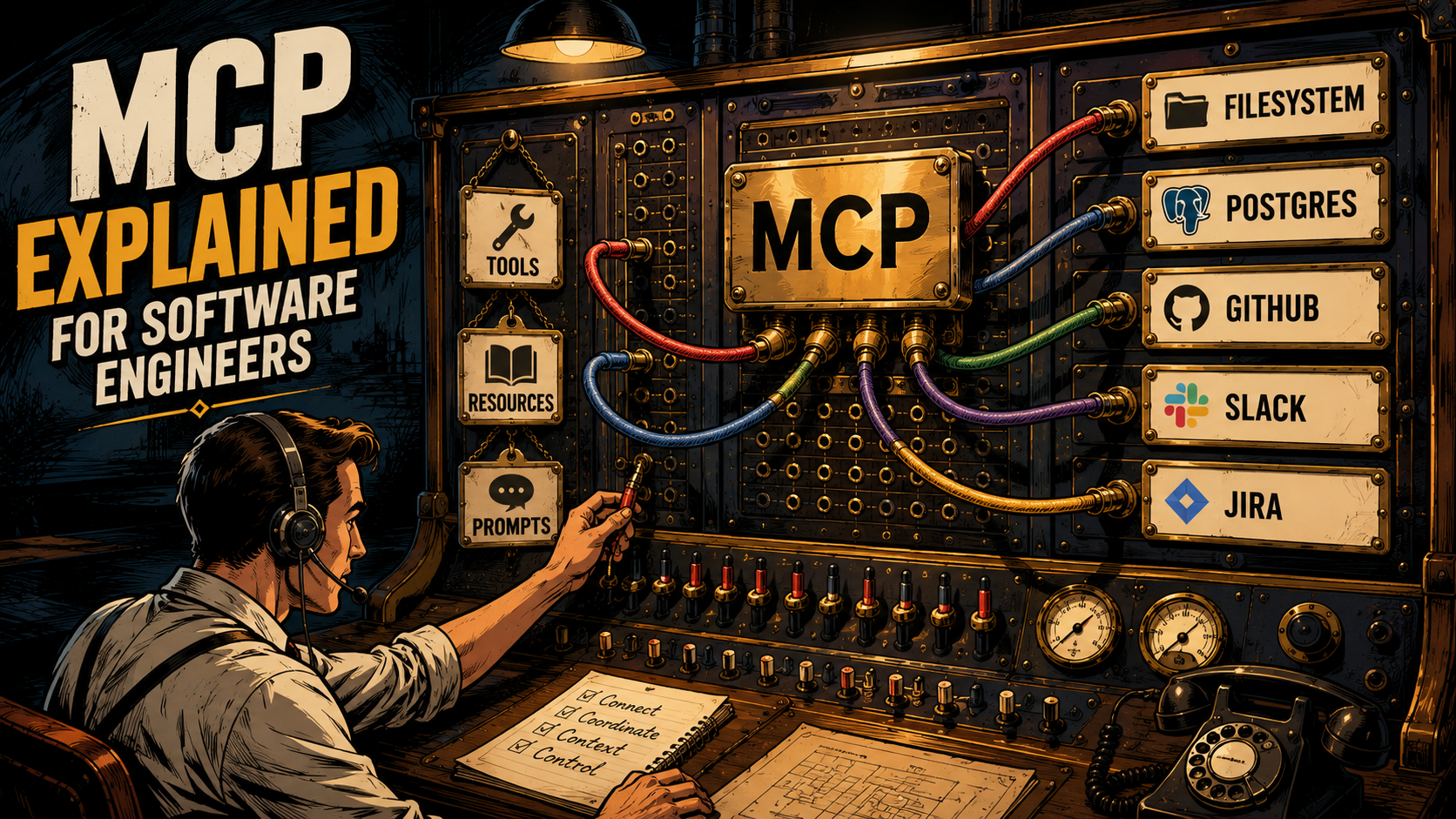
This is the problem MCP, the Model Context Protocol, was built to solve. And once you understand the three primitives it standardizes, most of the AI tooling you see floating around (Claude Desktop plugins, Cursor servers, Windsurf integrations) stops feeling like five different worlds and starts feeling like one.
Let's break it down.
What MCP Actually Is
MCP is an open protocol, published by Anthropic in late 2024, that defines how a "client" (the program running the model: Claude Desktop, Cursor, your own agent) talks to a "server" (a small process or service that exposes capabilities: tools, data, prompts). The spec lives at modelcontextprotocol.io and is genuinely open. There are official SDKs in Python and TypeScript, plus community implementations in other languages.
The protocol itself is JSON-RPC 2.0. The transport is either stdio (the client launches the server as a subprocess and they talk over standard input and output) or HTTP with Server-Sent Events (for remote servers, including streaming variants). Once connected, the client and server exchange messages with names like initialize, tools/list, tools/call, resources/read, prompts/get. That's it. The whole protocol fits in your head.
The marketing line was "USB-C for AI" and honestly that's the best one-liner anyone's come up with. A single connector shape on both ends, and a defined wire protocol underneath, means you stop writing N different cables.
The integration problem MCP was built to solve is a classic one, and it's worth a picture before going further:
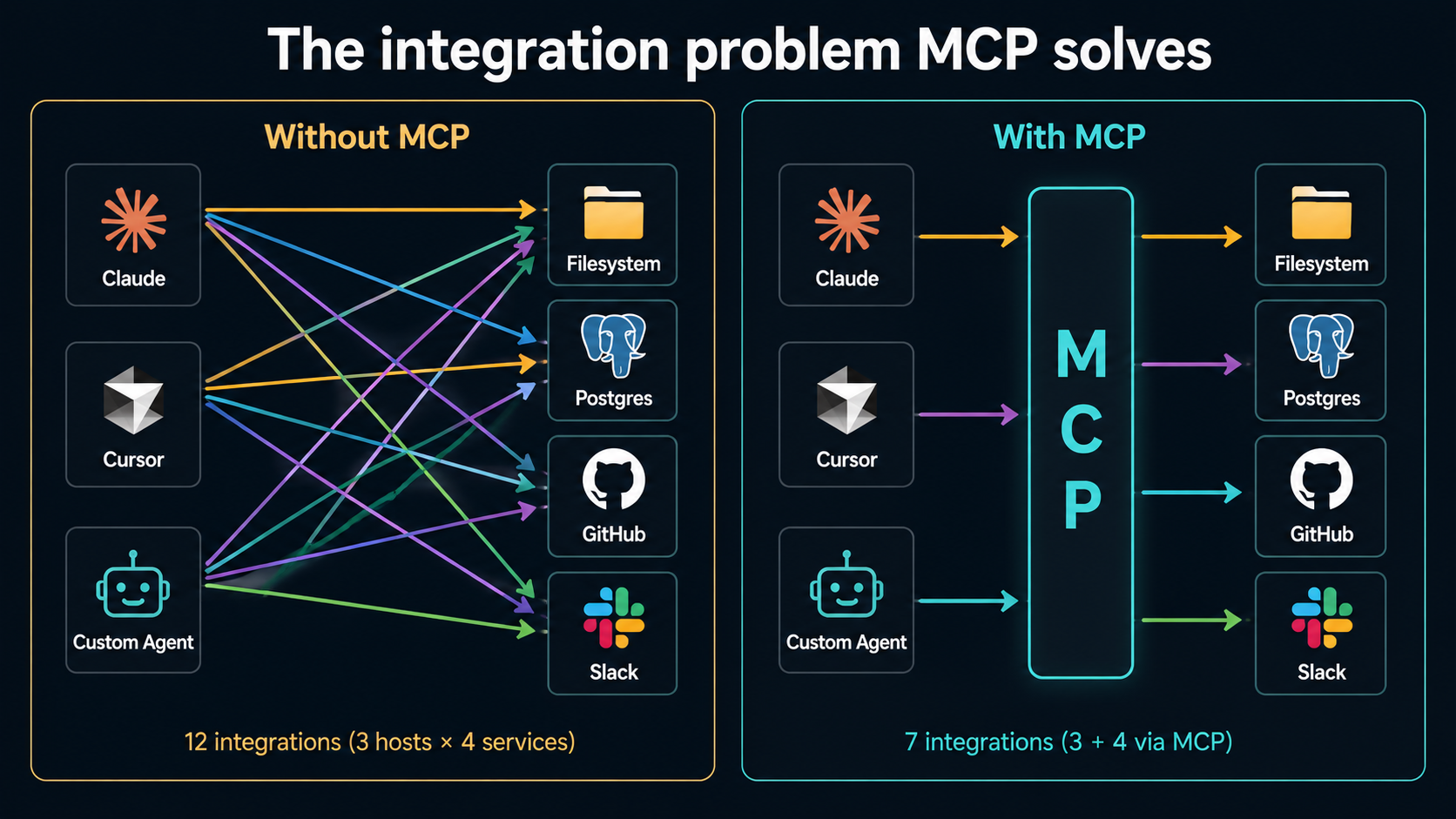
The "before" picture is M × N integrations: every host has to learn every service. The "after" picture is M + N: each host speaks MCP, each service speaks MCP, the work doesn't multiply.
The Three Primitives Every Server Exposes
If you remember nothing else, remember these three. They're the whole shape of what an MCP server can offer.
1. Tools
A tool is a callable function. The server says "I can do these things; here are their names, descriptions, and JSON schemas for arguments", and the client lists them to the model. When the model decides to use one, the client calls it through MCP and gets a result back.
If you've used OpenAI function calling or Anthropic's tool use, this is the same idea, except the definition of the tool lives in the server, not in your prompt-construction code.
Here's the smallest possible Python server that exposes one tool, using the official mcp SDK:
from mcp.server.fastmcp import FastMCP

mcp = FastMCP("weather")

@mcp.tool()
def get_forecast(city: str) -> str:
    """Return a short forecast for the given city."""
    # In real code: call a weather API.
    return f"Forecast for {city}: sunny, 22°C"

if __name__ == "__main__":
    mcp.run()
That's a complete MCP server. Drop it into Claude Desktop's config, restart, and Claude can now call get_forecast whenever a conversation needs it. No client-side code change. No prompt engineering. The model sees the tool, decides when to use it, and the user gets a forecast.
The TypeScript SDK is the same shape:
import { McpServer } from "@modelcontextprotocol/sdk/server/mcp.js";
import { StdioServerTransport } from "@modelcontextprotocol/sdk/server/stdio.js";
import { z } from "zod";

const server = new McpServer({ name: "weather", version: "0.1.0" });

server.tool(
  "get_forecast",
  { city: z.string().describe("City name") },
  async ({ city }) => ({
    content: [{ type: "text", text: `Forecast for ${city}: sunny, 22°C` }],
  })
);

await server.connect(new StdioServerTransport());
Two things to notice. First, the tool's contract (its name, description, and parameter schema) lives next to its implementation, not scattered between a tools array, a system prompt, and a switch statement. Second, the server is a small standalone process. It has no opinion about which model is calling it. Claude, GPT, or a local Llama can all use the same server unchanged, as long as their host speaks MCP.
2. Resources
A resource is read-only data the server can hand over when asked. Where tools are verbs, resources are nouns. They're addressed by URI.
A filesystem MCP server exposes resources like file:///Users/you/notes/today.md. A Postgres server might expose postgres://localhost/mydb/orders/schema. A GitHub server might expose github://owner/repo/issues/42. The URI scheme is the server's choice; the client just sees a list and can fetch any of them.
from mcp.server.fastmcp import FastMCP
from pathlib import Path

mcp = FastMCP("docs")

@mcp.resource("docs://{slug}")
def read_doc(slug: str) -> str:
    """Read a published doc by slug."""
    return Path(f"./docs/{slug}.md").read_text()

if __name__ == "__main__":
    mcp.run()
The distinction between tools and resources matters more than it looks at first. A tool is an action the model decides to take, often with side effects. A resource is context the host can attach to the conversation, often automatically. Reading a file as a resource doesn't need the model to decide anything; the client can stuff its contents into context up front. Running delete_file is a tool call, because someone has to make a choice about it.
This is also why MCP doesn't just collapse both into "tools". Resources are how a server says "here's everything I can show you; pick what's relevant", and the host can use that list however it wants: show it in a picker, attach by default, embed at the bottom of every prompt, or ignore.
3. Prompts
A prompt is a reusable prompt template the server provides to the client. The client typically surfaces these as slash commands or quick actions for the user.
from mcp.server.fastmcp import FastMCP

mcp = FastMCP("review")

@mcp.prompt()
def code_review(language: str, code: str) -> str:
    return (
        f"Review the following {language} code. "
        f"Call out correctness issues first, style second, "
        f"and ignore anything subjective.\n\n"
        f"```{language}\n{code}\n```"
    )
Prompts are the most "soft" of the three primitives: they're a convenience layer on top of the same model the host is already using. But they matter for one reason: they let the server author own the prompt for a workflow, not the user. If your team has decided that "explain this query plan" should phrase the request a specific way, you can ship that phrasing as a prompt instead of writing it into a doc nobody reads.
Tools, resources, prompts. Three words. That's the whole API surface a server can expose.
How A Client And Server Actually Talk
The protocol itself is small enough to walk through. Every MCP session has roughly the same shape:
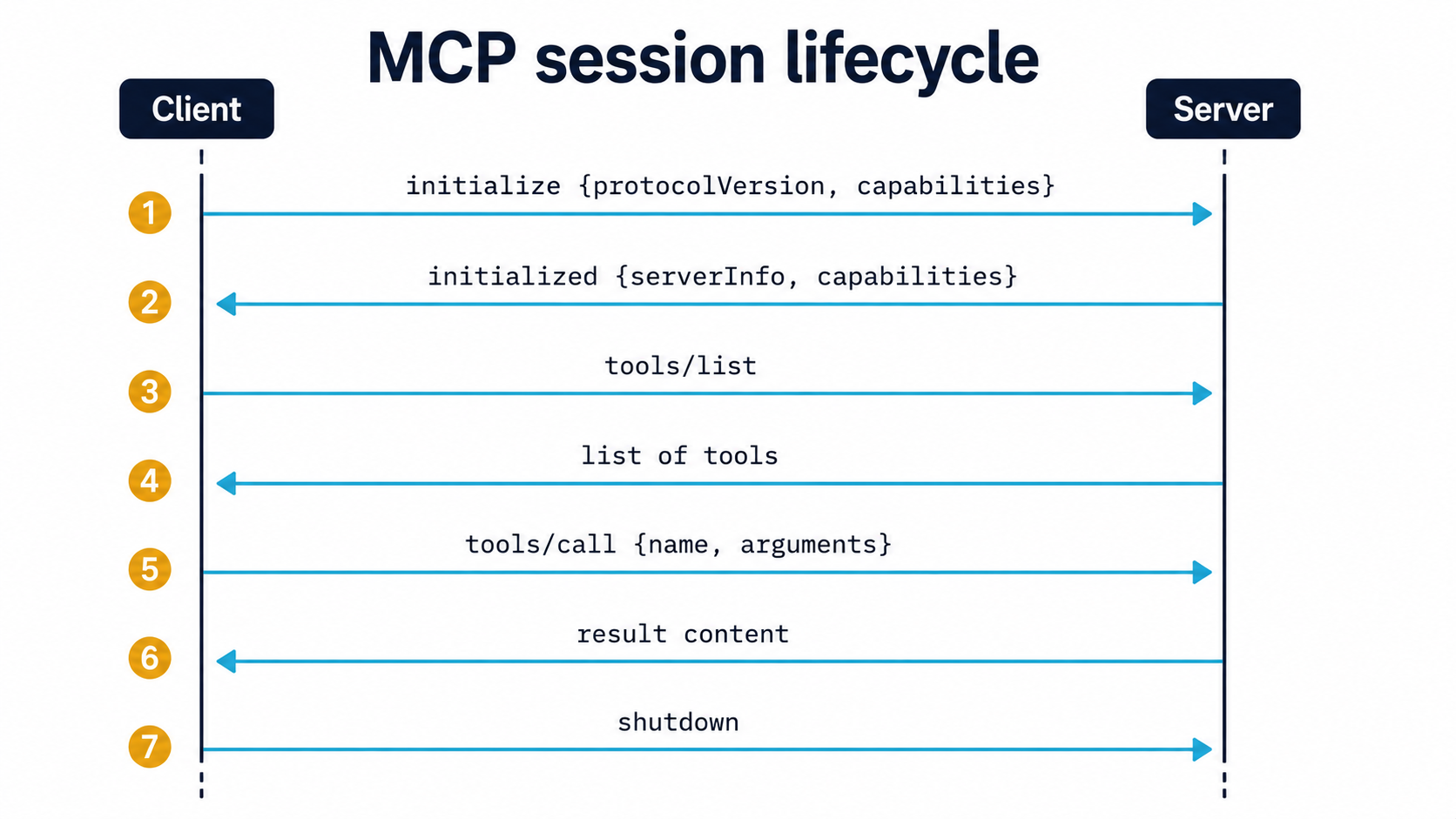
- Handshake. The client sends
initializewith the protocol version it supports and the capabilities it implements (does it support sampling? resource subscriptions?). The server replies with its own capabilities and metadata. - Discovery. The client asks
tools/list,resources/list,prompts/list. The server returns each catalogue. - Use. When the conversation needs it, the client sends
tools/call(with arguments matching the tool's schema),resources/read(with a URI), orprompts/get(with the prompt's arguments). The server runs the request and returns the result. - Notifications. Either side can send notifications mid-session. For example, a server can notify the client that its tool list has changed, or that a subscribed resource has updated.
- Shutdown. Either side can close.
The wire format is JSON-RPC 2.0. A tools/call request looks like this on the wire:
{
  "jsonrpc": "2.0",
  "id": 17,
  "method": "tools/call",
  "params": {
    "name": "get_forecast",
    "arguments": { "city": "Lisbon" }
  }
}
And the response:
{
  "jsonrpc": "2.0",
  "id": 17,
  "result": {
    "content": [
      { "type": "text", "text": "Forecast for Lisbon: sunny, 22°C" }
    ],
    "isError": false
  }
}
You will almost never write this by hand (the SDKs hide it), but it's worth seeing once. It's just JSON-RPC. There's no exotic framing, no custom binary format, no magic. If you can write a JSON-RPC client, you can talk to any MCP server, full stop.
There's also a less-talked-about reverse direction: sampling. A server can ask the client to perform an LLM completion on its behalf. This is how a server can be "smart" without bundling its own model. It borrows the host's. Most servers don't use it, but it's there.
Wiring A Server Into A Client
Tools, resources, prompts on the server side. On the client side, the wiring is usually a short config file. Claude Desktop, for example, reads a JSON config that maps friendly names to subprocess commands:
{
  "mcpServers": {
    "weather": {
      "command": "python",
      "args": ["/Users/you/servers/weather_server.py"]
    },
    "filesystem": {
      "command": "npx",
      "args": ["-y", "@modelcontextprotocol/server-filesystem", "/Users/you/projects"]
    }
  }
}
Restart Claude Desktop, and your custom Python server plus the off-the-shelf filesystem server both appear. Cursor, Windsurf, Zed, Cline and other MCP-aware hosts each have their own config format, but it's the same idea: name, command, arguments.
For remote servers, the config swaps the subprocess for a URL. The client opens an HTTP+SSE connection instead of spawning a process. From the server's perspective, none of this changes. It speaks the same protocol regardless of how it was reached.
This config-driven wiring is half the reason MCP feels lightweight. Adding a new capability to your AI assistant is not "wire up a new feature in the app, deploy, update users". It's "drop a server binary somewhere, add three lines to a JSON file". The model picks up the new tools on the next session.
Where MCP Fits In Agent Workflows
If you're building a single-turn AI feature ("summarize this page", "rewrite this email"), you may never need MCP. The model has the context it needs from the prompt. Done.
The moment you cross into agent territory, the picture changes. An agent loops: it reads context, decides on an action, takes the action, observes the result, and loops again. That action could be anything: query a database, write a file, call an API, ask a teammate. Without a standard interface, you end up implementing each action by hand inside the agent and re-implementing it for every new agent.
MCP slots in as the action layer. The agent loop stays in your code. Your prompts stay yours. But the catalogue of things the agent can do lives in MCP servers, and the protocol is what carries the call.
Here's a pseudo-code agent loop that uses MCP as its action layer:
async def agent_loop(user_goal: str, mcp_clients: list):
    # Aggregate tools from all connected MCP servers.
    tools = []
    for client in mcp_clients:
        tools.extend(await client.list_tools())

    messages = [{"role": "user", "content": user_goal}]
    while True:
        response = await llm.chat(messages=messages, tools=tools)

        if response.stop_reason == "end_turn":
            return response.text

        for call in response.tool_calls:
            # Route the call to whichever MCP client owns this tool.
            client = find_client_for_tool(mcp_clients, call.name)
            result = await client.call_tool(call.name, call.arguments)
            messages.append({"role": "tool", "tool_call_id": call.id, "content": result})
The agent doesn't know or care that one tool lives in a filesystem server, another in a Postgres server, and a third in your bespoke "internal admin" server. It sees a flat list of callables. The routing (which server owns query_orders?) is bookkeeping the host handles, and most MCP client libraries do it for you.
This is the part of MCP that quietly matters most. It separates agent logic (the loop, the planning, the conversation flow) from agent capabilities (the things the agent can actually do in the world). The first is the thing you want to keep working on. The second is the thing you want to be able to swap out without rewriting the first.
What Changes When You Adopt It
A few things stop being your problem:
- Tool wiring per host. Add a server once, every MCP-aware host picks it up.
- Schema drift. The tool's JSON schema lives next to its implementation, not in a system prompt that nobody updates when the function signature changes.
- Local-vs-remote. Stdio for local, HTTP+SSE for remote, same server code either way.
- Sharing. A server that does something useful (query a Linear workspace, search internal docs, talk to your CI) can be open-sourced and dropped into any MCP-aware tool by anyone, including teammates who don't use the same IDE you do.
A few things become new problems:
- Trust and permissions. A subprocess on your laptop with access to your filesystem and your shell is a meaningful security surface. The hosts give you per-tool approval prompts for a reason. Treat third-party MCP servers the way you treat third-party browser extensions.
- Catalogue noise. Connect ten servers and the model now sees fifty tools. Some of them overlap. The model will sometimes pick a worse one because its description was more eager. Curate.
- Versioning. The protocol itself versions cleanly via the initialize handshake, but your tools and resources still need thoughtful change management. Renaming a tool will silently break any prompts that mention it by name.
None of these are MCP problems specifically. They're the bills you pay for any extensible system. But they're worth seeing before you connect twenty servers and wonder why your agent's been "weird lately".
When MCP Is Probably Overkill
A protocol-shaped solution is the wrong shape for some problems. If your AI feature lives entirely inside one app, talks to exactly one database, and is never going to be reused by anything else, wiring it through MCP is extra ceremony for no benefit. A direct function call from your tool-use handler is shorter, easier to debug, and easier for the next person on your team to follow.
MCP earns its weight when at least one of these is true:
- More than one host (Claude Desktop, Cursor, custom agent, future thing) needs the same capability.
- The capability is interesting enough that other teams or open source might want it too.
- The capability runs in a different process or on a different machine from the host, and you'd be inventing your own RPC layer otherwise.
- You want to be able to swap which model or which host runs the agent without rewriting the tools.
If none of those apply, write the function inline and move on. Use MCP when you'd otherwise be inventing it.
The One-Sentence Mental Model
If MCP keeps slipping out of your head, hold on to this: MCP is a small protocol that lets a model's host (Claude Desktop, Cursor, your agent) talk to small servers that expose tools, resources, and prompts, so you write each integration once and every host picks it up.
That's the whole thing. Everything else (the JSON-RPC framing, the stdio vs HTTP transports, the SDK conveniences, the sampling reverse-channel) is detail you can look up when you need it.
Now go pick one tedious tool you've been re-implementing across three projects, wrap it in an MCP server, and watch it light up everywhere at once.