So, you've written a find(), then a slightly fancier find(), and then the day comes when product asks a question that no find() will answer. Something like "how much did each customer spend last month, grouped by country, only counting paid orders, with their email attached?"
You stare at it for a minute and do what most people do: pull a thousand documents into the app, write a for loop, build a hash map, fetch the user data in a second round trip, and ship it. It works. But it's also doing in your application what the database can do in a single call, on the index it already has, without sending a thousand documents over the wire.
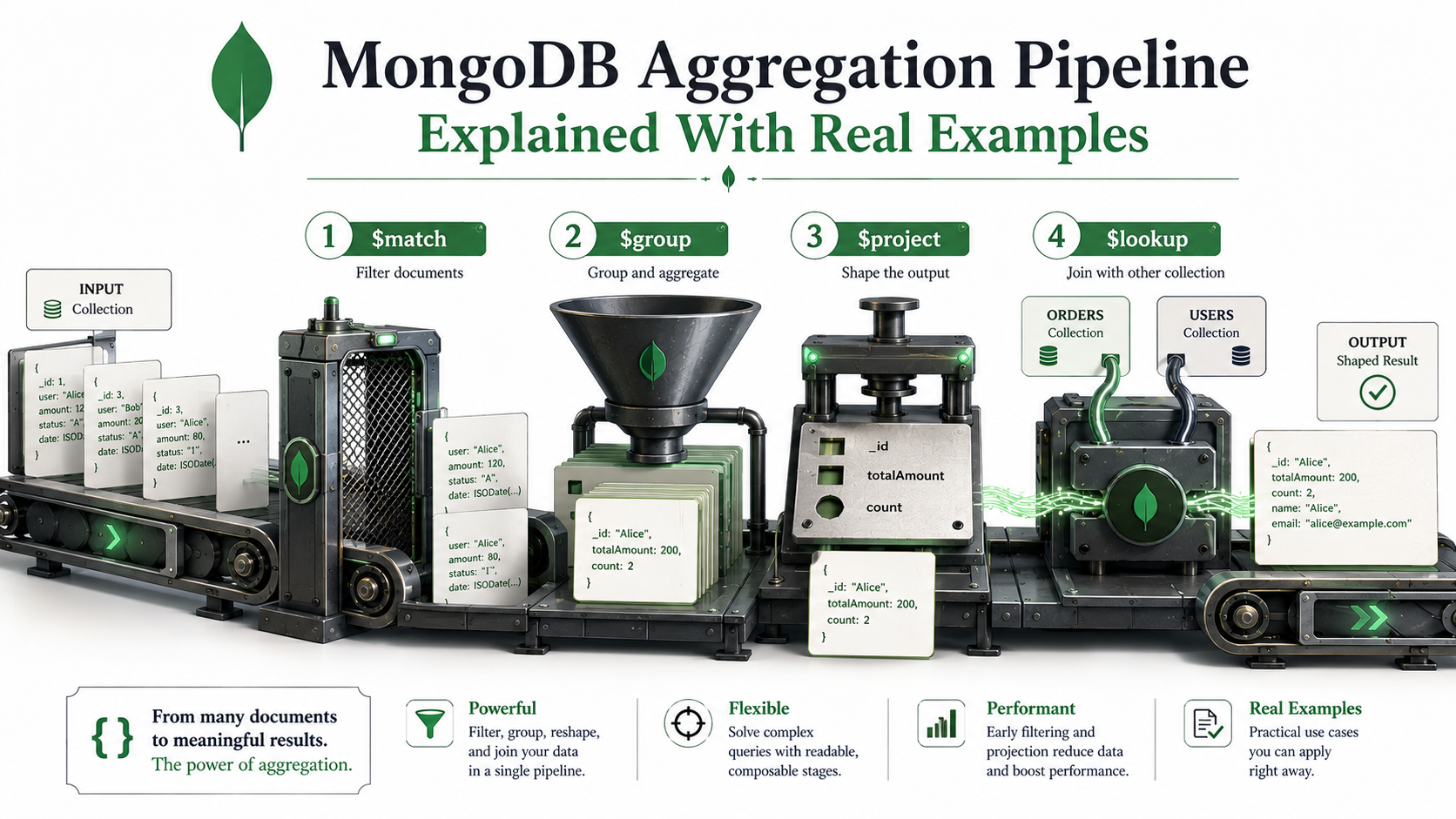
That single call is the aggregation pipeline. Once you understand the four stages people actually reach for ($match, $group, $project, and $lookup), most of the queries you used to do in code stop needing the app at all. Let's break it down.
The pipeline is a list of stages
The whole mental model fits on one line.
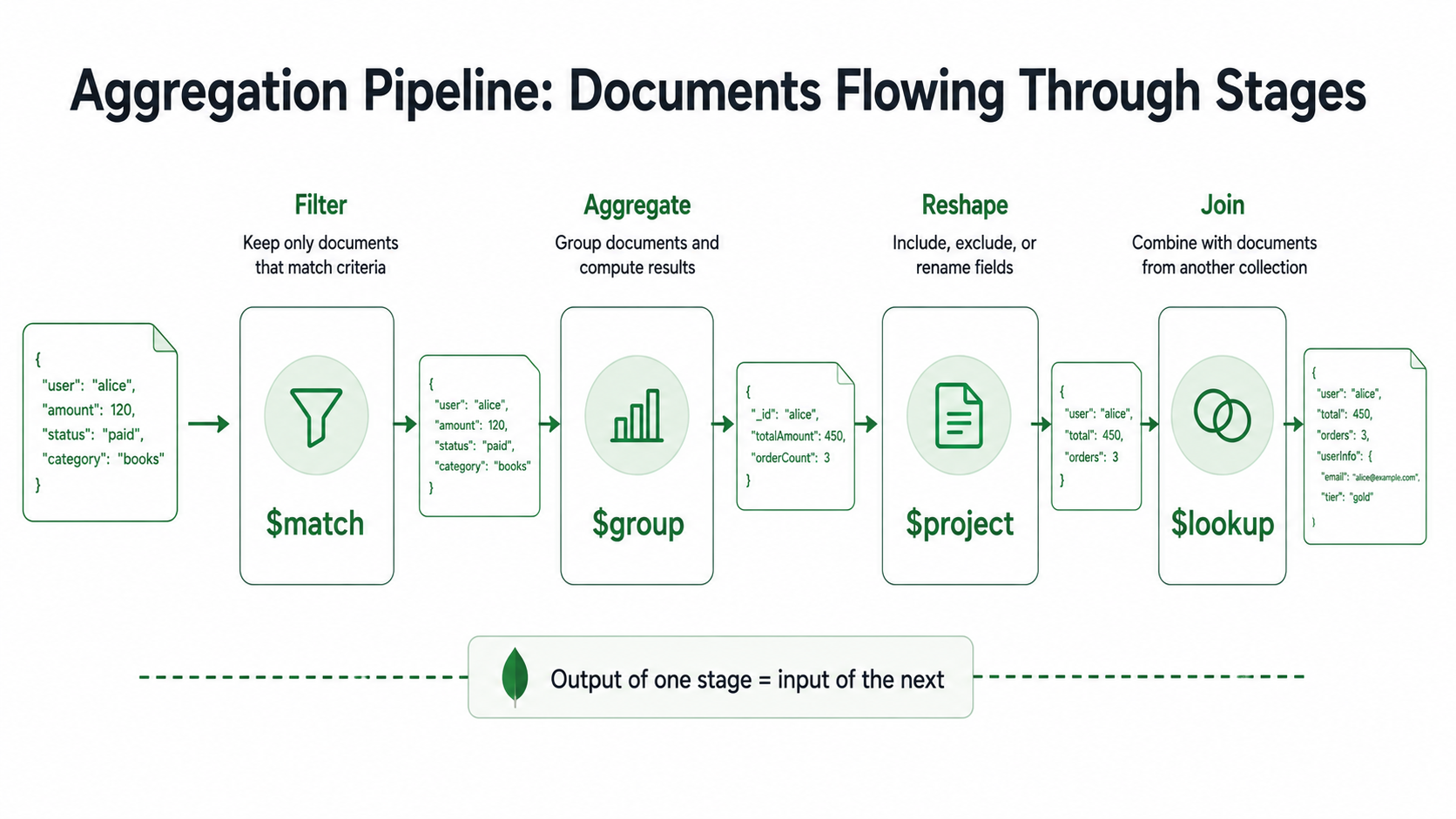
An aggregation is a list of stages. Each stage takes documents in, returns documents out. The output of one stage is the input of the next.
That's it. That's the whole abstraction.
You hand MongoDB an array of stage objects, and it pushes documents through them in order:
db.orders.aggregate([
  { $match:   { status: "paid" } },
  { $group:   { _id: "$customerId", total: { $sum: "$amount" } } },
  { $project: { customerId: "$_id", total: 1, _id: 0 } }
])
Read that top-down. "Take orders. Keep only the paid ones. Group what's left by customerId, summing amount. Then reshape the result so customerId is a real field and _id is gone."
It looks like SQL turned on its side. Where SQL is one statement with several clauses you read inside-out (SELECT ... FROM ... WHERE ... GROUP BY ... HAVING ...), aggregation is several small operations you read top-down. That ordering is also literal: stages run in the order you write them, and the order matters more than people realize.
The example dataset
Before we touch any stage, here's the dataset we'll use. It's deliberately small and ordinary. A real product would have more fields, but the shape is what matters.
// orders
{
  _id: ObjectId("..."),
  customerId: ObjectId("u1"),
  status: "paid",            // "paid" | "pending" | "refunded"
  amount: 79.90,
  currency: "USD",
  items: [
    { sku: "BOOK-001", qty: 1, price: 29.90 },
    { sku: "MUG-014",  qty: 2, price: 25.00 }
  ],
  createdAt: ISODate("2026-04-12T10:14:00Z")
}

// users
{
  _id: ObjectId("u1"),
  email: "ada@example.com",
  country: "GB",
  joinedAt: ISODate("2025-01-08T00:00:00Z")
}

// reviews
{
  _id: ObjectId("..."),
  productSku: "BOOK-001",
  rating: 5,
  body: "Great",
  authorId: ObjectId("u1")
}
Three collections: orders, users, reviews. Realistic enough to demonstrate every stage we care about.
$match: filter as early as you can
$match is the simplest stage and the one that has the biggest impact on performance. It does exactly what find() does: takes a query predicate and keeps only the documents that match.
db.orders.aggregate([
  { $match: { status: "paid", amount: { $gte: 50 } } }
])
Every operator you'd use in find() works here: $eq, $in, $gte, $regex, $or, $and, dot-notation into nested fields, the lot.
The non-obvious part is where you put $match in the pipeline.
Put it first. Put it as early as you possibly can. Two reasons.
The first is index usage. If $match is the very first stage, MongoDB can use a regular index on the underlying collection, exactly like find() would. Move it later in the pipeline, after a $group or $lookup, and the index is gone, because by then you're filtering computed documents that don't live on disk.
The second is volume. Every stage after $match only sees the documents $match let through. Cutting a million documents down to ten thousand at stage one means the rest of the pipeline does a hundred-times less work.
A common mistake looks like this:
// Bad: groups everything, then throws most of it away
db.orders.aggregate([
  { $group: { _id: "$customerId", total: { $sum: "$amount" } } },
  { $match: { total: { $gte: 1000 } } }
])
That $group runs on every order in the collection. Sometimes that's exactly what you want, like a top-spenders report on the whole table. But if you only care about paid orders from the last 30 days, prepend a $match for those conditions and you'll do a fraction of the work:
db.orders.aggregate([
  { $match: {
      status: "paid",
      createdAt: { $gte: ISODate("2026-04-10T00:00:00Z") }
  }},
  { $group: { _id: "$customerId", total: { $sum: "$amount" } } },
  { $match: { total: { $gte: 1000 } } }
])
Two $match stages, doing different jobs. The first filters the raw collection (uses an index). The second filters the grouped output (the total field, which only exists after $group, can't be on an index, and that's fine since the dataset is small by now).
The shape "filter early, aggregate, filter again on the result" shows up in almost every real pipeline you'll write.
$group: the stage you came for
$group is the reason you're on this page. It's also the stage with the most syntax to remember, so let's go slow.
The shape is always:
{ $group: {
    _id: <expression that defines the group key>,
    <outputField1>: { <accumulator>: <expression> },
    <outputField2>: { <accumulator>: <expression> },
    ...
}}
The _id is the key you're grouping by. Every other field is an accumulator: a function that combines values across all documents in the group.
A trivial example: total revenue across all orders.
db.orders.aggregate([
  { $match: { status: "paid" } },
  { $group: {
      _id: null,                       // null = "everything in one bucket"
      total: { $sum: "$amount" },
      count: { $sum: 1 }
  }}
])
// => [{ _id: null, total: 12450.55, count: 187 }]
_id: null is the "no grouping, just collapse everything" pattern. Useful when you only want one summary row.
Now group by something real. Revenue per customer:
db.orders.aggregate([
  { $match: { status: "paid" } },
  { $group: {
      _id: "$customerId",
      total: { $sum: "$amount" },
      orderCount: { $sum: 1 },
      avgOrder: { $avg: "$amount" },
      lastOrderAt: { $max: "$createdAt" }
  }}
])
A field reference uses the $fieldName syntax. "$customerId" means "the value of customerId from the input document", not the literal string. Every aggregation expression follows that rule, which trips people up the first three times.
The accumulators you'll use most:
$sum: sum a numeric expression, or$sum: 1to count documents in the group.$avg: average. Skips non-numeric values silently, which is helpful or dangerous depending on your data.$min/$max: extremes. Work on numbers, dates, strings, anything orderable.$first/$last: pick the first or last document's value in the group. Order is whatever the pipeline produced, so usually you want a$sortbefore$groupif you care.$push: collect every value into an array. Powerful, dangerous on large groups (the array can blow past the 16 MB document limit).$addToSet: like$pushbut deduplicates. Order isn't guaranteed.
Group keys can be compound. Want revenue per (customer, month)?
db.orders.aggregate([
  { $match: { status: "paid" } },
  { $group: {
      _id: {
        customerId: "$customerId",
        month: { $dateTrunc: { date: "$createdAt", unit: "month" } }
      },
      total: { $sum: "$amount" }
  }}
])
The _id becomes an object. Each unique combination of customerId and month is its own group. $dateTrunc is one of the date helpers MongoDB ships; it rounds a date down to a unit, so every order in April 2026 ends up with the same month bucket.
One last thing about $group: the output documents have only the fields you declared. Anything from the input document that you didn't roll up is gone. If you want to keep a customer's email next to the total, you have to bring it along explicitly with $first or pull it back later with $lookup.
$project: shape the output
$project is the stage that decides what each document looks like coming out. Add fields, drop fields, rename them, compute new ones from old ones.
The simplest projection includes or excludes fields by setting them to 1 or 0:
db.orders.aggregate([
  { $project: { _id: 0, customerId: 1, amount: 1, status: 1 } }
])
You generally pick one mode per $project: include the fields you want (and _id: 0 if you don't want the default _id), or exclude the fields you don't want. Mixing is mostly disallowed except for _id, which is special and lets you drop it in either mode.
Computed fields are where $project gets powerful. Anywhere you'd put 1, you can put an expression instead:
db.orders.aggregate([
  { $project: {
      _id: 0,
      customerId: 1,
      amountWithTax: { $multiply: ["$amount", 1.2] },
      isLargeOrder: { $gte: ["$amount", 100] },
      year: { $year: "$createdAt" }
  }}
])$multiply, $gte, $year are all aggregation expressions. There are dozens: string ops ($concat, $toLower, $split), array ops ($size, $filter, $map), conditional logic ($cond, $switch), math, dates. The reference docs are huge but the names are predictable.
A $project near the end of the pipeline does the obvious thing: pick the columns you want to return. A $project near the beginning does something less obvious but equally useful; it cuts down the document size early. If you're aggregating ten million orders and you only need customerId and amount, projecting away items, shipping, and the half-dozen denormalized fields you don't use means every later stage has less to chew on.
$lookup: join, with caveats
$lookup is the stage people approach with mixed feelings. It does what a SQL LEFT JOIN does, but with caveats worth respecting.
Here's the basic form. We have orders, and we want to attach the user document to each order:
db.orders.aggregate([
  { $match: { status: "paid" } },
  { $lookup: {
      from: "users",
      localField: "customerId",
      foreignField: "_id",
      as: "customer"
  }}
])
Read it as: "for each order, look in users for documents where _id equals this order's customerId, and put the matches in a new field called customer."
The result looks like this:
{
  _id: ObjectId("..."),
  customerId: ObjectId("u1"),
  status: "paid",
  amount: 79.90,
  customer: [                        // always an array, even for one match
    { _id: ObjectId("u1"), email: "ada@example.com", country: "GB" }
  ]
}
Three things to notice.
First, customer is an array. $lookup is conceptually a one-to-many join. Even if you know there's exactly one matching user, you get back an array of one. That's why you'll often see $lookup followed by $unwind: "$customer" to flatten it into a single embedded object.
Second, if there are no matches, customer is an empty array. It's a left outer join by default. To turn it into an inner join (drop orders without a matching user), use $unwind with preserveNullAndEmptyArrays: false (the default).
Third, performance. $lookup runs a query against the foreign collection for each input document. That means: make sure the foreignField is indexed. Without an index on users._id, you're doing a full collection scan per order. With one (and _id is always indexed by default), it's a series of cheap key lookups.
The classic combo of lookup, unwind, and project gives you a flat shape:
db.orders.aggregate([
  { $match: { status: "paid" } },
  { $lookup: {
      from: "users",
      localField: "customerId",
      foreignField: "_id",
      as: "customer"
  }},
  { $unwind: "$customer" },
  { $project: {
      _id: 0,
      amount: 1,
      email: "$customer.email",
      country: "$customer.country"
  }}
])
Output:
{ amount: 79.90, email: "ada@example.com", country: "GB" }That's the join you actually wanted. Three stages to express it, but each stage does one thing, and you can pause after any of them to see what's flowing through.
There's a more powerful form of $lookup with a sub-pipeline, useful when the match condition is more than a single field equality:
db.orders.aggregate([
  { $lookup: {
      from: "reviews",
      let: { customerId: "$customerId" },
      pipeline: [
        { $match: {
            $expr: { $eq: ["$authorId", "$$customerId"] },
            rating: { $gte: 4 }
        }}
      ],
      as: "happyReviews"
  }}
])
The let block makes outer fields available inside the sub-pipeline as $$variableName. $expr lets you use aggregation expressions in a $match. Use this form when you need to pre-filter the foreign collection. Pulling all reviews per user and filtering after is wasteful when you can filter inside the lookup.
Putting it together: a real query
Let's combine everything into one query that answers a real question: "For each country, what's the total revenue from paid orders in the last 30 days, and which customer in that country spent the most?"
const since = ISODate("2026-04-10T00:00:00Z");

db.orders.aggregate([
  // 1. Filter early -- uses the index on { status, createdAt }
  { $match: {
      status: "paid",
      createdAt: { $gte: since }
  }},

  // 2. Per-customer totals first
  { $group: {
      _id: "$customerId",
      total: { $sum: "$amount" }
  }},

  // 3. Attach the user so we know their country
  { $lookup: {
      from: "users",
      localField: "_id",
      foreignField: "_id",
      as: "user"
  }},
  { $unwind: "$user" },

  // 4. Group again, this time by country
  { $group: {
      _id: "$user.country",
      countryTotal: { $sum: "$total" },
      topCustomer: { $first: {
        email: "$user.email",
        spent: "$total"
      }}
  }},

  // 5. Make the output friendly
  { $project: {
      _id: 0,
      country: "$_id",
      countryTotal: 1,
      topCustomer: 1
  }},

  // 6. Largest country first
  { $sort: { countryTotal: -1 } }
])
That last result is what gets returned to your dashboard. One round trip. No code-side loops. The database does what databases are good at.
A small subtlety: step 4 uses $first to pick a customer, but $first picks whoever the previous stage happened to put first, which is whatever order Mongo wants to return. To make $first deterministic, add a $sort between $unwind and the second $group, sorting by total: -1, so the first document per country is genuinely the top spender:
{ $sort: { "user.country": 1, total: -1 } },That detail is the kind of thing you only catch by inspecting the pipeline output stage by stage. Which, again, is the whole point of how aggregation is structured: you can.
A few stages worth knowing about
The four we've covered carry most of the weight, but these come up often enough that you should recognize them when you see them.
$sort orders documents. Use it before $group when you care about $first / $last. Use it at the end to order results. Indexes help if $sort is the first stage.
$unwind explodes an array field into multiple documents, one per element. You need it when you want to aggregate over array contents. "Total revenue per SKU across all orders" is $unwind: "$items" followed by $group: { _id: "$items.sku", total: { $sum: { $multiply: ["$items.qty", "$items.price"] } } }.
$limit and $skip handle pagination. $limit is also useful right after $sort to do top-N queries efficiently; Mongo can stop sorting once it has the top N if it sees $limit next.
$count is shorthand for { $group: { _id: null, count: { $sum: 1 } } } followed by $project. Reads better when you literally just want a count.
$facet runs multiple sub-pipelines in parallel and returns a single document with their results. Useful for dashboards where you want totals, breakdowns, and a top-10 list in one round trip.
You don't need to memorize them. You need to know they exist, so when the answer "I'd write a for loop in Node for this" pops into your head, you can pause and ask whether one of these stages would do it on the database side.
Indexes still matter
Aggregation isn't a magic fast button. The pipeline can use indexes, but mostly only at the beginning. Specifically:
- A
$matchat stage one can use an index on the underlying collection. - A
$sortat stage one can use an index, even without a$match. - Once you pass through a
$group,$projectthat drops fields, or a$lookup, the index window closes. You're working with synthesized documents that no index covers.
The practical rule: do as much filtering and sorting as you can on the raw collection, before any reshaping stage. That's why $match and $sort belong at the top of almost every pipeline.
You can check what's actually happening with .explain():
db.orders.explain("executionStats").aggregate([
  { $match: { status: "paid", createdAt: { $gte: since } } },
  { $group: { _id: "$customerId", total: { $sum: "$amount" } } }
])
Look for IXSCAN in the first stage. If you see COLLSCAN, your $match isn't using an index. Either the index is missing, or the predicate doesn't fit the leftmost prefix of an existing one.
When not to reach for aggregation
Aggregation isn't always the answer.
If you only need a few documents and a single condition, plain find() is shorter, plays better with the driver's cursor APIs, and won't surprise anyone reading the code.
If your query is so complex that you're three nested $groups deep and writing $let expressions inside $lookup sub-pipelines just to get the right shape, the data model might be the actual problem. Aggregation can rescue you from a bad schema, but only so far. Sometimes the right move is to denormalize at write time, storing the customer's country on the order so the join goes away, or to split a hot reporting query into a materialized collection that a background job rebuilds.
But for the everyday "I need to summarize, group, reshape, or join across collections" question (and there are so many of those in any real product), the pipeline is the tool. $match to filter, $group to summarize, $project to shape, $lookup to join. Four stages, composed in different orders, will get you most of the way through any reporting question you'll ever face.
Once you stop reaching for the application-side for loop, you start writing queries that finish in milliseconds and return exactly the shape your UI wants. That's the whole quiet promise of the aggregation pipeline. Now that you can see the four moves, the rest is just practice.