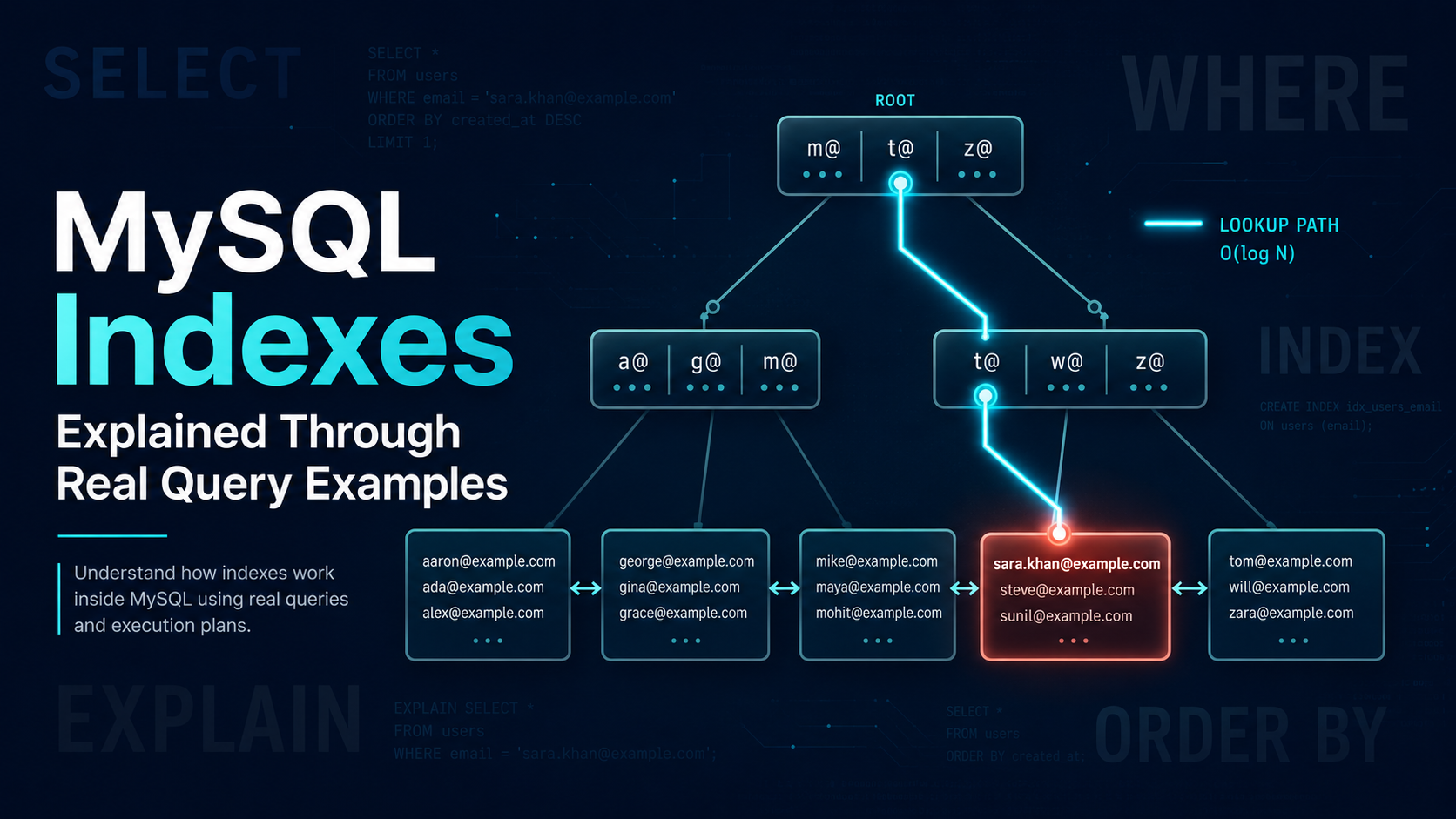
Indexes are one of the most important performance tools in MySQL.
They can turn a query from a full table scan into a fast lookup. They can help MySQL avoid sorting, reduce disk reads, speed up joins, and make pagination more predictable.
But indexes are also easy to misunderstand.
Many developers know that "indexes make queries faster," but they are not always sure:
- which columns should be indexed;
- why composite index order matters;
- why an index is not used even when it exists;
- what cardinality and selectivity mean;
- why
LIKE '%text%'is slow; - why
ORDER BYsometimes ignores an index; - why adding too many indexes can hurt writes;
- how to read
EXPLAIN.
This article explains MySQL indexes through real query examples.
The goal is not to memorize rules. The goal is to build the mental model you need when reviewing slow queries in a real backend application.
Learning Plan
Before going deep, here is the plan.
Part 1: Build the Mental Model
You need to understand what an index is, how MySQL uses B-tree indexes, and why indexes are not magic.
You will learn:
- how a B-tree index is ordered;
- why equality lookups are fast;
- why range queries are still efficient;
- why an index can help with
ORDER BY; - why a secondary index in InnoDB still needs to find the actual row.
Part 2: Learn Single-Column Indexes
You will see how a simple index helps queries like:
SELECT * FROM users WHERE email = 'nazar@example.com';You will also see when a single-column index is not enough.
Part 3: Learn Composite Indexes
Composite indexes are where most real performance work happens.
You will learn why this index:
CREATE INDEX idx_orders_user_status_created
ON orders (user_id, status, created_at);
can help some queries very well, but not others.
You will learn the leftmost-prefix rule and the common "equality columns first, range column later" strategy.
Part 4: Understand Cardinality and Selectivity
Not all indexed columns are equally useful.
An index on email is usually highly selective.
An index on status may be weak if most rows have the same value.
You will learn how to think about cardinality and why low-cardinality columns are not always useless, but often need to be combined with other columns.
Part 5: Practice With EXPLAIN (and EXPLAIN ANALYZE)
You will learn how to inspect query plans using EXPLAIN, EXPLAIN FORMAT=TREE, and EXPLAIN ANALYZE (MySQL 8.0.18+), and the meaning of the columns that matter most: type, possible_keys, key, rows, filtered, and Extra.
Part 6: Apply Real Indexing Patterns
You will learn practical indexing patterns for login lookups, order history, admin filters, soft deletes, queues, pagination, joins, reporting queries, and covering indexes.
Part 7: Use Modern MySQL 8.x Features
You will learn when to reach for:
- functional / expression indexes;
- invisible indexes;
- descending indexes;
- multi-valued indexes on JSON;
- FULLTEXT indexes;
- index hints.
Part 8: Avoid Common Mistakes
You will learn why these patterns can break index usage:
- wrapping indexed columns in functions;
- leading wildcard
LIKE; - wrong composite index order;
- too many indexes;
- redundant indexes;
- indexing every column;
- using
OFFSETpagination at scale.
Official MySQL References Used
This article is based on practical experience and the MySQL documentation, especially:
- MySQL 8.4 Reference Manual, How MySQL Uses Indexes
- MySQL 8.4 Reference Manual, Optimization and Indexes
- MySQL 8.4 Reference Manual, Multiple-Column Indexes
- MySQL 8.4 Reference Manual, Range Optimization
- MySQL 8.4 Reference Manual, EXPLAIN Output Format
- MySQL 8.4 Reference Manual, Index Condition Pushdown Optimization
- MySQL 8.4 Reference Manual, Column Indexes and Index Prefixes
- MySQL 8.4 Reference Manual, Invisible Indexes
- MySQL 8.4 Reference Manual, Descending Indexes
- MySQL 8.4 Reference Manual, Multi-Valued Indexes
- MySQL 8.4 Reference Manual, Optimizer Statistics (Histograms)
1. What Problem Do Indexes Solve?
Imagine a table with 10 million users.
CREATE TABLE users (
    id BIGINT UNSIGNED NOT NULL AUTO_INCREMENT,
    email VARCHAR(255) NOT NULL,
    name VARCHAR(255) NOT NULL,
    status VARCHAR(30) NOT NULL,
    created_at DATETIME NOT NULL,
    PRIMARY KEY (id)
);
Now imagine this query:
SELECT *
FROM users
WHERE email = 'nazar@example.com';
Without an index on email, MySQL may need to scan the table row by row.
That means:
- read row 1;
- check if
email = 'nazar@example.com'; - read row 2;
- check again;
- repeat until the match is found or the table ends.
On a small table, this is fine.
On a large table, this is painful.
Now add an index:
CREATE UNIQUE INDEX users_email_unique
ON users (email);
Now MySQL can use the index to find the matching email much faster.
The index is a separate data structure that stores values in sorted order, together with a way to find the matching row.
A simplified version looks like this:
email                         row pointer / primary key
-------------------------------------------------------
anna@example.com              101
john@example.com              482
nazar@example.com             917
sara@example.com              1021
Instead of scanning the whole table, MySQL can search the sorted index.
That is the core idea.
An index helps MySQL avoid unnecessary work.
2. B-tree Indexes: The Default Mental Model
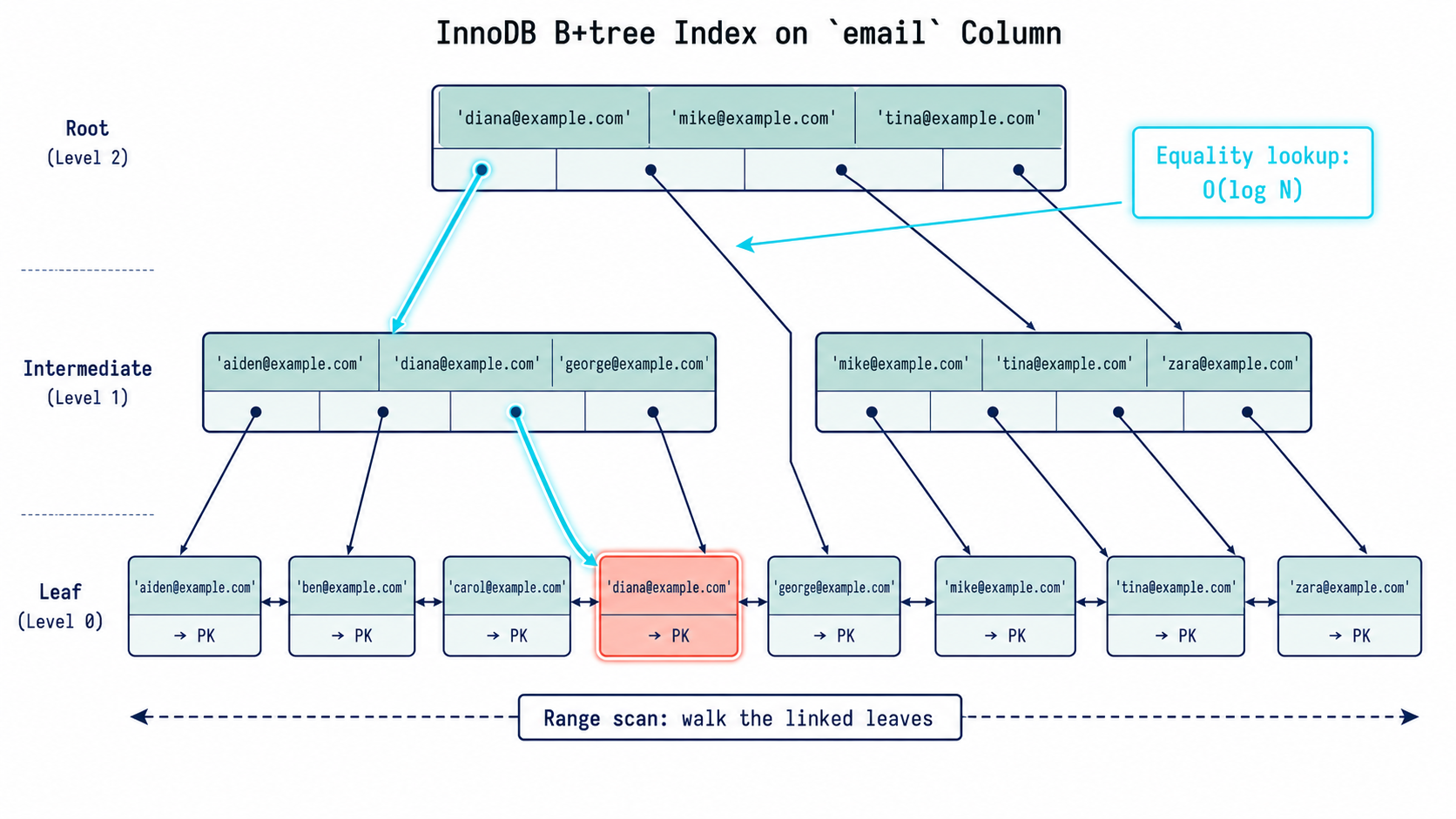
Most normal MySQL indexes use a B-tree-like structure.
When you create a regular index like this:
CREATE INDEX idx_users_email
ON users (email);
you are usually creating a B-tree index.
The exact internal structure is more complex than a simple sorted list, but the mental model is simple:
- values are stored in sorted order;
- MySQL can jump quickly to a value;
- MySQL can scan a range efficiently;
- MySQL can sometimes return rows already ordered;
- MySQL can use the index for equality, range, join, grouping, and sorting operations.
B-tree Example: Equality Lookup
SELECT *
FROM users
WHERE email = 'nazar@example.com';
Useful index:
CREATE INDEX idx_users_email
ON users (email);
Why it helps:
Find exact email in sorted index → find matching row → return resultThis is usually very fast because email has high uniqueness.
B-tree Example: Range Lookup
SELECT *
FROM orders
WHERE created_at >= '2026-05-01'
  AND created_at <  '2026-06-01';
Useful index:
CREATE INDEX idx_orders_created_at
ON orders (created_at);
Why it helps:
Jump to first date >= 2026-05-01
Walk the linked leaves forward
Stop at first date >= 2026-06-01
This is much better than checking every order.
B-tree Example: ORDER BY
SELECT id, created_at, total
FROM orders
ORDER BY created_at DESC
LIMIT 50;
Useful index:
CREATE INDEX idx_orders_created_at
ON orders (created_at);
Because the index is ordered, MySQL may be able to read rows in index order instead of sorting all rows manually.
This is one reason indexes can help even when there is no WHERE clause.
3. Primary Key vs Secondary Indexes in InnoDB
In InnoDB, the primary key is special.
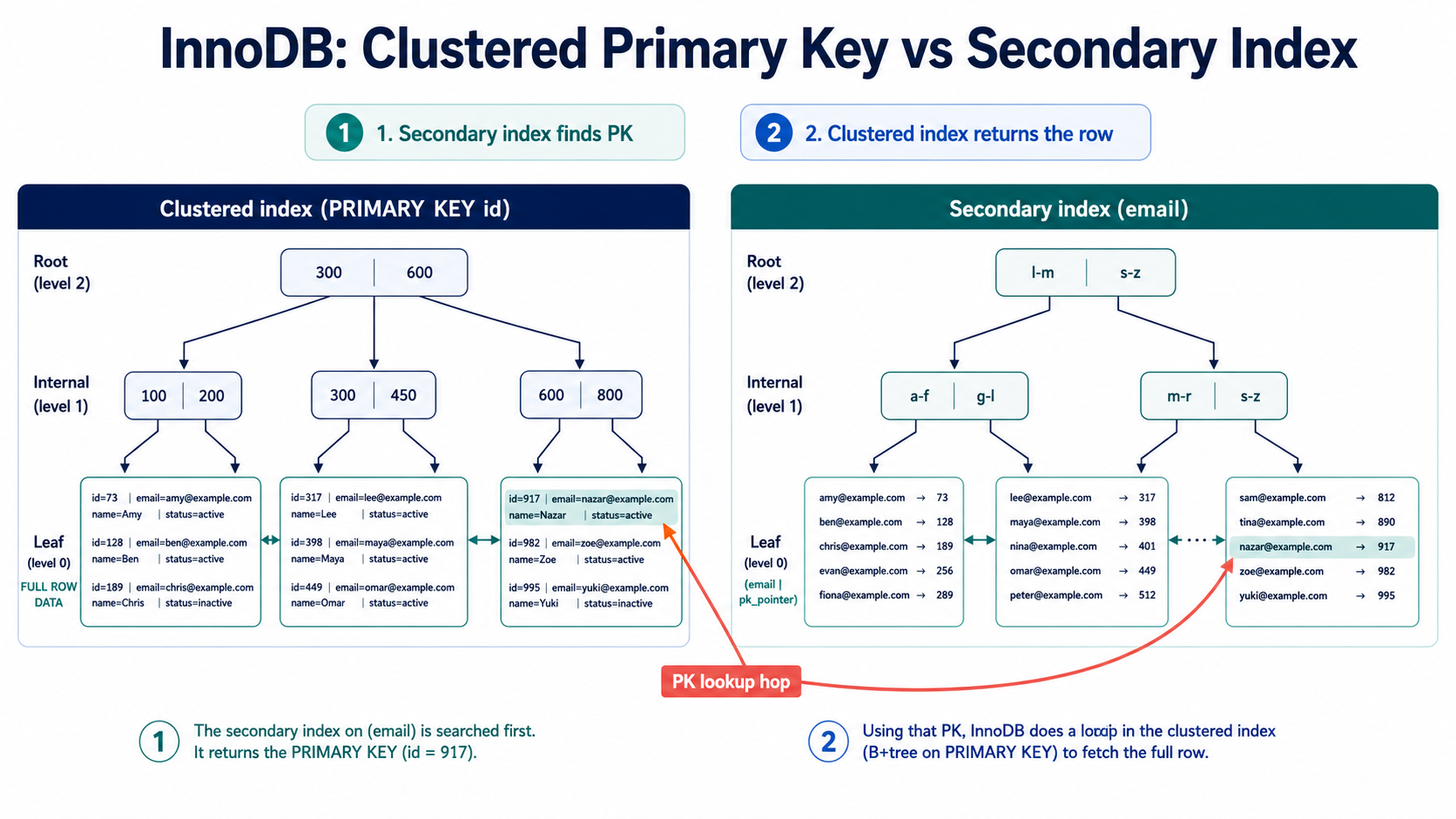
The table data is organized around the primary key. This is often called a clustered index.
Example:
PRIMARY KEY (id)The actual table rows are stored in primary key order.
A secondary index is any other index:
CREATE INDEX idx_users_email
ON users (email);
In InnoDB, a secondary index stores the indexed column values plus the primary key value.
A simplified secondary index on email might look like:
email                         primary key
------------------------------------------------
anna@example.com              101
john@example.com              482
nazar@example.com             917
Then MySQL uses the primary key to find the full row.
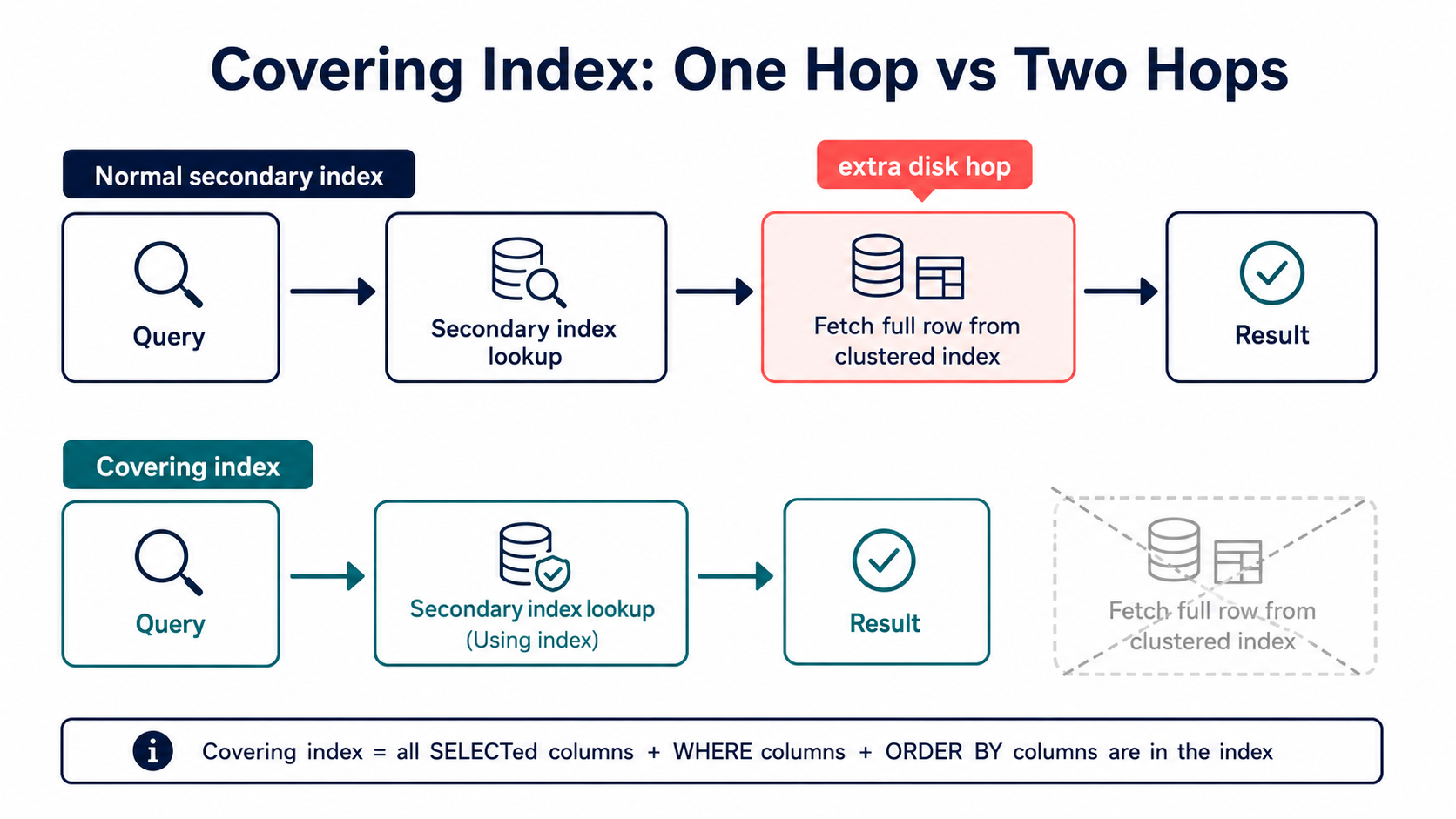
This means a secondary index lookup may involve two steps:
1. Search secondary index.
2. Use primary key to fetch full row.
That second step matters.
If your query can be answered completely from the secondary index, MySQL may not need to fetch the full row. That is called a covering index.
We will cover that later.
4. Single-Column Indexes
A single-column index is an index on one column.
CREATE INDEX idx_users_status
ON users (status);
It helps queries that filter, join, group, or sort by that column.
Example: Login by Email
SELECT id, email, password_hash
FROM users
WHERE email = 'nazar@example.com'
LIMIT 1;
Good index:
CREATE UNIQUE INDEX users_email_unique
ON users (email);
Why this is good:
emailis highly selective;- the query expects one row;
- a unique index tells MySQL that only one matching row can exist;
- it also protects data integrity.
This is a perfect index use case.
Example: Search by Status
SELECT *
FROM users
WHERE status = 'active';
Possible index:
CREATE INDEX idx_users_status
ON users (status);
But this may or may not help.
Why?
Because status often has low cardinality.
Maybe your table has only these values:
active
inactive
banned
pending
If 95% of users are active, then this query returns most of the table:
WHERE status = 'active'In that case, using the index may not be much better than scanning the table.
Sometimes it can even be worse because MySQL has to:
- scan many entries in the index;
- jump back to the table for many rows.
So the rule is not "index every filter column."
The better rule is:
Index columns that help MySQL eliminate a large amount of work.
5. Cardinality and Selectivity
Cardinality means how many distinct values a column has.
Selectivity means how well a condition narrows the result set.
These ideas are related.
High Cardinality
Example: email
10,000,000 rows
9,999,500 distinct emails
This is high cardinality.
A condition like this is highly selective:
WHERE email = 'nazar@example.com'It probably returns one row.
Great index candidate.
Low Cardinality
Example: status
10,000,000 rows
4 distinct statuses
This is low cardinality.
A condition like this may not be very selective:
WHERE status = 'active'If most users are active, the index may not help much.
Medium Cardinality
Example: country_code
10,000,000 rows
200 distinct country codes
This is medium cardinality.
An index may help if the filtered value is selective enough.
For example:
WHERE country_code = 'IS'may return a small number of rows.
But:
WHERE country_code = 'US'may return a large number of rows.
The usefulness depends on data distribution, not only the number of distinct values.
How to Estimate Selectivity
You can run:
SELECT
    COUNT(*) AS total_rows,
    COUNT(DISTINCT email) AS distinct_emails,
    COUNT(DISTINCT status) AS distinct_statuses,
    COUNT(DISTINCT country_code) AS distinct_countries
FROM users;
You can also check distribution:
SELECT status, COUNT(*) AS total
FROM users
GROUP BY status
ORDER BY total DESC;
Example result:
| status | total |
|---|---|
| active | 9,500,000 |
| pending | 300,000 |
| inactive | 150,000 |
| banned | 50,000 |
Now you can reason clearly.
An index on status may be useful for:
WHERE status = 'banned'but weak for:
WHERE status = 'active'Same column. Different value. Different selectivity.
6. Composite Indexes
A composite index is an index on multiple columns.
CREATE INDEX idx_orders_user_status_created
ON orders (user_id, status, created_at);
This index is not three separate indexes.
It is one ordered structure.
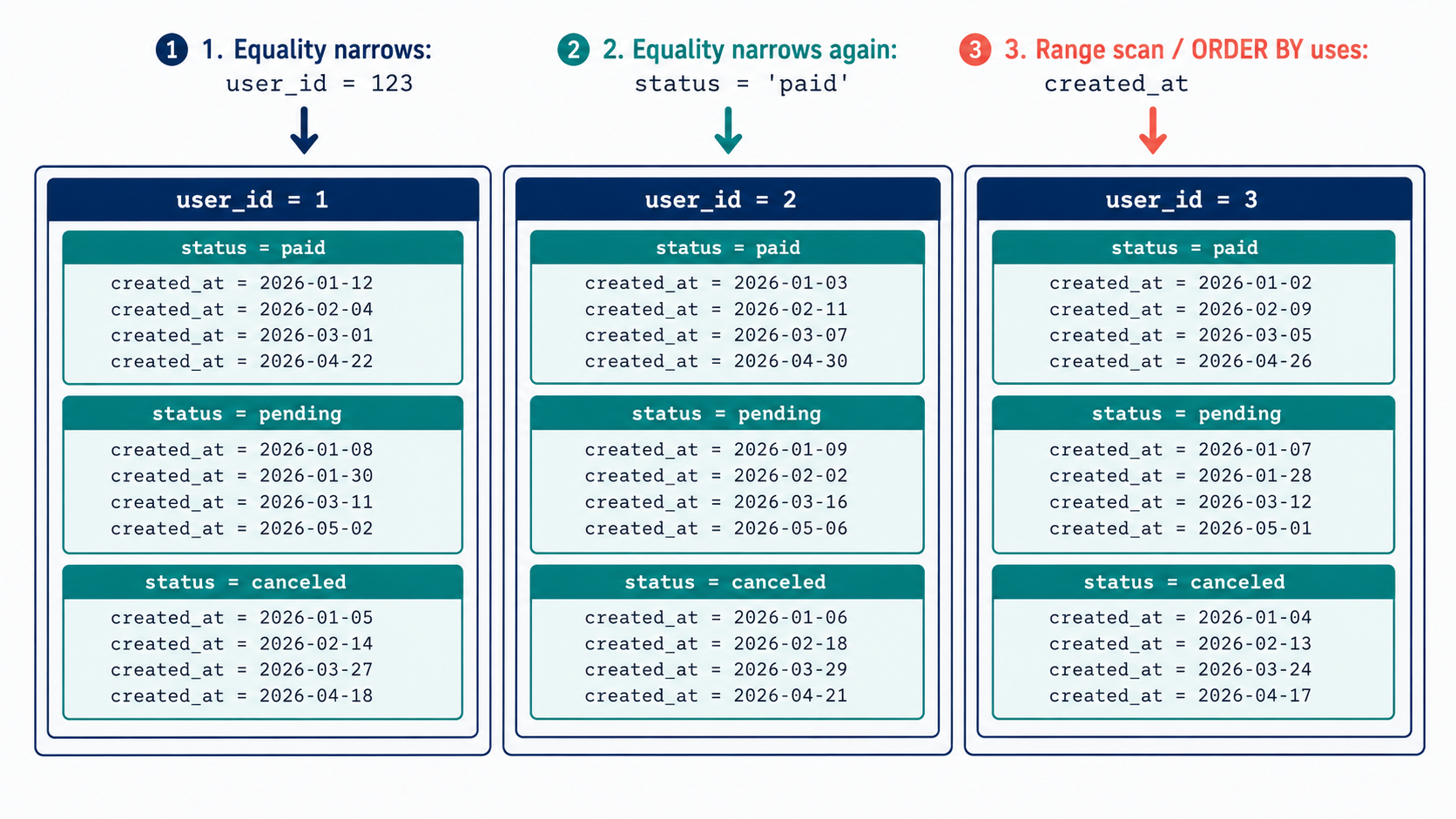
Think of it as being sorted like this:
user_id → status → created_atFirst by user_id.
Inside each user_id, sorted by status.
Inside each (user_id, status) group, sorted by created_at.
This order matters a lot.
Example Table
CREATE TABLE orders (
    id BIGINT UNSIGNED NOT NULL AUTO_INCREMENT,
    user_id BIGINT UNSIGNED NOT NULL,
    status VARCHAR(30) NOT NULL,
    total DECIMAL(10, 2) NOT NULL,
    created_at DATETIME NOT NULL,
    paid_at DATETIME NULL,
    PRIMARY KEY (id),
    INDEX idx_orders_user_status_created (user_id, status, created_at)
);
Query 1: Excellent Match
SELECT *
FROM orders
WHERE user_id = 123
  AND status = 'paid'
ORDER BY created_at DESC
LIMIT 20;
Index:
INDEX idx_orders_user_status_created (user_id, status, created_at)This is a strong match.
Why?
The query filters by:
user_id = 123
status = 'paid'
Then orders by:
created_at DESCThe index is already organized by:
user_id → status → created_atMySQL can jump to the section for user 123, then to status paid, then scan by created_at.
This is exactly the kind of query composite indexes are designed for.
Query 2: Leftmost Prefix Works
SELECT *
FROM orders
WHERE user_id = 123;
Same index can help:
INDEX (user_id, status, created_at)Because user_id is the leftmost column.
This is called the leftmost-prefix rule.
A composite index on:
(a, b, c)can be used for:
(a)
(a, b)
(a, b, c)
But not usually for:
(b)
(c)
(b, c)
because those are not leftmost prefixes.
Query 3: Skipping the First Column Is a Problem
SELECT *
FROM orders
WHERE status = 'paid';
Index:
INDEX (user_id, status, created_at)This index is not ideal.
Why?
Because the index is sorted first by user_id.
Across the whole index, status = 'paid' is scattered inside each user group.
Simplified:
user_id  status
----------------
1        canceled
1        paid
1        pending
2        paid
2        refunded
3        canceled
3        paid
There is no single continuous section for all paid orders.
If you often query by status alone, you may need a different index:
CREATE INDEX idx_orders_status_created
ON orders (status, created_at);
But do not create it automatically. First confirm that the query is important and selective enough.
7. The Leftmost-Prefix Rule
The leftmost-prefix rule is one of the most important indexing rules in MySQL.
For an index:
INDEX idx_example (a, b, c)MySQL can efficiently use:
WHERE a = ?WHERE a = ? AND b = ?WHERE a = ? AND b = ? AND c = ?It can also often use:
WHERE a = ? AND b > ?But after a range condition, the remaining columns are less useful for narrowing the index lookup.
Example: Equality + Range
SELECT *
FROM orders
WHERE user_id = 123
  AND created_at >= '2026-05-01'
  AND created_at <  '2026-06-01';
Good index:
CREATE INDEX idx_orders_user_created
ON orders (user_id, created_at);
Why?
The index groups rows by user_id, then sorts them by created_at.
MySQL can:
- jump to
user_id = 123; - scan the date range for that user.
Example: Wrong Order
CREATE INDEX idx_orders_created_user
ON orders (created_at, user_id);
For this query:
WHERE user_id = 123
  AND created_at >= '2026-05-01'
  AND created_at <  '2026-06-01'
this index is weaker.
It is sorted first by created_at, then user_id.
MySQL can find the date range, but inside that date range it may need to filter many users.
If the date range includes millions of orders, this is expensive.
Practical Rule
For many OLTP queries, a good composite index order is:
equality filters first → range filter → ordering column if compatibleExample:
WHERE tenant_id = ?
  AND status = ?
  AND created_at >= ?
ORDER BY created_at DESC
LIMIT 50
Good index:
CREATE INDEX idx_orders_tenant_status_created
ON orders (tenant_id, status, created_at);
Why?
tenant_id = ?narrows to one tenant;status = ?narrows further;created_at >= ?scans a time range;ORDER BY created_atcan often follow index order.
8. Composite Index Column Order: Real Examples
Choosing column order is one of the most important indexing decisions.
Let's use this table:
CREATE TABLE payments (
    id BIGINT UNSIGNED NOT NULL AUTO_INCREMENT,
    tenant_id BIGINT UNSIGNED NOT NULL,
    user_id BIGINT UNSIGNED NOT NULL,
    status VARCHAR(30) NOT NULL,
    provider VARCHAR(30) NOT NULL,
    amount DECIMAL(10, 2) NOT NULL,
    created_at DATETIME NOT NULL,
    PRIMARY KEY (id)
);
Query A: Tenant Dashboard
SELECT *
FROM payments
WHERE tenant_id = 10
  AND status = 'failed'
ORDER BY created_at DESC
LIMIT 50;
Good index:
CREATE INDEX idx_payments_tenant_status_created
ON payments (tenant_id, status, created_at);
Why not this?
CREATE INDEX idx_payments_status_tenant_created
ON payments (status, tenant_id, created_at);
It might also work for this exact query because both tenant_id and status are equality conditions.
But in multi-tenant systems, tenant_id is often a strong leading column because most queries are tenant-scoped.
It also helps more query shapes:
WHERE tenant_id = 10
ORDER BY created_at DESC
can use (tenant_id, status, created_at) only partially for filtering by tenant, but not perfectly for ordering across all statuses.
For this query:
SELECT *
FROM payments
WHERE tenant_id = 10
ORDER BY created_at DESC
LIMIT 50;
this index is better:
CREATE INDEX idx_payments_tenant_created
ON payments (tenant_id, created_at);
That is an important lesson:
One composite index cannot be perfect for every query.
Design indexes for your most important query patterns.
Query B: User Payment History
SELECT id, status, amount, created_at
FROM payments
WHERE user_id = 777
ORDER BY created_at DESC
LIMIT 20;
Good index:
CREATE INDEX idx_payments_user_created
ON payments (user_id, created_at);
This is a classic "history page" query.
The index lets MySQL find all payments for one user and return the newest rows quickly.
Query C: Failed Payments Report
SELECT id, tenant_id, provider, amount, created_at
FROM payments
WHERE status = 'failed'
  AND created_at >= '2026-05-01'
  AND created_at <  '2026-06-01'
ORDER BY created_at DESC;
Possible index:
CREATE INDEX idx_payments_status_created
ON payments (status, created_at);
This works if status = 'failed' is selective enough.
If many rows are failed, the query may still scan many rows.
If reports are large, you may need a reporting table, summary table, partitioning strategy, or async analytics pipeline. Indexes help, but they do not make every analytical query cheap.
9. Equality, Range, and Sorting
A common query pattern is:
WHERE a = ?
  AND b = ?
  AND c BETWEEN ? AND ?
ORDER BY c
Good index:
(a, b, c)Why?
aequality narrows the index;bequality narrows it more;crange scans within that smaller group;ORDER BY ccan use the same index order.
Example: Orders Page
SELECT id, total, created_at
FROM orders
WHERE user_id = 123
  AND status = 'paid'
  AND created_at >= '2026-01-01'
ORDER BY created_at DESC
LIMIT 50;
Good index:
CREATE INDEX idx_orders_user_status_created
ON orders (user_id, status, created_at);
This is strong because the sort column is also the range column.
When ORDER BY Cannot Use the Index Well
SELECT *
FROM orders
WHERE user_id = 123
  AND created_at >= '2026-01-01'
ORDER BY total DESC;
Index:
(user_id, created_at)This helps filter by user and date.
But it does not provide rows ordered by total.
MySQL may still need a filesort.
That does not always mean disaster. Sorting 100 rows is fine. Sorting 5 million rows is not.
Always ask:
How many rows are left after filtering before sorting?
10. Covering Indexes
A covering index is an index that contains all columns needed by a query.
Example:
SELECT id, user_id, status, created_at
FROM orders
WHERE user_id = 123
  AND status = 'paid'
ORDER BY created_at DESC
LIMIT 20;
Covering index:
CREATE INDEX idx_orders_user_status_created
ON orders (user_id, status, created_at);
The query needs:
id, user_id, status, created_atAll of these are available in the index. Note that id is "free" because in InnoDB the primary key is appended to every secondary index.
So MySQL may not need to fetch the full row from the table.
In EXPLAIN, you may see:
Extra: Using indexThat usually means a covering index is being used.
Covering Index vs Normal Index
Normal index:
CREATE INDEX idx_orders_user_status_created
ON orders (user_id, status, created_at);
Query:
SELECT *
FROM orders
WHERE user_id = 123
  AND status = 'paid'
ORDER BY created_at DESC
LIMIT 20;
Because of SELECT *, MySQL needs columns not stored in the index.
So it must fetch full rows.
Covering query:
SELECT id, status, created_at
FROM orders
WHERE user_id = 123
  AND status = 'paid'
ORDER BY created_at DESC
LIMIT 20;
This may be served mostly from the index.
11. EXPLAIN: How to See What MySQL Is Doing
Use EXPLAIN before your query:
EXPLAIN
SELECT id, status, created_at
FROM orders
WHERE user_id = 123
  AND status = 'paid'
ORDER BY created_at DESC
LIMIT 20;
Example output may look like this:
id | select_type | table  | type | possible_keys                  | key                            | rows | filtered | Extra
---+-------------+--------+------+--------------------------------+--------------------------------+------+----------+----------------
1  | SIMPLE      | orders | ref  | idx_orders_user_status_created | idx_orders_user_status_created | 120  | 100.00   | Using where
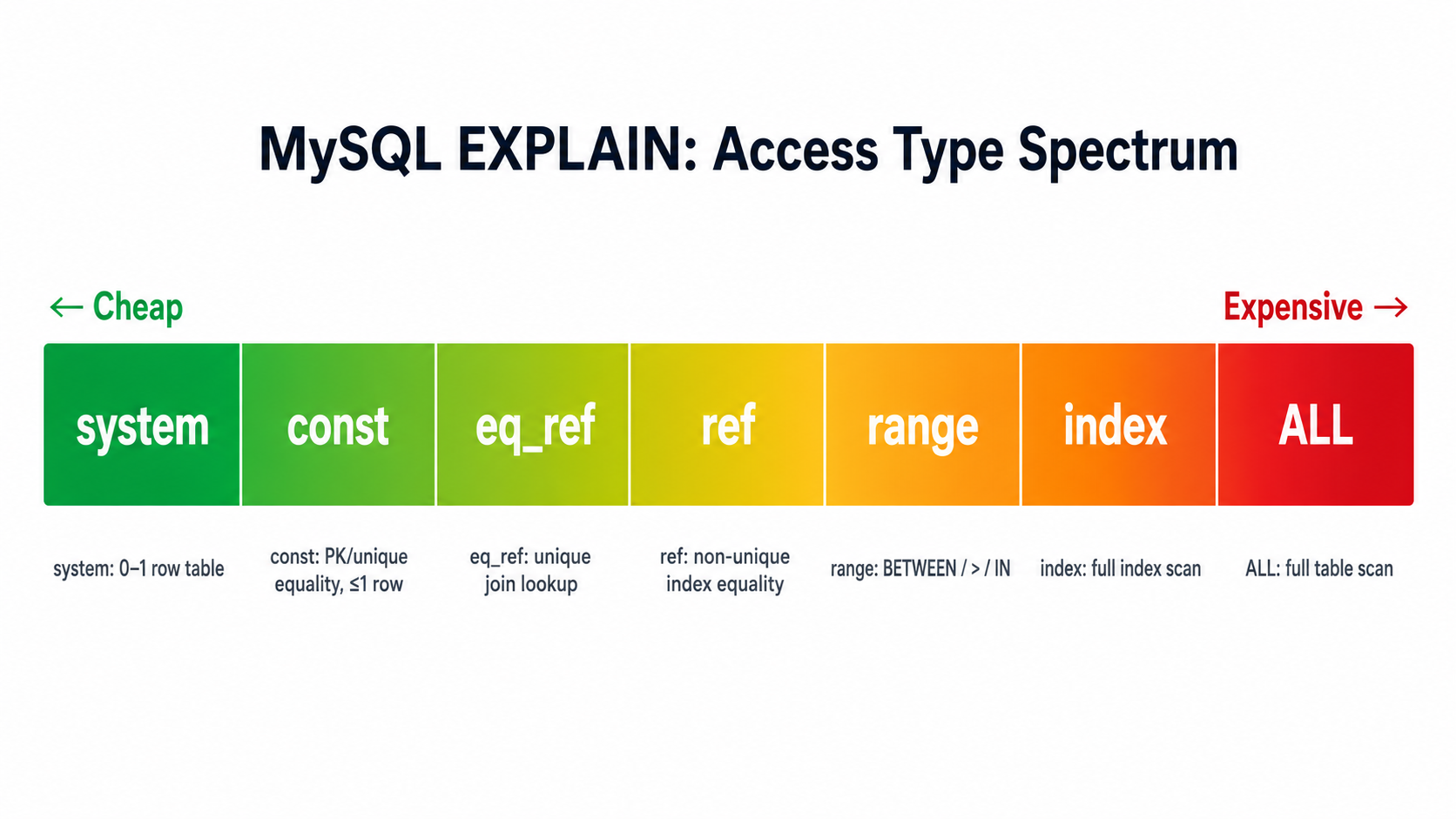
type
This shows the access type. Common values, from best to worst:
| type | Meaning |
|---|---|
system |
Table has 0 or 1 rows. Trivial. |
const |
At most one row matched, via PRIMARY KEY or UNIQUE on equality. |
eq_ref |
One row from this table for each row from a previous joined table. |
ref |
Non-unique index lookup on equality. Common and good. |
range |
Index range scan (BETWEEN, >, <, IN (...)). |
index |
Full index scan. Cheaper than ALL only if index is much smaller. |
ALL |
Full table scan. Acceptable for small tables; concerning for big ones. |
You usually want to avoid ALL on large tables. But context matters, a full scan of a 500-row table is fine.
possible_keys
Indexes MySQL could potentially use.
key
The index MySQL actually chose.
If this is NULL, MySQL did not use an index for that table.
rows
Estimated number of rows MySQL expects to examine.
This is an estimate, not an exact count.
If rows is very large, your query may be expensive.
filtered
Estimated percentage of rows that remain after conditions are applied.
Extra
This contains useful notes like:
Using where
Using index
Using filesort
Using temporary
Using index condition
Extra value |
What it means |
|---|---|
Using index |
Often a covering index, query answered from index without row lookup. |
Using where |
A WHERE clause is applied. Common; not a problem by itself. |
Using index condition |
Index Condition Pushdown is in play (more in Section 21). |
Using filesort |
Extra sorting step. Cheap on small result sets, expensive on large ones. |
Using temporary |
A temporary table is built, usually for GROUP BY or DISTINCT. |
Using join buffer |
The join is using a buffer because no usable index. Often a sign of trouble. |
EXPLAIN ANALYZE and FORMAT=TREE (MySQL 8.0.18+)
EXPLAIN shows what MySQL plans to do. Two newer forms show what actually happened, or describe the plan more precisely:
EXPLAIN FORMAT=TREE
SELECT id, status, created_at
FROM orders
WHERE user_id = 123
AND status = 'paid';EXPLAIN ANALYZE
SELECT id, status, created_at
FROM orders
WHERE user_id = 123
AND status = 'paid';Differences:
| Form | Runs the query? | Best for |
|---|---|---|
EXPLAIN |
No | Quick plan check; columns are familiar. |
EXPLAIN FORMAT=TREE |
No | Reading plan as a tree of iterators; clearer for joins. |
EXPLAIN ANALYZE |
Yes | Comparing estimated vs actual rows and timing. |
12. Real EXPLAIN Walkthrough
Suppose we have this table:
CREATE TABLE audit_logs (
    id BIGINT UNSIGNED NOT NULL AUTO_INCREMENT,
    tenant_id BIGINT UNSIGNED NOT NULL,
    actor_id BIGINT UNSIGNED NULL,
    action VARCHAR(100) NOT NULL,
    entity_type VARCHAR(100) NOT NULL,
    entity_id BIGINT UNSIGNED NOT NULL,
    created_at DATETIME NOT NULL,
    metadata JSON NULL,
    PRIMARY KEY (id)
);
Slow query:
SELECT id, actor_id, action, entity_type, entity_id, created_at
FROM audit_logs
WHERE tenant_id = 42
  AND entity_type = 'Order'
  AND entity_id = 999
ORDER BY created_at DESC
LIMIT 50;
Without a useful index, EXPLAIN may show:
type: ALL
key: NULL
rows: 8000000
Extra: Using where; Using filesort
That means MySQL may scan millions of rows and sort matching rows.
Good index:
CREATE INDEX idx_audit_tenant_entity_created
ON audit_logs (tenant_id, entity_type, entity_id, created_at);
Now the query can use:
tenant_id = 42
entity_type = 'Order'
entity_id = 999
created_at order
Better EXPLAIN may show:
type: ref
key: idx_audit_tenant_entity_created
rows: 75
Extra: Using where
This is a huge improvement. The index matches the query shape.
13. Optimizer Statistics, ANALYZE TABLE, and Histograms
The optimizer makes plan decisions using statistics about your data. If those statistics are wrong, the plan is wrong, even when the right index exists.
When Statistics Get Stale
InnoDB samples index pages to estimate cardinality. After massive inserts, deletes, or bulk imports, those samples can drift. The query that ran fine yesterday picks the wrong index today, and EXPLAIN's rows estimate is suddenly off by an order of magnitude.
Refresh With ANALYZE TABLE
ANALYZE TABLE orders;This re-samples the index and refreshes cardinality estimates. It's cheap, online (with some short metadata locking), and is the first thing to try when an EXPLAIN ANALYZE shows a huge gap between estimated rows and actual rows.
Histograms (MySQL 8.0+)
Plain index statistics know how many distinct values a column has, but not how those values are distributed. That's why WHERE status = 'active' and WHERE status = 'banned' can't be told apart by the optimizer using only cardinality.
Histograms fill that gap. They store an actual distribution snapshot for a column.
ANALYZE TABLE orders
UPDATE HISTOGRAM ON status, country_code WITH 32 BUCKETS;
After that, the optimizer knows that status = 'active' matches 95% of rows and status = 'banned' matches 0.5%, and can choose plans accordingly.
-- Drop a histogram you no longer want maintained:
ANALYZE TABLE orders DROP HISTOGRAM ON country_code;14. Indexes for Joins
Indexes are critical for joins.
Example:
SELECT o.id, o.total, u.email
FROM orders o
JOIN users u ON u.id = o.user_id
WHERE o.status = 'paid'
  AND o.created_at >= '2026-05-01'
ORDER BY o.created_at DESC
LIMIT 100;
Tables:
CREATE TABLE users (
    id BIGINT UNSIGNED NOT NULL AUTO_INCREMENT,
    email VARCHAR(255) NOT NULL,
    PRIMARY KEY (id)
);

CREATE TABLE orders (
    id BIGINT UNSIGNED NOT NULL AUTO_INCREMENT,
    user_id BIGINT UNSIGNED NOT NULL,
    status VARCHAR(30) NOT NULL,
    total DECIMAL(10, 2) NOT NULL,
    created_at DATETIME NOT NULL,
    PRIMARY KEY (id)
);
Useful indexes:
CREATE INDEX idx_orders_status_created_user
ON orders (status, created_at, user_id);
users.id is already indexed because it is the primary key.
The orders index helps MySQL find paid orders in the date range and includes user_id for the join.
Important:
Index foreign key columns used in joins.
For example:
orders.user_id
comments.post_id
line_items.order_id
payments.user_id
In many schemas, foreign keys are frequent join columns and should usually be indexed.
15. Indexes and Soft Deletes
In Laravel and many other applications, tables often have soft deletes:
deleted_at DATETIME NULLCommon query:
SELECT *
FROM posts
WHERE tenant_id = 10
  AND deleted_at IS NULL
ORDER BY created_at DESC
LIMIT 20;
Possible index:
CREATE INDEX idx_posts_tenant_deleted_created
ON posts (tenant_id, deleted_at, created_at);
Why?
tenant_id = 10narrows to one tenant;deleted_at IS NULLfilters active rows;created_atsupports ordering.
But be careful.
If almost all rows have deleted_at IS NULL, then deleted_at alone is not selective.
This index is useful not because deleted_at is amazing alone, but because it participates in a composite index that matches a common query pattern.
16. Indexes for Queues and Background Jobs
Suppose you have a jobs table:
CREATE TABLE jobs (
    id BIGINT UNSIGNED NOT NULL AUTO_INCREMENT,
    queue VARCHAR(60) NOT NULL,
    status VARCHAR(30) NOT NULL,
    available_at DATETIME NOT NULL,
    attempts INT NOT NULL DEFAULT 0,
    reserved_at DATETIME NULL,
    payload JSON NOT NULL,
    PRIMARY KEY (id)
);
Worker query:
SELECT *
FROM jobs
WHERE status = 'pending'
  AND available_at <= NOW()
ORDER BY available_at ASC
LIMIT 1;
Good index:
CREATE INDEX idx_jobs_status_available
ON jobs (status, available_at);
Why?
- filter pending jobs;
- scan jobs that are available now;
- return oldest available job first.
If your workers also filter by queue name:
SELECT *
FROM jobs
WHERE queue = 'emails'
  AND status = 'pending'
  AND available_at <= NOW()
ORDER BY available_at ASC
LIMIT 1;
Better index:
CREATE INDEX idx_jobs_queue_status_available
ON jobs (queue, status, available_at);
This is a classic high-impact index because queue polling happens very frequently.
17. Indexes and Pagination
Offset pagination is common:
SELECT id, title, created_at
FROM posts
WHERE tenant_id = 10
ORDER BY created_at DESC
LIMIT 20 OFFSET 100000;
Even with an index, large offsets can be expensive.
MySQL still needs to walk past many rows before returning the next 20.
Better pattern: cursor pagination.
SELECT id, title, created_at
FROM posts
WHERE tenant_id = 10
  AND created_at < '2026-05-08 12:00:00'
ORDER BY created_at DESC
LIMIT 20;
Good index:
CREATE INDEX idx_posts_tenant_created
ON posts (tenant_id, created_at);
Even better if created_at is not unique:
SELECT id, title, created_at
FROM posts
WHERE tenant_id = 10
  AND (
      created_at < '2026-05-08 12:00:00'
      OR (created_at = '2026-05-08 12:00:00' AND id < 987654)
  )
ORDER BY created_at DESC, id DESC
LIMIT 20;
Index:
CREATE INDEX idx_posts_tenant_created_id
ON posts (tenant_id, created_at, id);
Cursor pagination usually scales better than deep offset pagination.
18. Prefix Indexes for Long Strings
For long string columns, you can index only the first N characters.
Example:
CREATE INDEX idx_users_name_prefix
ON users (name(20));
This can reduce index size.
MySQL requires prefix length when indexing BLOB or TEXT columns.
CREATE INDEX idx_articles_title_prefix
ON articles (title(100));
But prefix indexes have a tradeoff.
If the prefix is too short, many values may look the same to the index.
"Introduction to MySQL indexes..."
"Introduction to MySQL performance..."
"Introduction to MySQL query plans..."
A short prefix like title(12) may not be selective.
Practical approach:
SELECT
    COUNT(DISTINCT title) AS full_distinct,
    COUNT(DISTINCT LEFT(title, 20)) AS prefix_20,
    COUNT(DISTINCT LEFT(title, 50)) AS prefix_50,
    COUNT(DISTINCT LEFT(title, 100)) AS prefix_100
FROM articles;
Choose a prefix that keeps good selectivity while reducing index size.
19. LIKE Queries and Indexes
This can use a B-tree index:
SELECT *
FROM users
WHERE email LIKE 'nazar%';
Useful index:
CREATE INDEX idx_users_email
ON users (email);
Why?
Because the prefix is known. MySQL can find the range of values starting with nazar.
But this usually cannot use a normal B-tree index efficiently:
SELECT *
FROM users
WHERE email LIKE '%nazar%';
The index is sorted from the start of the string. If you search for something in the middle, MySQL cannot jump to the right section.
For contains-search, consider:
- FULLTEXT indexes (next section);
- external search engines (Elasticsearch, Meilisearch, OpenSearch, Typesense);
- generated columns for special cases;
- n-gram indexing strategies;
- application-specific search tables.
20. FULLTEXT Indexes for Text Search
FULLTEXT indexes are a separate index type designed for natural-language and boolean searches over text columns. InnoDB has supported them since MySQL 5.6.
CREATE TABLE articles (
    id BIGINT UNSIGNED NOT NULL AUTO_INCREMENT,
    title VARCHAR(255) NOT NULL,
    body TEXT NOT NULL,
    PRIMARY KEY (id),
    FULLTEXT KEY ft_articles_title_body (title, body)
);
Query with natural-language mode:
SELECT id, title, MATCH(title, body) AGAINST ('mysql indexes' IN NATURAL LANGUAGE MODE) AS score
FROM articles
WHERE MATCH(title, body) AGAINST ('mysql indexes' IN NATURAL LANGUAGE MODE)
ORDER BY score DESC
LIMIT 20;
Or boolean mode for explicit operators (+, -, *, quoted phrases):
SELECT id, title
FROM articles
WHERE MATCH(title, body) AGAINST ('+mysql +"composite index" -mongodb' IN BOOLEAN MODE);| FULLTEXT good for | FULLTEXT bad for |
|---|---|
| Searching long text columns | Exact substring matching that doesn't respect word boundaries |
| Word-based and phrase queries | Languages with no whitespace word breaks (without ngram) |
| Relevance ranking for free | Anything that needs faceting, fuzzy matching, or typo-tolerance |
| Lightweight in-database search at small/mid scale | High-volume search at scale (use a real search engine) |
21. Functions on Indexed Columns (and How Functional Indexes Solve It)
This query is common and problematic:
SELECT *
FROM orders
WHERE DATE(created_at) = '2026-05-08';
Even if you have:
CREATE INDEX idx_orders_created_at
ON orders (created_at);
MySQL cannot use it efficiently because you wrapped the indexed column in a function.
Better, rewrite to a range:
SELECT *
FROM orders
WHERE created_at >= '2026-05-08 00:00:00'
  AND created_at <  '2026-05-09 00:00:00';
This allows a range scan on the raw indexed column.
General rule:
Do not transform the indexed column in the WHERE clause if you want a normal B-tree index to be used efficiently.
Avoid:
WHERE LOWER(email) = 'nazar@example.com'
WHERE DATE(created_at) = '2026-05-08'
WHERE YEAR(created_at) = 2026
WHERE price * 100 > 5000
Functional / Expression Indexes (MySQL 8.0.13+)
When you genuinely need to query on an expression, for example case-insensitive email lookup, or "everything from 2026", MySQL 8.0.13 introduced functional indexes: indexes on the result of an expression rather than a raw column.
CREATE INDEX idx_users_email_lower
ON users ((LOWER(email)));
Note the double parentheses, that's how MySQL distinguishes a functional key part from a column name.
Now this query can use the index:
SELECT id, email
FROM users
WHERE LOWER(email) = 'nazar@example.com';
Other useful functional indexes:
-- Index by date part of a timestamp:
CREATE INDEX idx_orders_created_date
ON orders ((DATE(created_at)));

-- Index by extracted JSON field:
CREATE INDEX idx_events_user
ON events ((CAST(payload->>'$.user_id' AS UNSIGNED)));If you're on MySQL ≤ 5.7, the alternative is a stored generated column plus an index on it:
ALTER TABLE users
  ADD COLUMN email_lower VARCHAR(255) GENERATED ALWAYS AS (LOWER(email)) STORED,
  ADD INDEX idx_users_email_lower (email_lower);
22. Index Condition Pushdown
Index Condition Pushdown (ICP) is an optimization where MySQL evaluates parts of the WHERE condition using index columns at the storage engine level, before reading the full row from the clustered index.
Example:
CREATE INDEX idx_people_zip_last_first
ON people (zipcode, lastname, firstname);
Query:
SELECT *
FROM people
WHERE zipcode = '55431'
  AND lastname LIKE 'Boy%'
  AND firstname = 'Nazar';
Without ICP, MySQL would seek by zipcode = '55431', fetch every full row in that zipcode, then check lastname and firstname in the server layer.
With ICP, MySQL pushes the lastname LIKE 'Boy%' and firstname = 'Nazar' checks down to the storage engine. Rows that fail those tests in the index are discarded before a full-row read happens. Fewer disk hops, less I/O.
In EXPLAIN, this can appear as:
Using index conditionThis does not mean the query is fully covered (that would be Using index). It means MySQL pushed part of the condition down to the storage engine while scanning the index.
23. Index Merge
Sometimes a query has two predicates on two different indexed columns and no single composite index matches. MySQL can sometimes use both single-column indexes at once. This is called index merge.
SELECT *
FROM users
WHERE email = 'nazar@example.com'
   OR phone = '+15551234567';
With:
CREATE INDEX idx_users_email ON users (email);
CREATE INDEX idx_users_phone ON users (phone);
MySQL may use both indexes and merge the results.
Three flavours:
| Index merge type | Used for | Extra shows |
|---|---|---|
| Union | OR between equality predicates on different indexes |
Using union(idx_a,idx_b); Using where |
| Intersection | AND between equality predicates on different indexes |
Using intersect(idx_a,idx_b); Using where |
| Sort-Union | OR where at least one side is a range |
Using sort_union(idx_a,idx_b); Using where |
Index merge is real but it isn't free, sorting and deduplicating row-IDs from two indexes has its own cost. A single composite index is usually faster when one matches the access pattern. If EXPLAIN shows Using sort_union on a hot query, that's a hint to consider a different index.
24. NULL and Indexes
NULL semantics trip up a lot of indexing intuition.
- B-tree indexes do include NULL values.
WHERE x IS NULLandWHERE x IS NOT NULLcan use an index. WHERE x = NULLis always false, useIS NULL.- For unique indexes, MySQL allows multiple NULL values (NULL is not equal to NULL for uniqueness purposes). This catches people writing migrations that "should have prevented duplicates."
Examples:
-- Uses idx_users_deleted_at:
WHERE deleted_at IS NULL

-- Also uses it:
WHERE deleted_at IS NOT NULL

-- Returns nothing, ever:
WHERE deleted_at = NULL
If you're indexing a nullable column where most rows are NULL and queries always look for IS NOT NULL, that index can be very selective for the non-null minority, useful for soft-delete-style flags inverted (e.g., archived_at).
25. Indexes for GROUP BY and DISTINCT
GROUP BY and DISTINCT can use indexes to avoid building a temporary result.
Tight Index Scan
SELECT user_id, COUNT(*)
FROM orders
WHERE status = 'paid'
GROUP BY user_id;
With:
CREATE INDEX idx_orders_status_user
ON orders (status, user_id);
MySQL filters status = 'paid' in the index and reads user_id in already-sorted order, grouping is "free." EXPLAIN's Extra should not show Using temporary or Using filesort.
Loose Index Scan
For queries that pull only the leading column(s) of a composite index, MySQL can sometimes use a loose index scan, jumping between distinct prefixes instead of reading every row.
SELECT user_id, MAX(created_at)
FROM orders
GROUP BY user_id;
With (user_id, created_at), MySQL can jump per-user-id and read just the last entry of each group.
When DISTINCT Wins
SELECT DISTINCT status
FROM orders;
With an index on status (or a leftmost prefix that starts with status), this is instant, MySQL walks the unique values in the index without scanning the table.
26. Modern MySQL 8.0 Index Features
Three index features added in MySQL 8.0 that change how you operate indexes in production.
Invisible Indexes (8.0+)
An invisible index exists on disk and is maintained on writes, but the optimizer pretends it doesn't exist when planning queries.
ALTER TABLE orders ALTER INDEX idx_orders_status INVISIBLE;Why this matters: before MySQL 8.0, the only way to see whether dropping an index would hurt performance was to drop it and find out. With invisible indexes, you can flip the index off, watch production, and flip it back if anything breaks, without re-creating it from scratch on a large table.
-- Restore:
ALTER TABLE orders ALTER INDEX idx_orders_status VISIBLE;Descending Indexes (8.0+)
Pre-8.0, the DESC keyword in CREATE INDEX was parsed but ignored, every index was effectively ascending, and MySQL handled ORDER BY x DESC by reading the index backwards. That worked for one column but broke for mixed-direction sorts:
SELECT *
FROM orders
WHERE tenant_id = 10
ORDER BY status ASC, created_at DESC
LIMIT 50;
Pre-8.0, no single index could serve this without a filesort. In 8.0+ you can declare directions per column:
CREATE INDEX idx_orders_tenant_status_created
ON orders (tenant_id, status ASC, created_at DESC);
Now that exact ORDER BY status ASC, created_at DESC reads the index forward and skips the sort.
Multi-Valued Indexes (8.0.17+): JSON Arrays
If you store arrays inside a JSON column, regular indexes can't help membership queries. Multi-valued indexes can.
CREATE TABLE products (
    id BIGINT UNSIGNED NOT NULL AUTO_INCREMENT,
    data JSON NOT NULL,
    PRIMARY KEY (id),
    INDEX idx_products_tags ((CAST(data->'$.tags' AS CHAR(40) ARRAY)))
);
Query:
SELECT id
FROM products
WHERE JSON_CONTAINS(data->'$.tags', '"sale"');

-- Or, equivalently and often clearer:
SELECT id
FROM products
WHERE 'sale' MEMBER OF (data->'$.tags');
MySQL stores one index entry per array element, so a single row with tags: ["sale", "new", "featured"] occupies three entries, meaning the index can be much larger than a row count would suggest. Use this for tag-style data where membership lookup is the dominant access pattern, not for everything-JSON.
27. Index Hints (USE / FORCE / IGNORE INDEX)
Sometimes the optimizer chooses the wrong index. Index hints let you suggest, force, or exclude indexes.
-- Suggest (optimizer may still ignore):
SELECT * FROM orders USE INDEX (idx_orders_user_created)
WHERE user_id = 123 ORDER BY created_at DESC LIMIT 20;

-- Strongly prefer (treats other plans as much more expensive):
SELECT * FROM orders FORCE INDEX (idx_orders_user_created)
WHERE user_id = 123 ORDER BY created_at DESC LIMIT 20;

-- Exclude:
SELECT * FROM orders IGNORE INDEX (idx_orders_status)
WHERE user_id = 123 ORDER BY created_at DESC LIMIT 20;28. Redundant and Duplicate Indexes
Indexes are not free.
Every index takes storage. Every insert, update, and delete may need to update indexes. Too many indexes slow down writes and increase memory pressure.
Duplicate Index Example
Bad:
CREATE INDEX idx_orders_user_id
ON orders (user_id);

CREATE INDEX idx_orders_user_id_duplicate
ON orders (user_id);
These are duplicate indexes. One should be removed.
Redundant Index Example
CREATE INDEX idx_orders_user
ON orders (user_id);

CREATE INDEX idx_orders_user_status
ON orders (user_id, status);
Is idx_orders_user redundant?
Maybe.
Because (user_id, status) can be used for queries filtering by user_id.
But do not blindly drop it.
The shorter index may still be useful because:
- it is smaller;
- it may be cheaper for some queries (less data per index entry, more entries per page);
- it may support constraints or foreign keys;
- the optimizer may choose it for specific plans.
Still, when you see both, review them, and use invisible indexes to test the drop safely.
A common cleanup task is finding indexes that are:
- exact duplicates;
- left-prefix duplicates;
- never used (
sys.schema_unused_indexesis the friendly view for this on MySQL 8.0+); - too wide;
- created for old query patterns that no longer exist.
29. Write Cost of Indexes
Indexes speed up reads, but slow down writes.
When you insert a row into orders, MySQL must update the primary key and every secondary index.
CREATE TABLE orders (
    id BIGINT UNSIGNED NOT NULL AUTO_INCREMENT,
    user_id BIGINT UNSIGNED NOT NULL,
    status VARCHAR(30) NOT NULL,
    total DECIMAL(10,2) NOT NULL,
    created_at DATETIME NOT NULL,
    PRIMARY KEY (id),
    INDEX idx_user_id (user_id),
    INDEX idx_status (status),
    INDEX idx_created_at (created_at),
    INDEX idx_user_status_created (user_id, status, created_at),
    INDEX idx_status_created (status, created_at)
);
Every insert must maintain all those indexes. Every update to status must update indexes that contain status.
Indexes are a tradeoff.
For read-heavy tables, more indexes may be acceptable. For write-heavy tables, every index must justify its cost.
30. Practical Index Design Workflow
Here is a practical workflow for indexing a real query.
Step 1: Start From the Query
Do not start from the table. Start from the query.
SELECT id, total, created_at
FROM orders
WHERE tenant_id = 10
  AND user_id = 123
  AND status = 'paid'
ORDER BY created_at DESC
LIMIT 20;
Step 2: Identify Equality Filters
tenant_id = 10
user_id = 123
status = 'paid'
Step 3: Identify Range Filters
None here. If we had created_at >= '2026-01-01', that would be a range filter.
Step 4: Identify Sorting
ORDER BY created_at DESCStep 5: Build Candidate Index
CREATE INDEX idx_orders_tenant_user_status_created
ON orders (tenant_id, user_id, status, created_at);
Step 6: Check Selectivity and Query Patterns
Ask:
- Is
tenant_idalways present? - Is
user_idalways present? - Is
statusalways present? - Do we also query only by tenant and created date?
- Is this query hot enough to deserve this index?
- Does another existing index already cover it?
Step 7: Run EXPLAIN (and EXPLAIN ANALYZE)
EXPLAIN
SELECT id, total, created_at
FROM orders
WHERE tenant_id = 10
  AND user_id = 123
  AND status = 'paid'
ORDER BY created_at DESC
LIMIT 20;
Check:
- Did MySQL choose the index?
- Are estimated rows low?
- Is there
Using filesort? - Is there
Using index? - Does
EXPLAIN ANALYZEconfirm low actual rows?
Step 8: Test With Realistic Data
Indexes behave differently on tiny dev databases.
A query that scans 500 rows locally may scan 50 million rows in production.
Use staging data that resembles production when possible.
31. Real Query Examples and Recommended Indexes
Example 1: User Login
SELECT id, email, password_hash
FROM users
WHERE email = 'nazar@example.com'
LIMIT 1;
Index:
CREATE UNIQUE INDEX users_email_unique
ON users (email);
Reason: high selectivity, uniqueness constraint, common hot query.
Example 2: User Profile by Public ID
SELECT id, public_id, name
FROM users
WHERE public_id = 'usr_abc123'
LIMIT 1;
Index:
CREATE UNIQUE INDEX users_public_id_unique
ON users (public_id);
Example 3: User Orders Page
SELECT id, status, total, created_at
FROM orders
WHERE user_id = 123
ORDER BY created_at DESC
LIMIT 20;
Index:
CREATE INDEX idx_orders_user_created
ON orders (user_id, created_at);
Example 4: Admin Order Filter
SELECT id, user_id, status, total, created_at
FROM orders
WHERE status = 'failed'
  AND created_at >= '2026-05-01'
  AND created_at <  '2026-06-01'
ORDER BY created_at DESC
LIMIT 100;
Index:
CREATE INDEX idx_orders_status_created
ON orders (status, created_at);
But test selectivity. If failed is common, this can still scan many rows.
Example 5: Tenant-Scoped List
SELECT id, title, created_at
FROM posts
WHERE tenant_id = 10
  AND deleted_at IS NULL
ORDER BY created_at DESC
LIMIT 20;
Index:
CREATE INDEX idx_posts_tenant_deleted_created
ON posts (tenant_id, deleted_at, created_at);
Example 6: Product Lookup by Slug
SELECT id, name, price
FROM products
WHERE slug = 'macbook-pro-16'
LIMIT 1;
Index:
CREATE UNIQUE INDEX products_slug_unique
ON products (slug);
If slugs are tenant-specific:
CREATE UNIQUE INDEX products_tenant_slug_unique
ON products (tenant_id, slug);
Example 7: Many-to-Many Pivot Table
CREATE TABLE role_user (
    user_id BIGINT UNSIGNED NOT NULL,
    role_id BIGINT UNSIGNED NOT NULL,
    PRIMARY KEY (user_id, role_id)
);
The composite primary key on (user_id, role_id) handles "what roles does user X have?" perfectly. But this query:
SELECT user_id
FROM role_user
WHERE role_id = 5;
needs another index because it doesn't use the leftmost column:
CREATE INDEX idx_role_user_role_user
ON role_user (role_id, user_id);
Example 8: Webhook Deduplication
SELECT id
FROM webhooks
WHERE provider = 'stripe'
  AND external_event_id = 'evt_123'
LIMIT 1;
Index:
CREATE UNIQUE INDEX webhooks_provider_event_unique
ON webhooks (provider, external_event_id);
Reason: fast lookup, prevents duplicate processing, enforces a real business rule at the database level.
Example 9: Latest Event Per User
SELECT id, event_type, created_at
FROM events
WHERE user_id = 123
  AND event_type = 'login'
ORDER BY created_at DESC
LIMIT 1;
Index:
CREATE INDEX idx_events_user_type_created
ON events (user_id, event_type, created_at);
Example 10: API Token Lookup
SELECT id, user_id, revoked_at
FROM api_tokens
WHERE token_hash = '...'
LIMIT 1;
Index:
CREATE UNIQUE INDEX api_tokens_token_hash_unique
ON api_tokens (token_hash);
Reason: token hash is unique, lookup must be fast, and you should never store raw tokens, only a secure hash.
32. Common Mistakes
Mistake 1: Indexing Every Column
Bad:
CREATE INDEX idx_users_email ON users (email);
CREATE INDEX idx_users_name ON users (name);
CREATE INDEX idx_users_status ON users (status);
CREATE INDEX idx_users_created_at ON users (created_at);
CREATE INDEX idx_users_updated_at ON users (updated_at);
This may look safe, but it often creates write overhead without solving real query patterns.
Better:
- identify slow queries;
- design indexes for those queries;
- remove unused or redundant indexes carefully (use invisible indexes to test removal safely).
Mistake 2: Wrong Composite Index Order
Query:
SELECT *
FROM orders
WHERE user_id = 123
ORDER BY created_at DESC
LIMIT 20;
Weak index:
CREATE INDEX idx_orders_created_user
ON orders (created_at, user_id);
Better:
CREATE INDEX idx_orders_user_created
ON orders (user_id, created_at);
Mistake 3: Assuming Low-Cardinality Indexes Are Always Bad
status alone may be weak. But this can be excellent:
CREATE INDEX idx_orders_tenant_status_created
ON orders (tenant_id, status, created_at);
Low-cardinality columns can be useful inside composite indexes.
Mistake 4: Using SELECT *
Bad on hot paths:
SELECT *
FROM orders
WHERE user_id = 123
ORDER BY created_at DESC
LIMIT 20;
Better:
SELECT id, status, total, created_at
FROM orders
WHERE user_id = 123
ORDER BY created_at DESC
LIMIT 20;
This reduces row size and may allow covering indexes.
Mistake 5: Ignoring Sorts
A query can filter quickly but still sort slowly.
SELECT *
FROM orders
WHERE tenant_id = 10
ORDER BY created_at DESC
LIMIT 100;
Index:
CREATE INDEX idx_orders_tenant_created
ON orders (tenant_id, created_at);
This helps both filtering and ordering.
Mistake 6: Trusting Dev Data
A query that is fast with 1,000 rows may fail with 100 million rows.
Always test with realistic data volume and distribution.
Mistake 7: Creating Indexes Without Measuring
Before adding an index:
- capture the slow query;
- run
EXPLAINandEXPLAIN ANALYZE; - check existing indexes;
- create candidate index;
- test again with realistic data;
- monitor write overhead and slow-query logs.
Mistake 8: Forgetting About Statistics
A query that worked yesterday breaks today after a bulk import. Plan flips because cardinality estimates went stale. Run ANALYZE TABLE. If a column is skewed (think status, country_code), build a histogram on it.
33. Practical Checklist
Use this checklist when reviewing a slow MySQL query.
Query Shape
- What table is large?
- What are the
WHEREconditions? - Which conditions are equality?
- Which conditions are ranges?
- Is there
ORDER BY? - Is there
GROUP BYorDISTINCT? - Is there
LIMIT? - Is the query using
SELECT *? - Is the query part of a hot path?
Index Design
- Does an existing index match this query?
- Is the leading column useful?
- Does the index follow the leftmost-prefix rule?
- Are equality columns before range columns?
- Can the index help with sorting (including mixed ASC/DESC if needed)?
- Can the index be covering?
- Is the index too wide?
- Is it redundant with another index?
EXPLAIN Review
Check type, key, rows, filtered, Extra.
Warning signs:
type: ALL
key: NULL
rows: huge number
Extra: Using filesort
Extra: Using temporary
These are not always bad, but they deserve attention on large tables.
Data Distribution
SELECT status, COUNT(*)
FROM orders
GROUP BY status;SELECT
COUNT(*) AS total,
COUNT(DISTINCT user_id) AS distinct_users,
COUNT(DISTINCT status) AS distinct_statuses
FROM orders;Do not assume selectivity. Measure it.
34. Senior-Level Indexing Advice
1. Index Query Patterns, Not Columns
Bad thinking:
We filter by
status, so indexstatus.
Better thinking:
Our hot query filters by
tenant_id,status, and sorts bycreated_at, so we need an index that matches that access pattern.
2. Composite Indexes Are Usually More Valuable Than Many Single Indexes
This:
INDEX (tenant_id, status, created_at)is often better than:
INDEX (tenant_id)
INDEX (status)
INDEX (created_at)
because the composite index matches how the query actually narrows and orders data.
3. Low Cardinality Is Not Automatically Bad
A standalone index on status may be weak. But (tenant_id, status, created_at) can be excellent. Context matters.
4. The Best Index Depends on Data Distribution
The same query can behave differently in two databases. If one tenant has 500 rows and another tenant has 50 million rows, the index strategy may need to account for tenant skew. Histograms help the optimizer pick the right plan per value.
5. Watch the Write Path
Indexes are not free. For high-write tables like logs, events, metrics, and jobs, avoid unnecessary indexes.
6. Use Covering Indexes Carefully
Covering indexes are powerful, but making every index wide is dangerous. A wide index uses more disk, more memory, slows writes, and may reduce buffer-pool cache efficiency. Use covering indexes for hot, stable, high-value queries.
7. Be Careful With OR Conditions
SELECT *
FROM users
WHERE email = 'nazar@example.com'
   OR phone = '+15551234567';
MySQL may use index merge in some cases, but sometimes splitting into two queries can be better:
SELECT * FROM users WHERE email = 'nazar@example.com'
UNION ALL
SELECT * FROM users WHERE phone = '+15551234567';
Only do this when it's semantically safe and measured.
8. Do Not Ignore Application Behavior
A query called once per day may not need a perfect index. A query called 10,000 times per minute probably does.
Index priority depends on:
- frequency;
- latency impact;
- rows scanned;
- business importance;
- write overhead;
- operational risk.
9. Operate Indexes, Don't Just Create Them
Production index work is a continuous loop, not a one-time design:
- monitor
sys.schema_unused_indexesfor indexes that haven't earned their cost; - run
ANALYZE TABLEafter large data changes; - mark indexes invisible before dropping them;
- review
EXPLAIN ANALYZEfor queries where estimated and actual rows diverge; - audit redundant indexes quarterly.
35. Mini Interview Section: Questions and Strong Answers
What is a MySQL index?
An index is a separate data structure that helps MySQL find rows faster without scanning the whole table. Most normal MySQL indexes are B-tree indexes (B+tree variant in InnoDB), which keep values ordered. That makes equality lookups, range scans, joins, sorting, and grouping more efficient when the index matches the query pattern.
What is a composite index?
A composite index is an index on multiple columns, such as (user_id, status, created_at). It is ordered by the first column, then the second, then the third. It is useful when queries filter or sort by those columns together.
What is the leftmost-prefix rule?
For an index (a, b, c), MySQL can efficiently use the index for (a), (a, b), and (a, b, c). It usually cannot use it efficiently for (b) or (c) alone because those columns are not the leftmost part of the index.
What is cardinality?
Cardinality is the number of distinct values in a column. A column like email usually has high cardinality. A column like status usually has low cardinality. High-cardinality columns are often better index candidates for exact lookups.
What is selectivity?
Selectivity describes how much a condition narrows the result set. WHERE email = ? is usually highly selective. WHERE status = 'active' may not be selective if most rows are active.
Why can an index on status be bad?
If status has only a few values and one value matches most rows, MySQL may still need to read a large part of the table. In that case, the index does not eliminate much work. But status can still be useful as part of a composite index, and a histogram can teach the optimizer to behave differently for different status values.
What is a covering index?
A covering index contains all columns needed by a query. MySQL can answer the query from the index without fetching the full table row. In EXPLAIN, this often appears as Using index.
Why should we avoid SELECT *?
SELECT * forces MySQL to read all columns, including columns the application may not need. It can prevent covering index usage and increase I/O, memory, and network cost.
What does EXPLAIN show?
EXPLAIN shows how MySQL plans to execute a query. It tells you which table access method is used, which indexes are possible, which index is selected, how many rows MySQL estimates it will examine, and extra operations such as sorting or temporary tables. EXPLAIN ANALYZE (8.0.18+) actually runs the query and shows real timing and row counts.
What does Using filesort mean?
Using filesort means MySQL needs an extra sorting step instead of returning rows directly in index order. It is not always bad, but it can be expensive for large result sets.
Why do indexes slow down writes?
Every insert, update, or delete must maintain indexes. More indexes mean more work during writes, more storage, and more memory pressure. The change buffer softens this for non-unique secondary indexes when affected pages aren't in the buffer pool, but it doesn't make writes free.
What's the difference between a clustered and a secondary index in InnoDB?
The clustered index is the table, leaf nodes contain full rows, ordered by the primary key. A secondary index is a separate structure whose leaf nodes contain the indexed columns plus the primary key, used as a pointer back into the clustered index. That's why a secondary-index lookup of all columns may need a second hop, and why covering indexes (which avoid the second hop) are valuable.
What's a functional index, and when would you use one?
A functional index (MySQL 8.0.13+) indexes the result of an expression, for example LOWER(email) or DATE(created_at). You use it when the application has to query on a transformed value and you can't change the query to use the raw column. Before 8.0.13, the workaround was a stored generated column with a regular index on it.
What's an invisible index for?
It's an index that exists and is maintained but is hidden from the optimizer. The point is risk-free index removal, flip it invisible, watch production for a day or two, and either drop it or restore it.
36. Final Mental Model
A MySQL index is not just a performance checkbox.
It is a data access path.
When you design an index, ask:
How will MySQL find the first matching row?
How many rows will it scan after that?
Can it stop early because of LIMIT?
Can it return rows already sorted?
Does it need to fetch the full row?
How expensive is this index for writes?
Good indexing is not about adding many indexes.
Good indexing is about matching your most important query patterns with the least amount of extra write and storage cost.
The best index is the one that helps MySQL do less work.
37. Quick Reference
Good Index Candidates
- primary keys;
- unique lookup columns;
- foreign keys used in joins;
- high-cardinality filter columns;
- composite query patterns;
- columns used for sorting after selective filters;
- hot queries with
LIMIT; - queue polling queries;
- cursor pagination queries.
Risky Index Candidates
- low-cardinality columns alone;
- columns rarely queried;
- columns frequently updated;
- very wide string columns;
- JSON columns without a specific access strategy (consider multi-valued indexes if the access pattern is array membership);
- indexes created only because "maybe we need them."
Composite Index Rule of Thumb
For many queries:
equality filters → range filter → order by columnExample:
WHERE tenant_id = ?
  AND status = ?
  AND created_at >= ?
ORDER BY created_at DESC
Index:
(tenant_id, status, created_at)EXPLAIN Red Flags
type = ALL
key = NULL
rows = very large
Using filesort on huge result set
Using temporary on huge result set
estimated rows >> actual rows in EXPLAIN ANALYZE
Practical Rule
Do not ask:
Do we have an index on this column?
Ask:
Do we have an index that matches this query?
That difference is what separates basic indexing from real database performance work.