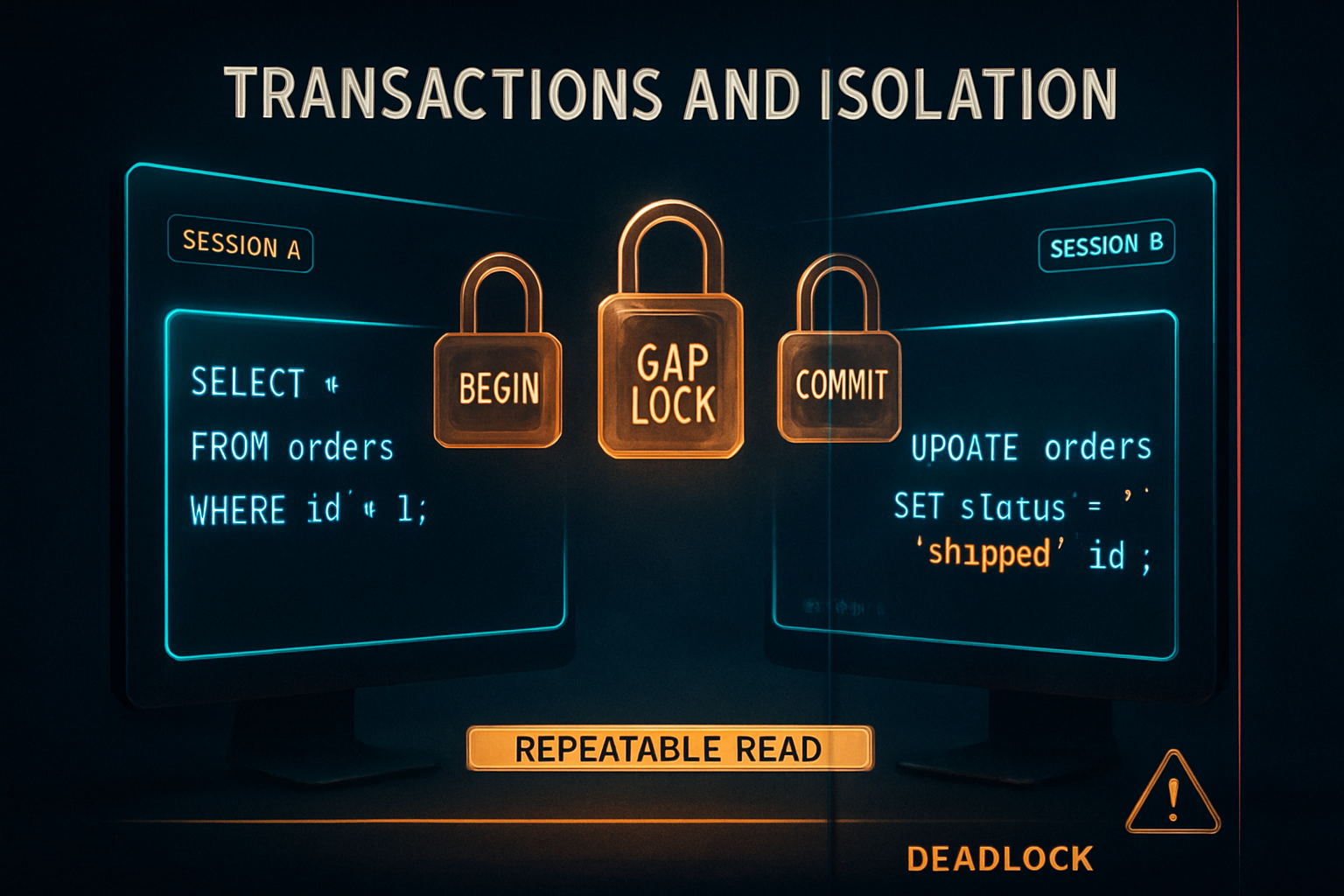
So you wrote a transaction.
You wrapped a few UPDATEs in BEGIN ... COMMIT. The code worked in development, passed code review, shipped to production. A week later, a support ticket lands on your desk: a customer's balance is wrong, two rows that should never coexist do, and the only audit trail is a database log that says everything ran exactly as expected.
You stare at it for an hour.
The query plan is clean. The indexes are there. The transaction completed. And yet the data is wrong.
That's almost always isolation. Or locks. Or both, in some combination you didn't know existed because nobody at your last three jobs ever sat you down and explained what REPEATABLE READ actually does to a query that's running at the same time as someone else's.
Let's fix that.
What A Transaction Actually Does
A transaction is a fence around a group of statements.
Inside the fence, MySQL pretends nothing else is happening, at least, that's what the marketing copy says. In practice, what "nothing else is happening" means depends entirely on the isolation level, and that's the part most articles skip.
The skeleton is simple:
START TRANSACTION;

UPDATE accounts SET balance = balance - 100 WHERE id = 1;
UPDATE accounts SET balance = balance + 100 WHERE id = 2;

COMMIT;
Two updates. Either both happen or neither does. If the second UPDATE fails, you ROLLBACK and the first one is undone as if it never ran.
The fence gives you four guarantees, packaged under the acronym ACID:
- Atomicity: all statements commit together or none do.
- Consistency: the database moves from one valid state to another (constraints, foreign keys, triggers).
- Isolation: concurrent transactions don't trip over each other in unexpected ways.
- Durability: once committed, the change survives a crash.
Three of those are easy. Atomicity is COMMIT vs ROLLBACK. Consistency is your schema. Durability is the disk.
Isolation is where everything gets interesting, because "concurrent transactions don't trip over each other" turns out to mean very different things depending on which knob you turned.
By default in MySQL with InnoDB, you're using REPEATABLE READ. That's not the ANSI default, that's not what Postgres gives you, and it has a few quirks that catch people off guard. We'll get there.
But first, autocommit.
Autocommit: The Transaction You Didn't Know You Had
If you run a single UPDATE outside a BEGIN, MySQL still wraps it in a transaction. That transaction is exactly one statement long, and COMMIT happens automatically the moment the statement finishes.
UPDATE accounts SET balance = balance - 100 WHERE id = 1;
-- behind the scenes: BEGIN; UPDATE ...; COMMIT;
This is autocommit = 1, which is the default. It means every statement is its own atomic unit. It also means if you wanted a multi-statement transaction, you needed to either say START TRANSACTION or set autocommit = 0 for the session.
Most application drivers (Node's mysql2, Python's mysqlclient, Go's database/sql) leave autocommit on and let you call connection.beginTransaction() to flip into explicit-transaction mode for a unit of work. That's fine. Just know that if a developer says "I added a transaction to the checkout flow," what they mean is "I told the driver to call START TRANSACTION instead of relying on per-statement autocommit."
If you ever see weird half-applied state in production and the code "definitely had a transaction," check whether the driver actually opened one. A surprising number of bugs are autocommit running unchallenged.
Two Sessions, One Database
The whole point of isolation is to describe what happens when two transactions overlap.
So we need two sessions. Open two terminal windows, connect both to the same MySQL instance, and use a tiny demo table:
CREATE TABLE accounts (
  id INT PRIMARY KEY,
  owner VARCHAR(50),
  balance INT NOT NULL
) ENGINE=InnoDB;

INSERT INTO accounts VALUES
  (1, 'alice', 1000),
  (2, 'bob',   500),
  (3, 'carol', 250);
In the rest of the article, anything labeled -- session A happens in the first window and -- session B happens in the second. Order matters, if I write A then B then A, that's three separate steps, in that order.
That's it. No application code. No ORM. Just SQL and time.
The Four Isolation Levels And The Anomalies They Prevent
ANSI SQL defines four isolation levels, ordered from "barely isolated" to "fully serial":
- READ UNCOMMITTED: you can see other transactions' uncommitted changes (dirty reads).
- READ COMMITTED: you only see committed data, but a re-read inside the same transaction may return different rows.
- REPEATABLE READ: within one transaction, the rows you've already read won't change.
- SERIALIZABLE: transactions behave as if they ran one after another.
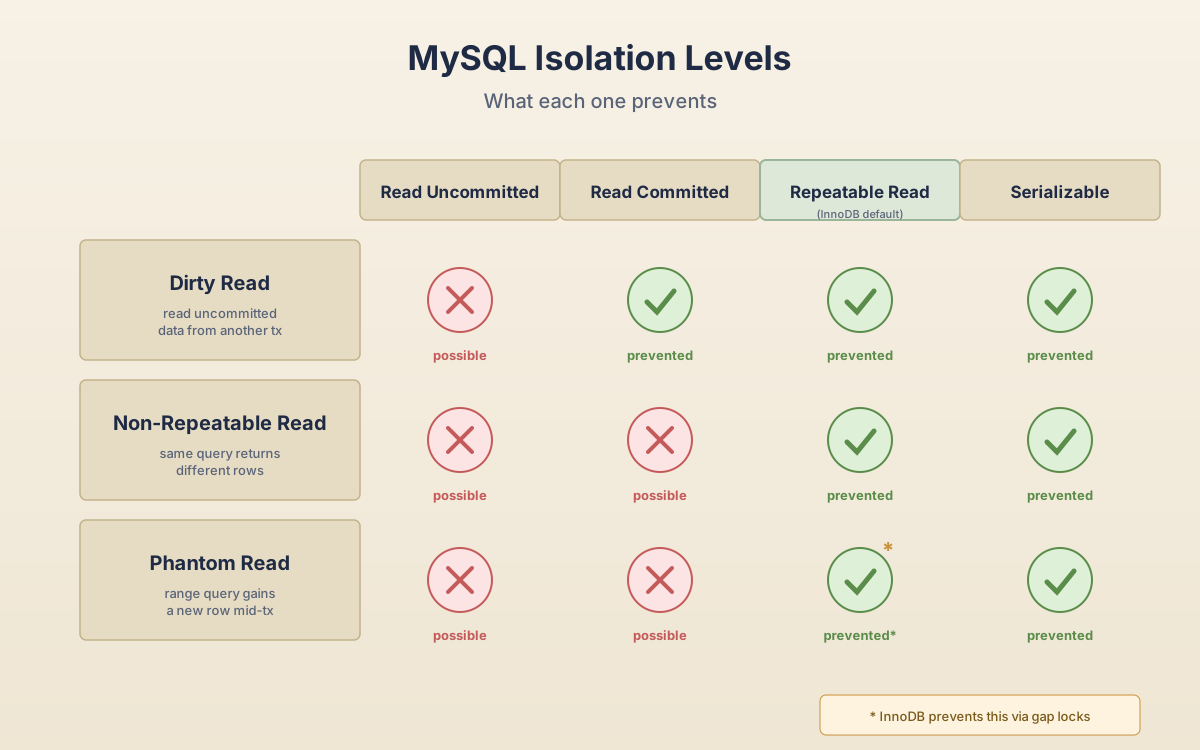
Each level prevents specific concurrency anomalies:
| Anomaly | Read Uncommitted | Read Committed | Repeatable Read | Serializable |
|---|---|---|---|---|
| Dirty read | possible | prevented | prevented | prevented |
| Non-repeatable read | possible | possible | prevented | prevented |
| Phantom read | possible | possible | prevented in InnoDB | prevented |
That last cell has an asterisk, and it's a big one. In the ANSI standard, REPEATABLE READ is allowed to have phantom reads. In InnoDB's implementation, it doesn't, because InnoDB uses gap locks to prevent them. That's one of the reasons MySQL feels different from textbook SQL.
We'll go through each level with a real two-session example.
Read Uncommitted: The Level You'll Probably Never Use
This is the wild west.
-- session A
SET SESSION TRANSACTION ISOLATION LEVEL READ UNCOMMITTED;
START TRANSACTION;
UPDATE accounts SET balance = 9999 WHERE id = 1;
-- don't commit yet-- session B
SET SESSION TRANSACTION ISOLATION LEVEL READ UNCOMMITTED;
SELECT balance FROM accounts WHERE id = 1;
-- returns 9999Session A hasn't committed. Session A could ROLLBACK and the 9999 disappears. But session B is allowed to see it anyway, and act on it.
That's a dirty read. You're reading data that isn't really there yet.
Almost no application wants this. It's occasionally useful for a read-only analytics dashboard where approximate-and-fast beats correct-and-blocking, but for OLTP work it's a bug factory. You'll see balances that briefly contain values from rolled-back transactions and you'll be debugging "impossible" support tickets for a week.
Move on.
Read Committed: A Fresh Snapshot Per Statement
Up one level, things get reasonable. READ COMMITTED says you only see data that has actually been committed.
-- session A
SET SESSION TRANSACTION ISOLATION LEVEL READ COMMITTED;
START TRANSACTION;
SELECT balance FROM accounts WHERE id = 1;
-- returns 1000-- session B
SET SESSION TRANSACTION ISOLATION LEVEL READ COMMITTED;
START TRANSACTION;
UPDATE accounts SET balance = 1500 WHERE id = 1;
COMMIT;-- session A (still in the same transaction)
SELECT balance FROM accounts WHERE id = 1;
-- returns 1500Session A read 1000, then session B updated and committed, then session A read again and saw 1500, inside the same transaction.
That's a non-repeatable read. The same query returned a different answer because something committed in the middle.
For most CRUD workloads this is fine. It's also Postgres's default, and Oracle's. If your code logic doesn't depend on "the row I read at the start of this transaction will still look the same five statements later," you can run on READ COMMITTED forever and never notice.
But sometimes you do depend on that. Anything that does math across multiple reads in the same transaction needs the row to hold still.
That's REPEATABLE READ.
Repeatable Read: MySQL's Default, And It's Stranger Than You Think
This is what InnoDB gives you by default. And here's where most engineers' mental model goes wrong.
REPEATABLE READ doesn't mean "MySQL locks the rows you read." It means MySQL gives you a snapshot: a consistent view of the database as it existed at the moment your transaction started its first read. Reads inside the transaction see that snapshot, no matter what anyone else commits.
-- session A
SET SESSION TRANSACTION ISOLATION LEVEL REPEATABLE READ;
START TRANSACTION;
SELECT balance FROM accounts WHERE id = 1;
-- returns 1000-- session B
START TRANSACTION;
UPDATE accounts SET balance = 1500 WHERE id = 1;
COMMIT;-- session A
SELECT balance FROM accounts WHERE id = 1;
-- returns 1000, NOT 1500Session A still sees 1000. The snapshot is frozen. This is MVCC, multi-version concurrency control, using InnoDB's undo logs to reconstruct what the row looked like at the start of session A's transaction.
That's the easy part. Now the trap.
The snapshot only applies to non-locking reads. The instant you do SELECT ... FOR UPDATE or UPDATE or DELETE, you're reading the current committed version, not your snapshot.
-- session A (still inside the same REPEATABLE READ transaction)
UPDATE accounts SET balance = balance + 100 WHERE id = 1;
-- this reads the current balance (1500), not the snapshot (1000)
-- result: 1600

SELECT balance FROM accounts WHERE id = 1;
-- returns 1600
The snapshot just got blown apart by your own write. Within the same transaction, you'll now see 1600 forever, until you commit or rollback.
This catches people. They assume "REPEATABLE READ means I can read my data at the start, do math on it, and write it back without anyone else interfering." That's not what it means. The snapshot is for reads. Writes always operate on current data.
If you actually want "no one touches this row while I work on it," you need a locking read:
-- session A
START TRANSACTION;
SELECT balance FROM accounts WHERE id = 1 FOR UPDATE;
-- now anyone else trying to write or lock id=1 has to wait
The lock holds until session A commits or rolls back. Other writers block. Other plain SELECTs pass through (they read from snapshots and don't care about your lock).
Phantom Reads And Gap Locks
Now the part where InnoDB diverges from the ANSI spec.
A phantom read is when you run a range query, then someone inserts a row that matches your range, then you re-run the range query and a new row "appears." Classic example:
-- session A
START TRANSACTION;
SELECT COUNT(*) FROM accounts WHERE balance > 100;
-- returns 3-- session B
INSERT INTO accounts VALUES (4, 'dave', 800);
COMMIT;-- session A
SELECT COUNT(*) FROM accounts WHERE balance > 100;
-- ANSI REPEATABLE READ: could return 4 (phantom)
-- InnoDB REPEATABLE READ: returns 3 (snapshot read)Snapshot reads in InnoDB don't see phantoms because they read the historical version. Easy.
But locking reads in REPEATABLE READ would, in theory, see phantoms, and InnoDB doesn't allow that. To prevent it, InnoDB uses gap locks and next-key locks.
A gap lock locks the space between index records. A next-key lock is a row lock plus the gap lock immediately before it. They don't lock data; they lock the absence of data.
-- session A
START TRANSACTION;
SELECT * FROM accounts WHERE balance BETWEEN 200 AND 800 FOR UPDATE;-- session B
INSERT INTO accounts VALUES (5, 'eve', 600);
-- BLOCKS until session A commitsSession B is trying to insert a row that would fall into a range session A has locked. The lock isn't on any specific row, it's on the gap. InnoDB blocks the insert until session A is done, because allowing it would let session A see a phantom row if it re-ran the query.
This is one of the most surprising parts of MySQL for people coming from Postgres. You get a lock on rows that don't exist yet. It prevents phantoms but it also prevents inserts that would otherwise have been independent. Long-running transactions doing big range scans with FOR UPDATE can lock out a huge chunk of the table for inserts.
Gap locks are also disabled when you switch to READ COMMITTED, that's one of the practical reasons people switch. If your workload is mostly point updates and you're getting blocked inserts that have nothing to do with your transaction, READ COMMITTED removes that source of blocking.
Serializable: Correctness At Full Throughput Cost
The strictest level. Every plain SELECT becomes an implicit SELECT ... LOCK IN SHARE MODE. Reads block writes. Writes block reads.
-- session A
SET SESSION TRANSACTION ISOLATION LEVEL SERIALIZABLE;
START TRANSACTION;
SELECT balance FROM accounts WHERE id = 1;
-- holds a shared lock on id=1-- session B
UPDATE accounts SET balance = 1500 WHERE id = 1;
-- BLOCKSYou get correctness so strong it's effectively as if transactions ran one after another. You also get throughput so weak that you almost never want this in OLTP. Reserve it for things like end-of-period financial closes where being slow is fine and being wrong is a lawsuit.
Locks You Can't See In Logs
So far I've mentioned several lock types in passing. Let's name them properly. InnoDB has a few different ones, and which one you get depends on what the query touched.
Shared lock (S): multiple transactions can hold it on the same row. Used by SELECT ... LOCK IN SHARE MODE (or SELECT ... FOR SHARE in MySQL 8.0+). Blocks exclusive locks.
Exclusive lock (X): only one transaction can hold it. Used by SELECT ... FOR UPDATE, UPDATE, and DELETE. Blocks both shared and exclusive locks from other transactions.
Gap lock: locks the range between two index records. Prevents inserts into the gap. Doesn't conflict with other gap locks (multiple transactions can hold gap locks on the same gap).
Next-key lock: a row lock + the gap before it. The default for index-range scans in REPEATABLE READ. This is the one that surprises people.
Intention lock (IS, IX): a table-level lock saying "I plan to take row locks." Mostly internal. You'll see them in SHOW ENGINE INNODB STATUS output but you don't take them directly.
Auto-inc lock: a special table-level lock around AUTO_INCREMENT value generation. Configurable via innodb_autoinc_lock_mode.
When you're trying to figure out why something is blocking, the answer almost always lives in InnoDB's status output. Run:
SELECT * FROM performance_schema.data_locks;
SELECT * FROM performance_schema.data_lock_waits;
Those two views (added in MySQL 8.0) give you a real-time picture of who holds what and who's waiting on whom. They're the single biggest improvement to MySQL debugging in years. If you're still on 5.7, you're stuck with SHOW ENGINE INNODB STATUS\G and squinting at the LATEST DETECTED DEADLOCK section, which is a paragraph of text you can almost parse.
Deadlocks Aren't Bugs, They're Expected
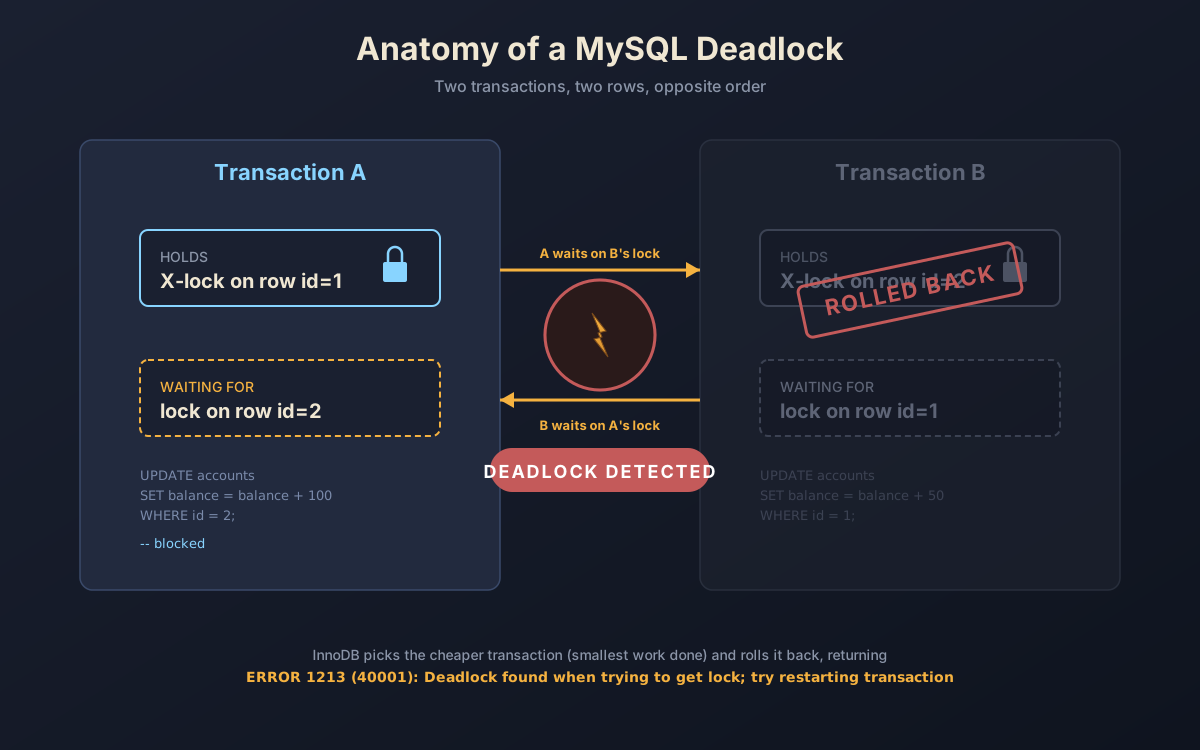
Two transactions, two rows, opposite order. The classic deadlock setup:
-- session A
START TRANSACTION;
UPDATE accounts SET balance = balance - 100 WHERE id = 1;
-- holds X lock on id=1-- session B
START TRANSACTION;
UPDATE accounts SET balance = balance - 50 WHERE id = 2;
-- holds X lock on id=2-- session A
UPDATE accounts SET balance = balance + 100 WHERE id = 2;
-- waits for B's lock on id=2-- session B
UPDATE accounts SET balance = balance + 50 WHERE id = 1;
-- waits for A's lock on id=1
-- DEADLOCKA wants what B has. B wants what A has. Neither will give it up.
InnoDB notices this almost instantly (it has a deadlock detector running in the background, controlled by innodb_deadlock_detect, on by default). It picks the cheaper transaction to kill, usually the one with the smallest amount of work done, and rolls it back, returning error 1213 (ER_LOCK_DEADLOCK) to that session. The other transaction continues normally.
Your application's job is to catch that error and retry.
ERROR 1213 (40001): Deadlock found when trying to get lock; try restarting transactionThat's not "your code is broken." That's "the database hit a contention point, picked a victim, and is asking you to try again." Most well-written applications retry deadlock errors with a short backoff and continue. If you're using a query builder or ORM, check whether it does this for you, many do, but not all.
The error code is on a different list from 1205 (ER_LOCK_WAIT_TIMEOUT), which is what you get when InnoDB doesn't detect a cycle but you've been waiting longer than innodb_lock_wait_timeout (default: 50 seconds). Lock wait timeouts are usually a sign that someone's holding a lock for too long, not a deadlock. Different problem, different fix, usually "make the holding transaction shorter," not "retry."
You can reduce deadlocks but you can't eliminate them. The most useful tactics:
- Always lock rows in the same order across transactions. If two code paths touch accounts 1 and 2, both should
UPDATE id=1first, thenUPDATE id=2. Symmetric ordering means cycles can't form. - Keep transactions short. The longer locks are held, the higher the chance someone else needs them. Don't do HTTP calls or
sleep()inside a transaction. - Use
FOR UPDATEto upgrade reads to writes early if you know you'll write. Avoids the upgrade-from-shared-to-exclusive race. - Index your
WHEREclauses. Without an index,UPDATEmay take next-key locks across the whole table, dramatically increasing contention.
The last one is underrated. An UPDATE accounts SET ... WHERE owner = 'alice' on an unindexed owner column doesn't lock just Alice's rows, it scans the whole index, taking gap and next-key locks on everything it inspects. Add an index, and the lock footprint shrinks to the rows that actually match.
Picking An Isolation Level Without Hand-Waving
Most teams ship on the default and never think about it again. That's fine for most workloads. But if you're picking deliberately, here's a reasonable decision frame.
Stay on REPEATABLE READ if your application has multi-statement transactions where you read data, do math, and write it back, and you'd be confused or wrong if those reads returned different values mid-transaction. This is the default for a reason, it gives the most "least surprising" semantics for application developers, at the cost of more gap locking and a few sharp edges (the snapshot/locking-read divergence).
Switch to READ COMMITTED if your workload is mostly short, point-style transactions and you're getting blocked by gap locks on inserts, or if your app already explicitly uses SELECT ... FOR UPDATE everywhere it cares and the implicit isolation isn't pulling its weight. READ COMMITTED is also less surprising to developers who learned on Postgres, fewer "wait, why is this row stale?" moments.
Use SERIALIZABLE only if you have a known correctness-critical read-modify-write where the cost of being wrong dwarfs the cost of being slow. End-of-month accounting jobs. Regulatory reports. Things where two-phase commits and explicit locks would also work, but SERIALIZABLE is simpler.
Don't use READ UNCOMMITTED in production. There's almost no real workload where dirty reads are the right answer. If you need fast approximate counts, use a separate read replica or cached aggregate.
You can set it per session:
SET SESSION TRANSACTION ISOLATION LEVEL READ COMMITTED;Per transaction:
SET TRANSACTION ISOLATION LEVEL READ COMMITTED;
START TRANSACTION;
-- ...
COMMIT;
Or globally in my.cnf:
[mysqld]
transaction-isolation = READ-COMMITTED
The per-transaction form is the most flexible. Use it for the rare query that needs different semantics, and leave the default alone everywhere else.
The Mental Model That Actually Holds Up
If you remember nothing else from this article, remember three things.
First, isolation isn't free. Every level above READ UNCOMMITTED costs locks, snapshots, or both. The defaults exist because they're a reasonable trade. Don't change them without a reason.
Second, the snapshot doesn't protect your writes. REPEATABLE READ gives you stable reads, but the moment your transaction does an UPDATE, that update reads current committed data, not your snapshot. If you need write-time consistency, take a FOR UPDATE lock at read time.
Third, deadlocks are routine. They mean the database protected you from a worse outcome. Catch error 1213, retry the transaction, log it for monitoring, and move on. The interesting question is never "did we deadlock?" but "are we deadlocking more this week than last week?", and the fix is usually about lock ordering, transaction length, or missing indexes, not about the database engine.
You won't know any of this from reading the START TRANSACTION documentation alone. You'll only know it once you've sat in front of two terminal windows, run the examples above, watched session B block on a row session A still holds, and asked yourself what's actually going on.
Now you have. Go open two terminals.