Most backend engineers do not need to become database optimizer authors.
But they do need to understand why a query became slow, why MySQL ignored an index, why a join suddenly scans millions of rows, and why adding ORDER BY created_at DESC LIMIT 20 can turn a simple endpoint into a production problem.
That is where EXPLAIN becomes one of the most useful tools in your backend toolbox.
EXPLAIN does not execute the query in the normal way and then tell you what happened. It shows the execution plan MySQL expects to use. It tells you how MySQL plans to read tables, which indexes it may use, which index it actually chose, how many rows it expects to examine, and whether extra work like sorting or temporary table creation may happen.
This article is a practical guide to reading EXPLAIN like a backend engineer: not as a database researcher, but as someone responsible for API latency, queue throughput, admin dashboards, reporting queries, and production incidents.
Plan
Before going deep, here is the plan for the article.
- Why backend engineers should care about
EXPLAIN. - Build a mental model for how MySQL reads data.
- How MySQL stores data, clustered index vs secondary index.
- The most important
EXPLAINcolumns. - Access types from best to worst.
- Reading
possible_keys,key,key_len, andref. - Why
rowsandfilteredare estimates, not guarantees. - Decoding common
Extravalues:Using index,Using where,Using filesort,Using temporary. - Realistic query examples from backend applications.
- How composite indexes change execution plans.
- Why MySQL sometimes ignores your index.
- Joins, sorting, pagination, covering indexes, and index merge.
- Beyond the basics: histograms, skip scan, invisible indexes, hash join.
- A production checklist for investigating slow queries.
1. Why Backend Engineers Should Care About EXPLAIN
A backend engineer usually sees slow queries through symptoms:
- An API endpoint starts timing out.
- A queue worker processes fewer jobs per minute.
- A dashboard page becomes slow as data grows.
- A database CPU spike appears after a deployment.
- A query that was fast with 10,000 rows becomes slow with 10 million rows.
The SQL may look harmless:
SELECT *
FROM orders
WHERE customer_id = 42
ORDER BY created_at DESC
LIMIT 20;
But whether this query is fast depends on the execution plan.
If MySQL can use an index like this:
CREATE INDEX idx_orders_customer_created
ON orders (customer_id, created_at DESC);
then the query can quickly jump to one customer's orders and read the newest rows in order.
Without a useful index, MySQL may scan many rows, filter them, sort them, and then return only 20.
That difference is often the difference between a 5 ms query and a 5 second query.
EXPLAIN helps you see the difference before guessing.
2. The Basic Mental Model
When MySQL executes a query, it has to answer a few questions:
- Which table should I read first?
- Can I use an index?
- If multiple indexes exist, which one is cheapest?
- How many rows do I expect to read?
- Do I need to sort?
- Do I need a temporary table?
- Can I satisfy the query from the index alone?
- For joins, how do I find matching rows in the next table?
EXPLAIN gives you clues for those decisions.
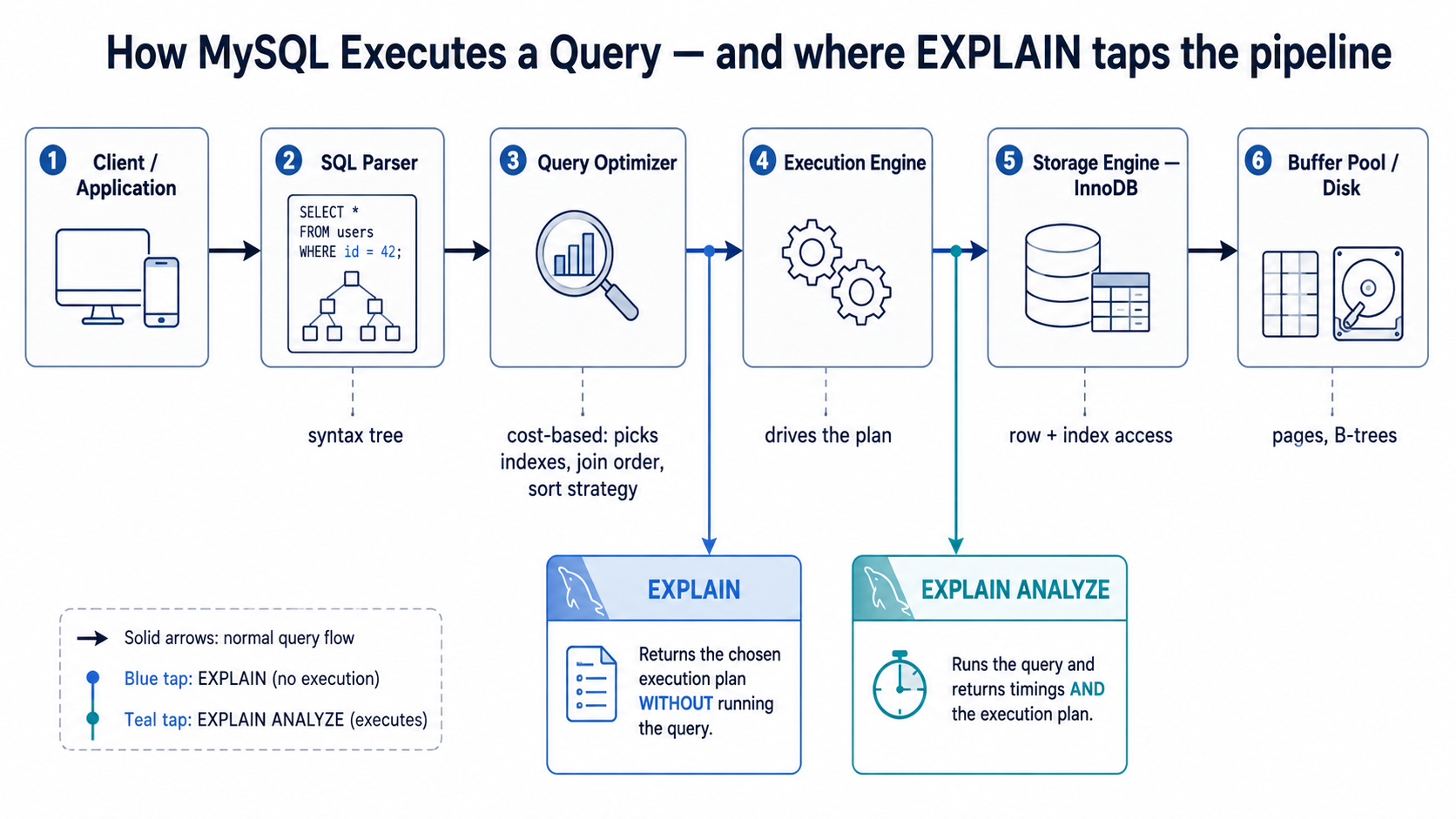
Run it like this:
EXPLAIN
SELECT *
FROM orders
WHERE customer_id = 42
ORDER BY created_at DESC
LIMIT 20;
A traditional tabular EXPLAIN output contains columns like:
id | select_type | table | partitions | type | possible_keys | key | key_len | ref | rows | filtered | ExtraThe exact output can vary by MySQL version and query shape, but these columns are the main ones backend engineers should understand.
You can also use JSON or tree format:
EXPLAIN FORMAT=JSON
SELECT * FROM orders WHERE customer_id = 42
ORDER BY created_at DESC LIMIT 20;

EXPLAIN FORMAT=TREE
SELECT * FROM orders WHERE customer_id = 42
ORDER BY created_at DESC LIMIT 20;3. How MySQL Stores Data: Clustered vs Secondary Indexes
This is the single most important concept missing from most "intro to indexes" articles, and it explains half of what you will see in EXPLAIN.
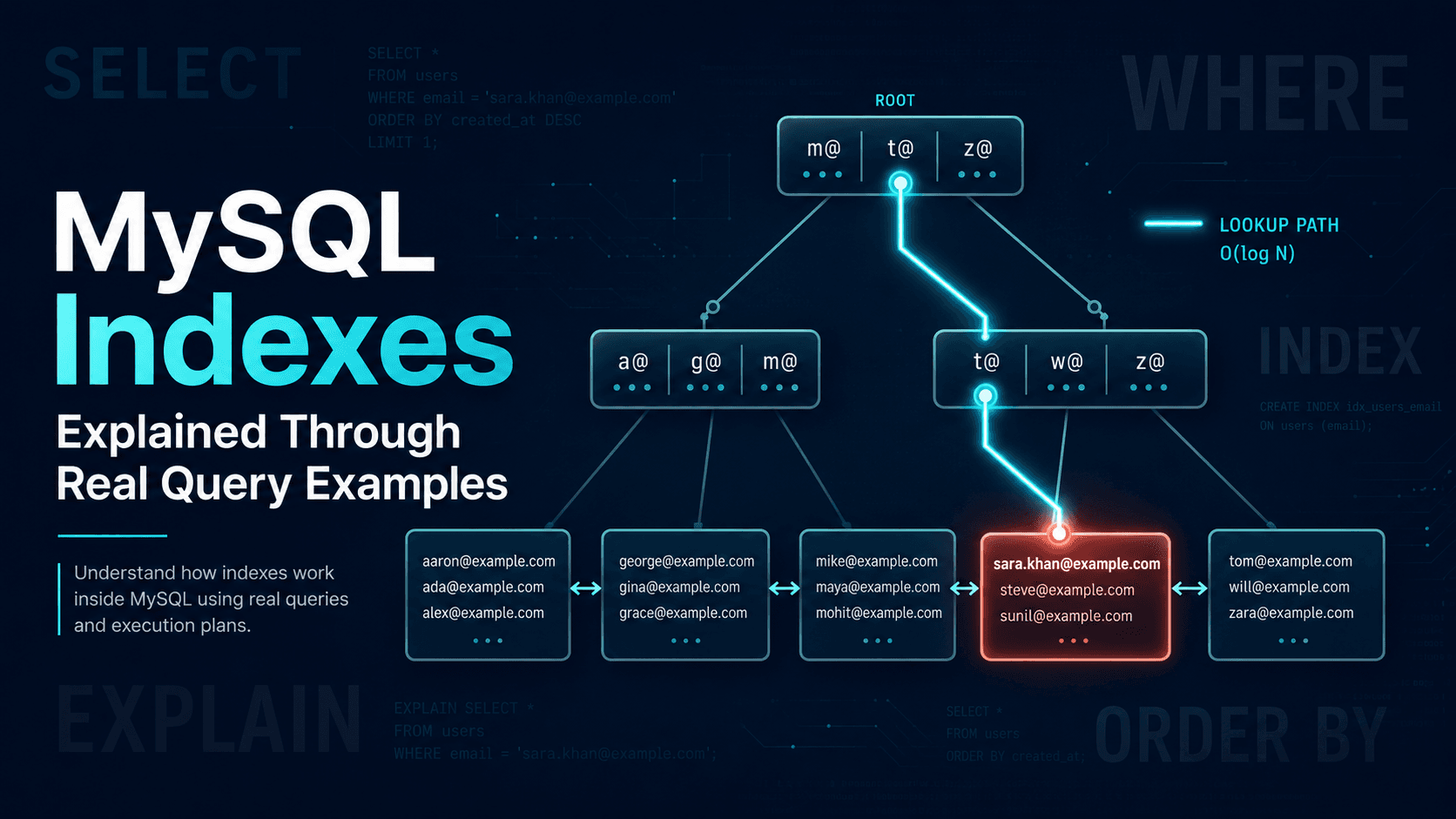
In InnoDB (the default MySQL storage engine), a table is physically stored as a B-tree organized by the primary key. The leaf pages of that B-tree contain the full row. This is called a clustered index.
Every other index, what people usually call "indexes", is a secondary index. A secondary index is a separate B-tree whose leaves contain the indexed columns plus the primary key value. They do not contain the full row.
So when you query through a secondary index, InnoDB does two lookups:
- Walk the secondary index B-tree to find matching primary key values.
- Walk the clustered index B-tree using each primary key to fetch the full row.
That second step is sometimes called a bookmark lookup or back to clustered index. It is one random I/O per row.
This is why these things matter:
- Primary key lookups (
type: const) only walk one B-tree. They are the cheapest possible access. - Secondary index lookups that need columns not in the index pay the bookmark lookup cost on every matching row.
- A covering index (
Using index) avoids bookmark lookups because every column the query needs is already in the secondary index leaf. That is whyUsing indexinExtrais such a strong signal. - Inserting a row updates the clustered index plus every secondary index. That is why "just add another index" has a real cost.
- The primary key is implicitly appended to every secondary index. That is why a
(customer_id, created_at)index can also be used for ordering by(customer_id, created_at, id),idis already there.
Keep this picture in mind for the rest of the article. Almost every optimization decision below, when to add a covering index, why SELECT * makes things harder, why secondary indexes on huge tables are expensive, comes back to this two-tree structure.
4. Example Schema
We will use a simple e-commerce style schema.
CREATE TABLE customers (
    id BIGINT PRIMARY KEY AUTO_INCREMENT,
    email VARCHAR(255) NOT NULL,
    status VARCHAR(30) NOT NULL,
    created_at DATETIME NOT NULL,
    UNIQUE KEY uniq_customers_email (email),
    KEY idx_customers_status_created (status, created_at)
);

CREATE TABLE orders (
    id BIGINT PRIMARY KEY AUTO_INCREMENT,
    customer_id BIGINT NOT NULL,
    status VARCHAR(30) NOT NULL,
    total_cents INT NOT NULL,
    created_at DATETIME NOT NULL,
    paid_at DATETIME NULL,
    KEY idx_orders_customer_created (customer_id, created_at),
    KEY idx_orders_status_created (status, created_at),
    KEY idx_orders_paid_at (paid_at)
);

CREATE TABLE order_items (
    id BIGINT PRIMARY KEY AUTO_INCREMENT,
    order_id BIGINT NOT NULL,
    product_id BIGINT NOT NULL,
    quantity INT NOT NULL,
    price_cents INT NOT NULL,
    KEY idx_order_items_order_id (order_id),
    KEY idx_order_items_product_order (product_id, order_id)
);
This schema is intentionally normal. It has primary keys, secondary indexes, composite indexes, and common query patterns.
5. The EXPLAIN Columns That Matter Most
Here is the practical meaning of the most important columns.
table
The table MySQL is reading at that step. For joins, each table usually appears as a separate row in the execution plan.
table: customers
table: orders
table: order_items
This tells you the join order MySQL selected. The first table is usually important because it often determines how many rows are passed into later join steps.
type
Despite the name, this is not a data type. It means the access type, how MySQL plans to access rows in this table. This is one of the most important columns.
Common values:
system, const, eq_ref, ref, range, index, ALLA rough ranking from best to worst is:
system / const → eq_ref → ref → range → index → ALLThis ranking is not absolute, but it is a very useful starting point. We will look at each one in detail in the next section.
possible_keys
Indexes MySQL thinks could be used for this table.
possible_keys: idx_orders_customer_created,idx_orders_status_createdIt does not mean MySQL will use them.
key
The index MySQL actually chose.
key: idx_orders_customer_createdIf key is NULL, MySQL did not choose an index for that table access. That does not always mean the query is bad, but it is a warning sign when the table is large.
key_len
The number of bytes of the index MySQL plans to use.
Backend engineers often ignore this column, but it is very useful for composite indexes. Suppose you have this index:
KEY idx_orders_status_created (status, created_at)For this query MySQL may use only the status part:
SELECT * FROM orders WHERE status = 'paid';But for this query MySQL may use both:
SELECT * FROM orders
WHERE status = 'paid' AND created_at >= '2026-01-01';
key_len helps you infer how much of the composite index is actually used. Byte length depends on data type, character set, and whether the column is nullable, so the absolute number is rarely meaningful, but a change in key_len after you add a predicate is a strong signal that MySQL is using more of the index.
ref
Shows what value or column is compared to the index.
ref: const            -- compared to a constant: WHERE x = 42
ref: app.customers.id -- compared to a column: orders.customer_id = customers.id
rows
The estimated number of rows MySQL expects to examine for this table. This is not the number of rows returned.
rows: 125000filtered
The estimated percentage of examined rows that will pass the table condition.
rows: 100000
filtered: 10.00
Roughly, MySQL expects to examine 100,000 rows and keep about 10% of them. So the next step might receive around 10,000 rows.
Extra
Additional notes about what MySQL will do.
Using where, Using index, Using filesort,
Using temporary, Using index condition, Using join buffer
This column often contains the biggest clues. Using filesort and Using temporary are not always bad, but they are common signs that a query may become expensive at scale.
partitions
If the table is partitioned, this column lists the partitions MySQL will read. Seeing fewer partitions than the table has means partition pruning worked, the optimizer eliminated whole partitions before scanning.
partitions: p202601,p202602Most backend applications do not partition tables, so this column is often empty. When it is populated, it is one of the highest-leverage things to check on time-series tables.
6. Access Types Explained
The type column tells you how MySQL accesses rows. Think of it as the query's access strategy.
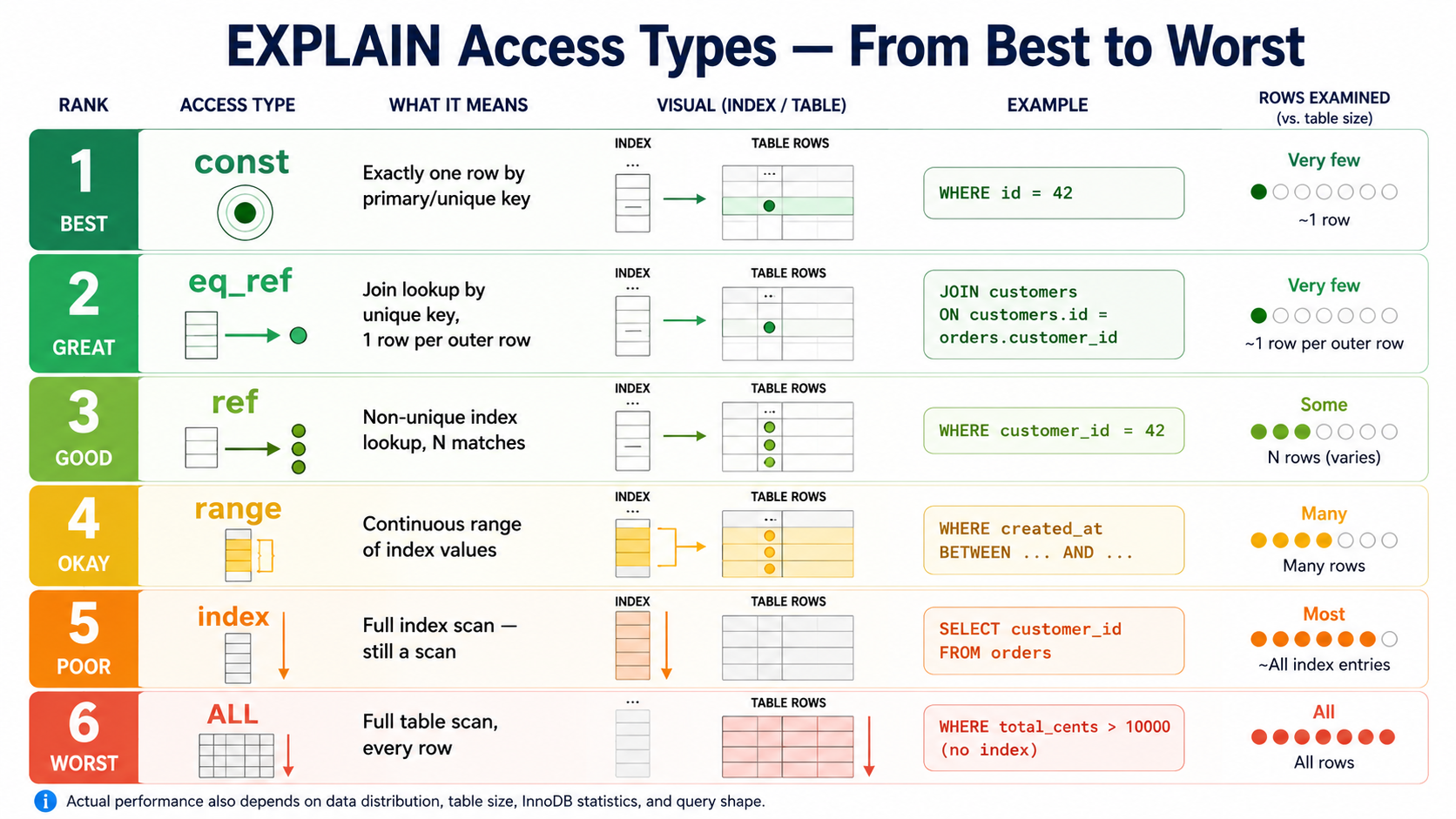
system
The table has only one row. Rare in normal application queries.
type: systemconst
MySQL can find at most one matching row using a primary key or unique index compared to constants.
EXPLAIN SELECT * FROM customers WHERE id = 123;Likely plan:
type: const
key: PRIMARY
rows: 1
This is excellent. MySQL knows there can be only one customer with id = 123.
EXPLAIN SELECT * FROM customers
WHERE email = 'nazar@example.com';
Because email has a unique index, MySQL can also treat this as a constant lookup.
type: const
key: uniq_customers_email
rows: 1eq_ref
eq_ref usually appears in joins when MySQL uses a primary key or unique index and expects exactly one matching row for each row from the previous table.
EXPLAIN
SELECT orders.id, customers.email
FROM orders
JOIN customers ON customers.id = orders.customer_id
WHERE orders.status = 'paid';
Possible plan:
table: orders     type: ref     key: idx_orders_status_created
table: customers  type: eq_ref  key: PRIMARY  ref: app.orders.customer_id  rows: 1
For every matching order, MySQL looks up exactly one customer by primary key.
ref
ref means MySQL uses a non-unique index lookup. It may find multiple rows for each value.
EXPLAIN SELECT * FROM orders WHERE customer_id = 42;type: ref
key: idx_orders_customer_created
ref: const
rows: 150The index can quickly find orders for customer 42, but there may be many orders. Usually good if the result set is reasonably selective.
But ref can still be expensive if the matching value is common:
SELECT * FROM orders WHERE status = 'paid';If 80% of orders are paid, the index on status may not help much.
range
range means MySQL scans a range of index values.
SELECT * FROM orders
WHERE created_at >= '2026-01-01' AND created_at < '2026-02-01';

SELECT * FROM orders WHERE id BETWEEN 1000 AND 2000;

SELECT * FROM orders WHERE paid_at IS NOT NULL;type: range
key: idx_orders_paid_at
rows: 50000range can be very good or very bad depending on how wide the range is. A range that reads 100 rows is great. A range that reads 10 million rows is not.
index
index means MySQL scans the index. Better than scanning the full table only when the index is smaller than the table or when the index covers the query.
EXPLAIN SELECT customer_id FROM orders;type: index
key: idx_orders_customer_created
Extra: Using indexThis can be acceptable for analytics-style queries, but dangerous for high-traffic endpoints if the table is large.
ALL
ALL means full table scan.
EXPLAIN SELECT * FROM orders WHERE total_cents > 10000;If there is no useful index on total_cents:
type: ALL
key: NULL
rows: 5000000
Extra: Using where
This is the classic red flag. But do not panic automatically.
A full scan of a 50-row lookup table is fine. A full scan of a 50-million-row orders table inside a public API endpoint is not fine.
7. Access Type Cheat Sheet
| Access type | Meaning | Usually good? | Backend interpretation |
|---|---|---|---|
system |
One-row table | ✅ | Rare; ignore most of the time |
const |
Single row by primary/unique key | ✅ | Ideal lookup |
eq_ref |
One matching row per outer row in a join | ✅ | Healthy join pattern |
ref |
Non-unique index lookup | ✅ | Check row count and selectivity |
range |
Index range scan | ⚠️ | Good for narrow ranges; bad for huge ranges |
index |
Full index scan | ⚠️ | Still a scan; okay if covering or small |
ALL |
Full table scan | ❌ | Red flag on large tables |
8. Reading possible_keys vs key
A common mistake is to see an index in possible_keys and assume the query is optimized.
EXPLAIN
SELECT *
FROM orders
WHERE status = 'paid'
ORDER BY created_at DESC
LIMIT 20;
Suppose output says:
possible_keys: idx_orders_status_created
key: idx_orders_status_created
Good. MySQL considered the index and chose it.
But now imagine:
possible_keys: idx_orders_status_created
key: NULL
type: ALL
This means MySQL knew an index might apply but chose not to use it.
Common reasons:
- The index is not selective enough.
- MySQL estimates a full scan is cheaper.
- The query returns too many rows.
- The condition uses a function on the indexed column.
- The data distribution makes the index unattractive.
- Statistics are stale or inaccurate.
- Another index is better for sorting or joining.
Example of a function blocking normal index usage:
SELECT * FROM orders WHERE DATE(created_at) = '2026-01-01';Even with an index on created_at, wrapping the column in DATE() can prevent MySQL from using the index efficiently. Better:
SELECT * FROM orders
WHERE created_at >= '2026-01-01 00:00:00'
  AND created_at <  '2026-01-02 00:00:00';
This keeps the indexed column directly comparable to constants.
9. Understanding rows: The Most Important Estimate
The rows column tells you how much work MySQL expects to do.
type: ref
key: idx_orders_customer_created
rows: 25
Likely fine.
type: ref
key: idx_orders_status_created
rows: 1800000
May not be fine. Even though MySQL is using an index, it expects to read 1.8 million rows.
This is why "using an index" is not enough.
If almost every order is paid, then status = 'paid' is not selective. Low-cardinality columns like these often make weak standalone indexes:
status, is_active, is_deleted, type, category, countryThey can still be useful as the first column of a composite index when paired with a more selective column or a sorting column:
CREATE INDEX idx_orders_status_created
ON orders (status, created_at);
Now MySQL can use status for filtering and created_at for ordered access.
10. Understanding filtered
filtered estimates how many examined rows survive the condition.
rows: 100000
filtered: 5.00
Approximate rows passed forward:
100000 * 5% = 5000For joins, this matters because rows from one step feed into the next step.
table: customers  rows: 10000  filtered: 10.00
table: orders     rows: 50     filtered: 100.00
A rough estimate:
customers output: 10000 * 10%        = 1000 customers
orders lookup:    1000 * 50          = 50000 order rows examined
This is not exact math, but it helps you reason about nested work.
11. The Extra Column: Where The Warnings Live
The Extra column often tells you what additional work MySQL performs.
Using where
MySQL applies a filter condition after reading rows. Common and not automatically bad. It simply means not all filtering was solved purely by index lookup.
SELECT *
FROM orders
WHERE customer_id = 42 AND total_cents > 5000;
If the index is only on customer_id, MySQL can use the index to find customer orders, then apply total_cents > 5000 as a filter. That may be perfectly fine if the customer has 20 orders. It may be bad if the customer has 500,000 orders.
Using index
MySQL can satisfy the query using only the index, a covering index. No bookmark lookup needed.
EXPLAIN
SELECT customer_id, created_at
FROM orders
WHERE customer_id = 42
ORDER BY created_at DESC
LIMIT 20;
With index idx_orders_customer_created (customer_id, created_at):
key: idx_orders_customer_created
Extra: Using where; Using indexUsing index condition
This refers to index condition pushdown (ICP). MySQL pushes part of the WHERE clause down into the storage engine, applying it during the index scan before fetching full rows. This reduces bookmark lookups.
Extra: Using index conditionUsually good. MySQL is using the index more intelligently to reduce row access.
Using filesort
MySQL cannot produce the requested order directly from an index and must perform a separate sort operation.
EXPLAIN
SELECT *
FROM orders
WHERE status = 'paid'
ORDER BY total_cents DESC
LIMIT 20;
If there is no useful index for (status, total_cents):
Extra: Using where; Using filesortA better index:
CREATE INDEX idx_orders_status_total
ON orders (status, total_cents DESC);
Now MySQL can find paid orders already ordered by total_cents.
Using filesort is one of the first things to investigate for slow ORDER BY queries, especially with large filtered result sets. But sorting 100 rows is fine, sorting 5 million rows for every request is not.
Using temporary
MySQL uses a temporary table to process the query. Common with some GROUP BY, DISTINCT, and complex sorting queries.
EXPLAIN
SELECT customer_id, COUNT(*)
FROM orders
WHERE created_at >= '2026-01-01'
GROUP BY customer_id
ORDER BY COUNT(*) DESC;Extra: Using where; Using temporary; Using filesortUsing join buffer
MySQL cannot use an index efficiently for a join and falls back to a join buffer strategy (block nested loop, or in MySQL 8.0.18+, hash join).
Extra: Using join bufferOften appears when joining on unindexed columns:
SELECT *
FROM orders
JOIN customers ON customers.email = orders.customer_email;
Usually a sign you need an index on the join column.
12. Example 1: Simple Primary Key Lookup
EXPLAIN SELECT * FROM orders WHERE id = 1001;table: orders
type: const
possible_keys: PRIMARY
key: PRIMARY
rows: 1
Extra: NULLMySQL uses the primary key. One row. No sorting. No temporary table. Optimal, nothing to fix.
13. Example 2: Customer Orders Page
Show the latest 20 orders for one customer.
SELECT *
FROM orders
WHERE customer_id = 42
ORDER BY created_at DESC
LIMIT 20;
Without a good composite index:
type: ALL
key: NULL
rows: 5000000
Extra: Using where; Using filesort
MySQL scans the orders table, filters rows for customer 42, sorts by created_at, then returns 20.
Add a composite index:
CREATE INDEX idx_orders_customer_created
ON orders (customer_id, created_at DESC);type: ref
key: idx_orders_customer_created
ref: const
rows: 150
Extra: Using where14. Example 3: Admin Filter By Status And Date
Admin page lists paid orders in a date range.
SELECT id, customer_id, total_cents, created_at
FROM orders
WHERE status = 'paid'
  AND created_at >= '2026-01-01'
  AND created_at <  '2026-02-01'
ORDER BY created_at DESC
LIMIT 100;
Useful index:
CREATE INDEX idx_orders_status_created
ON orders (status, created_at DESC);
Possible plan:
type: range
key: idx_orders_status_created
rows: 80000
Extra: Using index condition
This may be good or bad depending on the date range size. One day may be fast. One year may still read millions of rows.
15. Example 4: The Function-On-Column Problem
Bad query:
SELECT * FROM orders
WHERE DATE(created_at) = '2026-01-01';type: ALL
key: NULL
rows: 5000000
Extra: Using whereBetter query:
SELECT * FROM orders
WHERE created_at >= '2026-01-01 00:00:00'
AND created_at < '2026-01-02 00:00:00';type: range
key: idx_orders_created_at
rows: 120000
Extra: Using index conditionKeep indexed columns clean in predicates. Move transformations to the constant side when possible.
16. Example 5: Composite Index Order Matters
Suppose you have this index:
CREATE INDEX idx_orders_status_created
ON orders (status, created_at);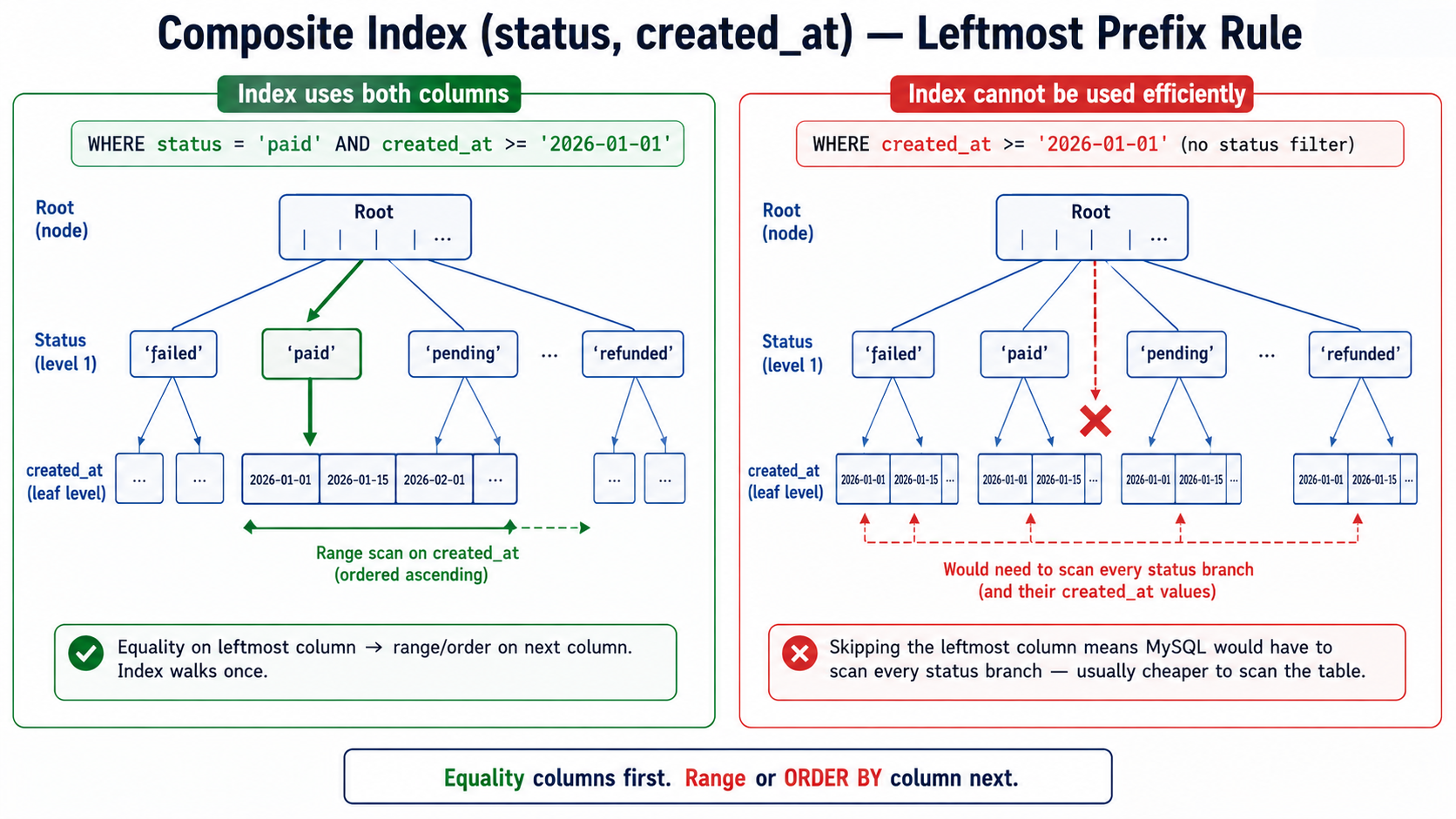
This query can use it well:
SELECT *
FROM orders
WHERE status = 'paid'
ORDER BY created_at DESC
LIMIT 20;
For one status, MySQL can read rows in created_at order.
But this query is different:
SELECT * FROM orders
WHERE created_at >= '2026-01-01'
ORDER BY status;
The same index may not help much because the query does not constrain the leftmost column status.
Composite indexes follow the leftmost prefix rule. An index on (a, b, c) can usually help with:
a
a, b
a, b, c
But it usually cannot be used efficiently for b only, c only, or b, c without a.
17. Example 6: Covering Index For A Hot Endpoint
Return the latest order IDs and totals for a customer.
SELECT id, total_cents, created_at
FROM orders
WHERE customer_id = 42
ORDER BY created_at DESC
LIMIT 20;
Index:
CREATE INDEX idx_orders_customer_created_total
ON orders (customer_id, created_at DESC, id, total_cents);type: ref
key: idx_orders_customer_created_total
rows: 20
Extra: Using where; Using indexUsing index means the query can be answered from the index itself, no clustered index lookup. Excellent for a high-traffic endpoint.
But every extra column in an index makes the index larger, which means:
- More storage.
- More memory pressure.
- Slower inserts.
- Slower updates to indexed columns.
- More work for replication and backups.
18. Example 7: Join Plan Reading
SELECT customers.email, orders.id, orders.total_cents
FROM customers
JOIN orders ON orders.customer_id = customers.id
WHERE customers.email = 'nazar@example.com'
ORDER BY orders.created_at DESC
LIMIT 20;
Useful indexes:
CREATE UNIQUE INDEX uniq_customers_email ON customers (email);

CREATE INDEX idx_orders_customer_created
ON orders (customer_id, created_at DESC);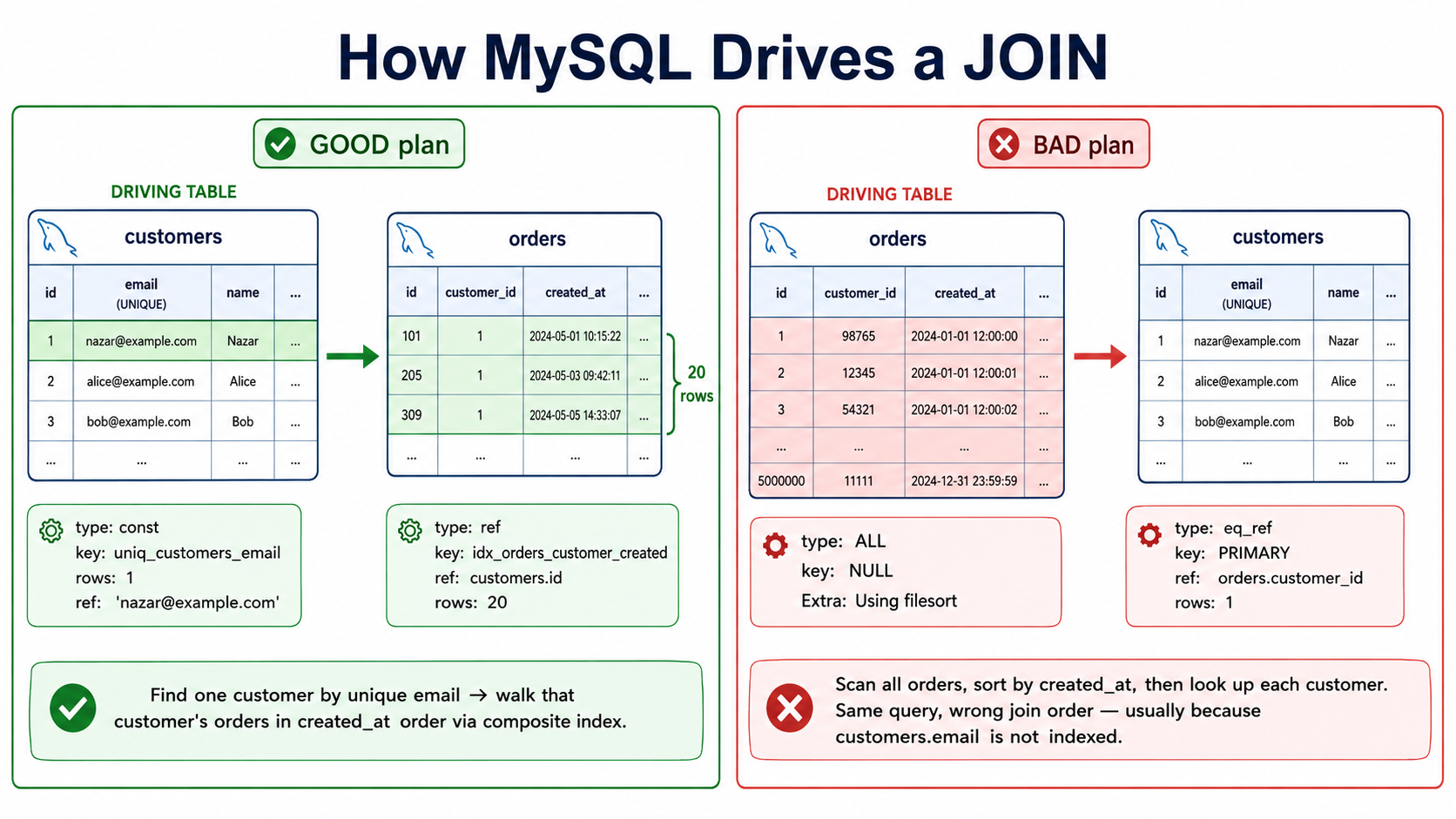
Good plan:
table: customers
type: const
key: uniq_customers_email
rows: 1

table: orders
type: ref
key: idx_orders_customer_created
ref: const
rows: 20
Extra: Using where
MySQL first finds the customer by unique email, that gives one customer row. Then it finds that customer's latest orders using the composite index.
Bad version (same query, no useful customer index):
table: orders
type: ALL
key: NULL
rows: 5000000
Extra: Using filesort

table: customers
type: eq_ref
key: PRIMARY
rows: 1
MySQL scans many orders, sorts them, and joins to customers.
19. Example 8: Using filesort With LIMIT
SELECT *
FROM orders
WHERE status = 'paid'
ORDER BY total_cents DESC
LIMIT 10;
Bad plan:
type: ref
key: idx_orders_status_created
rows: 2000000
Extra: Using where; Using filesort
This plan uses an index to find paid orders, but then it must sort many paid orders by total_cents.
Better index:
CREATE INDEX idx_orders_status_total
ON orders (status, total_cents DESC);
Better plan:
type: ref
key: idx_orders_status_total
rows: 10
Extra: Using where
Now MySQL can read paid orders in total_cents order and stop after 10.
20. Example 9: Using temporary With GROUP BY
SELECT customer_id, COUNT(*) AS order_count
FROM orders
WHERE created_at >= '2026-01-01'
GROUP BY customer_id
ORDER BY order_count DESC
LIMIT 20;type: range
key: idx_orders_created_at
rows: 1000000
Extra: Using where; Using temporary; Using filesortMySQL must:
- Find orders in the date range.
- Group them by customer.
- Count each group.
- Sort groups by count.
- Return the top 20.
An index can help with the date range, but sorting by aggregate count usually requires extra work.
Possible backend solutions:
- Accept it if this is an internal report and runs rarely.
- Add a narrower date range.
- Move it to a background job.
- Precompute daily customer order counts.
- Use a summary table.
- Cache the result.
- Move heavy analytics to a reporting database or OLAP store.
21. Example 10: Offset Pagination Problem
SELECT *
FROM orders
WHERE status = 'paid'
ORDER BY created_at DESC
LIMIT 50 OFFSET 500000;type: ref
key: idx_orders_status_created
rows: 500050
Extra: Using whereEven with a good index, deep offset pagination is expensive. MySQL still has to walk past many rows before returning the requested page.
Better approach: cursor (keyset) pagination.
SELECT *
FROM orders
WHERE status = 'paid'
  AND created_at < '2026-05-01 12:00:00'
ORDER BY created_at DESC
LIMIT 50;22. Why MySQL Ignores Your Index
This happens all the time. You create an index, rerun EXPLAIN, and MySQL does not use it.
Common reasons:
1. The index has low selectivity
If most rows have status = 'paid', an index on status may not help. MySQL may prefer a table scan.
2. The query reads too many rows anyway
SELECT * FROM orders WHERE created_at >= '2020-01-01';If this matches 95% of the table, a full scan may be cheaper than bouncing through an index and then doing 4.75 million bookmark lookups.
3. The index does not match the leftmost prefix
Index on (status, created_at), but query only filters by created_at, leftmost rule blocks efficient use.
4. The query uses a function on the column
WHERE DATE(created_at) = '2026-01-01' -- badWHERE created_at >= '2026-01-01'
AND created_at < '2026-01-02' -- good5. Data types do not match cleanly
WHERE user_id = '123' -- when user_id is an integerMySQL can often handle implicit conversion, but implicit conversions can lead to bad plans or confusing behavior. Use correct types in application code.
6. The optimizer estimates another path is cheaper
Sometimes MySQL chooses an unexpected plan because its cost model thinks another path is better. Investigate with:
EXPLAIN FORMAT=JSON SELECT ...;Or compare with index hints, carefully:
SELECT *
FROM orders FORCE INDEX (idx_orders_status_created)
WHERE status = 'paid'
ORDER BY created_at DESC
LIMIT 20;7. Statistics are stale
MySQL's optimizer uses cardinality statistics to choose plans. If those are stale (often after large bulk loads or schema changes), it may pick poorly. Run ANALYZE TABLE orders; to refresh them.
23. Beyond The Basics
These are the modern MySQL features that show up in real EXPLAIN plans and that interviewers love to ask about.
Histograms (MySQL 8.0+)
By default, the optimizer estimates selectivity from index cardinality only. For non-indexed columns, or columns with skewed data, that is rough. Histograms give the optimizer a real distribution.
ANALYZE TABLE orders UPDATE HISTOGRAM ON status WITH 16 BUCKETS;Now WHERE status = 'cancelled' (rare) and WHERE status = 'paid' (common) get different cost estimates without needing an index. Useful for low-cardinality filter columns where you do not want a full secondary index.
Skip scan (MySQL 8.0.13+)
The leftmost prefix rule has a small loophole. With loose index range scan, also called skip scan, MySQL can sometimes use a composite index (a, b) for a query that only filters on b, by jumping over each distinct value of a.
It only works when a has very low cardinality (a handful of distinct values). When it kicks in, you will see Using index for skip scan in Extra. Do not design indexes assuming it; treat it as a bonus when the optimizer finds it.
Invisible indexes (MySQL 8.0+)
You can mark an index invisible to the optimizer without dropping it:
ALTER TABLE orders ALTER INDEX idx_orders_paid_at INVISIBLE;The index still exists and is still maintained on writes, but the optimizer ignores it. Useful for testing whether an index is actually doing work, make it invisible, watch performance, decide whether to drop. Reverse with VISIBLE.
Hash join (MySQL 8.0.18+)
For joins where neither side has a usable index, MySQL 8.0.18 introduced hash joins. Older versions fell back to nested loops with a join buffer, which is slower for large unindexed joins. Hash join only shows up in EXPLAIN FORMAT=TREE output:
-> Inner hash join (orders.customer_id = customers.id)
    -> Table scan on orders
    -> Hash
        -> Table scan on customers
It is a fallback, not a goal, proper indexed joins are still cheaper.
Index merge
When two separate indexes each match part of a query, MySQL can sometimes use both and combine the results, Using union, Using intersect, or Using sort_union in Extra.
SELECT * FROM orders
WHERE customer_id = 42 OR paid_at IS NOT NULL;
Index merge is real and sometimes useful, but a well-designed composite index almost always beats it. If you see Using union regularly on a hot path, that is a hint to design one composite index instead of two.
Optimizer trace
When the plan really does not make sense:
SET optimizer_trace="enabled=on";
SELECT * FROM orders WHERE customer_id = 42 ORDER BY created_at DESC LIMIT 20;
SELECT * FROM information_schema.OPTIMIZER_TRACE\G
You get a verbose JSON dump of every cost estimate the optimizer considered. Heavy artillery, reach for it when you have eliminated the obvious things.
24. EXPLAIN Does Not Tell You Everything
EXPLAIN shows the plan and estimates. It does not always show actual runtime behavior.
For real performance investigation, combine it with:
EXPLAIN ANALYZE
SELECT ...;
EXPLAIN ANALYZE executes the query and reports actual timing and row counts per iterator. The output looks like this (in tree format):
-> Limit: 20 row(s)  (cost=0.42 rows=20) (actual time=0.085..0.241 rows=20 loops=1)
    -> Index lookup on orders using idx_orders_customer_created (customer_id=42)
       (cost=0.42 rows=150) (actual time=0.078..0.230 rows=20 loops=1)
The two numbers to compare are estimated rows versus actual rows. A large mismatch (an order of magnitude or more) is a sign the optimizer has bad information, usually stale statistics or missing histograms.
Also use:
- Slow query log.
- Performance Schema and
sysschema views. - Query digest tools (pt-query-digest).
SHOW INDEX FROM table_name, index cardinality at a glance.SHOW TABLE STATUS, table size and row estimates.- Application tracing (request → query correlation).
- Realistic production-shaped data.
A query can look fine on local data and fail badly in production.
25. Practical Debugging Workflow
When you find a slow query, use this workflow.
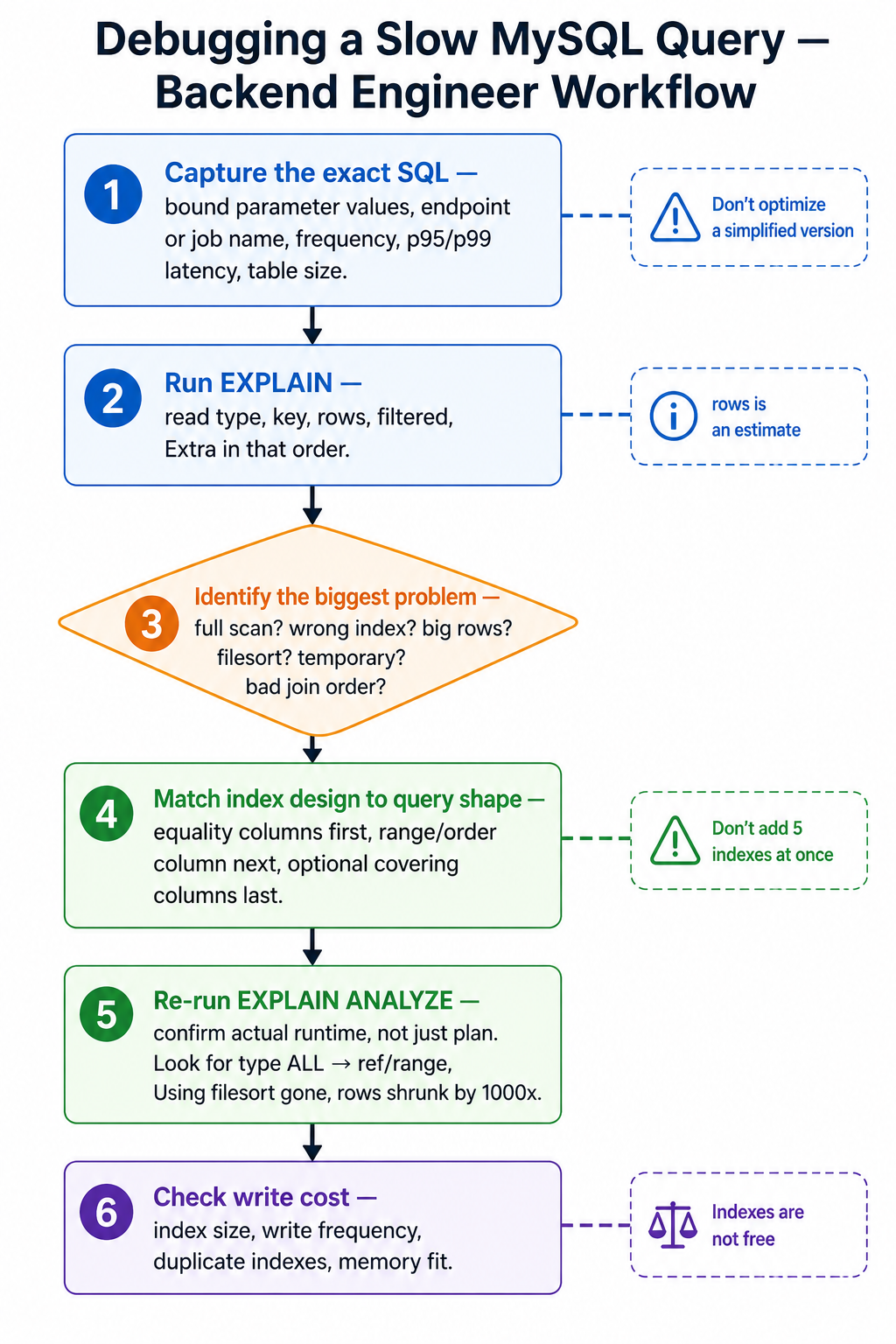
Step 1: Capture the exact SQL
Do not optimize a simplified version too early.
Capture:
- Full SQL with bound parameter values.
- Endpoint or job name.
- Frequency.
- Average and p95/p99 latency.
- Rows returned.
- Table sizes.
Parameter values matter. status = 'paid' may match millions of rows. status = 'failed' may match only thousands.
Step 2: Run EXPLAIN
EXPLAIN
SELECT *
FROM orders
WHERE status = 'paid'
  AND created_at >= '2026-01-01'
ORDER BY created_at DESC
LIMIT 50;
Look first at: type, key, rows, filtered, Extra.
Step 3: Identify the biggest problem
Ask:
- Is there a full table scan on a large table?
- Is MySQL using the wrong index?
- Is
rowsmuch larger than expected? - Is there
Using filesorton a huge result set? - Is there
Using temporaryon a hot endpoint? - Is the join order surprising?
- Is a join using
ALLinstead ofeq_reforref?
Do not randomly add indexes. Find the main source of work first.
Step 4: Match index design to query shape
For WHERE customer_id = ? ORDER BY created_at DESC LIMIT 20 → (customer_id, created_at).
For WHERE status = ? AND created_at >= ? ORDER BY created_at DESC LIMIT 50 → (status, created_at).
For WHERE tenant_id = ? AND status = ? ORDER BY created_at DESC LIMIT 50 → (tenant_id, status, created_at).
General rule:
- Equality filters first.
- Then range or ordering column.
- Then optional covering columns if the endpoint is hot and the tradeoff is worth it.
Step 5: Re-run EXPLAIN
After adding or changing an index, check again. You want to see improvements like:
type: ALL → ref/range
key: NULL → your_index
rows: 5000000 → 50
Extra: Using filesort → removed
But also benchmark actual runtime. The optimizer plan is not the same as user-visible latency.
Step 6: Check write cost
Every index has a write cost. Before adding an index, ask:
- How often is this table written to?
- Does this index duplicate another index?
- Can an existing composite index be reused?
- Is this endpoint hot enough to justify the index?
- Will the index fit in memory?
- Does it slow bulk imports or queue workers?
Indexes are not free.
26. Common EXPLAIN Smells
| Smell | Looks like | Likely cause |
|---|---|---|
| Full scan on a large table | type: ALL, rows: 12000000, key: NULL |
Missing index, function on column, low selectivity, or query asks for too much |
Using filesort with large rows |
rows: 2500000, Extra: Using filesort |
ORDER BY not supported by index; index column order wrong; sorting huge intermediate |
Using temporary; Using filesort |
Extra: Using temporary; Using filesort |
Expensive GROUP BY/DISTINCT/aggregate sort; consider summary table or async report |
Join table uses ALL |
table: order_items, type: ALL, rows: 8000000 |
Missing index on join column |
| Index considered but skipped | possible_keys: ..., key: NULL |
Optimizer decided index is not worth it; predicate not selective; statistics stale |
| Estimated vs actual rows mismatch | EXPLAIN ANALYZE shows estimated 100, actual 1,000,000 |
Stale statistics; missing histogram on skewed column |
27. Composite Index Design Patterns
Pattern 1: Tenant-scoped query
SELECT * FROM invoices
WHERE tenant_id = 100
ORDER BY created_at DESC
LIMIT 50;CREATE INDEX idx_invoices_tenant_created
ON invoices (tenant_id, created_at DESC);tenant_id narrows data, created_at supports ordering, LIMIT allows early stop.
Pattern 2: Tenant + status + latest
SELECT * FROM invoices
WHERE tenant_id = 100 AND status = 'overdue'
ORDER BY created_at DESC
LIMIT 50;CREATE INDEX idx_invoices_tenant_status_created
ON invoices (tenant_id, status, created_at DESC);Equality columns first (tenant_id, status), ordering column next (created_at).
Pattern 3: Date range report
SELECT * FROM orders
WHERE created_at >= '2026-01-01' AND created_at < '2026-02-01';CREATE INDEX idx_orders_created_at ON orders (created_at);Range scan over time. But if the query is tenant-scoped, prefer (tenant_id, created_at).
Pattern 4: Covering index for small projection
SELECT id, created_at, total_cents
FROM orders
WHERE customer_id = 42
ORDER BY created_at DESC
LIMIT 20;CREATE INDEX idx_orders_customer_created_cover
ON orders (customer_id, created_at DESC, id, total_cents);Supports filter, supports order, covers selected columns. Tradeoff: larger index, higher write cost.
28. Reading EXPLAIN Like A Backend Engineer
A database specialist may deeply analyze optimizer internals. A backend engineer should first answer practical questions.
Q1: Is this query reading too much data? Look at rows, filtered, type. If rows is huge, the query may be expensive even if it uses an index.
Q2: Is MySQL using the index I expected? Look at possible_keys, key, key_len. If possible_keys includes your index but key chooses another, ask why. If key_len suggests only the first column of a composite index is used, check your predicates.
Q3: Is MySQL sorting too much? Look for Using filesort. Then check ORDER BY columns, index column order, equality filters before ordering, LIMIT usage, number of rows before sorting.
Q4: Is MySQL creating temporary tables? Look for Using temporary. Then check GROUP BY, DISTINCT, aggregate sorting, reporting-style query shape.
Q5: Is the join efficient? For each joined table, check type, key, ref, rows. Healthy joins show eq_ref or ref. Risky joins show ALL and Using join buffer.
29. Production Checklist
Query capture
- Do I have the exact SQL?
- Do I have real bound parameter values?
- Do I know how often this query runs?
- Do I know the endpoint, job, or report that runs it?
- Do I know whether it is user-facing or background work?
EXPLAIN reading
- Is any large table using
type: ALL? - Is any large intermediate result using
Using filesort? - Is
Using temporaryexpected or suspicious? - Is the chosen
keythe index I expected? - Are
rowsestimates reasonable (compared toEXPLAIN ANALYZEactuals)? - Is
filteredvery low after reading many rows? - Are joins using
eq_reforrefwhere possible?
Index design
- Do composite indexes match the query shape?
- Are equality predicates first?
- Is the range or ordering column placed correctly?
- Is the index too wide?
- Does this new index duplicate an existing one?
- Is the read improvement worth the write cost?
Query design
- Am I wrapping indexed columns in functions?
- Am I using deep offset pagination?
- Am I selecting too many columns?
- Can I use a narrower date range?
- Can I precompute or cache reporting data?
- Can I move heavy work out of the request path?
Validation
- Did I rerun
EXPLAINafter changes? - Did I run
EXPLAIN ANALYZEto confirm actual timing? - Did I test with production-like data?
- Did I check p95/p99 latency, not only average?
- Did I consider write overhead?
30. Final Mental Model
When reading EXPLAIN, do not ask only:
Is MySQL using an index?
Ask better questions:
How many rows will MySQL read?
Is it using the right index for this query shape?
Can it avoid sorting?
Can it avoid temporary tables?
Are joins using indexed lookups?
Does the index match filtering, ordering, and limiting?
Is this query asking for too much data in the first place?
Good MySQL optimization is not about adding indexes everywhere. It is about matching access patterns to indexes, keeping queries predictable as data grows, and understanding when a query needs a different product or architecture decision.
EXPLAIN gives you the map. Your job as a backend engineer is to connect that map to real application behavior.
References
- MySQL Reference Manual:
EXPLAINoutput format - MySQL Reference Manual: Optimizing queries with
EXPLAIN - MySQL Reference Manual:
EXPLAINstatement andEXPLAIN ANALYZE - MySQL Reference Manual:
ORDER BYoptimization and filesort - MySQL Reference Manual:
LIMITquery optimization - MySQL Reference Manual: Descending indexes
- MySQL Reference Manual: Index condition pushdown
- MySQL Reference Manual: Optimizer histograms
- MySQL Reference Manual: Invisible indexes
- MySQL Reference Manual: Hash join optimization