So, you've built a MongoDB collection, shipped it to production, and life was great. Until the query that returned in 30 milliseconds on your laptop suddenly takes 4 seconds on the live cluster.
You open Atlas, stare at the slow-query log, and the truth lands.
You forgot the index.
Or you added one, but the query is somehow still doing a full collection scan, and you're not sure why.
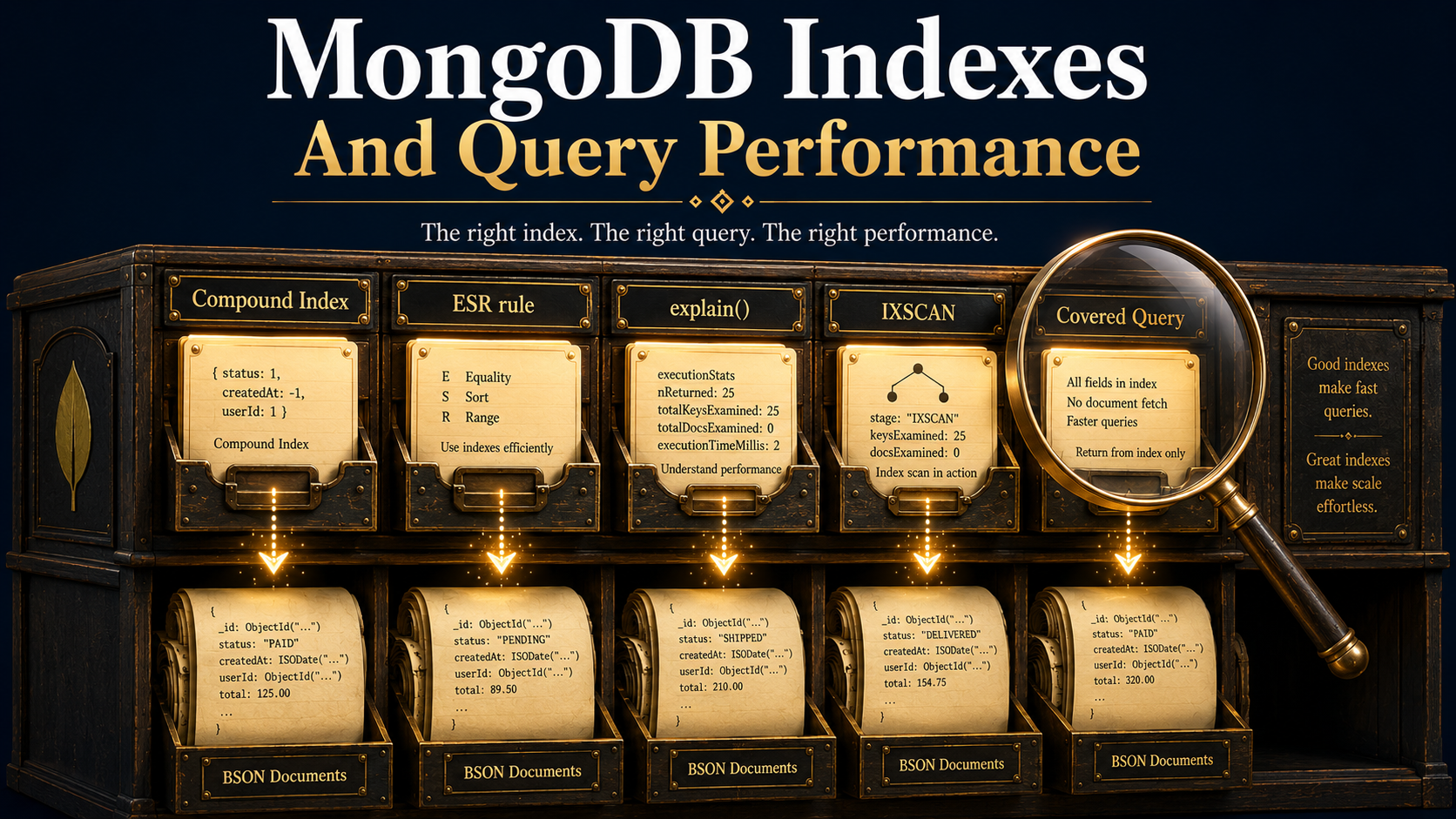
That's the thing about MongoDB indexes. They're not magic, and they're not optional. They're the single biggest lever you have over query performance, and the rules behind them are surprisingly mechanical once you see them. Let's break it down: what an index actually is, how compound indexes work (and why the order of fields matters more than you think), how to read explain() like a forensic report, and how to write covered queries that never even touch the document.
What An Index Actually Is
Forget the database vocabulary for a second.
A MongoDB index is a B-tree. That's it. It's a sorted data structure that maps values of one or more fields to the disk location of the document that holds them.
When there's no index, MongoDB has exactly one strategy for finding a document: open the collection and read every single one. That's a COLLSCAN. On a tiny collection it's invisible. On a million-document collection, it means the storage engine pulls every document into RAM, walks each one, checks the predicate, and discards 99.9% of what it just loaded.
When there is an index, MongoDB does what you'd do with a phone book. It descends the B-tree, finds the matching entries in O(log n), and only then fetches the actual documents (if it needs them at all; more on that later). That's an IXSCAN.
Here's the world's smallest example. Say you have a users collection:
db.users.insertMany([
  { _id: 1, email: "ada@example.com",   country: "UK", createdAt: ISODate("2024-01-10") },
  { _id: 2, email: "linus@example.com", country: "FI", createdAt: ISODate("2024-03-22") },
  { _id: 3, email: "grace@example.com", country: "US", createdAt: ISODate("2024-06-05") },
])
Without an index, this query walks every document:
db.users.find({ email: "linus@example.com" })With an index, it doesn't:
db.users.createIndex({ email: 1 })The 1 means ascending. -1 means descending. For a single-field index, direction barely matters. MongoDB can walk the B-tree either way. For compound indexes, direction matters a lot, which is the whole next section.
One field that always has an index is _id. MongoDB creates it automatically and you can't drop it. So db.users.find({ _id: 1 }) is always an IXSCAN, even on a brand-new collection.
Compound Indexes And The ESR Rule
A compound index covers more than one field, in a specific order.
db.orders.createIndex({ customerId: 1, status: 1, createdAt: -1 })That's not the same as three separate indexes. It's a single B-tree where the sort key is the concatenation of the three values, in that order. Think of it as sorting by customerId first, then by status within each customerId, then by createdAt within each (customerId, status) pair.
The order of the fields in the index is the most consequential decision you'll make about your queries. There are two rules that govern it.
The Prefix Rule
A compound index can only serve a query if the query touches the fields from the left, with no gaps. So the index { customerId: 1, status: 1, createdAt: -1 } can serve:
find({ customerId: ... }): uses the leftmost field. Good.find({ customerId: ..., status: ... }): uses the first two. Good.find({ customerId: ..., status: ..., createdAt: { $gte: ... } }): uses all three. Good.
But it cannot efficiently serve:
find({ status: ... }): skips the leftmost field.COLLSCAN.find({ createdAt: { $gte: ... } }): skips the first two.COLLSCAN.find({ customerId: ..., createdAt: { $gte: ... } }): uses field 1 and field 3 but skips field 2. MongoDB can use the index for thecustomerIdpart, but it'll still have to filter thecreatedAtpart in memory because the index entries between matchingcustomerIdrows aren't sorted bycreatedAtalone. They're sorted by(status, createdAt).
This is why a single well-designed compound index is worth ten lazy single-field indexes. You're encoding access patterns into the structure itself.
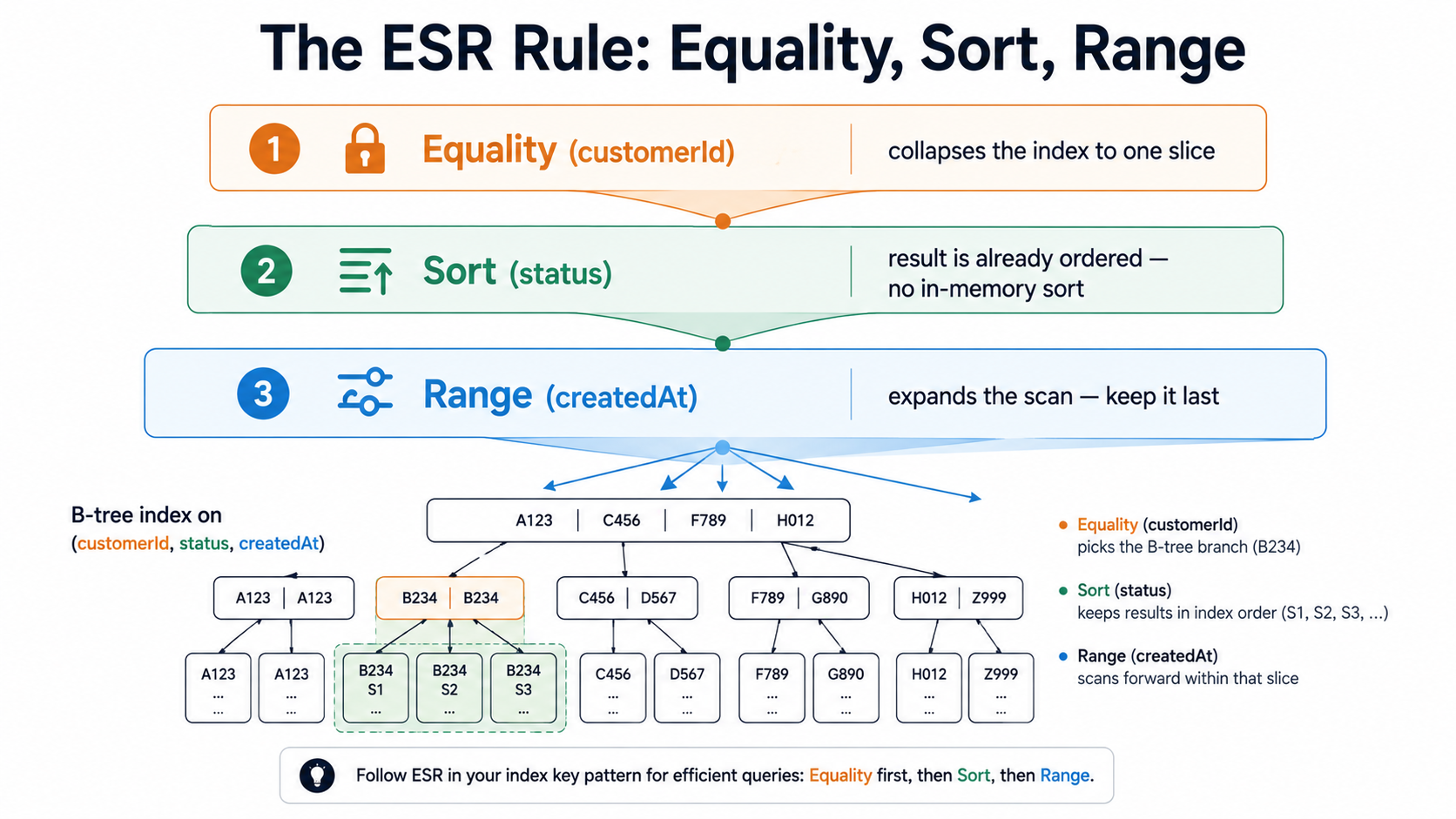
The ESR Rule (Equality, Sort, Range)
This one is gold. Once you internalise it, you'll design indexes faster than you can write them.
The fields in a compound index should appear in this order:
- Equality predicates first. Fields you're matching with
==or$inagainst a small set. - Sort fields next. Fields used in
.sort(...). - Range predicates last. Fields with
$gt,$lt,$gte,$lte,$ne, or any open-ended bound.
Why? Because equality predicates collapse the index to a single contiguous range of entries. Sort fields, when they come right after, mean the result is already in the order the query wants, no in-memory sort needed. Range predicates expand the scan again, so they go last.
Take this query:
db.orders
  .find({ customerId: "abc123", createdAt: { $gte: ISODate("2026-01-01") } })
  .sort({ status: 1 })
Equality on customerId. Sort on status. Range on createdAt. So:
db.orders.createIndex({ customerId: 1, status: 1, createdAt: 1 })That single index serves the query without an in-memory sort, with the smallest possible scan range. Reorder those fields and performance falls off a cliff. Put createdAt second and the sort by status becomes an in-memory operation that MongoDB will refuse if the result set crosses 100 MB. Put status first and you've made a useless prefix because the query doesn't filter on status at all.
Reading explain() Like A Detective
You can't tune what you can't see. explain() is how you see.
Append it to any query and MongoDB returns a JSON tree describing exactly how it ran the query: which indexes it considered, which one it picked, how many keys it walked, how many documents it pulled into memory, and how long each stage took.
db.orders
  .find({ customerId: "abc123", status: "shipped" })
  .explain("executionStats")
There are three verbosity modes. "queryPlanner" (the default) shows you the chosen plan and the alternatives that lost. "executionStats" actually runs the query and gives you the numbers you need. "allPlansExecution" runs every candidate plan and lets you compare. For tuning, "executionStats" is what you want 95% of the time.
Here's the slimmed-down output you should care about:
{
  "executionStats": {
    "executionSuccess": true,
    "nReturned": 42,
    "executionTimeMillis": 3,
    "totalKeysExamined": 42,
    "totalDocsExamined": 42,
    "executionStages": {
      "stage": "FETCH",
      "inputStage": {
        "stage": "IXSCAN",
        "indexName": "customerId_1_status_1_createdAt_-1",
        "keysExamined": 42
      }
    }
  }
}
Six numbers do all the work.
stage: IXSCAN at the leaf means MongoDB used an index. stage: COLLSCAN means it didn't, and that's almost always a problem on a collection over a few thousand documents. If you're seeing COLLSCAN and you didn't expect it, your index either doesn't exist, isn't a valid prefix for the query, or has a type mismatch (a common one: querying a string field with a number).
nReturned is how many documents the query actually returned to the client. totalKeysExamined is how many index entries MongoDB walked. totalDocsExamined is how many full documents it loaded from disk. The relationship between these three is everything:
nReturned == totalKeysExamined == totalDocsExamined: perfect. The index pointed straight at the answer.totalKeysExamined > nReturned: the index narrowed it down, but MongoDB still had to scan extra entries. Usually fine in moderation. If the ratio is huge (10,000 keys for 10 results), your index isn't selective enough.totalDocsExamined > nReturned: MongoDB pulled documents that didn't end up in the result. That means it had to fetch each one to check a predicate the index couldn't cover. This is where covered queries come in.totalDocsExamined == 0andnReturned > 0: congratulations, that's a covered query. The index alone answered the question.
executionTimeMillis is the wall-clock time. Use it to compare plans, not as an absolute number. It's noisy on a busy cluster.
The other thing to look out for is the dreaded SORT stage in the plan tree. If you see it, MongoDB sorted the results in memory after fetching them, which means your index didn't cover the .sort() clause. Check the ESR ordering.
Covered Queries: The Holy Grail
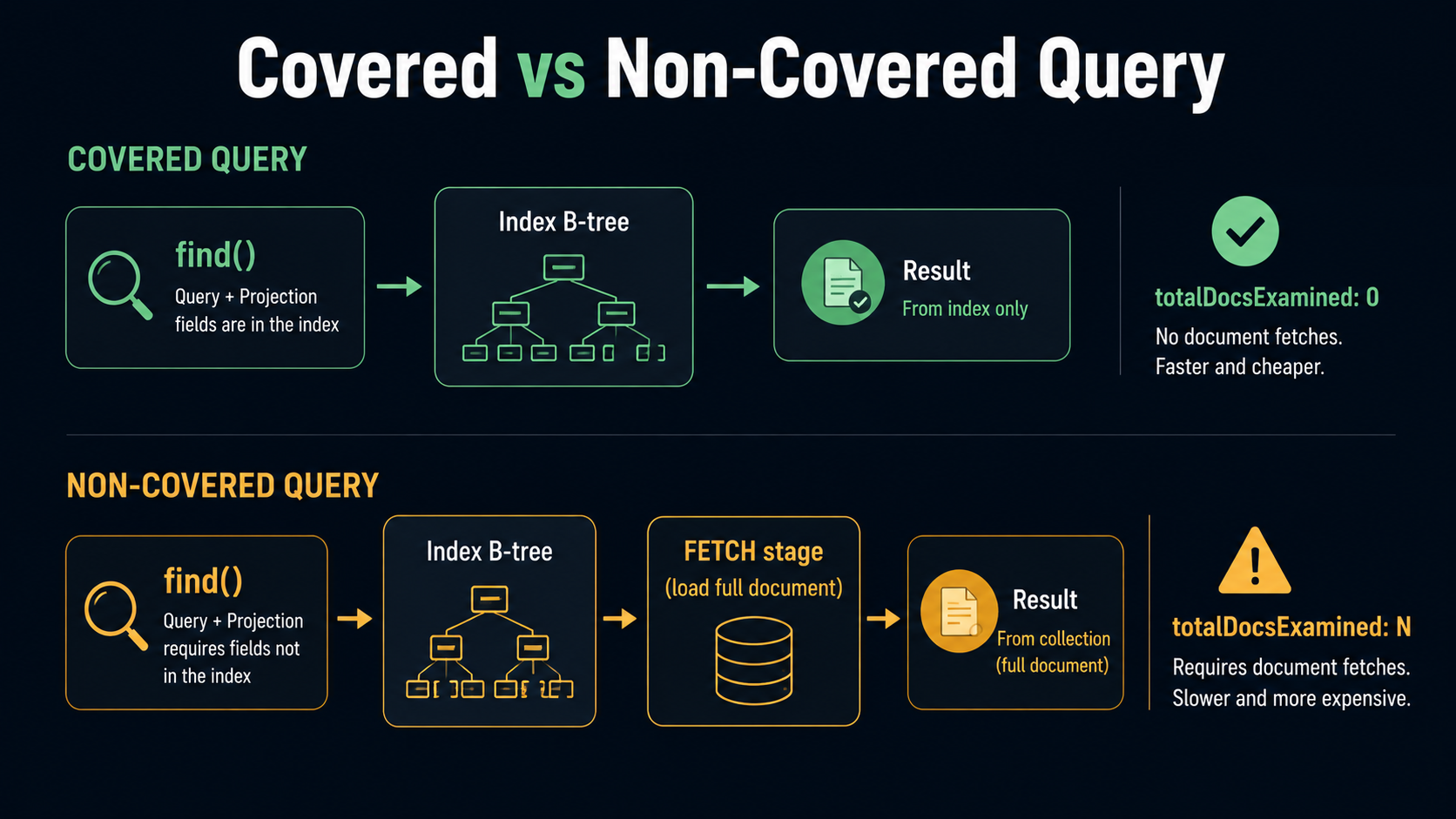
A covered query is a query that MongoDB answers entirely from the index, without ever touching the actual document.
Two conditions have to be true:
- Every field in the query predicate is in the index.
- Every field in the projection is also in the index, and the projection explicitly excludes
_id(or_idis part of the index).
That second condition is the one most people miss. By default, every projection includes _id. And unless _id is part of your index, MongoDB has to fetch the document just to get the _id back, which defeats the whole point.
Here's a covered query in action. Index:
db.orders.createIndex({ customerId: 1, status: 1 })Query:
db.orders.find(
  { customerId: "abc123", status: "shipped" },
  { _id: 0, customerId: 1, status: 1 }
)
The predicate uses customerId and status. The projection asks for customerId and status, and explicitly drops _id. Both required fields exist in the index. So MongoDB walks the B-tree, reads the values straight off the index entries, and returns them. totalDocsExamined is 0. Disk is never touched. This is the fastest possible kind of MongoDB query.
The opposite happens if you forget _id: 0:
db.orders.find(
  { customerId: "abc123", status: "shipped" },
  { customerId: 1, status: 1 } // _id: 1 is implicit
)
Now the projection wants _id, the index doesn't contain it, and MongoDB has to FETCH every matching document to retrieve the _id field. Same query, same index, vastly different I/O profile.
A few extra notes that catch people out:
- Multikey indexes can't cover queries if the array field is in the projection. If
tagsis an array and you index it, the index entry stores one tag per entry, not the whole array, so the index can't reconstruct the array for a projection. - Geospatial and text indexes can't cover queries. They're specialised structures.
- Embedded documents need exact field-path projections.
{ "address.city": 1 }can be covered if the index is onaddress.city;{ address: 1 }can't, because the index doesn't store the whole subdocument.
If a field is small and read-heavy, adding it to a compound index just to enable coverage is often worth the write cost. The savings on read I/O compound (pun intended) at scale.
When Indexes Hurt
Indexes aren't free. Every index you add has to be updated on every write: every insertOne, every updateOne that changes an indexed field, every deleteOne. A collection with twelve indexes is doing twelve B-tree mutations on every insert. At high write volume, that overhead is real.
A few patterns to watch for.
Indexes that never get used. MongoDB tracks index usage stats. Run this and you'll see how many ops have hit each index since the server started:
db.orders.aggregate([{ $indexStats: {} }])If you find an index with accesses.ops: 0 after a few weeks, it's dead weight. Drop it.
Indexes that don't fit in RAM. The whole point of a B-tree is fast traversal. If the index is larger than the working set of memory available, every traversal might page in from disk and the index becomes slower than a scan. Check db.collection.stats().indexSizes and compare against your cluster's RAM.
Redundant compound indexes. If you have { a: 1, b: 1, c: 1 }, you don't need a separate { a: 1 } or { a: 1, b: 1 }. The compound one already serves them as prefixes. Keep the longer one and drop the rest.
Index intersection is rare. MongoDB can combine two single-field indexes to answer one query, but the planner usually picks one or the other. Don't rely on intersection. Build the right compound index.
Background builds on busy clusters. Building a new index on a multi-terabyte collection in production is no small thing. Use a rolling index build across replica set members: bring secondaries down one at a time, build, sync back up. Atlas handles this for you; self-hosted, you do it by hand.
A Workflow That Actually Works
When a query is slow, this is the loop:
- Run the query with
.explain("executionStats"). - Look at
stageat the leaf. If it'sCOLLSCAN, you have no usable index. If it'sIXSCAN, look at the ratio oftotalKeysExaminedtonReturned. - Look for a
SORTstage. If it's there, your index doesn't cover the sort. - Look at
totalDocsExaminedvsnReturned. If they're far apart, consider widening the index to cover the projection. - Apply ESR. Reorder the fields if needed.
- Build the new index, re-run
.explain(), watch the numbers move.
Indexes are one of those rare areas in software where the feedback loop is direct. You change one line, rerun one query, and the numbers tell you exactly whether you helped. Use that. Most slow MongoDB queries aren't slow because MongoDB is slow. They're slow because someone didn't show the planner what it needed.
Show it the right index. Read the explain. Cover the query when you can.
That's most of the game.