You've shipped a feature, the test suite is green, the data looks fine in staging. Then production gets one extra million rows and a single page hangs for thirty seconds.
The query didn't change. The data did. Or the optimizer picked a different index. Or someone added an ORDER BY that quietly forced a sort over millions of rows in memory. EXPLAIN is how you find out which one.
EXPLAIN is the cheapest debugging tool MySQL gives you. You prepend it to a query, MySQL hands back a small table describing how it would execute that query, and most of the answers to "why is this slow?" are in that table. The rest are in EXPLAIN ANALYZE, which is a different button in the same console.
The trouble is that EXPLAIN's output looks dense the first few times you see it. A row of mostly capitalised words and abbreviations. type=ALL. Extra=Using where; Using filesort. rows=412988. None of that comes with a hover tooltip in production.
This piece is a backend engineer's reading order: what to look at first, what each column actually means, what a healthy plan smells like, and what the scary words you've been hoping mean nothing actually mean.
How To Run It
The basic form just prepends EXPLAIN to the query:
EXPLAIN SELECT * FROM orders WHERE customer_id = 42;This prints the plan without running the query. Think of it like a dry run.
If you want the plan with concrete execution numbers (actual rows, actual time spent at each step, actual loop counts), use EXPLAIN ANALYZE (MySQL 8.0.18+):
EXPLAIN ANALYZE SELECT * FROM orders WHERE customer_id = 42;This runs the query, with profiling, and returns an inverted-tree shape with timings. It's much closer to what really happened. We'll come back to it.
For long plans, switch the format. FORMAT=TREE (MySQL 8.0+) is the readable hierarchy. FORMAT=JSON is the everything-and-the-kitchen-sink view, including cost estimates and details about each access path:
EXPLAIN FORMAT=TREE SELECT ...;
EXPLAIN FORMAT=JSON SELECT ...;
Most of the time you start with the plain table, then drop into JSON or TREE when something looks suspicious.
The Columns That Actually Matter
The default EXPLAIN output has about a dozen columns. Five of them carry the weight. Look at these first, every time: type, key, key_len, rows, and Extra.
The other columns (id, select_type, table, partitions, possible_keys, ref, filtered) are useful, but they're context, not the headline. We'll touch the important ones inline.
type: How MySQL Will Find The Rows
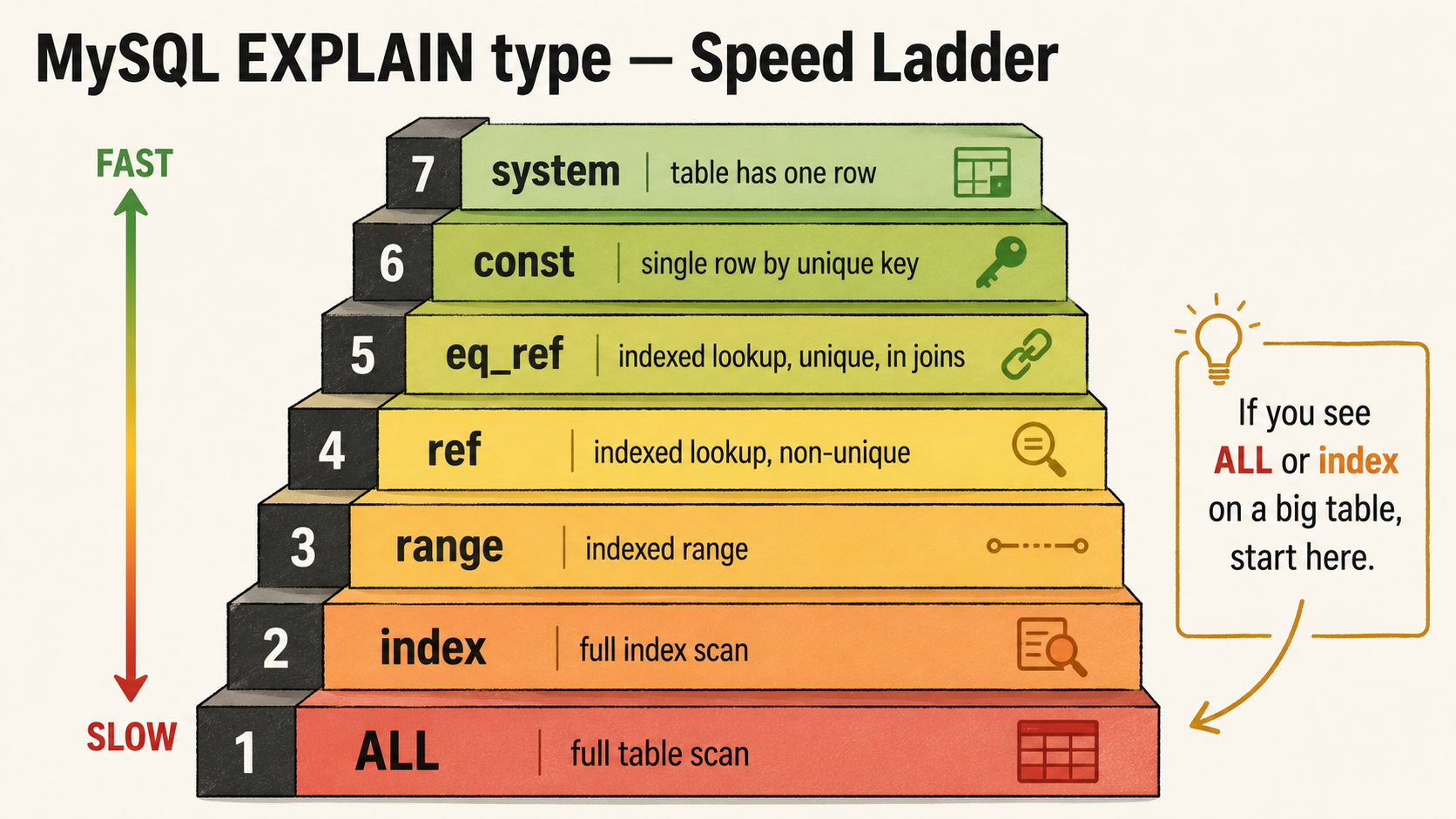
This is the most important column on the page. It tells you the access strategy MySQL chose for this table, and it's a tight ladder from "very fast" to "very slow". The names look arbitrary; learn the order.
From best to worst:
system: table has exactly one row. Effectively free. You'll see this on tiny config or singleton tables.const: at most one row, looked up by primary key or unique index. Constant time.WHERE id = 7against the primary key.eq_ref: for joins: one row from the joined table per row from the previous table, via primary key or unique index. The join equivalent ofconst. This is whatJOINlooks like when it's healthy.ref: multiple rows match a non-unique index lookup. Still indexed, still good.WHERE customer_id = 42against a non-unique index oncustomer_idends up here.range: index scan over a range of values.WHERE created_at BETWEEN ? AND ?orid IN (1, 2, 3). Fine for small ranges; can hide a problem when the range is huge.index: full index scan. MySQL reads the entire index, not just a slice. Less bad thanALLbecause indexes are smaller than tables and may be in memory, but still O(n).ALL: full table scan. MySQL will read every row. For a 10-row config table, that's fine. For a 50-million-row orders table, it's a day-ruiner.
Two more you'll meet:
index_merge: MySQL combined results from two indexes for one query. Sometimes a clever fallback when no single composite index fits. Sometimes a sign you should add the composite.fulltext:MATCH ... AGAINSTagainst a fulltext index.
The mental rule: if you see ALL or index on a big table, that's where you start. If you see ref, eq_ref, or const, the access strategy is healthy and you should look elsewhere, probably at Extra.
key And possible_keys: Which Index Got Picked
possible_keys is the list of indexes the optimizer considered. key is the one it actually used. They are not always the same.
When key is NULL, MySQL chose to ignore every index in possible_keys (or there were none) and went with a full scan. There's almost always a reason. Common ones:
- The optimizer's row estimate said the indexes wouldn't help: the query would touch most of the table anyway, so the index lookup plus row fetches is more expensive than just scanning.
- The query used a function on the indexed column.
WHERE DATE(created_at) = '2022-05-10'defeats the index oncreated_atbecause the value being compared isn'tcreated_at, it'sDATE(created_at). Functional indexes (8.0.13+) or rewriting the predicate as a range usually fixes this. - Implicit type conversion.
WHERE phone = 12345against aVARCHARcolumn forces a string-vs-int comparison, which can throw out the index.
When possible_keys lists multiple indexes and key picks one that surprises you, you can:
- Force the optimizer with
USE INDEX (idx_name)orFORCE INDEX (idx_name), useful for debugging. Don't sprinkle hints across production code; they age badly when the data distribution changes. - Run
ANALYZE TABLE table_nameto refresh the optimizer's statistics. A stale histogram can lead to bad index choice.
The aim isn't to override the optimizer. It's to understand why it picked what it picked and decide whether it's wrong.
key_len: How Much Of The Index You're Using
This one trips people up. key_len is the number of bytes of the index that the lookup actually used. It matters most for composite indexes.
Imagine an index on (customer_id, status, created_at). Each column has a byte width, say 8 for BIGINT customer_id, a couple for the status enum, 5 for DATETIME. If you query with WHERE customer_id = 42, only the first part of the index is used, and key_len reflects only those 8 bytes. If you query with WHERE customer_id = 42 AND status = 'pending', two parts get used, and key_len grows.
So key_len is a quick health check: are you using all of the composite index, or just the prefix? If the index is (customer_id, status, created_at) and your query filters on all three columns but key_len says only the first one is in play, the optimizer has only used the leading column. That usually means the rest of the WHERE is being filtered post-lookup, which is much slower than using the full index.
Things that quietly cap key_len:
- A range condition before an equality. The optimizer can't use index columns past the first range.
WHERE customer_id BETWEEN 1 AND 100 AND status = 'pending'will only usecustomer_idfrom the index above, even thoughstatusis the next column. - Functions or expressions on a column.
- An
ORbetween non-indexed columns.
This is where you find out your beautifully designed three-column index is doing one column's worth of work.
rows: The Estimate That Lies Just Enough
rows is MySQL's estimate of how many rows it expects to examine to satisfy this step. It's based on table statistics, sometimes outdated, and it can be wildly off, but as a first read, it's your scale check.
A few numbers to anchor on:
- Single-digit
rowson the leftmost table: probably fine. - Hundreds of rows: usually fine.
- Hundreds of thousands or millions on a frequently-hit query: investigate.
rowsclose to the table's full row count: you're heading toward a full scan, regardless of whattypesays.
The filtered column (a percentage) tells you what fraction of those rows the optimizer expects to actually pass the WHERE clause. So rows=1000000, filtered=10 means MySQL plans to examine a million rows and expects 10% of them to match, about 100k. That's a lot of work for 100k results.
Combine rows x filtered with type. A range over half the table isn't really better than ALL. The access path matters, but so does the volume.
Note:
rowsis an estimate, not a measurement. If you want the real number, runEXPLAIN ANALYZEand compare the estimated rows to the actual rows. Big divergence usually means stale stats.ANALYZE TABLErefreshes them.
Extra: Where The Real Story Hides
Extra is a free-form column that the optimizer uses to mention things it didn't include elsewhere. Half the EXPLAIN information lives here. Don't gloss past it.
Some flags are just informational. Using where means MySQL applies the WHERE clause after fetching rows from storage; it's the default for any query with a WHERE that isn't fully solved by the index. Almost every EXPLAIN you'll ever read has Using where. It's not bad on its own.
Other flags are the headline news.
The Smells, Ranked
Once you've read type, key, key_len, and rows, the Extra column is where you find out whether the query is doing extra work the index can't avoid. Here are the entries you'll see often, in roughly the order they cause real problems.
Using filesort
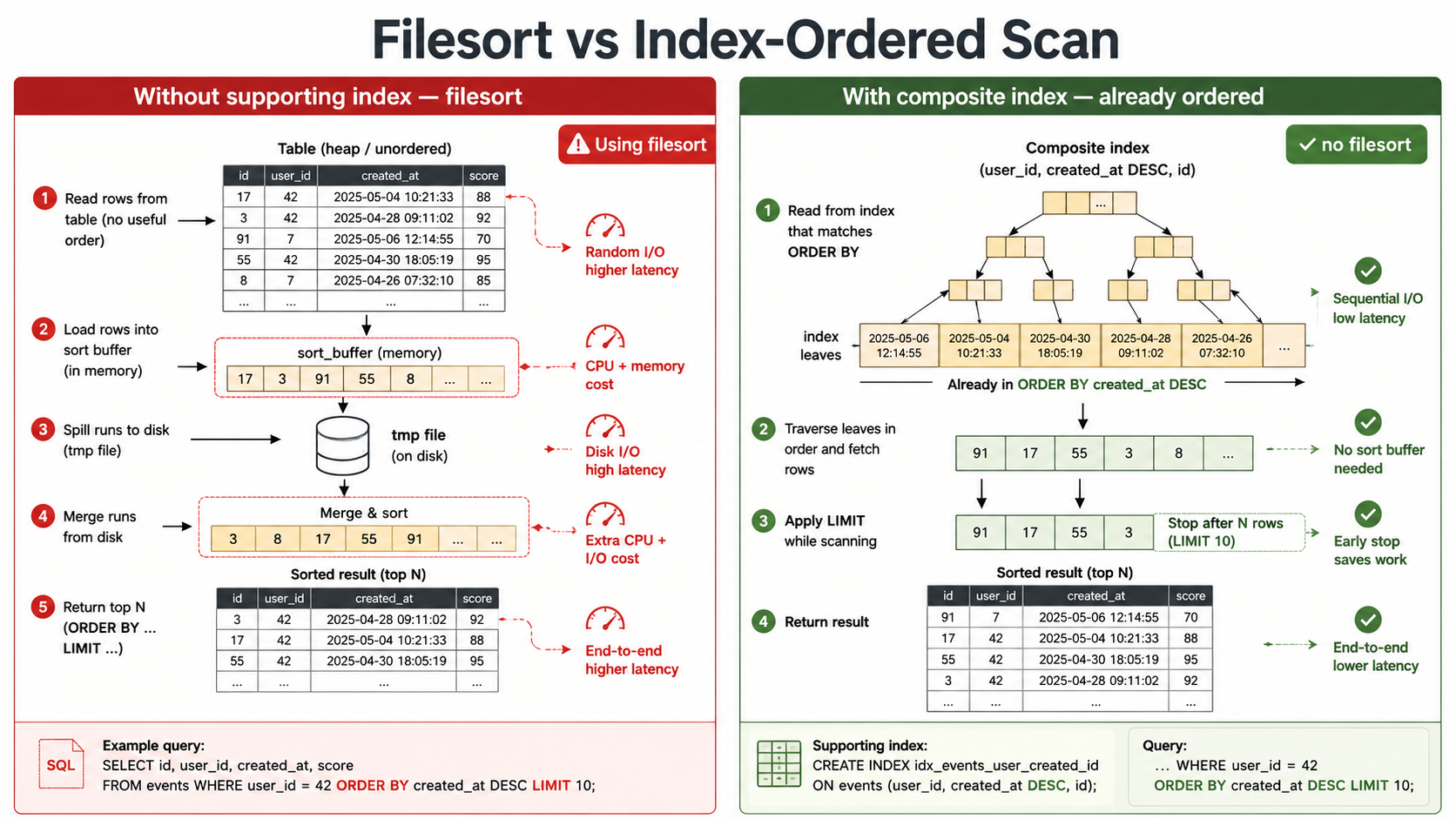
This is the one that surprises people. It does not always mean writing to disk. MySQL calls any sort that wasn't satisfied by the index "filesort", even if it happens entirely in memory. The name is a leftover, not a literal description.
Still, every filesort means MySQL had to gather the rows and then sort them after the access. The index couldn't deliver them in the order you asked for. If the data fits within sort_buffer_size, it sorts in RAM (cheap). If it doesn't, MySQL spills to disk in chunks and merges them (expensive, with real I/O). You usually can't tell which one you got from EXPLAIN alone: EXPLAIN ANALYZE or SHOW STATUS LIKE 'Sort%' is what tells you.
What causes it:
ORDER BYon a column that isn't part of the chosen index, or isn't in the right position to be delivered in order.ORDER BYmixed with a different access path. If the optimizer picked an index oncustomer_idto filter, and youORDER BY created_at, thecustomer_idindex can't delivercreated_atin order.GROUP BYwithout a matching index.
The fix is usually a composite index that covers both filter and sort:
CREATE INDEX idx_orders_customer_created
  ON orders (customer_id, created_at);
Now WHERE customer_id = ? ORDER BY created_at DESC can use the index for both: MySQL walks the index in customer order, then in created_at order within each customer, and LIMIT stops it early. The filesort disappears from EXPLAIN.
Using temporary
MySQL had to build an internal temporary table to satisfy the query. Combined with Using filesort, this often means a GROUP BY or DISTINCT over a large result, or a subquery the optimizer couldn't pipeline.
Like filesort, the temporary may be in memory or on disk, depending on size and settings (tmp_table_size, max_heap_table_size). On disk, it's noticeably slow and pollutes the buffer pool with throwaway data.
Common triggers:
GROUP BYon an unindexed column.DISTINCTon a wide projection.- Subqueries that the optimizer couldn't rewrite away.
UNION(the default deduplicates, which needs a temp table;UNION ALLdoesn't).
Fixes are case-by-case. Often: a covering index on the GROUP BY columns, or rewriting UNION as UNION ALL when you don't need deduplication, or replacing a correlated subquery with a join.
Using index (The Good One)
This is the covering index case. Every column the query needs to read is in the index, so MySQL doesn't have to go back to the row data on disk. The whole query is answered from the index pages.
If you see Using index on a hot query, leave it alone. You designed the index right.
You can engineer for it. A query like:
SELECT id, status FROM orders WHERE customer_id = 42;with an index on (customer_id, status, id) is fully covered. MySQL never touches the row.
Using index condition
Index Condition Pushdown (ICP). MySQL pushes part of the WHERE clause down to the storage engine so it can filter at index-read time, before fetching the row. This means fewer rows fetched from the clustered index.
Roughly: with an index on (customer_id, status) and the query WHERE customer_id = 42 AND status = 'pending' AND notes LIKE '%urgent%', ICP can use the index for the first two conditions before the engine pulls the row to check the LIKE. Without ICP, the row comes back first and the LIKE filters after.
Using index condition in Extra is good news. It's the optimizer being clever for you.
Using join buffer
This shows up on joins where one side has no usable index. MySQL falls back to buffered nested-loop join (Block Nested Loop) or, in 8.0.18+, a hash join.
Both work, but they're the symptom of a missing join index. If both join sides should have an index on the join column and one of them doesn't, this is where it bites. In modern MySQL the hash join is much better than the older block nested loop for unindexed joins, but if you're seeing it on a hot query, an index on the join column is almost always cheaper than the join algorithm working harder.
Using where
As mentioned above: this is usually nothing. It just means there's a WHERE clause being applied. Worry only if it's paired with ALL and a big rows. That's a full scan that filters after the fact.
Backward index scan
MySQL is reading the index in reverse to satisfy ORDER BY ... DESC. This is a 8.0+ optimization that lets a DESC order use an ascending index without a filesort. When it appears, you're getting the index sort and the descending order for free.
Impossible WHERE and Impossible WHERE noticed after reading const tables
The optimizer figured out the WHERE clause can never be true: WHERE 1 = 0, or a join where one side resolves to no rows. The query short-circuits and returns nothing. Sometimes it's a typo. Sometimes it's a clever optimization (a feature flag query that dynamically becomes WHERE flag = 0 and flag = 1).
A Worked Example
Here's a query against an orders table with about 5 million rows:
EXPLAIN
SELECT id, customer_id, total_cents, created_at
FROM orders
WHERE status = 'pending'
ORDER BY created_at DESC
LIMIT 50;
A simplified output:
type=ALL key=NULL rows=4980000 Extra=Using where; Using filesortFive things wrong in one row.
type=ALL means MySQL is reading every row of the table. key=NULL confirms it's not using any index. rows≈5M confirms the scale of the work. Using where means the WHERE is being applied after the read. Using filesort means after gathering all matching rows, MySQL is sorting them by created_at to find the top 50.
For a query that should return 50 rows from a 5M-row table, this plan reads the entire table on every call. On a LIMIT 50 page that loads on every dashboard hit, that's roughly the worst possible plan.
Add an index that supports both the filter and the sort:
CREATE INDEX idx_orders_status_created
  ON orders (status, created_at);
Re-run EXPLAIN:
type=ref key=idx_orders_status_created rows=120 Extra=Using where; Backward index scanNow type=ref (indexed lookup), key=idx_orders_status_created, rows≈120 (the optimizer's estimate of how many pending orders it'll examine to fill the LIMIT), and Backward index scan means MySQL is walking the index in reverse to satisfy ORDER BY created_at DESC without a filesort. The query goes from "scan 5M rows, sort them all, take 50" to "walk the index backwards from the end of the pending range, take 50".
You'll see this pattern over and over: ALL to ref, filesort gone, rows from millions to hundreds.
The order of columns in the index matters. (status, created_at) works for this query because status is an equality filter and created_at is the sort. If you swapped them to (created_at, status), the index would be useless for this query: the leading column doesn't match either the equality filter or anything that narrows down efficiently. The leftmost column of a composite index is the one the optimizer can use for equality and range; everything to its right is helpful for sorts and additional filters within the matched set.
EXPLAIN ANALYZE: The Real Numbers
EXPLAIN is a plan. EXPLAIN ANALYZE is the receipt.
It runs the query (with full execution) and returns a tree of operators with actual timings:
-> Limit: 50 row(s)  (cost=15.20 rows=50) (actual time=0.083..0.115 rows=50 loops=1)
    -> Index range scan on orders using idx_orders_status_created
       (cost=15.20 rows=120) (actual time=0.080..0.111 rows=50 loops=1)
Each line shows: estimated cost and rows, then actual time (first row..last row), actual rows produced, and how many times this step was looped (relevant for joins).
Compare actual rows to the optimizer's estimate. If they differ wildly (the optimizer says 120, the engine actually examined 4 million), your statistics are stale, or the query is hitting a corner the optimizer can't model. ANALYZE TABLE is the first thing to try; histogram-based stats (ANALYZE TABLE ... UPDATE HISTOGRAM ...) help on skewed columns the cardinality estimate can't see.
EXPLAIN ANALYZE is more expensive to run than plain EXPLAIN, since it actually executes the query, so you don't sprinkle it across production. But on a slow staging query with realistic data, it tells you where the time is actually spent, not where the optimizer guessed it would be.
It also shows you join order, which is genuinely hard to read in the flat EXPLAIN output. The tree format makes it obvious which table is the outer loop and which is the inner, and the loops=N count tells you how many times the inner step ran. A loops=1000000 on an inner step you thought was an eq_ref is a much louder signal than the same information buried in a row of the flat EXPLAIN.
What EXPLAIN Won't Tell You
A few things to keep in mind, so you don't put too much faith in the table.
EXPLAIN doesn't run the query (without ANALYZE). The estimates are based on statistics, not on the actual data at this moment. Stats can be old. ANALYZE TABLE refreshes them.
EXPLAIN doesn't show lock contention, deadlock risk, or buffer pool pressure. A query with a perfect plan can still be slow because something else is holding locks or the buffer pool is thrashing. EXPLAIN is about plan; performance has other axes.
EXPLAIN doesn't always reflect the value of prepared-statement parameters. The optimizer might pick a different plan with WHERE customer_id = 1 (a customer with 5 rows) than with WHERE customer_id = 42 (a customer with 5 million rows). Run EXPLAIN with realistic values for the common and the worst-case path, especially for skewed data.
And EXPLAIN won't tell you that your application code is calling the same query 200 times in a loop. That one's on you.
Building The Habit
Three small habits make a backend engineer's relationship with EXPLAIN much healthier.
The first is to EXPLAIN every new query that touches a non-trivial table before merging it. Treat it like reading the diff. It takes ten seconds and catches the worst plans before they make it past code review.
The second is to keep a small mental table of the column names. type, key, key_len, rows, Extra. Read those columns first, every time. Don't look at the rest until you've looked at those five.
The third is to be suspicious when a query that's been fast for a year suddenly isn't. The query didn't change. The data did. Re-EXPLAIN it. Often the row count crossed some threshold and the optimizer switched plans on you. The fix is usually an index, sometimes a query rewrite, sometimes ANALYZE TABLE to refresh stats.
EXPLAIN won't write your queries for you. It tells you which ones MySQL is going to have to fight with. That's the part most worth knowing in advance.