So, you've got a feature that needs a flexible field. Maybe it's product attributes, where a t-shirt has a size and a color but a laptop has a CPU and a screen size. Maybe it's a webhook payload from a third party that nobody promises is shaped the same way twice. Maybe it's user preferences, where the product team adds a new toggle every other sprint.
You stare at your relational schema and think: I could add a JSON column.
Then a small voice in the back of your head whispers: am I about to do something dumb?
Both reactions are right. MySQL's JSON column is one of the most useful features added in the 5.7 era, and one of the most overused. It can collapse a painful piece of schema into one clean field. It can also turn a tidy relational database into a half-baked document store with worse tooling than MongoDB and worse query plans than a properly normalised table.
The trick is knowing which one you're about to do.
What a JSON column actually is
Before we get to the philosophy, the mechanics. A JSON column in MySQL is not just a LONGTEXT with a clever name. When you write to it, MySQL parses the value, validates that it's well-formed JSON, and stores it in a binary format that's cheap to read keys out of. Invalid JSON is rejected at insert time, not at read time. That alone is worth the type. You never end up with a row whose "JSON" column is the literal string "undefined" because someone's frontend serializer had a bad day.
CREATE TABLE products (
  id BIGINT PRIMARY KEY,
  sku VARCHAR(64) NOT NULL,
  attributes JSON
);

INSERT INTO products (id, sku, attributes)
VALUES (1, 'TSHIRT-RED-M', '{"color": "red", "size": "M", "material": "cotton"}');
Reading individual keys uses path expressions. The -> operator returns a JSON value; ->> (with the extra >) unquotes it into a regular SQL value.
SELECT
  attributes->'$.color'  AS color_json,   -- "red"
  attributes->>'$.color' AS color_text    -- red
FROM products
WHERE id = 1;
Under the hood that's JSON_EXTRACT and JSON_UNQUOTE. The shorter operators are just sugar for them, and most people prefer the operators in everyday queries. There are also dozens of JSON_* functions for searching, modifying, merging, and validating documents.
That's the foundation. The interesting question isn't can you put data in a JSON column. The question is should you, for this specific column, in this specific table.
When JSON columns are the right answer
There's a small set of situations where reaching for JSON is genuinely the right move. They share a common shape: the data is structured enough that you want to store it, but not structured enough to model with columns.
The clearest example is opaque payloads. If you receive a webhook from Stripe, Shopify, or any third party, you often want to keep the raw payload alongside whatever you extracted from it. The shape can change between versions. You'll occasionally need to re-process old payloads with new logic. The payload is not your data. It's their data, captured. A JSON column captures the full thing without committing your schema to whatever they happen to send today.
CREATE TABLE webhook_events (
  id BIGINT PRIMARY KEY AUTO_INCREMENT,
  source VARCHAR(64) NOT NULL,
  event_type VARCHAR(64) NOT NULL,
  payload JSON NOT NULL,
  received_at DATETIME(6) NOT NULL
);
The next clear case is user-defined or product-defined attributes. A platform that lets sellers define their own product attributes can't model every shape in columns. The classic alternative is the EAV (entity-attribute-value) anti-pattern, with a product_attributes table holding (product_id, key, value) rows. EAV gives you the same flexibility, plus joins, plus a row count that grows by every key on every row, plus query plans that make grown engineers cry. A JSON column on the product itself is usually faster, simpler, and easier to read.
The third case is per-row configuration. Feature flags scoped to a tenant, A/B test assignments per user, the small bag of switches each integration carries. You rarely query across these. You read them when you load the row and apply them. JSON keeps the bag in one place without spawning ten skinny tables.
The thread tying these together: you mostly read the JSON whole, by primary key, in your application. You do not filter, aggregate, or join on its inner keys very often. When you do, you have a plan for it (we'll get to generated columns in a moment).
When it's a schema smell
Now the other side. Most of the JSON-column abuse I've seen comes from one of three motivations.
The first is laziness disguised as flexibility. The product team isn't sure yet what the final shape of an order is, so somebody slaps an extra JSON column on orders and starts dumping new fields in there. Six months later, half your business logic reads keys out of extra that should be first-class columns: extra->>'$.coupon_code', extra->>'$.gift_message', extra->>'$.delivery_window'. Each of those started as "we'll figure it out later" and became "we'll never extract it because too much code reads from there now." Your schema is a lie. The real schema lives inside JSON, undocumented, untyped, and unindexable without effort.
The second is treating MySQL as a bad MongoDB. Storing whole entities as JSON because "we want to be flexible like a document store." If you actually want a document store, use one. MongoDB, Couchbase, and Postgres's JSONB are all better at being document stores than MySQL is. MySQL JSON support is good for embedded JSON inside a relational world. It is not a great choice for the spine of your model.
The third is fear of migrations. Adding a column to a hot 200M-row table is scary, so people add to a JSON column instead. This is a reasonable short-term call sometimes: schema changes on a giant table really are a project. But if the field is going to live forever and be queried on, you're paying interest on that decision every day. Tools like pt-online-schema-change and gh-ost exist for a reason.
The rule of thumb that catches most of the bad cases: if you'll ever want to filter, sort, group, join, or unique-constraint a value, it should not live only inside a JSON column. The moment a field becomes queryable, the JSON column stops being storage and starts being a half-built index, and MySQL is going to make you do the other half by hand.
Generated columns: the bridge back to relational
This is the feature that makes JSON columns workable in MySQL. A generated column is a column whose value is computed from an expression over other columns. It comes in two flavors.
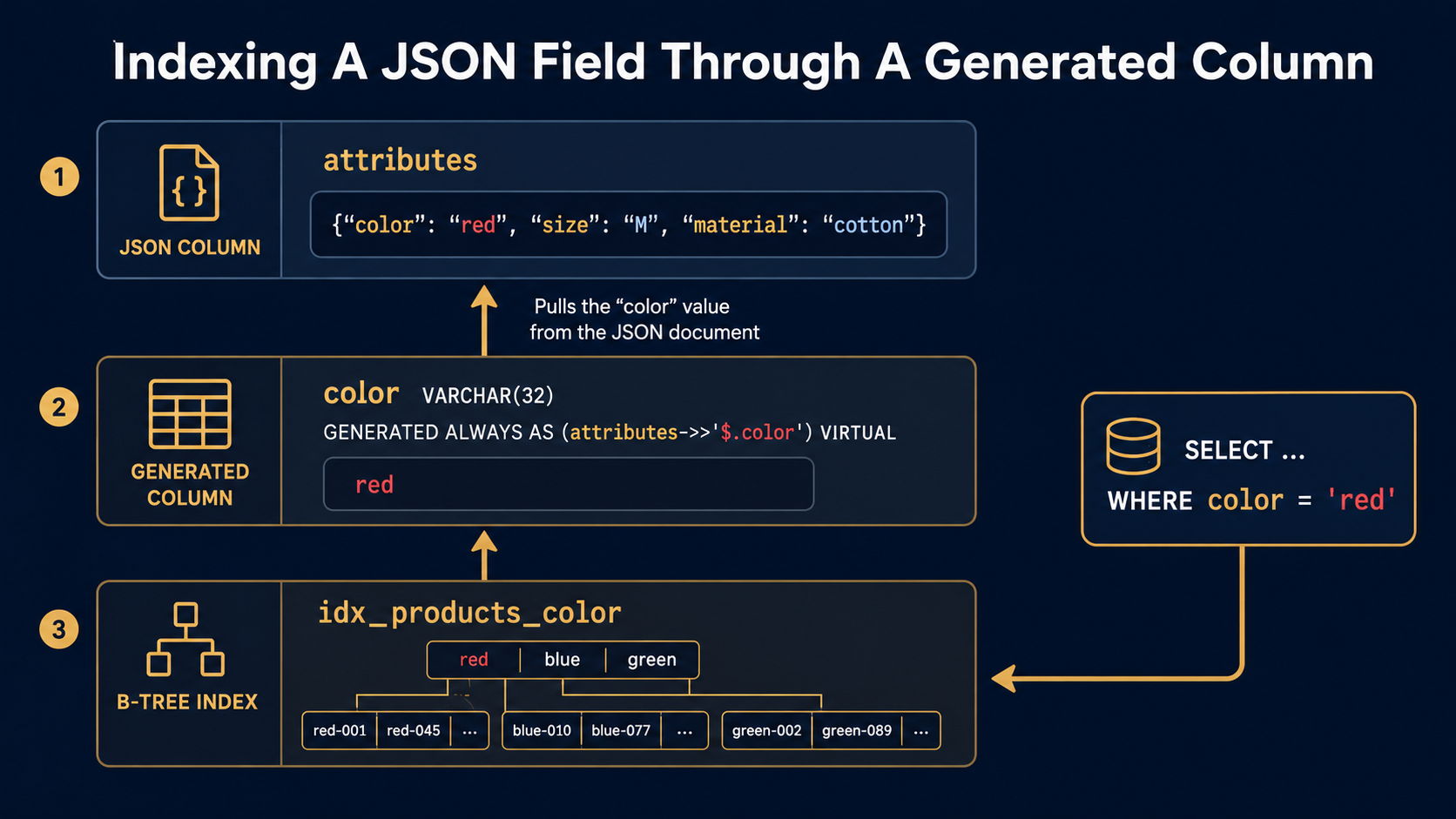
A STORED generated column is materialised at write time and lives on disk. A VIRTUAL generated column is computed on read and takes no extra space. Both of them can be indexed. Both of them can be referenced in queries like any other column. And both of them can pull values out of a JSON column.
ALTER TABLE products
  ADD COLUMN color VARCHAR(32)
    GENERATED ALWAYS AS (attributes->>'$.color') VIRTUAL,
  ADD INDEX idx_products_color (color);
Now color looks like a first-class column to your queries. You can filter on it, sort by it, even join on it. The JSON document is still the single source of truth. You didn't denormalise. You exposed one key.
SELECT id, sku FROM products WHERE color = 'red';The query planner uses idx_products_color directly. No JSON parsing per row. No table scan. Just a regular B-tree lookup that happens to be backed by a JSON path.
The choice between VIRTUAL and STORED matters less than people think. VIRTUAL is the right default: no extra storage, no rewrite cost on update. Use STORED when the expression is expensive enough that you don't want to recompute it on every read, or when you need a primary key, foreign key, or full-text index on the column (those require STORED).
There's also a shorter form that skips the column entirely: a functional index (added in MySQL 8.0.13) lets you index an expression directly.
CREATE INDEX idx_products_size
  ON products ((CAST(attributes->>'$.size' AS CHAR(8))));
The cast matters: functional indexes need a deterministic, fixed-width type so MySQL knows how to compare keys. The query planner uses this index when your WHERE expression matches the indexed expression exactly, character for character, including the cast. That's a sharp edge: write the same expression in your queries, or you'll get a table scan and wonder why.
A generated column with a regular index is usually friendlier. The expression lives in the schema, not scattered across queries. Reviewers can see what's indexed at a glance.
Indexing arrays: multi-valued indexes
JSON often holds arrays: tags on a product, role names on a user, region codes on a shipment. You can't index an array with a normal B-tree (a B-tree wants one key per row). MySQL 8.0.17 added multi-valued indexes specifically for this case.
ALTER TABLE products
  ADD INDEX idx_products_tags ((CAST(attributes->'$.tags' AS CHAR(64) ARRAY)));
The ARRAY keyword is what makes it multi-valued. Each row contributes one index entry per array element. Then MEMBER OF and JSON_OVERLAPS can use the index for membership queries.
SELECT id FROM products
WHERE 'sale' MEMBER OF (attributes->'$.tags');
The planner checks for MEMBER OF and JSON_CONTAINS / JSON_OVERLAPS against the same expression you indexed. As with functional indexes, the expression in the query has to match the indexed expression exactly. This is one of the few places MySQL gives you something close to a "tags" index without a separate join table, and it's worth knowing it exists before you build a product_tags table by reflex.
Schema validation: the sanity check you can add
The biggest practical complaint about JSON columns is that they don't enforce structure. A column that allows anything tends, given enough time, to contain anything. MySQL 8.0.17 added a way to push back: JSON_SCHEMA_VALID as a CHECK constraint.
CREATE TABLE webhook_events (
  id BIGINT PRIMARY KEY AUTO_INCREMENT,
  source VARCHAR(64) NOT NULL,
  payload JSON NOT NULL,
  received_at DATETIME(6) NOT NULL,
  CHECK (JSON_SCHEMA_VALID(
    '{
      "type": "object",
      "required": ["event_type", "id"],
      "properties": {
        "event_type": {"type": "string"},
        "id":         {"type": "string"}
      }
    }',
    payload
  ))
);
Now an insert that doesn't carry event_type and id fails at write time, not three weeks later when somebody's analytics query crashes. You can be loose where you want to be loose (the schema doesn't have to mention every key) and strict where it matters (require the keys you'll always need).
This is the move that turns JSON from "anything goes" into "structured but flexible." For payloads you control, it's worth the few minutes of schema-writing.
So how do you decide?
The questions to ask before reaching for JSON:
Will I read this whole, mostly by primary key? If yes, JSON is fine. If you'll constantly extract a few keys with ->>, those keys want to be columns or generated columns.
Will I filter, sort, or aggregate on inner keys? If rarely, generated columns and functional indexes cover it. If constantly, the keys are first-class fields wearing a costume.
Is the shape mine to define, or somebody else's? If you control the shape, define it as columns. If it's a third-party payload, JSON earns its place.
Will values across rows be compared, joined, or unique-constrained? If yes, columns. JSON makes those queries possible but ugly, and you'll pay for that ugliness in every query plan.
Do I need to enforce structure? If yes, write a JSON_SCHEMA_VALID check. The "JSON columns can hold anything" excuse stopped being true in 8.0.17.
The single line that fits most decisions: JSON is great storage and bad schema. Use it for things that are already shaped like documents: opaque payloads, per-row config, tenant-defined extras. Don't use it for things that want to be columns but feel inconvenient to model right now.
The good news is that nothing about this is one-way. A JSON key can graduate to a generated column. A generated column can graduate to a real stored column on the next migration. You're not committing forever. You're just deciding what the schema looks like today.
And if you're sitting on a JSON column right now that you regret, that's the work for next sprint, not an emergency. Pick one key. Promote it. Repeat. The schema you wish you had is usually one ALTER away.