So you set up a read replica.
You followed a tutorial, turned on the binary log on the primary, gave it a server-id, ran CHANGE REPLICATION SOURCE TO ... on the replica, started the replication threads, watched Seconds_Behind_Source drift down to zero, and called it done. SELECTs on the replica return the same numbers as on the primary. The dashboard is green. You move on.
Then someone (probably you, on a Monday morning) runs a heavy analytical query against the replica. While it runs, writes pile up on the primary. The replica falls behind by ninety seconds. A user creates an order on the primary, your API redirects them to the order detail page, the page reads from the replica, and the replica says "no such order." The user reloads. Same error. They email support.
That's the part the tutorial skipped.
Replication isn't really one feature. It's three or four overlapping problems sharing a name: how does data get from here to there, how stale is "there" allowed to be, what happens when "here" dies, and which queries belong on which node. None of them are hard on their own. All of them are subtle when they interact, and almost every team learns about that interaction in production.
Let's break it down.
What MySQL Replication Actually Is
At its core, MySQL replication is a one-way pipe.
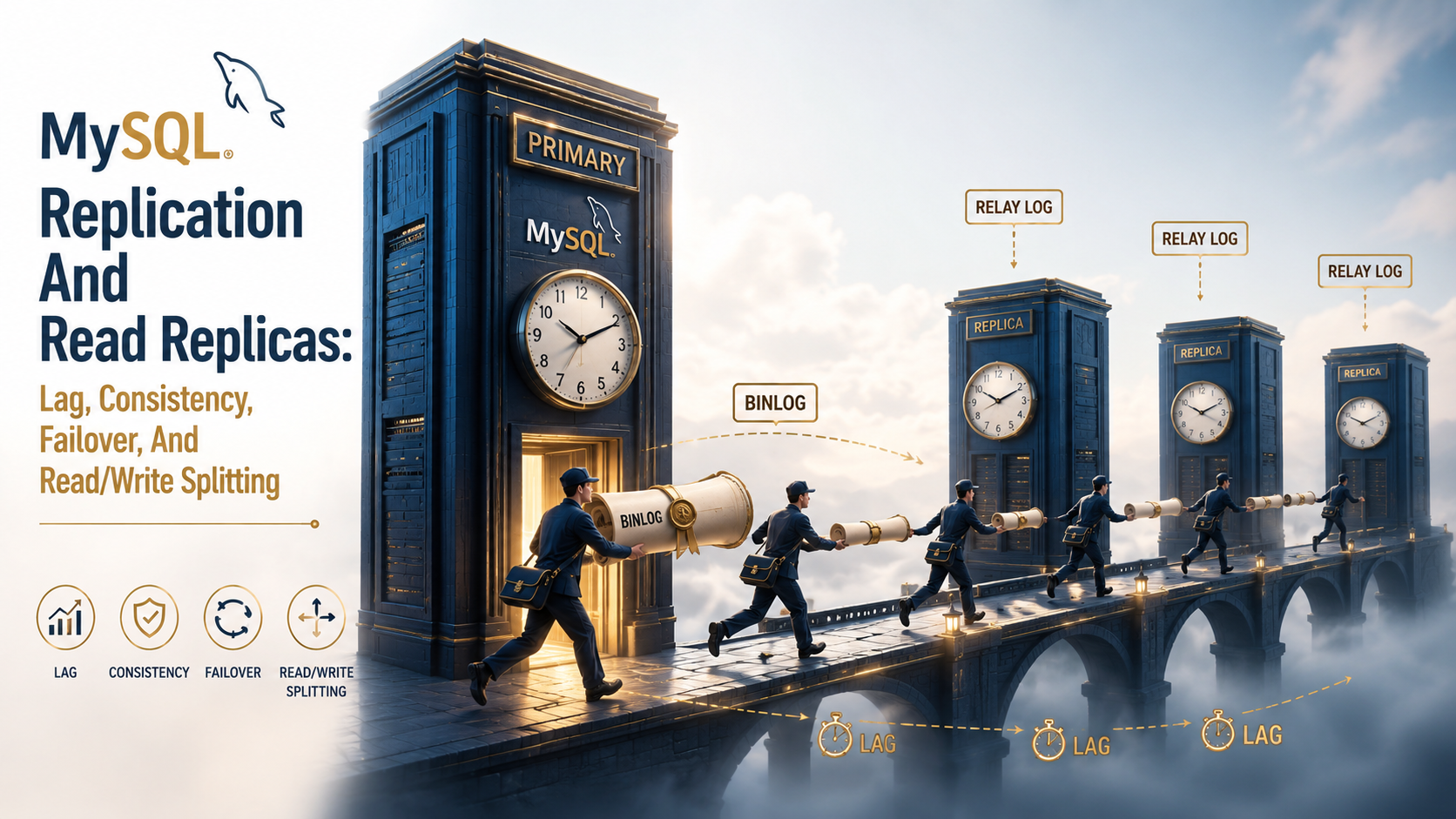
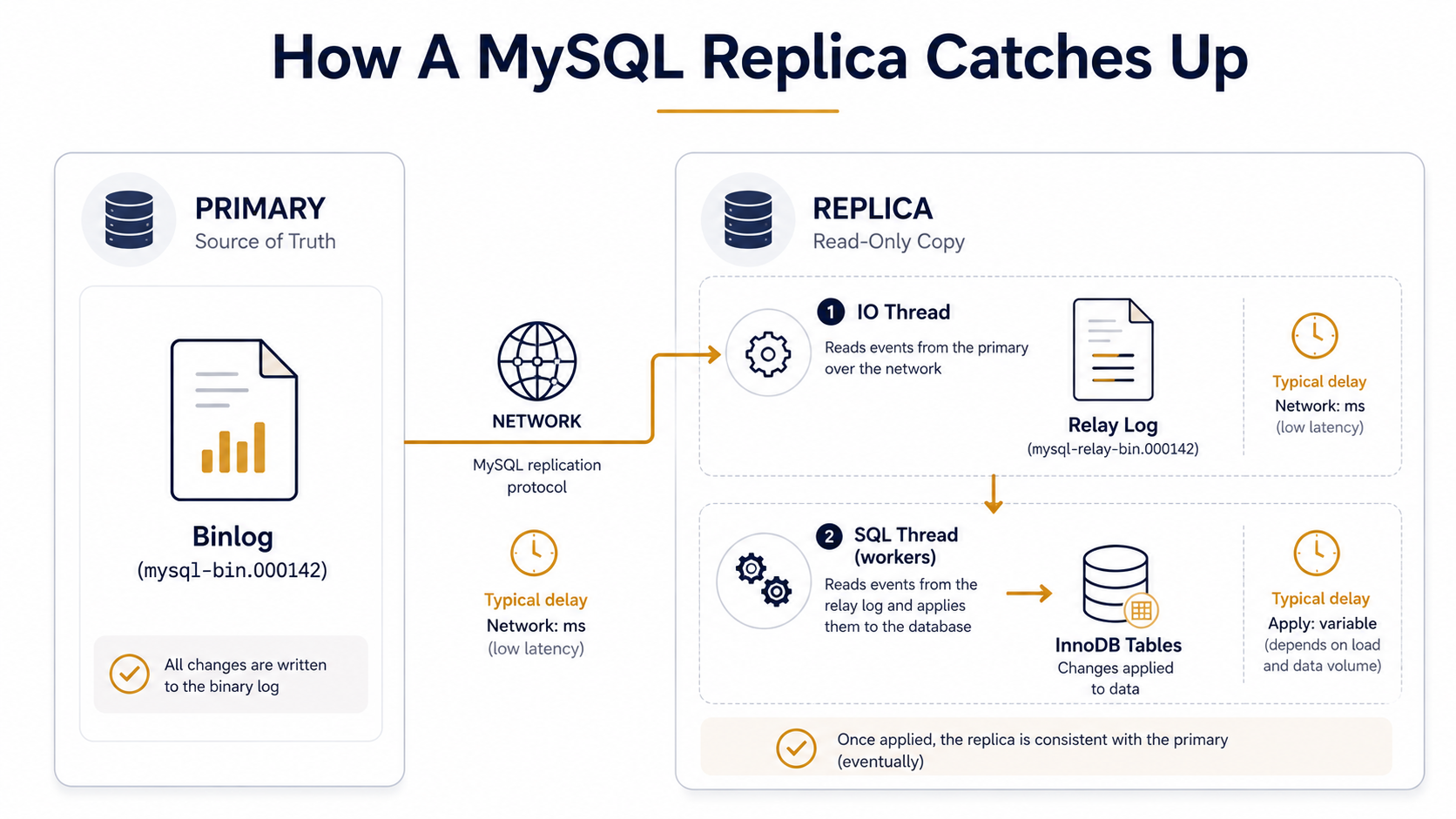
The primary writes every change it makes to a file called the binary log (the binlog). A replica connects to the primary, asks for a continuous stream of binlog events, writes those events to its own local file (the relay log), and then a worker thread reads the relay log and re-applies each event as a real database operation.
That's it. There is no magical "sync." There is no shared filesystem, no distributed lock manager, no consensus protocol (well, not in classic replication; we'll get to Group Replication). There is one machine playing back the writes of another machine, with a delay measured in milliseconds when things are healthy and in minutes when things are not.
Three pieces matter:
The binlog. A sequential, append-only log of changes on the primary. Every committed transaction gets one or more events written here. The format is configurable: STATEMENT (logs the SQL), ROW (logs the actual row before/after), or MIXED (uses ROW for non-deterministic statements and STATEMENT for the rest). For replication you almost always want ROW: it's the only format that's safe under non-deterministic functions, triggers, and certain replication topologies.
The replica's IO thread. A connection from the replica to the primary, fetching binlog events and writing them to the local relay log. This is fast: it's basically a network copy. The IO thread rarely falls behind unless the network is saturated.
The replica's SQL thread (or workers). This is the apply side. It reads the relay log and re-runs each event against the local database. In old MySQL this was a single thread, which is why one slow UPDATE on the primary could stall an entire replica behind it. In MySQL 5.7+ you can configure a pool of parallel workers (replica_parallel_workers, used to be slave_parallel_workers), and MySQL 8.0.27+ changed the default to LOGICAL_CLOCK with four parallel workers, which figures out which transactions can apply concurrently.
Set up looks roughly like this. On the primary's my.cnf:
[mysqld]
server-id      = 1
log-bin        = /var/log/mysql/mysql-bin
binlog_format  = ROW
gtid_mode      = ON
enforce_gtid_consistency = ON
On the replica:
[mysqld]
server-id      = 2
log-bin        = /var/log/mysql/mysql-bin
relay_log      = /var/log/mysql/relay-bin
read_only      = ON
super_read_only = ON
gtid_mode      = ON
enforce_gtid_consistency = ON
replica_parallel_workers = 4
replica_parallel_type    = LOGICAL_CLOCK
And then on the replica, you point it at the primary:
CHANGE REPLICATION SOURCE TO
  SOURCE_HOST    = 'primary.internal',
  SOURCE_USER    = 'repl_user',
  SOURCE_PASSWORD = '...',
  SOURCE_AUTO_POSITION = 1;

START REPLICA;
SOURCE_AUTO_POSITION = 1 tells the replica to use GTIDs to decide where to resume, rather than tracking binlog filename + offset by hand. If you take one operational thing from this article: always use GTIDs. Filename-and-offset replication still works, but GTIDs make every other operation (failover, replica reseeding, topology changes) dramatically less painful.
You can check what's happening with SHOW REPLICA STATUS\G:
*************************** 1. row ***************************
             Replica_IO_State: Waiting for source to send event
                  Source_Host: primary.internal
                  Source_User: repl_user
              Source_Log_File: mysql-bin.000142
          Read_Source_Log_Pos: 419822101
                Relay_Log_File: relay-bin.000087
                 Relay_Log_Pos: 419822314
            Replica_IO_Running: Yes
           Replica_SQL_Running: Yes
        Seconds_Behind_Source: 0
 Retrieved_Gtid_Set: 8e7f4f3a-...:1-984231
  Executed_Gtid_Set: 8e7f4f3a-...:1-984231
The two columns to glance at first are Replica_IO_Running, Replica_SQL_Running (both should be Yes), and Seconds_Behind_Source (smaller is better, but the value is more nuanced than it looks, more on that below).
Async, Semi-Sync, And Group Replication
There are three flavors of MySQL replication, and the difference between them is when the primary considers a write done.
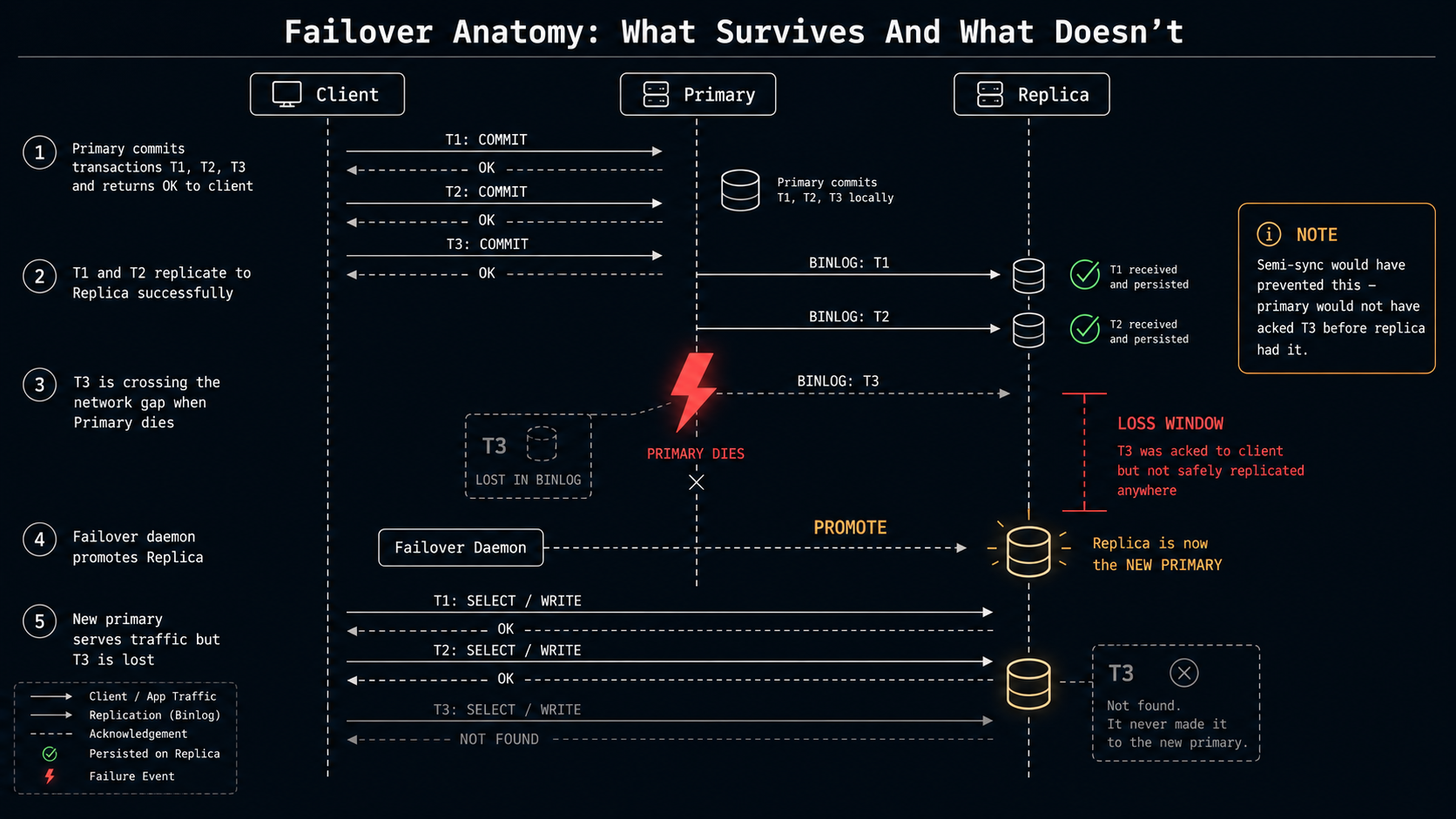
Asynchronous (the default). The primary writes the binlog event, the transaction commits, the client gets OK. Whether any replica has actually received that event yet is irrelevant. If the primary dies one millisecond after the commit, that transaction may be lost forever: it never made it to a replica. This is the fastest mode and the one most people run by default. The price is that every failover has a "last few transactions" question mark.
Semi-synchronous. The primary writes the binlog event, then waits until at least one replica acknowledges receipt of that event, then tells the client OK. The replica only has to confirm it received the binlog event into its relay log, not that it actually applied it. So you've still got apply lag, but you have a much stronger durability guarantee: at least one replica has the binlog before the client thinks the write succeeded.
You enable it with the plugin and a few variables:
-- on the primary
INSTALL PLUGIN rpl_semi_sync_source SONAME 'semisync_source.so';
SET GLOBAL rpl_semi_sync_source_enabled = 1;
SET GLOBAL rpl_semi_sync_source_timeout = 1000;  -- ms

-- on the replica
INSTALL PLUGIN rpl_semi_sync_replica SONAME 'semisync_replica.so';
SET GLOBAL rpl_semi_sync_replica_enabled = 1;
STOP REPLICA IO_THREAD;
START REPLICA IO_THREAD;
Watch out for rpl_semi_sync_source_timeout. That's the amount of time the primary waits for an ack before falling back to async. If your replica is slow or unreachable for longer than the timeout, the primary silently downgrades, and your "semi-sync" cluster is doing async writes until things recover. Most people set this in the 1-10 second range; smaller is more durable but more disruptive when a replica hiccups.
Group Replication. A multi-primary (or single-primary) cluster where every member runs a Paxos-style consensus protocol on every transaction. Writes have to be agreed on by a majority of members before they commit. This is what underpins MySQL InnoDB Cluster. It gives you actual high availability with automatic failover and stronger consistency guarantees than semi-sync. The cost is operational complexity and tighter coupling between members: you need careful network configuration, certificate management, and sane group sizes (3, 5, or 7 nodes; never 2 or 4).
Most teams running "replication" are running plain async with one or two replicas behind a primary. That's fine. It's the simplest, fastest, and most-documented setup. But know which flavor you're on, because the consistency and failover stories are very different.
Replication Lag, In Detail
Seconds_Behind_Source is the headline metric every dashboard shows you, and it's a great example of a number that's nearly right and quietly wrong.
What it actually measures: the difference between the system clock on the replica and the timestamp of the binlog event the SQL thread is currently applying. So when it shows 0, the SQL thread is applying events that were written on the primary "right now." When it shows 30, the SQL thread is applying events that were written 30 seconds ago.
The first thing to notice: it's measured at the apply side, not the receive side. The IO thread can be perfectly up to date, the relay log can have all the events sitting on disk ready to go, and Seconds_Behind_Source will still climb if the SQL thread is slow at applying them. Conversely, the SQL thread can be wedged on a single huge UPDATE for ten minutes, and the moment that statement finishes you'll see Seconds_Behind_Source jump from 600 to 0 in one tick: the next event in the relay log was written one second before the apply.
Second thing to notice: when the IO thread is broken, Seconds_Behind_Source is NULL. Some monitoring tools display that as 0, which is exactly the wrong default. A NULL here means the replica isn't even receiving events, which is a much worse failure than "we're 30 seconds behind." Always alert on Replica_IO_Running = No and Replica_SQL_Running = No separately, not just on lag.
A more reliable lag check is heartbeat-based. You write a row to a heartbeat table on the primary every second:
-- on the primary, run from a cron-like job once a second
REPLACE INTO heartbeat (id, ts) VALUES (1, NOW(6));
Then on the replica:
SELECT TIMESTAMPDIFF(MICROSECOND, ts, NOW(6)) / 1e6 AS lag_seconds
FROM heartbeat WHERE id = 1;
The replica reads its own copy of the heartbeat row (which got there via replication) and compares it to the local clock. The result is end-to-end lag, including network, IO thread, relay log, and SQL thread. This is what tools like Percona's pt-heartbeat do, and it's a much truer measurement than Seconds_Behind_Source. If you're serious about replication health, get a heartbeat in place.
Why does lag grow in the first place? Six common reasons, in roughly the order you'll encounter them:
- A long-running transaction on the primary. A single
UPDATE customers SET status = 'archived' WHERE created_at < '2020-01-01'that touches ten million rows will produce one giant transaction in the binlog. The replica has to apply it as one transaction too, and depending on parallel workers and the row format, that can take longer on the replica than on the primary, because the replica was probably also doing other apply work when it arrived. - Single-threaded apply on schema-incompatible workloads. Even with
LOGICAL_CLOCKparallel workers, transactions that touch the same row can't be parallelised: they have to apply in order. A workload that hammers a small number of hot rows replicates effectively single-threaded no matter how many workers you give it. - A missing index on the replica. A common surprise. If your replica is missing an index that exists on the primary (maybe a DBA dropped it for a recovery operation and forgot to recreate),
UPDATEs by primary key still work fine, butUPDATEs with a differentWHEREwill scan the whole table on apply. The primary did a fast index-driven update; the replica is doing a full scan for every row event. Lag explodes. - A heavy analytical query on the replica.
SELECTs don't block replication writes (replicas use the same InnoDB MVCC as primaries). But they do compete for I/O and CPU, and a multi-hour reporting query can starve the SQL thread. This is why dedicated reporting replicas are a thing. - Network saturation between primary and replica. Rare in datacenter setups; common in cross-region replication. The IO thread can't pull events fast enough, lag grows from the receive side.
- Disk slow on the replica. Cheap disks on read replicas to save money is a classic mistake. The SQL thread writes to the relay log, then writes to the data files, then writes to the redo log. If any of those storage paths are slower than the primary's, lag is inevitable under load.
A short audit checklist when lag appears: is the IO thread running? is the SQL thread running? is Seconds_Behind_Source climbing or just bouncing? what's the heartbeat lag say? are workers parallelising or stuck? what's the running query on the SQL thread (SHOW PROCESSLIST on the replica, look for the system user)? is the replica's disk pegged?
The Read-After-Write Problem
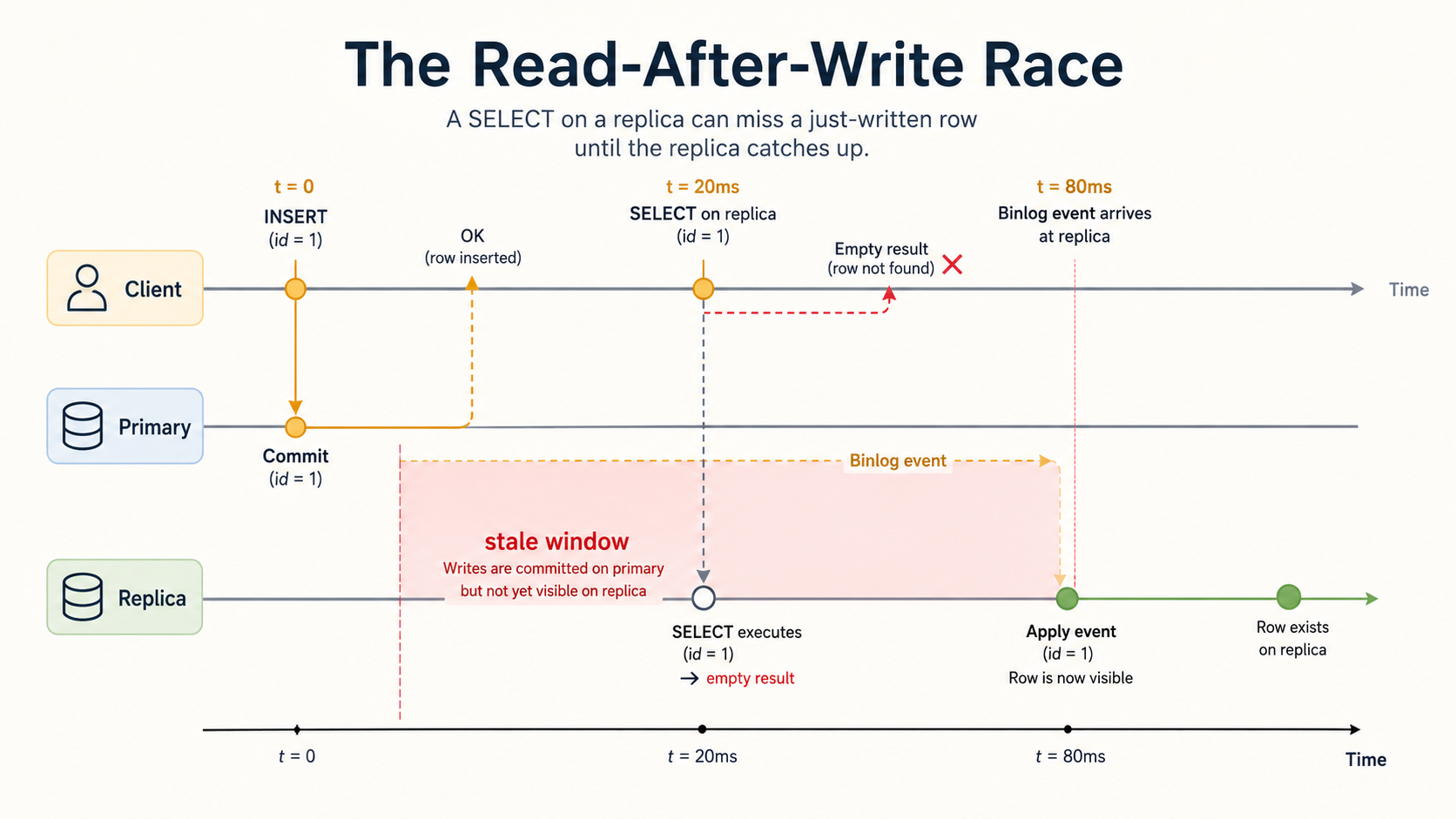
Now the consistency conversation. Async replication has one fundamental honesty problem: when a client writes to the primary and then immediately reads from a replica, the replica may not have the write yet.
t = 0ms     primary: INSERT INTO orders (...) VALUES (...);  -- returns OK
t = 0ms     replica: row not yet replicated
t = 50ms    primary -> replica: binlog event arrives
t = 80ms    replica: SQL thread applies the event, row exists
If the application reads from the replica between t=0 and t=80, it gets nothing. Your user just placed an order, and your "your order" page is empty.
You have four real strategies for this:
Strategy 1: Read-your-writes from the primary. Send any read that follows a write within the same logical session to the primary, not to a replica. This is what most ORMs default to when they offer read/write splitting at all. The cost is more load on the primary; the benefit is correctness without thinking. Implementations vary: some are sticky for the entire request lifecycle, some are sticky for a configurable window after a write.
Strategy 2: GTID-based read tracking. When a write commits on the primary, capture its GTID. Pass that GTID along with the user's session. On the next read, before issuing the query against a replica, run WAIT_FOR_EXECUTED_GTID_SET('<gtid>', timeout). If the replica has caught up to that transaction, the function returns immediately and you proceed. If not, it blocks until either the replica catches up or the timeout fires.
-- after a write on the primary, capture the GTID
SELECT @@gtid_executed;
-- '8e7f4f3a-...:1-984231'

-- on the replica, before reading
SELECT WAIT_FOR_EXECUTED_GTID_SET('8e7f4f3a-...:984231', 1) AS waited;
-- waited = 0 means the replica is already at or past that GTID
This is precise (you know the replica has the exact transaction you care about), but it requires plumbing the GTID through your application. Some proxies (ProxySQL with the right configuration) can do this for you transparently.
Strategy 3: Bounded staleness. Accept that reads can be stale by up to N seconds and design the UX around it. After a successful order placement, redirect to a page that polls the order detail with a small spinner for the first second. Or display the order details inline from the write response, rather than re-reading. This sounds like a cop-out but it's often the right answer: cleaner architecture, lower load on the primary, and a better-feeling UI than a hard "your order doesn't exist."
Strategy 4: Don't split reads. For workloads that are already small enough to live on one box, just send everything to the primary. Replicas become pure failover targets, not read-scaling targets. This is the right answer more often than people admit. If your primary is at 20% CPU, splitting reads is solving a problem you don't have and adding a consistency problem you didn't have.
The one strategy that doesn't work, and that you'll see in tutorials anyway: "just read from the replica, the lag is usually low." Usually-low lag is a guarantee about the average case. Production failures live in the tail. If your read-after-write breaks at p99 lag of two seconds, your customer doesn't care that p50 was 30 milliseconds.
Read/Write Splitting In Application Code
Once you have the consistency story figured out, you can think about the routing story.
The simplest split is at the connection level: have two pools, one pointing at the primary, one pointing at the replicas. Writes use the primary pool. Reads use the replica pool. Most application frameworks have a way to express this:
DATABASES = {
    'default': {
        'ENGINE': 'django.db.backends.mysql',
        'HOST': 'primary.internal',
        # ...
    },
    'replica': {
        'ENGINE': 'django.db.backends.mysql',
        'HOST': 'replica.internal',
        # ...
    },
}

DATABASE_ROUTERS = ['app.routers.PrimaryReplicaRouter']
const writes = knex({ client: 'mysql2', connection: process.env.DB_PRIMARY });
const reads = knex({ client: 'mysql2', connection: process.env.DB_REPLICA });
async function getUser(id: number) {
return reads('users').where({ id }).first();
}
async function updateEmail(id: number, email: string) {
return writes('users').where({ id }).update({ email });
}var primary, replica *sql.DB
func init() {
primary, _ = sql.Open("mysql", os.Getenv("DB_PRIMARY"))
replica, _ = sql.Open("mysql", os.Getenv("DB_REPLICA"))
}
func getUser(ctx context.Context, id int64) (*User, error) {
return scan(replica.QueryRowContext(ctx, "SELECT ... WHERE id = ?", id))
}
func updateEmail(ctx context.Context, id int64, email string) error {
_, err := primary.ExecContext(ctx, "UPDATE users SET email = ? WHERE id = ?", email, id)
return err
}'mysql' => [
'driver' => 'mysql',
'read' => [
'host' => [env('DB_REPLICA_HOST_1'), env('DB_REPLICA_HOST_2')],
],
'write' => [
'host' => env('DB_PRIMARY_HOST'),
],
'sticky' => true,
// ...
],The Laravel sticky => true flag is worth calling out. It means: once any query in this request hits the write connection, all subsequent reads in the same request also hit the write connection. That's read-your-writes per request, the cheap way. Most frameworks have an equivalent: Django's db_for_read router can implement it, Rails has a connected_to(role: :writing) block, Hibernate's read/write split has request-scoped pinning. If your framework offers it, turn it on by default. It's almost always what you want.
Where this gets harder is dynamic queries: code paths where the same function might read the just-written row, or might not, depending on a flag you can't see. Imagine a getOrCreate(...) helper that does a SELECT and falls back to an INSERT. If you route it to the replica by default, the create path's subsequent read will miss the row it just inserted (because the insert went to the primary). You either have to route the whole helper to the primary, or you have to explicitly mark the read as "after-write" so the framework pins it.
There are also dedicated proxy layers that take the routing problem out of your application entirely:
- ProxySQL is the most popular. It sits in front of MySQL, parses queries, and routes based on rules (regex against the query, hostgroup membership, transaction state). It can also handle GTID-tracking for read-after-write, connection pooling, and query rewriting. Setup is non-trivial but the operational story is cleaner: your application connects to one host, proxy figures out where it goes.
- MySQL Router is the official Oracle product, designed primarily for InnoDB Cluster but also usable with classic replication. Less feature-rich than ProxySQL but supported.
- MariaDB MaxScale is the MariaDB ecosystem equivalent.
A common shape: the application opens a connection to the primary for transactions and writes, opens a separate connection through the proxy for reads, and lets the proxy spread reads across replicas with health checks and weighted routing. That gets you most of the benefit of the proxy without giving up the simple "I'm writing to a known host" mental model.
Failover: What You Lose When The Primary Dies
This is the part where async replication's bill comes due.
When the primary fails (disk dies, network partitions, kernel panics, AWS pulls a power cable), the cluster needs to promote a replica. With classic async replication, the replica that gets promoted may not have all the binlog events the primary committed before it died. Anything the primary acknowledged but didn't replicate is gone.
The size of "anything" depends on three things: how far behind the replica was, how many transactions were in flight, and which durability flags you have set. With sane settings (sync_binlog = 1, innodb_flush_log_at_trx_commit = 1) and a healthy replica, the loss is typically the in-flight transactions at the moment of failure, usually milliseconds of data. With async replication and a replica that was lagging, it can be everything that happened in the last N minutes.
Semi-sync narrows this window. Because the primary waits for at least one replica's ack before committing, you're guaranteed that any client-acknowledged transaction made it into the binlog of at least one replica. As long as your failover picks that replica, no committed data is lost. The catch is the "as long as" part: if you fail over to a different replica that hadn't received the latest events, you're back to data loss. Failover tools that understand semi-sync know to pick the most-up-to-date member.
Group Replication takes this further with consensus: a write only commits if a majority of members has agreed on it. The cluster can lose any minority of nodes without data loss. This is the strongest guarantee, but you pay for it in throughput and operational complexity.
The actual mechanics of failover (the promote a replica, repoint the application, fence the old primary dance) depend on your tooling. The common ones:
- Manual. A human SSHs in, runs
STOP REPLICA,RESET REPLICA ALL,SET GLOBAL read_only = OFF, and updates DNS. Fine for low-traffic apps; terrifying for anything where minutes of downtime is real money. Don't do this for production HA, but know the underlying steps because every automated tool just does this faster. - Orchestrator. A widely-used third-party tool that watches the topology, detects primary failures via cross-replica checks, and automates the promote-and-rewire flow. It's the de-facto standard for self-managed MySQL HA outside of InnoDB Cluster.
- MySQL InnoDB Cluster. Built on Group Replication and MySQL Router. The cluster handles its own elections; the router handles client redirection. This is the official path forward for fully-automated HA.
- Cloud-managed (RDS, Aurora, Cloud SQL, PlanetScale). Failover is the cloud provider's problem. You configure a multi-AZ setup, they handle the rest. RDS multi-AZ uses a synchronous block-level replica with typical failover times of 60-120 seconds; Aurora uses a shared distributed storage layer that's a different model entirely.
The handoff has subtleties. Even with great tooling, a few things will bite you:
Connection pool pinning. Application connection pools tend to keep long-lived connections to the database. After failover, those connections are now pointed at a server that's read-only (the old primary, if it came back) or doesn't exist (if it didn't). Pools need an aggressive health check to evict broken connections. Many production failovers turn into application restarts because the pool didn't recover gracefully.
Stale reads on the new primary. The newly-promoted replica might still have queued relay-log events to apply at the moment it gets promoted. There's a window (often seconds, sometimes longer) where the new primary is still applying events from the old primary's binlog before it starts accepting writes. Tools like Orchestrator and InnoDB Cluster wait for the apply queue to drain before flipping read_only = OFF. Manual failover often skips this step and produces ordering anomalies.
The split-brain problem. If the network partition that caused the failover wasn't actually a primary failure (the primary was alive but unreachable from the failover daemon), and the daemon promotes a replica, you now have two primaries. Both accept writes. Reconciliation is hell. Real HA setups use fencing: STONITH-style mechanisms that physically prevent the old primary from accepting writes, like blocking its network at the firewall or shutting down the host, before promoting a new one.
GTIDs save your life here. When a replica is promoted to primary, the other replicas need to know how to follow it instead of the old one. With GTIDs, this is CHANGE REPLICATION SOURCE TO SOURCE_HOST = 'new-primary', SOURCE_AUTO_POSITION = 1 and they figure out the rest by looking at which transactions they have versus which ones the new primary has. With filename-and-offset replication, you have to figure out the equivalent binlog position on the new primary by hand, which during a 3am failover is the exact wrong time to be doing arithmetic.
A Few Operational Things That Will Save You
Some of these you'll only learn by getting bitten. I'll save you the bites where I can.
Set read_only and super_read_only on every replica. read_only blocks normal users from writing, but users with the SUPER privilege bypass it (which is most of the application users at small companies, because privilege management is hard). super_read_only blocks them too. The combination prevents the classic "someone wrote to the replica by accident and now replication is broken because the next event from the primary conflicts" disaster.
Watch for replication errors, not just lag. A replica can be at zero lag and broken. The SQL thread can hit a row-not-found error or a duplicate-key error and stop, with the IO thread happily continuing to fetch events into the relay log. Seconds_Behind_Source in this state will report NULL, but lag-only dashboards display that as 0. Alert on Last_Errno != 0 separately.
Backup from a replica, not the primary. A mysqldump on the primary holds metadata locks for the duration of the dump. On any reasonably-sized database, that's long enough to cause user-visible latency. Take backups from a replica. And if you want consistent backups, take them from a paused replica using STOP REPLICA SQL_THREAD, take the dump, then START REPLICA SQL_THREAD to catch up. Or use xtrabackup, which doesn't need to lock at all.
Don't run schema changes through normal replication. A ALTER TABLE on a billion-row table replicates as a single huge event. The SQL thread on the replica blocks for as long as it takes to apply, which means hours of lag. Use a tool like pt-online-schema-change or gh-ost that does the alter in chunks across primary and replicas. Alternately, MySQL 8.0 has ALGORITHM=INSTANT for some types of column additions, which is genuinely instant on both primary and replica, but the supported set is narrow, so check before you assume.
Test your failover regularly. Once a quarter, in business hours, with the team paying attention. Failover that hasn't been exercised in a year has every chance of failing the first time you actually need it. The application's connection pool, the proxy's routing rules, the monitoring dashboards, the runbook: all of them rot when not exercised.
Don't trust CHANGE MASTER TO from a tutorial without SOURCE_AUTO_POSITION = 1. Older tutorials predate widespread GTID adoption and often use SOURCE_LOG_FILE and SOURCE_LOG_POS. The setup will work, but every subsequent operational task (reseeding, failover, re-pointing) gets harder. Spend the extra ten minutes turning on GTIDs in the initial setup. Your future self will thank you.
Configure binlog_expire_logs_seconds deliberately. Default is 30 days. Too short and a replica that's been offline for a week can't resume: it has to be rebuilt from a backup. Too long and your binlog disk fills up. Pick a value with your worst-case replica downtime in mind, plus a margin.
The replica's hardware doesn't have to match the primary, but the storage class does. Replicas can have less RAM and fewer cores: the apply path is mostly sequential. But if your primary is on NVMe and your replica is on EBS magnetic, the replica will never keep up, no matter how many parallel workers you give it. Storage IOPS is the silent killer of replication.
The Mental Model That Actually Holds Up
If you remember nothing else, remember three things.
First, replication is async by default and that's a durability story, not a routing story. Reading from a replica is fine; just know the data you're reading is from a moment slightly in the past, and decide whether that matters for the query at hand. If your business cares about every transaction surviving a primary failure, you need semi-sync or Group Replication, not "more replicas."
Second, lag is what your application sees, not what the dashboard shows. Seconds_Behind_Source is a useful number until it isn't, and it isn't whenever the failure mode is more interesting than "one machine is slow." Heartbeats, GTID waits, and end-to-end checks beat the headline metric every time.
Third, failover is a two-system handoff, not a database operation. The database part (promoting a replica, redirecting writes) is the easy half. The application part (connection pools, routing rules, in-flight requests, retries) is where most failovers actually go wrong. Plan and rehearse the whole flow, not just the SQL.
You won't get a feel for any of this from reading documentation. You'll get it from running pt-heartbeat, watching a replica fall behind during a slow ALTER, fixing it, breaking it again with a runaway analytical query, learning to write read-after-write code that survives a 30-second outage on a replica, and one day handling a real failover where every assumption in your runbook turns out to be slightly wrong.
Set up two MySQL boxes, point one at the other, and start poking. The good news is that everything in this article is reproducible on a laptop. The bad news is that production has worse weather. Start running the experiments anyway.