You opened a Next.js app for the first time in a while and stared at the folder tree.
app/. layout.tsx. page.tsx. loading.tsx. error.tsx. route.ts. A folder named @modal. Another named (marketing). A file at the top of every route that doesn't render anything but seems important. A function marked "use server" inside a component file. The same fetch call somehow cached in one place and not in another.
If your last serious encounter with Next.js was the Pages Router - the world where pages/index.js rendered the homepage and getServerSideProps did the data fetching - you are not just looking at "React with routing" anymore. You're looking at a different mental model for how a web application is built, deployed, and cached, and the routing is the smallest part of it.
Let's break down what actually changed, because the surface-level migration guide ("rename pages/ to app/, replace getServerSideProps") undersells the shift by a wide margin.
What "Next.js" Used To Mean
For most of its life, Next.js was a thin, opinionated shell around React. It gave you three things React didn't have out of the box: file-based routing, a server-rendering pipeline, and a build step that produced static HTML or a Node server depending on the page. That was the value proposition. You wrote React components, the framework figured out the rest.
The mental model fit on a napkin. A file under pages/ became a route. Each page was a React component. If you needed data from the server, you exported getServerSideProps or getStaticProps. The component received the data as props. The browser hydrated the page and you carried on writing React the way you would in a Create React App project.
That model was easy to teach. It was also missing a lot.
The two things it didn't solve well: data fetching inside the component tree (you had to lift everything to the page level and pass it down), and the cost of shipping every component's JavaScript to the browser even when the component had no interactivity. Both of those got worse the more your app grew. By the time you had a layout with a navbar that needed user data, a sidebar that needed permissions, a content area that needed a database query, and a footer that needed nothing at all - you were either prop-drilling four unrelated concerns through one getServerSideProps, or you were stacking client-side useEffect calls and accepting the loading-spinner soup that came with them.
The App Router exists because the team decided to fix the model, not the symptoms.
The App Router Is A Folder-Shaped Runtime
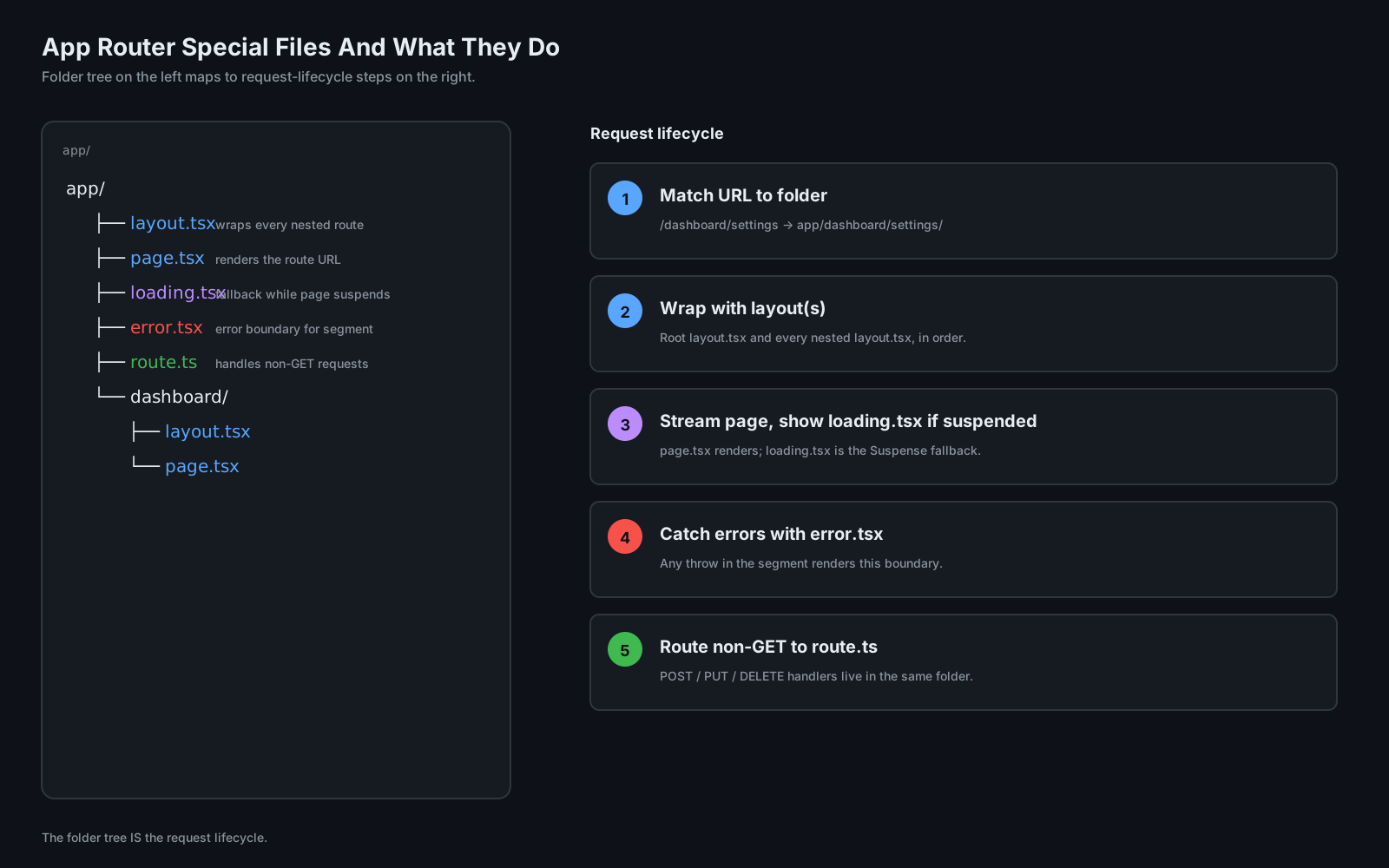
In the Pages Router, a file was a page. In the App Router, a folder is a route segment, and a small set of reserved filenames inside that folder describe what happens when the segment matches.
app/
├── layout.tsx           # wraps every route below it
├── page.tsx             # renders for the route /
├── loading.tsx          # shown while page.tsx suspends
├── error.tsx            # caught error boundary for this segment
├── not-found.tsx        # rendered when notFound() is called
└── dashboard/
    ├── layout.tsx       # wraps /dashboard and everything below
    ├── page.tsx         # renders /dashboard
    ├── loading.tsx      # only for /dashboard
    └── settings/
        ├── page.tsx     # renders /dashboard/settings
        └── route.ts     # handles non-GET requests at /dashboard/settings
Each of these filenames is a slot in the framework's runtime. layout.tsx wraps everything nested under its folder and persists across navigations within that subtree - it doesn't re-render when you go from /dashboard to /dashboard/settings. loading.tsx is the fallback the framework shows when the page's data is still streaming. error.tsx is a React error boundary that the framework wires up for you. route.ts is the new shape of API routes - same file, same folder as your UI, but it exports GET, POST, PUT handler functions.
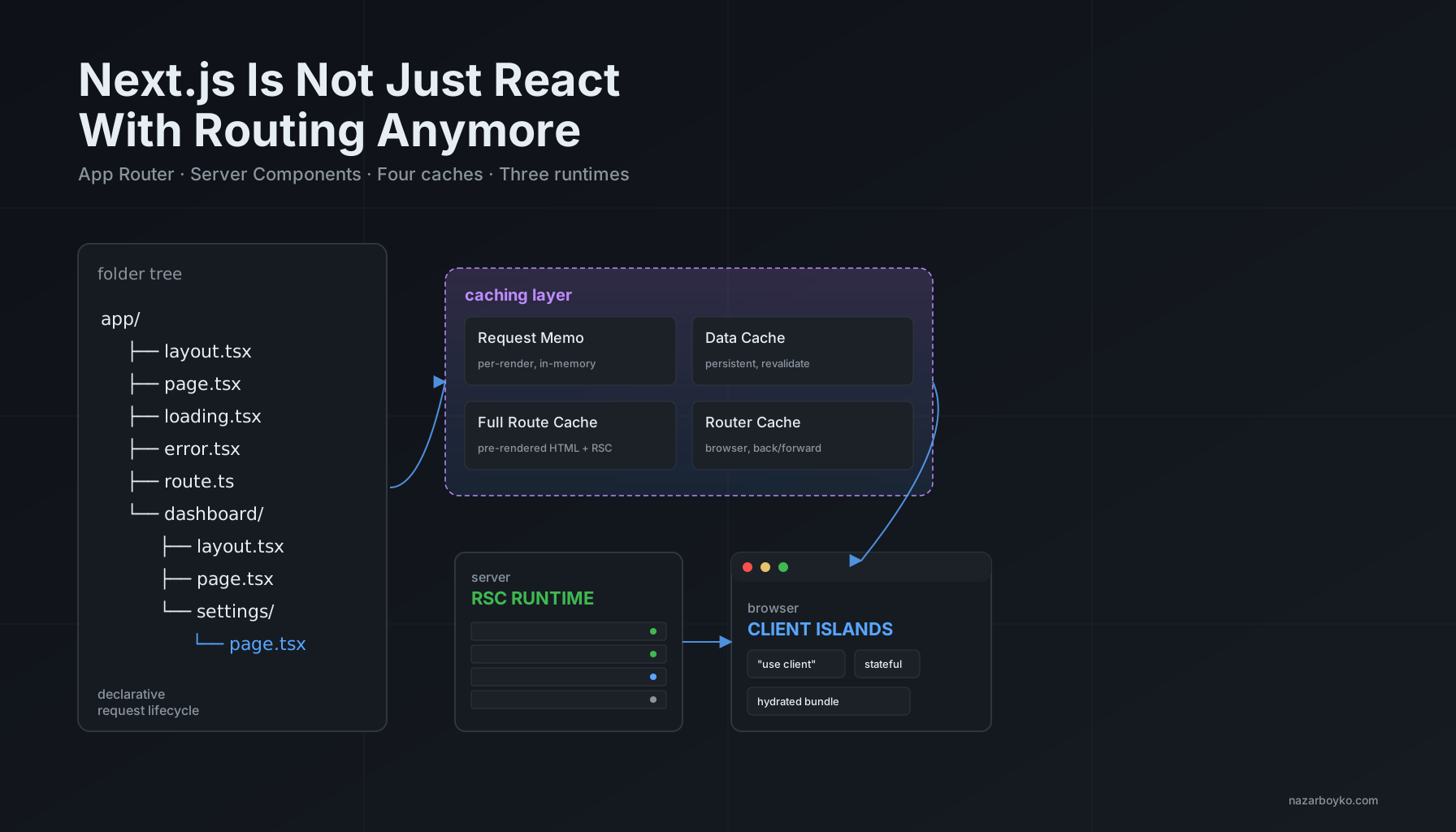
There are more of them - template.tsx (like layout but remounts on navigation), default.tsx (the fallback for parallel routes that haven't matched), and a couple of folder naming conventions: a folder wrapped in parentheses like (marketing) becomes a route group that doesn't add a URL segment, and a folder prefixed with @ like @modal is a parallel route slot. The point isn't to memorise the table. The point is that the folder tree is now a declarative description of the request lifecycle. The framework reads the tree and figures out what to render, what to stream, what to fall back to, what to cache.
This is a bigger change than it sounds. In the Pages Router, the only thing the framework inferred from your file structure was the URL. Everything else - loading states, error boundaries, layouts, parallel UI - was code you wrote in user-land, usually with libraries. In the App Router, that whole class of concerns moved into the framework's vocabulary.
Server Components Are The Default - And That Changes Everything
Inside the app/ directory, every component is a React Server Component unless you opt out. That single default flips the cost equation of building a Next.js app.
A Server Component runs on the server, renders to a serialised tree, and ships zero JavaScript to the browser for itself. It can be async. It can await your database, your filesystem, your internal HTTP service. It cannot use useState, useEffect, event handlers, or any browser API - those need a Client Component, which you mark with "use client" at the top of the file.
import { db } from '@/lib/db';

export default async function UsersPage() {
  const users = await db.user.findMany({
    orderBy: { createdAt: 'desc' },
  });

  return (
    <ul>
      {users.map((user) => (
        <li key={user.id}>{user.name}</li>
      ))}
    </ul>
  );
}
This is the entire data layer for that page. No API route. No useEffect. No React Query. No loading spinner inside the component - Next.js renders loading.tsx while the database call is pending and streams the result in when it arrives. The function runs once per request on the server, and the browser receives HTML plus a small JSON payload describing the rendered tree. The database client never reaches the browser. The query never reaches the browser. Even the db.user.findMany call signature never reaches the browser.
The change is structural, not cosmetic. In the old model, every component that needed data either pulled it through props from a top-level loader, or fetched it itself via a client hook. Either choice had a tax: prop drilling on one side, hydration cost and waterfalls on the other. Server Components let any component anywhere in the tree fetch its own data, and the cost of that fetch is a server-side await instead of a round trip from the browser.
The boundary you have to think about now is "use client". A Client Component is the React you already know - hooks, events, browser APIs, the whole catalogue. Server Components can render Client Components freely. Client Components can render Server Components, but only when they're passed in as props (children or other named slots) - they can't import one directly, because by the time a Client Component runs there is no server to call back to.
The practical heuristic: keep Client Components as small as you can. A page might be a Server Component that fetches data, passes it down to a few mostly-server children, and reaches a "use client" boundary only where there's a stateful input, a click handler, or a chart that needs the DOM. Everything above that boundary stays on the server, ships no JavaScript, and renders faster.
Caching Is Not One Thing - It's Four
This is the part of the App Router that surprises people the most, because it changed again between Next.js 14 and Next.js 15. In Next.js 14, a fetch() inside a Server Component was cached by default. In Next.js 15, that default flipped - fetch() is uncached unless you explicitly opt in. GET route handlers became uncached by default in the same release. The team made these changes because the implicit caching surprised too many people in production. But the four caches themselves are still there, and you still need a mental model for them.
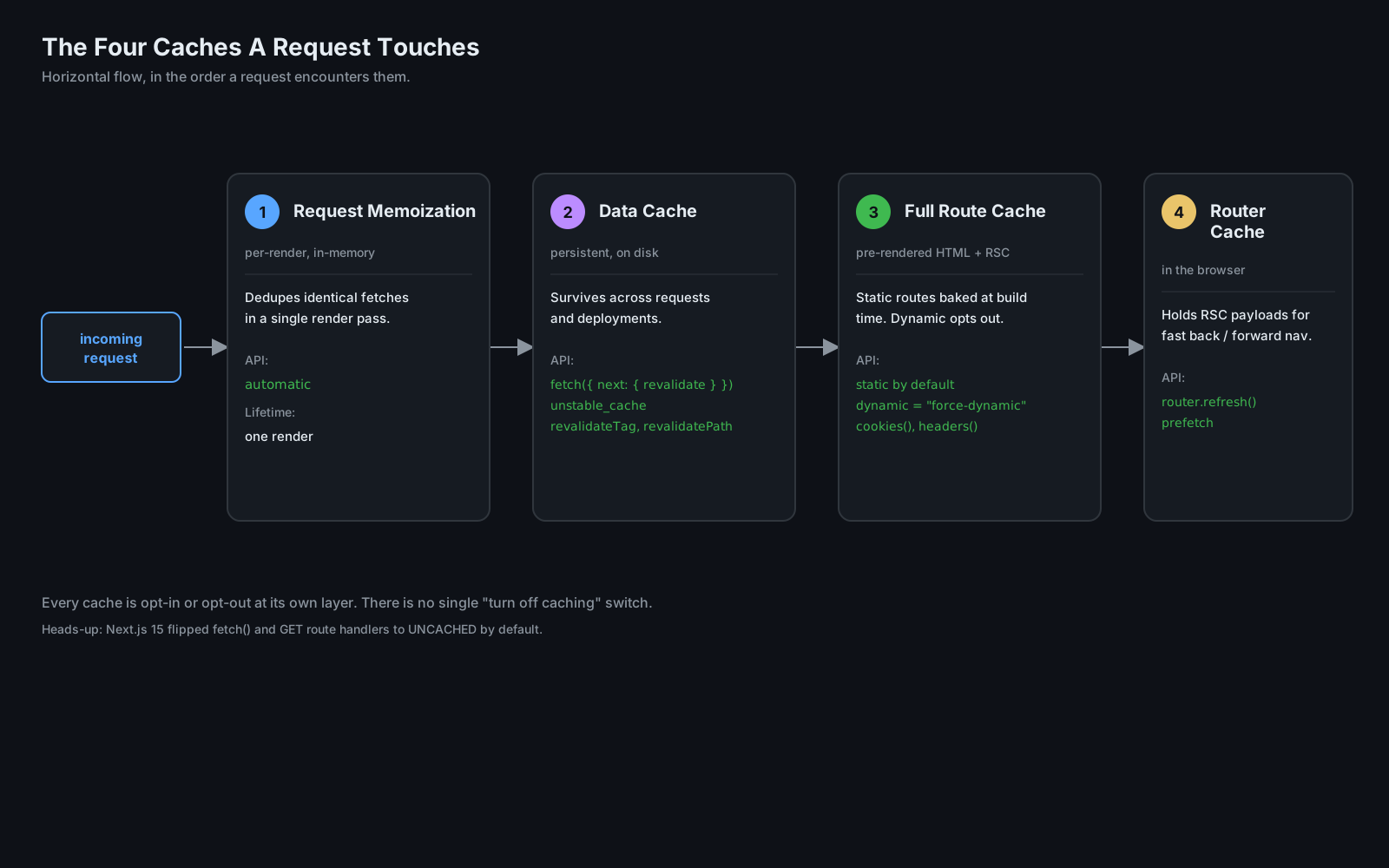
Here are the four, in the order a request flows through them:
1. Request Memoization  - in-memory, dedupes identical fetches within ONE render pass
2. Data Cache           - persistent across requests, on disk or in your platform's cache
3. Full Route Cache     - the pre-rendered HTML and RSC payload of a route
4. Router Cache         - in the browser, holds RSC payloads for fast back/forward nav
Request Memoization lives for the duration of a single render. If the same Server Component is rendered twice in one request (a layout and a page both calling getCurrentUser(), for example), only one network call goes out. You don't configure this. It just happens, and it's why you can put a fetch deep in the tree without worrying that the parent did the same fetch already.
The Data Cache is the persistent one. It's what fetch(url, { next: { revalidate: 3600 } }) and unstable_cache write into. It survives across requests and across deployments depending on your hosting platform. You invalidate it explicitly with revalidatePath('/blog') or revalidateTag('user-profile'). This is the cache you actually have to think about, because mistakes here mean stale data for thousands of users.
The Full Route Cache is the pre-rendered output of a route - both the HTML and the React Server Components payload. Static routes get baked at build time. Dynamic routes are rendered on demand and may be cached, depending on whether they use any dynamic functions like cookies() or headers(). The moment you read cookies, the route opts out of full-route caching and renders per request.
The Router Cache is in the browser. When you navigate from /dashboard to /dashboard/settings, the layout doesn't refetch - the router has its RSC payload in memory. When you click the back button, the previous route renders instantly from the same cache. This is why navigations in Next.js feel snappier than a normal SPA's: there's no roundtrip, just a cache hit.
The mental model that unlocks the whole thing: every cache is opt-in or opt-out at a specific layer, and the framework gives you a tool for each one. cache: 'no-store' on a fetch opts out of the Data Cache. export const dynamic = 'force-dynamic' on a page opts out of the Full Route Cache. router.refresh() invalidates the Router Cache for the current segment. revalidatePath and revalidateTag invalidate the Data Cache. There is no global "turn off caching" switch, because the framework treats these as four separate concerns with four different correct answers.
Server Actions Killed The API Route For Most Mutations
In the old model, every form submission, every "save", every "delete" went to an API route. You wrote a pages/api/posts/create.ts, you defined a request shape, you parsed the body, you validated, you called the database, you returned JSON. The client side was a useState for the form values, a fetch to that endpoint, a manual cache invalidation, and a redirect.
Server Actions collapse all of that into a function call. You write a function, mark it "use server", and reference it from a form's action prop. The framework wires up the network call, the serialization, the cache invalidation, and the redirect.
import { redirect } from 'next/navigation';
import { revalidatePath } from 'next/cache';
import { db } from '@/lib/db';

async function createPost(formData: FormData) {
  'use server';

  const title = formData.get('title')?.toString();
  const body = formData.get('body')?.toString();

  if (!title || !body) {
    throw new Error('Missing required fields');
  }

  await db.post.create({ data: { title, body } });

  revalidatePath('/posts');
  redirect('/posts');
}

export default function NewPostPage() {
  return (
    <form action={createPost}>
      <input name="title" required />
      <textarea name="body" required />
      <button type="submit">Publish</button>
    </form>
  );
}
That 'use server' line is the trigger. It tells the bundler this function is a server action - call it from the client, but never bundle it for the browser. The form's action={createPost} is a real reference to the server-side function. When the form submits, Next.js POSTs the form data to a generated endpoint, calls createPost, runs revalidatePath, and triggers the redirect - all without you writing an API route or a fetch call.
You can also call server actions from Client Components by importing them like normal functions. The bundler replaces the import with a thin client-side stub that does the network call. From the developer's perspective, you wrote a function and called it; from the runtime's perspective, that call crossed the network boundary.
What this changes practically: most of your CRUD glue code disappears. Forms don't need an onSubmit handler that constructs a fetch. Mutations don't need a custom hook with optimistic update logic (though you can still add one with useOptimistic when you want it). Cache invalidation lives next to the mutation that caused it, not in a separate React Query setup.
The traps to know about: server actions run in the same Node-or-edge runtime as the rest of your route, so a long-running action will eat your function's execution time on serverless platforms. You still need input validation - the form data is user input and should be parsed and validated like any other untrusted boundary. And the framework currently uses POST for all server action calls, which means they bypass GET-based caching layers but also can't be linked to or bookmarked.
The Deployment Model Runs Your Code In Three Places
The Pages Router had a clean story: your code is either static (built once, served from a CDN) or dynamic (rendered on a Node server per request). Two places. Easy to reason about.
The App Router runs your code in three places, and which one a given function lands in is a per-route decision driven by what that route does.
At build time. Static routes - routes that don't read cookies, headers, or any dynamic input - are rendered at build time and served from the edge as flat HTML. This is the same shape as getStaticProps from the old world, but the trigger is implicit rather than explicit. If you didn't call a dynamic function and didn't opt out, you got static.
On the server, per request. Dynamic routes render on demand. On Vercel that's a serverless function; on Node it's the long-running server. This is where Server Components actually execute, server actions run, database queries happen. The interesting wrinkle: a single route can switch between static and dynamic based on whether it called cookies() once. There's no separate file or config - the runtime decides based on what your code did.
In the browser. Client Components hydrate and run in the browser. Their JavaScript is bundled and served from the CDN. They re-render on state changes, handle events, do everything client React always did. The new part is that the bundle for a given page no longer includes the components above the "use client" boundary, so the JavaScript payload is often dramatically smaller than the equivalent Pages Router app.
There's also the edge runtime as a fourth wrinkle - a stripped-down V8 environment with no Node APIs, designed to run as close to the user as possible. You opt into it per route with export const runtime = 'edge'. It's good for short, latency-sensitive routes (auth checks, geolocation, simple personalisation) and bad for anything that needs a full Node API or a fat dependency.
Knowing which place a given function runs in is now part of writing the function. A console.log in a Server Component shows up in your server logs, not the browser console. A process.env.SECRET in a Server Component is fine; the same line in a Client Component will throw a build error because that variable would have to be inlined into the browser bundle. A useEffect cannot exist in a Server Component because there's no React DOM lifecycle to attach to.
It's a more powerful model. It's also a model that punishes people who carry assumptions over from the old one without updating them.
Where The Model Still Leaks
None of this is to oversell what the App Router gives you. There are real sharp edges:
The caching story changed enough times between releases that "what's the default again?" is a fair question even for experienced users. The 14-to-15 flip on fetch defaults broke production apps that relied on implicit caching. If you're upgrading, read the changelog carefully, because the framework will silently not cache things that used to be cached.
Error messages around the Server/Client boundary still leak React internals at you. "You're importing a Client Component from a Server Component" makes sense once you internalise the directionality rule, but it's the kind of error that sends a newcomer down a thirty-tab debugging session.
Server actions are easy to write and easy to leave under-validated. The function looks like a local call, which trains the wrong instincts - there's a real network boundary in front of it, and the form data is real user input.
The framework still has rough corners around streaming and the order in which loading.tsx versus error.tsx fire when something deep in the tree throws. Investigating a Suspense-related rendering issue in a real app means reaching for the React DevTools and reading framework internals, not just your own code.
And the deployment story, despite Vercel's marketing, is not "deploy it anywhere and it works." Self-hosting Next.js with full App Router support means running a Node server that supports streaming, configuring the cache backend yourself, and accepting that some of the platform-integrated features (like ISR with on-demand revalidation across distributed instances) need more glue than the docs admit.
These aren't dealbreakers. They're the price of a framework that's doing genuinely more than the previous version did. But "Next.js is just React with routing" hasn't been an honest description of the framework for several major releases, and pretending it still is mostly hurts the people who try to learn it that way.
What This Actually Means For Your Next App
If you're starting a new project today and you reach for Next.js, what you're picking is no longer "React, but with file-based routing." You're picking a framework with opinions about where your code runs, how data is fetched, what the request lifecycle looks like, when things get cached, how mutations are dispatched, and what the deployment model assumes. The opinions are mostly good - the App Router solved real problems the Pages Router accumulated over the years - but they're opinions, and a lot of them only become visible when you bump into them.
The shift to internalise: stop thinking of Next.js as a router on top of React, and start thinking of it as a runtime that happens to use React as its component model. Once that frame clicks, the special filenames stop feeling magical, the "use server" directive stops feeling weird, the four caches stop feeling redundant. They're just the surface area of the runtime you're actually programming against.
The folder is the route. The default is the server. The cache is four layers. The mutation is a function. The deployment is three places. That's the framework now.