Try this. Open a 12 GB CSV in Node with fs.readFile, parse it, and write the result somewhere. You'll get one of two outcomes: the process dies with ERR_STRING_TOO_LONG or Invalid string length, or it eats 14 GB of RSS and your container gets OOM-killed. Either way, the job is dead before row one of useful work.
Now rewrite the same job with fs.createReadStream, a CSV transform, and a fs.createWriteStream, glued together with stream.pipeline. Same machine, same file, same code length. RSS sits around a few tens of MB. The whole thing finishes. Nothing about the file got smaller; what changed is who is allowed to hold how much of it in memory at once.
That's what streams really are. Not a fancy way to read files. A flow-control protocol between producers and consumers that lets your process touch data much larger than it. Once you see them that way, the API stops feeling weird, the error messages start making sense, and you can build pipelines that move terabytes through a 256 MB container without flinching.
Let's pull the floor up.
The model: producers, consumers, and a small buffer in between
A Node stream is, underneath, three things glued together:
- A producer that has more data than it wants to give you all at once.
- A consumer that wants to eat data at its own pace.
- A bounded internal buffer sitting between them, with a watermark.
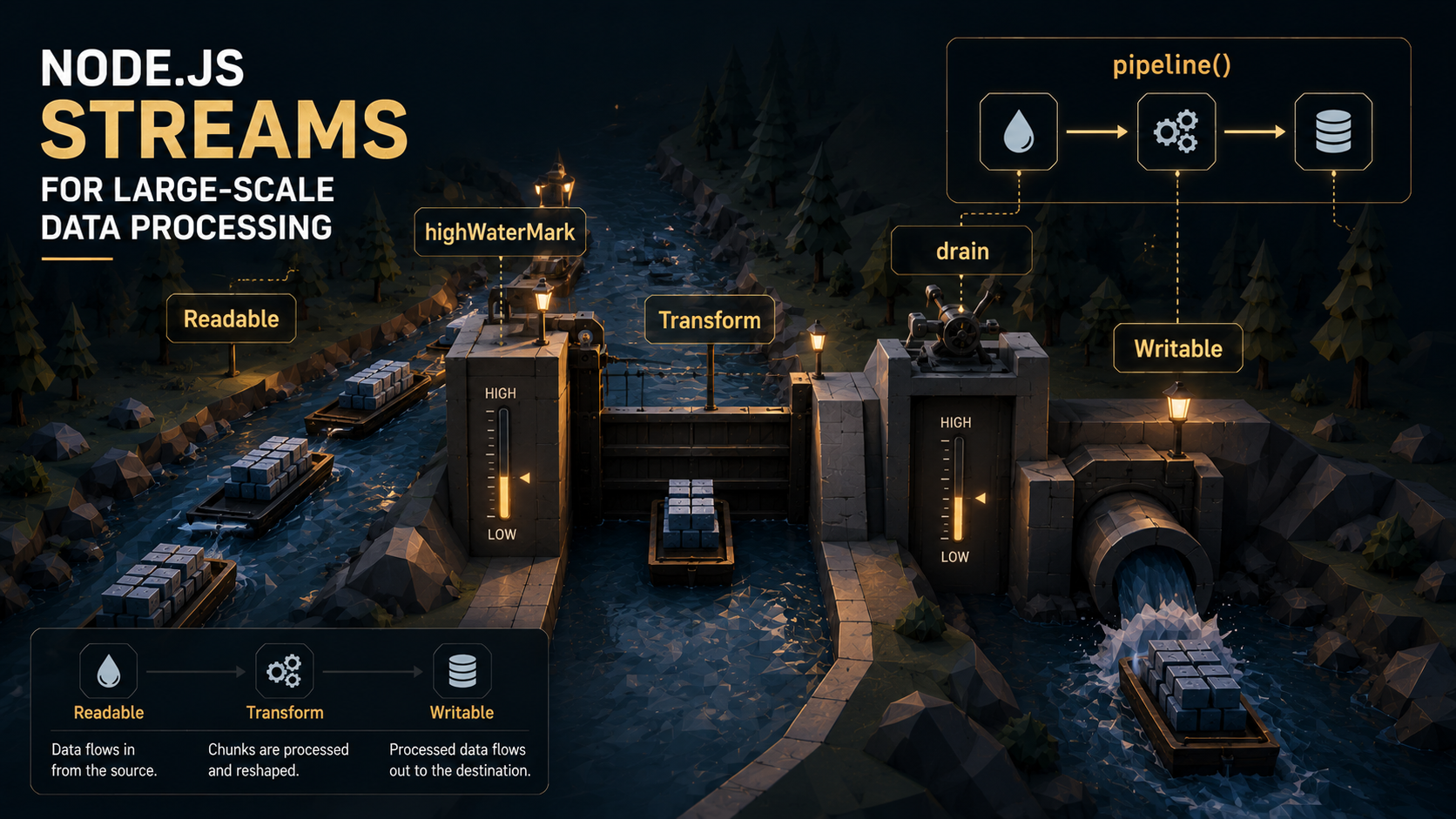
That last piece is the one that does the real work. Every Readable and Writable stream carries an internal buffer with a configurable threshold called highWaterMark. The default is 64 KB for byte streams (65536 bytes) and 16 objects for object-mode streams. It was 16 KB before Node 22 bumped it, and it still is on Windows. Either way, that is the whole number. Not 16 MB. Not "however much fits". Sixty-four kilobytes, a small bounded buffer.
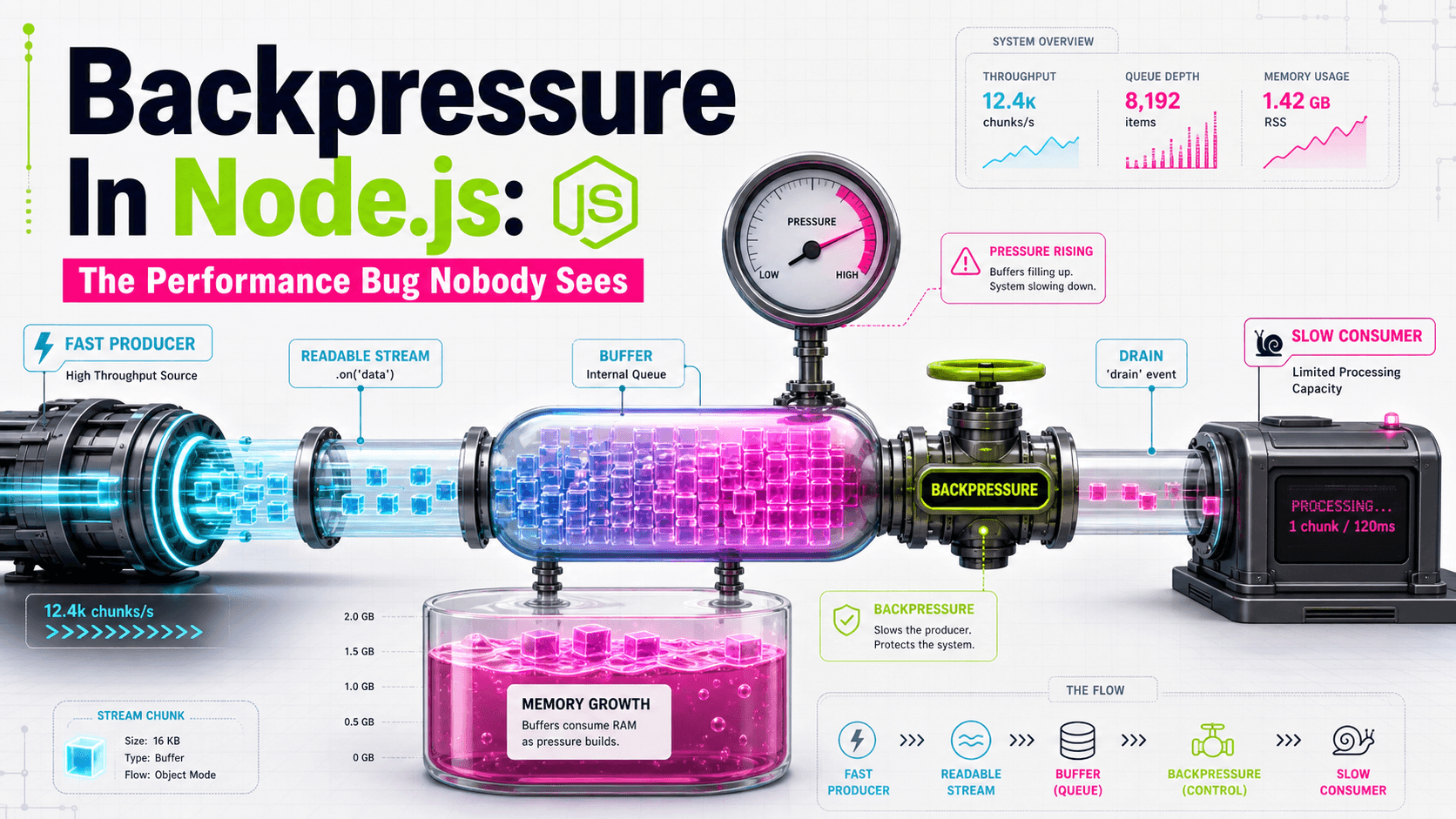
That number is the entire reason streams are memory-safe. Once the buffer goes over the watermark, the stream tells whoever is feeding it: stop, I'm full. When the buffer drains, it says: okay, more please. Two signals, in two directions. That's backpressure.
A Readable can be in one of two modes:
- Flowing mode - data is pushed out as fast as it arrives. You opt into this with
.on('data', ...),.pipe(),.resume(), or by iterating withfor await. - Paused mode - data sits in the buffer until you call
.read()to pull it.
Flowing mode is what you almost always want, but it's also the mode where backpressure matters most, because the producer doesn't know if you're falling behind unless something tells it.
Backpressure: the actual mechanic
Here's the part that gets hand-waved in most tutorials. Every writable stream has a .write(chunk) method, and it returns a boolean. The boolean is not decoration. It is the entire backpressure protocol.
const ok = writable.write(chunk);
if (!ok) {
  // We've filled the writable's internal buffer past highWaterMark.
  // Stop pushing. Wait for the 'drain' event, then resume.
  readable.pause();
  writable.once('drain', () => readable.resume());
}
That's it. That's the whole thing. write() returns true while the writable is still under its watermark and false once it goes over. When it returns false, you are contractually obliged to stop writing - not because the write will fail (it won't; the data still goes into the buffer), but because if you keep going, the buffer is unbounded and you've just rebuilt fs.readFile with extra steps.
The 'drain' event fires when the writable's buffer falls back below the watermark, telling you it's safe to write again. Pair it with readable.pause() and readable.resume() on the producer side, and you have a closed loop: the consumer dictates the pace, the producer follows.
When you use .pipe() or pipeline(), Node does this dance for you automatically. The pipe machinery listens for write() returning false, pauses the upstream readable, listens for 'drain', and resumes. You almost never have to write the manual version above. But you do have to understand it, because the moment your transform stream forgets to honor backpressure - by calling this.push() without checking the return value, or by buffering inside itself - the protocol is broken and memory starts climbing.
Watching backpressure happen
You can see this in numbers. Both Readable and Writable expose .readableLength and .writableLength, plus .readableHighWaterMark and .writableHighWaterMark. Log them inside a slow consumer and you'll watch the buffer fill to exactly the watermark, then plateau.
const { pipeline } = require('node:stream/promises');
const { Transform } = require('node:stream');
const fs = require('node:fs');

const slow = new Transform({
  highWaterMark: 64 * 1024,
  transform(chunk, _enc, cb) {
    // Pretend each chunk is expensive to process.
    setTimeout(() => cb(null, chunk), 10);
  },
});

setInterval(() => {
  console.log({
    writableLen: slow.writableLength,
    readableLen: slow.readableLength,
    hwm: slow.writableHighWaterMark,
  });
}, 200).unref();

pipeline(
  fs.createReadStream('big.bin'),
  slow,
  fs.createWriteStream('out.bin'),
).then(() => console.log('done'));
Run that against a multi-gigabyte file. You'll see writableLen climb to ~64 KB and stop there. The readable upstream is being throttled - not by your code, but by the protocol - because pipeline saw write() return false and paused the source. Watching that number plateau is the most satisfying moment in stream debugging.
Why pipeline() exists, and why you should always use it
.pipe() shipped in Node 0.x. It's the original way to glue streams together, and it's still in the API. But it has one flaw that turns out to be expensive: it doesn't clean up properly on error.
Here's the classic broken pattern:
const fs = require('node:fs');
const zlib = require('node:zlib');

fs.createReadStream('huge.txt')
  .pipe(zlib.createGzip())
  .pipe(fs.createWriteStream('huge.txt.gz'));
Question: what happens if the disk fills up while the writable is mid-flight? The writable emits 'error'. The gzip transform doesn't know - it keeps running, holding the read file open, occupying memory. The readable doesn't know either. You now have a half-closed pipeline, a leaked file descriptor, and an error that may or may not bubble up depending on which .on('error') listeners you remembered to wire up. If you didn't wire any, the process crashes on Uncaught error.
The error-handling story for raw .pipe() is brutal: you have to add an .on('error') handler to every stream in the chain, and even then, when one errors, the others keep going. You need to manually call .destroy(err) on the rest to tear them down.
Node 10 fixed this with stream.pipeline(). Same idea - chain streams - but with proper error propagation and cleanup baked in. If any stream in the chain errors, every other stream in the chain gets destroyed. The callback (or returned promise) fires with the error. No leaks, no zombie streams.
const { pipeline } = require('node:stream/promises');
const fs = require('node:fs');
const zlib = require('node:zlib');

await pipeline(
  fs.createReadStream('huge.txt'),
  zlib.createGzip(),
  fs.createWriteStream('huge.txt.gz'),
);
That's the same code, but if the disk fills up, you get a clean rejected promise, a properly closed file descriptor, and a gzip transform that gets torn down instead of hanging around. The callback version (require('node:stream').pipeline) is the older shape, but the promise version from node:stream/promises is what you want in modern code.
There is essentially no reason to use .pipe() directly anymore. If you see it in code review, replace it with pipeline(). The migration is mechanical and the safety win is huge.
Object mode: streams beyond bytes
So far everything has been bytes. The big unlock for data processing is that streams don't have to carry bytes. Set objectMode: true and a stream's chunks are arbitrary JavaScript values - rows, records, JSON objects, anything you can pass around.
Once you're in object mode, the watermark unit changes. Instead of a byte budget, the buffer holds at most 16 objects before backpressure kicks in. That sounds tiny, and it is - deliberately. The framework can't know how big your objects are, so it picks a small safe number. If your objects are little, you can crank it up; if they're huge, leave it alone or lower it.
The classic shape of a real ETL pipeline becomes obvious here:
const { pipeline } = require('node:stream/promises');
const fs = require('node:fs');
const { parse } = require('csv-parse');
const { Transform } = require('node:stream');

const validate = new Transform({
  objectMode: true,
  transform(row, _enc, cb) {
    if (!row.email || !row.user_id) return cb(); // drop invalid rows
    cb(null, { id: row.user_id, email: row.email.toLowerCase() });
  },
});

const batchInsert = (db, size = 500) => {
  let batch = [];
  return new Transform({
    objectMode: true,
    async transform(row, _enc, cb) {
      batch.push(row);
      if (batch.length >= size) {
        try {
          await db.insertMany('users', batch);
          batch = [];
          cb();
        } catch (err) { cb(err); }
      } else cb();
    },
    async flush(cb) {
      try {
        if (batch.length) await db.insertMany('users', batch);
        cb();
      } catch (err) { cb(err); }
    },
  });
};

await pipeline(
  fs.createReadStream('users.csv'),
  parse({ columns: true }),  // bytes → objects
  validate,                  // objects → objects
  batchInsert(db, 500),      // objects → nothing (terminal)
);
Read that pipeline top to bottom. Bytes come off disk in 64 KB chunks. The CSV parser turns them into row objects. Validate drops bad rows and normalizes good ones. The batcher accumulates 500 rows at a time and flushes them to Postgres. When the database is slow, batchInsert doesn't call cb() until the insert finishes - that holds back the watermark, which pauses the validator, which pauses the parser, which pauses the file read. The disk literally stops spinning until Postgres catches up. That's the whole shape of every memory-stable ETL job in Node.
A few subtle things in that code:
- The validate transform calls
cb()with no arguments when it wants to drop a row. That's how you filter in object mode - push nothing. - The batcher uses
flush(cb)to handle the tail. Every Transform supports it; it fires after the lasttransform()and before the stream ends. If you forget it, you lose the last N rows where N < your batch size - a quiet, infuriating bug. - There's no
try/catcharoundpipeline()in this snippet, but in real code there must be one. Any error in any stream rejects the promise.
Writing a Transform that actually behaves
Most production stream code lives or dies on transforms. The interface is small but the semantics have sharp edges.
const { Transform } = require('node:stream');

class JsonLines extends Transform {
  constructor(opts = {}) {
    super({ ...opts, objectMode: true, writableObjectMode: false });
    this._buf = '';
  }
  _transform(chunk, _enc, cb) {
    this._buf += chunk.toString('utf8');
    const lines = this._buf.split('\n');
    this._buf = lines.pop(); // last fragment may be partial
    for (const line of lines) {
      if (line.length) {
        try { this.push(JSON.parse(line)); }
        catch (err) { return cb(err); }
      }
    }
    cb();
  }
  _flush(cb) {
    if (this._buf.length) {
      try { this.push(JSON.parse(this._buf)); cb(); }
      catch (err) { cb(err); }
    } else cb();
  }
}
A working transform follows three rules:
- Call
cb()exactly once per chunk. Eithercb()for success,cb(null, value)to also push a value, orcb(err)to signal error. Calling it twice is a hard-to-find bug. Forgetting to call it stalls the entire pipeline forever - no error, no timeout, just silence. - Push as many or as few outputs as makes sense. In the example above, one input chunk produces many
push()calls (one per line). A batcher might produce zero pushes for many inputs, then one push on a boundary. The input/output ratio is unrelated to the chunk boundary. - Honor what
push()returns. Whenthis.push(value)returnsfalse, the downstream consumer is full. If you keep pushing anyway, you've just bypassed backpressure inside your own stream. The framework forgives this for short bursts, but a transform that ignores the boolean on a hot path is the most common cause of "my Node memory grows forever even though I'm using streams."
A subtle one: writableObjectMode and readableObjectMode can be different. The example above accepts bytes (from a file) and emits objects (parsed JSON). Setting objectMode: true is a shortcut for "both sides are objects." For asymmetric transforms, set them independently and the rest of the chain just works.
for await of - when async iteration replaces transforms
Since Node 10, every Readable stream is an async iterable. That means you can write:
for await (const row of csvStream) {
  await db.insert(row);
}
...and you get backpressure for free. The await db.insert(row) blocks the loop, which blocks the iterator's .next(), which keeps csvStream from pushing the next row. Same protocol, completely different shape.
For straight line-by-line work, this is the cleanest API Node has. No transforms, no callbacks, no pipeline(). You can try/catch around the loop and errors land naturally; you can break out of the loop and the stream gets destroyed; you can compose with async generators to build transform pipelines that look almost like synchronous code.
There's a real performance asterisk, though. Early implementations of stream async iteration were noticeably slower than the equivalent pipe() chain - issue #31979 on the Node repo tracked this. Successive Node versions closed most of the gap, with measured improvements in async-iterator throughput across Node 18 and 20, but for raw byte-shoveling workloads at terabyte scale, pipeline() with native transforms still tends to edge out for await of because it avoids the per-chunk promise allocations.
A practical guideline:
- Per-record async work (DB writes, HTTP calls, anything where each row triggers an awaited side effect) →
for await ofwins on readability and the perf cost is dominated by the side effect anyway. - Pure byte transformation at high throughput (compression, encryption, format conversion) →
pipeline()with Transforms wins on throughput, sometimes meaningfully. - Mixed pipelines → mix both. You can pipeline through some transforms, then drop into
for awaitat the end for the side-effect-heavy step. Both APIs interoperate.
The web streams cousin
Node also ships the WHATWG Web Streams API (ReadableStream, WritableStream, TransformStream) in node:stream/web. This is the same standard browsers use - the one behind fetch().body, Response.body, and so on.
Web streams use a slightly different shape:
controller.enqueue(chunk)instead ofthis.push(chunk).controller.desiredSize(a number, can go negative) instead of afalseboolean.- Locked vs unlocked readers - you can only have one active reader at a time.
In Node, you can convert between the two with Readable.toWeb(nodeReadable) and Readable.fromWeb(webReadable). The conversions are real bridges, not shims, so you can pipe a node:fs ReadStream into a Web TransformStream and the backpressure protocol still works end to end.
When to use which: if your code has to run in browsers and on the server (edge runtimes, isomorphic libraries, anything that calls fetch), use web streams. If it's server-only and performance matters, stick with classic Node streams - they're more mature, faster on byte workloads, and have a richer ecosystem of compatible packages (csv-parse, JSONStream, pg-copy-streams, etc.).
Real-world workflows
Here are the shapes that come up over and over.
Streaming HTTP responses without buffering
A common server bug: an endpoint loads 200 MB from S3, parses it, transforms it, and returns the result. Naive code builds the entire response in memory before sending. Streaming code never holds more than a few KB:
const { pipeline } = require('node:stream/promises');

app.get('/export.csv', async (req, res) => {
  res.setHeader('Content-Type', 'text/csv');
  try {
    await pipeline(
      db.queryStream('SELECT * FROM events'),
      toCsv(),
      res,
      { signal: AbortSignal.timeout(60_000) },
    );
  } catch (err) {
    if (!res.headersSent) res.status(500).end('export failed');
    else res.destroy(err);
  }
});
res is a Writable. Pipeline knows how to push into it. The client downloads the file at whatever rate their network allows, which throttles your DB cursor through backpressure. Your process holds maybe 64 KB of bytes plus 16 rows of objects, regardless of how many million rows the query returns. The AbortSignal.timeout kills the whole chain if the client takes too long.
Compressed log shipping
const { pipeline } = require('node:stream/promises');
const fs = require('node:fs');
const zlib = require('node:zlib');
const https = require('node:https');

await pipeline(
  fs.createReadStream('access.log'),
  zlib.createGzip({ level: 6 }),
  https.request('https://logs.example.com/ingest', {
    method: 'POST',
    headers: { 'content-encoding': 'gzip', 'content-type': 'text/plain' },
  }),
);
This compresses and uploads a multi-gigabyte log file using ~tens of KB of memory. Gzip's compression ratio dictates how much of the upstream file is paused at any moment, and the HTTP socket's write buffer dictates how fast gzip runs. The chain self-regulates.
Per-record transformation with an external service
const { pipeline } = require('node:stream/promises');
const { Transform } = require('node:stream');

const enrich = new Transform({
  objectMode: true,
  async transform(record, _enc, cb) {
    try {
      const meta = await fetch(`https://api.example.com/lookup/${record.id}`)
        .then(r => r.json());
      cb(null, { ...record, ...meta });
    } catch (err) { cb(err); }
  },
});

await pipeline(
  ndjsonReadable,  // newline-delimited JSON from disk
  enrich,
  postgresCopyWritable,
);
One thing to watch here: enrich processes records sequentially. If the external API is the bottleneck, you may want parallel transforms - and Node doesn't ship one out of the box. The community standby is parallel-transform, which lets you run N concurrent transforms while preserving order. Without it, you serialize at the slowest external dependency, which is often fine and sometimes catastrophic.
Memory efficiency, debugged
If a stream pipeline grows memory in production, the cause is almost always one of:
1. A transform that buffers internally without honoring backpressure. It collects items, holds them, and doesn't pause anything. Sort transforms are the classic offender - sorting is inherently buffered. If you have to sort a stream, sort chunks (windows, batches) instead of the whole thing, or accept the memory cost and size the host accordingly.
2. objectMode with very large objects. The watermark is 16 objects, not 16 KB. If each object is 10 MB, you'll happily buffer 160 MB at every stage of the pipeline. Lower highWaterMark aggressively (often highWaterMark: 1 or 2) for large-object pipelines.
3. Listening with .on('data', ...) and forgetting to pause. The 'data' event puts the stream in flowing mode immediately. If your handler is async and slower than the producer, the producer keeps pushing - events queue up, listeners pile up - and you're holding the whole file in callback closures. Either use for await of (which pauses naturally) or call stream.pause() inside the handler and stream.resume() after.
4. Forgetting _flush. Transforms that batch (group N items together) need to handle the tail in _flush. If you don't, the final partial batch is held in memory until process exit and never flushed downstream. Memory looks fine; data is silently incomplete.
5. Mixing pipe() and listeners on the same chain. When you call .pipe(), Node registers its own listeners. Adding your own .on('data') on top puts the stream in flowing mode twice and breaks the pipe machinery in subtle ways. Pick one.
The diagnostic move when memory climbs is to instrument the pipeline. Log writableLength and readableLength on each stage every second. The stage where writableLength keeps growing without bound is the broken one - that's where backpressure is leaking. From there, you either fix the transform, lower its watermark, or split the work.
Closing - the mental model that fixes everything
The reason streams confuse people isn't the API. The API is small. It's that streams require you to think in rates instead of totals. You don't ask "how big is this file" - that's irrelevant. You ask "how fast can the slowest consumer in my chain process a chunk", because that's the rate the entire pipeline will run at, and that's the rate that decides whether you're memory-safe.
Once you internalize that, the whole library makes sense. highWaterMark is a buffer between rate-mismatched neighbors. 'drain' is the slow neighbor telling the fast one to resume. pipeline() is the supervisor that makes sure everyone tears down together when one of them gives up. Object mode is the same protocol applied to records instead of bytes. for await of is the same protocol expressed with await.
You don't load big files in Node. You let big files flow through Node. That's the whole game.