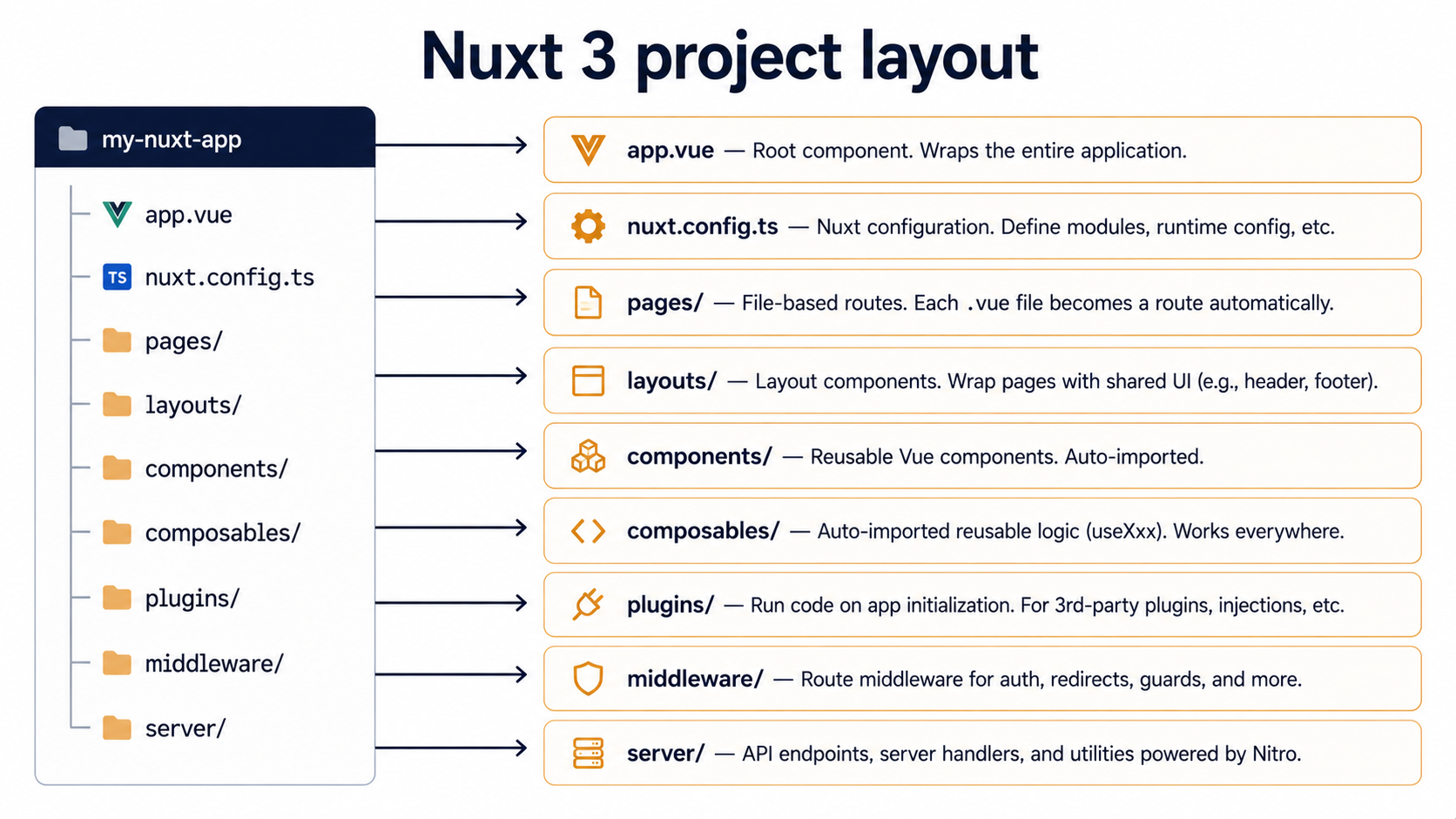
So, you've been writing Vue for a while. You're comfortable with the Composition API, you've got opinions about ref versus reactive, you can wire up Pinia in your sleep. Then you open a Nuxt 3 project for the first time and the room shifts. There's a pages/ folder you didn't make. There's a composables/ folder you didn't import from. There's a server/ directory full of .ts files that somehow respond to HTTP requests without you ever calling app.listen(). And every component you write seems to know about every other component without a single import statement.
It looks like magic. It isn't. Nuxt is Vue with a thick layer of conventions stacked on top, and once you can see those conventions for what they are, a set of directories that the framework scans, names that the framework looks for, and a build step that wires it all together, Nuxt stops feeling like a different framework and starts feeling like a Vue app that came pre-furnished.
This is the tour. We'll go directory by directory, talk about what each one does, what the file names mean, and where the seams are when something inevitably stops working the way you expected. By the end you should be able to look at any Nuxt project and know roughly where to put a new feature and roughly how it'll end up at the user's browser.
The core mental model: convention over configuration, but with escape hatches
Before we open any folders, the one idea worth keeping in your head: Nuxt scans your project for files in known locations and turns them into pieces of your app automatically. If you put a Vue file in pages/, it becomes a route. If you put a .ts file in composables/, every component can call it without importing. If you put a file in server/api/, it becomes an HTTP endpoint. There's no central registry you maintain, the directory is the registry.
This is the same idea behind Next.js, Remix, SvelteKit, and Laravel's controller conventions. The win is that you stop spending time wiring things up; the cost is that you have to learn the conventions before any of it feels obvious. Once you know what each directory does, navigating an unfamiliar Nuxt codebase becomes much faster than navigating an unfamiliar Vue+Vite+Vue Router setup, because the layout is the same in every Nuxt project.
The other thing worth knowing upfront: Nuxt runs in three "places", at build time (when Vite bundles your code), on the server (when a request comes in and Nuxt renders HTML), and in the browser (when the page hydrates and becomes interactive). Some directories run in all three, some in one. We'll flag this as we go, because it's the single most common source of "why doesn't this work" confusion when you're new.
The starting shape of a Nuxt 3 project
When you run npx nuxi init my-app, you get a project that looks roughly like this:
my-app/
├── app.vue
├── nuxt.config.ts
├── package.json
├── public/
│   └── favicon.ico
├── server/
│   └── tsconfig.json
└── tsconfig.json
That's it. No src/, no main.ts, no createApp() call, no router setup. Just app.vue (your root component) and nuxt.config.ts (the only configuration file you'll ever need to touch directly).
app.vue is the entry point. In a minimal Nuxt app it's often just this:
<template>
  <NuxtPage />
</template>
<NuxtPage /> is the magic. It's a built-in component that says "render whatever page matches the current URL". It's the equivalent of <router-view /> in a plain Vue app, except you don't have to set up the router or define any routes, Nuxt figures both out from your filesystem.
Everything else, pages/, components/, layouts/, composables/, plugins/, server/, middleware/, assets/, stores/, is opt-in by convention. The folder doesn't exist until you create it. The moment you create pages/index.vue, Nuxt notices, generates a route for /, and rewires <NuxtPage /> to render it.
pages/: file-based routing without writing a router
The pages/ directory is the most visible piece of Nuxt's convention layer. Each .vue file becomes a route, and the path mirrors the filesystem.
pages/
├── index.vue            → /
├── about.vue            → /about
├── blog/
│   ├── index.vue        → /blog
│   └── [slug].vue       → /blog/:slug
└── users/
    └── [id]/
        └── settings.vue → /users/:id/settings
Brackets in file names become dynamic segments. Inside the component, you read them with useRoute():
<script setup lang="ts">
const route = useRoute()
const slug = route.params.slug
</script>

<template>
  <article>
    <h1>Reading post: {{ slug }}</h1>
  </article>
</template>
Notice there's no import { useRoute } from 'vue-router'. That's the auto-import system, which we'll get to. For now, just notice the absence, every Nuxt page you see will look like this, with composables appearing out of nowhere.
Pages can also declare their own meta with definePageMeta(), which is a Nuxt-specific compile-time macro:
<script setup lang="ts">
definePageMeta({
  layout: 'admin',
  middleware: ['auth'],
})
</script>
This tells Nuxt "render this page inside the admin layout" and "run the auth middleware before navigating here". The macro is stripped from the bundle at build time and turned into route configuration, you never call it as a real function.
The one piece that catches Vue developers off guard: there's no router configuration file. If you need to override how routes are generated, you do it in nuxt.config.ts via the hooks API, or you ship a route in a Nuxt module, but for 95% of apps you'll never need to. The filesystem is the router config.
layouts/: the chrome around your pages
A layout is a Vue component that wraps the current page. It's where you put the things that appear on every page or every page-of-a-type: the header, the footer, the sidebar, the global nav.
<template>
  <div class="app-shell">
    <AppHeader />
    <main>
      <slot />
    </main>
    <AppFooter />
  </div>
</template>
The <slot /> is where the page content lands. Whatever <NuxtPage /> resolves to gets rendered into that slot.
For a layout to apply, you need <NuxtLayout> somewhere, usually in app.vue:
<template>
  <NuxtLayout>
    <NuxtPage />
  </NuxtLayout>
</template>
By default, <NuxtLayout> picks layouts/default.vue. To use a different one for a specific page, you set it in definePageMeta:
<script setup lang="ts">
definePageMeta({ layout: 'admin' })
</script>
And layouts/admin.vue becomes the wrapper for that page only.
The mental shift from a plain Vue app: in Vue + Vue Router you'd typically use nested routes and named router-views to swap layouts. In Nuxt you don't need to, layouts are a separate concept that sits outside the routing tree. A page declares which layout it wants, Nuxt swaps them on navigation, and the layout never has to know which page is inside it.
components/: auto-import, with smart naming
Drop any .vue file into components/ and you can use it in any template without importing it. The component name is derived from the file path:
components/
├── AppHeader.vue            → <AppHeader />
├── ui/
│   └── Button.vue           → <UiButton />
└── form/
    └── input/
        └── Text.vue         → <FormInputText />
The path becomes a PascalCase prefix. This sounds weird until you've used it for a week, at which point you'll find yourself naming components by where they go in the tree, which makes the codebase easier to navigate.
You can opt out per-component if the auto-name is ugly:
<script setup lang="ts">
defineOptions({ name: 'Btn' })
</script>
You can also import explicitly if you want, auto-imports don't block manual imports, they just make them optional.
The thing that genuinely changes is that circular imports become much less of a problem. Because components reference each other by name in templates rather than by import path, Nuxt's bundler resolves them lazily, and the "A imports B imports A" loops that plain Vue projects sometimes hit just don't appear.
composables/: reusable logic, auto-imported
This is the one that, more than anything else, makes Nuxt code look like it shouldn't compile.
Any .ts or .js file in composables/ whose default export (or named export matching the file name) starts with use is auto-imported globally. You write it once and call it from any component, layout, page, or other composable.
export const useCounter = () => {
  const count = ref(0)
  const increment = () => { count.value++ }
  return { count, increment }
}<script setup lang="ts">
const { count, increment } = useCounter()
</script>
<template>
<button @click="increment">Count is {{ count }}</button>
</template>Notice again, no import { useCounter } from '~/composables/useCounter'. No import { ref } from 'vue' either, because Vue's reactivity primitives are auto-imported too.
There's a subtlety here worth flagging because it bites everyone exactly once. Composables run per call site, not per app. If you call useCounter() in two different components, you get two different count refs. That's a feature, it's how stateless logic works. But if you want shared state across the whole app, you need to either:
- Use
useState('counter', () => 0): Nuxt's built-in SSR-safe shared state primitive. - Use Pinia (or another state library) and put the store in
stores/, which is also auto-imported. - Define the ref outside the composable function so the same reference is closed over by every call.
The third option works but is rarely the right move, module-level state survives across requests on the server, which is a great way to leak user data between different visitors. useState exists specifically to solve this, and it's the answer most of the time.
plugins/: code that runs once at app startup
Plugins are where you put initialization logic that needs to run before the app starts handling pages. Any file in plugins/ is auto-loaded and called by Nuxt during the bootstrap phase.
export default defineNuxtPlugin((nuxtApp) => {
  console.log('Nuxt is starting up')
})
The defineNuxtPlugin macro takes a function that receives the Nuxt app instance. From there you can:
- Register Vue plugins via
nuxtApp.vueApp.use(somePlugin). - Provide values that other code can access via
useNuxtApp()(using theprovidehelper). - Run side effects like setting up an error tracker, an analytics client, or a feature-flag SDK.
export default defineNuxtPlugin(() => {
  if (process.env.NODE_ENV !== 'production') return

  // hypothetical analytics setup
  window.analytics?.init({ writeKey: useRuntimeConfig().public.analyticsKey })
})
The .client.ts suffix is one of Nuxt's most useful tricks. It tells the framework "only run this plugin in the browser, never on the server". The matching suffix .server.ts does the opposite. With no suffix, the plugin runs in both environments.
This becomes important the moment you try to set up something that touches window or document, browser-only APIs that don't exist on the server. Putting that code in a .client.ts plugin is the cleanest way to avoid the "window is not defined" error that haunts every server-rendered framework.
The order plugins run in is the alphabetical order of their filenames. If you need a strict order, plugin B depends on plugin A having run first, you can prefix filenames numerically (01.errors.ts, 02.analytics.ts) or use the dependsOn option in defineNuxtPlugin.
middleware/: route guards as files
Middleware is code that runs before navigating to a route. Use it for auth checks, redirects, feature flags, or anything else that needs to inspect the upcoming route and either let it through or send the user somewhere else.
export default defineNuxtRouteMiddleware((to, from) => {
  const user = useUserStore()
  if (!user.isLoggedIn && to.path !== '/login') {
    return navigateTo('/login')
  }
})
The function returns void to allow navigation, or a route (via navigateTo() or abortNavigation()) to redirect or cancel.
Middleware comes in three flavours, distinguished by how they're applied:
- Named middleware: files like
middleware/auth.tsthat you opt into per page viadefinePageMeta({ middleware: ['auth'] }). This is the most common. - Global middleware: files suffixed
.global.ts(e.g.middleware/track.global.ts) that run on every navigation automatically. - Inline middleware: defined directly in a page with
definePageMeta({ middleware: defineNuxtRouteMiddleware(...) }). Useful for one-off logic that doesn't deserve its own file.
This is also a place where the client/server split shows up. Middleware runs on the server during the initial page load and in the browser on subsequent client-side navigations. If you do something in middleware that requires window (or document, or browser-only APIs), you have to guard it with if (import.meta.client) { ... }, otherwise the server crash will be your only signal.
server/: the Nitro backend hiding inside your Nuxt app
This is the directory that most surprises Vue developers. Nuxt 3 ships with Nitro, a separate server engine that lives inside your Nuxt app and gives you a fully-featured backend without spinning up Express or Fastify or any other server framework.
server/
├── api/
│   ├── hello.get.ts          → GET /api/hello
│   ├── users/
│   │   ├── index.get.ts      → GET /api/users
│   │   └── [id].get.ts       → GET /api/users/:id
│   └── users.post.ts         → POST /api/users
├── routes/
│   └── sitemap.xml.ts        → GET /sitemap.xml (no /api prefix)
└── middleware/
    └── log.ts                → runs on every server request
Files in server/api/ become HTTP handlers mounted under /api/. Files in server/routes/ become handlers mounted at the root. The filename suffix declares the HTTP method (hello.get.ts, hello.post.ts), and brackets in the path become dynamic params, same as on the page side.
Each handler is a defineEventHandler that receives an event object and returns the response body:
export default defineEventHandler(async (event) => {
  const id = getRouterParam(event, 'id')
  const user = await db.users.findById(id)
  if (!user) {
    throw createError({ statusCode: 404, statusMessage: 'User not found' })
  }
  return user
})
You don't have to set up CORS, body parsing, or routing, Nitro handles all of it. You don't have to start a server, nuxt dev runs both the Vue side and the Nitro side on the same port. In production you can deploy the whole thing as a Node server, a Cloudflare Worker, a Vercel function, a Netlify function, or a static site with a separate server, all from the same codebase.
For Vue developers coming from a separate-backend setup (Vue + Express, Vue + Laravel, Vue + Go), this collapses a lot of plumbing. You can call your own API from the page side without thinking about deployment, CORS, or domain mismatches:
<script setup lang="ts">
const route = useRoute()
const { data: user } = await useFetch(`/api/users/${route.params.id}`)
</script>

<template>
  <article v-if="user">
    <h1>{{ user.name }}</h1>
  </article>
</template>
useFetch is one of Nuxt's data-fetching composables. It runs on the server during SSR, ships the result to the client as part of the HTML payload (so the client doesn't re-fetch), and gives you a reactive ref to the response. We'll touch data fetching properly in a moment.
The thing to internalize about server/: it does not share imports with the Vue side. The two halves of a Nuxt app are bundled separately. You can't import from ~/components/ inside server/api/foo.ts, and you shouldn't import from ~/server/ inside a page. They're two programs that happen to live in the same repo. If you have logic that needs to run in both, say, validation schemas, put it in a separate folder like shared/ or utils/ and import it from each side explicitly.
stores/: Pinia, if you want it, also auto-imported
If you install Pinia (via @pinia/nuxt), the stores/ directory becomes another auto-import target. Any .ts file there exporting a defineStore call is available globally by store name.
export const useCartStore = defineStore('cart', () => {
  const items = ref<CartItem[]>([])
  const total = computed(() =>
    items.value.reduce((sum, i) => sum + i.price * i.qty, 0)
  )

  const add = (item: CartItem) => { items.value.push(item) }
  const clear = () => { items.value = [] }

  return { items, total, add, clear }
})
Then anywhere in your app:
<script setup lang="ts">
const cart = useCartStore()
</script>

<template>
  <p>Items: {{ cart.items.length }}, Total: {{ cart.total }}</p>
</template>
No imports. Pinia's defineStore is itself auto-imported through the Nuxt module integration. The mental shift is small if you've used Pinia before, what's different is just the lack of import ceremony.
The auto-import system, demystified
By now you've seen "no import needed" mentioned a dozen times. Let's name the thing.
Nuxt's auto-import system is a build-time transform that runs over your code, finds references to symbols it knows about, and inserts the import statements before bundling. It's powered by the unimport library under the hood, but the user-facing rules are:
The following are auto-imported by default:
- Vue's reactivity primitives:
ref,reactive,computed,watch,watchEffect, etc. - Vue's lifecycle hooks:
onMounted,onBeforeUnmount, etc. - Nuxt's built-in composables:
useRoute,useRouter,useFetch,useAsyncData,useState,useNuxtApp,useRuntimeConfig,useHead,useSeoMeta,navigateTo, and a long list of others. - Anything you put in
composables/(exported as a function starting withuse). - Anything you put in
utils/(any exported function). - Anything you put in
components/(used as Vue components in templates). - Pinia stores in
stores/(if@pinia/nuxtis installed).
The catch, and there's always a catch, is that auto-imports run at build time, which means they don't work in:
- Files outside the conventional directories (e.g. some random
lib/foo.tswon't auto-import composables). - The
server/directory (it has its own separate auto-import scope, with Nitro's primitives likedefineEventHandler,getQuery,readBody, etc.). - Code inside
<script>blocks withoutsetup(you need<script setup>for the transform to fire on script-level code).
When something "doesn't exist" but you swear it should, the auto-import scope is the first place to check. The error usually looks like useFoo is not defined or Cannot find name 'useFoo', depending on whether TypeScript or the runtime catches it first.
You can extend the auto-import list manually in nuxt.config.ts:
export default defineNuxtConfig({
  imports: {
    dirs: ['composables/**', 'lib/auto/**'],
  },
})
But honestly, the default rules cover almost every case. The directories are the configuration.
Data fetching: where pages meet the server
We've talked about useFetch in passing. It's worth pausing on because it sits at the seam between the Vue side and the Nitro side, and it's the place where SSR mistakes happen most often.
useFetch is Nuxt's HTTP composable, designed to be called in <script setup> at the top level. It runs on the server during SSR, on the client during navigation, and de-duplicates calls so the same URL isn't fetched twice.
<script setup lang="ts">
const route = useRoute()
const { data: post, pending, error } = await useFetch(`/api/posts/${route.params.id}`)
</script>

<template>
  <article v-if="pending">Loading…</article>
  <article v-else-if="error">Failed to load post</article>
  <article v-else>
    <h1>{{ post.title }}</h1>
    <p>{{ post.body }}</p>
  </article>
</template>
The thing to understand about useFetch: when it runs on the server, the result is serialized into the HTML and sent down to the client. When the client takes over, the data is already there, no second fetch, no flash of loading state. This is the whole point of SSR with hydration, and Nuxt makes it the default with one composable.
Its sibling is useAsyncData, which is the more general version, instead of a URL string, you pass a function that returns a promise. Use it when the data doesn't come from HTTP, or when you need transformations the URL-based API can't express.
<script setup lang="ts">
const { data: stats } = await useAsyncData('dashboard-stats', () =>
  $fetch('/api/stats').then((res) => ({
    activeUsers: res.users.filter((u) => u.active).length,
    totalRevenue: res.revenue,
  }))
)
</script>
The key on useAsyncData ('dashboard-stats' above) is what Nuxt uses to deduplicate calls. If two components both call useAsyncData('dashboard-stats', ...) during the same render, only one network call happens, and they share the result.
The mistake everyone makes at least once: calling fetch (or axios, or the raw browser fetch) directly inside <script setup> instead of useFetch. It works in dev, then in production the first page load shows a flash of nothing because the data wasn't fetched on the server. The fix is always to wrap it in useFetch or useAsyncData, which tells Nuxt to await the data before sending HTML.
nuxt.config.ts: the one configuration file
Nuxt's central config is a single file at the project root:
export default defineNuxtConfig({
  devtools: { enabled: true },
  modules: ['@pinia/nuxt', '@vueuse/nuxt'],
  css: ['~/assets/css/main.css'],
  runtimeConfig: {
    apiSecret: '',                       // server-only
    public: {
      apiBase: 'https://api.example.com', // exposed to client
    },
  },
})
A few things worth knowing:
modulesis how you plug in pre-built integrations: Pinia, image optimization, i18n, content, analytics, auth. The Nuxt module ecosystem is large and most popular libraries have a module wrapper that handles auto-import setup for you.runtimeConfigis how you handle environment variables. The top-level keys are server-only, available viauseRuntimeConfig()in server code. Thepublickey is exposed to the client, also viauseRuntimeConfig().public. Both are populated fromNUXT_*env vars at runtime, not build time.- You won't see Vite in this config most of the time, but you can pass
vite: { ... }to override or extend the underlying bundler. Same fornitro: { ... }to configure the server engine.
The mental model: nuxt.config.ts is where you tell Nuxt about your app, not how to wire it up. The wiring is done by the directory conventions. Config is for choosing modules, overriding defaults, and declaring values that need to be in one place.
Server rendering, hydration, and where things break
Nuxt's default rendering mode is universal rendering, server-side render the initial HTML, ship it to the browser, then hydrate it so Vue takes over and the page becomes interactive. This is what gives you fast first paint, SEO-friendly HTML, and a normal Vue app afterwards.
The price you pay is that every page component runs twice, once on the server, once in the browser, and the two runs have to produce the same output. If they don't, you get a hydration mismatch warning in the console, and sometimes a visible flicker as Vue corrects the DOM after the fact.
Common sources of hydration mismatch:
- Using
Date.now()orMath.random()at render time: different on server and client. - Reading
localStorage,window, ordocumentduring initial render: they don't exist on the server. - Checking the user's timezone or locale on the server with no client-side equivalent.
The fix is usually to delay the differing code until after mount:
<script setup lang="ts">
const now = ref<string | null>(null)
onMounted(() => {
  now.value = new Date().toLocaleString()
})
</script>

<template>
  <p>Time: {{ now ?? 'loading…' }}</p>
</template>
Or to use <ClientOnly> to wrap a chunk of template that should never render on the server at all:
<template>
  <ClientOnly>
    <ThirdPartyWidget />
  </ClientOnly>
</template>
This isn't a Nuxt invention, every SSR framework has the same trade-off. But because Nuxt makes universal rendering the default, you'll meet it sooner than you would in a SPA-first setup.
You can also opt out per-route by setting the render mode in your config:
export default defineNuxtConfig({
  routeRules: {
    '/admin/**': { ssr: false },         // SPA-only
    '/blog/**': { prerender: true },     // static HTML at build
    '/api/**': { cors: true },           // CORS headers on /api routes
  },
})
routeRules is one of the more powerful corners of Nuxt, per-route control over rendering, caching, headers, redirects, and prerendering, all declared in one place.
How a request actually flows through a Nuxt app
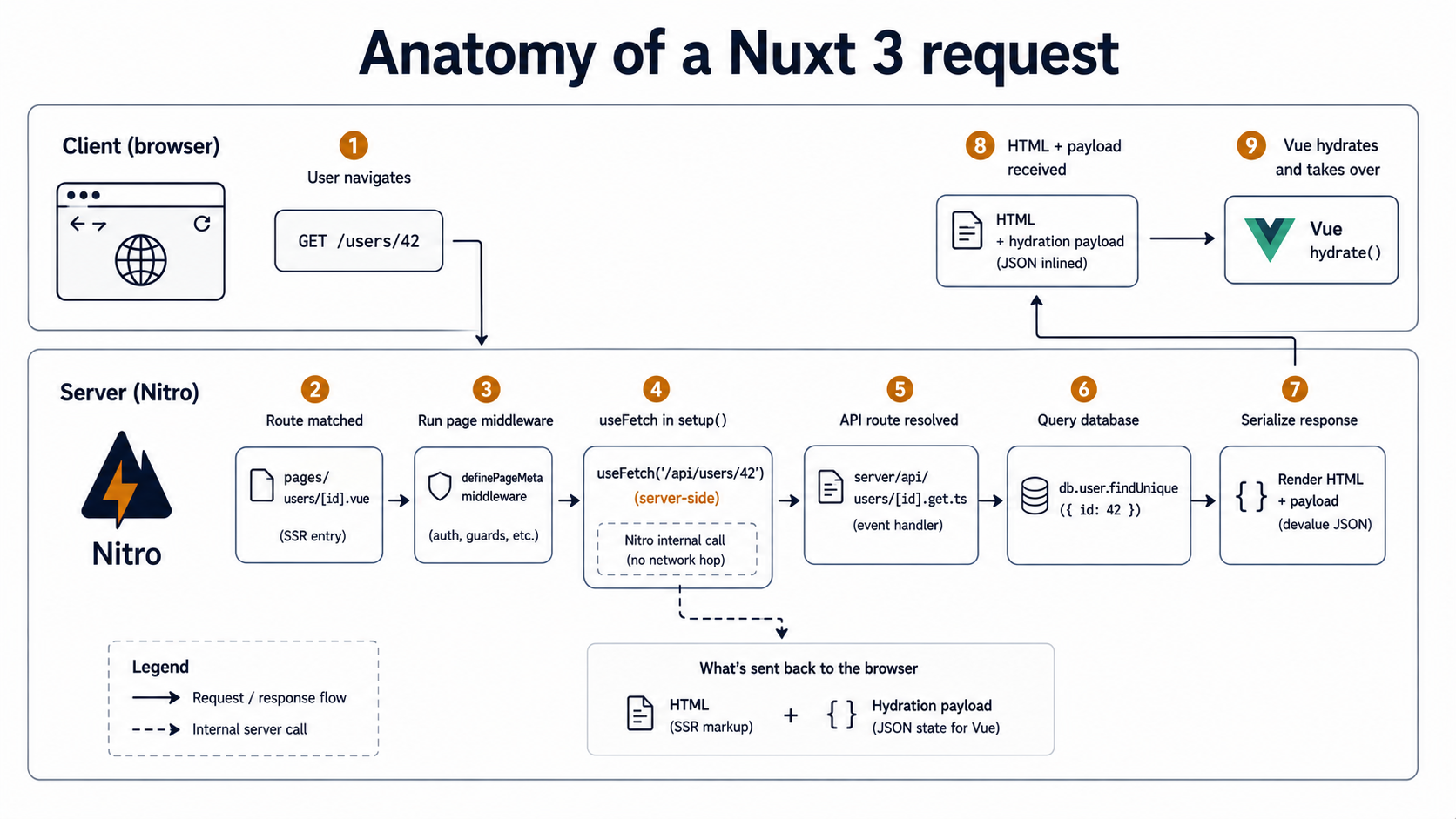
Putting it together, when a user types a URL into their browser and hits enter, this is roughly what happens in a Nuxt app:
- The request arrives at the Nitro server.
- Nitro checks
server/middleware/: any handler there runs first. - If the URL matches a
server/api/orserver/routes/file, Nitro runs that handler and returns the response. Done. - Otherwise, Nuxt treats it as a page request. It finds the matching file in
pages/, runs any global middleware, then any route middleware declared indefinePageMeta. - The page's
<script setup>runs. AnyuseFetchoruseAsyncDatacalls await their promises. The data is collected. - Vue renders the page into HTML inside the matching layout from
layouts/. - The collected data is serialized as a JSON payload and embedded in the HTML.
- The HTML + payload is sent to the browser.
- The browser parses the HTML, paints it, then loads the Vue bundle.
- Vue hydrates the existing DOM, reading the payload so
useFetchdoesn't re-run, attaches event listeners, and the page becomes interactive.
After that, any in-app navigation (a <NuxtLink> click) is a client-side route change, Vue Router takes over, runs the relevant route middleware again, calls useFetch (which this time runs in the browser and hits your /api/ endpoint), and renders the new page without a full reload.
Knowing this flow is what lets you debug a Nuxt app when something goes wrong. "Why is my plugin running twice?", once on server, once on client, unless you suffix it .server.ts or .client.ts. "Why is my middleware checking the user but the cookie isn't there?", because middleware runs on the server first, and you need to use useCookie() (which is SSR-safe) rather than document.cookie. "Why does my data flash?", because you're fetching outside useFetch/useAsyncData, so SSR didn't await it.
Where to put new code, by example
A few quick mappings to make the conventions stick. If you find yourself reaching for one of these tasks in a Nuxt app:
- "I need a new page at /reports/quarterly" →
pages/reports/quarterly.vue. - "I need a date-formatting helper used in many components" →
utils/formatDate.ts(auto-imported fromutils/) orcomposables/useFormattedDate.ts(if it needs reactivity). - "I need shared state for the logged-in user" →
useState('user', () => null)in a composable, or a Pinia store instores/user.ts. - "I need to initialize Sentry on the client only" →
plugins/sentry.client.ts. - "I need an API endpoint that returns the latest products" →
server/api/products.get.ts. - "I need to redirect non-logged-in users away from /admin" →
middleware/auth.tsplusdefinePageMeta({ middleware: ['auth'] })inpages/admin/index.vue. - "I need a custom 404 page" →
error.vueat the project root (Nuxt picks it up automatically for unhandled errors).
There's a place for every kind of code. Once the mapping clicks, you spend more time writing the actual feature and less time arguing with yourself about where it should live.
A final note on where the magic ends
The whole point of this article is that there's no magic, just conventions Nuxt applies on top of a normal Vue app. Once you can name the conventions, the framework stops feeling like a black box and starts feeling like a Vue app where you don't have to write the boring parts.
That said, "no magic" doesn't mean "no leaky abstractions". Auto-imports occasionally don't fire when you expect. SSR occasionally renders something the client renders differently. The server/ and pages/ worlds occasionally bleed into each other in ways the docs don't perfectly cover. Plugins occasionally run in the wrong order. You will, at some point, spend an afternoon swearing at a hydration mismatch you can't reproduce.
But you'd be doing the same thing with any SSR framework. What Nuxt buys you is that 80% of the boilerplate, routing, layouts, state, data fetching, the server, the build, is decided for you by where you put your files. That's a lot of decisions you don't have to make, and a lot of code you don't have to write. For most Vue apps that need SSR, or that just want a project structure they don't have to invent, it's a very good trade.