AI features are different from normal application features. A normal API endpoint usually has clear behavior: you send input, you get output, and you can test exact values. You can monitor latency, errors, CPU, memory, database queries, and queue failures. The contract is tight, and when it breaks, the failure has a shape you can recognize.
AI features are messier. The same user question can produce slightly different answers. The model may call a tool, retrieval may return weak documents, the prompt may grow too large, and token cost can spike without warning. A small prompt change may quietly reduce quality, and a model upgrade may improve one workflow while breaking another.
So observability for AI is not only "did the request fail?" You also need to ask: did the model receive the right context, did retrieval find the right documents, did the model call the right tools? Was the answer useful, was it safe, was it too slow, was it too expensive? Could we debug this later? If you cannot answer these questions, your AI feature is not production-ready yet.
Start with the AI request lifecycle
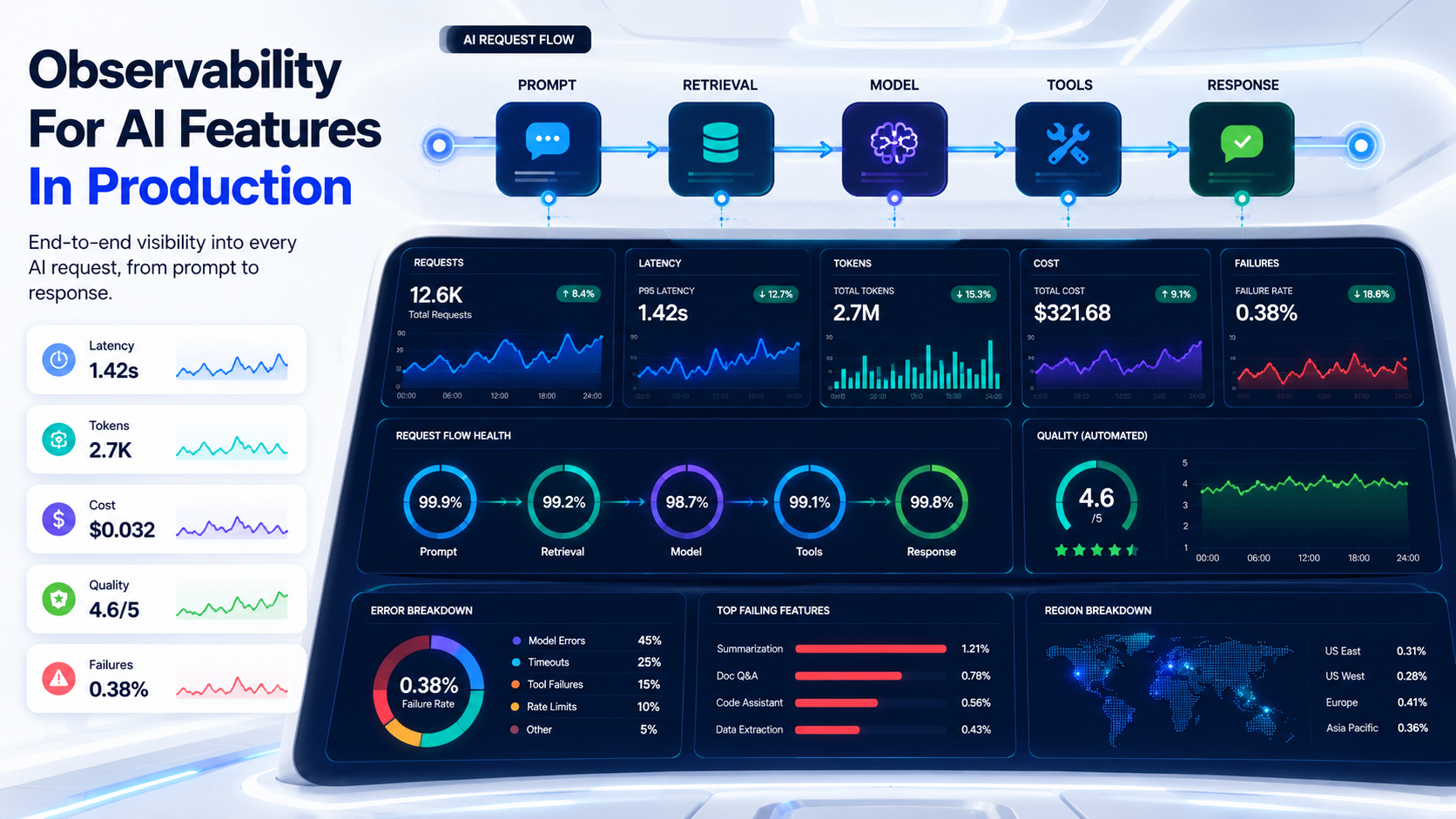
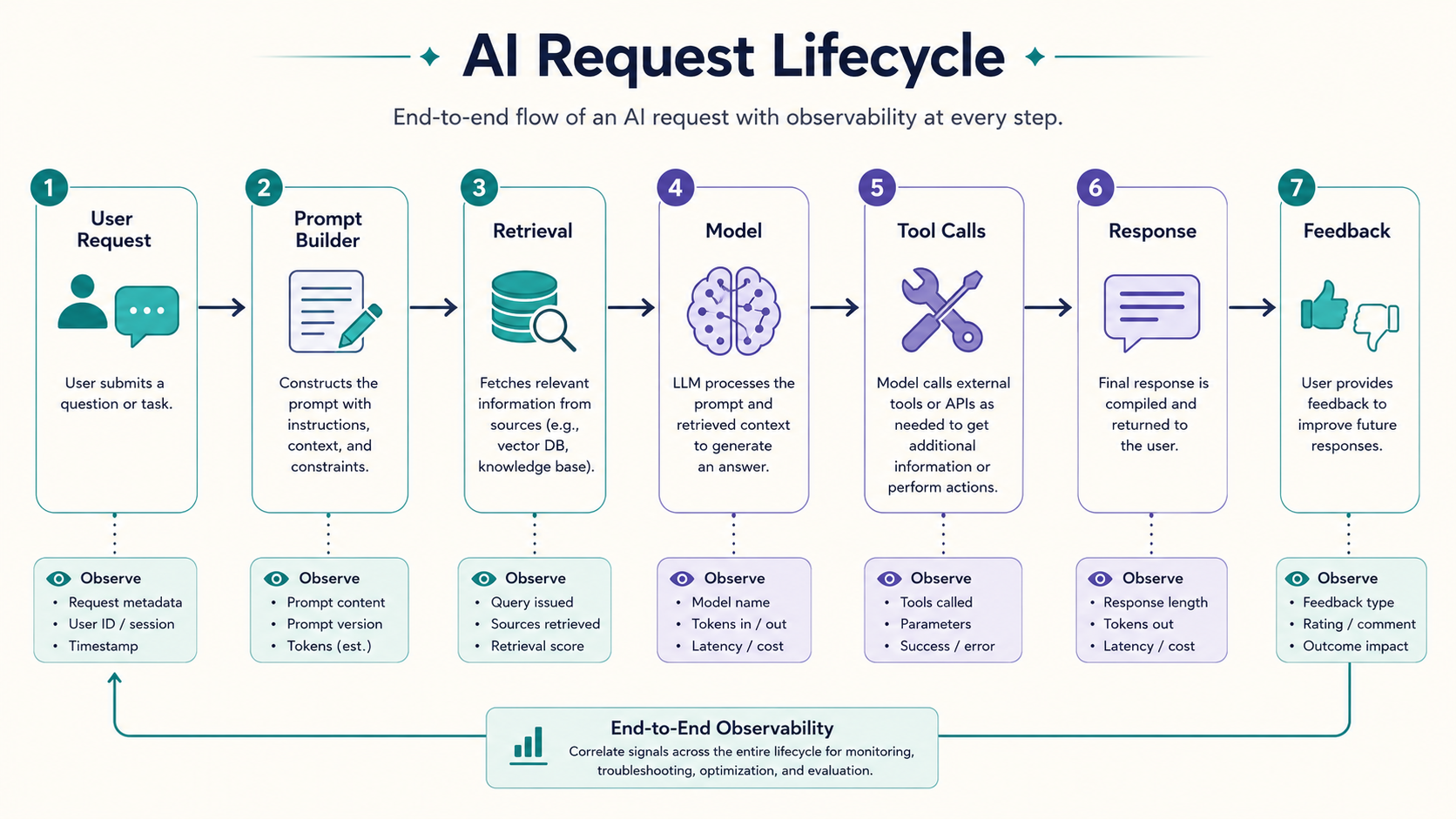
Before adding dashboards, define the lifecycle of one AI request. A common AI feature looks like this:
User input
  -> validation
  -> prompt construction
  -> optional retrieval
  -> model call
  -> optional tool call
  -> response validation
  -> response shown to user
  -> user feedback
Each step can fail in a different way. Input validation can fail because the user asks for unsupported behavior. Prompt construction can fail because the template is missing variables. Retrieval can fail because documents are missing, stale, or irrelevant. The model call can fail because of latency, provider errors, rate limits, or poor output. Tool calls can fail because external APIs fail. Response validation can fail because the answer does not match the required schema. And user feedback can reveal that the answer was technically valid but not useful.
That means your logs should not only say:
{
  "status": "success"
}
They should tell the story of the request.
What to log for prompts
Prompt logs are useful, but they must be handled carefully. Prompts can contain personal data, customer data, secrets, internal documents, or sensitive business information. Do not blindly log everything forever. A safe approach is to log structured metadata by default and store full prompts only in controlled environments or with redaction.
Example prompt log:
{
  "request_id": "ai_req_01HX9",
  "feature": "support_reply_assistant",
  "prompt_template": "support_reply_v4",
  "template_version": 4,
  "system_prompt_hash": "sha256:8f91...",
  "user_prompt_length": 1840,
  "final_prompt_tokens": 3120,
  "redaction_applied": true,
  "created_at": "2026-05-03T18:40:12Z"
}
Notice the hash. You do not always need to store the entire system prompt in every log; a hash plus a version is often enough to connect a production request to the exact prompt that produced it.
For debugging, you may also store redacted prompt snapshots:
function redactPrompt(prompt: string): string {
  return prompt
    .replace(/[A-Z0-9._%+-]+@[A-Z0-9.-]+\.[A-Z]{2,}/gi, '[EMAIL]')
    .replace(/\b\d{4}[- ]?\d{4}[- ]?\d{4}[- ]?\d{4}\b/g, '[CARD_NUMBER]')
    .replace(/sk-[A-Za-z0-9_-]+/g, '[API_KEY]');
}
This is simple, not perfect. In real systems, redaction should be layered and tested. But the principle is important: observability should not become a data leak.
What to log for retrieval
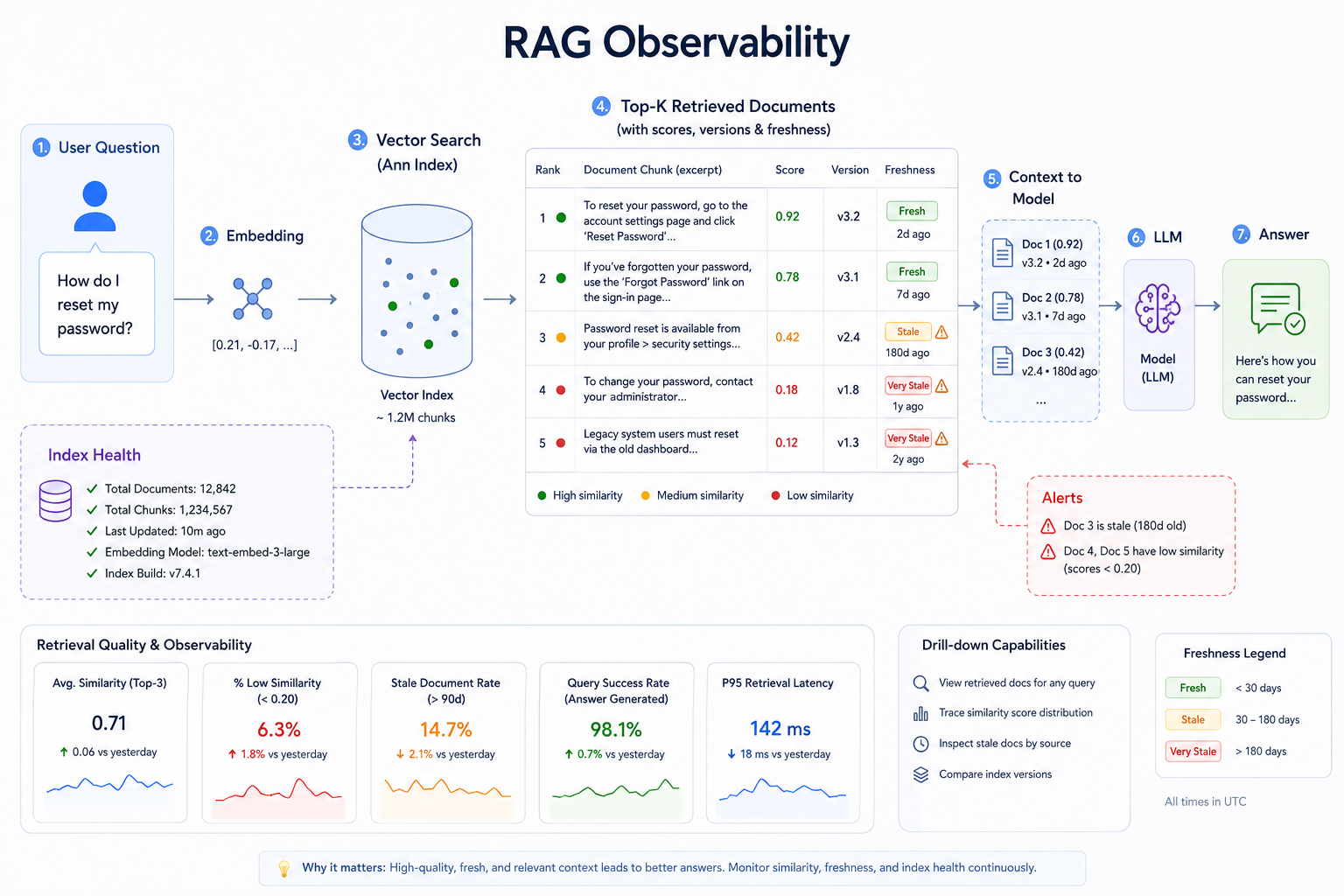
RAG features need retrieval observability. If an AI answer is bad, the model may not be the problem. The retrieved context may be weak, the index may be stale, or the user's question may sit outside the knowledge base entirely. Log what retrieval returned:
{
  "request_id": "ai_req_01HX9",
  "retrieval": {
    "index": "support_docs_prod",
    "query": "refund after annual renewal",
    "top_k": 5,
    "documents": [
      {
        "doc_id": "refund-policy-2026",
        "title": "Refund Policy",
        "score": 0.82,
        "version": "2026-04-12"
      },
      {
        "doc_id": "billing-faq",
        "title": "Billing FAQ",
        "score": 0.64,
        "version": "2026-02-01"
      }
    ]
  }
}
This helps you answer practical questions. Did we retrieve the correct policy? Was the document stale? Did the top result have a low score? Did the user ask a question outside the knowledge base? You can also track retrieval quality over time:
type RetrievalMetric = {
  query: string;
  topScore: number;
  resultCount: number;
  clickedDocumentId?: string;
  userFeedback?: 'helpful' | 'not_helpful';
};

function detectWeakRetrieval(metric: RetrievalMetric): boolean {
  return metric.resultCount === 0 || metric.topScore < 0.65;
}
Weak retrieval should be visible. Otherwise, teams blame the model when the actual issue is missing content.
What to log for tool calls
AI agents often call tools: database lookups, internal APIs, search services, code runners, ticket systems, or deployment systems. Tool calls need serious observability because they can change real systems.
Log the tool name, the input schema version, the sanitized arguments, the result status, the duration, the retry count, the authorization context, and whether the tool was read-only or write-enabled. Example:
{
  "request_id": "ai_req_01HX9",
  "tool_call": {
    "tool": "get_customer_subscription",
    "tool_version": "v2",
    "mode": "read_only",
    "duration_ms": 182,
    "status": "success",
    "arguments_redacted": {
      "customer_id": "cus_[REDACTED]"
    }
  }
}
For write tools, add extra guardrails:
{
  "tool": "cancel_subscription",
  "mode": "write",
  "requires_human_confirmation": true,
  "confirmation_id": "confirm_7831",
  "executed": false
}
A production AI assistant should not casually execute dangerous actions because the model "thought it was right." Read-only tools are safer. Write tools need approvals, audit logs, permissions, and rollback plans.
Latency: measure the full path, not only the model
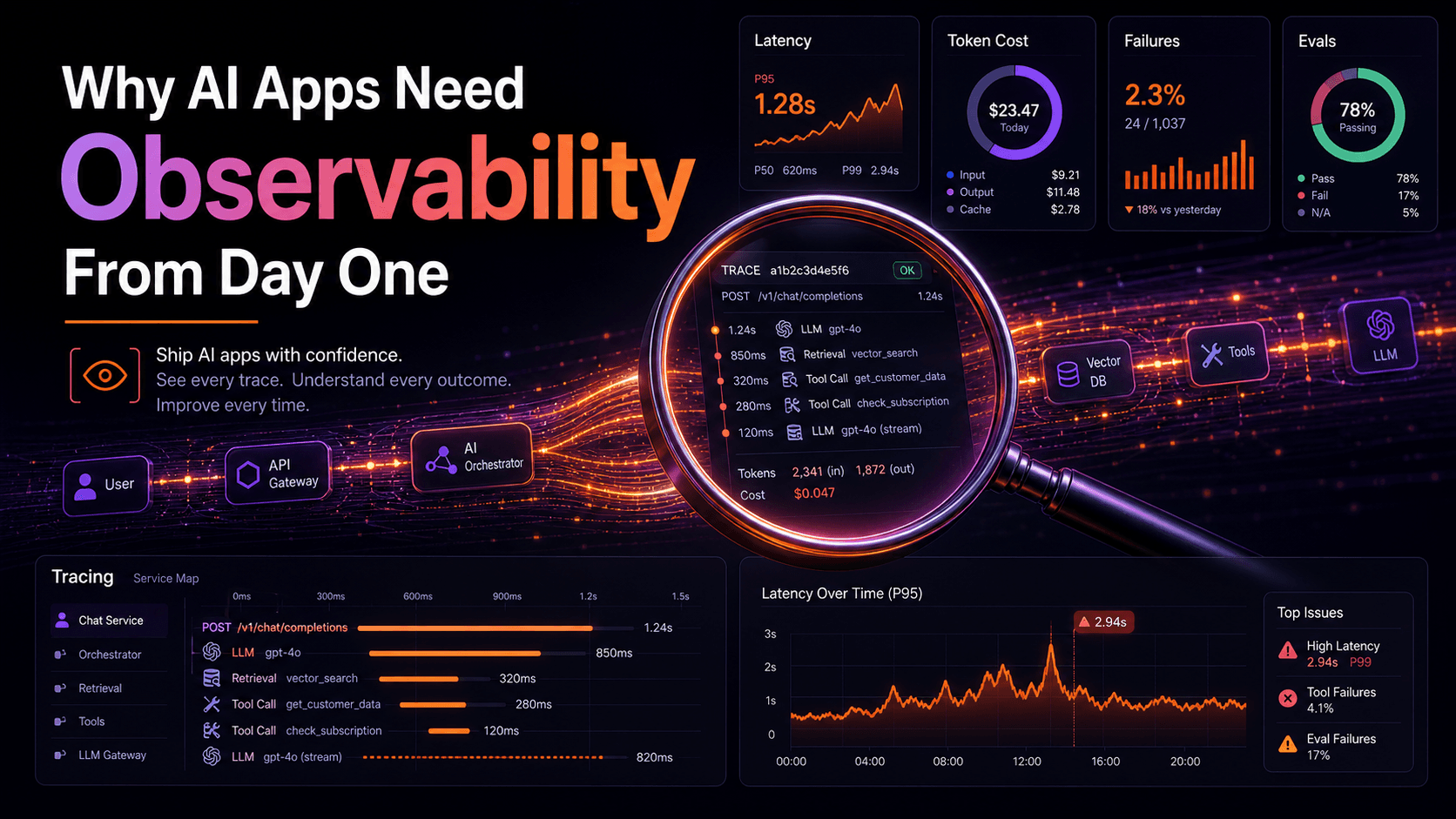
AI latency is often multi-part. A slow response may include prompt building, retrieval, model generation, tool calls, response validation, streaming delay, and frontend rendering. Track each part separately:
type AiTiming = {
  requestId: string;
  promptBuildMs: number;
  retrievalMs: number;
  modelMs: number;
  toolMs: number;
  validationMs: number;
  totalMs: number;
};

function logTiming(timing: AiTiming): void {
  console.log(JSON.stringify({
    event: 'ai_timing',
    ...timing,
  }));
}
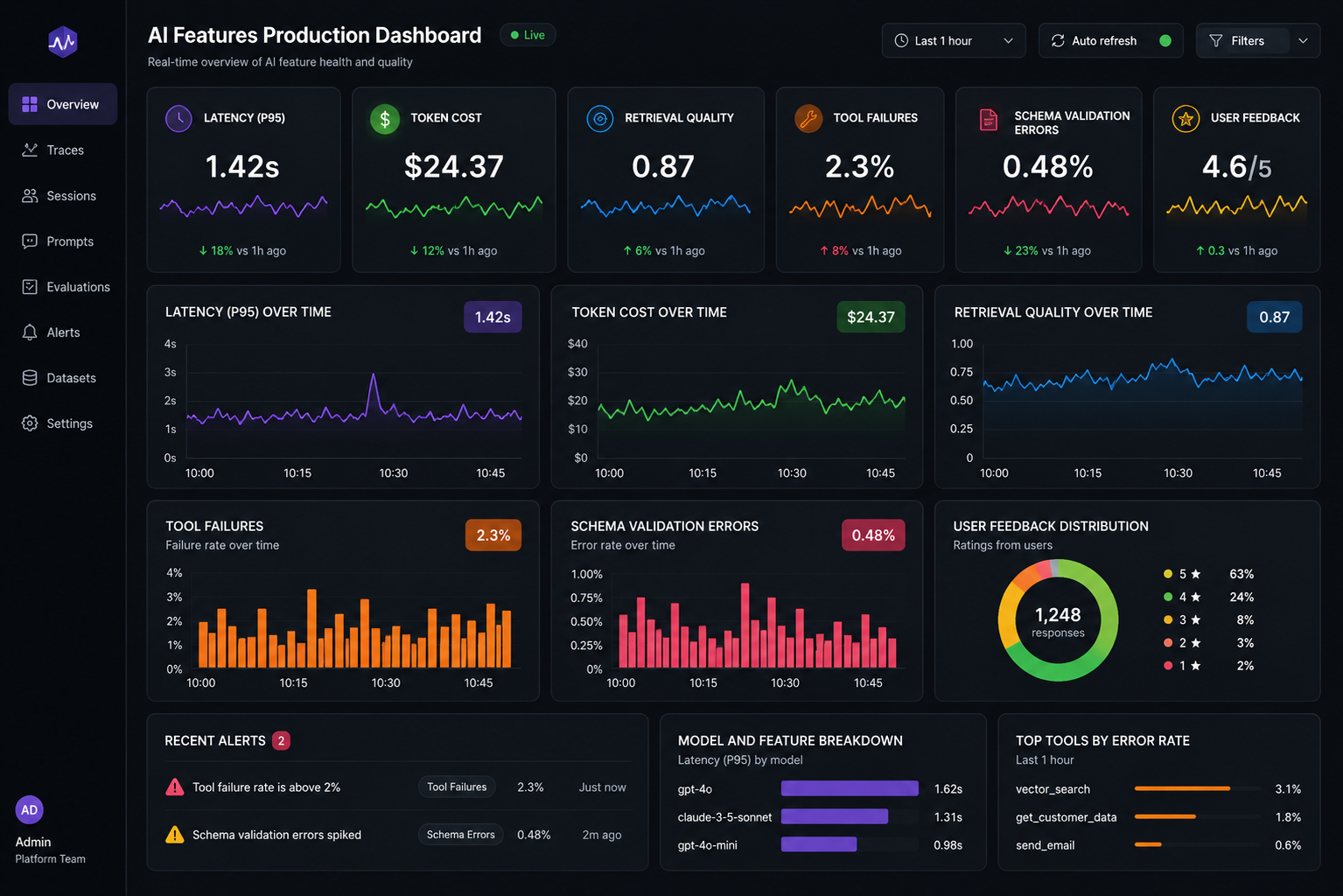
A dashboard should show p50, p95, and p99 latency. Average latency hides pain; if most requests finish in two seconds but 5% take thirty, users will notice the long tail before any chart does.
For streaming responses, also track time to first token:
{
  "request_id": "ai_req_01HX9",
  "time_to_first_token_ms": 740,
  "time_to_complete_ms": 8420
}
Time to first token matters because users feel the product is alive when streaming starts quickly.
Token usage and cost
Token usage is not just a billing detail. It is a product health signal. A feature can become expensive because prompts include too much irrelevant context, retrieval returns too many long chunks, conversation history is not summarized, the model is too powerful for a simple task, agents call each other repeatedly, or retries happen silently. Log token usage per feature:
{
  "feature": "pr_summary_assistant",
  "model": "example-large-model",
  "input_tokens": 18420,
  "output_tokens": 1620,
  "cached_input_tokens": 9000,
  "estimated_cost_usd": 0.084,
  "request_id": "ai_req_45KQ"
}
Then create cost dashboards by feature, customer, team, or workflow. A useful metric is cost per successful outcome, not only cost per request. For example:
support_reply_assistant
- 10,000 requests
- $420 model cost
- 6,800 helpful responses
- cost per helpful response = $0.061
That is much more useful than saying "we spent $420."
Failed generations and schema validation
AI output can fail even when the API request succeeds. Maybe the response is not valid JSON, maybe it misses required fields, maybe it includes text when your application expects structured data. Use schema validation:
import { z } from 'zod';

const PrSummarySchema = z.object({
  summary: z.string().min(20),
  changedBehavior: z.array(z.string()),
  riskyFiles: z.array(z.string()),
  testsRun: z.array(z.string()),
  missingTests: z.array(z.string()),
});

function parsePrSummary(raw: unknown) {
  const result = PrSummarySchema.safeParse(raw);

  if (!result.success) {
    throw new Error(`Invalid AI response schema: ${result.error.message}`);
  }

  return result.data;
}
Then log validation failures:
{
  "event": "ai_response_validation_failed",
  "feature": "pr_summary_assistant",
  "template_version": 3,
  "model": "example-large-model",
  "error": "missing required field: testsRun"
}
This lets you detect prompt regressions quickly.
User feedback is part of observability
AI quality is not only technical. Users can tell you when an answer was helpful, wrong, too long, unsafe, or irrelevant. Do not collect only thumbs up/down; add lightweight reason categories:
type AiFeedback = {
  requestId: string;
  rating: 'positive' | 'negative';
  reason?:
    | 'incorrect'
    | 'missing_context'
    | 'too_verbose'
    | 'unsafe'
    | 'not_actionable'
    | 'other';
  comment?: string;
};
This feedback can feed evaluation datasets. If users repeatedly mark answers as missing_context, the problem may be retrieval. If they mark answers as too_verbose, the prompt may need tighter formatting rules. If they mark answers as incorrect, you need deeper analysis: bad prompt, bad context, weak model, ambiguous user input, or missing business rule.
Evaluation and regression testing
Production observability tells you what happened. Evaluations help you prevent known failures from coming back. Create a small dataset of realistic cases:
[
  {
    "id": "refund_annual_plan_001",
    "input": "Can I get a refund if my annual plan renewed yesterday?",
    "expected_traits": [
      "mentions refund window",
      "does not promise refund automatically",
      "asks for account details if needed"
    ],
    "forbidden_traits": [
      "invented policy",
      "asks for full credit card number"
    ]
  }
]
You can run this dataset whenever you change the prompt template, the retrieval index, the model, the tool definitions, the system instructions, or the response schema. The goal is not perfect testing. The goal is catching obvious regressions before users do.
A simple AI observability schema
Here is a practical event model:
type AiEvent =
  | {
      type: 'ai.request.started';
      requestId: string;
      feature: string;
      userId?: string;
      promptTemplate: string;
    }
  | {
      type: 'ai.retrieval.completed';
      requestId: string;
      topScore: number;
      resultCount: number;
      documentIds: string[];
    }
  | {
      type: 'ai.model.completed';
      requestId: string;
      model: string;
      inputTokens: number;
      outputTokens: number;
      durationMs: number;
    }
  | {
      type: 'ai.tool.completed';
      requestId: string;
      toolName: string;
      status: 'success' | 'failure';
      durationMs: number;
    }
  | {
      type: 'ai.response.validation_failed';
      requestId: string;
      error: string;
    }
  | {
      type: 'ai.feedback.received';
      requestId: string;
      rating: 'positive' | 'negative';
      reason?: string;
    };
You can send these events to your normal observability stack. The exact vendor matters less than consistency.
Privacy and retention
AI observability can collect sensitive information if you are not careful. Set clear rules: redact secrets before logging, avoid storing raw prompts by default, set retention limits, separate debugging access from general analytics access, record prompt template versions, store document IDs instead of full documents when possible, and audit access to AI traces. This is especially important for internal assistants that can read customer support tickets, invoices, medical records, legal documents, or private engineering docs.
Final thoughts
AI features need observability because they are probabilistic, context-sensitive, and expensive. You need more than HTTP 200 and p95 latency. You need to see prompts, retrieval, tool calls, tokens, cost, validation failures, user feedback, and evaluation results.
The best AI observability systems do not only help you debug failures. They help you improve the product. They show where retrieval is weak, where prompts waste context, where model upgrades changed behavior, and where users do not trust the answer. That is the difference between an AI demo and an AI product. A demo only needs to work once. A product needs to keep working tomorrow.
Further reading
- OpenAI production best practices: https://developers.openai.com/api/docs/guides/production-best-practices
- OpenAI Agents SDK tracing: https://openai.github.io/openai-agents-python/tracing/
- OpenTelemetry documentation: https://opentelemetry.io/docs/