You install Postgres, you write some CREATE TABLEs, you add a few indexes, and for about a year it feels like you have everything you need. Then one morning a designer asks if you can "search names but, like, ignore typos." A week later someone wants UUIDs instead of bigserial IDs. A month after that a feature lands on the roadmap that quietly says "show users within 10km." And suddenly your beautiful, perfectly normal Postgres database needs to do four things it absolutely does not do out of the box.
You can paper over each of these in application code. You can fuzzy-match in your API layer, generate UUIDs in your ORM, geocode in a microservice. People do this. It works. It's also slow, awkward, and gives up the one superpower Postgres gives you for free: doing the right thing in one round-trip to the database, with an index already covering it.
The trick is that Postgres ships with (or makes one command away) a library of extensions that solve exactly these problems. Most of them have been in the box since the early 2010s. Most of them are battle-tested by databases ten times bigger than yours. And most of them are exactly two SQL statements away from your project right now.
This piece is a tour of the four I think every backend engineer should know cold: pg_trgm, uuid-ossp, PostGIS, and citext. We'll go through what each one actually does, when it earns its keep, the indexing decisions that make or break it, and the gotchas you only learn the hard way. At the end I'll mention a handful of honourable mentions you'll want to look up on your own time.
What an extension actually is
Before we get into the four, a one-paragraph mental model. An extension is a package of types, functions, operators, and sometimes index methods that get loaded into a specific database. They live alongside the core Postgres APIs. Once installed, the functions look and feel native. You install them per-database, not per-cluster, with:
CREATE EXTENSION IF NOT EXISTS pg_trgm;You can see what's installed in the current database with:
SELECT extname, extversion FROM pg_extension;And what's available to install on this server with:
SELECT name, default_version, comment FROM pg_available_extensions ORDER BY name;That last query is genuinely worth running on your own dev database right now. There are usually 40+ things sitting there waiting for a CREATE EXTENSION and you've probably been writing application-layer code to substitute for half of them.
A few extensions ship with Postgres itself (the "contrib" set: pg_trgm, uuid-ossp, citext, pgcrypto, hstore, pg_stat_statements, and so on). Others, like PostGIS, are separate packages that you install at the OS level first and then CREATE EXTENSION to enable per-database. On managed Postgres (RDS, Cloud SQL, Supabase, Neon), almost all of the contrib set is pre-allowed; PostGIS usually is too, but check the docs for your provider.
pg_trgm: fuzzy search without leaving the database
This is the one most teams discover too late. You build a "find user by name" feature, you start with ILIKE '%alice%', and on day one with a hundred users it's instant. Then the table grows, the searches grow, and ILIKE '%...%' runs a sequential scan every time. The standard B-tree index doesn't help. Leading-wildcard searches can't use it.
pg_trgm solves this and also gives you typo-tolerant matching for free.
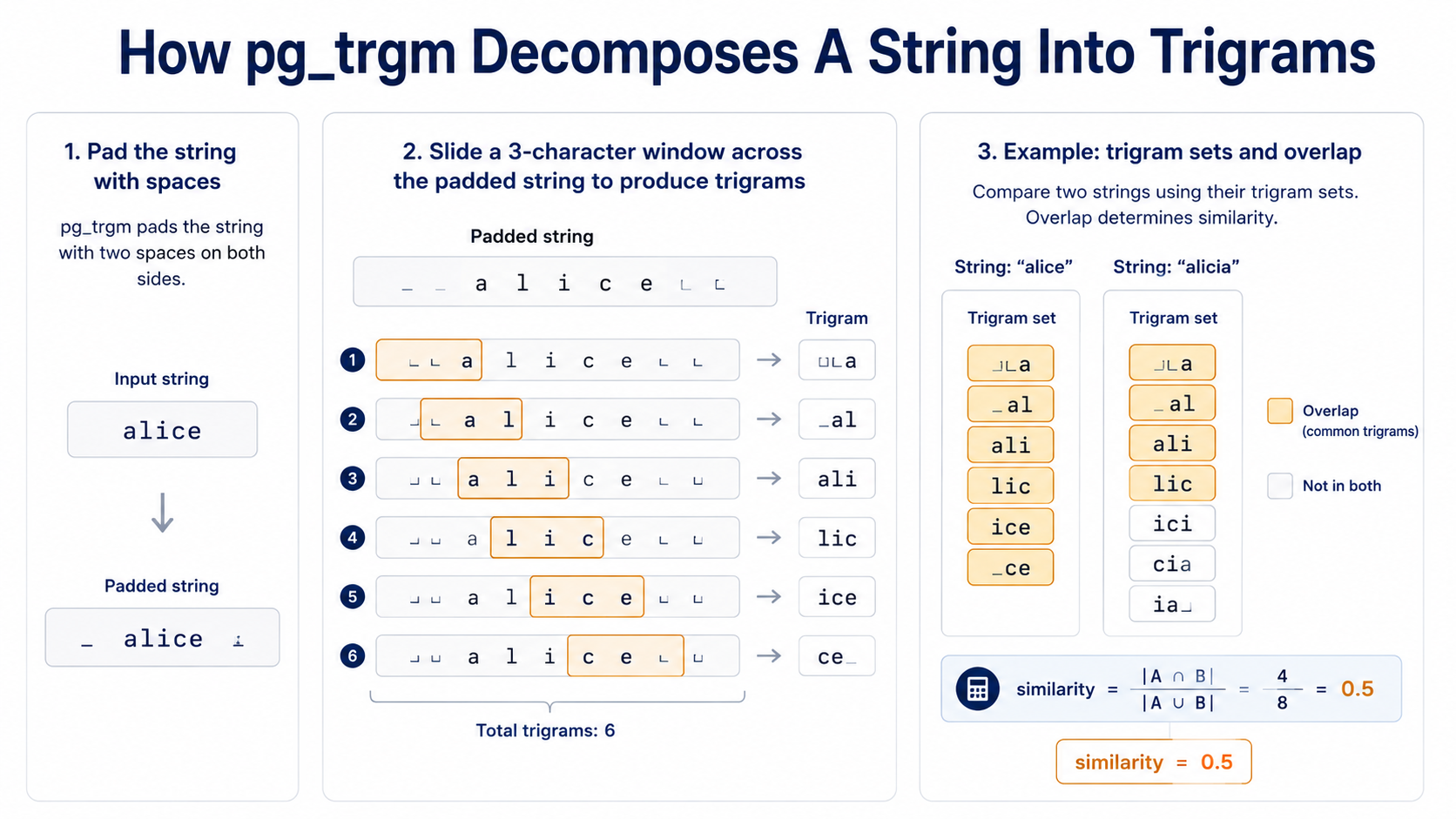
A trigram is a sequence of three consecutive characters. The string "alice" breaks down into the trigrams " a", " al", "ali", "lic", "ice", and "ce " (note the padding, that's intentional: it makes prefix and suffix matches stronger). Two strings are "similar" if they share a lot of trigrams. That's the whole idea.
CREATE EXTENSION IF NOT EXISTS pg_trgm;

SELECT show_trgm('alice');
-- {"  a"," al","ali","ce ","ice","lic"}

SELECT similarity('alice', 'alicia');
-- 0.5

SELECT similarity('alice', 'bob');
-- 0
You get four useful tools out of this: the % operator (similarity above a configurable threshold), the <-> operator (distance, where smaller is more similar), the similarity() function (for explicit scoring), and the ability to make LIKE '%foo%' actually use an index.
The index choice that makes pg_trgm worth it
Here's where most "I tried pg_trgm and it was still slow" stories come from: people install the extension, write WHERE name % 'alice', and forget the index.
-- This is what makes everything fast
CREATE INDEX users_name_trgm_idx ON users USING gin (name gin_trgm_ops);
That gin_trgm_ops operator class is the magic. It tells Postgres to build a GIN index over the trigrams of the column instead of over the raw values. Now WHERE name ILIKE '%alic%', WHERE name % 'alice', and ORDER BY name <-> 'alice' LIMIT 10 can all use the index.
GIN is the right default. There's also gist_trgm_ops for a GiST-based version: smaller index, faster writes, but slightly slower lookups. Unless you have a write-heavy workload where the GIN size or write amplification is a problem, stick with GIN.
-- Typo-tolerant exact-ish match - uses the GIN index
SELECT id, name, similarity(name, 'alicia') AS score
FROM users
WHERE name % 'alicia'
ORDER BY score DESC
LIMIT 10;

-- "Nearest neighbour" sorted by similarity - also uses the index
SELECT id, name
FROM users
ORDER BY name <-> 'alicia'
LIMIT 10;

-- Leading-wildcard ILIKE that's normally a seq-scan killer
SELECT id, name
FROM users
WHERE name ILIKE '%lic%';
The default similarity threshold for % is 0.3, which is permissive. You can lower it for stricter matches:
SET pg_trgm.similarity_threshold = 0.5;Set it per-session or per-query, not globally. Different features want different sensitivities.
When pg_trgm is the wrong tool
pg_trgm is character-level fuzzy matching. It doesn't know words, it doesn't know stemming, it doesn't know English vs. French. If your search needs to understand that "running" and "ran" are the same word, you want Postgres full-text search (tsvector) instead, or both side by side. The pattern is: full-text search for "did the user mean this word", pg_trgm for "the user spelled the word slightly wrong."
It also doesn't really understand long text. The trigram set of a 5000-word article is huge, similarity scores get noisy, and the index gets unwieldy. Use it on names, titles, short labels, search-suggest fields, not document bodies.
uuid-ossp: when bigserial isn't the right call
UUIDs are the answer to a question a lot of teams don't ask until they have to: "what if our auto-incrementing integer IDs leak business information?" If your invoice IDs go up by one every day, anyone with two invoices can guess how many customers you have. If your user IDs are sequential, a competitor can scrape /u/1 through /u/n and learn your sign-up rate. UUIDs make all of that go away.
uuid-ossp is the extension that historically gave Postgres UUID generation. It exposes a handful of functions, the ones you care about being:
CREATE EXTENSION IF NOT EXISTS "uuid-ossp";

SELECT uuid_generate_v1();  -- timestamp + MAC address
SELECT uuid_generate_v4();  -- random
SELECT uuid_generate_v5(uuid_ns_url(), 'https://example.com');  -- name-based
The one you almost always want is uuid_generate_v4(): fully random, no information leakage, no global coordination needed.
CREATE TABLE invoices (
  id uuid PRIMARY KEY DEFAULT uuid_generate_v4(),
  amount numeric NOT NULL,
  created_at timestamptz NOT NULL DEFAULT now()
);
The modern note: you might not even need uuid-ossp
Since Postgres 13, the built-in gen_random_uuid() function (originally from pgcrypto) is exposed directly without any extension. It produces the same kind of v4 UUIDs as uuid_generate_v4():
-- Works on Postgres 13+ with no extension
CREATE TABLE invoices (
  id uuid PRIMARY KEY DEFAULT gen_random_uuid(),
  amount numeric NOT NULL
);
If you're on 13 or newer and you only ever use v4, you can skip uuid-ossp entirely. Reach for the extension when you specifically need v1 (timestamp-based) or v5 (deterministic from a namespace and a string). The v5 case is genuinely useful. If you want to generate the same UUID every time from the same input (think "make a stable user ID from an external system's username"), v5 is built for that.
The thing nobody mentions: random UUIDs and B-tree pain
Here's the gotcha. A v4 UUID is fully random, which means consecutive inserts land at random points in your B-tree primary key index. On a small table this doesn't matter. On a hot, large table doing thousands of inserts per second, you end up with random write patterns across the index: more page splits, worse cache locality, slower bulk inserts, and a bigger index footprint than you'd expect.
The fix is one of the time-ordered UUID variants. UUIDv7 is a proposed standard (currently an IETF draft) that starts with a millisecond timestamp, so newly-generated values cluster at the end of the index, the same way bigserial does. Postgres doesn't ship a v7 generator in core, but the pg_uuidv7 extension adds uuid_generate_v7() to give you the same capability. If you're starting fresh on a high-write workload, use a v7 generator before you commit to random v4 IDs everywhere. If you're already in production with v4 and it's fine, leave it alone. Most workloads never hit this wall.
-- Postgres 18+ native
CREATE TABLE events (
  id uuid PRIMARY KEY DEFAULT uuidv7(),
  payload jsonb NOT NULL,
  occurred_at timestamptz NOT NULL DEFAULT now()
);

-- Postgres 17 or earlier with pg_uuidv7 installed:
-- DEFAULT uuid_generate_v7()
Storage: use the uuid type, not text or varchar(36)
This is the cheapest win in this whole article. A uuid is 16 bytes. The string representation ("550e8400-e29b-41d4-a716-446655440000") stored as text is 37 bytes plus header overhead. On a table with a million rows and a UUID primary key, that's a difference of about 21MB on disk just for the column, plus every index on it. Indexes on a real uuid column also compare faster: fixed-width binary comparison instead of string comparison.
If you're inheriting a schema with varchar(36) UUIDs, a migration to uuid is one of the easiest performance wins on the table. Don't put it off.
citext: case-insensitive without the LOWER() dance
How many times have you written this?
SELECT * FROM users WHERE LOWER(email) = LOWER($1);It works. It also defeats the index on email unless you've thought to create a functional index on LOWER(email):
CREATE INDEX users_email_lower_idx ON users (LOWER(email));And now every other query against email has to remember to wrap both sides in LOWER(...) or it bypasses the index. Half your codebase has it, half doesn't. New developers wonder why some lookups are fast and some are slow. It's a mess.
citext makes this go away. It's a text type that compares and hashes case-insensitively, all the time, automatically:
CREATE EXTENSION IF NOT EXISTS citext;

CREATE TABLE users (
  id uuid PRIMARY KEY DEFAULT gen_random_uuid(),
  email citext UNIQUE NOT NULL,
  name text NOT NULL
);

-- All of these find the same row
SELECT id FROM users WHERE email = 'alice@example.com';
SELECT id FROM users WHERE email = 'Alice@Example.com';
SELECT id FROM users WHERE email = 'ALICE@EXAMPLE.COM';
A normal B-tree index on email citext works for case-insensitive lookups directly. The UNIQUE constraint enforces uniqueness case-insensitively. You stop having to think about it.
It's tailor-made for emails, usernames, country codes, slug-like fields, anywhere the rule is "case is for display, not for identity."
The gotchas you should know up front
A few things to know before you replace every text column with citext:
1. It preserves the original case for display. If a user signs up as Alice@Example.com, that's what's stored and what you see when you SELECT. Comparisons are case-insensitive; storage isn't case-destructive.
2. It's marginally slower than text. Every comparison has to do the case-folding work. For typical workloads (millions of rows, indexed lookups), the difference is invisible. For tight inner-loop string crunching, benchmark before you switch.
3. It doesn't help with accent-insensitive matching. 'café' = 'cafe' is still false. If you need accent folding too, you want unaccent (another extension: CREATE EXTENSION unaccent) layered on top, or you switch to non-deterministic ICU collations introduced in Postgres 12, which can be case- and accent-insensitive at the collation level.
4. Some ORMs need a nudge. Django, Rails, and a few others know about citext and have first-class support. Some lighter-weight clients will introspect the column as text unless you tell them. Usually one line of config. Check your ORM's docs.
PostGIS: geospatial as a first-class citizen
This is the big one. PostGIS turns Postgres into a fully featured GIS database. Not "you can store coordinates", but "you can do spatial joins, distance queries, polygon containment, routing, raster analysis, projection transforms, the entire OGC standard, with proper indexes." Most "show users near me" features that scale are built on PostGIS, and a lot of geographic data warehouses are PostGIS underneath the dashboard.
It's not bundled with Postgres core. You install the OS-level package (postgis on Debian/Ubuntu, postgis on Homebrew, etc.) and then enable it per-database:
CREATE EXTENSION IF NOT EXISTS postgis;

SELECT PostGIS_Version();
Geometry vs. geography: pick the right one once
PostGIS exposes two main types and people pick the wrong one constantly.
geometry is planar: coordinates on a flat plane. It's fast, it's flexible, it supports every PostGIS function. But it doesn't understand the curvature of the Earth, so a ST_Distance on geometry values stored as longitude/latitude returns degrees, not meters, and it's wrong by a lot near the poles.
geography is spheroidal: coordinates on the Earth's surface. It's a bit slower (everything is great-circle math), it supports fewer functions, but it returns real-world meters and handles the wrap-around at the antimeridian correctly.
The rule of thumb:
- Storing GPS coordinates from phones, locations of users, addresses, points of interest →
geography. - Working in a single projected coordinate system (a city plan, a country-level dataset in a national grid) →
geometrywith an explicit SRID.
You can mix and convert, but pick one as the default for each column and stick with it.
CREATE TABLE places (
  id uuid PRIMARY KEY DEFAULT gen_random_uuid(),
  name text NOT NULL,
  location geography(Point, 4326) NOT NULL
);

INSERT INTO places (name, location) VALUES
  ('Office', ST_MakePoint(-73.9857, 40.7484)::geography),
  ('Cafe',   ST_MakePoint(-73.9912, 40.7505)::geography);
4326 is the SRID for WGS 84, the lat/lon coordinate system GPS, Google Maps, OpenStreetMap, and basically every consumer-facing geo system uses. If you're storing data that came from a phone or a map, it's 4326. Always declare the SRID on the column type. It saves you from a category of bugs where two datasets in different projections look identical and silently produce nonsense joins.
The index that makes spatial queries fast
Like trigrams, like full-text search, the index is the thing that makes PostGIS go from "interesting toy" to "production database."
CREATE INDEX places_location_idx ON places USING gist (location);GiST is the standard. There's also SP-GiST for some specific use cases (kd-tree-like splits, useful for point-heavy data) and BRIN for very large, naturally clustered datasets. But GiST is the right default and the documentation will tell you when to deviate.
With the index in place, the bread-and-butter "find things near me" query is:
SELECT id, name, ST_Distance(location, $1::geography) AS meters
FROM places
WHERE ST_DWithin(location, $1::geography, 1000)
ORDER BY meters
LIMIT 20;
ST_DWithin is the right operator for "within X meters." Not ST_Distance(...) < 1000. That one calculates the exact distance for every row, doesn't use the index, and is slow. ST_DWithin is designed to use the GiST index for a bounding-box prefilter and then refine.
What PostGIS actually unlocks
A short menu of things that go from "build a microservice" to "one SQL query" once PostGIS is in your stack:
- Distance and nearest-neighbour search.
ST_DWithin,ST_Distance,ST_ClosestPoint, the<->operator for KNN ordering. - Containment.
ST_Contains,ST_Within,ST_Intersects: "is this point inside this polygon", "do these two regions overlap." - Geometric operations.
ST_Buffer(grow a shape by N meters),ST_Union(merge),ST_Intersection,ST_Difference. - Routing and isochrones. With the
pgRoutingcompanion extension on top, you can do shortest-path, travelling-salesman, isochrone polygons ("everywhere reachable in 15 minutes"). - Geocoding. With the
address_standardizerand TIGER extensions, you can geocode US addresses inside the database. Not as good as Google's API, but free and offline. - Map tile generation.
ST_AsMVTproduces Mapbox Vector Tiles directly from SQL. Your map renderer queries Postgres and gets tiles back, no intermediate server needed.
That last one is genuinely under-appreciated. A surprising number of "we built a map backend" stacks could be replaced with PostGIS plus a thin tile server, and the SQL is shorter than the Go code most teams write.
The PostGIS warning label
PostGIS is huge. It has hundreds of functions, an entire OGC standard's worth of operators, and a learning curve. The most common failure mode isn't writing bad PostGIS. It's writing PostGIS the way you write normal SQL, missing the spatial index, and ending up with a query that scans every polygon in the table on every request. If you adopt it, give yourself a day to read the PostGIS docs on indexes, spatial reference systems, and the difference between geometry and geography. That day pays back the first time you ship a "near me" feature.
Honourable mentions
Four extensions in depth feels right for one piece, but you'd be cheating yourself if I didn't at least point at the next layer.
pgcrypto: symmetric and asymmetric encryption, hashing (digest, hmac), random bytes, and the original home of gen_random_uuid(). Useful when you need column-level encryption at rest. Be careful about how you handle keys; encrypting data with a key stored in the same database is theatre.
hstore: key/value pairs in a single column. Mostly superseded by jsonb for new code, but if you inherit a schema that uses it, it's still there and still works. jsonb is more flexible (nested structures, arrays, richer query operators); hstore is leaner and slightly faster for flat string-to-string maps.
pg_stat_statements: query-level statistics across your whole database. Tells you which queries are slow, which are frequent, which are eating the most planning time. If you only install one extension on a production database for observability reasons, this is it. Almost every "why is the database slow" investigation starts with SELECT * FROM pg_stat_statements ORDER BY total_exec_time DESC LIMIT 20.
ltree: hierarchical labels with index-friendly operators (ancestor, descendant, pattern matching). If you're modelling categories, org charts, file paths, or any tree structure and you're doing it with parent-id columns and recursive CTEs, take a look at ltree before you write the next migration. It's a different mental model and worth the hour to evaluate.
pg_trgm's neighbours: fuzzystrmatch (Levenshtein, Soundex, Metaphone) and unaccent (strip accents). Often used together with pg_trgm for the strongest search experience: unaccent the column, trigram-index it, and use Levenshtein for the final tie-break.
How to think about adopting one
A pattern I've found useful: most of these extensions are "tax now, savings forever." The cost of adopting citext is roughly nothing: you change a column type, drop the LOWER() calls, and you're done. The cost of adopting pg_trgm is one CREATE EXTENSION, one CREATE INDEX, and rewriting a few queries. The cost of adopting uuid-ossp (or gen_random_uuid) is changing a few DEFAULT clauses.
PostGIS is the only one with a real learning curve, and even there the curve is "spend one day on the docs." The savings are real every time. You replace whole categories of application code (fuzzy match libraries, geocoding services, case-folding utilities) with native database operations that come with proper indexes and ACID guarantees built in.
The mistake teams make is treating extensions as exotic. They're not. They're the parts of Postgres that aren't loaded by default because not everyone needs them. But once your application needs them, they're battle-tested code sitting one SQL statement away. The first time you write WHERE email = ? against a citext column and it just works, you'll wonder why you ever fought with LOWER(). The first time you write ST_DWithin(location, $1, 1000) instead of building a haversine helper in your API, you'll wonder the same thing. That's the whole point: there's a good chance Postgres can already do the thing you're about to build, and the index for it is included.