So, you've been writing MySQL for years.
You know how it behaves. You've internalised its quirks. You know that an INSERT into a VARCHAR(10) column with a 12-character string used to silently truncate, and that a '2024-13-45' date used to land in the table as '0000-00-00' if you were on an older server. You learned to live with it. You set sql_mode = STRICT_ALL_TABLES once you knew better, and life went on.
Then a new project lands on your desk. The team picked Postgres.
You open psql, type something familiar, and immediately the database starts arguing with you.
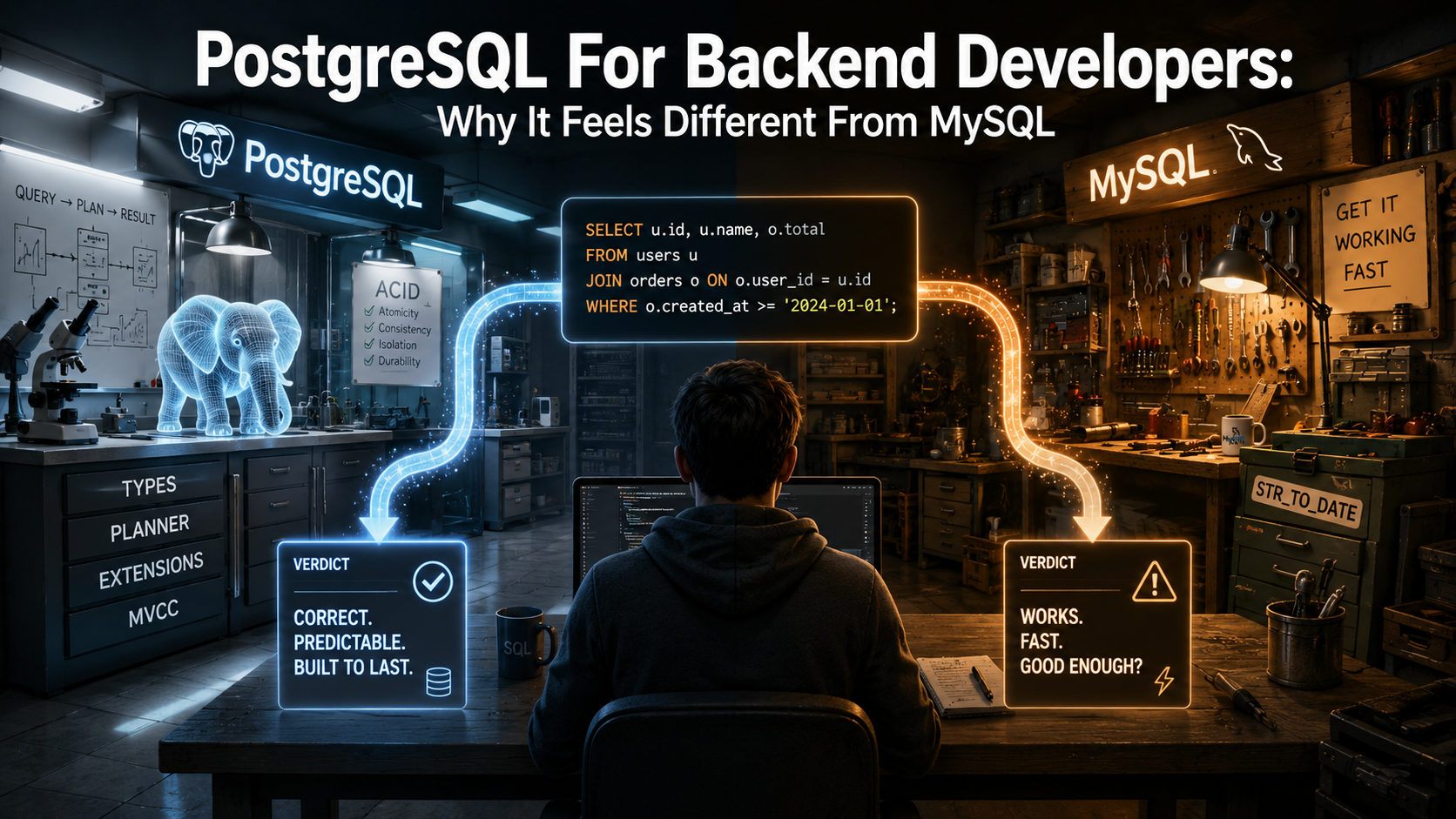
That feeling, the "why is it being like this" feeling, is the whole reason this article exists. Postgres isn't harder than MySQL. It's not better at everything either. It's just built around a different philosophy, and once you see the shape of that philosophy, the surprises stop being surprises and start being features you reach for on purpose.
Let's walk through the biggest differences a backend developer notices in the first month, and why each one is the way it is.
Strictness is the default, not a setting
The first thing that bites you is how seriously Postgres takes your schema.
In MySQL, the historical default was lenient. If you inserted the wrong type, the engine would do its best to coerce it. INSERT INTO users (age) VALUES ('twenty') would land you a 0. An over-long string would get clipped. A bad date would become a sentinel. Modern MySQL fixes most of this with STRICT_ALL_TABLES, but the muscle memory of forgiving behaviour still leaks into a lot of codebases.
Postgres doesn't have a lenient mode. The same insert in Postgres throws:
INSERT INTO users (age) VALUES ('twenty');
-- ERROR:  invalid input syntax for type integer: "twenty"
You can't turn this off. There's no global "be cool about it" flag. If you put INTEGER on the column, you're going to get integers in that column or you're going to get an error.
The same applies to almost every type-versus-value mismatch you can think of. Out-of-range numerics? Error. A string that doesn't parse as a date? Error. A JSON value that isn't valid JSON? Error. A row that violates a CHECK constraint? Error. A NOT NULL you forgot to populate? Error.
This sounds annoying for about a week. After that, you start to notice that the bugs you used to catch in production are now caught at insert time. The database is doing some of the validation work your application layer used to be responsible for, and it's doing it in a place where no path can go around it.
There's a related habit shift here too. In MySQL, identifiers fold to lowercase by default on most platforms, and case-sensitivity rules depend on the OS and the collation. In Postgres, unquoted identifiers fold to lowercase, but quoted identifiers preserve case exactly. So SELECT * FROM Users and SELECT * FROM users are the same query, but SELECT * FROM "Users" is a different table. If you ever create a table with a quoted name, you'll be quoting it forever.
The type system is a real feature, not a checkbox
MySQL has types. Postgres has a type system.
In MySQL, you mostly compose schemas out of the standard primitives: integers, decimals, varchars, text, datetime, JSON. There are some niceties (generated columns, spatial types), but most teams use a small subset and treat the rest as exotic.
In Postgres, the types feel like a programming language. You get the standard set, plus:
- Arrays of any type. A column can be
INTEGER[]orTEXT[]orJSONB[]. Postgres knows how to index them with GIN, query them with operators, and unnest them on demand. - Range types.
INT4RANGE,TSRANGE,DATERANGE: first-class ranges with operators for overlap, containment, and adjacency. If you've ever modelled a booking system with two columns and a thicket ofWHERE start_at < ... AND end_at > ...predicates, ranges plus aGISTexclusion constraint will change how you think about it. JSONB. Indexed, queryable, type-aware binary JSON. We'll come back to this in its own section.UUIDas a real type. Not aCHAR(36)you cast in your head, but a 16-byte type with comparison and indexing built in.ENUMtypes that are real types rather than implicit per-column shadow types.INETandCIDRfor IP addresses and networks, with operators like<<=for subnet containment.- Domains: named, constrained types.
CREATE DOMAIN email AS TEXT CHECK (VALUE ~ '^[^@]+@[^@]+$')and now every column you declare asemailis validated. - Composite types. You can declare a row type and use it as a column. Mostly useful for stored procedures, but it's there.
- Custom types. You can write your own with
CREATE TYPE, and the planner will treat them as first-class citizens.
A small example that combines a few of these:
CREATE TABLE room_bookings (
  id          BIGSERIAL PRIMARY KEY,
  room_id     INTEGER     NOT NULL,
  guest_name  TEXT        NOT NULL,
  during      TSTZRANGE   NOT NULL,
  EXCLUDE USING GIST (
    room_id WITH =,
    during  WITH &&
  )
);
That EXCLUDE clause is the database telling itself: "no two rows for the same room_id may have overlapping during ranges." You don't enforce that in application code. You don't write a trigger. You declare it once, and Postgres enforces it for every insert and update from any client, forever.
This is the moment the type system stops feeling like decoration and starts feeling like leverage.
JSONB and the death of the side table
If you've spent time in MySQL, you probably have a few "settings" or "metadata" tables. A user has a user_preferences row, which has a preference_key and a preference_value, both VARCHAR. You join, you cast, you wince.
Postgres gives you JSONB. Binary JSON, indexed and queryable.
CREATE TABLE users (
  id          BIGSERIAL PRIMARY KEY,
  email       TEXT NOT NULL UNIQUE,
  preferences JSONB NOT NULL DEFAULT '{}'::jsonb
);

CREATE INDEX users_prefs_gin ON users USING GIN (preferences jsonb_path_ops);

-- Find every user with notifications turned on
SELECT id, email
FROM users
WHERE preferences @> '{"notifications": {"email": true}}';
That @> operator is "contains." The GIN index makes the lookup fast even on millions of rows. You can index a specific JSON path:
CREATE INDEX users_theme_idx ON users ((preferences->>'theme'));

SELECT id FROM users WHERE preferences->>'theme' = 'dark';
MySQL also has a JSON type, and it's a perfectly reasonable JSON type. The difference is that Postgres treats JSON as a first-class member of the type system: operators, functional indexes, GIN indexes, path queries, type coercions, full-text search inside JSON values via expressions, all of it works the same way the rest of the database works. You don't feel like you've stepped into a different world when you query a JSON column.
The practical effect is that the "EAV side table" pattern goes away. You don't model preferences as a child table with (user_id, key, value). You put a JSONB column on the user, you GIN-index it, and you move on.
A word of caution though: this isn't a license to put everything in JSON. If a field is queried, joined, or constrained on every request, it should still be a real column. JSONB is for the long tail of optional, evolving, semi-structured data, not for the fields your hot paths read every second.
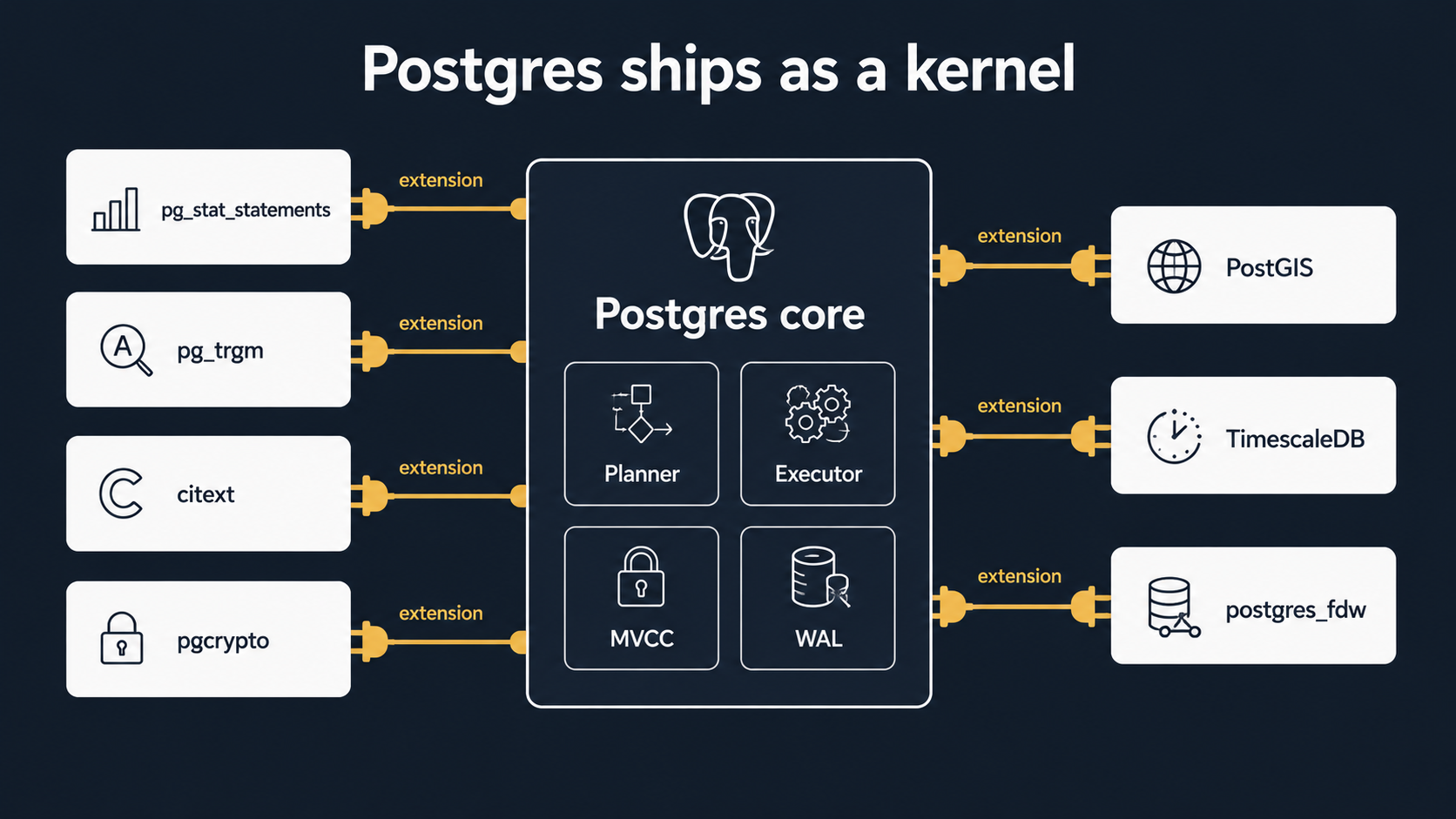
Extensions: Postgres ships as a kernel
Here's the mental model shift that took me the longest.
MySQL is mostly one binary. The features it has are the features it ships with. The team adds new features in new versions. If you want something exotic, you usually leave the database and reach for another service.
Postgres is more like an operating system. The core is small, focused, and rock-solid. Around it sits a culture of extensions, first-party and third-party, that bolt new types, new operators, new index methods, new languages, and new background workers into the same database without forking it.
A few extensions that show up in real projects all the time:
pg_stat_statements: keeps a rolling table of every normalised query the database has executed, with call counts, total time, mean time, rows. The single most valuable place to look when something is slow and you don't know what.pg_trgm: trigram matching for fuzzy text search.LIKE '%foo%'becomes indexable, and you get a similarity operator (%) that's perfect for "did you mean..." features.citext: case-insensitive text type. Drop it onemailcolumns and stop writingLOWER(email) = LOWER($1)everywhere.uuid-ossporpgcrypto: UUID generation.gen_random_uuid()is built-in since PG 13; usepgcryptofor older installs.btree_gin/btree_gist: lets you mix btree-indexable types into GIN/GIST composite indexes. Useful for those exclusion constraints we saw earlier.- PostGIS: turns Postgres into a serious spatial database. If your app has anything to do with geography, this is the reason you'd pick Postgres.
postgres_fdw: query a remote Postgres database as if its tables were local. Foreign data wrappers also exist for MySQL, MongoDB, S3, parquet files, and more.- TimescaleDB (third-party): turns Postgres into a competitive time-series database with chunking, retention, and continuous aggregates.
You install most of these with one statement:
CREATE EXTENSION IF NOT EXISTS pg_stat_statements;
CREATE EXTENSION IF NOT EXISTS pg_trgm;
CREATE EXTENSION IF NOT EXISTS citext;
CREATE EXTENSION IF NOT EXISTS pgcrypto;
Some need to be loaded into shared_preload_libraries in postgresql.conf and require a restart (pg_stat_statements does). Most don't.
The reason this matters for backend developers is that "Postgres can't do X" is almost never the right phrasing. Usually the question is "is there an extension for X, and is my hosting provider willing to install it?" Managed providers vary in what they allow (RDS, Cloud SQL, Supabase, Neon all publish lists), but the universe of possibility is much bigger than the core feature set.
The query planner is a glass box
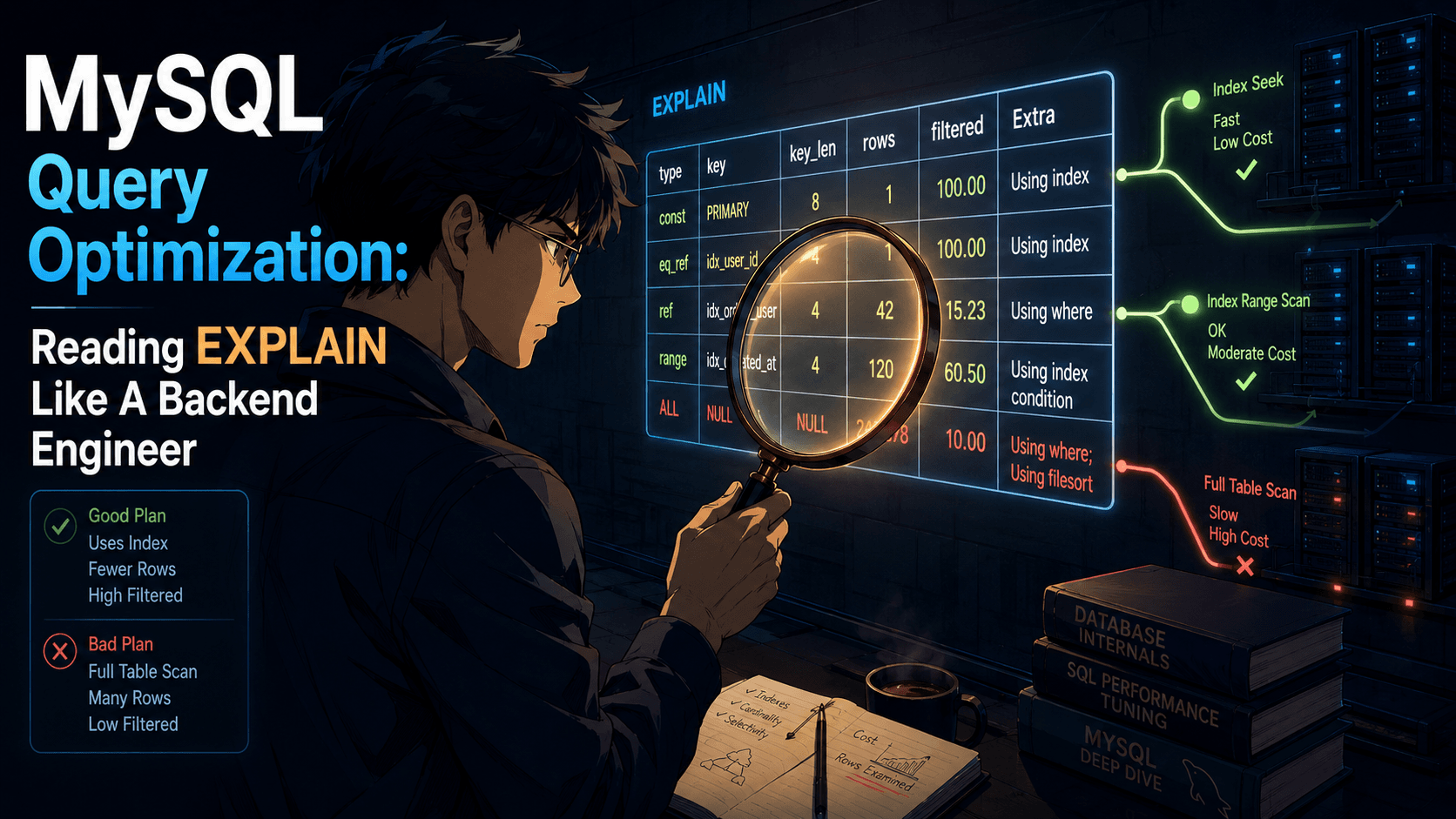
In MySQL, when a query is slow, you reach for EXPLAIN. You get a row per accessed table with a join type, a key, and a rows estimate. It's compact. It's useful. It hides a lot.
In Postgres, EXPLAIN shows you the actual plan tree. Every node (sequential scan, index scan, bitmap heap scan, hash join, merge join, sort, aggregate) is a node in the tree, with its estimated cost, estimated row count, and width. Add ANALYZE and Postgres runs the query for real and shows you the actual times and actual row counts next to the estimates. Add BUFFERS and you get cache hits and disk reads per node.
EXPLAIN (ANALYZE, BUFFERS, SETTINGS)
SELECT u.id, u.email, COUNT(o.id) AS order_count
FROM users u
LEFT JOIN orders o ON o.user_id = u.id
WHERE u.created_at > NOW() - INTERVAL '30 days'
GROUP BY u.id, u.email
ORDER BY order_count DESC
LIMIT 50;
A typical output is a tree of nodes with cost=..., rows=..., actual time=..., and Buffers: shared hit=... read=... on each. You learn to scan it for two things: where the estimate is wildly off from the actual (that means your statistics are stale or your query has something the planner can't reason about), and where the bulk of the time is being spent.
What the planner is doing under the hood is a cost-based optimisation: it samples the table statistics (pg_statistic, refreshed by ANALYZE), enumerates a set of candidate plans, and picks the one with the lowest estimated cost. You can nudge it with planner-level settings (enable_seqscan = off, random_page_cost, effective_cache_size), but the right answer is almost always to fix the statistics or the query, not to disable a node type.
A few habits worth building:
Run ANALYZE after a big data change. Vacuum's autovacuum worker does this on a schedule, but if you've just bulk-loaded a million rows and the next query is a join over that table, the planner is working with stale statistics. A manual ANALYZE takes seconds and can change the plan completely.
When ANALYZE doesn't help, look at extended statistics. CREATE STATISTICS lets you tell Postgres about correlated columns. If country and language are correlated in your data, the planner won't know unless you tell it.
Watch for the "no parallel plan" surprise. Some operations disable parallelism (CTEs in older versions, certain function calls, certain volatility settings). If you expected a parallel scan and got a single worker, the plan will tell you.
Use pg_stat_statements as your first stop. When something is "slow," don't start by re-reading code. Start by asking the database which queries took the most cumulative time over the last hour.
SELECT
  query,
  calls,
  total_exec_time,
  mean_exec_time,
  rows
FROM pg_stat_statements
ORDER BY total_exec_time DESC
LIMIT 20;
That's almost always where the truth is hiding.
MVCC, transactions, and the things you can do inside them
This one is more about the runtime model than the SQL surface, but it changes how you write migrations and how you reason about long-running operations.
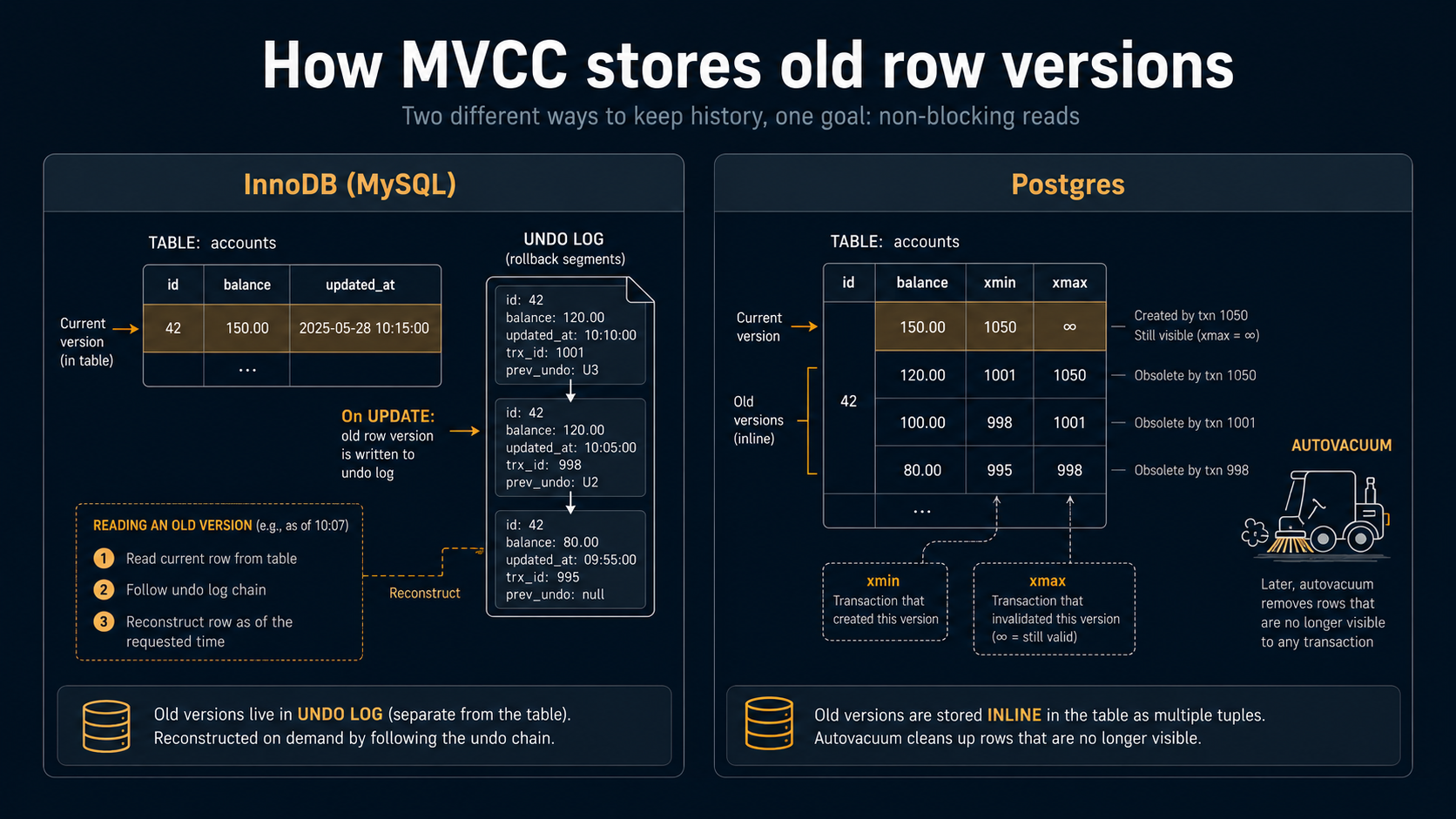
Both InnoDB (MySQL's default engine) and Postgres use MVCC, multi-version concurrency control. Readers don't block writers, writers don't block readers, and each transaction sees a consistent snapshot. So far, the same.
The implementation is different in a way that leaks into operations.
InnoDB stores the current row in the table and keeps undo records in an undo log. To produce an old version for a snapshot read, it reconstructs the old row by walking back through the undo log.
Postgres stores every version of every row directly in the table. An UPDATE doesn't modify a row in place. It writes a new tuple, marks the old one as "dead at this transaction id," and lets snapshots that started earlier still see the old one. Eventually, autovacuum comes through and reclaims the space from rows no version of any current snapshot needs anymore.
The practical consequences are:
- Long-running transactions are dangerous. A transaction that stays open for an hour prevents vacuum from cleaning up any row version newer than that transaction's snapshot anywhere in the database. If your application leaves a transaction open while it waits on an external API, you can end up with table bloat that doesn't go away until the transaction ends.
UPDATEis roughly the cost of anINSERT. It always writes a new tuple. There's no "in-place update" optimisation in the general case. Most of the time this doesn't matter. When you're updating millions of rows, it does.- Index entries die slower than table rows. Vacuum cleans up the heap, but indexes have their own bloat story.
pg_stat_user_indexesandpg_stat_user_tableswill tell you when something has gone wrong.
The other piece is transactional DDL.
In MySQL, most DDL is implicitly committed. You start a transaction, you ALTER TABLE, the alter commits immediately, and rolling back the transaction won't undo it.
In Postgres, almost all DDL is transactional. You can wrap a multi-step migration in a BEGIN / COMMIT and either every step happens or none of them do.
BEGIN;

ALTER TABLE orders ADD COLUMN refund_reason TEXT;
UPDATE orders SET refund_reason = 'legacy' WHERE status = 'refunded';
ALTER TABLE orders ALTER COLUMN refund_reason SET NOT NULL;

COMMIT;
If anything in there fails, the table is exactly as it was before. This is one of those features you don't appreciate until you've spent a Saturday cleaning up a half-applied migration.
There are exceptions. CREATE INDEX CONCURRENTLY cannot run inside a transaction (because it has to do its work in multiple internal transactions). VACUUM cannot. A few other commands. The error messages are clear about it when they happen.
The little things that catch you off guard
A handful of smaller differences that don't deserve their own section but will trip you on day one if you don't know about them.
NULL ordering. In Postgres, ORDER BY puts NULL last by default for ascending sorts and first for descending. MySQL is the opposite. There's a NULLS FIRST / NULLS LAST modifier on both engines now, and the right move is to be explicit any time it matters.
Boolean is real. Postgres has a true BOOLEAN type. WHERE is_active works. MySQL has TINYINT(1), which is fine, but the type system pretends the difference matters more than it does.
Single-quote strings, double-quote identifiers. 'foo' is a string. "foo" is an identifier. MySQL's lenient quoting habits don't survive the move. If you ever write WHERE name = "Alice" in Postgres, you'll get an error about a column called Alice.
Auto-increment is SERIAL or IDENTITY. BIGSERIAL is the older shorthand and still works. The modern, SQL-standard form is GENERATED ALWAYS AS IDENTITY on a column. Both produce a sequence under the hood; the difference is mostly cosmetic and which one your ORM emits.
LIMIT and OFFSET exist, but FETCH ... OFFSET ... ROWS is the standard form. Postgres supports both. MySQL only supports LIMIT.
RETURNING. This one is a gift. Every INSERT, UPDATE, and DELETE can have a RETURNING clause that gives you back the affected rows in the same statement.
INSERT INTO users (email, name)
VALUES ('a@example.com', 'Alice')
RETURNING id, created_at;
You don't go fetch the row separately. The driver gets it back inline.
UPSERT is INSERT ... ON CONFLICT. Cleaner than MySQL's ON DUPLICATE KEY UPDATE once you get used to it, because you say which conflict you mean by naming the constraint or the conflict columns.
INSERT INTO sessions (user_id, token, expires_at)
VALUES ($1, $2, $3)
ON CONFLICT (user_id) DO UPDATE
  SET token      = EXCLUDED.token,
      expires_at = EXCLUDED.expires_at;
Common Table Expressions are powerful and worth using. Postgres has had recursive CTEs for years and they're solid. MySQL only added them in 8.0, and a lot of teams still write hierarchy queries with self-joins from habit. In Postgres, a recursive CTE is the natural way to walk a tree.
Schemas are a real namespace. Postgres has both databases and schemas inside databases. A typical app uses one database with a public schema, but you can split a multi-tenant app across schemas, or move analytics tables into an analytics schema, and reference them with dotted names.
So when do you actually pick Postgres?
The honest answer is that for most general-purpose backend work, either Postgres or MySQL will be fine. Both are mature, both are fast, both have huge ecosystems. The choice is rarely about performance. It's about which set of tradeoffs and which culture fits your team.
That said, the cases where Postgres is the obvious pick:
- You want a database that catches more of your bugs at the schema level instead of in production.
- You have data that doesn't fit cleanly into rectangles: JSON blobs, arrays, ranges, geographic data, network addresses.
- You expect to need extensions (full-text search, fuzzy matching, time series, GIS) and don't want to add another service.
- You write complex queries (window functions, recursive CTEs, lateral joins) and want them to be fast and predictable.
- Your team values transactional DDL because migrations have hurt you before.
And the cases where MySQL is the better fit:
- You're operating at a scale where the read replica + sharded write patterns are well-trodden in the MySQL ecosystem (Vitess, PlanetScale).
- Your hosting story is dictated by something that targets MySQL natively.
- Your team's muscle memory is deep on MySQL and there's no specific feature pulling you the other way.
The mistake is treating the choice as "Postgres is better, MySQL is legacy." It isn't. They're two different products with overlapping use cases and different cultural defaults. The thing you want to avoid is fighting the database you picked because you're still thinking in the other one's idioms.
The first month of any Postgres project, you'll write some queries that the planner laughs at, get yelled at by a NOT NULL you didn't know was there, and discover that the fancy thing you used to do with three side tables is now one column. That's the database telling you, politely, that there's a different way to think about this. Listen to it.