So you added a search box.
It worked great for two months. The table had eighty thousand rows, WHERE name ILIKE '%' || $1 || '%' returned in 30ms, and nobody on the team had a reason to think about it. Then product asked for "search descriptions too." Then someone wanted "results by relevance, not just date." Then the table crossed a few million rows and the same query started taking four seconds, the database CPU graph started doing impressions of a heartbeat monitor, and the on-call engineer learned to dread the words "search is slow."
That's the moment every Postgres-backed product hits, eventually. The moment where ILIKE runs out of room and you have to actually think about how text gets searched.
Postgres has full-text search built in. It's good. It's been good since 2008. It's not as flexible as Elasticsearch and it's not as effortless as Algolia, but for the vast majority of products you don't need either of those: use the FTS that's already in your database, and use it correctly.
This piece is about the "correctly" part. Not the syntax tour you can get from the docs in five minutes. The stuff that decides whether your search box scales or melts: where you put the tsvector, which index you put on it, how you rank, and the dictionary surprises that quietly ruin everything.
The 60-Second tsvector Mental Model
Postgres FTS is built on two types: tsvector and tsquery.
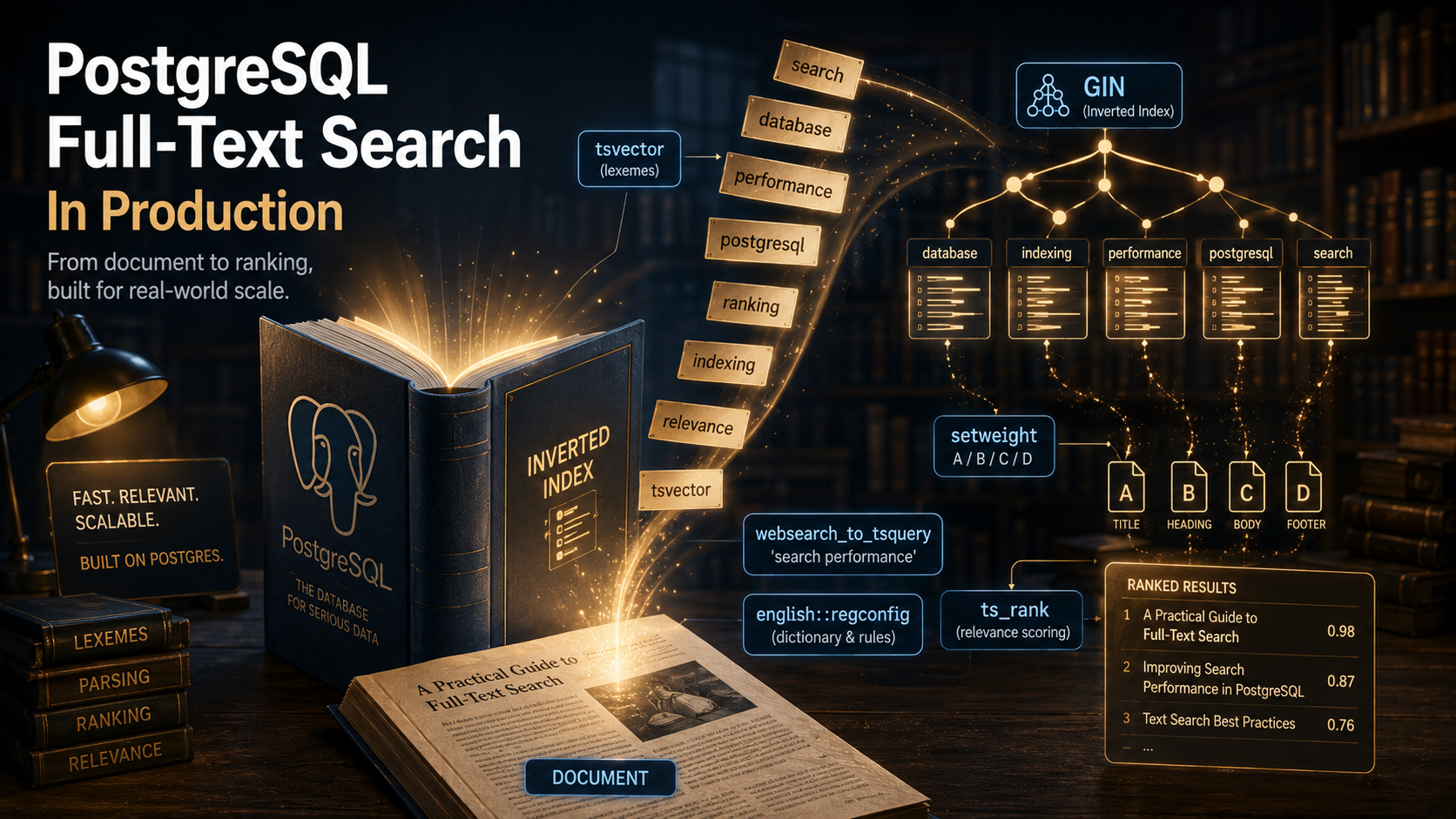
A tsvector is what you get when you take a piece of text, tokenize it, normalise the tokens (lowercase, strip stopwords, stem), and store the result as a sorted list of lexemes with their positions. A tsquery is the parsed search query in the same lexeme space. The @@ operator answers: does this tsvector match this tsquery?
SELECT to_tsvector('english', 'The quick brown foxes were jumping over the lazy dogs');
--  'brown':3 'dog':10 'fox':4 'jump':6 'lazi':9 'quick':2
Notice what happened. "The" and "were" and "over" are gone: they're stopwords in the english configuration. "foxes" became fox. "jumping" became jump. "lazy" became lazi (Snowball stemming is aggressive and a little ugly). The numbers are positions, used later for phrase queries and ranking.
A tsquery goes through the same normalisation:
SELECT plainto_tsquery('english', 'jumping foxes');
--  'jump' & 'fox'
Match the two:
SELECT to_tsvector('english', 'The quick brown foxes were jumping over the lazy dogs')
    @@ plainto_tsquery('english', 'jumping foxes');
--  t
That's the whole game. Tokenize both sides into the same shape, then ask whether the document's lexemes contain the query's lexemes.
Where this gets interesting is that you almost never want to recompute to_tsvector(...) on every row at query time on a million-row table. That's the single most important thing to internalise: the tsvector has to be precomputed and indexed, or you don't have full-text search, you have a slow scan.
Indexing The tsvector: GIN vs GiST
Once you have a tsvector, you index it. Two options:
GIN (Generalised Inverted iNdex). Stores a posting list per lexeme: "the lexeme fox appears in documents 7, 22, 81, 412...". Queries are fast because looking up a word is a direct lookup. Updates are slower because every lexeme in the new document touches its own posting list. Index size is larger.
GiST (Generalised Search Tree). Stores documents as bloom-filter-like signatures in a tree. Queries are slower (and lossy, with a recheck pass against the actual tsvector) but updates are cheaper and the index is smaller.
For 95% of production workloads (read-heavy search with periodic writes), use GIN. The query speedup is enormous and the write cost is manageable, especially with gin_pending_list_limit tuning.
CREATE INDEX articles_search_idx ON articles USING GIN (search_vector);Use GiST only if you're ingesting documents at a really high write rate and search latency is less critical than write throughput. In a typical app (a CMS, a marketplace, an internal tool), you're not in that regime. Pick GIN and move on.
One thing worth knowing: GIN supports the optional fastupdate mode, which buffers new entries in a pending list and merges them into the main index lazily. It speeds up writes a lot, but means a search query may need to scan the pending list before returning. On hot tables this can produce surprising tail latencies. If your p99 search times look fine until they spike to 800ms for no obvious reason, check gin_pending_list_limit and consider lowering it or running periodic gin_clean_pending_list() calls on your search index.
Where Do You Put The tsvector? (The Big Decision)
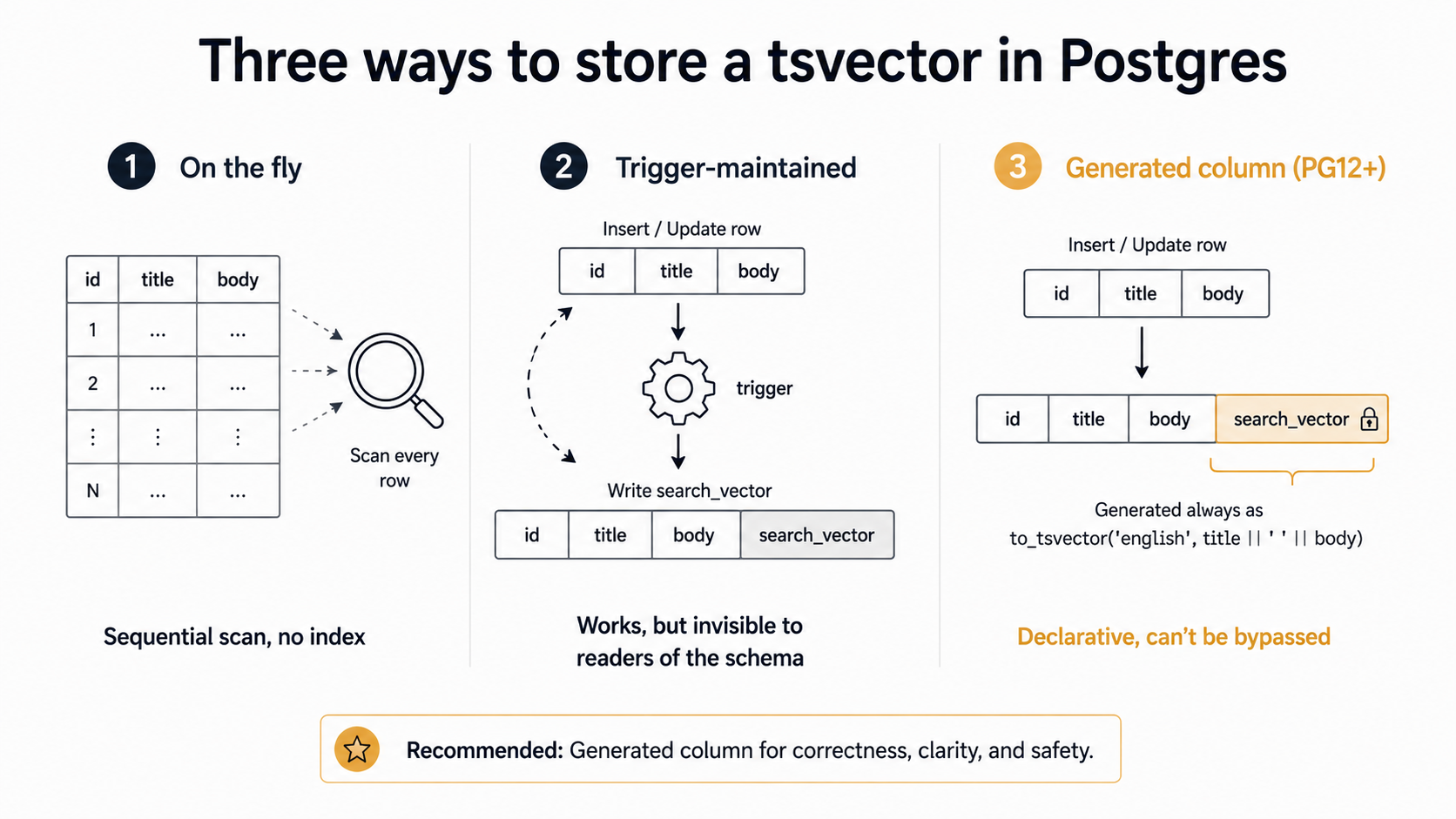
There are three real options. Most teams pick the wrong one first and then migrate.
Option 1: Compute it on the fly
SELECT id, title
FROM articles
WHERE to_tsvector('english', title || ' ' || body) @@ plainto_tsquery('english', $1);
This is what every Postgres FTS tutorial shows you in the first ten minutes. It works on a developer laptop with a thousand rows. It's a disaster on production with a million.
There's no index. to_tsvector(...) is a function call producing a value that didn't exist until the query ran. Postgres has to compute it for every row, then check the match. Sequential scan, every time. The whole point of FTS was to avoid scanning text, and you've reintroduced the scan.
You can build an expression index:
CREATE INDEX articles_fts_idx ON articles
    USING GIN (to_tsvector('english', title || ' ' || body));
And it works, but only if the query repeats the expression byte-identically. Change the column order, add a space, change the configuration name, and the planner doesn't recognise the index. This is brittle. It also means every row read pays for the function call when you do anything other than the indexed query.
Use this option only for tables under a few thousand rows where you genuinely don't care.
Option 2: A trigger-maintained column (the old way)
Pre-Postgres-12, the standard pattern was: add a tsvector column, write a trigger that recomputes it on every insert and update, index the column.
ALTER TABLE articles ADD COLUMN search_vector tsvector;

CREATE FUNCTION articles_search_vector_update() RETURNS trigger AS $$
BEGIN
    NEW.search_vector :=
        setweight(to_tsvector('english', coalesce(NEW.title, '')), 'A') ||
        setweight(to_tsvector('english', coalesce(NEW.body,  '')), 'B');
    RETURN NEW;
END
$$ LANGUAGE plpgsql;

CREATE TRIGGER articles_search_vector_trigger
    BEFORE INSERT OR UPDATE ON articles
    FOR EACH ROW EXECUTE FUNCTION articles_search_vector_update();

CREATE INDEX articles_search_idx ON articles USING GIN (search_vector);
This works. It still works. Most legacy Postgres apps you'll touch have something like this in their migrations folder. Postgres even ships a built-in helper, tsvector_update_trigger, that handles the simple case where you just concat columns with one configuration:
CREATE TRIGGER articles_search_vector_trigger
    BEFORE INSERT OR UPDATE ON articles
    FOR EACH ROW EXECUTE FUNCTION
    tsvector_update_trigger(search_vector, 'pg_catalog.english', title, body);
The catch with the built-in helper is that it doesn't let you set per-field weights. The moment you need "matches in the title rank higher than matches in the body", you're back to writing the trigger by hand.
The bigger catch with triggers in general is that they're invisible. New engineers join the team, look at the schema, see the column, don't see the trigger, and write code that updates the column directly. Or someone runs a COPY import that bypasses triggers. Or the trigger gets dropped during a migration and nobody notices for a week.
Option 3: A generated column (Postgres 12+, the modern default)
Postgres 12 added stored generated columns, and they fix everything wrong with the trigger approach.
ALTER TABLE articles
    ADD COLUMN search_vector tsvector
    GENERATED ALWAYS AS (
        setweight(to_tsvector('english', coalesce(title, '')), 'A') ||
        setweight(to_tsvector('english', coalesce(body,  '')), 'B')
    ) STORED;

CREATE INDEX articles_search_idx ON articles USING GIN (search_vector);
The column is part of the schema. There's no trigger to forget about. Anyone reading the table definition can see exactly how the search vector is built. Inserts and updates can't accidentally write the wrong value because they can't write to it at all: GENERATED ALWAYS rejects direct writes.
If you're on Postgres 12 or later (a supported version at time of writing), this is the right answer. If you have an existing trigger-based system, migrating is straightforward: drop the trigger, add the generated column, drop the old physical column, rename. The application code doesn't change.
The one constraint: the generation expression has to be immutable, which means you can't use to_tsvector(text, text) with a configuration that's stored in a row: you have to hardcode the configuration as a literal. For multi-language tables that store user-selected language per row, generated columns don't quite work and you fall back to triggers.
Ranking: ts_rank vs ts_rank_cd, And What The Numbers Actually Mean
A search that returns the right rows in the wrong order is barely better than one that returns nothing.
Postgres has two ranking functions: ts_rank and ts_rank_cd. They both take a tsvector, a tsquery, and (optionally) a weights array and a normalisation flag, and they both return a float4 between 0 and 1-ish.
SELECT id, title,
       ts_rank(search_vector, query) AS rank
FROM articles, plainto_tsquery('english', 'postgres indexes') AS query
WHERE search_vector @@ query
ORDER BY rank DESC
LIMIT 20;
ts_rank looks at frequency: how often each query lexeme appears in the document, weighted by which weight class it landed in (A, B, C, D). More mentions = higher rank.
ts_rank_cd (cover density) looks at proximity: how close the query lexemes are to each other in the document. A document where "postgres" and "indexes" appear next to each other ranks higher than one where they're paragraphs apart, even if both contain the words the same number of times.
For most general search, ts_rank is the safer default. ts_rank_cd shines when phrases matter: product names, person names, technical terms that should appear together. But it can produce surprising results when the query terms are common.
The four weight classes (A, B, C, D) have default multipliers {0.1, 0.2, 0.4, 1.0}. Note that D is the default and A is the most rare, which is the opposite of what most people expect. You set them via setweight() when building the tsvector:
setweight(to_tsvector('english', title),    'A') ||  -- titles weighted highest
setweight(to_tsvector('english', subtitle), 'B') ||
setweight(to_tsvector('english', tags),     'C') ||
setweight(to_tsvector('english', body),     'D')     -- body weighted lowest
The weights themselves don't change anything until you tell ts_rank how to interpret them:
SELECT ts_rank('{0.1, 0.2, 0.4, 1.0}', search_vector, query)The first argument is {D, C, B, A}, reversed alphabetically, because of course it is. The defaults are usually fine; tune them only when you have a clear product reason and you're A/B testing the result.
One gotcha worth burning into your memory: ts_rank returns very small numbers, often in the 0.001 to 0.1 range. They're not meaningful as absolute scores, only as a relative ordering within one query. Don't expose the raw rank to users. Don't store it. Don't compare ranks across different queries. It's an ordering primitive, nothing more.
Building Queries That Match What Users Actually Type
Users don't type tsquery syntax. They type "postgres index slow help."
Postgres gives you four functions for converting human input into a tsquery, each with a different temperament.
to_tsquery is the strict one. It expects valid tsquery syntax (boolean operators, quoted phrases, the lot) and errors on free-form input. Never feed user input directly to it. It's for hand-built admin queries and tests, not for production.
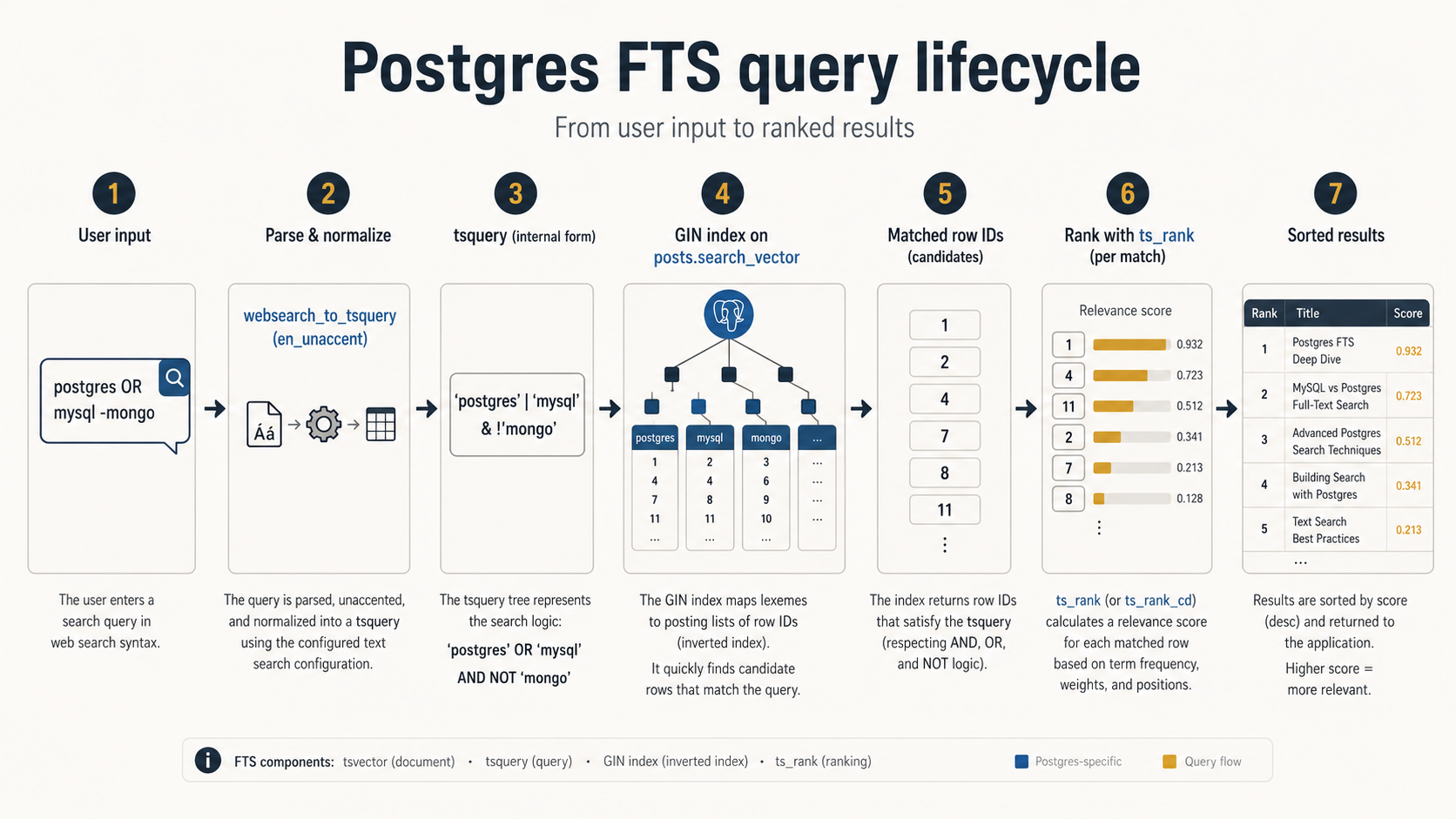
plainto_tsquery takes free text and ANDs the lexemes together. "postgres indexes" becomes 'postgres' & 'index'. Simple, safe, and exactly what you want for a basic search box.
phraseto_tsquery ANDs them in order with a <-> (followed-by) operator, requiring the words to appear adjacently. "postgres indexes" becomes 'postgres' <-> 'index'. Useful when phrase matching is the product expectation.
websearch_to_tsquery is the underrated hero. Added in Postgres 11, it parses Google-style search syntax: quoted phrases, OR, leading minus for negation, all of it. It never errors on bad input; it just does the most reasonable thing. "postgres OR mysql -mongodb" becomes ('postgres' | 'mysql') & !'mongodb'. "hello world" foo becomes 'hello' <-> 'world' & 'foo'.
If your users have any expectation of typing search-engine syntax, this is what you want. It's also the safest, because it can't be made to error.
import { Pool } from "pg";

export async function searchArticles(pool: Pool, term: string) {
  const { rows } = await pool.query(
    `
    SELECT id, title, ts_rank(search_vector, query) AS rank
    FROM articles, websearch_to_tsquery('english', $1) AS query
    WHERE search_vector @@ query
    ORDER BY rank DESC
    LIMIT 20
    `,
    [term],
  );
  return rows;
}
The user can type "postgres indexes" -mongodb and you don't need to parse anything yourself. The function eats the input, does its best, and returns a valid tsquery. If the user types pure garbage like !!! ?? ??, you get an empty query that matches nothing rather than a 500.
The Dictionary Problem (Where Most People Get Bitten)
The english text search configuration is a pipeline: it tokenises text, removes English stopwords, applies the Snowball stemmer to reduce words to their roots. It's good. It's also the source of a lot of "why isn't this matching?" tickets.
The classic surprises:
Stopwords. A search for "the matrix" loses the "the" in both the document and the query. That sounds harmless until you have a movie database and someone searches for "it" (the 2017 horror film) and gets nothing because "it" is in the stopword list. The fix is usually to switch the column or part of it to the simple configuration, which doesn't have stopwords or stemming, so words match literally.
Stemming. "university" and "universal" both stem to univers in English. A search for "universal pictures" will match articles about "university press." Sometimes that's fine. Sometimes it's a bug your product owner will not understand and will not forgive.
Accents. Out of the box, "café" and "cafe" are different lexemes. Install the unaccent extension, then build a custom configuration that adds it to the dictionary chain:
CREATE EXTENSION IF NOT EXISTS unaccent;

CREATE TEXT SEARCH CONFIGURATION en_unaccent (COPY = english);

ALTER TEXT SEARCH CONFIGURATION en_unaccent
    ALTER MAPPING FOR hword, hword_part, word
    WITH unaccent, english_stem;
Now to_tsvector('en_unaccent', 'café') produces cafe, and so does the query side, and they match.
Multi-language documents. This is where it gets ugly. If your tables hold text in many languages, you can't stem with a single configuration without wrong results. The cheap-and-cheerful answer is to use the simple configuration (literal words, no stemming) for everything. The proper answer is to store a per-row language column and compute the tsvector in a trigger that branches on it, which is one of the few cases where you can't use a generated column, because the configuration argument has to be a constant for the expression to be immutable.
Typos. FTS does not handle typos. "postgress" will not find "postgres". If typo tolerance matters (and on a public-facing search box it usually does), pair FTS with the pg_trgm extension and combine results, or fall back to trigram similarity when FTS returns nothing. It's not as elegant as Elasticsearch's edit-distance scoring, but it works.
A Realistic Production Setup
Let's put it together. A posts table with title and body, weighted, indexed, queryable, ranked, with accent-insensitive matching:
-- 1. Extension for accent stripping
CREATE EXTENSION IF NOT EXISTS unaccent;

-- 2. Custom configuration combining unaccent + english stemming
CREATE TEXT SEARCH CONFIGURATION en_unaccent (COPY = english);
ALTER TEXT SEARCH CONFIGURATION en_unaccent
    ALTER MAPPING FOR hword, hword_part, word
    WITH unaccent, english_stem;

-- 3. The table with a generated tsvector column
CREATE TABLE posts (
    id           bigserial PRIMARY KEY,
    title        text NOT NULL,
    body         text NOT NULL,
    published_at timestamptz,
    search_vector tsvector GENERATED ALWAYS AS (
        setweight(to_tsvector('en_unaccent', coalesce(title, '')), 'A') ||
        setweight(to_tsvector('en_unaccent', coalesce(body,  '')), 'B')
    ) STORED
);

-- 4. GIN index on the generated column
CREATE INDEX posts_search_idx ON posts USING GIN (search_vector);

-- 5. The query, using websearch_to_tsquery for safe user input
SELECT id, title,
       ts_rank(search_vector, query) AS rank
FROM   posts, websearch_to_tsquery('en_unaccent', $1) AS query
WHERE  search_vector @@ query
  AND  published_at IS NOT NULL
ORDER  BY rank DESC, published_at DESC
LIMIT  20;
This is small, but every piece is deliberate. The configuration handles accents and stems. The vector is generated, weighted, and stored. No triggers, no surprises. The index is GIN. The query uses websearch_to_tsquery so user input can't error and can use Google-style syntax. The tie-breaker on rank is published_at DESC, because for a feed it's almost always what users actually want when two articles are equally relevant.
What Will Break In Production (And When)
A short tour of the failure modes you'll meet, roughly in the order you meet them.
Sequential scans because the index isn't being used. You added the index, you can see it in \d posts, and EXPLAIN still shows a Seq Scan. Three usual causes: the planner thinks the table is small enough that a scan is cheaper (often correct on dev tables, fix by inserting more rows or running ANALYZE); your query expression doesn't match the indexed expression byte-for-byte (use a generated or triggered column instead of expression indexes wherever you can); you forgot to wrap the query side in to_tsquery / websearch_to_tsquery and Postgres doesn't see a tsquery on the right of @@.
Slow updates because GIN is doing too much work per row. Every update to a tracked column rebuilds the row's lexeme set and touches every posting list those lexemes belong to. On hot tables this turns a millisecond write into a 50ms write. Mitigation: make sure you're updating the source columns only when they change (your application code probably writes the same values back on every save: stop doing that); consider GIN's fastupdate mode and tune gin_pending_list_limit to your write rate; for very hot tables, GiST may genuinely be the right pick despite the slower reads.
Index bloat after a big bulk update. If you UPDATE posts SET body = ... across millions of rows, the GIN index doesn't shrink. Old entries stick around as dead tuples until vacuum reclaims them. Run VACUUM ANALYZE posts after the bulk update, or schedule a REINDEX INDEX CONCURRENTLY posts_search_idx if the bloat is severe.
Search returning irrelevant results because the body dominates. Without setweight, every match is weighted equally and a one-mention-in-the-title document loses to a five-mention-in-the-body document. If your title field is treated as the most important signal in your domain, weight it as A and tune the multipliers accordingly. Don't set them all to 1.0 and shrug.
Search returning nothing for queries you'd swear should match. Almost always a dictionary problem. Run the query side through to_tsquery('english', ...) in psql and look at what you actually get. "the matrix" becomes 'matrix'. The "the" is gone. "running shoes" becomes 'run' & 'shoe'. If the answer surprises you, your users are surprised too.
Surprising tail latencies on a busy GIN index. Almost always the pending list. Watch pg_stat_user_indexes and gin_metapage_info() (from pageinspect) for clues, and consider scheduling gin_clean_pending_list('posts_search_idx') during low-traffic windows.
When To Stop Using Postgres FTS
Postgres FTS handles a lot. Multi-million-row tables with sub-100ms ranked search, fielded relevance, accent and stemming control, phrase queries, boolean operators. All of it works.
What it doesn't handle well: edit-distance typo tolerance (use pg_trgm to patch this, or accept the limitation); language-aware stemming for many languages in the same column; learning-to-rank or behavioural relevance signals; faceted search with aggregations across tens of millions of documents and dozens of facets; vector / semantic similarity (use pgvector for that, possibly alongside FTS).
If you find yourself bolting more and more on top of Postgres FTS (a separate trigram index, a custom dictionary, an application-layer typo correction step, a re-ranking pipeline), at some point you've built a worse search engine than the ones you can rent. That's the signal to either stop adding scope to FTS, or to bring in something purpose-built (Meilisearch, Typesense, OpenSearch, Algolia) and let Postgres go back to being the source of truth.
But that day comes much later than most teams think. Before that day, you can get an embarrassing amount of mileage out of tsvector, a generated column, a GIN index, and websearch_to_tsquery. Most products never need anything more.
The trick is using them properly the first time, before the 2am page.