So, you've got a table. It started small. A few thousand rows a day, no big deal. A year passes. You blink and it's two hundred million rows. Queries that used to come back in 30 milliseconds now take 4 seconds. The nightly job to delete old data has started running into the morning standup. VACUUM takes longer than it used to, and somehow your pg_dump now takes an hour.
You haven't done anything wrong. You've just outgrown the assumption that one giant table is the right shape forever.
Partitioning is the answer Postgres gives you for this problem. Not a silver bullet, not magic. It's a way to take that one giant logical table and physically split it into smaller pieces that the database can treat together when it needs to and individually when that's faster. For time-series data especially, it changes the game: you stop fighting your retention policy, your indexes shrink to something the cache can hold, and queries that filter by date suddenly skip 99% of the data without you doing anything clever.
This is the long tour. We'll go through how native partitioning actually works in modern Postgres, when each strategy fits, what partition pruning is doing under the hood, the index gotchas that ambush almost everyone, and how to manage the whole thing in production without a 4 AM page.
The mental model: one logical table, many physical pieces
Before any syntax, the picture in your head needs to be right.
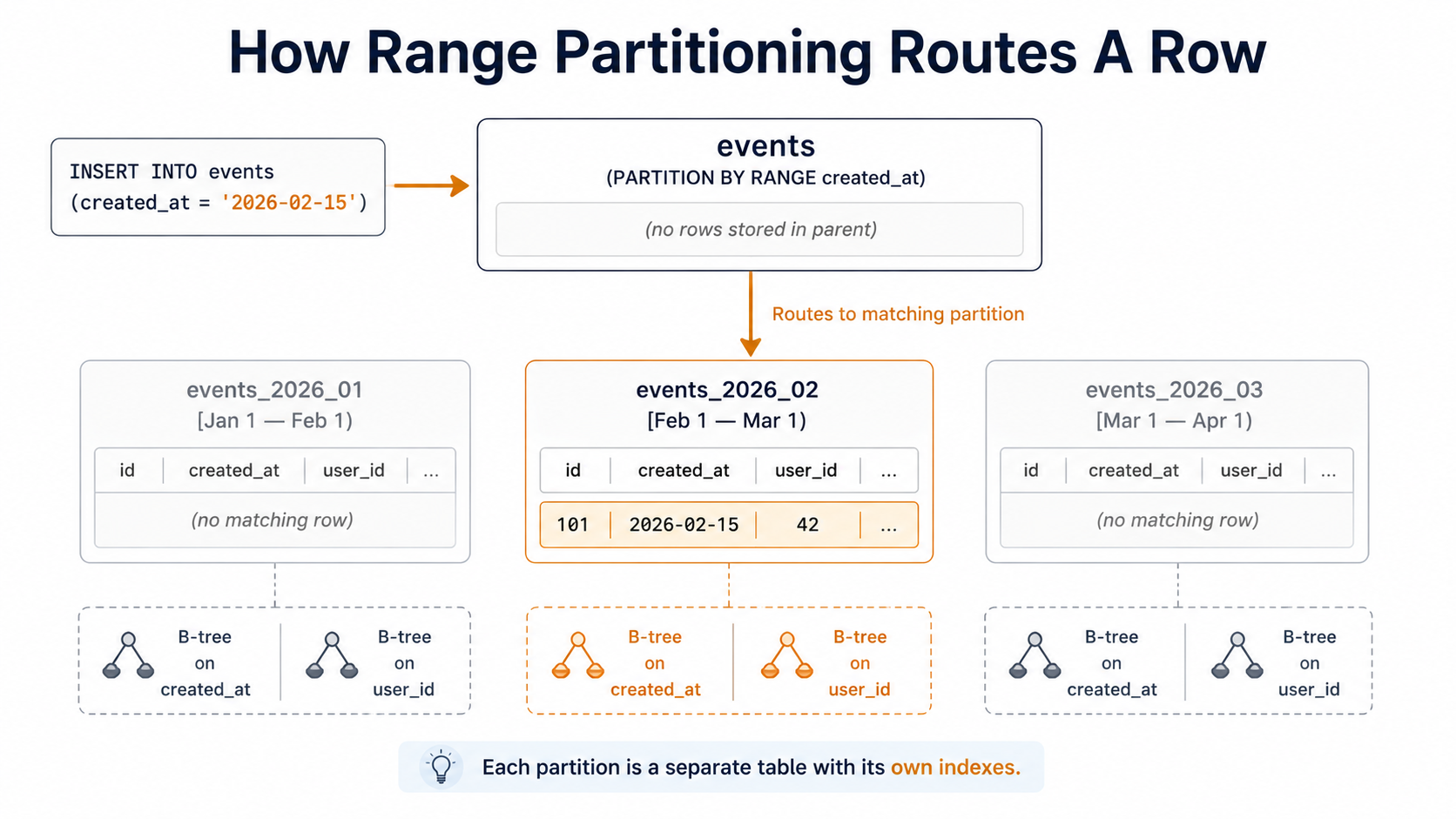
A partitioned table in Postgres is a parent table that holds no data of its own. Every row lives in one of its child partitions, each of which is a normal Postgres table. When you INSERT INTO events, the parent looks at the row, decides which partition it belongs in based on a key you defined (usually a timestamp), and routes it there. When you SELECT FROM events, the planner figures out which partitions could possibly contain matching rows and only reads those.
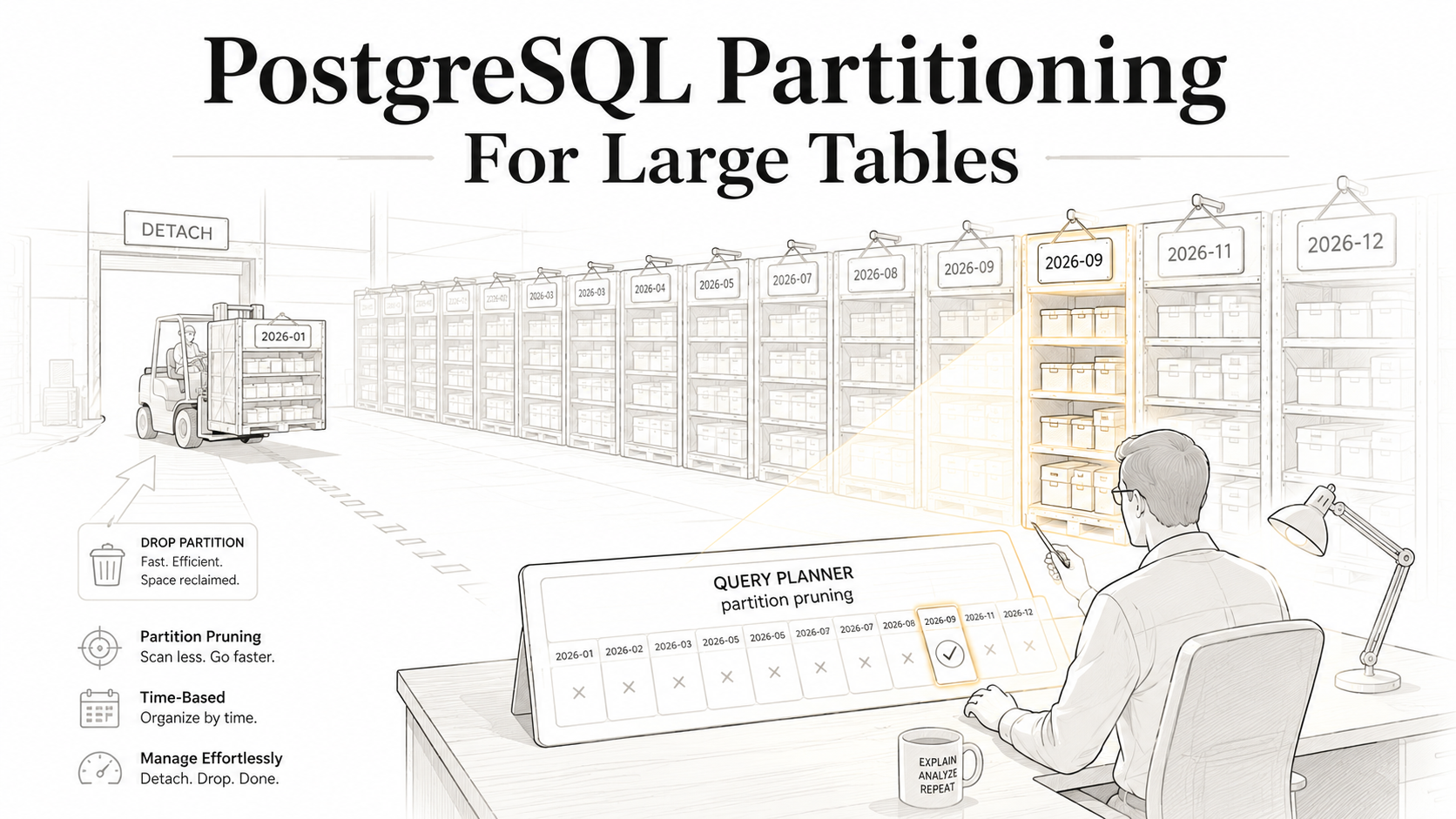
That second part is where the wins come from. If you've partitioned events by month, and you ask for "everything yesterday", Postgres doesn't scan the whole 2-billion-row table. It opens one partition, yesterday's month, and walks that. The other 23 monthly partitions might as well not exist. That's partition pruning, and it's the single most important reason to partition.
The other wins follow naturally. Each partition has its own indexes, so a B-tree on created_at for one month is small enough to fit in memory. VACUUM runs per partition, so reclaiming space on a hot recent partition doesn't block work on the historical ones. And when retention day arrives, you don't DELETE 50 million rows, you detach a whole partition in milliseconds and drop it.
You give up some flexibility for all this. The partition key has to be part of every unique constraint and primary key. Foreign keys pointing into a partitioned table have edge cases. Some queries you didn't think about might force the planner to scan all partitions if the predicate doesn't include the partition key. We'll get to all of that. First, the syntax.
Range partitioning: the time-series default
For time-series data, events, logs, metrics, audit trails, anything where rows have a timestamp and you mostly query recent ranges, range partitioning is what you want.
CREATE TABLE events (
  id          bigserial,
  user_id     bigint        NOT NULL,
  event_type  text          NOT NULL,
  payload     jsonb,
  created_at  timestamptz   NOT NULL,
  PRIMARY KEY (id, created_at)
) PARTITION BY RANGE (created_at);
Two things to notice. First, PARTITION BY RANGE (created_at) at the end: that's the line that turns this from a normal table into a partitioned one. Second, the primary key is (id, created_at), not just id. The partition key must be part of every unique constraint and primary key on a partitioned table. This is the rule that surprises people most often, and we'll come back to it.
Now you need partitions. The parent doesn't store anything; you have to create children:
CREATE TABLE events_2024_01
  PARTITION OF events
  FOR VALUES FROM ('2024-01-01') TO ('2024-02-01');

CREATE TABLE events_2024_02
  PARTITION OF events
  FOR VALUES FROM ('2024-02-01') TO ('2024-03-01');

CREATE TABLE events_2024_03
  PARTITION OF events
  FOR VALUES FROM ('2024-03-01') TO ('2024-04-01');
The bounds are half-open: FROM is inclusive, TO is exclusive. That means 2024-02-01 00:00:00 lives in events_2024_02, not events_2024_01. If you write the bounds with overlapping endpoints by mistake, Postgres will reject the second CREATE. If you leave a gap and try to insert a row that falls in the gap, the insert fails with no partition of relation "events" found for row. There is no "default partition" unless you ask for one:
CREATE TABLE events_default
  PARTITION OF events
  DEFAULT;
A default partition catches anything that doesn't match. It feels like a safety net, and for some workloads it is. But it has a real cost: when you later try to add a new partition for a range, Postgres has to scan the default to confirm no rows in the new range have ended up there. On a fat default partition, that scan can lock you out of writes for minutes. Most production setups skip the default partition and accept that an insert with a missing partition is a bug to fix immediately, not a row to silently absorb.
List and hash partitioning, briefly
Range is what you want for time-series. The other two strategies are real, but narrower:
List partitioning splits by an explicit set of values. Useful when you have a small, stable set of categories like region, tenant in a multi-tenant SaaS, or environment:
CREATE TABLE customers (
  id          bigserial,
  region      text NOT NULL,
  email       text NOT NULL,
  PRIMARY KEY (id, region)
) PARTITION BY LIST (region);

CREATE TABLE customers_eu  PARTITION OF customers FOR VALUES IN ('EU');
CREATE TABLE customers_us  PARTITION OF customers FOR VALUES IN ('US');
CREATE TABLE customers_apac PARTITION OF customers FOR VALUES IN ('APAC');
If a value isn't covered, you get the same insert failure unless you have a default. List partitioning shines when each partition will live on different hardware, different replicas, or under different retention rules. It's underwhelming if all you want is "split a big table into smaller ones". Hash usually does that better.
Hash partitioning splits by a hash of the key, evenly:
CREATE TABLE sessions (
  id        bigserial,
  user_id   bigint NOT NULL,
  data      jsonb,
  PRIMARY KEY (id, user_id)
) PARTITION BY HASH (user_id);

CREATE TABLE sessions_p0 PARTITION OF sessions FOR VALUES WITH (MODULUS 4, REMAINDER 0);
CREATE TABLE sessions_p1 PARTITION OF sessions FOR VALUES WITH (MODULUS 4, REMAINDER 1);
CREATE TABLE sessions_p2 PARTITION OF sessions FOR VALUES WITH (MODULUS 4, REMAINDER 2);
CREATE TABLE sessions_p3 PARTITION OF sessions FOR VALUES WITH (MODULUS 4, REMAINDER 3);
Hash gives you a guaranteed even distribution, where every partition is roughly the same size, which is great when you want concurrency benefits but don't have a natural range or list to split on. The catch is that pruning only helps for WHERE user_id = ? (equality on the partition key). A query like WHERE user_id IN (1, 2, 3, 4) will likely hit all four partitions, because the hashes won't be neatly clustered.
For the rest of this article, we'll stay with range partitioning on a timestamp, because that's where the gravity is.
Partition pruning: where the speed actually comes from
Partitioning by itself is just an organisational change. Partition pruning is what makes it fast.
When you write a query, the Postgres planner looks at the WHERE clause and tries to figure out, without reading any data, which partitions could possibly contain matching rows. The ones that can't are skipped entirely. They aren't opened, they aren't locked, their indexes aren't loaded into the cache.
-- Hits one partition: events_2024_03
EXPLAIN ANALYZE
SELECT count(*)
FROM events
WHERE created_at >= '2024-03-01' AND created_at < '2024-03-15';
In the plan you'll see something like:
Aggregate
  ->  Append
        ->  Seq Scan on events_2024_03 events
              Filter: ((created_at >= '2024-03-01'::timestamptz)
                   AND (created_at <  '2024-03-15'::timestamptz))
One partition. Not three. Not twenty-four. The other partitions are not in the plan at all. Pruning happened during planning. You can verify by running EXPLAIN (without ANALYZE) and seeing only the partitions that survived.
Pruning happens in two places. Plan-time pruning happens when the planner has constant values to compare against, like created_at >= '2024-03-01'. Execution-time pruning happens when the value isn't known until the query runs, like created_at >= now() - interval '7 days' or created_at = $1 for a prepared statement. Postgres prunes in both cases (since version 11), but in the execution-time case EXPLAIN will show all partitions in the plan and the actual scans will only fire against the surviving ones. Look for (actual rows=0 loops=0) on the pruned partitions to confirm.
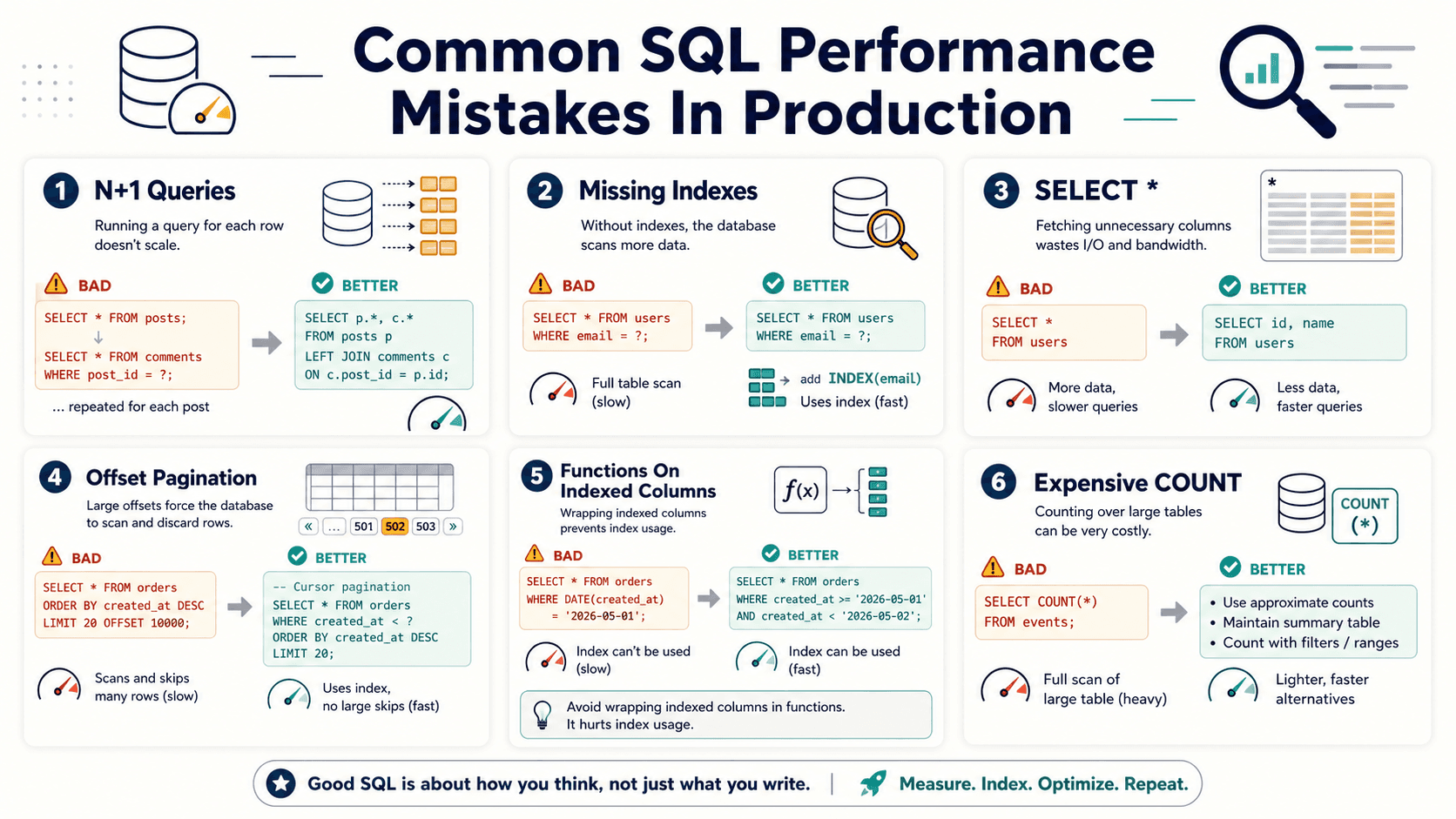
The thing that breaks pruning, every time, is wrapping the partition key in a function. This:
-- Pruning works
SELECT * FROM events WHERE created_at >= '2024-03-01';
is fine. This:
-- Pruning is gone
SELECT * FROM events WHERE date_trunc('day', created_at) = '2024-03-15';
is not. The planner has no way to map date_trunc('day', created_at) back to the partition bounds, so it gives up and scans every partition. The fix is to rewrite the predicate so the bare partition key column appears on one side:
-- Pruning works again
SELECT *
FROM events
WHERE created_at >= '2024-03-15'
  AND created_at <  '2024-03-16';
This pattern shows up constantly. Anywhere you see WHERE func(partition_key) = constant, ask whether the predicate can be rewritten as a range. Almost always it can.
Indexes on partitioned tables: the gotchas
This is where partitioning ambushes people the most, so it gets its own long section.
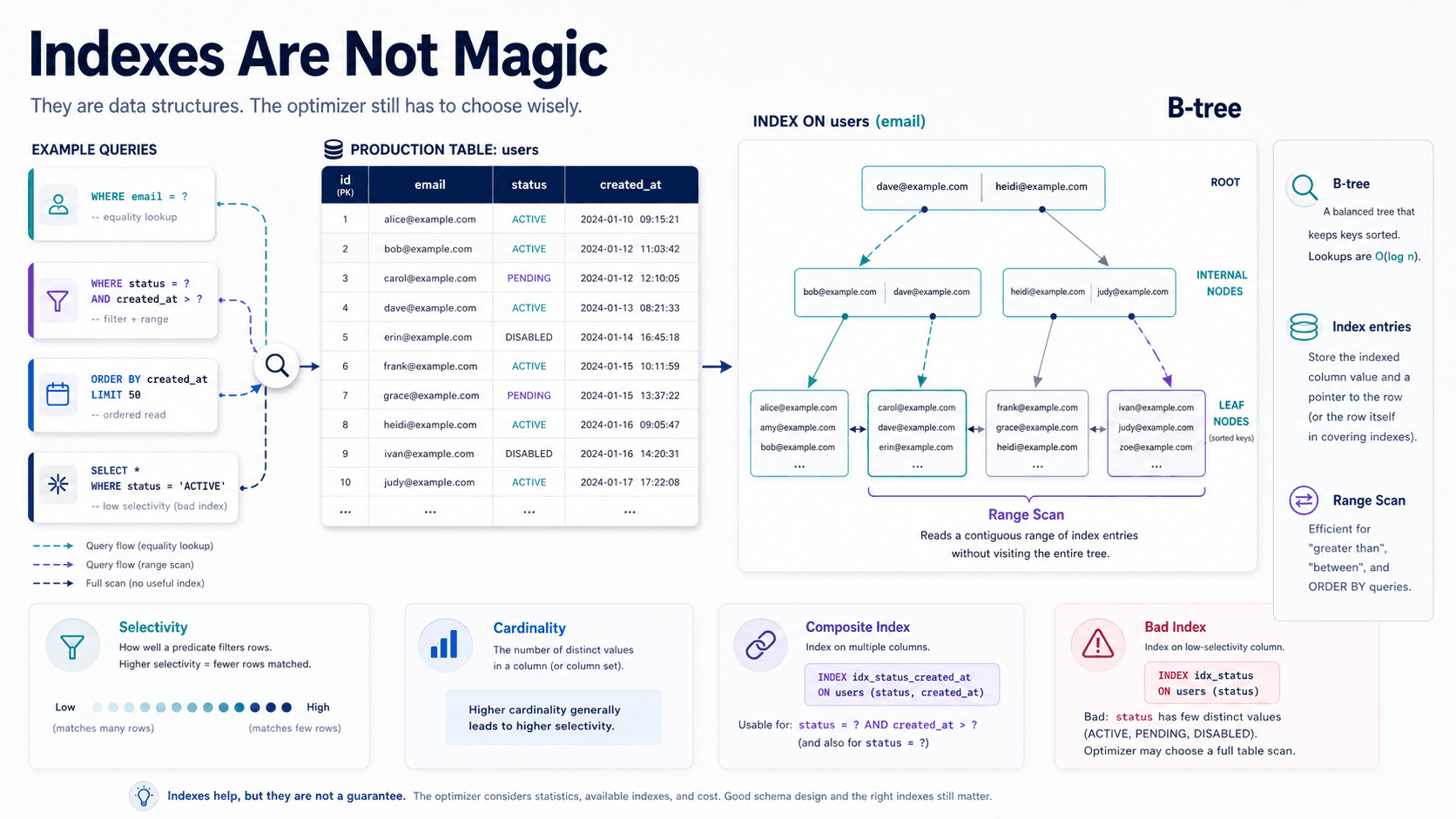
When you create an index on the parent table, what actually happens depends on the version of Postgres. Modern versions (11+) support partitioned indexes, which are indexes defined on the parent that automatically create a matching index on each existing partition and on every new partition you attach later:
CREATE INDEX events_user_id_idx ON events (user_id);Run that on the parent and you'll see Postgres build a events_user_id_idx on every partition. New partitions you create will get one too. From your application's point of view, "the events table has an index on user_id", and the partitioning is an implementation detail.
But there are several edges sharper than they look.
Unique constraints must include the partition key
This is the big one. A unique constraint or primary key on a partitioned table must include the partition key as one of its columns. So this fails:
-- ERROR: unique constraint on partitioned table must include all partitioning columns
CREATE TABLE events (
  id         bigserial PRIMARY KEY,
  created_at timestamptz NOT NULL
) PARTITION BY RANGE (created_at);
You have to write it as:
CREATE TABLE events (
  id         bigserial,
  created_at timestamptz NOT NULL,
  PRIMARY KEY (id, created_at)
) PARTITION BY RANGE (created_at);
The reason is mechanical: a unique index on a partitioned table is implemented as a separate unique index per partition. Postgres can guarantee uniqueness within a partition, but it can't cheaply guarantee that an id in events_2024_01 doesn't collide with an id in events_2024_02. It would have to check every partition on every insert. By forcing the partition key into the unique constraint, the question becomes "is (id, created_at) unique within the partition that owns this created_at," which the per-partition index can answer.
In practice this means your auto-incrementing id is no longer the global unique key it was. Two rows can technically share the same id if they're in different partitions. With bigserial and a single sequence, that won't happen by accident, since the sequence guarantees uniqueness, but it's not enforced by the schema. If you depend on application-level uniqueness of id alone, write it down somewhere. Or use UUIDv7, which gives you uniqueness without a sequence and doesn't fight the partition key.
Foreign keys into a partitioned table
For a long time you couldn't have a foreign key pointing into a partitioned table at all. That changed in Postgres 12, and it works now: you can reference a partitioned table from another table's REFERENCES. But the foreign key has to reference the partitioned table's primary key (which, remember, has to include the partition key), so child tables that point to events will need to carry both events_id and the corresponding events_created_at as their FK columns.
That's an awkward shape for an application. A lot of teams just don't use foreign keys for partitioned event tables and enforce the relationship in application code instead. That's fine, as long as your team knows it.
Indexes are per-partition, so re-indexing is per-partition too
When an index gets bloated or you want to rebuild it, REINDEX TABLE events does work on a partitioned table (since Postgres 14, the command iterates every child partition for you and rebuilds each partition's indexes). What it doesn't let you do is run concurrently on the parent: REINDEX (TABLE) CONCURRENTLY events is rejected on a partitioned table, so for zero-downtime rebuilds you still walk the partitions: REINDEX TABLE CONCURRENTLY events_2024_03, and so on. That's actually a nice property. You can rebuild one month's index without touching the others. The flip side is automation: if you're used to one REINDEX job, you now write a loop, but each step is short and locks only one partition's writes.
One concurrent index, one partition at a time
CREATE INDEX CONCURRENTLY doesn't work on a partitioned parent. If you try, Postgres tells you so. The workaround is documented in the docs but worth knowing before you find it at 2 AM:
-- 1. Create the index on the parent as ONLY (no per-partition build, no lock)
CREATE INDEX events_event_type_idx
  ON ONLY events (event_type);

-- 2. For each partition, create a matching index concurrently
CREATE INDEX CONCURRENTLY events_event_type_idx_2024_01
  ON events_2024_01 (event_type);

-- ... repeat per partition ...

-- 3. Attach each partition's index to the parent
ALTER INDEX events_event_type_idx
  ATTACH PARTITION events_event_type_idx_2024_01;
When every partition's index is attached, the parent's index becomes valid (you can verify with \d events). Until then, the parent index is "invalid". It exists but doesn't enforce or accelerate anything. New partitions you attach later will get the index built automatically; you only need this dance for partitions that existed before the index was added.
Retention without tears: detach, drop, done
This is the workflow that makes partitioning worth the trouble for time-series data.
Without partitioning, deleting old rows looks like:
DELETE FROM events WHERE created_at < now() - interval '90 days';On a big table, that's a disaster. It writes to the WAL for every row, generates dead tuples that VACUUM has to clean up later, locks rows the application might be reading, and leaves the table the same size on disk. You probably end up batching it (DELETE ... WHERE id IN (SELECT ... LIMIT 10000) in a loop), and even then the index bloat is something you'll be paying down for weeks.
With monthly range partitioning, the same retention policy is two statements:
ALTER TABLE events DETACH PARTITION events_2023_12;
DROP TABLE events_2023_12;
DETACH PARTITION removes the partition from the parent without touching the data. By default it takes a brief ACCESS EXCLUSIVE lock on the parent, fine for most setups, but if you can't tolerate that, use DETACH PARTITION ... CONCURRENTLY (since Postgres 14), which detaches with only a SHARE UPDATE EXCLUSIVE lock. After the detach, events_2023_12 is just a normal table, so you can keep it around if you want a slow-tier archive, dump it to S3, or drop it.
The DROP TABLE is instant. No row-by-row deletion, no WAL flood, no VACUUM aftermath. Disk space is reclaimed on the spot.
This is the closest thing to free retention that Postgres offers. If your retention is "delete data older than N days/months", and you partition by that same time grain, retention becomes a one-line cron job.
Adding new partitions: don't forget, don't fail
The corollary to "easy retention" is "you have to keep adding new partitions." If today is March 31 and your latest partition is for March, an insert at midnight on April 1 will fail (unless you have a default partition, which we already argued against).
Three ways teams handle this in production:
The cron job. A nightly script that creates the next month's partition if it doesn't exist. Idempotent, simple, easy to test.
DO $$
BEGIN
  IF NOT EXISTS (
    SELECT 1 FROM pg_class c
    JOIN pg_inherits i ON i.inhrelid = c.oid
    WHERE c.relname = 'events_2024_04'
  ) THEN
    EXECUTE format(
      'CREATE TABLE %I PARTITION OF events FOR VALUES FROM (%L) TO (%L)',
      'events_2024_04', '2024-04-01', '2024-05-01'
    );
  END IF;
END $$;pg_partman. A widely used extension that does this for you, plus retention, plus a few other things. You configure it once with the partition interval and how many partitions ahead to keep, and it manages the rest:
SELECT partman.create_parent(
  p_parent_table => 'public.events',
  p_control      => 'created_at',
  p_type         => 'range',
  p_interval     => '1 month',
  p_premake      => 6
);
p_premake => 6 tells partman to keep six future partitions ready at all times, so even if your maintenance job fails for a while you've got a long runway before inserts start failing. There's a companion function for retention (run_maintenance) that you call from cron or pg_cron.
Run-time creation. The "don't try this at home" option: a trigger on the parent table that creates partitions on demand when a row arrives for a missing range. It works but adds complexity to the write path and can have weird locking behaviour during high-concurrency inserts. Most teams settle on partman or a small in-house script.
Whichever you pick, set up an alert for "no partition exists for tomorrow." Inserts failing at midnight because of a forgotten partition is a classic pager incident.
When partitioning actively hurts you
Partitioning is a power tool. Like any power tool, it can take a finger off if you reach for it at the wrong time.
The table is small. If your table is under, say, 50 million rows and not growing fast, partitioning adds operational complexity and gives you almost nothing in return. The planner overhead of considering partitions, however small, is non-zero. Indexes on a 10-million-row table fit comfortably in memory anyway. Don't partition speculatively. Wait until you have an actual problem: slow queries that pruning would fix, retention pain that detach would fix, or VACUUM that's taking too long.
Queries don't filter on the partition key. If your access pattern is "look up events by user_id, regardless of date", and you partition by created_at, every query will hit every partition. You get the operational overhead of partitioning with none of the pruning benefit. In that case the partition key is wrong. Either pick a key the queries actually use, or don't partition.
You need cross-partition uniqueness on a non-partition-key column. Already covered, but worth saying again: if your application semantics depend on email being globally unique across all of users, and you partition users by region, you can't enforce that with a unique constraint anymore. You'd need a separate global lookup table or application-level checks.
Joins to partitioned tables on the wrong column. When you join orders (partitioned by created_at) to users (not partitioned), the planner can sometimes do "partition-wise joins": joining each partition of orders to users independently, which parallelises well. But that requires the join to involve the partition key, and enable_partitionwise_join to be on (it's off by default for legacy reasons). If you join two partitioned tables on a non-partition column, expect a plain old scan-and-hash that doesn't benefit from the partitioning.
Many small partitions. There's a per-partition planning cost, even with pruning. A table partitioned into 10,000 daily partitions over 27 years will plan more slowly than the same data partitioned into 324 monthly partitions, and most of those daily partitions are tiny. As a rough rule, aim for partitions that are somewhere in the "tens of millions of rows, hundreds of MB to a few GB on disk" range. If you're partitioning monthly and each month is 50 MB, your interval is too small. If each month is 500 GB, you might want weekly.
A small reality check at the end
The first time you set up partitioning, it feels heavier than you expected. You write more DDL than you would for a normal table, you have to think about index propagation, you have to set up the maintenance job, and there's a moment when you wonder whether you've just made the schema worse to look at for a payoff you haven't seen yet.
Then you ship it. The dashboard query that used to take 3 seconds takes 40 milliseconds. Your nightly retention job goes from 2 hours of locking churn to a single DETACH that returns instantly. Your VACUUM schedule stops being a thing you worry about. And six months later, when traffic doubles, none of it gets harder. You just add more partitions and the workload stays the same shape.
It's not magic. It's just the right shape for the data, finally.