So you've been using Postgres for a while.
You wrap your writes in BEGIN ... COMMIT, you read the docs about isolation levels, maybe you even bumped one of your services to REPEATABLE READ because someone said it was safer. The app works. Until one Monday morning you notice the orders table is 18GB on disk while SELECT count(*) says there are about two million rows, and that math doesn't add up. Or a long-running export job from analytics is somehow slowing down OLTP writes that aren't even touching the same tables. Or a query that ran in 4ms last week now takes 600ms with no schema change in between.
That's MVCC saying hello.
Postgres doesn't lock rows the way you probably think it does. It doesn't overwrite them either. It writes new versions, marks the old ones as dead, and then quietly relies on a background process called autovacuum to clean up the mess later. Most of the time you don't have to think about any of that. The other 5% of the time, you can't debug your database without thinking about it, and the official docs assume you already know.
Let's fix that.
What A Postgres Transaction Actually Is
A transaction in Postgres is the same thing it is everywhere else: a group of statements that either all commit or all roll back. The skeleton is boring.
BEGIN;

UPDATE accounts SET balance = balance - 100 WHERE id = 1;
UPDATE accounts SET balance = balance + 100 WHERE id = 2;

COMMIT;
Two updates. Either both happen or neither does. If anything fails between BEGIN and COMMIT, a ROLLBACK puts the world back the way it was. That part isn't surprising.
What's interesting is what Postgres is doing under the hood while that transaction is open. It's not editing the rows in place. It's not even necessarily blocking other transactions from reading them. What it's doing is writing new row versions next to the old ones and tagging each version with metadata that says who created me and who deleted me. Other transactions that are also running at the same time get a private view of the table that may or may not include those new versions, depending on when each transaction started.
That's MVCC: Multi-Version Concurrency Control. It's the reason readers don't block writers in Postgres. It's also the reason your tables grow.
Every Row Has Two Hidden Columns You Don't See
Open up any Postgres table and run this:
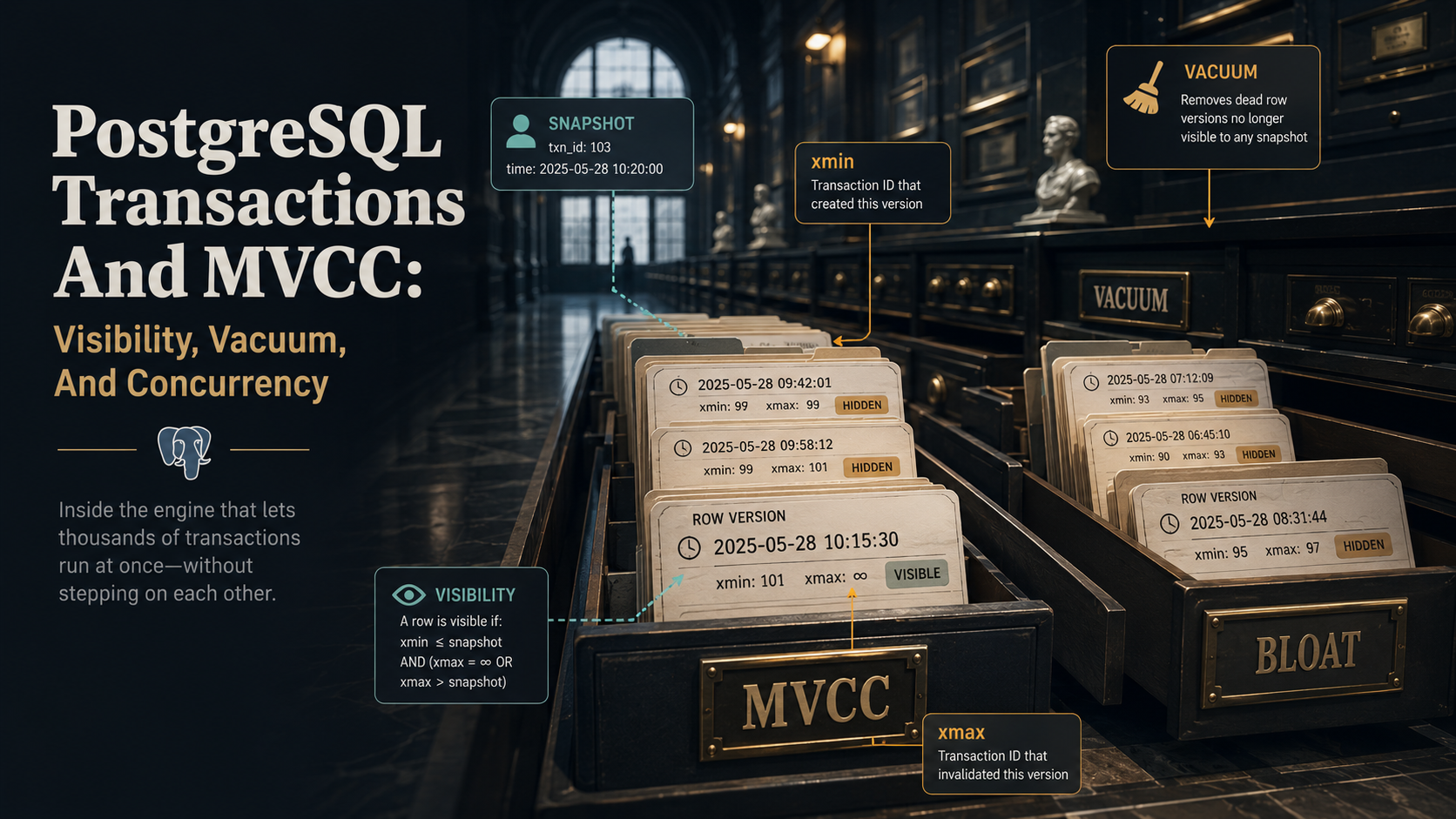
SELECT xmin, xmax, * FROM accounts LIMIT 5;You'll get two columns you didn't define: xmin and xmax. They're system columns, present on every heap tuple in every table, and they're how Postgres tracks which transactions can see which versions of a row.
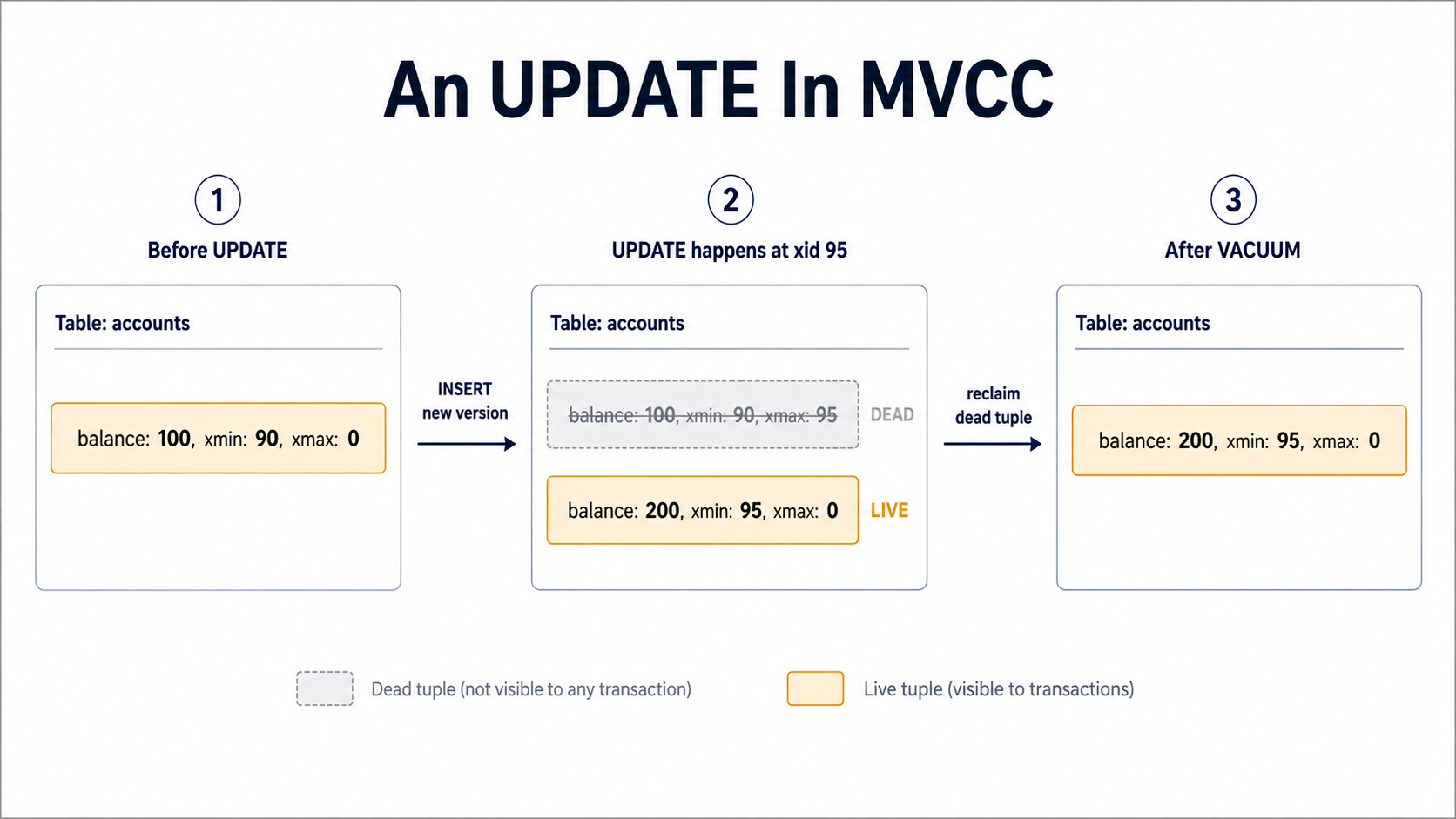
xminis the transaction ID that created this row version.xmaxis the transaction ID that deleted or replaced it (or0if the row is still live).
When you INSERT a row, Postgres writes a tuple with xmin = current_xid and xmax = 0. When you UPDATE a row, Postgres doesn't change the row in place; it writes a new tuple with a fresh xmin, then sets xmax = current_xid on the old tuple. The old tuple stays on disk. It's just marked as superseded. When you DELETE, Postgres sets xmax on the existing tuple and writes nothing new.
So an UPDATE in Postgres is actually an INSERT plus a logical mark-as-dead on the previous version. That single design decision is the reason concurrency in Postgres works the way it does, and the reason vacuum exists.
Snapshots: The Private View Each Transaction Gets
Now the question becomes: when transaction T runs SELECT * FROM accounts, which row versions does T see?
Postgres answers that with a snapshot. A snapshot is a small piece of metadata that says, roughly:
- The current transaction ID.
- The list of transaction IDs that were still in flight when this snapshot was taken.
- The lowest transaction ID that hadn't started yet.
Every time you run a query, Postgres uses your snapshot to ask, for each tuple it touches: was the creator (xmin) committed before my snapshot, and was the deleter (xmax) either zero or not yet committed when my snapshot was taken? If yes, the tuple is visible. If no, it isn't.
That's the whole visibility check, conceptually. Two transaction IDs and a snapshot. The implementation has more corners (subtransactions, prepared transactions, hint bits, the commit log) but the logic above is what's actually deciding what your SELECT returns.
The interesting part is when the snapshot is taken, because that's the part you control with the isolation level.
Isolation Levels Are Just Snapshot Policies
Postgres officially supports three isolation levels: READ COMMITTED, REPEATABLE READ, and SERIALIZABLE. (READ UNCOMMITTED is accepted as a synonym for READ COMMITTED: Postgres doesn't actually do dirty reads, ever.)
The difference between them is how often you take a new snapshot.
READ COMMITTED (the default)
Each statement in your transaction takes a fresh snapshot when it starts.
BEGIN;

SELECT balance FROM accounts WHERE id = 1;
-- snapshot 1 — sees whatever was committed before this statement

-- some other transaction commits an UPDATE here

SELECT balance FROM accounts WHERE id = 1;
-- snapshot 2 — sees the new value

COMMIT;
Two SELECTs in the same transaction can return different values. That's not a bug, that's the contract. READ COMMITTED means I will never read uncommitted data, but I make no promise that my view is stable across statements.
For most application workloads this is fine. Your web request opens a transaction, does its thing, commits, and moves on. The window where two statements within the same request see different worlds is small and usually harmless.
REPEATABLE READ
The snapshot is taken once, when the first statement of the transaction runs, and reused for every subsequent statement.
BEGIN;
-- nothing happens yet

SELECT balance FROM accounts WHERE id = 1;
-- snapshot taken now — frozen for the rest of the transaction

-- other transactions can do whatever they want

SELECT balance FROM accounts WHERE id = 1;
-- same snapshot — returns the same value, even if someone committed an UPDATE

COMMIT;
This is what you want for reports, exports, anything that needs a consistent view of the database for more than one query. Postgres' REPEATABLE READ is also strong enough to prevent phantom reads, by the way; that's a quirk where it's stricter than the SQL standard requires.
The catch: if your transaction tries to UPDATE a row that another transaction has already updated since your snapshot was taken, Postgres throws a serialization failure (ERROR: could not serialize access due to concurrent update) and you have to retry the whole transaction. Your code needs a retry loop or it'll surface as a 500.
SERIALIZABLE
Same snapshot rules as REPEATABLE READ, but Postgres additionally tracks read-write dependencies between concurrent transactions and aborts one of them if their combined effect couldn't have been produced by running them one after the other in some order.
This is the strongest isolation. It's also the only one that makes SELECT FOR UPDATE and other locking gymnastics unnecessary in many cases. The price is more aborts under contention, more retries in your application, and a bit more bookkeeping in the database.
In practice most teams default to READ COMMITTED and only reach for stronger levels when a specific workload demands it. There's nothing wrong with that. Just know what each one buys you.
Why Readers Don't Block Writers
Here's the part that surprises people coming from MySQL or SQL Server: in Postgres, a long SELECT doesn't block a concurrent UPDATE on the same row, and a concurrent UPDATE doesn't block the SELECT either.
The reason is that the SELECT is reading an old version of the tuple, the one that was visible at the time its snapshot was taken, while the UPDATE is writing a brand new version next to it. Both transactions are working on different physical tuples even though they're talking about the same logical row. There's nothing to wait on.
That's a huge property. It means your hot read paths don't get stuck behind long-running writes, and your long analytical queries don't make OLTP writes back up. It's also what lets pg_dump run against a live production database without freezing it.
The flip side: writers do block other writers on the same row. If two transactions both UPDATE id = 1, one of them waits until the other commits or rolls back. That's a row lock, and it's the only kind of lock you'll see in normal workloads. Everything else is invisible MVCC bookkeeping.
The Cost: Bloat And Dead Tuples
You've probably guessed the downside by now. If UPDATE writes a new tuple instead of overwriting, and DELETE doesn't actually free anything, the table grows every time you write to it.
Run an experiment:
CREATE TABLE bloat_demo (id int PRIMARY KEY, value text);
INSERT INTO bloat_demo SELECT i, 'hello' FROM generate_series(1, 100000) AS i;

SELECT pg_size_pretty(pg_relation_size('bloat_demo'));
-- something like 4448 kB

UPDATE bloat_demo SET value = 'updated';

SELECT pg_size_pretty(pg_relation_size('bloat_demo'));
-- now around 8896 kB — same row count, twice the size
The table doubled because every old version is still on disk. Postgres can't reclaim that space until it's sure no remaining transaction can still see those old tuples. That sureness is what VACUUM is for.
The dead tuples that accumulate between vacuums are called bloat. Bloat affects you in three ways:
- Disk usage. Obvious. The table file is bigger than the live data.
- Cache hit rate. Postgres reads pages of data from disk into memory. If 30% of your pages are dead tuples, you're wasting 30% of your buffer pool on rows nobody can see.
- Query speed. A sequential scan over a bloated table reads every dead tuple too; Postgres still has to look at each one to check visibility before skipping it.
Index bloat is its own headache. When a row gets a new version, Postgres usually has to insert a new index entry too, even if the indexed column didn't change. There's a special case called HOT updates (heap-only-tuple) where the new version stays on the same page and no new index entry is needed, but it only applies when no indexed column was modified and there's free space on the page. If you're updating an indexed column or your pages are already full, every index needs a fresh entry, and your index files grow alongside the heap.
VACUUM: The Cleanup Process
VACUUM is the answer to bloat. Its job is to find dead tuples that no transaction can possibly see anymore and mark their disk space as reusable. Note: reusable, not returned to the OS. A regular VACUUM doesn't shrink the file. The space gets refilled by future inserts and updates instead of allocating new pages.
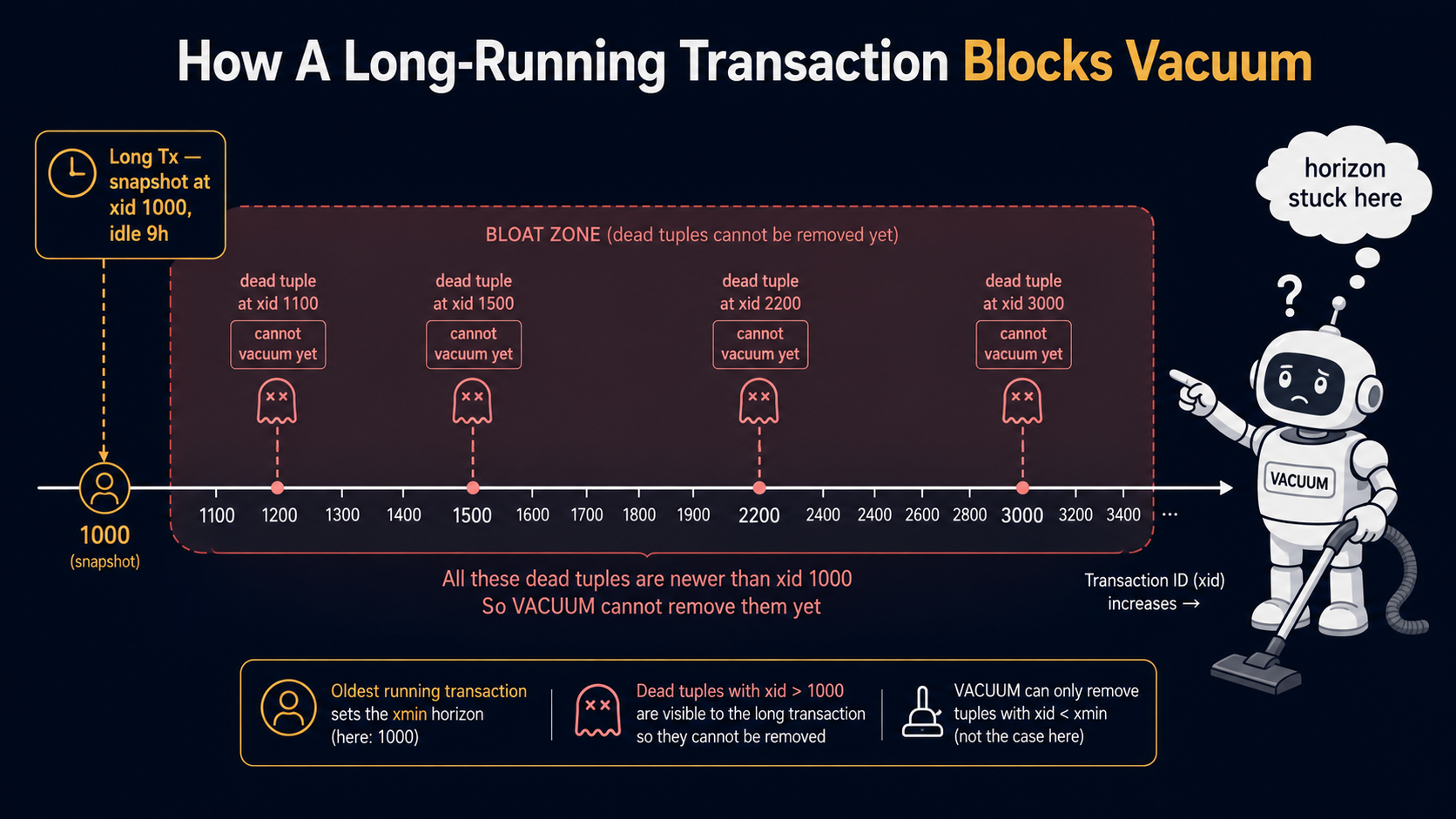
The "no transaction can possibly see them anymore" check is the key. Postgres tracks a value called the xmin horizon: the lowest transaction ID that any currently-running transaction might still need. Anything older than that is unambiguously dead, anything newer might still be visible to someone, and VACUUM is conservative about the boundary.
You can run vacuum manually:
VACUUM;                    -- vacuum everything in the current database
VACUUM accounts;           -- just one table
VACUUM (VERBOSE) accounts; -- show what got cleaned
But you almost never should. Postgres ships with autovacuum, a background process that wakes up periodically, looks at the per-table dead-tuple counters, and runs vacuum on tables that have crossed a threshold. The default thresholds are tunable per table:
ALTER TABLE high_churn_table SET (
  autovacuum_vacuum_scale_factor = 0.05,  -- vacuum when 5% of rows are dead
  autovacuum_vacuum_cost_limit = 1000     -- be more aggressive than the default
);
For most tables the defaults are fine. For tables that get hammered with updates (session stores, queue tables, counters) you usually want to lower the scale factor so autovacuum runs more often and bloat doesn't accumulate.
VACUUM FULL Is Not The Same Thing
There's also VACUUM FULL, and the name is misleading. It doesn't just do a more thorough version of VACUUM. It rewrites the entire table from scratch, copying live tuples into a new file and dropping the old one. That returns disk space to the OS, but it also takes an ACCESS EXCLUSIVE lock on the table: no one can read or write to it while it runs.
For a 100GB table, that's a long outage.
If you need to actually reclaim disk space, the modern answer is usually pg_repack or pg_squeeze, extensions that do the same rewrite-the-table dance but in chunks, online, without holding an exclusive lock. Reserve VACUUM FULL for emergency situations on small tables where you can take the downtime.
Long-Running Transactions: The Hidden Foot-Gun
This is where MVCC, vacuum, and concurrency all collide and break each other.
Remember the xmin horizon: the lowest transaction ID anyone might still need. As long as a transaction is open, the horizon can't advance past its snapshot, because that transaction might still want to read a tuple created or deleted at that point. That's true even if the transaction is idle. Even if it's been idle for nine hours because someone left psql open in another tmux pane.
Now imagine that idle transaction is sitting on REPEATABLE READ. It has a fixed snapshot from nine hours ago. Vacuum can't clean up any tuple that became dead in the last nine hours, because that snapshot might still want to see it. Your tables bloat. Your indexes bloat. Queries get slower. Disk fills up. And the only fix is to find and kill the long-running transaction, after which autovacuum catches up and life returns to normal.
SELECT
  pid,
  now() - xact_start AS duration,
  state,
  query
FROM pg_stat_activity
WHERE xact_start IS NOT NULL
ORDER BY duration DESC;
That's the query you want bookmarked. Run it any time bloat or vacuum behavior is mysterious. Anything in idle in transaction for more than a few minutes is a red flag. Anything for more than an hour is almost certainly the cause of whatever you're debugging.
The other classic offender is replication slots. If you use logical replication or streaming replication with replication slots, an idle or disconnected subscriber holds back the wal_horizon and can hold back the xmin horizon too; same effect, different source. pg_replication_slots tells you who's lagging.
Transaction ID Wraparound: The Other Reason Vacuum Matters
Postgres transaction IDs are 32-bit integers. That's about 4 billion of them, and a busy production database can chew through that in months.
When the counter is about to wrap, every existing tuple's xmin would suddenly look "newer" than the new transactions' IDs, and visibility checks would break catastrophically. To prevent that, Postgres reserves part of the xid space and runs a special operation called freezing during vacuum: rows old enough that everyone can see them get their xmin replaced with a special marker that says "this is older than all possible snapshots". Once frozen, a tuple is safe regardless of where the xid counter is.
Autovacuum runs an anti-wraparound vacuum automatically when a table gets close to the danger zone. You don't normally interact with it. The reason it's worth knowing about: anti-wraparound vacuums can't be skipped or canceled, and they run in foreground mode if normal autovacuum hasn't kept up. If you've ever seen a database go briefly unresponsive while a "VACUUM (FREEZE)" runs against your busiest table, that's why. The fix is to tune autovacuum to be aggressive enough that anti-wraparound never has to step in.
SELECT
  relname,
  age(relfrozenxid) AS xid_age
FROM pg_class
WHERE relkind = 'r'
ORDER BY xid_age DESC
LIMIT 10;
Tables with the highest xid_age are the ones autovacuum hasn't gotten around to freezing recently. If any of them are pushing past 200 million, your autovacuum is falling behind.
Concurrency Patterns You Should Actually Use
MVCC gives you optimistic-by-default concurrency. Most of the time you don't have to think about it. The cases where you do are predictable, and the patterns are well-known.
SELECT FOR UPDATE
If you need to read a row and then update it based on its current value, and you don't want anyone else changing it underneath you, lock it explicitly:
BEGIN;

SELECT balance FROM accounts WHERE id = 1 FOR UPDATE;
-- the row is now locked for writes until I commit or rollback

UPDATE accounts SET balance = balance - 100 WHERE id = 1;

COMMIT;
FOR UPDATE makes other writers wait. Other readers (without FOR UPDATE) still see the old version through MVCC and don't block. This is the right primitive for things like "decrement an inventory count safely" or "claim the next pending job from a queue table".
SELECT FOR UPDATE SKIP LOCKED
If you're building a job queue inside Postgres, this is the magic you want:
SELECT id, payload
FROM jobs
WHERE status = 'pending'
ORDER BY id
LIMIT 1
FOR UPDATE SKIP LOCKED;
Multiple workers can run that query at the same time. Each one will lock and return a different row. None of them block each other. It turns Postgres into a competent work queue without an extra Redis or RabbitMQ.
Idempotent retries on serialization failures
If you use REPEATABLE READ or SERIALIZABLE, you have to handle serialization_failure and deadlock_detected errors. They're not bugs. They're the database telling you to retry. The pattern is the same in any language:
import psycopg2

def transfer_funds(conn, src, dst, amount):
    for attempt in range(5):
        try:
            with conn.transaction(isolation_level="serializable"):
                cur = conn.cursor()
                cur.execute("SELECT balance FROM accounts WHERE id = %s", (src,))
                balance = cur.fetchone()[0]
                if balance < amount:
                    raise ValueError("insufficient funds")
                cur.execute("UPDATE accounts SET balance = balance - %s WHERE id = %s", (amount, src))
                cur.execute("UPDATE accounts SET balance = balance + %s WHERE id = %s", (amount, dst))
            return
        except psycopg2.errors.SerializationFailure:
            continue
    raise RuntimeError("transfer failed after 5 retries")
Same idea in Go, Node, Java: wrap the transaction in a retry loop, catch the specific error class, back off briefly between attempts. Don't retry forever, don't retry on errors that aren't retryable, don't bury the failure in logs and pretend it didn't happen.
Things That Catch People Off Guard
A scattered list of MVCC weirdness that I wish I'd known earlier in my Postgres career.
count(*) is slow on large tables, even with an index. There's no row-count to read off a header; Postgres has to visit each tuple and check visibility against your snapshot, because what counts as "a row" depends on who's asking. The pattern of caching counts in an aggregate table or using pg_class.reltuples for an approximation is real and used widely.
SELECT ... FROM x WHERE id = 1 can do a sequential scan of dead tuples too if a recent vacuum hasn't run. Visibility maps and index-only scans help, but only when the visibility map is up to date, which means after a recent vacuum.
UPDATE on an indexed column that didn't change still rewrites the index entry unless HOT applies. Fillfactor settings on tables (fillfactor = 70 or so) leave room on each page for HOT updates and are worth tuning on heavily-updated tables.
Truncating a table with DELETE FROM big_table instead of TRUNCATE writes one dead tuple per row, which then has to be vacuumed. For "delete everything in this table" workloads, TRUNCATE is dramatically cheaper because it doesn't go through MVCC at all; it just unlinks the table file.
Foreign keys take a row lock on the parent row when you insert a child. That used to be FOR UPDATE-strength and caused contention storms; modern Postgres uses FOR KEY SHARE which is gentler, but the locking still exists. If you're seeing weird waits on a parent table during high-write workloads, this is usually why.
pg_stat_activity.wait_event tells you what each backend is currently waiting on: Lock, BufferPin, IO, anything. Combined with pg_locks, it's how you debug "why is this query just sitting there?"
What This Buys You
MVCC is one of those topics where reading the docs once doesn't give you intuition. You need to have the model in your head: every row has hidden version columns, my transaction has a private snapshot, vacuum cleans up versions no one can see anymore. That model has to click before the rest of the database's behavior starts making sense. Once that model clicks, you can read pg_stat_activity, you can guess why a table is bloated, you can spot the long-running transaction that's holding back vacuum, you can pick an isolation level for the right reason instead of cargo-culting one.
Postgres is a database that rewards engineers who understand it. MVCC is the deepest of those rewards. Spend an hour with xmin, xmax, and a couple of psql sessions side by side, and you'll come out the other end able to debug things your team currently treats as black magic.
That's a pretty good return on an hour.