Most developers start using AI with a very simple prompt:
Write code for this feature.And sometimes it works.
But in real software engineering, “write code” is rarely the actual job.
The real job is closer to this:
Change the system without breaking existing behavior.That is a very different task.
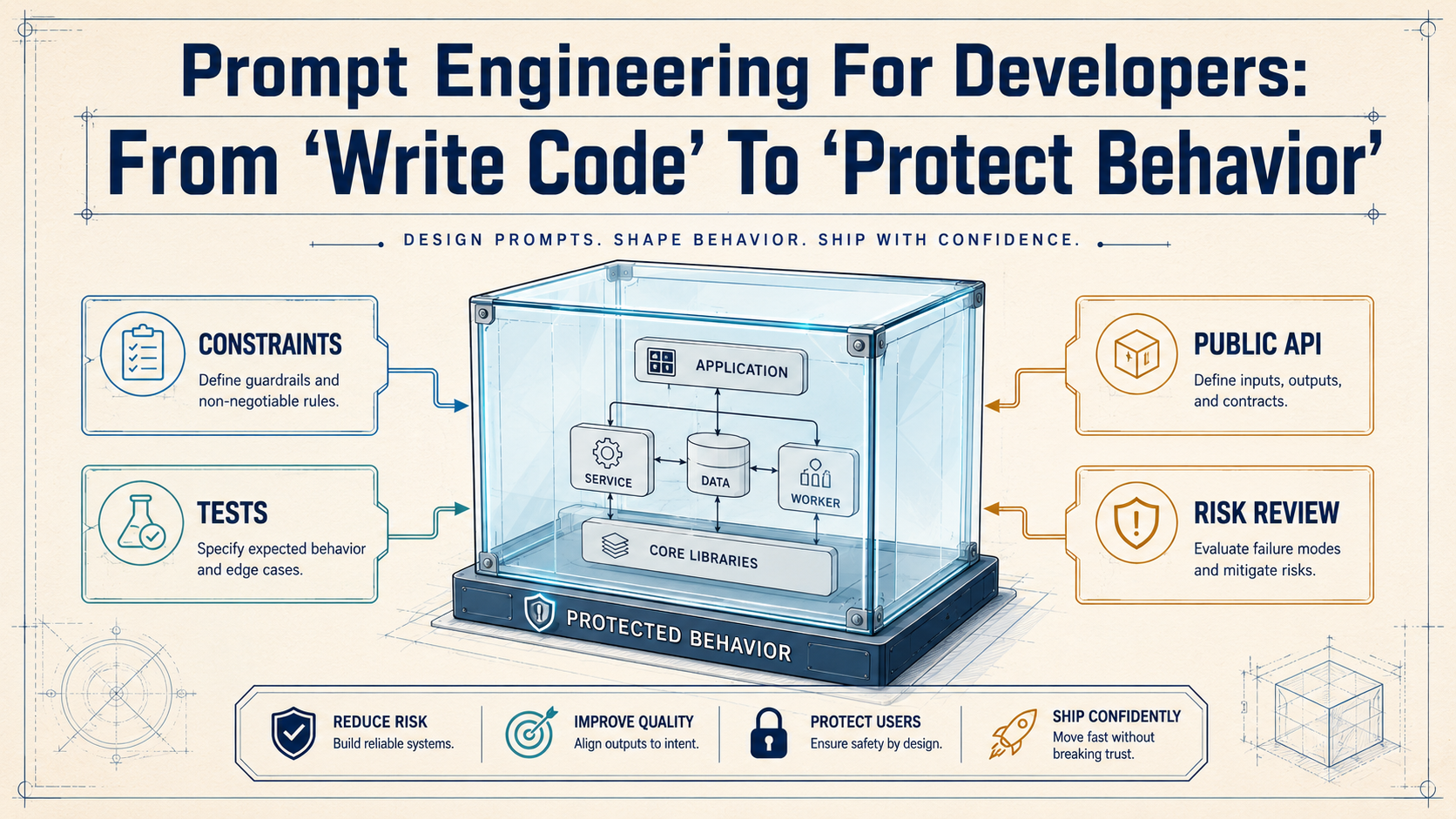
A junior prompt asks AI to generate something new. A senior prompt asks AI to protect what already exists.
That difference matters a lot. Production code has old behavior, hidden rules, public APIs, database assumptions, tests, edge cases, customers, billing flows, permissions, logs, jobs, retries, and weird historical decisions that nobody remembers anymore.
So prompt engineering for developers is not about “magic words.” It is about giving the AI enough engineering context to make safer decisions.
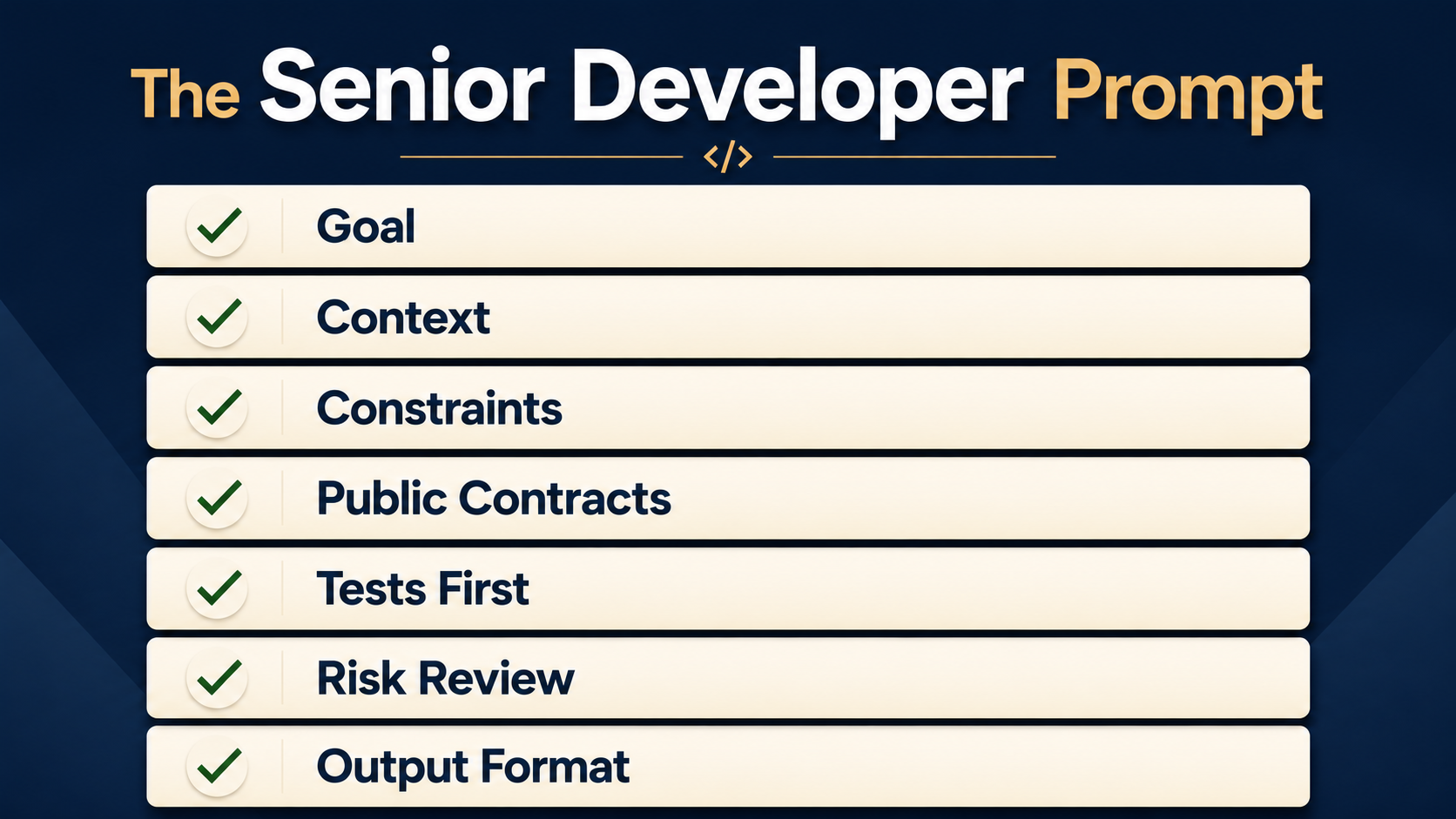
A good developer prompt should answer these questions:
- What should change?
- What must not change?
- Which files are in scope?
- Which public APIs must stay compatible?
- Which tests should be added first?
- Which risks should be explained before coding?
- What should the AI do when it is unsure?
That is the whole mindset shift.
You are not asking for code. You are asking for controlled change.
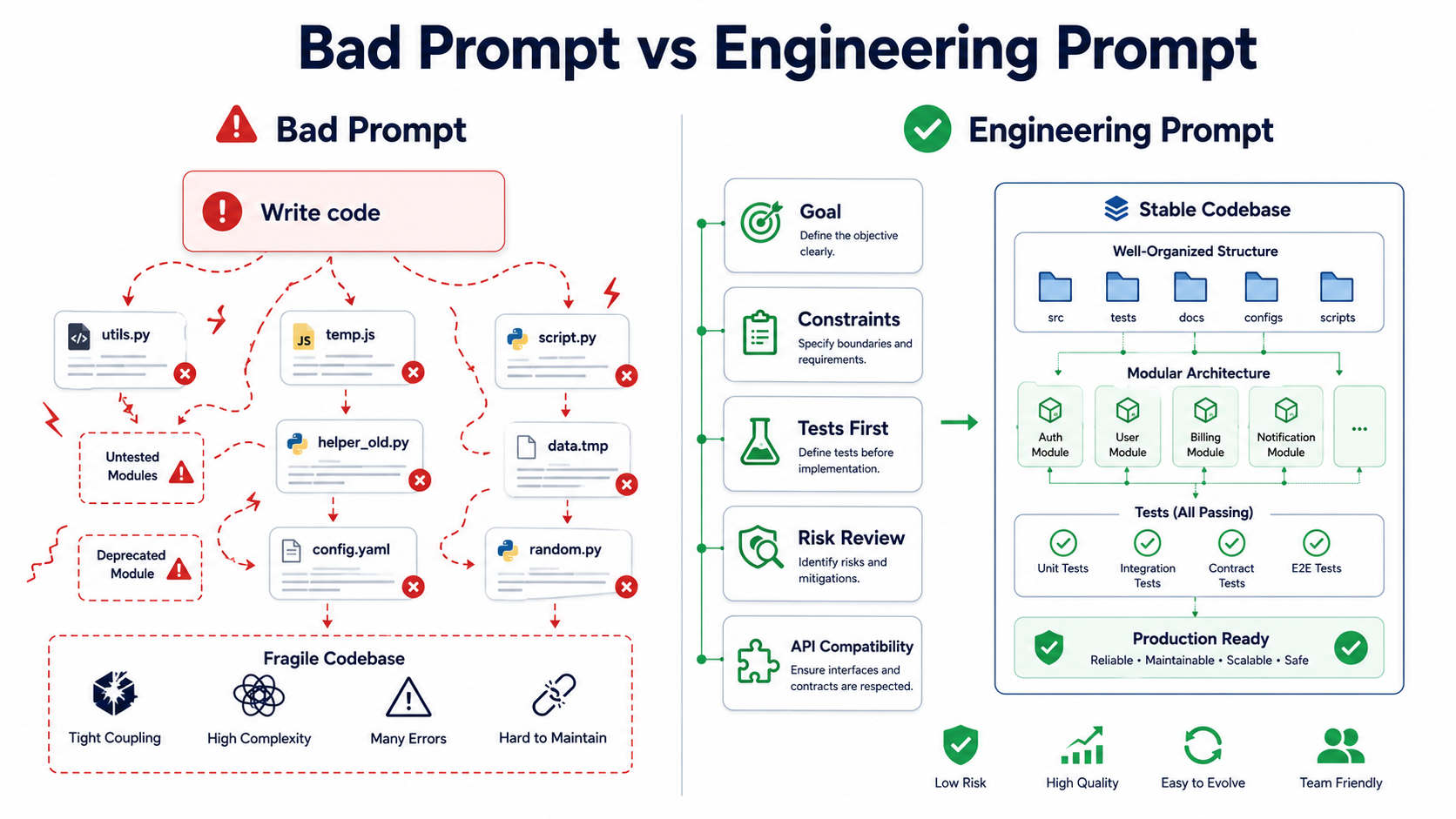
Why “Write Code” Is A Weak Prompt
AI models are very good at producing plausible code. That is useful, but also dangerous — a model can generate code that looks correct, compiles successfully, and still changes behavior in a subtle way.
For example, imagine this Laravel-style controller method:
public function update(Request $request, int $id): JsonResponse
{
    $user = User::findOrFail($id);

    $user->update([
        'name' => $request->input('name'),
        'email' => $request->input('email'),
        'role' => $request->input('role'),
    ]);

    return response()->json($user);
}
A simple prompt might be:
Refactor this controller method.The AI may produce something cleaner:
public function update(UpdateUserRequest $request, int $id): JsonResponse
{
    $user = User::findOrFail($id);

    $user->update($request->validated());

    return response()->json($user);
}
This looks better. In many cases, it is better. But did the behavior stay the same? Maybe not.
The previous method accepted name, email, and role. The new method depends on UpdateUserRequest. If that request does not allow role, role updates silently stop working. If it allows role without authorization, you may still have a security problem. If validation changes how empty strings are handled, clients may observe different behavior.
The prompt did not tell the AI what to protect.
A stronger prompt would be:
Refactor this controller method for readability, but preserve the existing external behavior.

Constraints:
- Do not change the JSON response shape.
- Do not change which fields can currently be updated.
- Do not add new authorization behavior yet.
- Do not rename the route, method, or public request parameters.
- First explain current behavior and possible risks.
- Then propose a small refactor.
- Then suggest tests that would prove behavior is preserved.
This prompt is not longer because we like long prompts. It is longer because production work has constraints.
Prompt Engineering Is Requirements Engineering
For developers, prompt engineering is basically requirements engineering in a smaller format.
You describe:
- the goal,
- the constraints,
- the existing behavior,
- the expected output,
- the safety checks.
That is what we already do when we write tickets, pull request descriptions, test cases, and architecture notes.
The AI prompt is simply another engineering interface.
Bad prompt:
Make this faster.Better prompt:
Analyze this query and suggest safe performance improvements.

Context:
- This endpoint is used by the admin dashboard.
- The response shape must not change.
- The query runs on MySQL 8.
- The table has around 10 million rows.
- We cannot add caching in this task.
- Prefer index/query changes over application rewrites.

Output:
1. Explain why the current query may be slow.
2. Show the safest first improvement.
3. Show the SQL index if needed.
4. Explain trade-offs.
5. List tests or checks before deployment.
This is much more useful because the AI now has a clear job.
It should not invent a new architecture. It should help you improve the current system safely.
The Core Structure Of A Good Developer Prompt
A practical developer prompt usually has five parts.
Role:
You are acting as a senior backend engineer reviewing this change.

Goal:
Help me refactor this service method to reduce duplication.

Context:
This code runs in the checkout flow. It handles real payments. We use PHP 8.4, Laravel, MySQL, and queue jobs.

Constraints:
- Preserve public method signatures.
- Do not change database schema.
- Do not change event names.
- Do not change payment gateway behavior.
- Prefer small steps.

Acceptance criteria:
- Existing behavior is documented.
- Characterization tests are suggested before refactoring.
- Refactor plan is split into safe commits.
- Risky assumptions are clearly listed.
This structure works because it reduces ambiguity.
The AI does not need to guess whether you want a quick rewrite, a deep architectural refactor, or a cautious production-safe plan.
You told it.
Constraints Are More Important Than Instructions
Developers often write prompts like this:
Make this code better.But “better” is not specific.
Better for whom?
Better for readability? Performance? Security? Testability? Shorter code? Fewer queries? Fewer classes? More explicit domain language?
You need constraints.
For example:
Improve readability without changing behavior.

Constraints:
- No database schema changes.
- No changes to public method names.
- No new packages.
- Keep the same exception types.
- Keep the same response format.
- Keep the same event dispatching behavior.
These constraints help the AI avoid the most common mistake: solving a different problem than the one you actually have.
Here is another example for a React component:
type Props = {
  userId: string;
  initialStatus: "active" | "disabled";
  onSaved: () => void;
};

export function UserStatusForm({ userId, initialStatus, onSaved }: Props) {
  const [status, setStatus] = useState(initialStatus);

  async function save() {
    await fetch(`/api/users/${userId}/status`, {
      method: "POST",
      body: JSON.stringify({ status }),
    });

    onSaved();
  }

  return (
    <form>
      <select value={status} onChange={(e) => setStatus(e.target.value as any)}>
        <option value="active">Active</option>
        <option value="disabled">Disabled</option>
      </select>

      <button type="button" onClick={save}>
        Save
      </button>
    </form>
  );
}
Weak prompt:
Improve this component.Stronger prompt:
Improve this React component for type safety and basic error handling.

Constraints:
- Do not change the Props type unless you explain why.
- Do not change the API endpoint.
- Do not introduce a form library.
- Keep the UI simple.
- Avoid `as any`.
- Explain what behavior changes, if any.
- Add a short test plan.
Now the AI has boundaries.
A possible safer improvement:
type UserStatus = "active" | "disabled";

type Props = {
  userId: string;
  initialStatus: UserStatus;
  onSaved: () => void;
};

const allowedStatuses: UserStatus[] = ["active", "disabled"];

function isUserStatus(value: string): value is UserStatus {
  return allowedStatuses.includes(value as UserStatus);
}

export function UserStatusForm({ userId, initialStatus, onSaved }: Props) {
  const [status, setStatus] = useState<UserStatus>(initialStatus);
  const [isSaving, setIsSaving] = useState(false);
  const [error, setError] = useState<string | null>(null);

  async function save() {
    setIsSaving(true);
    setError(null);

    try {
      const response = await fetch(`/api/users/${userId}/status`, {
        method: "POST",
        headers: {
          "Content-Type": "application/json",
        },
        body: JSON.stringify({ status }),
      });

      if (!response.ok) {
        throw new Error("Failed to save user status.");
      }

      onSaved();
    } catch (error) {
      setError(error instanceof Error ? error.message : "Unexpected error.");
    } finally {
      setIsSaving(false);
    }
  }

  return (
    <form>
      <select
        value={status}
        onChange={(event) => {
          if (isUserStatus(event.target.value)) {
            setStatus(event.target.value);
          }
        }}
      >
        <option value="active">Active</option>
        <option value="disabled">Disabled</option>
      </select>

      <button type="button" onClick={save} disabled={isSaving}>
        {isSaving ? "Saving..." : "Save"}
      </button>

      {error && <p role="alert">{error}</p>}
    </form>
  );
}
This is not just “cleaner.” It is safer because the prompt asked for a specific kind of improvement.
Acceptance Criteria Make AI Output Easier To Review
Acceptance criteria are one of the best tools you can put into a prompt.
Without acceptance criteria, the AI may give you a beautiful solution that is difficult to verify.
With acceptance criteria, you can check the output like a pull request.
Example:
Task:
Add soft-delete support to archived projects.

Acceptance criteria:
- Existing active projects still appear in the dashboard.
- Archived projects do not appear in the default dashboard list.
- Admin users can view archived projects with `include_archived=true`.
- API response shape does not change.
- Add tests for default list, admin archived list, and non-admin access.
- Explain whether any database index is needed.
This is much better than:
Add archived projects.Acceptance criteria force the AI to think in testable terms.
They also help you notice missing cases.
For example, if the AI does not mention non-admin access, you know the output is incomplete.
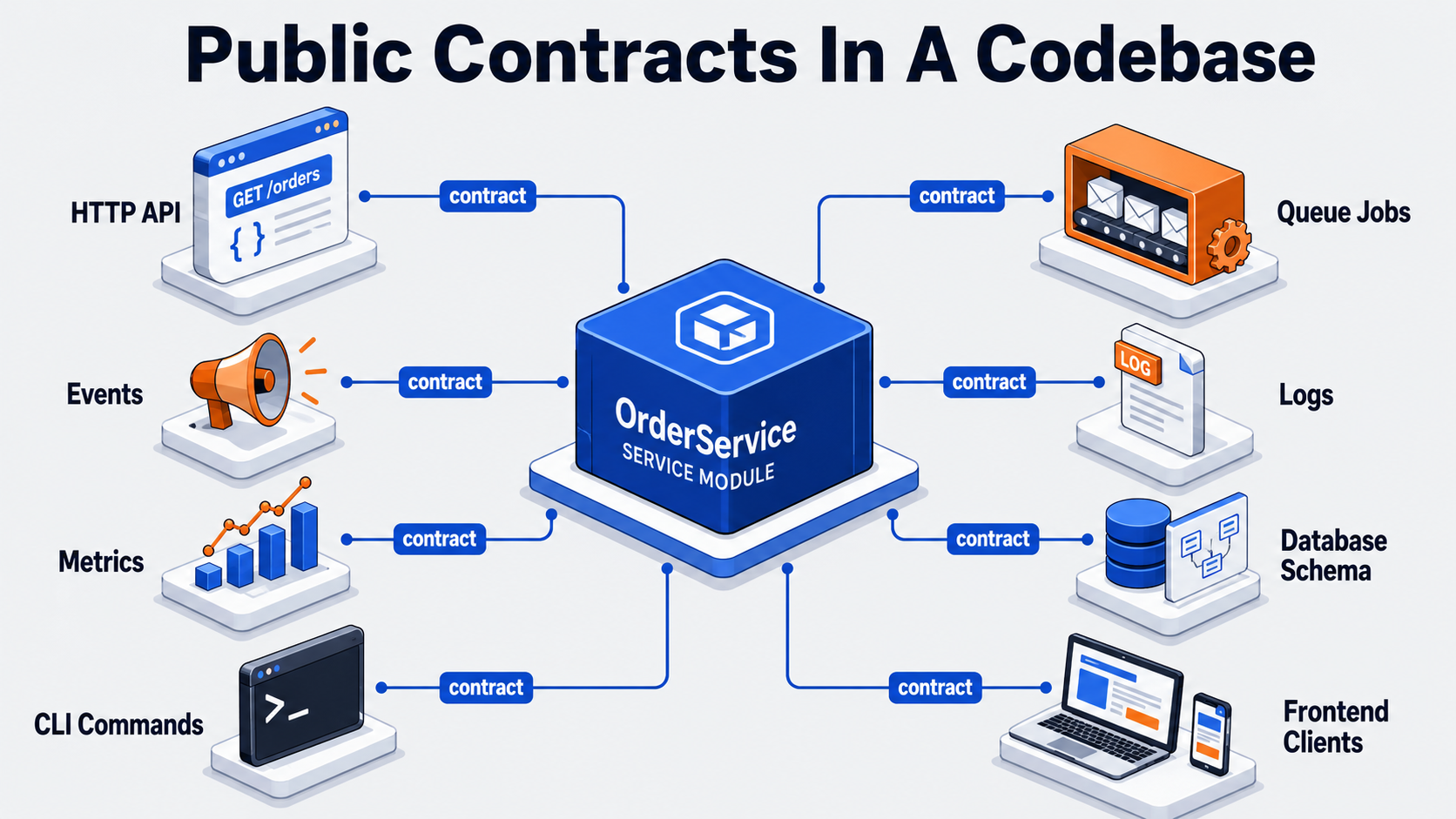
Ask AI To Preserve Public APIs
This is one of the most important prompt patterns for real codebases.
Public APIs are not only HTTP APIs.
They can include:
- route names,
- request fields,
- response JSON shape,
- class method signatures,
- event names,
- queue payloads,
- database column meanings,
- CLI command arguments,
- config keys,
- emitted metrics,
- log fields used by dashboards.
If you want a safe refactor, say it clearly:
Preserve all public APIs.

Treat the following as public contracts:
- HTTP method and route path.
- Request parameter names.
- Response JSON keys and types.
- Status codes.
- Event names and payload shape.
- Public PHP method signatures.
- Queue job payload format.

Before proposing code, list every public contract you detect.
This prompt changes the task from “rewrite code” to “map contracts first.”
That is exactly what a senior engineer would do.
For example, this method may look internal:
public function dispatchInvoiceEmail(int $invoiceId, bool $force = false): void
{
    SendInvoiceEmailJob::dispatch([
        'invoice_id' => $invoiceId,
        'force' => $force,
    ]);
}
But the queue payload is a contract. Existing workers may expect invoice_id and force.
A risky AI rewrite might change it to:
SendInvoiceEmailJob::dispatch($invoiceId, $force);Maybe that is cleaner. Maybe it breaks production workers during a rolling deploy.
A better prompt catches this:
Review this refactor for deployment safety.

Pay special attention to:
- queue payload compatibility,
- rolling deploy behavior,
- old workers processing new jobs,
- new workers processing old jobs.
That is prompt engineering as production thinking.
Request Tests Before Implementation
One of the strongest developer prompts is:
Do not implement yet. First write the tests that should pass before and after the change.This is especially useful for legacy systems.
Before asking AI to refactor, ask it to describe current behavior and propose characterization tests.
Characterization tests are tests that capture how the system currently behaves, even if the behavior is ugly.
Example prompt:
Analyze this legacy method.

Do not refactor yet.

First:
1. Explain what the method currently does.
2. List inputs, outputs, side effects, and exceptions.
3. Identify hidden business rules.
4. Propose characterization tests that preserve current behavior.
5. Only after that, suggest a small refactor plan.
Example legacy method:
public function calculateDiscount(User $user, Cart $cart): int
{
    if ($user->is_vip && $cart->total > 10000) {
        return 20;
    }

    if ($cart->coupon === 'WELCOME' && !$user->has_orders) {
        return 15;
    }

    if ($cart->total > 5000) {
        return 5;
    }

    return 0;
}
The AI may suggest tests like:
public function testVipUserWithLargeCartGetsTwentyPercentDiscount(): void
{
    $user = User::factory()->make(['is_vip' => true]);
    $cart = new Cart(total: 10001, coupon: null);

    $this->assertSame(20, $service->calculateDiscount($user, $cart));
}

public function testWelcomeCouponForFirstOrderGetsFifteenPercentDiscount(): void
{
    $user = User::factory()->make(['has_orders' => false]);
    $cart = new Cart(total: 1000, coupon: 'WELCOME');

    $this->assertSame(15, $service->calculateDiscount($user, $cart));
}

public function testLargeCartGetsFivePercentDiscount(): void
{
    $user = User::factory()->make(['is_vip' => false, 'has_orders' => true]);
    $cart = new Cart(total: 5001, coupon: null);

    $this->assertSame(5, $service->calculateDiscount($user, $cart));
}
Now you have safety before cleanup.
That is the difference between AI as a generator and AI as an engineering assistant.
Ask AI To Explain Risk
AI output often sounds confident. That is why you should explicitly ask for uncertainty.
Good prompt:
Before giving the final solution, list:
- assumptions you are making,
- behavior that might change,
- files that need human review,
- test cases most likely to catch regressions,
- production risks.
For example, when changing authentication code:
Review this authentication middleware change.

Focus on risk:
- Could this allow unauthenticated access?
- Could this block valid users?
- Could this break API tokens?
- Could this break session-based auth?
- Could this affect internal admin routes?
- What tests should be required before merge?
The goal is not to make AI paranoid.
The goal is to make risk visible.
Senior engineers do this naturally. They think about what can go wrong. Your prompt should ask the model to do the same.
Use “Plan First, Code Second”
For anything non-trivial, avoid asking AI to jump directly into implementation.
Use this pattern:
Do not write code yet.

First:
1. Explain the current behavior.
2. Identify risky parts.
3. Propose a step-by-step plan.
4. Identify tests to add.
5. Wait for confirmation before implementation.
Even if your tool supports direct file editing, this pattern is useful.
It keeps you in control.
A good implementation plan might look like this:
Plan:
- Add tests around current invoice status transitions.
- Extract status transition rules into a small InvoiceStatusPolicy class.
- Keep the existing public service method.
- Update the service method to delegate to the policy.
- Run existing invoice tests.
- Add one regression test for paid invoices not being canceled.
This is much easier to review than a giant patch.
Practical Prompt Templates For Daily Development
Here are prompt templates you can reuse.
Codebase Explanation Prompt
Act as a senior engineer onboarding into this codebase.

Analyze the selected files and explain:
- the main responsibility of each file,
- how data flows through them,
- important public contracts,
- hidden business rules,
- risky dependencies,
- what I should understand before changing this area.

Do not suggest refactoring yet.
Safe Refactoring Prompt
Act as a senior engineer helping with a safe refactor.

Goal:
Improve readability and reduce duplication in this code.

Constraints:
- Preserve external behavior.
- Preserve public method signatures.
- Preserve request and response formats.
- Do not change database schema.
- Do not introduce new packages.

Before writing code:
1. Explain current behavior.
2. List side effects.
3. Suggest characterization tests.
4. Propose a small-step refactor plan.
Test-First Prompt
Before implementing this feature, design the tests.

Feature:
[describe feature]

Please provide:
- unit tests,
- integration tests,
- edge cases,
- authorization tests,
- failure cases,
- data setup needed,
- what should be mocked and what should not be mocked.

Do not write production code yet.
API Compatibility Prompt
Review this proposed change for API compatibility.

Treat these as public contracts:
- route path,
- HTTP method,
- request fields,
- response JSON keys,
- status codes,
- error format,
- pagination format.

List anything that changes.
If behavior changes, explain whether it is intentional or risky.
SQL Performance Prompt
Analyze this MySQL query for performance.

Context:
- MySQL version: 8.x
- Approximate table size: [number]
- Existing indexes: [paste indexes]
- Query frequency: [high/medium/low]
- Endpoint: [admin/customer/background job]

Output:
1. Explain how MySQL is likely to execute the query.
2. Suggest which EXPLAIN fields to inspect.
3. Recommend the safest index or query change.
4. Explain trade-offs.
5. List checks before deploying.
Pull Request Review Prompt
Review this pull request as an additional AI reviewer.

Focus on:
- security,
- authorization,
- validation,
- database performance,
- N+1 queries,
- behavior changes,
- missing tests,
- migration safety,
- backward compatibility.

Do not approve or reject.
Return advisory comments grouped by severity.
Prompting For Output Format
AI output becomes much easier to use when you define the format.
Instead of:
Review this code.Use:
Return the review in this format:

## Summary
Short explanation of the change.

## Behavior Changes
List any detected behavior changes.

## Risks
Group by High, Medium, Low.

## Missing Tests
List concrete tests.

## Suggested Patch
Only include code if the change is small and low-risk.
This helps you compare outputs across different tasks.
It also prevents the model from mixing explanation, code, warnings, and assumptions into one long wall of text.
What Not To Do
Do not paste secrets into prompts.
Do not ask AI to rewrite huge systems in one shot.
Do not accept generated code without reading it.
Do not let AI change migrations, auth, billing, or permissions without focused review.
Do not assume that a passing test suite means the AI understood the business logic.
And please do not use AI as an excuse to skip engineering judgment.
Prompt engineering helps you communicate with AI. It does not replace responsibility.
A Strong Developer Prompt Is A Safety Tool
The best developer prompts are not fancy.
They are clear, constrained, testable, and honest about risk.
A weak prompt says:
Write this feature.A strong prompt says:
Help me change this system safely.
Protect existing behavior.
Explain the contracts.
Write tests first.
Show the risks.
Then propose the smallest useful change.
That is the real shift.
Prompt engineering for developers is not about getting more code faster.
It is about getting safer thinking earlier.
And in production software, that is much more valuable.