
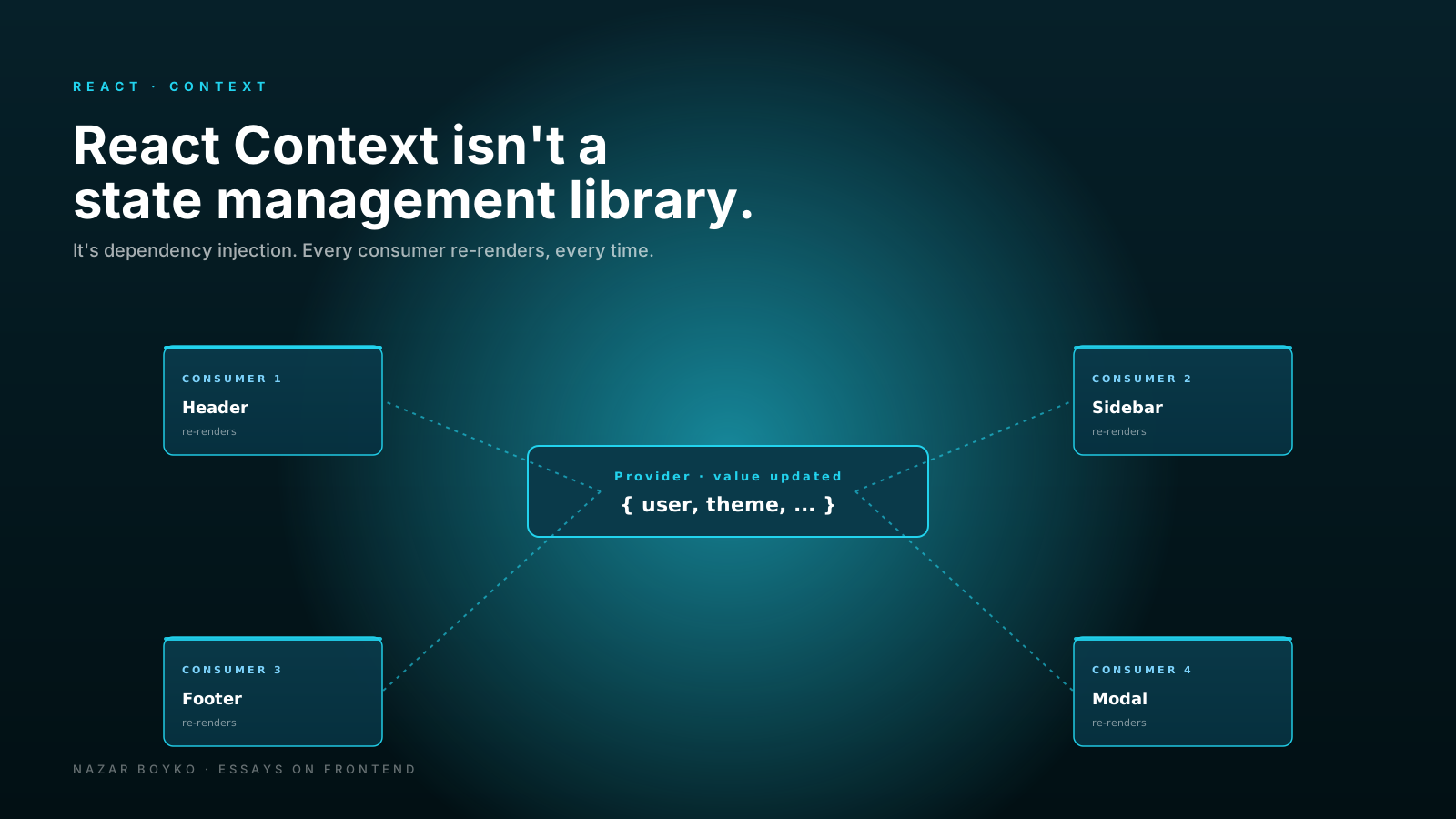
There's a moment in many React projects where a developer types createContext, wraps the whole app in a provider, and announces "we have state management now". Three months later the entire app re-renders every time anyone types into a search box, and nobody can figure out why.
This is the most common React performance pitfall I see, and it always traces back to the same misunderstanding: context is not a state management library. It's a transport mechanism — a way to make a value available to deeply nested children without prop-drilling. Anything else you put on top is your responsibility, including the parts that real state libraries handle for you.
This article is about understanding that line, and what to do once you know where it is.
What Context Actually Does
The mental model that fits is dependency injection. A Provider declares "here is a value at this point in the tree". A useContext consumer says "give me whatever the closest provider has for this slot". That's it. There's no store. There's no subscription model with selectors. There's no built-in change detection beyond "did the value reference change?"
const ThemeContext = createContext('light');

function App() {
  return (
    <ThemeContext.Provider value="dark">
      <Page />
    </ThemeContext.Provider>
  );
}

function Button() {
  const theme = useContext(ThemeContext);
  return <button data-theme={theme}>Click</button>;
}
If the value passed to the provider gets a new identity (Object.is says it's different), every component that reads the context re-renders. Every. One. There is no way to opt out, no selector to subscribe to a slice, no equality function. If you give context a fresh object on every parent render, you've just made every consumer re-render every parent render.
The Trap: Bundling Unrelated State
The pattern that goes bad fast looks like this:
function AppProvider({ children }) {
  const [user, setUser] = useState(null);
  const [theme, setTheme] = useState('light');
  const [sidebar, setSidebar] = useState({ open: true });
  const [notifications, setNotifications] = useState([]);

  return (
    <AppContext.Provider value={{ user, setUser, theme, setTheme, sidebar, setSidebar, notifications, setNotifications }}>
      {children}
    </AppContext.Provider>
  );
}
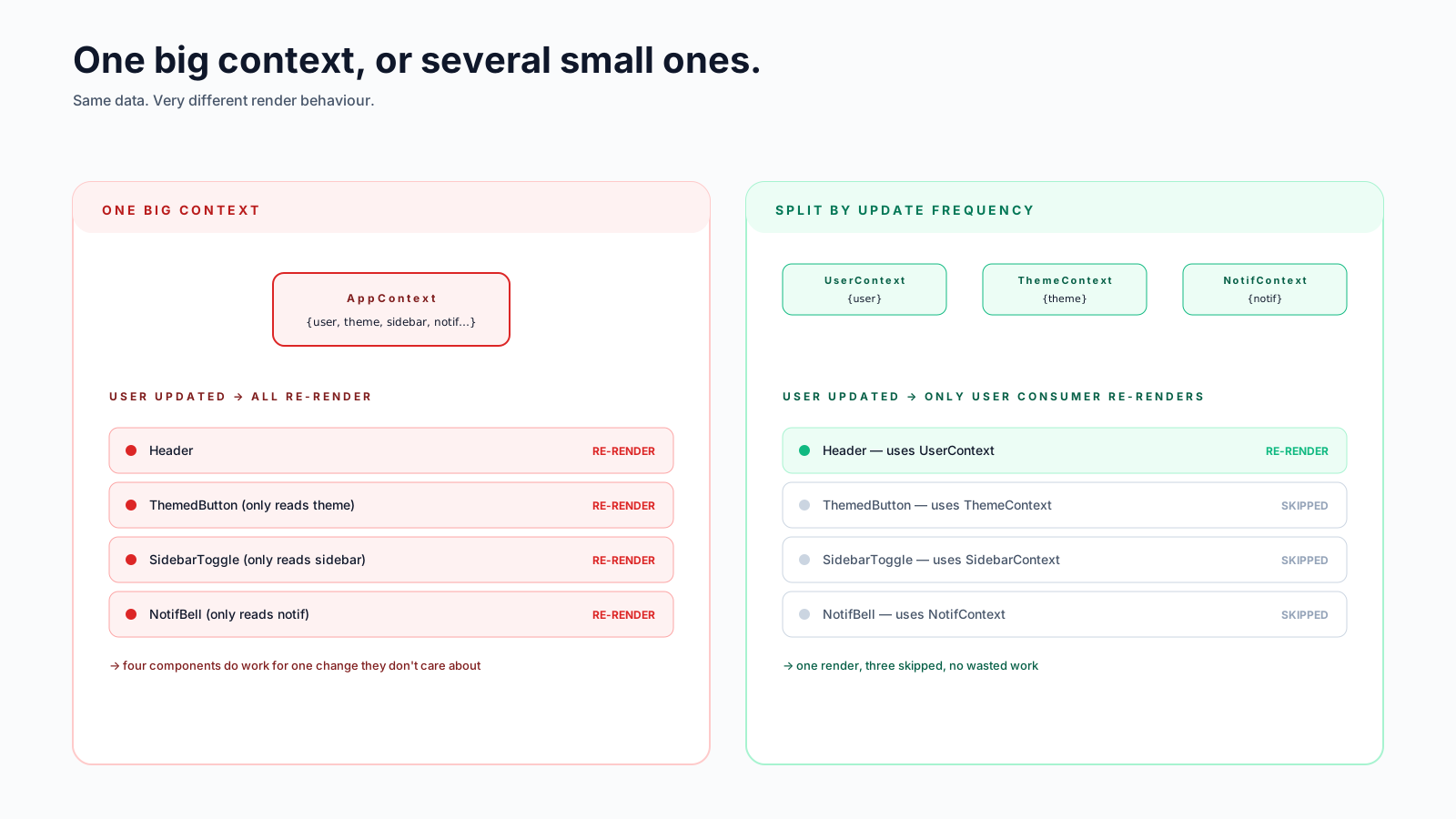
Two things are wrong here. First, the value prop is a brand-new object on every render of AppProvider. Every consumer re-renders even when nothing they care about changed. Second, even if you wrap that object in useMemo, every consumer still re-renders when any field changes — a notification arrives and your theme-aware button re-renders. There's no way to say "I only care about theme".
Fix #1: Split Contexts By Update Frequency
The single most useful refactor for context-heavy apps is splitting one big context into several small ones, grouped by how often they change.
const UserContext = createContext(null);
const ThemeContext = createContext('light');
const SidebarContext = createContext({ open: true });
const NotificationsContext = createContext([]);
Now changes to notifications don't re-render theme consumers, and vice versa. This isn't a micro-optimisation — it's the difference between a quiet UI and one that flickers on every interaction.
Fix #2: Memoise The Provider Value
Even with split contexts, the provider value should be stable across renders that don't actually change it:
function ThemeProvider({ children }) {
  const [theme, setTheme] = useState('light');

  const value = useMemo(
    () => ({ theme, setTheme }),
    [theme]
  );

  return <ThemeContext.Provider value={value}>{children}</ThemeContext.Provider>;
}
Without useMemo, every render of ThemeProvider (which can happen for unrelated reasons) creates a new { theme, setTheme } object. Consumers re-render even though the underlying values haven't changed. With useMemo, the value reference is stable until theme actually changes.
Fix #3: Split Read From Write
This is the trick that quietly fixes a lot of context performance issues. The setter doesn't change between renders (state setters are stable), but the value does. So put them in two different contexts:
const ThemeStateContext = createContext('light');
const ThemeDispatchContext = createContext(() => {});

function ThemeProvider({ children }) {
  const [theme, setTheme] = useState('light');
  return (
    <ThemeDispatchContext.Provider value={setTheme}>
      <ThemeStateContext.Provider value={theme}>
        {children}
      </ThemeStateContext.Provider>
    </ThemeDispatchContext.Provider>
  );
}

function useTheme() { return useContext(ThemeStateContext); }
function useSetTheme() { return useContext(ThemeDispatchContext); }
Now a component that only needs setTheme (a settings dropdown, say) doesn't re-render when theme changes. The dispatch context's value is stable forever. This pattern shows up in the React docs and a few popular state libraries — it's not something I made up.
When Context Is The Right Tool
After all these caveats, context is genuinely good for a specific kind of value:
- Stable, rarely-changing identity values. Current user, locale, feature flags, the i18n function.
- Theme. Changes when the user toggles, not on every render.
- Configuration injected from above. "Which API base URL should this subtree call?" "Which logger should it use?" — actual dependency injection.
- Compound component communication. When
<Tabs>wants<TabPanel>to know which tab is active, context is exactly right (and stays internal to the component).
These all share two properties: the value changes infrequently, and most of the tree wants to read it. That's the sweet spot.
When Context Is Not The Right Tool
- Cart contents, draft document, anything that updates fast. Use a real store with selectors.
- Server data. Use a server-state library. The cache is the store.
- State that's only read by one subtree. Lift it to that subtree's root, don't make it global.
- State that needs middleware, persistence, devtools, or time travel. Redux Toolkit / Zustand earn their keep here.
The "use(Context)" Note
In React 19, useContext got a sibling: use(Context). The big difference is that use() can be called conditionally — it doesn't fall under the Rules of Hooks restrictions that apply to useContext.
function Page() {
  if (someCondition) return null;
  const theme = use(ThemeContext);   // ✅ allowed; the conditional return is fine
  return <Themed theme={theme} />;
}
The same shape with useContext would violate the Rules of Hooks (the lint rule react-hooks/rules-of-hooks flags it, and inconsistent hook ordering across renders can cause subtle bugs). use() lifts that restriction.
use() is also the way to read context inside React Server Components when the context is supported. Note that in Next.js App Router specifically, createContext is not allowed in Server Components — you can only consume a context inside a 'use client' subtree. That's a framework constraint, not a React one, but it's the situation most readers will run into.
The performance characteristics are otherwise the same — every consumer still re-renders when the value changes. use() is a flexibility improvement, not a performance one.
A Real Store In Three Lines, For Comparison
If you find yourself fighting context — wrapping everything in useMemo, splitting into ten small contexts, juggling state vs dispatch — that's usually the moment to graduate. The smallest store with selectors is shorter than the context plumbing it replaces:
import { create } from 'zustand';

const useApp = create(() => ({
  user: null,
  theme: 'light',
  notifications: [],
}));

// only re-renders when user changes
const user = useApp(s => s.user);
Zustand uses useSyncExternalStore under the hood, gives you fine-grained subscriptions for free, and weighs about a kilobyte. There's no provider, no useMemo dance, no split contexts. When that's what you actually want, just use it.
The Honest Summary
Context is great. Context is not Redux. Knowing where the line is — value reference equality drives re-renders, no selectors, no middleware — turns context from a performance footgun into a quietly useful tool.
Three habits to keep:
- Split big contexts into small ones grouped by change frequency.
- Memoise the value.
- Split read from write when the setter is more popular than the value.
Do those, and context will quietly do its job for years. Skip them, and you'll be writing a lot of useMemos wondering why everything still re-renders.






