
Custom hooks were probably the most clever idea in React's whole hook system. The pitch was simple: any function whose name starts with use can call other hooks, which means you can compose hooks the same way you compose functions. The result is the cleanest mechanism for sharing stateful logic the framework has ever had.
It's also the easiest one to overuse. I've seen codebases where every component has its own custom hook, every hook calls three more, and a one-line render touches eight files before any actual JSX shows up. The hooks aren't wrong individually — they just aren't earning their keep.
This article is about telling the difference.
What Custom Hooks Actually Are
A custom hook is a function. That's the whole secret. The only thing that distinguishes it from a regular function is that it can call other hooks — useState, useEffect, useContext, anything starting with use. Because of that, the rules of hooks apply: same number of hook calls in the same order, every render. Don't call them in loops, conditions, or nested functions.
function useDocumentTitle(title) {
  useEffect(() => {
    const previous = document.title;
    document.title = title;
    return () => { document.title = previous; };
  }, [title]);
}
That's a complete custom hook. It looks like a function because it is a function. The use prefix isn't magic — it's a signal to React's linter (and to humans) that the thing inside calls hooks.
When Custom Hooks Earn Their Keep
Four shapes fit naturally. Outside of these, ask twice before reaching for one.
1. Wrapping a subscription pattern.
Anything with a "subscribe + unsubscribe" lifecycle becomes much cleaner as a hook:
function useOnlineStatus() {
  const [online, setOnline] = useState(navigator.onLine);

  useEffect(() => {
    const update = () => setOnline(navigator.onLine);
    window.addEventListener('online', update);
    window.addEventListener('offline', update);
    return () => {
      window.removeEventListener('online', update);
      window.removeEventListener('offline', update);
    };
  }, []);

  return online;
}
Now any component just calls const isOnline = useOnlineStatus(). The setup, teardown, and edge cases are written once. (For production code, prefer useSyncExternalStore here — it's concurrent-safe.)
2. Encapsulating non-trivial state logic.
When state has more than one transition rule, a hook is a good place to keep them together:
function useToggle(initial = false) {
  const [value, setValue] = useState(initial);
  const toggle = useCallback(() => setValue(v => !v), []);
  const setTrue = useCallback(() => setValue(true), []);
  const setFalse = useCallback(() => setValue(false), []);
  return { value, toggle, setTrue, setFalse };
}
Tiny, but every consumer gets the same well-named transitions. If you ever need to change one (rename, add logging), you do it in one place.
3. Wrapping a third-party imperative API.
Charts, maps, video players, drag-and-drop libraries — anything that wants you to call methods on a ref. A hook turns it into something declarative:
function useChart(canvasRef, data) {
  const chartRef = useRef(null);

  useEffect(() => {
    if (!canvasRef.current) return;
    chartRef.current = new ChartLib(canvasRef.current, data);
    return () => chartRef.current.destroy();
  }, [canvasRef]);

  useEffect(() => {
    chartRef.current?.update(data);
  }, [data]);
}
The component now just renders a <canvas ref={canvasRef} /> and calls the hook. The imperative dance is hidden where it belongs.
4. Sharing reusable side-effecty logic.
useDebounce, useLocalStorage, useMediaQuery, useInterval — small, well-known patterns that show up across components. Most teams have a shared/hooks/ folder for these. Five-line hooks beat copy-pasting useEffect blocks.
When Custom Hooks Become Hidden Complexity
The problem patterns I see most often:
1. The hook with hidden side effects.
function useCart(userId) {
  const [cart, setCart] = useState([]);

  useEffect(() => {
    fetch(`/api/cart?userId=${userId}`).then(r => r.json()).then(setCart);
  }, [userId]);

  const addItem = (item) => {
    fetch('/api/cart/add', { method: 'POST', body: JSON.stringify(item) });
    setCart(c => [...c, item]);
    sendAnalytics('cart_add', item);
  };

  return { cart, addItem };
}
Looks fine. Now imagine a colleague calls this hook in two components on the same page. Two GET requests fire. Each addItem triggers two state updates and two analytics events. The hook looks declarative but it's quietly punching holes through your network and analytics layers.
The cure is usually to move the network parts to a server-state library and let the hook only manage UI concerns. If the hook hits the network, it should say so by being named useCartQuery or built on top of useQuery.
2. The hook chain.
function useUserProfile() {
  const user = useUser();
  const settings = useUserSettings(user?.id);
  const avatar = useAvatar(settings?.avatarId);
  const status = useStatusBadge(user, settings);
  return { user, settings, avatar, status };
}
Each one is innocent. Together, they're a four-step network waterfall hidden inside one render. The component that calls this hook has no way of knowing why it's slow. The right shape is usually one query that fetches everything together, or making the dependencies explicit at the call site so they're visible.
3. The hook that returns 14 things.
const { value, setValue, reset, isDirty, isValid, errors, validate, ...When a hook returns more than ~5 things, it's usually two hooks pretending to be one. Splitting them often makes both easier to test and reuse.
4. The shared ref nightmare.
function useGlobalToast() {
  const ref = useRef(null);
  // ... uses ref.current.show(...)
}
If two components call useGlobalToast(), they each have their own ref — the toast doesn't actually broadcast. Hooks are per call. Anything that needs to be truly global goes in a real store or a singleton outside React, exposed via a hook.
The Smell Test
When you're deciding whether to extract a custom hook, ask:
- Does it have a single, namable purpose? "Sync with localStorage" — yes. "Manage the dashboard" — no.
- Is the extracted hook simpler at the call site than the original code? If the call site is the same length plus an import, you saved nothing.
- Does it hide a side effect that should be visible? Network calls, global subscriptions, timers — these often belong on the surface.
- Could it be a regular function? If your hook doesn't call any other hooks, it's just a function. Make it one.
The fourth point is the most common micro-mistake. A hook like:
function useFormatPrice(amount, currency) {
  return new Intl.NumberFormat('en-US', { style: 'currency', currency }).format(amount);
}
This is a regular function pretending to be a hook. There's no state, no effect, no React-specific behaviour. Make it formatPrice(amount, currency) and remove the use prefix — saves a lint warning and a layer of indirection.
A Worked Example: From "OK" To "Good"
Here's a hook from a real codebase that started reasonable and slowly grew teeth:
function useUserSearch(initialQuery = '') {
  const [query, setQuery] = useState(initialQuery);
  const [results, setResults] = useState([]);
  const [loading, setLoading] = useState(false);
  const [history, setHistory] = useState(() =>
    JSON.parse(localStorage.getItem('search-history') || '[]')
  );

  useEffect(() => {
    if (!query) return;
    setLoading(true);
    fetch(`/api/users?q=${query}`)
      .then(r => r.json())
      .then(data => {
        setResults(data);
        setHistory(h => [query, ...h].slice(0, 10));
      })
      .finally(() => setLoading(false));
  }, [query]);

  useEffect(() => {
    localStorage.setItem('search-history', JSON.stringify(history));
  }, [history]);

  return { query, setQuery, results, loading, history };
}
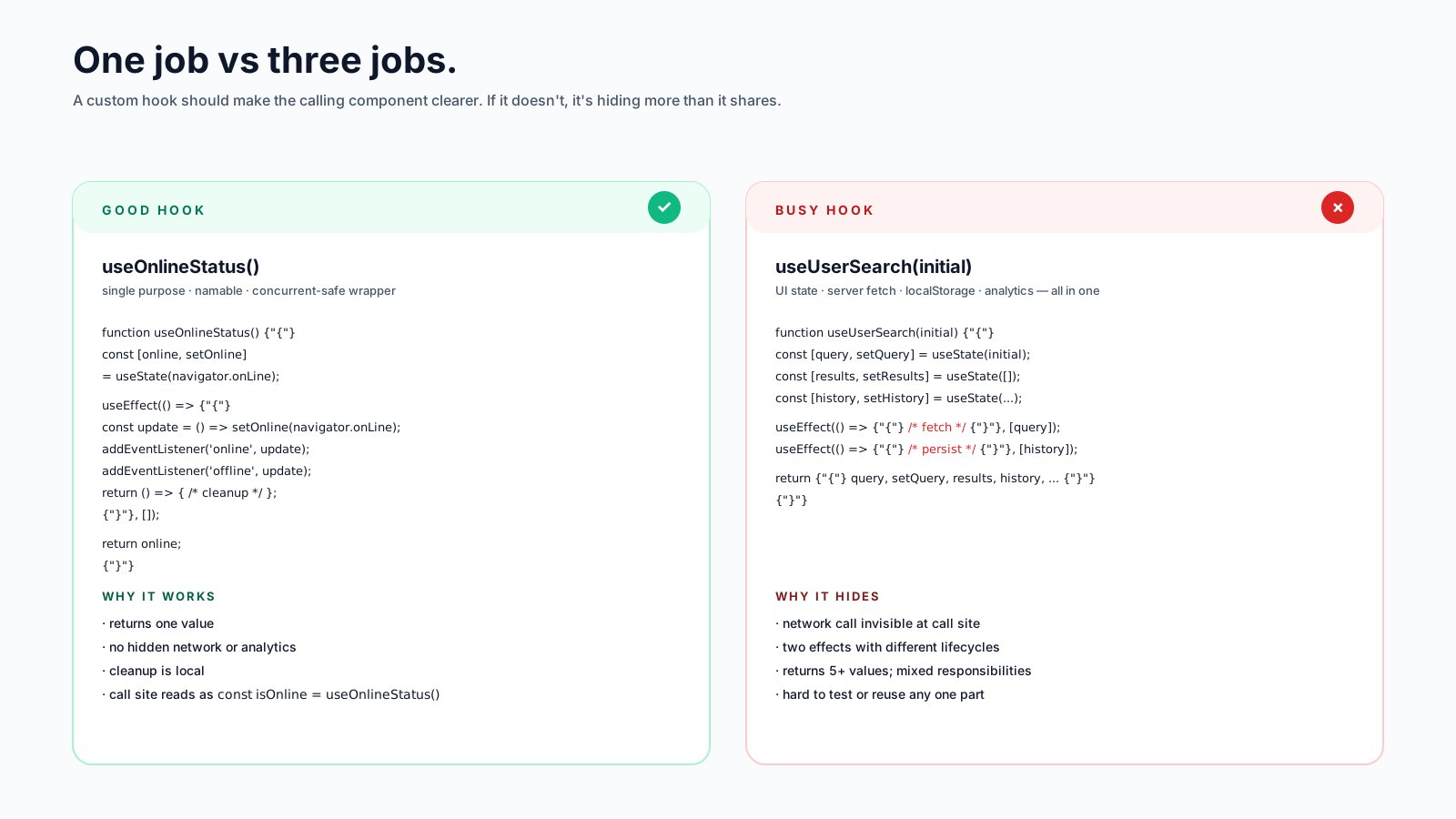
It works. It also bundles three concerns: the search query (UI state), the network results (server state), and the history persistence (browser state). Three different responsibilities, three different lifecycles, three different bug surfaces.
The split version:
// pure UI state
function useSearchQuery(initial = '') {
  const [query, setQuery] = useState(initial);
  return [query, setQuery];
}

// server state — uses TanStack Query under the hood
function useUserSearchResults(query) {
  return useQuery({
    queryKey: ['users', 'search', query],
    queryFn: () => fetch(`/api/users?q=${query}`).then(r => r.json()),
    enabled: !!query,
  });
}

// browser state — uses useSyncExternalStore via a small library
function useSearchHistory() {
  return useLocalStorage('search-history', [], { max: 10 });
}
Each piece is testable on its own. Each one uses the right tool. The component that uses all three composes them at the call site, which is the place where you want the seams to be visible.
The Honest Summary
Custom hooks are a sharp tool. They reward composition and reuse better than any pattern React shipped before them. They also let you abstract too early, hide network calls, and produce indirection that doesn't pay rent.
Use them when:
- The logic is genuinely reusable across multiple components.
- The lifecycle (subscribe / unsubscribe, mount / unmount) is repetitive.
- You're wrapping an imperative third-party API.
Skip them when:
- The "hook" doesn't call any other hooks — that's a function.
- You'd be the only consumer.
- The hook returns more than ~5 things, or has more than one job.
The goal of a custom hook is to make the calling component clearer. If it doesn't, the abstraction isn't earning its keep.






