
For a long time, Suspense was the React feature people kept hearing about and never quite using. The early demos relied on libraries that didn't exist yet. The "official" way to fetch data with Suspense kept changing. By 2026, the dust has settled — Suspense is real, it's stable, and there are four very specific situations where it makes your code dramatically simpler.
This article is the practical version. What Suspense actually is, the four use cases it shines in, and the things it doesn't try to replace.
What Suspense Actually Does
Suspense is a way to tell React: "if anything inside this boundary isn't ready, show this fallback instead, and try again later." The mechanism is a thrown promise. When a child throws a promise during render, the closest <Suspense> ancestor catches it, renders its fallback, and re-renders the child once the promise resolves.
<Suspense fallback={<Spinner />}>
  <UserProfile id={42} />
</Suspense>
That's the entire surface. The suspending logic — the part that "throws a promise" — lives inside the data-fetching library or the React feature you're using (React.lazy, use(promise) in React 19, server components, etc.). You almost never throw promises by hand.
The crucial thing: Suspense doesn't fetch anything itself. It's a coordinator. Something else fetches; Suspense orchestrates the loading UI.
Use Case 1: Code Splitting With React.lazy
This is the oldest, most stable use of Suspense, and the one most teams already use:
import { lazy, Suspense } from 'react';

const Reports = lazy(() => import('./Reports'));

function App() {
  return (
    <Suspense fallback={<Skeleton />}>
      <Routes>
        <Route path="/reports" element={<Reports />} />
      </Routes>
    </Suspense>
  );
}
React.lazy returns a component that, when first rendered, suspends while the JS chunk downloads. Suspense shows the skeleton during the download. Once the chunk is ready, the real component renders. No loading state to track manually, no useEffect to wire up — the render result is the loading state.
For Next.js App Router and modern routers, route-based code splitting happens automatically. Suspense at the layout level lets you control the loading skeleton without writing any conditional logic.
Use Case 2: Data Fetching With Suspense-Aware Libraries
The story changed quietly over the last few years. TanStack Query, SWR, and Relay all support Suspense mode. Use it and the loading UI moves into the boundary, not the component:
import { useSuspenseQuery } from '@tanstack/react-query';

function UserProfile({ id }) {
  // No isLoading. No data?.name. The query suspends until ready.
  const { data: user } = useSuspenseQuery({
    queryKey: ['user', id],
    queryFn: () => fetch(`/api/users/${id}`).then(r => r.json()),
  });

  return <Profile user={user} />;
}

function Page() {
  return (
    <Suspense fallback={<ProfileSkeleton />}>
      <UserProfile id={42} />
    </Suspense>
  );
}
The body of UserProfile is now linear: there is no loading branch, no if (!user) return null. The data is always available by the time the component runs. The boundary handles the wait, the error boundary (one level up) handles the failure.
This is the cleanest data-loading code I've written in React. Whenever I remember to use it, I wonder why I went years without.
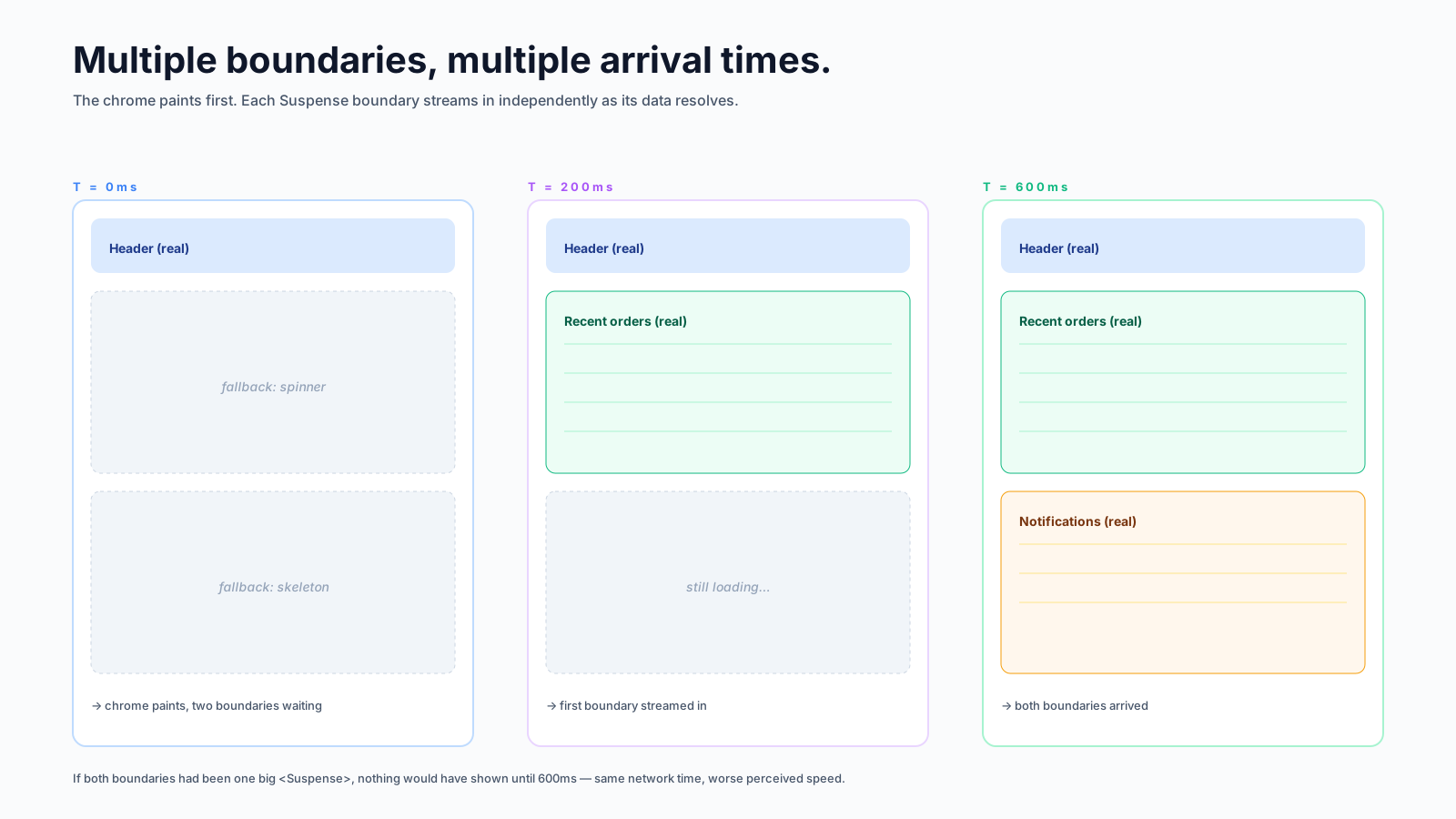
The trade-off is that suspending blocks the render of the entire boundary's children. If you have ten widgets that fetch in parallel and you put one Suspense around them all, the user waits for all ten before seeing anything. The fix is multiple smaller boundaries — one per widget — so each renders the moment its data lands.
Use Case 3: React Server Components
In RSC (Next.js App Router, etc), an async server component is naturally Suspense-aware. The first render of the component runs the await; the matching <Suspense> boundary handles the wait:
// app/dashboard/page.tsx — Server Component
export default async function Page() {
  return (
    <main>
      <h1>Dashboard</h1>
      <Suspense fallback={<Spinner />}>
        <RecentOrders />
      </Suspense>
      <Suspense fallback={<Spinner />}>
        <Notifications />
      </Suspense>
    </main>
  );
}

async function RecentOrders() {
  const orders = await db.orders.list();
  return <OrderList orders={orders} />;
}
RecentOrders and Notifications stream in independently. The page sends the static parts immediately, then streams in each Suspense boundary's content as its data resolves. The user sees the heading instantly and the data fills in. This is where Next.js gets a lot of its perceived speed — the user thinks the page loaded fast because the chrome arrived first.
For this to feel good, the boundaries need to wrap the smallest reasonable unit. Wrapping the whole page in one Suspense means streaming buys you nothing.
Use Case 4: Lazy Images And Other Async Resources
A less-discussed use: components that wrap an async resource (an image preload, a font, a third-party widget). The use() hook in React 19 makes this almost trivial:
import { use } from 'react';

function preloadImage(src) {
  return new Promise((resolve, reject) => {
    const img = new Image();
    img.src = src;
    img.onload = () => resolve(src);
    img.onerror = reject;
  });
}

function ImageBlock({ src }) {
  use(preloadImage(src));      // suspends until the image is decoded
  return <img src={src} />;
}

function Gallery() {
  return (
    <Suspense fallback={<ImageSkeleton />}>
      <ImageBlock src="/photo.jpg" />
    </Suspense>
  );
}
The fallback shows a skeleton while the image decodes. There's no flash of broken-image, no layout shift, no "show low-res then high-res" flicker. (In production, you'd cache the promise per src so you don't re-fetch on every render — that's the kind of detail libraries handle for you.)
The Things Suspense Doesn't Do
Important to be honest about:
- Suspense doesn't fetch. It needs a data layer that knows how to suspend. You can't drop a
useState+useEffectfetch behind a Suspense boundary and expect it to work. - Suspense doesn't catch errors. Pair it with an error boundary. Loading state + failure state = Suspense + error boundary, in that order.
- Suspense doesn't replace
useState. Local UI state is still local UI state. - Suspense doesn't make network calls faster. It just rearranges where the waiting happens. If the fetch takes 2 seconds, you still wait 2 seconds — you just see a nicer fallback.
- Suspense in concurrent mode can be subtle. Updates inside
startTransitiondon't trigger a fallback if the previous content is still on screen — they keep the old UI visible while loading. This is usually what you want, but worth knowing about when "where did my fallback go?" comes up.
A Practical Pattern: Suspense + Error Boundary + ResetKeys
The shape that has earned its keep:
<ErrorBoundary
  resetKeys={[userId]}
  fallbackRender={({ error, resetErrorBoundary }) => (
    <ErrorView error={error} onRetry={resetErrorBoundary} />
  )}
>
  <Suspense fallback={<ProfileSkeleton />}>
    <UserProfile userId={userId} />
  </Suspense>
</ErrorBoundary>
Loading, success, and failure handled in three lines. The component itself contains zero conditional logic for these cases. This is the form I reach for almost every time I write a data-driven component now.
When Not To Use Suspense
A few situations where it's overkill:
- You're showing data the user just typed. No fetching, no async, no need for Suspense.
useStateand render. - The fallback would look the same as the eventual content (e.g. a 1-pixel change). Save the boundary.
- The data is already in cache and you want it inline immediately. Use the non-Suspense version (
useQueryinstead ofuseSuspenseQuery) so the cached value renders without re-mounting. - Streaming SSR isn't supported by your hosting. Static export environments can't stream. Suspense still works for client-side splitting, but you lose the SSR streaming benefit.
A One-Sentence Mental Model
Suspense is React's built-in way to say "here's what to show while waiting for something to be ready". The "something" can be a JS chunk, a network request, an image, a server component — anything that knows how to suspend. The "show" is whatever you put in fallback. Once you internalise that, the rest of the API is small, and the patterns above cover almost every real use case.






