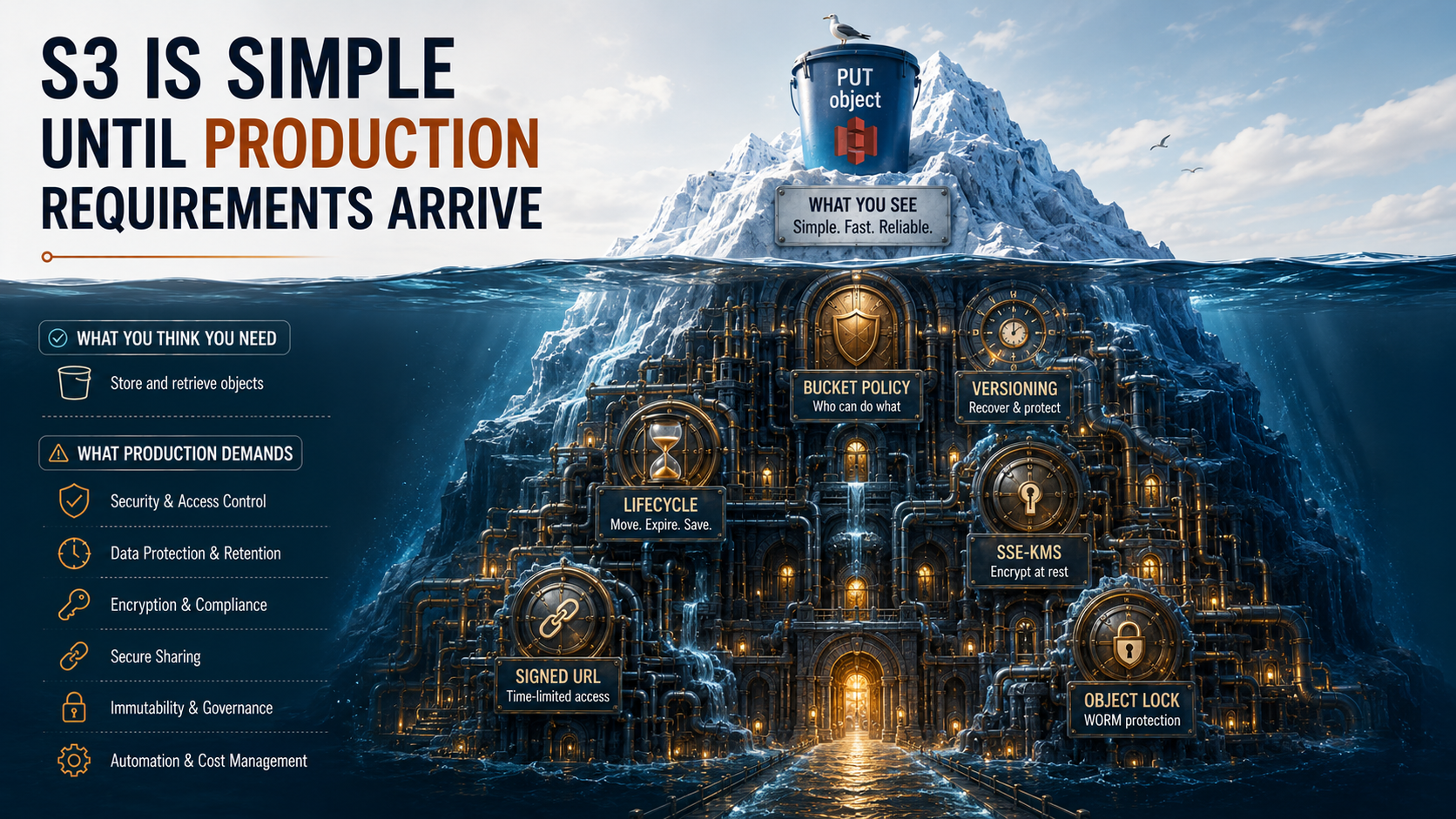
So, you've used S3.
It's the AWS service everyone learns first. aws s3 cp ./report.pdf s3://my-bucket/ and you're done. The file's there. You can curl it from anywhere. You feel slightly invincible. The dashboard says it costs you less than a coffee per month.
Then production happens.
Someone uploads a 4GB log dump and your bill triples. A regulator asks where personal data is stored and you can't answer with a straight face. A QA engineer accidentally overwrites the daily export with an empty file. A leaked CDN link gives the entire internet a year of read access to your internal reports. A junior dev creates a public bucket with a great name and gets a cease-and-desist from the team that already owned it three years ago.
None of this is S3 being broken. It's all S3 working exactly as documented. The problem is that the five-line tutorial covers maybe 4% of the surface area you actually need before you ship.
This is the rest of it. Buckets, versioning, lifecycle rules, encryption, signed URLs. Five quiet decisions that decide whether S3 is a delight or a disaster.
The Bucket Is The Decision You Can't Undo
A bucket looks like a folder. It isn't. A bucket is a globally-unique account-owned namespace that lives in exactly one region forever, and almost every later decision you make hangs off it.
Let's name what's actually being chosen when you type aws s3 mb s3://my-app-prod:
The name is global. Across all AWS accounts in a partition, every bucket name is unique. If my-app-prod is taken, you cannot use it. Not even in a different region, not even in a different account. This is the only AWS resource with this property, and it's the reason teams end up with names like acme-corp-prod-app-eu-west-1-data-2024. Pick a naming convention before you make your first bucket, not after.
The region is locked. Once you create a bucket in eu-west-1, it lives there. There is no "move bucket" button. To move data to another region you create a new bucket and replicate or copy. Cross-region replication helps, but it's not retroactive: it covers objects written after you enable it. Pick the region thinking about latency to your users, the region of your other services, and the region your regulators care about.
The DNS is yours. Every bucket gets a hostname: my-app-prod.s3.eu-west-1.amazonaws.com. Public buckets are addressable from anywhere on the internet if the bucket policy and Block Public Access settings allow it. The default for new buckets has been "all public access blocked" since 2023. Please don't be the person who turns this off without a good reason.
The account ownership matters. When an object is uploaded by a different account (e.g., a customer uploading via presigned URL), the object can end up owned by them, not by the bucket owner. This breaks the assumption "I own my bucket, I own my objects". The fix is the Bucket Ownership Controls setting: set to BucketOwnerEnforced and ACLs are disabled entirely, all objects belong to the bucket owner. Make this the default for every new bucket you create.
Here's the smallest sane bucket creation flow:
BUCKET="acme-reports-prod"
REGION="eu-west-1"

aws s3api create-bucket \
  --bucket "$BUCKET" \
  --region "$REGION" \
  --create-bucket-configuration LocationConstraint="$REGION"

aws s3api put-bucket-ownership-controls \
  --bucket "$BUCKET" \
  --ownership-controls 'Rules=[{ObjectOwnership=BucketOwnerEnforced}]'

aws s3api put-public-access-block \
  --bucket "$BUCKET" \
  --public-access-block-configuration \
    BlockPublicAcls=true,IgnorePublicAcls=true,BlockPublicPolicy=true,RestrictPublicBuckets=true
Three calls. Five seconds. They prevent more incidents than any monitoring you'll ever add.
Versioning: The Feature That Pays For Itself On The Day You Need It
S3 versioning is the most "I'll turn it on later" feature in the entire AWS catalogue. It's also the one that quietly saves you the moment someone runs the wrong delete.
When versioning is off (the default for new buckets), every PUT to a key overwrites the previous object. Gone. No recovery. When versioning is on, every PUT creates a new version with a unique version ID, and every DELETE creates a "delete marker," a tombstone that hides the object without actually removing the bytes. You can recover by deleting the delete marker or by reading a specific version ID.
Turning it on is one call:
aws s3api put-bucket-versioning \
  --bucket acme-reports-prod \
  --versioning-configuration Status=Enabled
Now every overwrite is recoverable. The catch, and there's always a catch, is that versioning never deletes anything on its own. Every overwrite costs you storage for both the new and the old version. Forever. If you push a 100MB build artifact to the same key every hour for a year, you have 876 versions × 100MB = 85GB of storage you may not have noticed.
This is where versioning meets lifecycle rules, which we'll get to in a moment. The two features are designed to work together: versioning gives you recovery; lifecycle rules clean up the old versions on a schedule you choose.
A few sharp edges worth knowing before you flip the switch:
- You can't turn versioning fully off again. Once enabled, the only options are
EnabledorSuspended. Suspended means new writes don't create versions, but existing versions stay until you explicitly delete them. - MFA Delete is a separate flag you can layer on top of versioning. It requires a hardware MFA token to permanently delete a version or to suspend versioning. It can only be enabled by the root user of the AWS account, not by an IAM user, and only via the CLI or API. It's annoying. That's the point: it stops a compromised admin role from wiping years of data in one call.
- Delete markers are versions too. When you list objects with
aws s3api list-object-versions, you'll see them as separate entries withIsLatest: true. Removing the marker reveals the underlying object.
If you want one rule of thumb: turn versioning on for any bucket that holds something a human created or that powers production. Turn it off (or never turn it on) for caches, derived data, and anything you'd happily regenerate.
Lifecycle Rules: The Bill Killer
Storage in S3 is cheap. Storage at scale, kept forever, in the wrong storage class, with thousands of orphaned multipart uploads and a year of non-current versions. That's where the bill gets weird.
Lifecycle rules are how you stop that from happening without writing your own cron. They're JSON declarations that say "after N days, do this to objects matching this filter". The actions are:
- Transition the object to a cheaper storage class (Standard → Standard-IA → Glacier Instant Retrieval → Glacier Flexible Retrieval → Glacier Deep Archive).
- Expire the current version (delete it, leaving only delete markers if versioning is on).
- Expire non-current versions (clean up old versions created by overwrites).
- Abort incomplete multipart uploads (the silent killer: partial uploads that never finished and never expire on their own).
- Expire delete markers with no versions behind them (housekeeping).
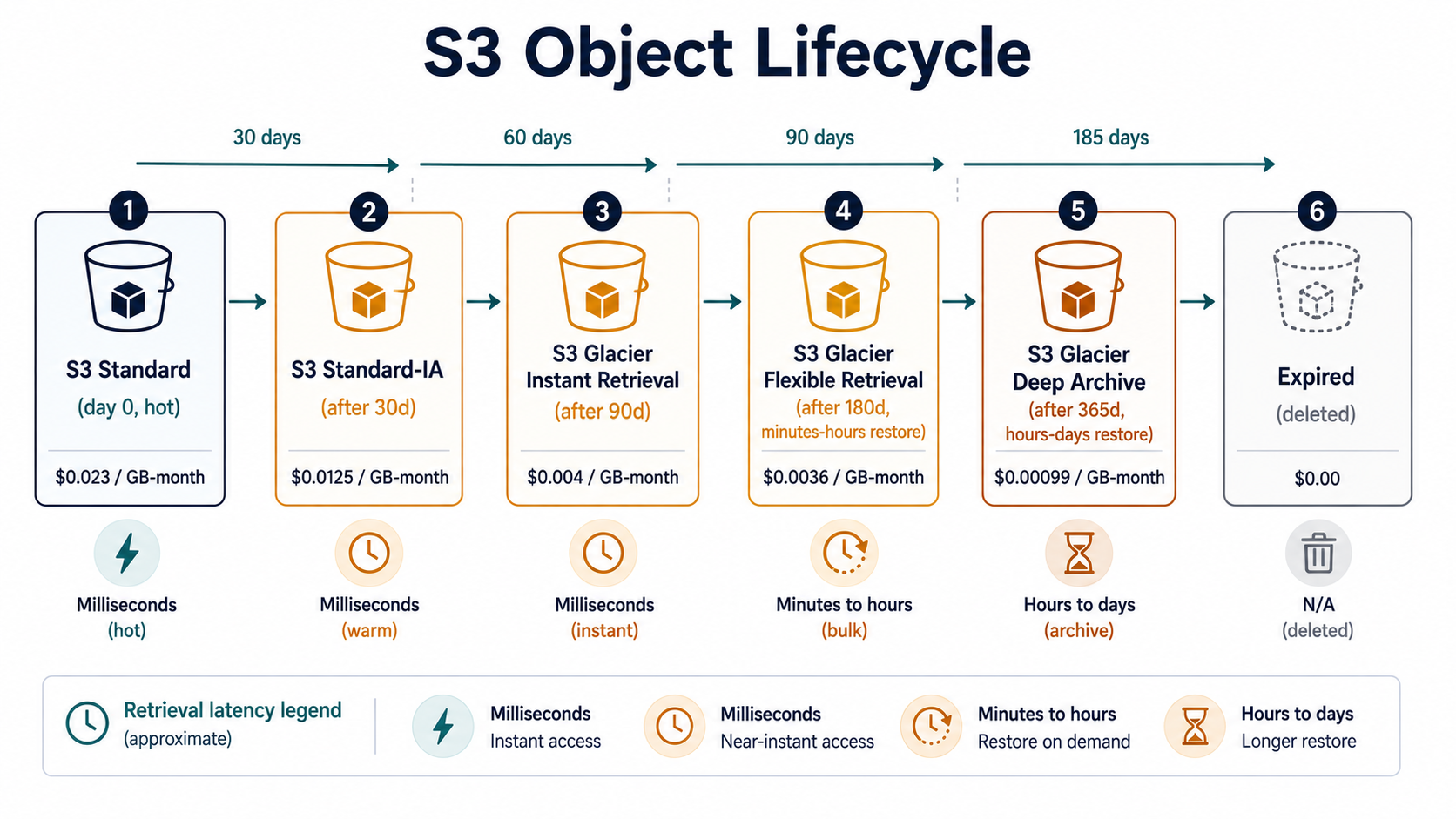
Here's a real-shaped lifecycle policy for a reports bucket that's versioned:
{
  "Rules": [
    {
      "ID": "tier-reports-to-cheaper-storage",
      "Status": "Enabled",
      "Filter": { "Prefix": "reports/" },
      "Transitions": [
        { "Days": 30,  "StorageClass": "STANDARD_IA" },
        { "Days": 180, "StorageClass": "GLACIER_IR" },
        { "Days": 365, "StorageClass": "DEEP_ARCHIVE" }
      ]
    },
    {
      "ID": "clean-up-old-versions",
      "Status": "Enabled",
      "Filter": {},
      "NoncurrentVersionExpiration": {
        "NoncurrentDays": 90
      }
    },
    {
      "ID": "abort-stuck-multipart-uploads",
      "Status": "Enabled",
      "Filter": {},
      "AbortIncompleteMultipartUpload": {
        "DaysAfterInitiation": 7
      }
    }
  ]
}
Three rules doing three different jobs: cool reports as they age, prune old versions after 90 days, abort multipart uploads that never finished within a week. Apply with one call:
aws s3api put-bucket-lifecycle-configuration \
  --bucket acme-reports-prod \
  --lifecycle-configuration file://reports-lifecycle.json
A few things that will bite you if you don't know them:
- Each storage class has a minimum storage duration. Standard-IA is 30 days, One Zone-IA is 30 days, Glacier Flexible Retrieval is 90 days, Deep Archive is 180 days. If you delete an object before the minimum, you still pay for the full minimum. Transitioning a 5KB temp file to Glacier and deleting it the next day is more expensive than leaving it in Standard.
- There's also a minimum object size for IA pricing. Objects smaller than 128KB transitioned to Standard-IA still get billed as 128KB. Don't tier tiny files. Either keep them on Standard or batch them into bigger archives first.
- Lifecycle transitions cost money per object. Each transition is a request you're billed for. A bucket with 10 million tiny objects transitioning daily is not the win you'd expect.
- Glacier restores are not free or instant. Glacier Flexible Retrieval takes minutes to hours; Deep Archive takes hours to days. You pay per GB restored and per request. Don't tier active datasets.
AbortIncompleteMultipartUploadis the rule everyone should add. Partial uploads from failed clients sit on your account and bill you indefinitely. They don't show up in the regular object listing. You can list them withaws s3api list-multipart-uploads --bucket ...and watch your eyes water. Set this lifecycle rule on every bucket, even ones you don't think do multipart uploads. Most AWS SDKs use multipart for anything over a few MB by default.
If you only ever take one thing from this section: every bucket should have AbortIncompleteMultipartUpload and a NoncurrentVersionExpiration rule. The other transitions are an optimization you do on purpose; those two are hygiene you do on day one.
Encryption: Three Letters That Decide Three Things
"Encrypt my S3 data" sounds like one decision. It's three.
- Who holds the key?
- Who pays for the key operations?
- What do I want the audit log to look like?
S3 gives you four options, and the difference between them is exactly those three questions.
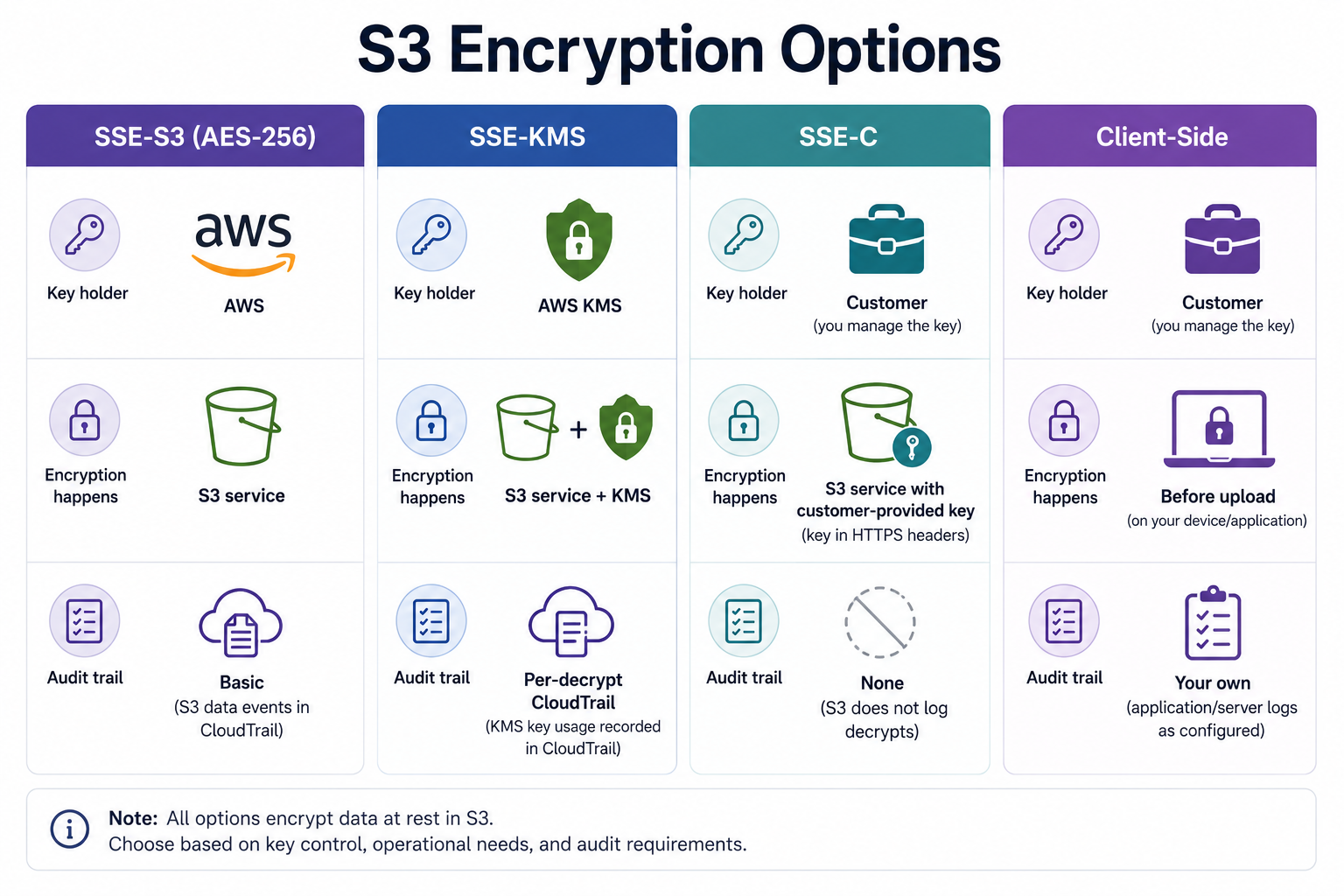
SSE-S3 is the default since 2023 on all new buckets. AWS holds the keys, AWS rotates them, AWS does the encrypt and decrypt. From your code's perspective, encryption is invisible. Every GetObject just works. There's no extra cost. There's also no per-object decrypt entry in CloudTrail and no way to revoke access via the key (since you don't control it). Fine for most data. Not enough for regulated data.
SSE-KMS uses an AWS KMS key, either AWS-managed (aws/s3) or a customer-managed CMK. Every encrypt and decrypt is a kms:Encrypt / kms:Decrypt call that shows up in CloudTrail, every call is billed at KMS request pricing, and the key can be revoked. Disable the CMK and every object encrypted with it becomes unreadable, immediately, including for the IAM principal that wrote them. That's the feature, not the bug. It's also the foot-gun: a misconfigured key policy makes objects you wrote yesterday unreadable today.
KMS request costs add up fast on hot buckets: every GetObject is at least one Decrypt. The fix is S3 Bucket Keys: enable them and S3 uses a single bucket-level data key per a fixed period, dropping per-object KMS calls by orders of magnitude. The trade-off is slightly coarser auditing. Instead of one CloudTrail entry per object decrypt, you get one per bucket-key rotation. Enable bucket keys on any SSE-KMS bucket that gets meaningful traffic.
aws s3api put-bucket-encryption \
  --bucket acme-reports-prod \
  --server-side-encryption-configuration '{
    "Rules": [{
      "ApplyServerSideEncryptionByDefault": {
        "SSEAlgorithm": "aws:kms",
        "KMSMasterKeyID": "arn:aws:kms:eu-west-1:111122223333:key/abcd-1234-...."
      },
      "BucketKeyEnabled": true
    }]
  }'
SSE-C is the option for paranoids. You provide the encryption key with every single request, both PUT and GET, and S3 holds nothing. AWS never sees the key, so AWS can never decrypt the object. Lose the key, lose the data. There's no CloudTrail entry that helps you, no recovery flow. Use it when a contract or regulator forbids any AWS-held keys and you've genuinely thought through key management. For 95% of teams, you don't want this.
Client-side encryption means you encrypt the bytes before the upload and decrypt them after the download. S3 sees only ciphertext. This is the right answer for end-to-end encrypted products where even AWS shouldn't see plaintext: encrypted file sync apps, password managers, healthcare data flows with HIPAA-style requirements. The libraries are non-trivial. The AWS Encryption SDK exists for a reason. Don't roll your own.
The most common mistake I see in production: a team enables SSE-KMS thinking they're "doing encryption properly", then writes a bucket policy that allows the engineering AWS account to kms:Decrypt the key, then gives that account to every engineer with read-only access. The objects are encrypted at rest, sure. They're also readable by 40 people. Encryption answers "what happens if AWS gets breached"; it doesn't answer "who in my own org can read this". That's IAM.
Signed URLs: The Feature Most Teams Misuse
A presigned URL is a regular S3 URL with a signature in the query string. The signature includes the action (GET or PUT), the bucket, the key, the expiry, and is created using the credentials of the IAM principal that signed it. Anyone with the URL can perform that exact action until it expires, no authentication required.
It's how you let a browser download a private object without proxying through your server. It's how you let a client upload directly to S3 without sending the file through your app first. It's the right tool for those jobs.
It's also the feature people footgun the most, because signing a URL feels like authentication when it's really authorization-with-no-revocation.
Here's what generating one looks like in the three SDKs most backend teams reach for:
import { S3Client, GetObjectCommand } from "@aws-sdk/client-s3";
import { getSignedUrl } from "@aws-sdk/s3-request-presigner";

const s3 = new S3Client({ region: "eu-west-1" });

export async function reportDownloadUrl(key: string) {
  const command = new GetObjectCommand({
    Bucket: "acme-reports-prod",
    Key: key,
  });

  return getSignedUrl(s3, command, { expiresIn: 300 }); // 5 minutes
}
import boto3
s3 = boto3.client("s3", region_name="eu-west-1")
def report_download_url(key: str) -> str:
return s3.generate_presigned_url(
ClientMethod="get_object",
Params={"Bucket": "acme-reports-prod", "Key": key},
ExpiresIn=300, # 5 minutes
)package storage
import (
"context"
"time"
"github.com/aws/aws-sdk-go-v2/aws"
"github.com/aws/aws-sdk-go-v2/service/s3"
)
func ReportDownloadURL(ctx context.Context, client *s3.Client, key string) (string, error) {
presigner := s3.NewPresignClient(client)
req, err := presigner.PresignGetObject(ctx, &s3.GetObjectInput{
Bucket: aws.String("acme-reports-prod"),
Key: aws.String(key),
}, s3.WithPresignExpires(5*time.Minute))
if err != nil {
return "", err
}
return req.URL, nil
}Now the rules nobody tells you on day one:
- Expiry has a hard ceiling. With Signature Version 4 (the only version that still works), the maximum expiry is 7 days. Don't set a week unless you mean it.
- The expiry you choose is also the maximum window an attacker has if the URL leaks. Logged in your access logs, copy-pasted to a Slack channel, screenshotted, indexed by a misconfigured proxy. A signed URL has no concept of "this user", only "anyone who knows this string, until time T".
- Credentials behind the signature outlive themselves only as long as they're valid. If you sign a URL with temporary credentials (an IAM role, AWS SSO, an STS session), the URL stops working when those credentials expire, even if the URL's own expiry hasn't been reached yet. This is the cause of 90% of "the signed URL expired early" tickets. The fix is signing with credentials that live at least as long as the URL.
- Bucket policies still apply. A presigned URL doesn't escape policy. If the bucket policy denies the request (e.g., requires a VPC endpoint, requires TLS, requires a specific aws:Referer), the signed URL fails too. This is a feature: you can layer presigned URLs under policy guardrails.
- For uploads, pin every constraint you can. A presigned
PutObjectURL is a write privilege. If you don't pinContent-Length,Content-Type, orx-amz-server-side-encryption, the holder can upload anything within S3's general limits. For browser uploads, presigned POST policies (different mechanism, similar idea) let you set exact size and key-prefix constraints. Use them for any user-facing upload flow.
A safer pattern for downloads: short expiry, single resource, and a layer of access checking in your app before you mint the URL. Don't mint a URL the moment a page loads "just in case the user wants to download". Mint it when they click. Five minutes is plenty.
For uploads, the safer pattern is presigned POST with explicit policy conditions:
post = s3.generate_presigned_post(
    Bucket="acme-uploads-prod",
    Key="user-uploads/${filename}",
    Fields={"acl": "private", "x-amz-server-side-encryption": "AES256"},
    Conditions=[
        {"acl": "private"},
        {"x-amz-server-side-encryption": "AES256"},
        ["content-length-range", 0, 10 * 1024 * 1024],   # 10MB max
        ["starts-with", "$Content-Type", "image/"],       # images only
    ],
    ExpiresIn=600,
)
That post is a small JSON object with a url and fields your frontend submits as a multipart form. The client can't cheat the conditions: S3 rejects the upload if any constraint fails.
The Things That Tie It Together
You can think of those five features as five independent settings, but in a production-shaped bucket they're a system. Each one papers over what the next would otherwise let through.
- The bucket is the trust boundary. Without sane defaults (BucketOwnerEnforced, all public access blocked, encryption-by-default), everything downstream is dangerous.
- Versioning is your "undo" button. Without it, every
PUTis destructive. - Lifecycle rules are how you stop versioning from becoming a bill. Without them, recoverability turns into a storage tax.
- Encryption is how you survive a stolen credential or a leaked snapshot. Without it, every other control assumes the disk never gets read out-of-band.
- Signed URLs are how you safely grant temporary, narrow access without proxying every byte through your app. Without them, you either build a download endpoint that pulls multi-GB objects through your service, or you make the bucket public and pray.
The mistake almost every team makes is rolling these out one at a time, in response to incidents. Versioning gets added the day a junior overwrites a file. Lifecycle rules get added the day the bill spikes. Encryption gets added the day before an audit. Signed URLs get added the day someone finds a year-old public bucket via Google.
You can save yourself most of those incidents by writing one Terraform module or one boring shell script that does all five for every new bucket. Default to safe. Make "unsafe" the choice that takes extra typing, not the other way around.
That's really the whole lesson. S3 is simple. It's the production requirements that are the work, and the production requirements are mostly the same on every bucket. They just don't fit on the front page of the docs.