
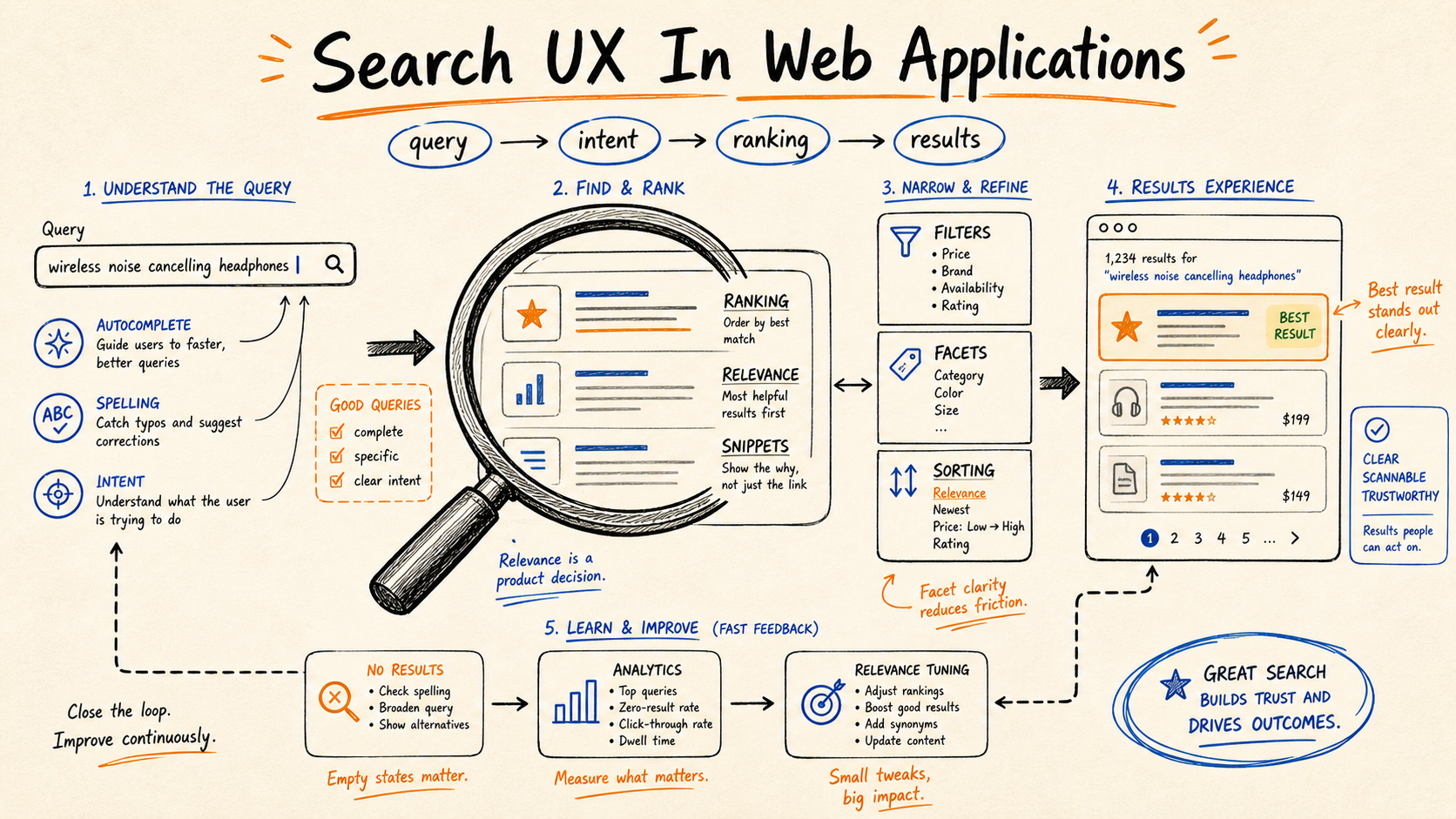
You can tell a lot about a web app from its search box. Type three letters fast and the broken ones reveal themselves immediately: the spinner that never goes away, the results that flicker between two stale responses, the page that scrolls because you accidentally hit space, the input that loses focus when results render.
Good search has the opposite tell. You start typing, the results appear under your fingers, the arrow keys work, Enter does the obvious thing, Esc closes the panel. It feels like the application read your mind.
That feeling is not magic. It's a small, opinionated set of patterns layered on top of one truth: the user types faster than your network. Everything good about search UX is about making that gap invisible.
Debounce, But Pick The Right Number
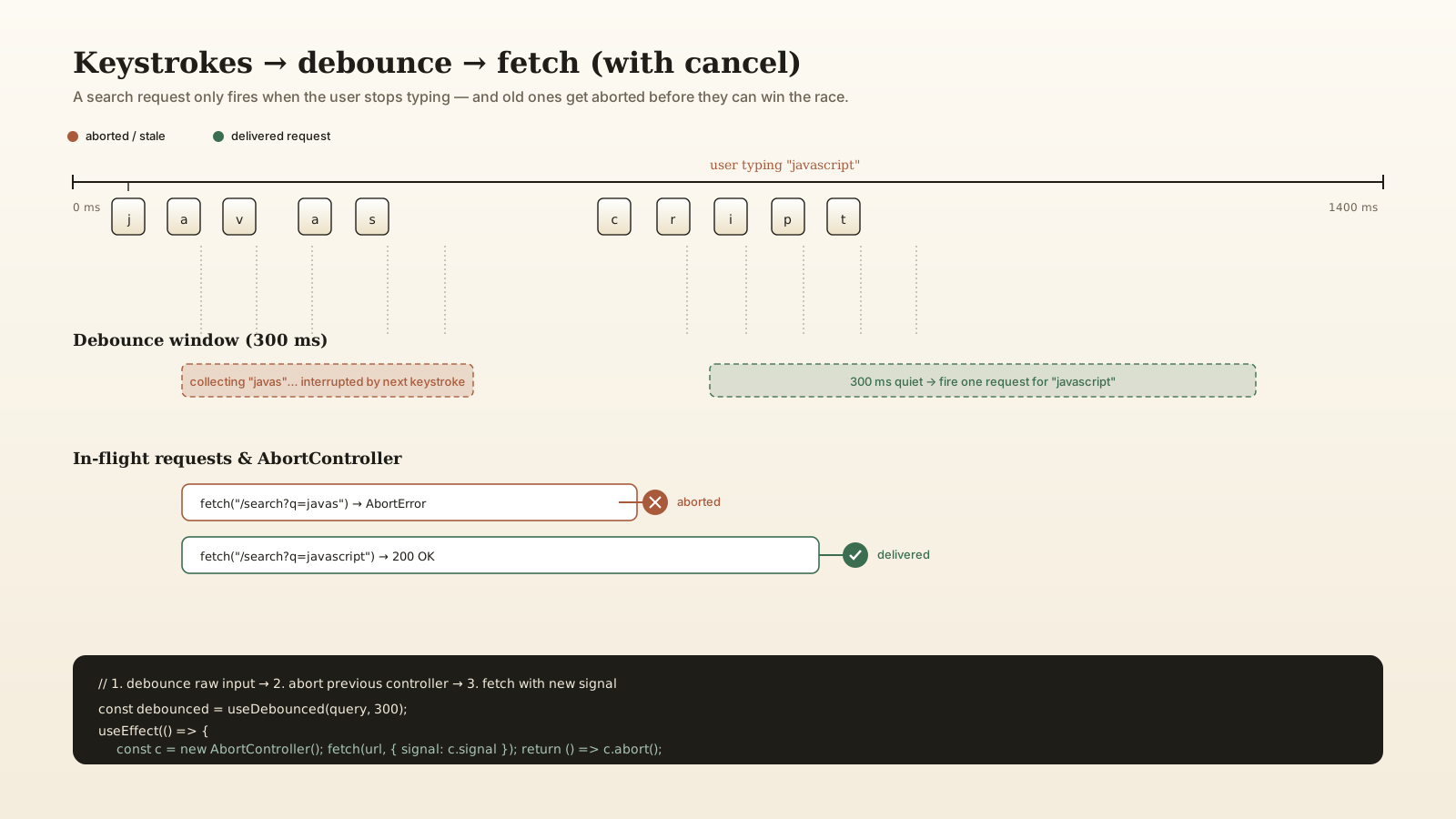
The first instinct when wiring up an instant-search input is to fire a request on every keystroke. Don't. A user typing "javascript" sends nine requests, gets nine racing responses back, and the UI flickers between partial states.
Debounce the input. The number that works in practice is between 250 and 400 milliseconds. Below 200 and you fire on individual keystrokes; above 500 and the user starts to feel they're waiting on the app to "catch up." 300 ms is a safe default.
function useDebounced<T>(value: T, delay = 300): T {
  const [debounced, setDebounced] = useState(value);
  useEffect(() => {
    const t = setTimeout(() => setDebounced(value), delay);
    return () => clearTimeout(t);
  }, [value, delay]);
  return debounced;
}
Use that as the input to your fetch effect, not the raw value from the input. The user gets one request per pause in typing rather than one per character.
A small extra rule: don't query at all until the user has typed at least 2 or 3 characters. Single-letter queries are almost always too broad to return useful results, and they hammer your search backend with the worst-shaped queries you'll ever see.
AbortController Cancels The Old Race
Debouncing is half the answer. The other half is what to do when the user types more letters while a request is still in flight.
If you fire request A for "reac", then request B for "react" 320 ms later, both responses are coming back. The order they arrive in is not guaranteed. If A arrives second, your UI shows results for "reac" even though the input says "react". This is the classic race condition that makes instant search feel haunted.
The fix is AbortController. Each new request gets a fresh controller; before firing, abort the previous one.
useEffect(() => {
  if (query.length < 2) return;
  const controller = new AbortController();
  fetch(`/api/search?q=${encodeURIComponent(query)}`, { signal: controller.signal })
    .then((r) => r.json())
    .then(setResults)
    .catch((err) => {
      if (err.name !== "AbortError") throw err;
    });
  return () => controller.abort();
}, [query]);
The cleanup function fires whenever the effect re-runs (because query changed), which aborts the previous request. The AbortError is expected behavior, not a bug — swallow it specifically and let real errors through.
This pattern composes with debouncing perfectly. Together they give you "one request per pause, no stale answers ever."
Filter Where The Data Lives
For a small dataset — a contact list of 200 names, the items in a single dashboard, a help center with a few hundred articles — client-side filtering with a String.includes is fine. The user feels no latency at all because there is none.
Past a few thousand records, you need real search infrastructure. The choices are well-shaped:
- Algolia. Hosted, fastest to integrate, expensive at scale, excellent typo tolerance and ranking out of the box.
- Typesense. Open source, self-hostable, has a hosted offering, similar feature set to Algolia. Good middle ground.
- Meilisearch. Open source, very pleasant DX, smaller footprint, ships with prefix search and typo tolerance by default.
- Elasticsearch / OpenSearch. Heavyweight, infinitely flexible, the right pick for log analytics and complex faceted search but overkill for "search the products page."
- Postgres full-text search. If you already have Postgres, you have a search engine.
tsvector,tsquery, and especiallywebsearch_to_tsquerygive you decent ranked search without adding a service to your stack.
The Postgres path is underrated. For projects where your data is already in Postgres and you don't need typo tolerance or instant-search latencies under 50ms, FTS gets you 90% of the value at zero infrastructure cost:
SELECT id, title, ts_rank(search_doc, query) AS rank
FROM   articles, websearch_to_tsquery('english', $1) query
WHERE  search_doc @@ query
ORDER  BY rank DESC
LIMIT  20;
Reach for Algolia or Typesense when you need typo tolerance, faceted filtering, sub-50ms response times globally, or you're working at a scale where "the users always wait the same amount" matters more than infrastructure tidiness.
Keyboard Navigation Is The Whole Game
Watch a power user search. They never touch the mouse. They focus the input with /, type, navigate results with Up/Down, hit Enter to select, hit Esc to dismiss. If your search dropdown requires a click to do any of those, you've already lost them.
The minimum keyboard contract:
Up/Downmoves through results. Stops at the ends, doesn't wrap (or does, but consistently).Enteractivates the highlighted result.Escclears the query and closes the panel.Tabpreserves whatever the selected result is; it shouldn't blow up your dropdown.- Focus stays in the input while arrow keys navigate the result list. Don't move focus into the list — it makes typing impossible.
The pattern that works: the input owns focus, an aria-activedescendant attribute on the input points at the highlighted result's id, the list items have stable ids, and the keydown handler on the input does the navigation logic. Screen readers announce "result 3 of 12" without losing focus.
Command Palettes Use The Same Engine
The Cmd+K palette has become a standard pattern — Linear, GitHub, Vercel, every dev tool ships one. The right library here is cmdk by Paco Coursey. It handles all the keyboard logic (focus management, search filtering, scoring, keyboard shortcuts on items) and stays out of your styling.
A command palette is just search with three additions: actions are first-class results alongside data, recent items get pinned to the top, and the keyboard shortcut to open is universal. Same debounce, same abort, same arrow-key contract.
The mental model that helps: a search box is a question with answers; a command palette is a question with answers and verbs. "Settings" in a search box gives you the settings page; in a palette it can also offer "Open settings," "Reset settings," "Export settings."
Empty And Error States Are Half The Feature
Three states deserve real design attention beyond "I'll throw a spinner there":
- Pre-query state — the dropdown before anyone types. This is the place to show recent searches, suggested searches, or popular results. A blank panel feels broken.
- No results — most apps render "No results" and stop. A better version: "No results for
xpzq. Try fewer characters, different keywords, or browse all products." Give the user the next move. - Error state — the search service is down, the network failed, the rate limit kicked in. Don't show "No results" for an error. Show "We couldn't search right now" with a retry button.
The hardest of the three is the pre-query state. Empty is acceptable on a tiny app. On anything with substantial content, show me popular content, my recent searches, or suggested categories — anything that gives the panel a reason to be open.
A Practical Stack For Most Apps
The setup that holds up across projects:
- Input layer — controlled
<input>with a debounced derived value (~300ms) and a minimum length check (2-3 chars). - Fetch layer —
useEffectwithAbortController; cancel on every input change. - Search backend — Postgres FTS for small/medium projects, Typesense or Algolia for anything that needs typo tolerance, faceting, or global low latency.
- Result layer — virtualize if you ever return more than a few hundred matches; otherwise, a plain list with keyboard nav is fine.
- Empty/error states — pre-query suggestions, helpful no-results copy, retry on network failure.
Build that and search stops being a UX risk and starts being a quiet competitive advantage. The team that can find anything in two seconds works faster, and that compounds.
A One-Sentence Mental Model
Good search makes the network feel invisible — debounce collects intent, AbortController kills the obsolete requests, the server does the actual filtering, and the keyboard owns navigation so your hands never leave home row.






