
You're staring at a new route in your app/ folder, and the question that nobody quite answered in the docs is the one you actually need an answer to: should this page be static, dynamic, SSR, or ISR?
You've read the conceptual explanations. You've seen the diagrams. You know what each one means in isolation. What you don't know -- what nobody really tells you up front -- is which one to pick for the specific page you're building right now. The product page on an e-commerce site. The admin dashboard with twelve charts. The marketing homepage. The article view on a blog.
The honest answer is that you don't pick by reading a definition. You pick by looking at three things: how often the data changes, how personalized the page is, and how much you care about the latency of the very first byte. Once you have those three answers, the strategy almost falls out of the request. Let's walk through what each one actually is in the App Router, how Next.js decides for you when you don't explicitly tell it what to do, and then go through four real-shaped pages and pick a strategy for each.
The Four Strategies, In One Mental Model
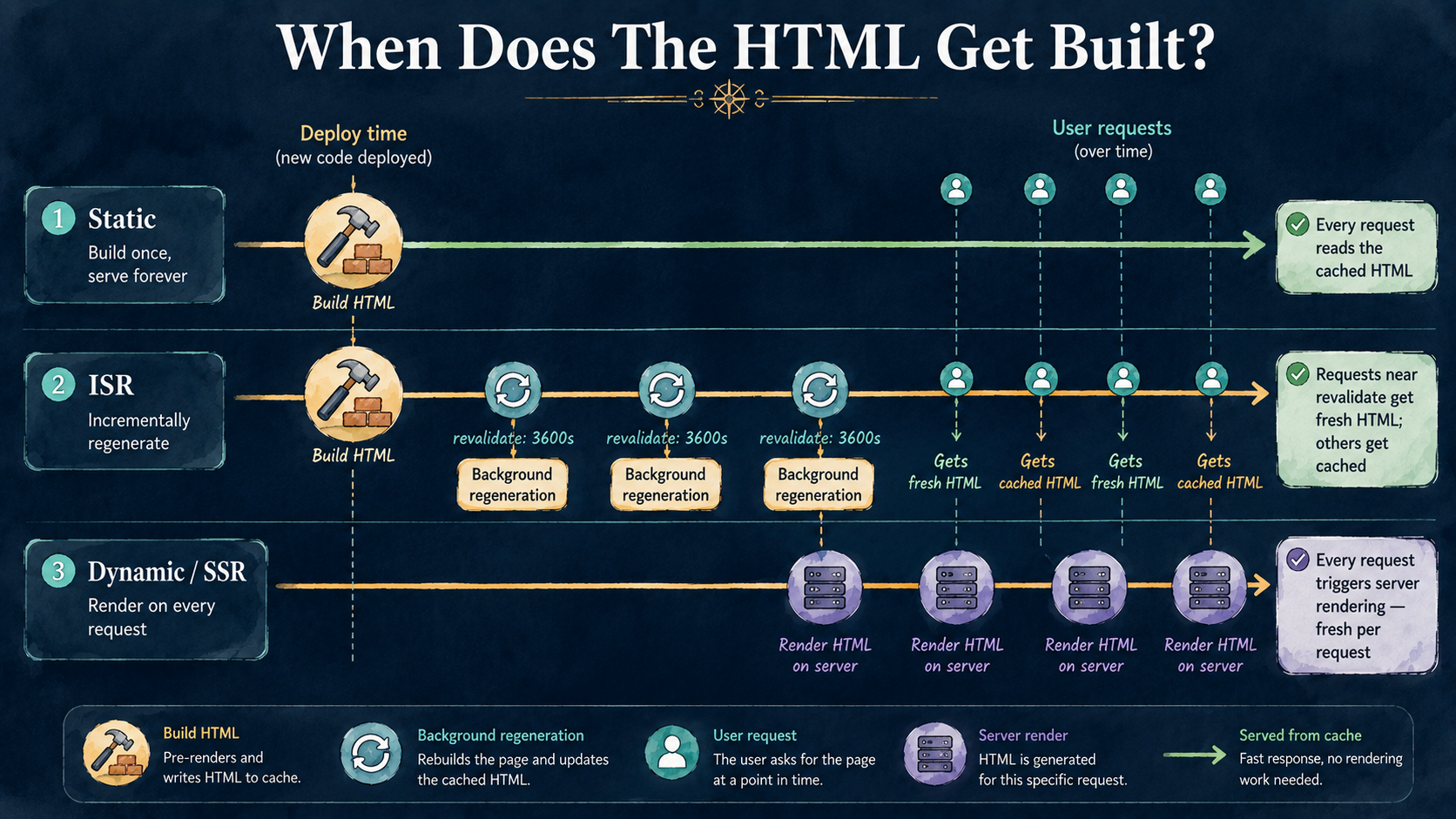
Forget the acronyms for a second. Every rendering strategy in Next.js is answering the same two questions: when does the HTML for this page get built, and where is it served from after that. The answers form a small grid.
Static rendering builds the HTML at build time and serves it from a CDN edge cache forever, until the next deploy. Dynamic rendering (which is what "SSR" actually maps to in the App Router) builds the HTML on every request, on the server, fresh each time. Incremental Static Regeneration sits in between: build the HTML at build time, serve it from the cache, but quietly regenerate it in the background after a configurable interval or when something explicitly invalidates it.
That's three positions on the same axis. The fourth -- client-side rendering -- is technically also a choice, but in the App Router it lives at the component level (a "use client" boundary) rather than as a page-level strategy. We'll touch on it where it matters, but the page-level decision is really between the first three.
The thing that trips people up coming from the Pages Router is that the vocabulary moved. There's no getStaticProps anymore. There's no getServerSideProps. The strategy isn't named in your file -- it's inferred from what your component does, and you only override the inference when you want to.
Static: The Default You Get For Free
Inside the App Router, the default rendering mode for any page that doesn't do anything request-specific is static. If your component reads from a database, calls an API, or imports a file -- but never touches cookies(), headers(), the searchParams prop, or a fetch call marked with cache: 'no-store' -- Next.js will pre-render it at build time and serve the resulting HTML from the CDN.
export default function AboutPage() {
  return (
    <main>
      <h1>About Us</h1>
      <p>We've been shipping software since 2014.</p>
    </main>
  );
}
That page is static. No annotation needed, no special export. Next.js looks at it, sees nothing request-specific, runs it once during next build, and ships the HTML.
A page that fetches data can still be static, as long as the fetch itself doesn't opt out of caching:
async function getChangelog() {
  const res = await fetch('https://api.example.com/changelog');
  return res.json();
}

export default async function ChangelogPage() {
  const entries = await getChangelog();

  return (
    <ul>
      {entries.map((e) => (
        <li key={e.id}>{e.title}</li>
      ))}
    </ul>
  );
}
The fetch happens at build time. The response is captured. The HTML is generated, cached at the edge, and served from there. The browser gets a fully-formed page in one round trip, and your server isn't involved at all after deploy.
This is what you want for anything that doesn't need to be different per visitor and doesn't need to be fresher than your deploy cadence. Marketing pages, documentation, changelogs, public profile pages where the profile doesn't change every minute, blog posts. Static is the cheapest, fastest thing you can ship -- there is no server to scale, no cold start, no database to hammer. The trade-off is that the data is frozen at the moment of build, and if you want it fresher you need to deploy again.
If you have a dynamic route segment (something like app/post/[slug]/page.tsx), you can still get static rendering by exporting generateStaticParams to tell Next.js which slugs to pre-render:
export async function generateStaticParams() {
  const posts = await fetchAllSlugs();
  return posts.map((p) => ({ slug: p.slug }));
}

export default async function PostPage({
  params,
}: {
  params: { slug: string };
}) {
  const post = await fetchPost(params.slug);
  return <article>{post.body}</article>;
}
At build time, Next.js iterates over the returned params and pre-renders one HTML file per slug. The result is the same as a fully-static site: every page is sitting in the cache before a single user shows up.
Dynamic: When The Page Has To Know Who You Are
A page becomes dynamic the moment it does something that can't be answered at build time. There's a small set of triggers, and each one is a function call or a prop access that tells Next.js this can't be pre-rendered:
- Reading
cookies()orheaders()fromnext/headers. - Accessing the
searchParamsprop on a page component. - Calling
fetchwithcache: 'no-store'ornext: { revalidate: 0 }. - Using
unstable_noStore()(or the stablenoStoreexport fromnext/cache). - Explicitly opting in with
export const dynamic = 'force-dynamic'.
Any of those, and the page is rendered fresh on every request, on the server, with a real request context. This is what people mean when they say "SSR" in the App Router. There's no separate function to write -- the page component just runs on the server, like any other Server Component, except now it runs per-request instead of once at build.
import { cookies } from 'next/headers';
import { getSession } from '@/lib/session';

export default async function AccountPage() {
  const session = await getSession(cookies());
  const user = await fetchUser(session.userId);

  return (
    <section>
      <h1>Welcome back, {user.name}</h1>
      <p>Your last login was {user.lastLoginAt}.</p>
    </section>
  );
}
The cookies() call is the trigger. Next.js sees it, marks the route dynamic, and from then on every request goes through the server. The page can be fully personalized, can read fresh data, can vary per user -- all the things a marketing page can't.
You can also force a route dynamic explicitly, even when nothing in your component obviously demands it:
export const dynamic = 'force-dynamic';This is useful when you want fresh data on every request without depending on the framework's inference -- say, a page that polls a status endpoint where the values change second-to-second and you never want a cached HTML page sitting in front of it.
The cost of dynamic rendering is that every request hits your server, every request runs your component code, and every request waits for whatever data fetches happen inside it. The latency floor is whatever your slowest data source is. The throughput ceiling is whatever your server can sustain. If your data isn't actually personal or fresher-than-deploy, you're paying for both of those costs and getting nothing in return.
ISR: Static, But With An Expiry Date
Incremental Static Regeneration is the strategy that exists because the choice between "frozen at build" and "fresh on every request" is too coarse. ISR says: serve the cached HTML, but regenerate it in the background every N seconds, or when something explicitly tells it to.
The most common form is time-based revalidation. You can set it at the data-fetching level:
async function getPost(slug: string) {
  const res = await fetch(`https://api.example.com/posts/${slug}`, {
    next: { revalidate: 3600 },
  });
  return res.json();
}
Or at the route level, with a top-level export:
export const revalidate = 3600;Either way, the behavior is the same shape. The first request after the page becomes stale gets the cached version (so it's still fast), and Next.js kicks off a background regeneration. The next request gets the fresh page. From the user's perspective, the page is always quick; from the data's perspective, it's never more than an hour behind.
The other form is on-demand revalidation, which is what you want when "every hour" isn't good enough -- when a content editor publishes a new article and they want it live in seconds, not on the next revalidation tick. You call revalidatePath or revalidateTag from a server action or a route handler:
import { revalidatePath, revalidateTag } from 'next/cache';

export async function POST(req: Request) {
  const { slug } = await req.json();
  await publishToCms(slug);

  revalidatePath(`/blog/${slug}`);
  revalidateTag('blog-index');

  return Response.json({ ok: true });
}
The cached HTML for that path (and anything tagged blog-index) is invalidated immediately, and the next request rebuilds it. This is the strategy that gives you the editorial workflow people actually want -- publish a post, see it on the site five seconds later, never deploy.
ISR is the right answer for a much larger class of pages than people assume. Anything where the data changes on a schedule slower than every-request but faster than every-deploy is a candidate. Product pages, blog posts, article archives, leaderboards, anything backed by a CMS.
The trade-off is mostly conceptual rather than technical. You have to be okay with the first request after staleness still seeing the old data. For a blog this is fine. For a price on a product page during a flash sale, it might not be -- in which case you either drop the revalidation interval to something very small (and accept the cost), or you reach for on-demand revalidation triggered by the inventory system, or you fall back to dynamic.
How Next.js Decides For You (And When To Override)
Here's the part that surprises people coming from the Pages Router: in the App Router, you mostly don't choose the strategy explicitly. You write the page, and Next.js looks at what's inside it and picks. The classification happens at build time, and the build output tells you what it decided.
When you run next build, the route summary at the end of the build prints a symbol next to each route: ○ for static, λ (or ƒ) for dynamic, ● for routes pre-rendered via generateStaticParams. If a route you expected to be static shows up as dynamic, the build is telling you it found a trigger somewhere -- a cookies() call deep inside a server util, a fetch with no-store, an unwrapped searchParams prop.
The inference is surprisingly easy to break by accident. Here's a page that looks like it should be static but isn't:
export default async function ProductsPage({
  searchParams,
}: {
  searchParams: { sort?: string };
}) {
  const products = await fetchProducts({ sort: searchParams.sort });
  return <ProductGrid products={products} />;
}
The searchParams access marks this route dynamic, because the framework has no way to know which sort values exist at build time. That might be exactly what you want -- but if you didn't realize it was happening, you're now paying for SSR on a page you thought was static. The fix depends on what you want: if there are only a handful of sort options, move them into the URL path (/products/sort/popular) and use generateStaticParams. If they're truly arbitrary, accept that this is a dynamic page.
You override the inference with three exports at the top of any route file:
export const dynamic = 'force-static';   // pre-render even if triggers exist
export const dynamic = 'force-dynamic';  // render per request, no matter what
export const dynamic = 'error';          // build fails if any dynamic trigger fires
export const dynamic = 'auto';           // default — infer from triggers
The error mode is underrated. If you have a page that must be static for performance reasons, set dynamic = 'error' and the build will fail the moment someone adds a cookies() call or an uncached fetch. It's a guardrail you can put on routes that matter.
There's also revalidate (the time-based ISR setting we saw above), and dynamicParams (which controls what happens when a route segment is requested with params not returned by generateStaticParams -- true means render on-demand, false means return a 404).
Now The Hard Part: Picking The Right Strategy For A Real Page
Definitions are easy. Picking is the part where people get stuck. Let's walk through four pages you'd actually build and reason about which strategy fits each one.
A Blog
A blog has three kinds of page: the post list, the individual post, and the archive (by tag, by year, whatever). For each one, the question is how often does this change?
Posts get published on a schedule the writer controls. Once published, they rarely change. The post list and tag archives update only when a new post lands. There are no per-user variations -- every visitor sees the same content.
This is ISR with on-demand revalidation, and it's not even close. Pre-render every post and every list page. Set a generous time-based revalidate (an hour, a day, whatever) as a safety net. Wire up revalidatePath and revalidateTag calls in your publishing flow so that the moment a post is published or updated, the affected pages are invalidated. Visitors get static-fast pages; the editorial team gets near-instant publishing; your server load is basically zero between regenerations.
export const revalidate = 86400; // safety net: 24 hours

export async function generateStaticParams() {
  const posts = await fetchAllPostSlugs();
  return posts.map((slug) => ({ slug }));
}

export default async function PostPage({
  params,
}: {
  params: { slug: string };
}) {
  const post = await fetchPost(params.slug);
  return <Article post={post} />;
}
The mistake people make here is reaching for dynamic = 'force-dynamic' because "the blog needs to be fresh." It doesn't. The blog needs to be fresh when something changes, which is exactly what on-demand revalidation gives you, without paying SSR costs for every read.
A Dashboard
A dashboard is the opposite. Every panel is personal -- it's your metrics, your projects, your recent activity. Cookies and session lookups are everywhere. The data is fresh-second, not fresh-hour. Two users hitting the same URL must see different things.
This is dynamic rendering, no shortcuts. The page reads cookies(), fetches per-user data, and renders on every request. You don't try to cache the HTML -- you'd just be caching the wrong user's view.
import { cookies } from 'next/headers';
import { getSession } from '@/lib/session';

export default async function DashboardPage() {
  const session = await getSession(cookies());
  const [projects, activity, billing] = await Promise.all([
    fetchProjects(session.userId),
    fetchActivity(session.userId),
    fetchBilling(session.orgId),
  ]);

  return (
    <DashboardLayout
      projects={projects}
      activity={activity}
      billing={billing}
    />
  );
}
What you can do -- and should -- is push expensive, slow, or rarely-changing parts of the page into smaller cached units. unstable_cache (or the stable cache function depending on the Next.js version you're on) lets you wrap a data fetch in a memoised, taggable cache without making the whole page static. Billing data that updates once a day? Cache it with a daily revalidate and a tag tied to billing-${orgId}. The page is still dynamic, but the slow data isn't fetched fresh on every load.
The other move is Suspense streaming. The page is dynamic, but each panel can suspend independently -- the user sees the layout shell instantly, then each panel pops in as its data arrives. This isn't a rendering strategy in the SSG/SSR sense, but it changes how dynamic feels to the user enormously.
An E-Commerce Store
E-commerce is the case where you'll use all four strategies in the same app, and that's the right call.
The category page (/category/headphones) is read-heavy, mostly the same for every visitor, and updates when new products are added or stock changes. ISR. Generate the page at build, revalidate periodically, invalidate on-demand when inventory changes.
The product page (/product/[slug]) is the same -- mostly identical per visitor (the description, images, specs, reviews don't change per user), refreshed when price or stock changes. ISR with on-demand invalidation hooked into your inventory system.
The cart page (/cart) is per-user, lives entirely behind cookies, can never be cached. Dynamic.
The checkout page is the same -- every field, every total, every shipping option depends on the current session. Dynamic.
The "trending products" widget on the homepage updates every few minutes? Wrap the data fetch in a 60-second revalidate. The homepage itself stays static, the widget streams in fresh-ish data.
The pattern that emerges is: ISR for everything catalog-shaped, dynamic for everything session-shaped, and Suspense boundaries to mix the two on shared pages.
export const revalidate = 60; // short window for price changes

export async function generateStaticParams() {
  const products = await fetchTopProducts(1000);
  return products.map((p) => ({ slug: p.slug }));
}

export default async function ProductPage({
  params,
}: {
  params: { slug: string };
}) {
  const product = await fetchProduct(params.slug);

  return (
    <>
      <ProductHero product={product} />
      <Suspense fallback={<RecsSkeleton />}>
        <PersonalizedRecommendations productId={product.id} />
      </Suspense>
    </>
  );
}
The bones of the page are ISR. The personalized recommendations block is its own dynamic child component -- it can read cookies, hit the recs service, suspend independently, stream in. The user sees the product instantly; the recs fade in a beat later. The page works for both the search bot and the logged-in user without forcing one strategy on the whole route.
An Admin Panel
Admin panels look like dashboards at first glance, but the right strategy is often even simpler: pure dynamic, everywhere, no caching effort.
The traffic is low (a handful of internal users), the data must be fresh (admins make decisions on what they see), every page is gated by auth, and you don't really care about CDN edge performance because the entire user base fits in a Slack channel. The cost of "every page is SSR" that would crush a public e-commerce site is rounding error for an admin panel with twelve daily active users.
export const dynamic = 'force-dynamic';Put that at the top of your admin layout (it cascades) and stop thinking about it. You'll save yourself an entire category of "why is this stale" bugs that come from accidentally caching admin data.
The one place to be careful: if your admin panel serves customer-facing reports that you also want indexable or fast -- those aren't admin pages, those are public pages, and they go back to ISR.
The Things People Get Wrong
A few patterns come up over and over in real codebases.
Forcing dynamic everywhere because "we want it fresh." This is the most expensive habit in Next.js. You're paying for an SSR roundtrip on every page load, and most of those pages aren't actually fresher than the cached version would be. The data is the same. The HTML is the same. You've just turned a CDN-served page into a server-rendered one and gained nothing. ISR with a short revalidation window gives you almost the same freshness with a fraction of the cost.
Accidental dynamic from one stray cookies() call. A shared utility deep in your code reads cookies() for analytics or experimentation. It gets imported by what you thought was a static page. The whole page silently flips to dynamic. The build output is the only place you'll notice. If a route's rendering mode matters to you, set dynamic = 'error' and let the build tell you when it changes.
Treating getServerSideProps muscle memory as the default. People migrating from the Pages Router reach for force-dynamic because that's what their old pages did. But most of those old pages didn't need SSR either -- they used getServerSideProps because that was the convenient API, not because the data was truly per-request. In the App Router, the absence of that habit is a feature. Let the page be static by default. Add dynamism where you actually need it.
Confusing static with stale. Static doesn't mean "never updates" -- it means "updates when you deploy or when ISR invalidates it." A static blog with on-demand revalidation is just as fresh as a dynamic one, from the user's perspective. The difference is what happens between updates: static serves from a cache, dynamic re-renders every time.
Setting revalidate: 60 on a page that nobody hits more than once a day. ISR's value scales with traffic. If a page gets one request per hour and you set revalidate: 60, you're basically rendering every request and paying for the regeneration overhead on top. Match the revalidation window to your actual traffic and tolerance for staleness -- five minutes, an hour, a day, whatever the data deserves.
What To Take Away
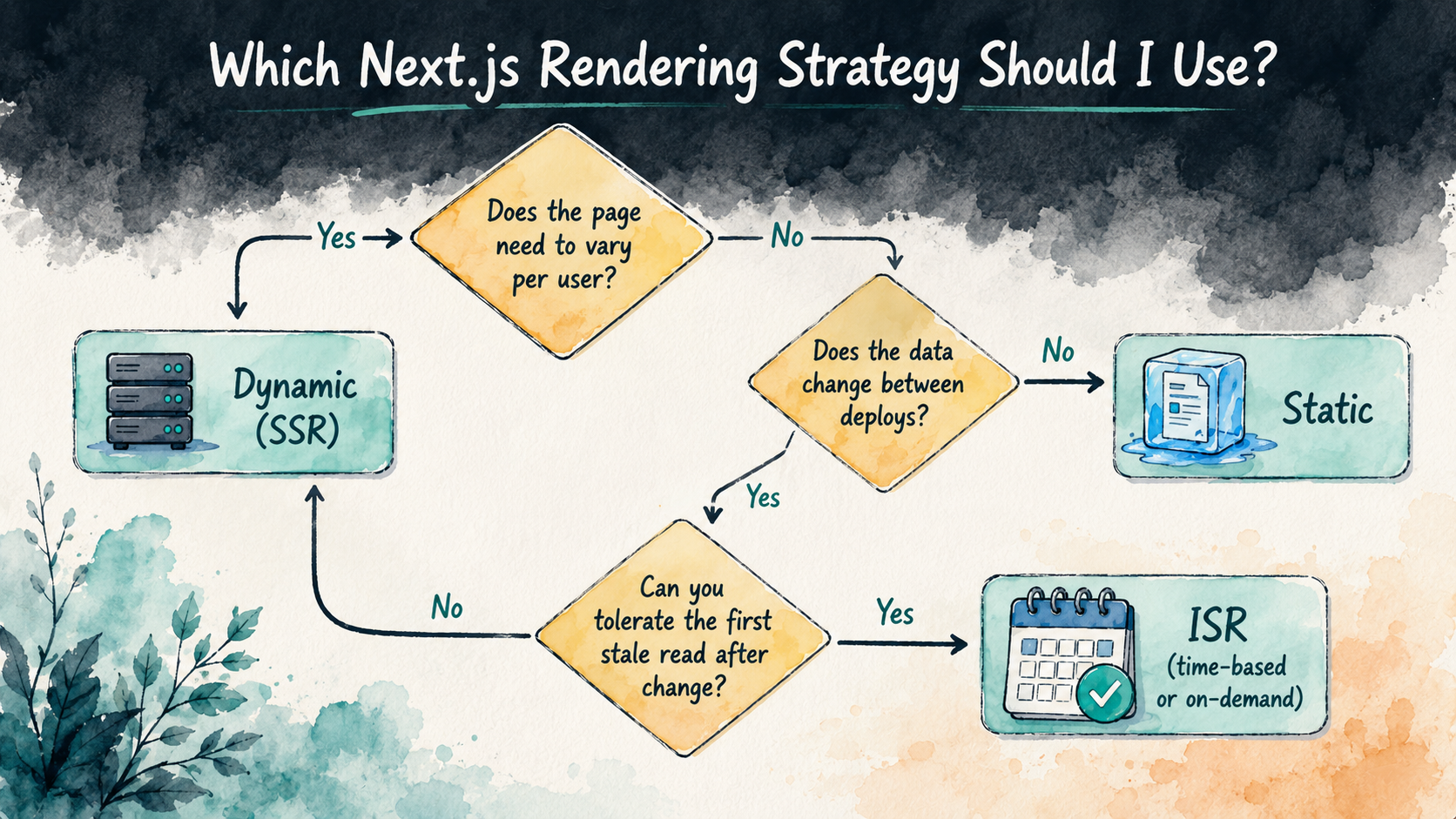
Three answers determine your strategy: who the page is for (everyone vs. one user), how often the data changes (per deploy, per hour, per second), and whether the first request after a change can show the old data. Run any new route through that filter and the strategy almost always becomes obvious.
Stop reaching for force-dynamic as a default. Start with static -- let Next.js infer it from the absence of triggers, and override only when the page genuinely depends on per-request state. Reach for ISR the moment you have data that changes between deploys but doesn't change per request. Reserve dynamic for the pages that truly are per-user, per-second, or per-search.
The same app can -- and usually should -- use all four. The marketing pages are static, the catalog is ISR, the cart is dynamic, the admin panel is force-dynamic. The framework is comfortable with this mix; the routing model exists specifically to support it. Your job is to look at each page, ask the three questions, and tell the framework what it's looking at -- or, more often, just write the component and let it figure out the rest.