

You open the deployed app on your phone. The progress bar fills almost instantly — five-bar Wi-Fi, a 100ms TTFB, fonts already cached. The page paints. You tap a button. Nothing happens. You tap again. Still nothing. After two and a half seconds the menu finally opens, and you wonder how a "fast" page could feel so dead.
The network was never the issue. The browser was busy parsing, compiling, and executing the JavaScript bundle you shipped, and your tap was queued behind it. This is the cost of too much client-side JavaScript, and it does not show up in any waterfall chart.
Bytes Of JS Are Not Bytes Of JPEG
People often equate file sizes when comparing assets. They are not equivalent. A 200KB JPEG is 200KB of pixels — the browser decodes it on a background thread and paints it. A 200KB JavaScript bundle is 200KB of source code that has to be parsed into an AST, compiled to bytecode, and (if it ever runs hot) JIT-compiled to native instructions. All of that happens on the main thread.
On an entry-level Android phone in 2025, a budget chip has roughly a quarter of the JS execution speed of an M-series MacBook. The 50KB you saved by trimming an image won back milliseconds; the 50KB you trimmed from your JavaScript bundle won back a measurable fraction of a second of main-thread time. They are not interchangeable currencies.
That asymmetry is the reason a site can have a perfect Lighthouse score in development and feel laggy in the user's hand. Bandwidth keeps improving. CPUs on cheap phones do not, at least not at the same rate.
The Main Thread Is A Single Lane
Almost everything the browser does for your page runs on one thread: parsing HTML, applying styles, running layout, painting, executing JavaScript, dispatching events. Workers exist, but the moment a worker's result needs to touch the DOM, you are back on the main thread.
When you ship a heavy bundle, that single lane is fully occupied. The browser cannot service a tap, cannot start a transition, cannot scroll smoothly, until your code yields. The Web Vitals team renamed this kind of pain into a metric — Interaction to Next Paint — precisely because it captures how the second, fifth, and tenth interaction feel, not just the first.
The textbook symptom: the page looks fully loaded, the spinner is gone, and the user clicks anyway, but for two seconds nothing answers. That gap is hydration, third-party scripts, and your own initialization fighting for the lane. The user has no idea what is happening; they just decide your app is broken.
The Framework Tax
Every modern UI framework imposes a runtime tax that the user pays in CPU. With a traditional client-rendered React SPA the steps look like this:
- Download React, ReactDOM, and your application bundle.
- Parse and compile every file.
- Run your component tree once to build the virtual DOM.
- Diff against the existing DOM the server sent (hydration).
- Attach event listeners, run effects, schedule the first paint.
Hydration is the loud one. The HTML is already on screen, but React still walks the whole tree to wire up handlers and reconcile state. On a complicated page with thousands of nodes, this can lock the main thread for hundreds of milliseconds — the precise window during which the user is most likely to tap something.
You can mitigate this by lazy-loading routes, by streaming HTML, by using startTransition for non-urgent updates. None of those tricks change the underlying truth: the more JavaScript you send, the more main-thread time you spend booting it up.
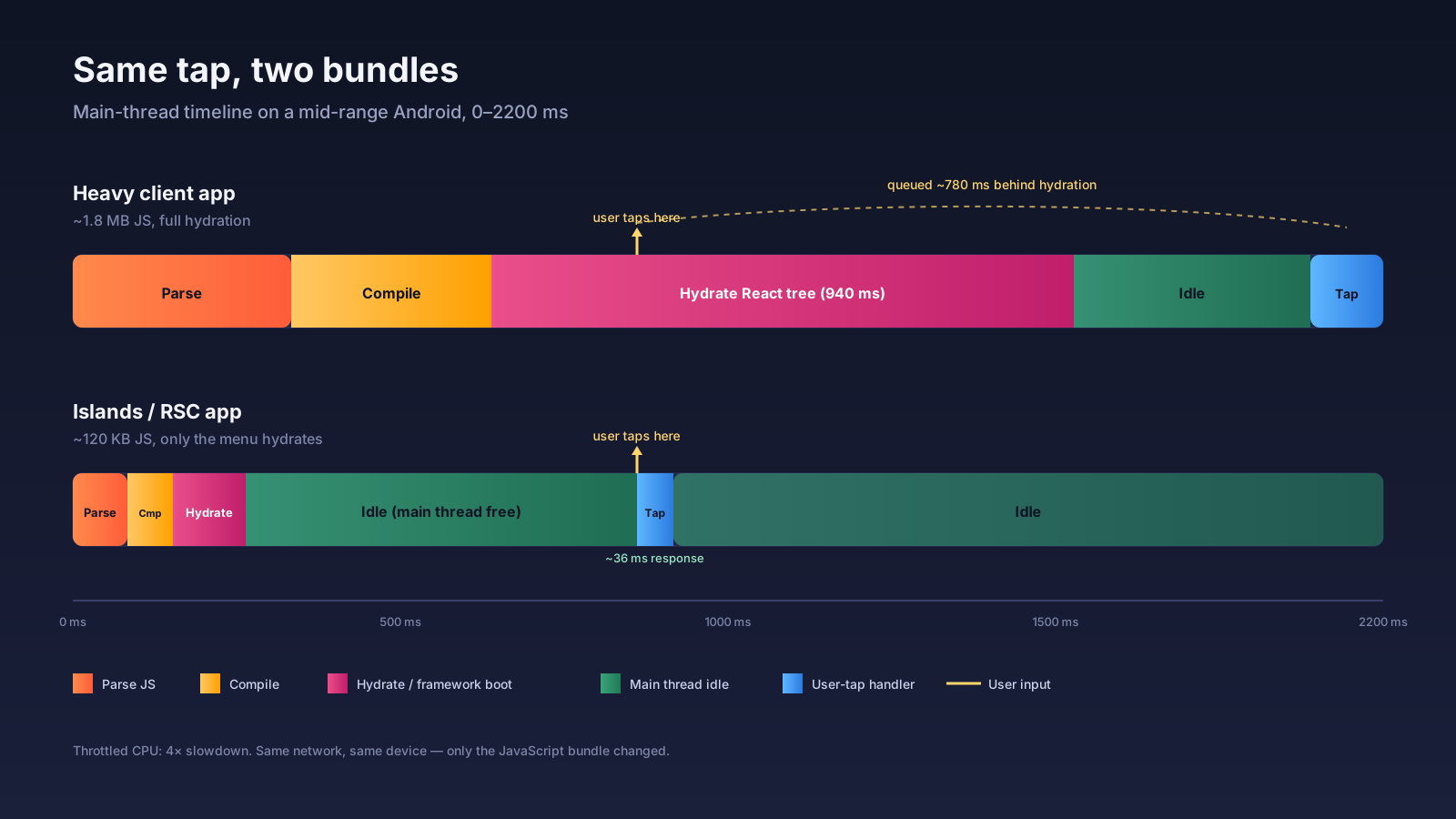
Architectures That Cut The Tax
The good news: the industry is no longer pretending hydration is free. Several architectures attack the problem from different angles, and they are all production-ready by now.
Islands architecture. Astro popularised it. The page is rendered as static HTML on the server. Only the components you explicitly mark as interactive ship JavaScript, and only that island hydrates in the browser. A marketing page with one carousel and a search box ends up with a few kilobytes of client JS instead of a megabyte. Eleventy, Fresh, and several Vue/Svelte stacks support the same model.
React Server Components. Next.js App Router and other RSC-based frameworks let server components run only on the server. Their imports — date libraries, markdown parsers, ORM clients — never reach the browser. You move logic, not just markup, to the server. Client components are still client components, but they shrink because the orchestration happens upstream.
Resumability. Qwik takes the most aggressive line. It serializes enough state into the HTML that the client does not need to "boot" the application at all. When a user clicks a button, the browser fetches a tiny chunk of code that handles that specific event and runs it. There is no global hydration step, so the cost scales with what the user actually does, not with how big your app is.
Each of these is a real production option in 2025, with serious teams running serious traffic on them. The conversation has shifted from "should we render on the server" to "how little JavaScript can we get away with sending."
Field Data Is Where The Truth Lives
Lab measurements lie politely. Your laptop on a wired connection produces a story your phone-on-the-train users never live. The only honest number is what real users on real devices in real network conditions report back.
Real User Monitoring (RUM) is the fix. The simplest version is the web-vitals library — a tiny script you load on every page that reports Core Web Vitals (LCP, INP, CLS) and a few diagnostics back to your own endpoint or to a vendor. With v4 you get onINP, onLCP, onCLS, onFCP, and onTTFB, and the API surface is small enough that you can roll it yourself in an afternoon if you don't want a third-party agent.
import { onINP, onLCP, onCLS } from 'web-vitals';

const send = (metric) => {
  navigator.sendBeacon('/rum', JSON.stringify({
    name: metric.name, value: metric.value, id: metric.id,
    rating: metric.rating, ua: navigator.userAgent,
  }));
};

onINP(send);
onLCP(send);
onCLS(send);
What changes when you start collecting field data: you stop arguing about averages and start looking at p75 by device class. A flagship iPhone hits INP under 200ms easily — that's the "good" threshold the Web Vitals team publishes. A budget Android on a flaky LTE connection on the same page often sits at 500ms+. The same code, the same bundle, dramatically different lived experiences. You will not see this on your own machine. You have to ask the network for the answer.
Once you split the histogram by effectiveType, by device memory, and by user-agent class, the architectural conversation gets concrete. "Mid-tier Android users have a p75 INP of 480ms on the search page" is something a team can act on. "The site feels slow" is not.
A useful exercise the first time you set this up: pull a $150 Android out of a drawer, hold it in your hand, and use the production app for ten minutes. The number on the dashboard becomes a feeling, and the feeling is what gets prioritized in the next sprint. Every senior performance engineer I know keeps one of these phones on their desk for exactly this reason.
What To Measure, And With What
The metrics that actually correlate with "this app feels alive" are narrower than the dashboard usually suggests. Three are worth pinning to the wall:
- Interaction to Next Paint (INP). Replaces FID. Captures the slowest interaction on the page (with some smoothing). Under 200ms is good, 200–500ms needs work, above 500ms is broken. INP catches the second and third tap, which is where heavy hydration shows up.
- Total Blocking Time (TBT). Lab proxy for INP — sum of long-task time between FCP and TTI. Useful in CI because you can measure it without a user.
- JavaScript execution time per route. Not a Web Vital, but the number that explains the others. Chrome DevTools' Performance panel breaks this into "Scripting" time. Lighthouse surfaces it under "Reduce JavaScript execution time."
The tools to get those numbers, ordered by how close to the user they sit:
- Lighthouse / PageSpeed Insights. Lab plus CrUX field data. Good for one-off audits and CI gates.
- WebPageTest. Multi-device, multi-location, real Chrome, reproducible. The closest thing to lab truth that exists. Use the "Mobile - Slow 4G" preset on a low-end Moto G profile and the report stops being flattering.
web-vitalslibrary reporting to your own backend, or to Sentry, Datadog RUM, Vercel Analytics, SpeedCurve. Field data, segmented by route and device. The only way to know what is shipping.- Chrome DevTools Performance panel with 4× CPU throttle. When you need to understand why a specific interaction is slow.
A workable habit: gate INP and TBT in CI with Lighthouse so regressions don't sneak in, and watch the RUM dashboard weekly so the field number stays in your peripheral vision.
One subtle point that catches a lot of teams. The Performance API gives you PerformanceEventTiming entries that the web-vitals library uses internally — if you want to dig deeper than the headline number, you can attach a PerformanceObserver for event entries and inspect the slow ones directly. Each entry includes the event type, the target element, the processing time, and the duration. That is usually how you find the one button that is dragging the p75 down.
Where The Weight Usually Hides
When I audit a slow app, the bundle culprits cluster into a handful of categories:
- Date and time libraries. Moment.js is still in production at companies that should have moved to
date-fns,dayjs, or the nativeIntl.DateTimeFormatyears ago. - Icon sets imported as a whole. A single
import * as Iconsships every glyph in the library. Per-icon imports or SVG sprites cut this drastically. - Two copies of React. Usually because a UI library bundled its own. The bundle analyzer makes this obvious; without one it is invisible.
- Polyfills for browsers nobody uses.
core-jsconfigured for the bottom of the support matrix can add tens of kilobytes that 99% of your users do not need. - Markdown and syntax highlighting in the client. When the content is known at build time, render it on the server and ship plain HTML.
These are not micro-optimisations. Pulling Moment plus a couple of unused polyfills off a typical page can save 80–150KB of parse-and-execute work, which on a budget Android translates directly into INP improvement.
The Wins You Can Land This Sprint
Architectural shifts (islands, RSC, resumability) are real, but they are also a rewrite. Most teams need cheaper wins they can ship next week. The ones that consistently pay back the most for the least:
- Move what you can to server components. If you are on Next.js App Router, every component that doesn't use state, effects, or browser APIs should not be
'use client'. The default in App Router is server, but it's easy to mark a parent client and accidentally drag a whole subtree along with it. Audit your'use client'boundaries — the ones you can push down are bundle savings for free. - Split per route, then per interaction. Modern bundlers split per route by default. The next layer is dynamic
import()for components that hydrate on user intent — modals, tooltips with rich content, code editors, charts that only matter once you scroll.next/dynamicand React'slazymake this a one-line change. - Remove dead dependencies. Run
knipordepcheckagainst the repo. Almost every codebase has a handful of packages nobody imports anymore, plus a long tail of deps imported in one file that could be replaced with a few lines of inline code. The bundle analyzer (@next/bundle-analyzerorwebpack-bundle-analyzer) tells you which ones are actually expensive to remove. - Audit third-party scripts. Analytics, A/B testing, chat widgets, marketing pixels — these are often the heaviest scripts on the page and the ones engineering doesn't own. Move them behind
next/scriptwithstrategy="lazyOnload"or"afterInteractive", and push back when marketing wants to add the fifth one. - Prefer
Intlto libraries. Date formatting, number formatting, list formatting, relative time, plural rules — all in the platform now. A surprising number of teams shipdate-fns-tzornumeral.jsfor thingsIntl.DateTimeFormatandIntl.NumberFormatdo for free. - Drop unused polyfills. Check
browserslist. If it still targets IE11 or "last 5 versions" out of habit, your bundles are carrying transforms and shims for browsers no real user has. A sensible modern target usually trims another 20–40KB of polyfill weight on its own.
A typical week of this work, on a typical mid-sized Next.js app, removes 200–400KB of JavaScript without changing a single feature. That is parse-and-execute time the user gets back on every visit, on every device, forever.
The order matters too. Audit dependencies first, because every kilobyte you remove there is a kilobyte you don't have to split, lazy-load, or hydrate later. Move to server components second, because what runs on the server doesn't ship at all. Code-split last, because splitting a heavy bundle into smaller heavy bundles still gives the user a heavy bundle — it just gives it to them piece by piece.
Splitting is a way of deferring the cost, not removing it. Removing the dependency removes the cost. Always reach for removal first.
Measure The Devices Your Users Actually Have
The persistent blind spot in performance work is the dev machine. You write code on a laptop with a fast CPU and a fast network, and your first benchmark of the app is also on that laptop. Everything looks fine because your hardware is hiding the problem.
Two habits change this. First, throttle deliberately. Chrome DevTools has CPU throttling presets — "4× slowdown" approximates a low-end Android. Use it during development, not just during audits. Second, look at field data, not lab data. The Chrome User Experience Report and any RUM tool (Vercel Analytics, SpeedCurve, the web-vitals library reporting to your own backend) tell you what your real users are experiencing on their real devices. Lab numbers tell you what is possible; field numbers tell you what is shipping.
The fastest JavaScript is the JavaScript you do not send. Everything after that — code splitting, lazy loading, server components, islands, resumability — is a way of getting closer to that ideal. Treat client-side bytes as expensive, not free, and the whole class of "the page feels weirdly slow" complaints starts to dissolve.






