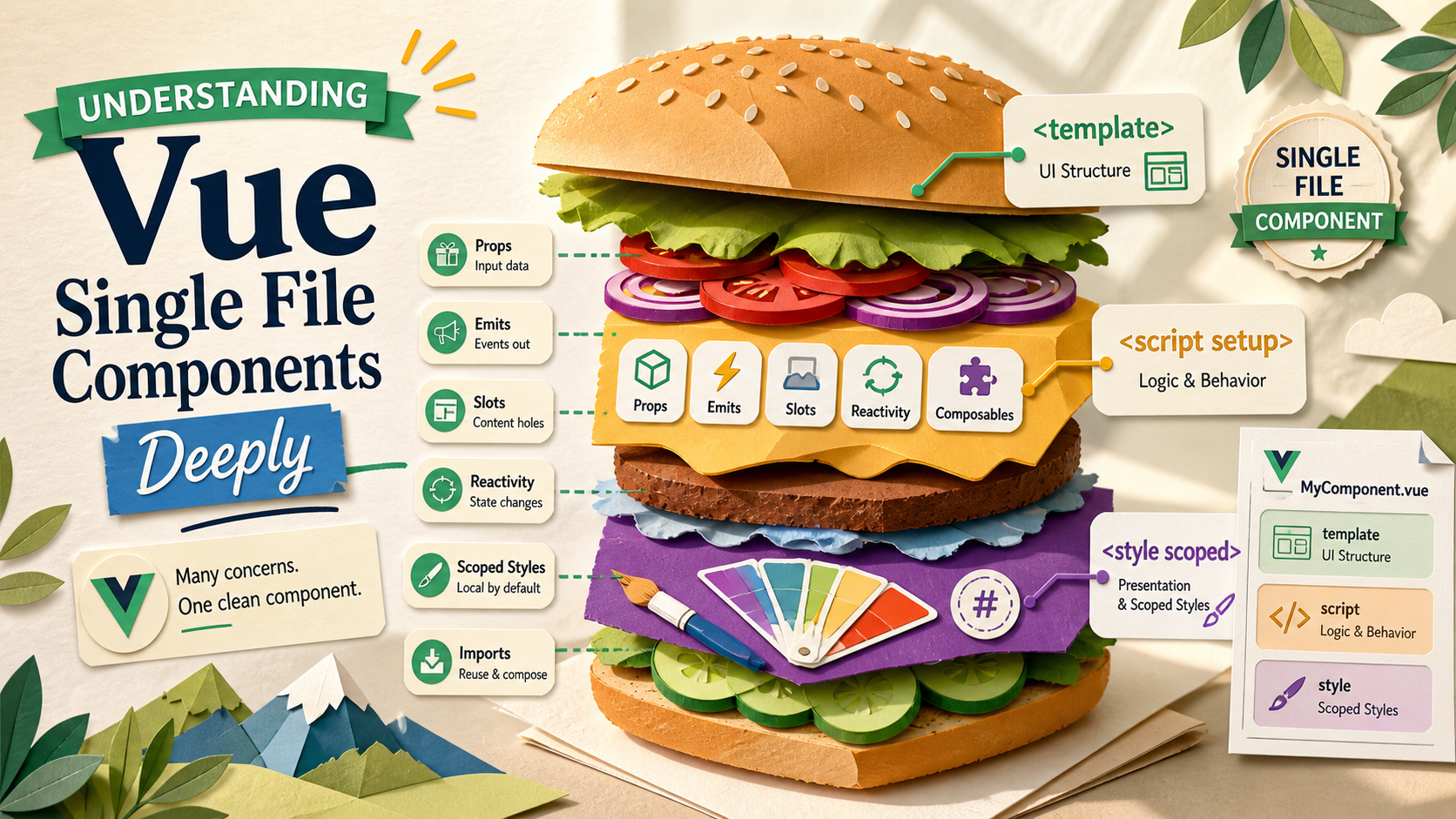
It's tempting to read a .vue file as just a folder pretending to be a file. Template up top, script in the middle, styles at the bottom, all comfortably separated. That's the surface. The interesting bits — the ones that change how you write reusable components — are in what the compiler does on the way out.
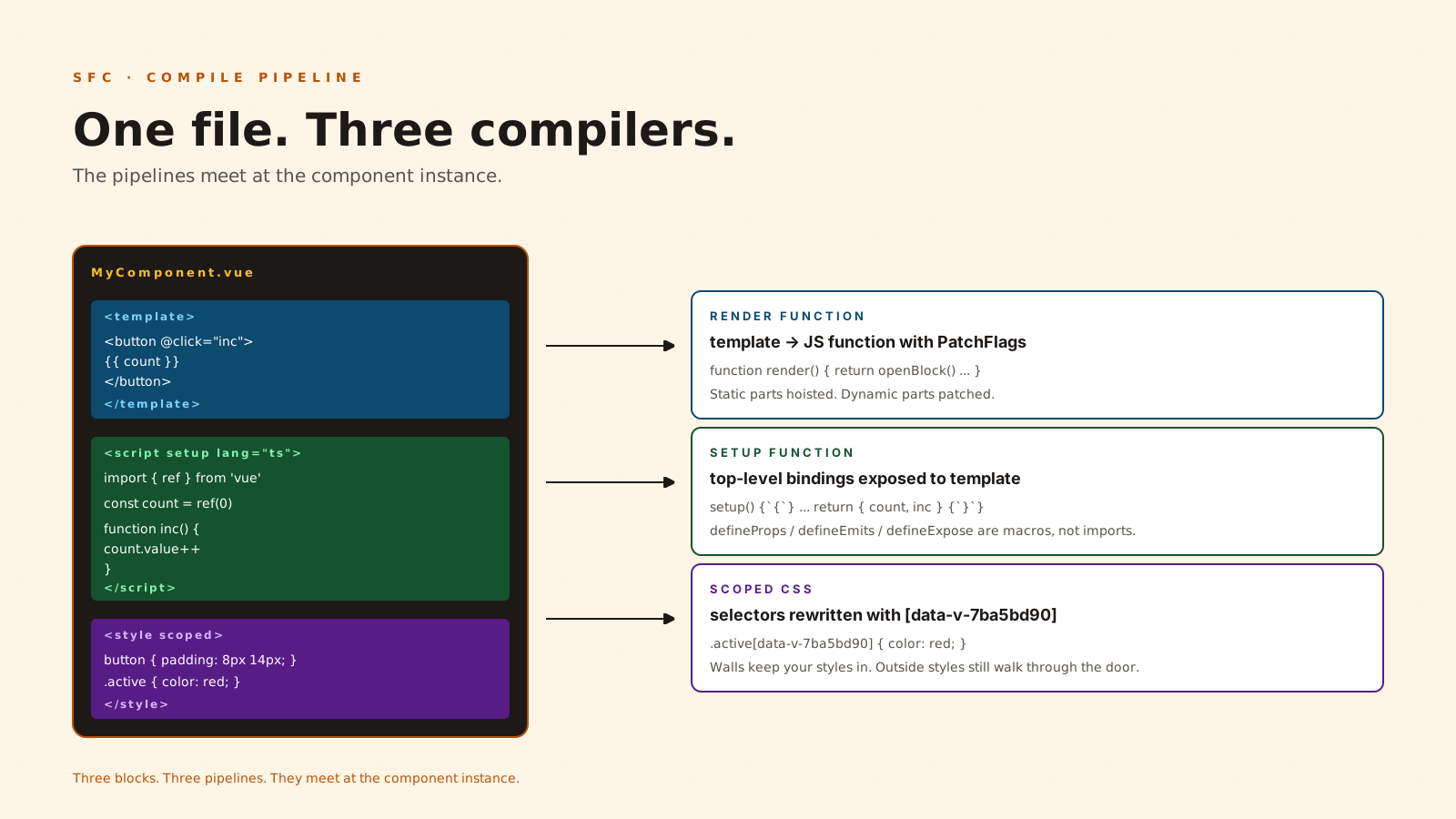
A Single File Component is a compile-time unit. Each block runs through a different pipeline. The template becomes a render function, the script becomes a normal ES module, and the style becomes scoped CSS with attribute selectors. Knowing how those three transformations meet is what separates "write components that feel like Vue" from "write three things in three languages and hope they cohere."
What <script setup> Actually Compiles To
<script setup> looks like top-level code, but it isn't. The compiler wraps the body in a setup() function and exposes whatever you declare at the top level to the template scope automatically. No more return { foo } at the bottom of setup().
<script setup lang="ts">
import { ref } from 'vue'

const count = ref(0)
function increment() { count.value++ }
</script>

<template>
  <button @click="increment">{{ count }}</button>
</template>
count and increment are visible in the template not because of magic, but because the compiler analyzes the bindings of the script block and generates the render function with those bindings in scope. This also means only what you declare at the top level is available — a variable defined inside an if block, or only re-exported from another module, won't be reachable from the template.
Two consequences worth holding onto:
- Imports are real ES imports. Tree-shaking works. A component you import but never use in the template is dead-code eliminated by the bundler.
- The compiler macros (
defineProps,defineEmits,defineModel,defineSlots,defineExpose) are not runtime imports. They're compile-time markers that the compiler rewrites into the underlying options. This is why you can't dynamically alias them or call them conditionally.
defineExpose Decides Your Public Surface
By default, <script setup> components are closed. A parent that holds a template ref to the child can't reach into its bindings. That's a feature — it stops parents from reaching across the boundary by accident.
When you genuinely need to expose something (a focus method, an imperative reset), use defineExpose:
<script setup lang="ts">
import { ref } from 'vue'

const inputEl = ref<HTMLInputElement | null>(null)

function focus() { inputEl.value?.focus() }
function clear() { /* ... */ }

defineExpose({ focus, clear })
</script>

<template>
  <input ref="inputEl" />
</template>
Now a parent doing useTemplateRef<typeof InputField>('field') sees field.value?.focus() typed correctly. Anything not in defineExpose is unreachable. This is the SFC equivalent of public vs private — and Vue's default is private.
The Template Is Compiled, Not Interpreted
The template isn't parsed at runtime. The compiler turns it into a render function during build, and the render function is what runs. This is why template-only features (v-if, v-for, v-model, slots) optimize so well: the compiler knows the static parts and patches only the dynamic ones (Vue's "PatchFlags" approach).
A practical implication: things you can do in the template that look like JavaScript aren't always valid expressions. You can't define a function inline in v-on (well, you can, but the compiler narrows what's allowed). You can't import inside a template. The template is a domain-specific language that resembles HTML + JS, not a JSX-style "everything is a function call" model.
When you need full JS expressiveness, drop into a render function or use JSX in a script block (Vue supports both). The day-to-day SFC trade is: lose some flexibility, gain a much smarter compiler.
Scoped Styles Are An Attribute-Selector Trick
<style scoped> looks like CSS Modules or shadow DOM. It's neither. The compiler adds a unique attribute (something like data-v-7ba5bd90) to every element that originates in this component's template, and rewrites every selector in the scoped block to include [data-v-7ba5bd90].
/* you write */
.btn { color: red; }

/* it ships as */
.btn[data-v-7ba5bd90] { color: red; }
Two facts that catch people:
- Child component roots are matched, not their internals. A scoped rule from
Parent.vuewill match the root element of a child component (because the parent compiled the child's tag and stamped the attribute), but won't match anything deeper. If you need to reach in, use:deep(...)— explicitly. - Scoped is not isolated. Global styles, third-party CSS, and
bodyrules still affect your component. Scoping prevents your styles from leaking out, not other styles from leaking in.
For a real design system, scoped styles are the wrong unit. Token-driven CSS with utility classes or a real CSS-in-JS solution gives you composition. Scoped styles are great for one-off component-internal layout fixes.
CSS v-bind Is The Underrated Bit
You can interpolate reactive state into your scoped CSS:
<script setup lang="ts">
import { ref } from 'vue'
const accent = ref('#0ea5e9')
</script>

<template>
  <div class="card">…</div>
</template>

<style scoped>
.card {
  border: 2px solid v-bind(accent);
}
</style>
The compiler turns the bound expression into a CSS custom property and updates it on the root element when the source changes. This is a simpler alternative to inline style="--accent: ..." for theme-style values, and it composes nicely with useCssVars for more dynamic cases.
When To Split, When To Keep It Together
The "single file" part of SFC sometimes gets used as an excuse to put everything inside. A few rules I've found hold up:
- Composables move out when the logic could plausibly run in a different component. A 40-line component with a 200-line
<script setup>is a sign that the heavy lifting wants to be auseX()next door. - Templates split when the conditional rendering inside
v-if/v-elsemakes the file hard to scan. Two child components with clear names beat one component with three branches. - Styles stay as long as they describe layout that's specific to this component. The moment you're writing a button color that should match three other buttons, lift to a token.
- Types and pure helpers — utility functions, type guards, formatters — live next to the SFC, not inside it.
MyCard.vue+MyCard.types.tsis fine. Stuffing types into the script block makes the IDE outline noisy.
The Honest Summary
The "Single File" framing makes it sound like the win is co-location. Co-location is part of it, but the real value is that the three blocks share a compile pipeline that understands them together. The template knows the script's bindings. The script knows the macros. The styles can read the script's reactive state.
When you write SFCs with that pipeline in mind — bindings exposed at the top level, public surface declared with defineExpose, scoped styles for layout and tokens for design — the components end up shorter, more navigable, and easier to delete. That last one is the underrated metric.