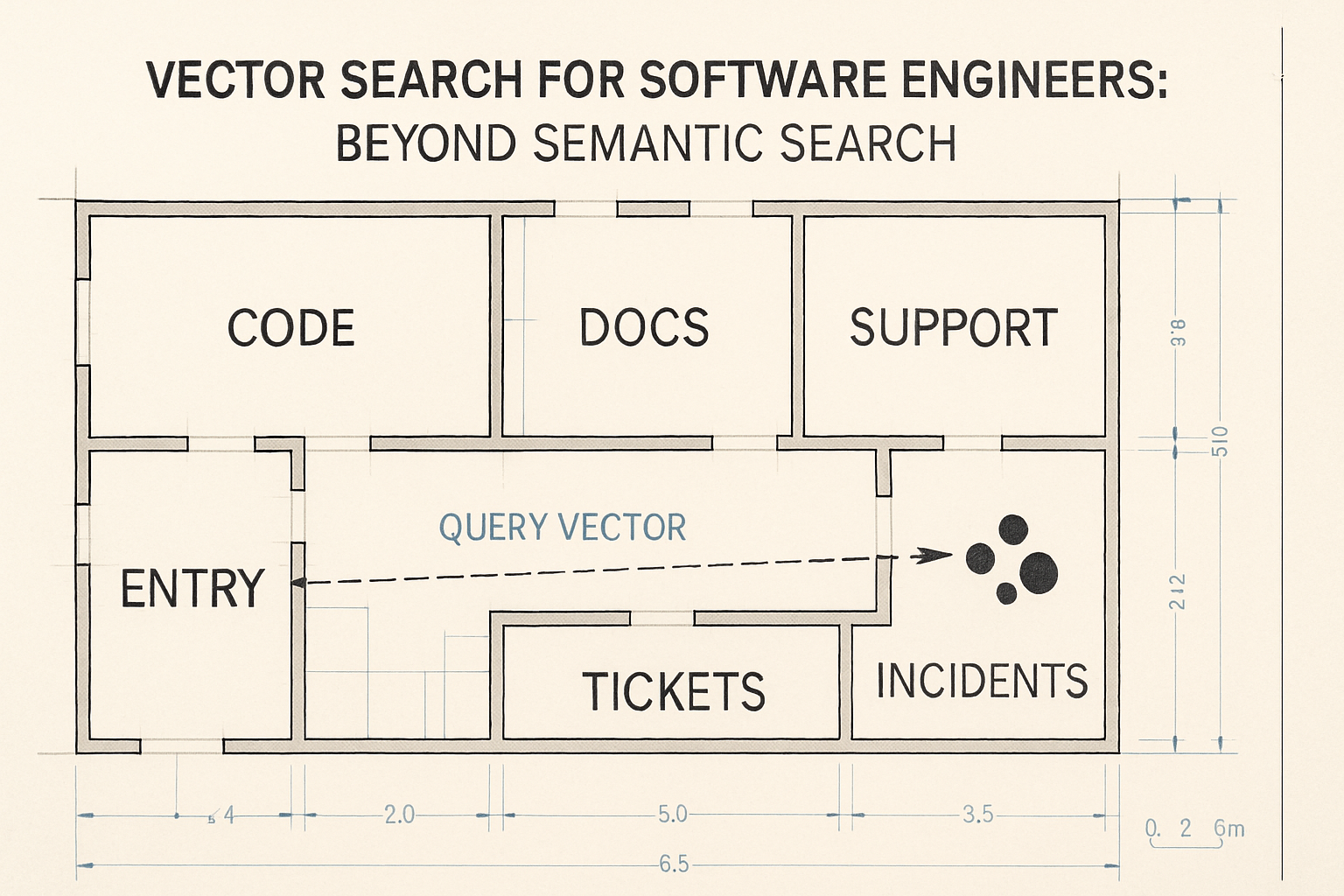
Vector search is usually explained as "semantic search," and that framing is fine for a one-liner — but it's also incomplete. For software engineers, vector search is a similarity tool that touches a lot more than document retrieval. It can drive code search, documentation search, duplicate ticket detection, support knowledge bases, incident similarity, architecture discovery, RAG retrieval, recommendation systems, and clustering of related issues.
But it isn't the right tool for everything. Sometimes exact keyword search is better. Sometimes SQL is better. Sometimes a metadata filter is better. And often the right answer is hybrid — vectors for meaning, keywords for exact symbols, metadata for control. This article walks through what vector search actually does, where it helps engineering teams, where it fails, and how to combine it with the boring search you already have. No hype, no magic — just the engineering shape of it.
What Vector Search Actually Does
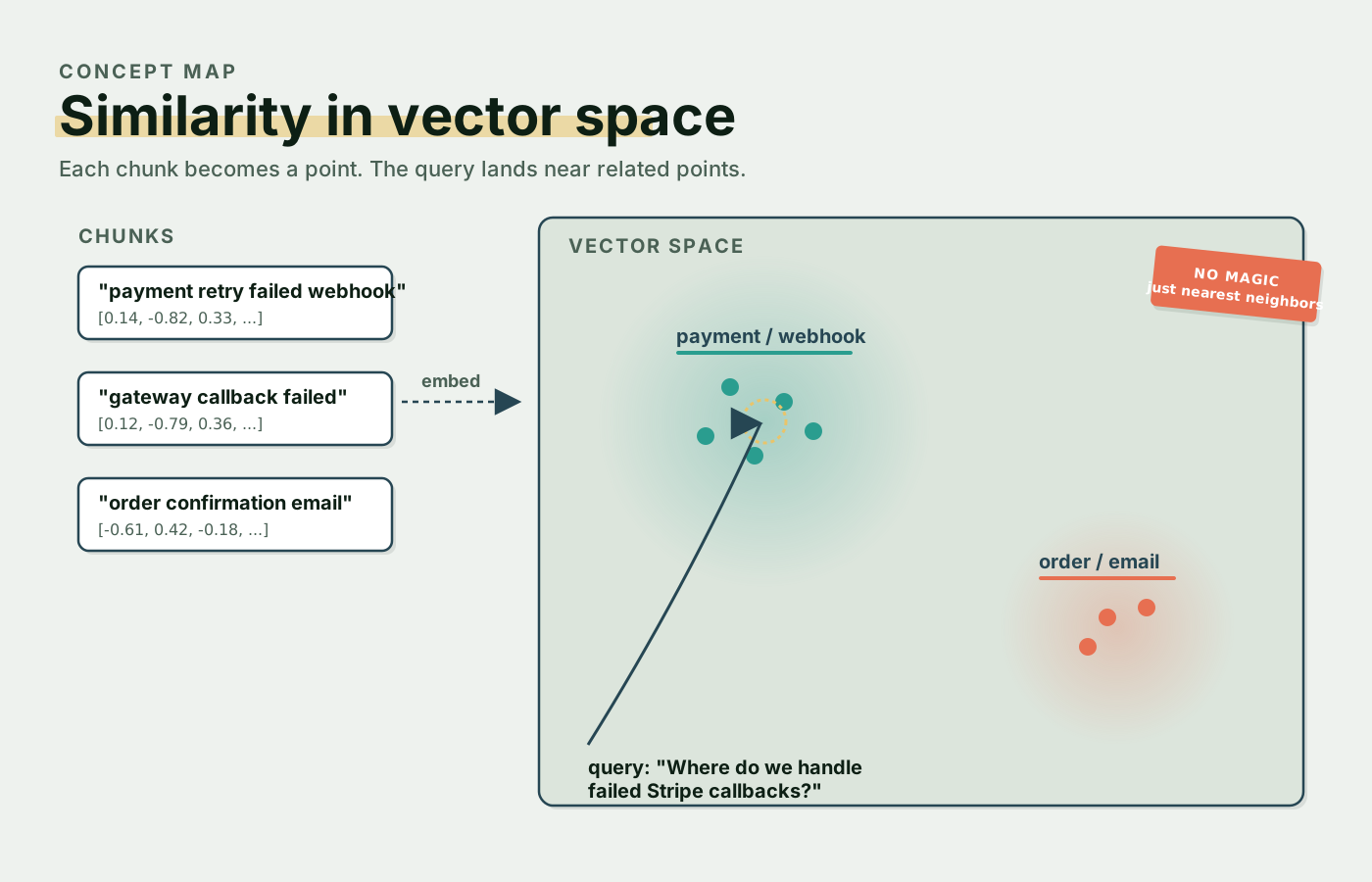
Vector search starts with embeddings. An embedding model takes a piece of text — or code, or anything tokenizable — and turns it into a fixed-length list of numbers. Phrases that mean similar things land close together in that vector space, even when the surface words are completely different.
"payment retry failed webhook"
→ [0.14, -0.82, 0.33, ...]

"gateway callback failed and retried"
→ [0.12, -0.79, 0.36, ...]
Those two phrases share almost no words, but their vectors sit near each other because the meaning overlaps. Vector search is just nearest-neighbor lookup over that space — give me the K closest vectors to this query — and that's the whole magic. You search by concept instead of by literal token. So a query like "Where do we handle failed Stripe callbacks?" can retrieve a document titled "PaymentWebhookController handles gateway webhook failures" even though the word "callback" never appears in the document. Useful, especially when the developer asking doesn't know the exact name of the thing they're looking for.
Code Search
Code search is its own special problem because developers split their time between two very different query styles. Sometimes they search for an exact symbol — PaymentRetryService, CancelExpiredTrialsCommand, subscription.cancelled — and for that, plain keyword search is unbeatable. You don't want vector search "almost matching" a class name; you want the exact one.
But a lot of the time the developer doesn't know the symbol. They have a concept in their head and they're hunting for whatever code implements it. "Where do we prevent duplicate invoice reminder emails?" is the kind of question that has zero exact-symbol matches. The actual implementation might look like this:
final class ReminderDeduplicationService
{
    public function recentlySent(Invoice $invoice): bool
    {
        return $invoice->reminders()
            ->where('created_at', '>=', now()->subHours(24))
            ->exists();
    }
}
The word "duplicate" is nowhere in the code. Vector search still finds it because "prevent duplicate" maps semantically onto "deduplication" and "recently sent." That's the case it's good at. The practical pattern for code search across a codebase ends up being a mix: keyword for exact symbols, vector search for concepts, metadata filters for language and service and path, and a reranker that gets the final shortlist right. No single one of those tools is enough on its own.
Documentation Search
Documentation is a natural fit for vector search because nobody remembers exact titles. Developers ask things like "How do we rotate webhook secrets?", "What is the rollback plan for checkout?", "Where is the runbook for stuck jobs?" — open-ended, conceptual, plain English. The doc itself might be titled "Payment Gateway Signature Key Rotation," and a keyword search for "webhook secrets" finds nothing. A vector index connects the two because the meanings overlap.
The other half of documentation search is metadata. Without it, you'll happily retrieve a deprecated runbook from three years ago that's still in the index. Useful filters look like this:
source_type: runbook
service: payments
updated_at: recent
access_level: engineering
The combination — semantic retrieval plus structured filters — is what makes the result list trustworthy instead of just plausible.
Duplicate Ticket Detection
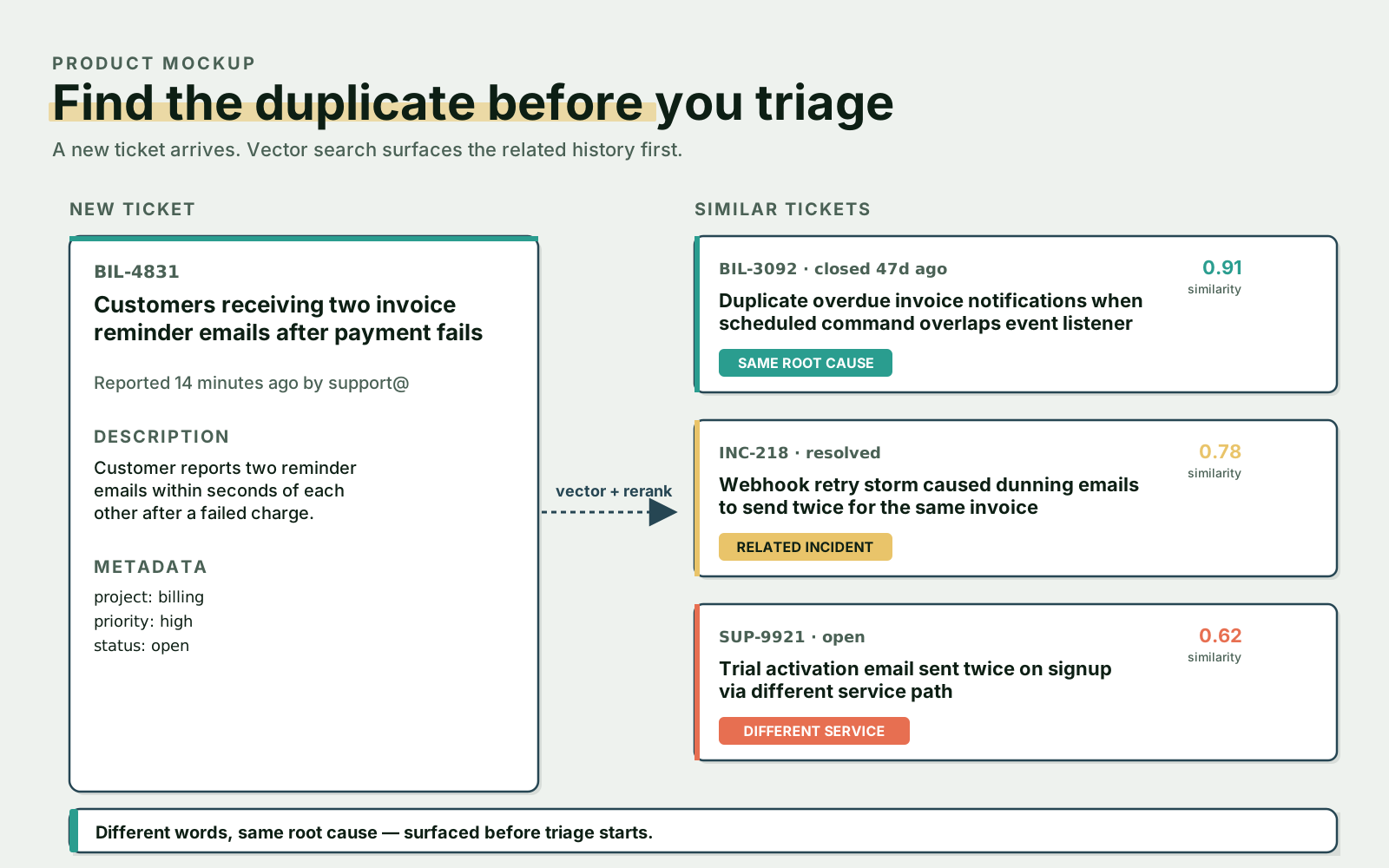
This is one of the highest-ROI uses of vector search inside engineering orgs. A new ticket comes in saying "Customers are getting two invoice reminder emails after payment fails." Somewhere in the backlog there's an old ticket: "Duplicate overdue invoice notifications when scheduled command overlaps event listener." Different wording, same root cause. A keyword search misses it. A vector search lands it on the first page.
A simple flow looks like this in Python:
def find_duplicate_tickets(ticket_title: str, ticket_body: str) -> list[Ticket]:
    query = f"{ticket_title}\n{ticket_body}"

    candidates = vector_search(
        collection="tickets",
        query=query,
        top_k=20,
        filters={
            "status": ["open", "recently_closed"],
            "project": "billing",
        },
    )

    return rerank(query, candidates)[:5]
The same flow in TypeScript on the backend of a Next.js or Node service:
async function findDuplicateTickets(
  title: string,
  body: string,
): Promise<Ticket[]> {
  const query = `${title}\n${body}`;

  const candidates = await vectorSearch({
    collection: "tickets",
    query,
    topK: 20,
    filters: {
      status: ["open", "recently_closed"],
      project: "billing",
    },
  });

  return (await rerank(query, candidates)).slice(0, 5);
}
Same shape, two stacks. Triage saves time, recurring incidents get connected to old fixes instead of being rediscovered, and the support team stops paying the cost of "we already solved this six months ago" twice.
Support Knowledge Base Search
Support agents and end users rarely phrase their question the way the knowledge base phrases the answer. A customer types "Customer says they were charged but subscription is still inactive." The KB article is titled "Payment succeeded but activation webhook delayed." Vector search bridges that gap, and that's why nearly every modern support assistant has one.
But support search needs more than just relevance. It needs permission filtering so unauthorized articles never surface, source freshness so deprecated answers don't get returned, an approved-articles tier so official policy outranks community notes, citations so the agent can verify the source, confidence indicators so low-similarity results don't get presented as facts, and an escalation path for when no good match exists. A support assistant should not invent policy — it should retrieve approved knowledge, cite it, and back off when it isn't sure.
Hybrid Search
Hybrid search is vector search plus keyword search, and for engineering data it's almost always the right starting point. The reason is structural: engineering content contains both meaning and exact identifiers, and neither retrieval method handles both well alone.
Take a query like "Why does ProcessPaymentWebhookJob retry failed events?" The exact symbols (ProcessPaymentWebhookJob, retry, failed events) are critical — you don't want a near-miss match like PaymentReminderJob. But the conceptual shape ("why does this thing retry") is what vector search handles well. Combining them gets you both. Two common implementations exist. You can score-merge:
score = (0.65 * vector_score) + (0.35 * keyword_score)Or you can retrieve from both systems independently, deduplicate the merged list, and let a reranker make the final call:
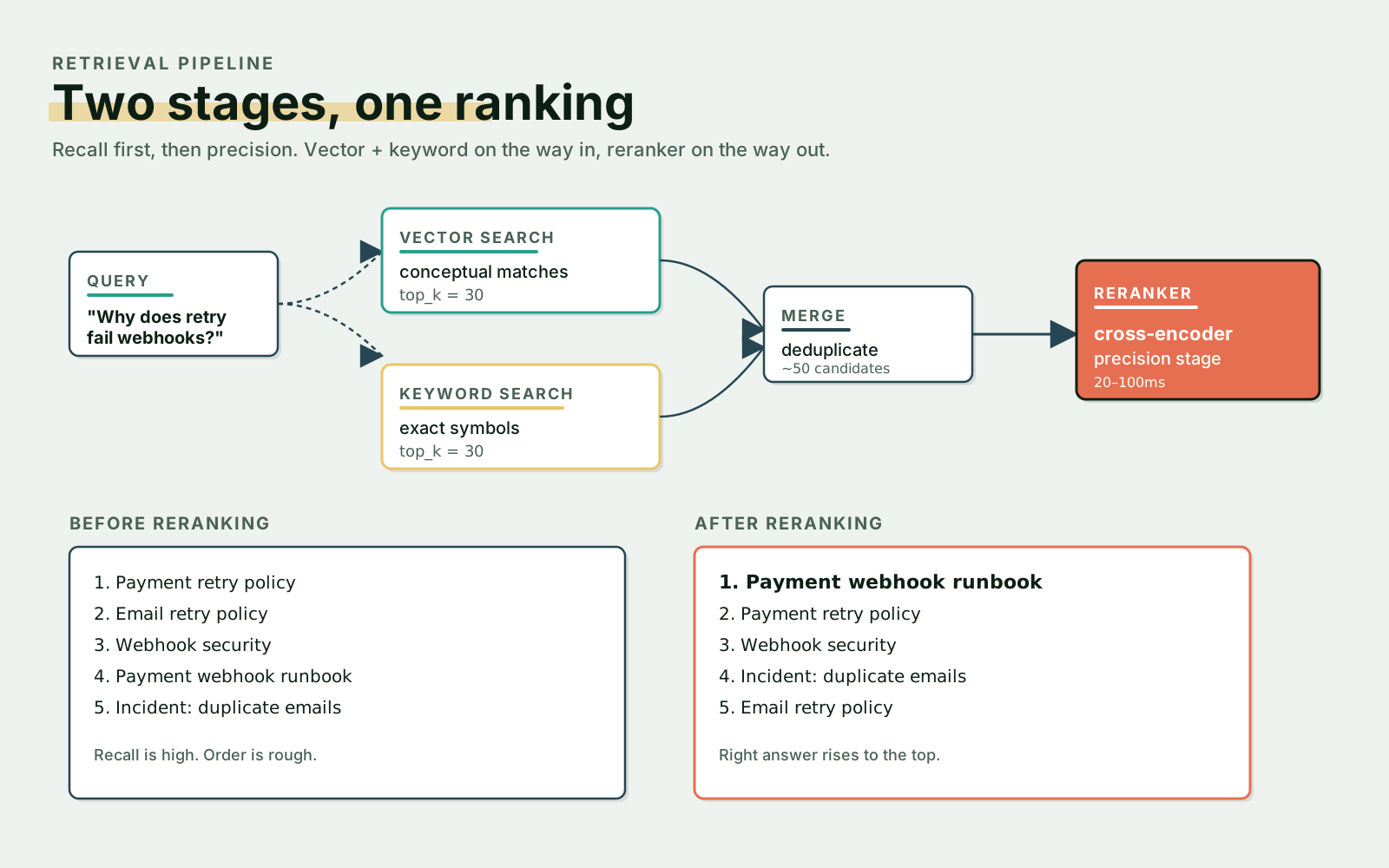
vector_results = vector_search(query, top_k=30)
keyword_results = keyword_search(query, top_k=30)

merged = merge_and_deduplicate(vector_results, keyword_results)

final = rerank(query, merged)[:10]
The exact weights are dataset-dependent — tune them on a held-out eval set, not on intuition.
Reranking
Vector search is a recall stage. It's tuned to surface anything that could be relevant, even if some of those candidates are off-topic. Reranking is the precision stage — given 30 candidates, which 5 are actually the right answer? A small cross-encoder model or an LLM-based reranker reads the query and each candidate together and produces a tighter ranking.
The effect is most visible when the first stage is broad. A query like "How do we retry failed payment webhooks?" can pull back five plausible candidates: a payment retry policy, an email retry policy, a webhook security doc, the payment-webhook runbook, and an incident report about duplicate invoice emails. The runbook is the right answer, but the vector search alone has it ranked third or fourth. The reranker reads each of them with the query in context and pushes the runbook to the top. It costs more per query — usually 20–100ms for a cross-encoder on top of the vector lookup — but for any user-facing search it earns its keep.
Metadata Is Not Optional
Vector search without metadata is a toy. The minute your index has more than one source, more than one team, or more than one freshness level, you need structured fields alongside the vector. A reasonable shape for an engineering chunk:
{
  "source_type": "code",
  "language": "php",
  "service": "billing",
  "file_path": "app/Jobs/ProcessPaymentWebhookJob.php",
  "symbol": "ProcessPaymentWebhookJob::handle",
  "updated_at": "2026-04-20",
  "owner": "payments-team",
  "access_level": "engineering"
}
With those fields you can scope a retrieval to "billing service code, written by the payments team, updated this year" before similarity even runs:
results = vector_search(
    query="failed payment webhook retry",
    filters={
        "service": "billing",
        "source_type": ["code", "runbook"],
        "access_level": "engineering",
    },
)
Metadata pays off across the whole stack — better relevance, working access control, real citations, easier debugging, sharper evals, and a freshness story you can actually defend.
When Vector Search Earns Its Place
Vectors are the right tool when users ask in natural language, when exact words are unlikely to match, when the corpus is long-form and varied, when you need similarity matching or duplicate detection or semantic clustering, or when you're feeding a RAG pipeline that needs anything potentially related. Typical wins: find docs about webhook secret rotation, find similar incidents to this error, find tickets related to duplicate invoice emails, find code related to payment retry behavior, find support articles for this customer issue. All of those are open-ended questions that don't have a single canonical phrasing — exactly the failure mode of keyword search.
When Vector Search Is The Wrong Tool
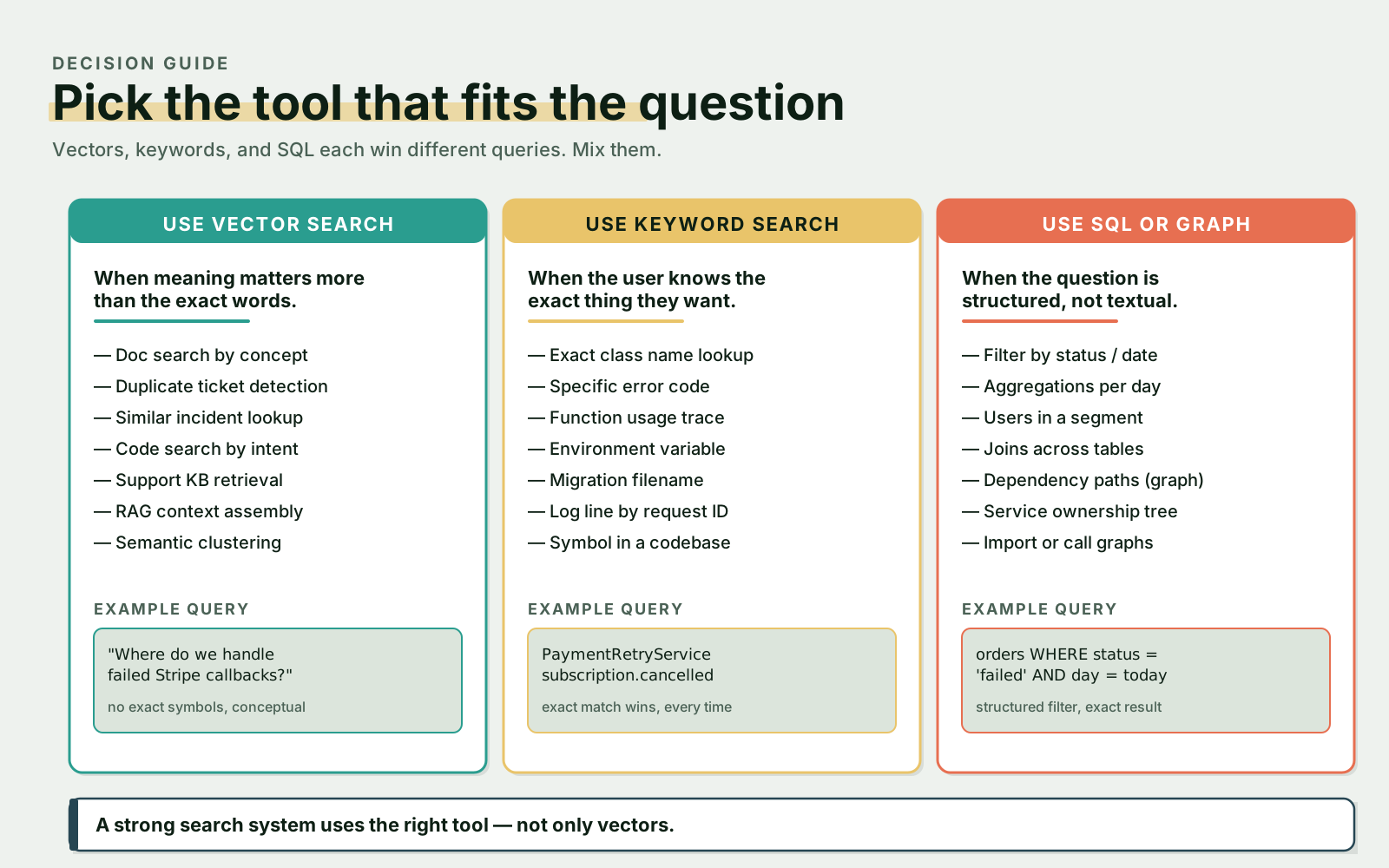
Vector search is wrong for plenty of queries too, and the failure mode is sneakier — you get a result, it just isn't the right one. Reach for keyword search instead when the user knows the exact thing they want: an exact class name, an exact error code, a function usage, an environment variable, a migration filename, a log line with a request ID. Reach for SQL when the question is structured: filter orders by status and date, count failed payments per day, find users in a segment, join across structured tables. Reach for graph search when you're walking relationships: dependency paths, service ownership trees, import or call graphs. A search system that only knows how to do vectors will lose to one that picks the right tool per query.
Debugging Vector Search
When the results look bad, the cause is almost always upstream of the model. Walk the checklist: are chunks too large or too small? Is metadata missing? Is the embedding model appropriate for the content (a general-purpose model on a code corpus is a common mismatch)? Are the filters too broad, or too narrow? Do you actually need hybrid search for this query type? Do you need a reranker on top? Is the source itself out of date? Is the query just vague?
The fix that works for everyone, regardless of which one is biting you today, is an evaluation set. Pick 30–50 representative queries, write down the expected results, and measure retrieval quality before you measure answer quality.
[
  {
    "query": "How do we rotate webhook secrets?",
    "expected_results": [
      "runbooks/webhook-secret-rotation.md"
    ]
  },
  {
    "query": "Where do we prevent duplicate invoice emails?",
    "expected_results": [
      "app/Services/ReminderDeduplicationService.php",
      "incidents/duplicate-invoice-reminders.md"
    ]
  }
]
Once you can score retrieval, every change — new chunker, new model, new reranker — becomes a number you can compare against last week. Without that set, you're tuning on vibes.
Final Thoughts
Vector search is a sharp tool, but it isn't a search system on its own. The good engineering setups stack it with the rest: vectors for meaning, keywords for exact terms, metadata for control, reranking for precision, citations so the user can audit the answer, and an eval set so you know whether any of it is working. The goal isn't "semantic search" as a buzzword — it's helping the people on your team find the right knowledge faster than they could before. If a keyword query gets there in one step, that's the win. If it takes a hybrid retrieval and a reranker to surface the runbook from three years ago that solves today's incident, that's also the win. Pick the tool that fits the question.