If you've ever quoted a form as "two days of work" and shipped it three weeks later, you're in good company. Vue forms look like the simplest thing in a UI — v-model on a few inputs, a button, post the values. Then the requirements arrive: validation that runs at the right time, errors that don't shout at the user mid-typing, server-side errors mapped to the right field, a Save button that disables itself, accessibility that survives a screen reader.
Forms are where every state-management lesson in Vue shows up at once. This article is the practical survival guide.
Validation Timing Is The Real Problem
The hardest decision in form UX is when to show errors. Three policies, all wrong in slightly different situations:
- Validate on every keystroke. A user typing their email sees "invalid email" after every letter until the moment they finish. Annoying.
- Validate on submit only. They fill out fifteen fields, hit Submit, and get back a wall of red.
- Validate on blur. Probably the best default — errors appear when the user leaves a field, which usually means they think they're done.
In practice, the policy that works best is progressive validation: validate on blur for a fresh field, then re-validate on every keystroke once the field has shown an error. Quick feedback while fixing a mistake; quiet while typing a fresh value.
This is the kind of behaviour that's a pain to write by hand and a one-line config in a form library. Which is most of the reason form libraries exist.
"Dirty" And "Touched" Are Both Important And Different
Two pieces of state every form needs:
- Dirty: has the value changed from its initial value? Drives the unsaved changes banner.
- Touched: has the user interacted with this field? Drives whether to show validation errors.
A field can be touched without being dirty (clicked into, then clicked out without changing). It can be dirty without being touched (programmatically updated). The distinction matters; tracking it by hand is the kind of thing that turns a 50-line component into a 200-line one.
The Stack That Won
In 2025, the practical defaults for non-trivial Vue forms:
VeeValidate + Zod (or Valibot, or Yup). The most popular and most flexible. Headless API, schema-driven, type-safe.
<script setup lang="ts">
import { useForm } from 'vee-validate'
import { toTypedSchema } from '@vee-validate/zod'
import * as z from 'zod'

const schema = z.object({
  name: z.string().min(1, 'Required'),
  email: z.string().email('Invalid email'),
  age: z.coerce.number().min(18, 'Must be 18+'),
})

const { defineField, handleSubmit, errors, isSubmitting, setErrors } = useForm({
  validationSchema: toTypedSchema(schema),
  validateOnMount: false,
})

const [name, nameAttrs] = defineField('name')
const [email, emailAttrs] = defineField('email')
const [age, ageAttrs] = defineField('age')

const onSubmit = handleSubmit(async (values) => {
  try {
    await api.signup(values)
    navigate('/welcome')
  } catch (err) {
    if (err.code === 'EMAIL_TAKEN') {
      setErrors({ email: 'This email is already registered' })
      return
    }
    setErrors({ root: 'Something went wrong' })
  }
})
</script>

<template>
  <form @submit="onSubmit">
    <input v-model="name" v-bind="nameAttrs" />
    <span v-if="errors.name" role="alert">{{ errors.name }}</span>

    <input v-model="email" v-bind="emailAttrs" type="email" />
    <span v-if="errors.email" role="alert">{{ errors.email }}</span>

    <input v-model="age" v-bind="ageAttrs" type="number" />
    <span v-if="errors.age" role="alert">{{ errors.age }}</span>

    <button :disabled="isSubmitting">
      {{ isSubmitting ? 'Saving…' : 'Sign up' }}
    </button>
  </form>
</template>
What's happening:
- Zod describes the shape of valid data and generates a TypeScript type from it (
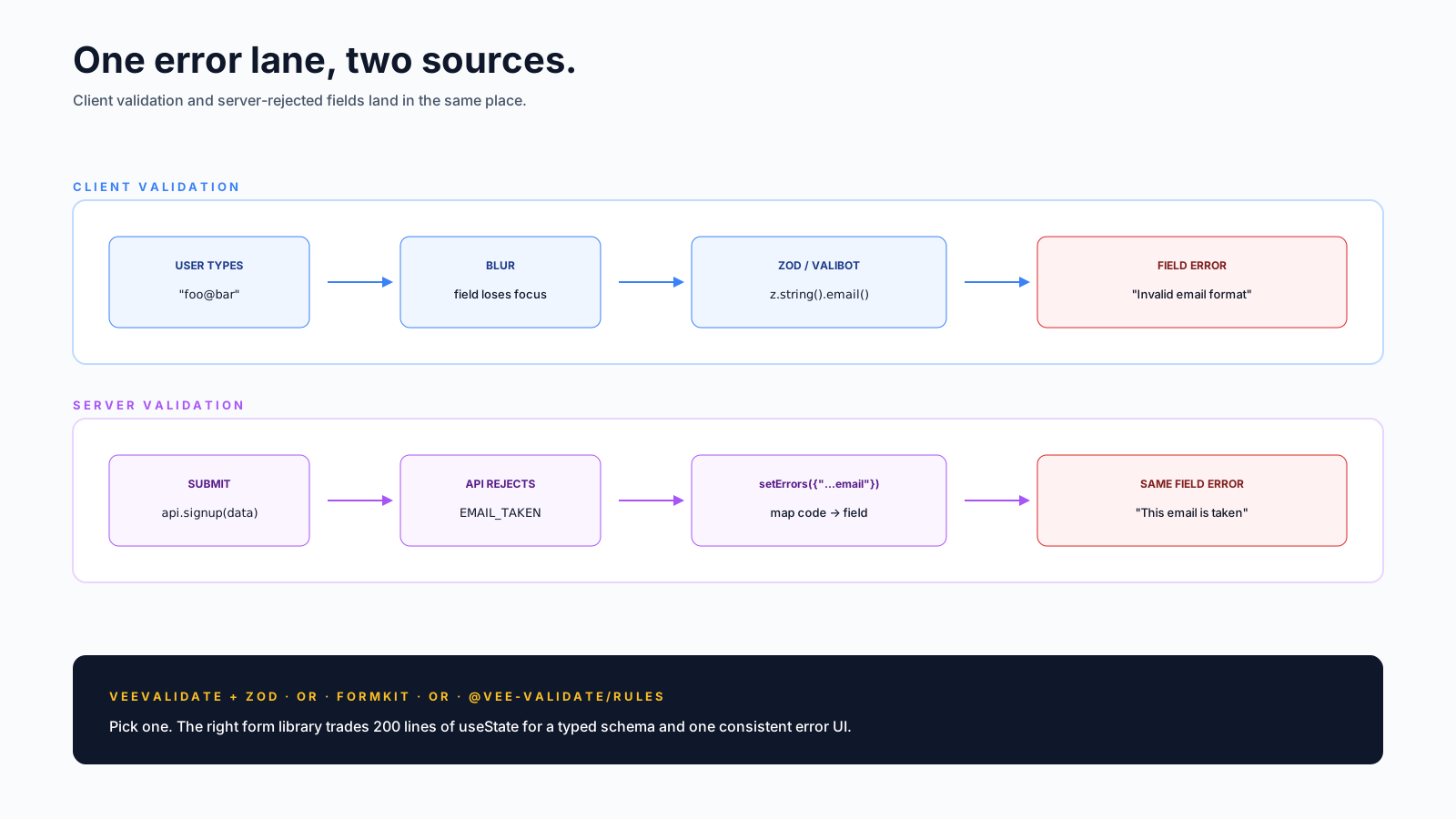
z.infer<typeof schema>). One source of truth for validation and types. toTypedSchemabridges Zod into VeeValidate's adapter so errors are typed and field paths autocomplete.defineFieldbinds a field to the form's state and gives you the right v-model + attrs (includingaria-invalid) for free.setErrorsis how server-rejected fields land in the same error UI as client validation.
FormKit is the strong alternative — schema-first, more opinionated, ships its own input components and styling. If your team prefers conventions over a la carte, FormKit is excellent.
Server-Side Errors Are The Forgotten Half
Most form tutorials stop at client validation. Real apps have errors only the server knows about — username taken, card declined, rate limited. These need to land on the correct field:
catch (err) {
  if (err.code === 'EMAIL_TAKEN') {
    setErrors({ email: 'This email is already registered' })
    return
  }
  if (err.code === 'WEAK_PASSWORD') {
    setErrors({ password: 'Pick a stronger password' })
    return
  }
  setErrors({ root: 'Something went wrong, try again' })
}
setErrors from VeeValidate (or the equivalent in your library) lets server-side rejections live in the same error display system as client-side ones. The user sees one consistent UI whether the failure was local or remote.
The pattern that goes wrong: showing a toast for server errors. Toasts disappear, screen readers miss them, the user doesn't know which field is problematic. Field-level errors stay on screen until fixed.
The Submit Button Has Four Jobs
<button
  :disabled="!meta.valid || isSubmitting"
  :aria-busy="isSubmitting"
>
  {{ isSubmitting ? 'Saving…' : 'Save' }}
</button>
It needs to:
- Disable while submitting — prevent double-clicks.
- Show a loading state — feedback that something is happening.
- Re-enable on error — let the user retry.
- Stay disabled while invalid — no point submitting bad data.
meta.valid and isSubmitting come from the form library's bookkeeping. Without it, you'd track the state manually with a ref('idle' | 'submitting' | 'success' | 'error') and several more lines of logic.
Accessibility, In One Section
Forms are where accessibility quietly fails. The minimum bar:
- Every input has an associated
<label>. Eitherfor+id, or wrap the input. - Errors are linked with
aria-describedbyso screen readers announce them when the field has focus. - Required fields use
aria-required="true", not just a red asterisk. - Error messages have
role="alert"so they're announced when they appear. - Don't use
placeholderas the label. It vanishes the moment the user types.
<div>
  <label for="email">Email</label>
  <input
    id="email"
    type="email"
    v-model="email"
    v-bind="emailAttrs"
    aria-required="true"
    :aria-invalid="!!errors.email"
    :aria-describedby="errors.email ? 'email-err' : undefined"
  />
  <span v-if="errors.email" id="email-err" role="alert">{{ errors.email }}</span>
</div>
VeeValidate's defineField doesn't add aria-invalid by default — you bind it yourself with :aria-invalid="!!errors.email" (as in the example above), or pass a custom mapAttrs to useForm that injects it whenever a field has an error. Either way, aria-describedby is always your job.
Subtle Bugs Vue Forms Always Hit
- Browser autofill doesn't always trigger Vue's
v-model. With most form libraries this works because they read on submit; rawv-modelsometimes needs an explicit listener for autocomplete events. - Submitting on Enter inside a multi-input form. Without an explicit submit button, Enter in any input submits. Either accept that, add a button, or set
type="button"on non-submit buttons. - Number inputs and locale.
<input type="number">accepts comma vs dot decimals depending on the user's locale. Coerce explicitly with Zod (z.coerce.number()) or normalise on submit. - File inputs are uncontrolled. You can't
v-modela<input type="file">value. Use a ref to the input element and readfileson change. - Dynamic field arrays. Adding/removing items from a list (VeeValidate's
useFieldArray) is its own small skill — read the docs once before rolling your own.
A Quick Mental Map
When you're about to build a form, ask:
- How many fields? Under 5 with no async validation → plain
refis fine. More than that → VeeValidate or FormKit. - Where does validation come from? Reuse the same Zod schema for the API layer if you can.
- What's the validation timing? Pick once. Don't change it per field.
- How are server errors mapped to fields? Build this in from day one.
- What's the accessibility plan? Labels, aria, role="alert" — non-negotiable.
Forms remain harder than they look because they're not just UI — they're a tiny app coordinating user input, async work, server feedback, and accessibility. The good news: the modern Vue stack (VeeValidate + Zod, or FormKit, plus a discipline around timing) handles 90% of it. The remaining 10% is the part you actually had to think about anyway.