You can build a small Vue app with three top-level routes and never see the router again. The problems start at fifteen routes, two layouts, three role-based access tiers, and a "this shouldn't be navigable while a form is dirty" requirement. By that point, the router stops being plumbing and starts being a load-bearing piece of the architecture — and the patterns you use to wire it up matter.
This is a tour of the patterns I keep coming back to in Vue Router 4. None of them are surprising; they're just the ones that survive contact with a real app.
Layout Routes Are Nested Routes
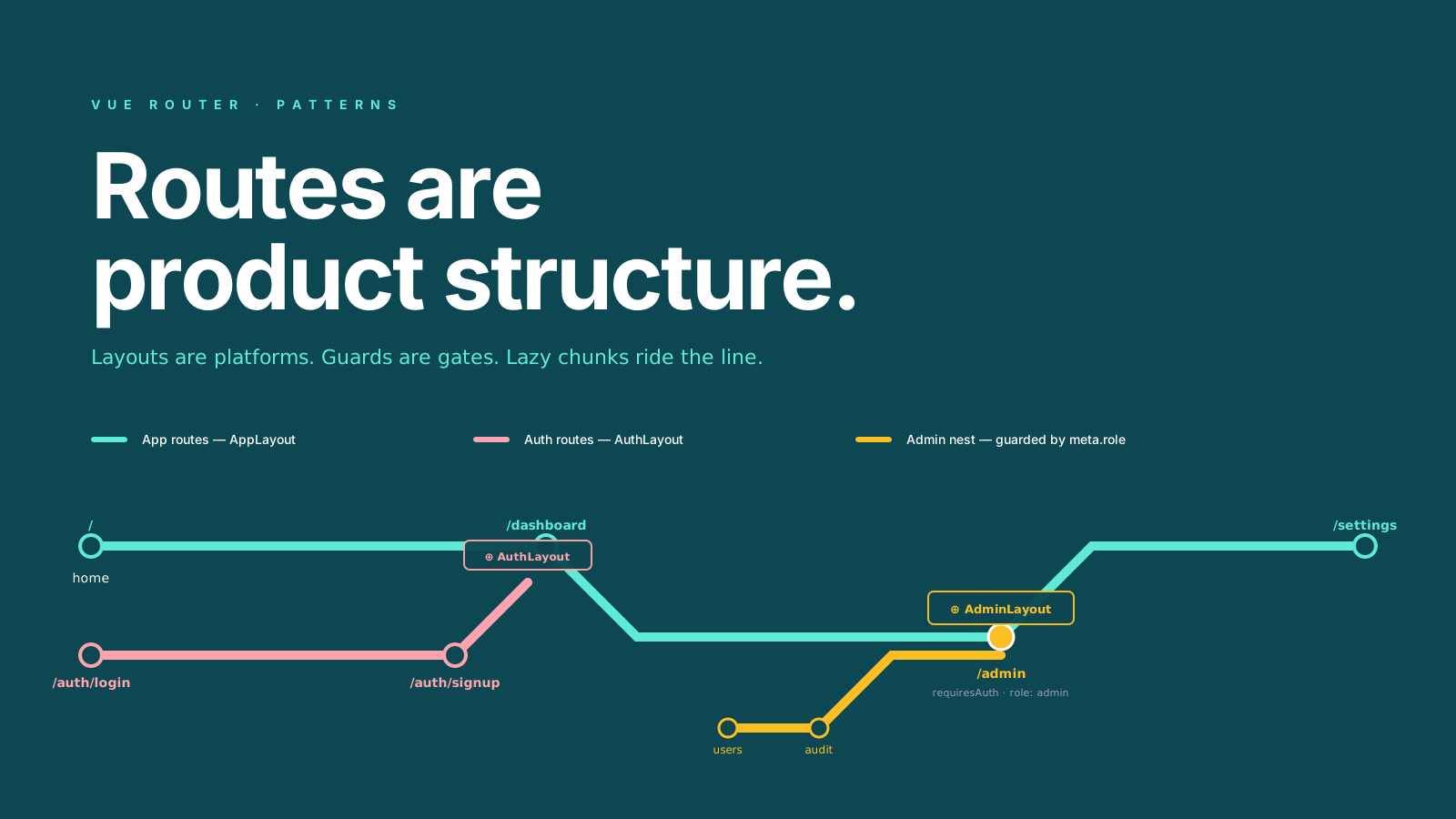
The most common architectural decision a Vue Router app makes: how do layouts work? The clean answer is "layouts are routes." A layout is a component with <RouterView /> in it, and you nest the actual page components as children:
// router/index.ts
import { createRouter, createWebHistory } from 'vue-router'

export default createRouter({
  history: createWebHistory(),
  routes: [
    {
      path: '/',
      component: () => import('@/layouts/AppLayout.vue'),
      children: [
        { path: '', name: 'home', component: () => import('@/pages/Home.vue') },
        { path: 'settings', name: 'settings', component: () => import('@/pages/Settings.vue') },
      ],
    },
    {
      path: '/auth',
      component: () => import('@/layouts/AuthLayout.vue'),
      children: [
        { path: 'login', name: 'login', component: () => import('@/pages/Login.vue') },
        { path: 'signup', name: 'signup', component: () => import('@/pages/Signup.vue') },
      ],
    },
  ],
})
The login page renders inside AuthLayout, the home page renders inside AppLayout. There's no "is this an auth route?" check anywhere — the structure makes the answer obvious.
For unplugin-vue-router (file-based routing), this same shape comes from folder structure. The mental model is the same.
Async Components Are The Default
Every route component should be () => import('...'). Vue Router treats async components as a first-class case, and Vite emits each one as a separate chunk. The first paint downloads only the layout + landing page; navigating to settings downloads the settings chunk on demand.
{ path: 'settings', component: () => import('@/pages/Settings.vue') }Two practical refinements:
Group related routes into the same chunk so a feature ships as one bundle instead of fifteen. With Vite (the default for new Vue projects), use rollupOptions.manualChunks in vite.config.ts:
// vite.config.ts
export default defineConfig({
  build: {
    rollupOptions: {
      output: {
        manualChunks(id) {
          if (id.includes('/pages/admin/')) return 'admin'
          if (id.includes('/pages/billing/')) return 'billing'
        },
      },
    },
  },
})
(For projects still on webpack, the equivalent is the /* webpackChunkName: "admin" */ magic comment inside the dynamic import() — Vite/Rollup ignores those, so don't sprinkle them in a Vite codebase.)
Suspense for a coordinated loading state. Wrap <RouterView /> in <Suspense> and provide a fallback. The route navigation waits for the async setup to resolve, so you don't get half-rendered pages.
Navigation Guards: Small And Composable
The biggest trap in Vue Router is the "god guard" — one beforeEach that checks auth, validates roles, fetches user data, sets the page title, and tracks analytics. By month six, nobody knows what changing it will break.
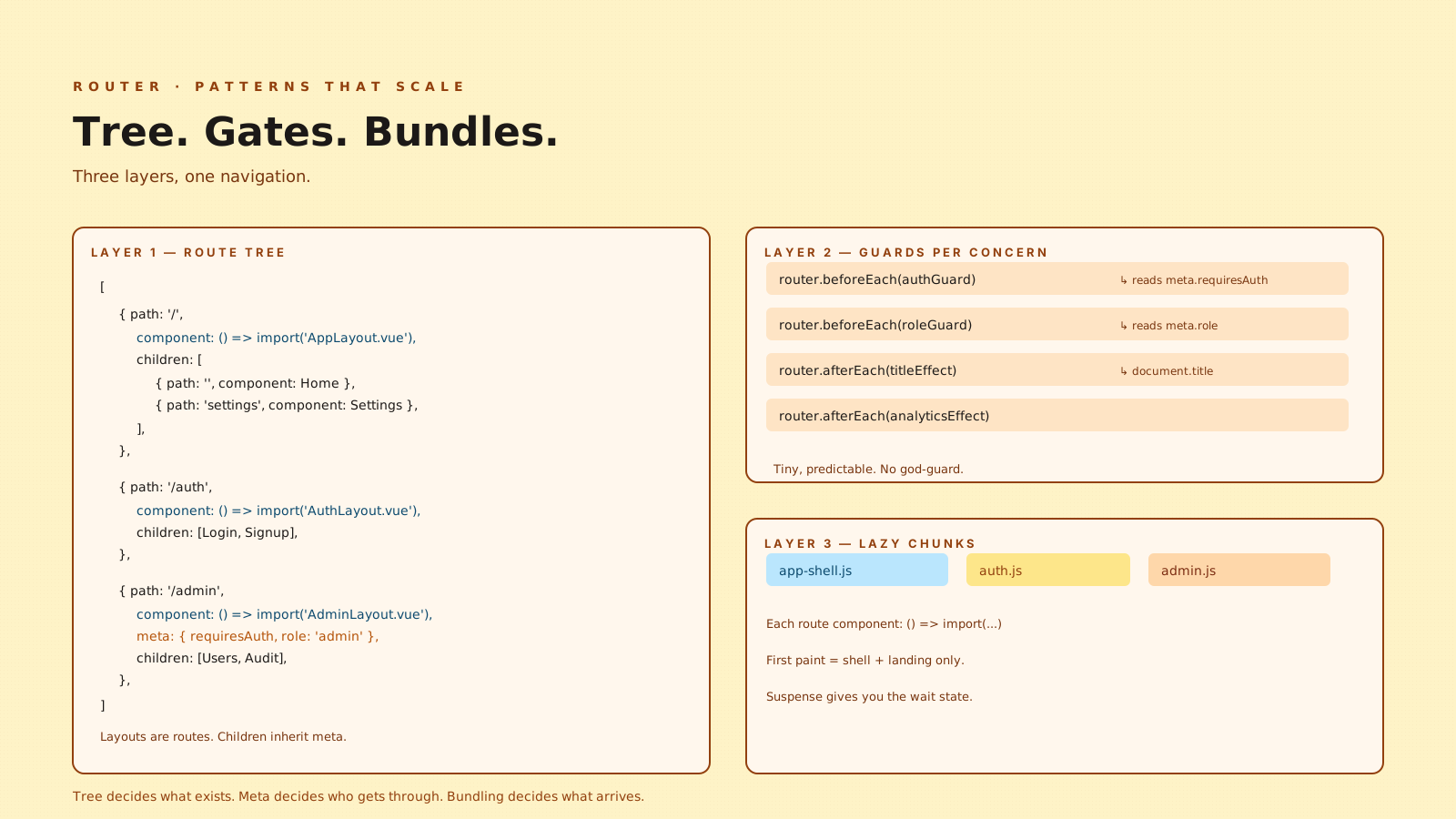
The pattern that holds: tiny per-concern guards, each driven by route meta.
// router/index.ts
router.beforeEach(authGuard)
router.beforeEach(roleGuard)
router.afterEach(titleEffect)
router.afterEach(analyticsEffect)// guards/auth.ts
import type { NavigationGuard } from 'vue-router'
import { useAuthStore } from '@/stores/auth'
export const authGuard: NavigationGuard = (to) => {
if (!to.meta.requiresAuth) return true
const auth = useAuthStore()
if (auth.isAuthenticated) return true
return { name: 'login', query: { redirect: to.fullPath } }
}The route declares its requirement in meta, the guard checks it. Each guard does one thing. If a route doesn't need a check, the guard is a no-op.
{
  path: '/admin',
  component: () => import('@/layouts/AdminLayout.vue'),
  meta: { requiresAuth: true, role: 'admin' },
  children: [
    { path: 'users', component: () => import('@/pages/admin/Users.vue') },
  ],
}
meta is inherited by children unless overridden. The admin route requires auth + admin role; every child inherits that.
Typing Route Meta
Route meta is Record<string, unknown> by default — useful, but unsafe. Vue Router gives you a module augmentation for it:
// router/types.ts
import 'vue-router'

declare module 'vue-router' {
  interface RouteMeta {
    requiresAuth?: boolean
    role?: 'admin' | 'editor' | 'viewer'
    title?: string
    layout?: 'app' | 'auth' | 'plain'
  }
}
After this, to.meta.requiresAuth is typed, and putting a typo into a route definition is a compile-time error. The five lines you'd otherwise spend chasing a runtime "undefined is not a boolean."
Query Vs Params
A persistent confusion. Quick reference:
- Params are part of the path.
/users/:idmatches/users/42, androute.params.id === '42'. Required (or the route doesn't match). - Query is the part after
?./users?page=2&sort=name, androute.query.page === '2'. Always optional.
A useful rule: if removing the value would still match a route, it belongs in query. If the value identifies the resource, it belongs in params. Filters, sorts, page numbers, search terms → query. Resource IDs → params.
Both route.params.x and route.query.x come back as string | string[] | undefined. Coerce to numbers with Number(...) before using them, and validate against your expectation.
Programmatic Navigation Patterns
useRouter() for navigation, useRoute() for reading the current location:
import { useRouter, useRoute } from 'vue-router'

const router = useRouter()
const route = useRoute()

// after a successful login
router.replace((route.query.redirect as string) || { name: 'home' })

// preserve query while changing path
router.push({ name: 'users', params: { id: 42 }, query: route.query })
replace instead of push for redirects — it doesn't add a back-button entry. Worth the two characters.
Scroll Behavior
A small thing that makes apps feel finished:
createRouter({
  // ...
  scrollBehavior(to, from, savedPosition) {
    if (savedPosition) return savedPosition  // back/forward restores
    if (to.hash) return { el: to.hash, behavior: 'smooth' }
    return { top: 0 }
  },
})
savedPosition is non-null on browser back/forward navigation. Returning it restores the previous scroll. This is the difference between a router that feels native and one that feels glued together.
Data Loading: Don't Do It In Guards
The temptation is to fetch data in beforeEach. Don't. Guards run on every navigation, they block the transition, and putting fetch logic there couples the router to your data layer in a way that's hard to test.
The shape that scales: keep guards for decisions (allow/deny/redirect), keep data loading in the page component (or in a TanStack Query / Pinia Colada hook), and use Suspense or a loading state to handle the wait. The guard answers "should this navigation happen?"; the page answers "what data do I need?"
The exception: critical data that the guard needs to make its decision (the current user's role, for example). Load that once at app startup, cache it in the auth store, and let the guard read it synchronously.
A One-Sentence Mental Model
Vue Router is just nested components, with the URL as the props. Layouts are routes that render children, guards are predicates over route meta, lazy components are cheap by default — and once you stop trying to make the router do anything more than route, the rest of the app gets a lot quieter.