The first time you write tests for a Vue app, the question feels like "which library do I use?" Six months later it's "why is the test suite slow, flaky, and somehow still letting bugs through?" Both questions have the same answer: testing strategy is about what each test type is for, not which framework you picked.
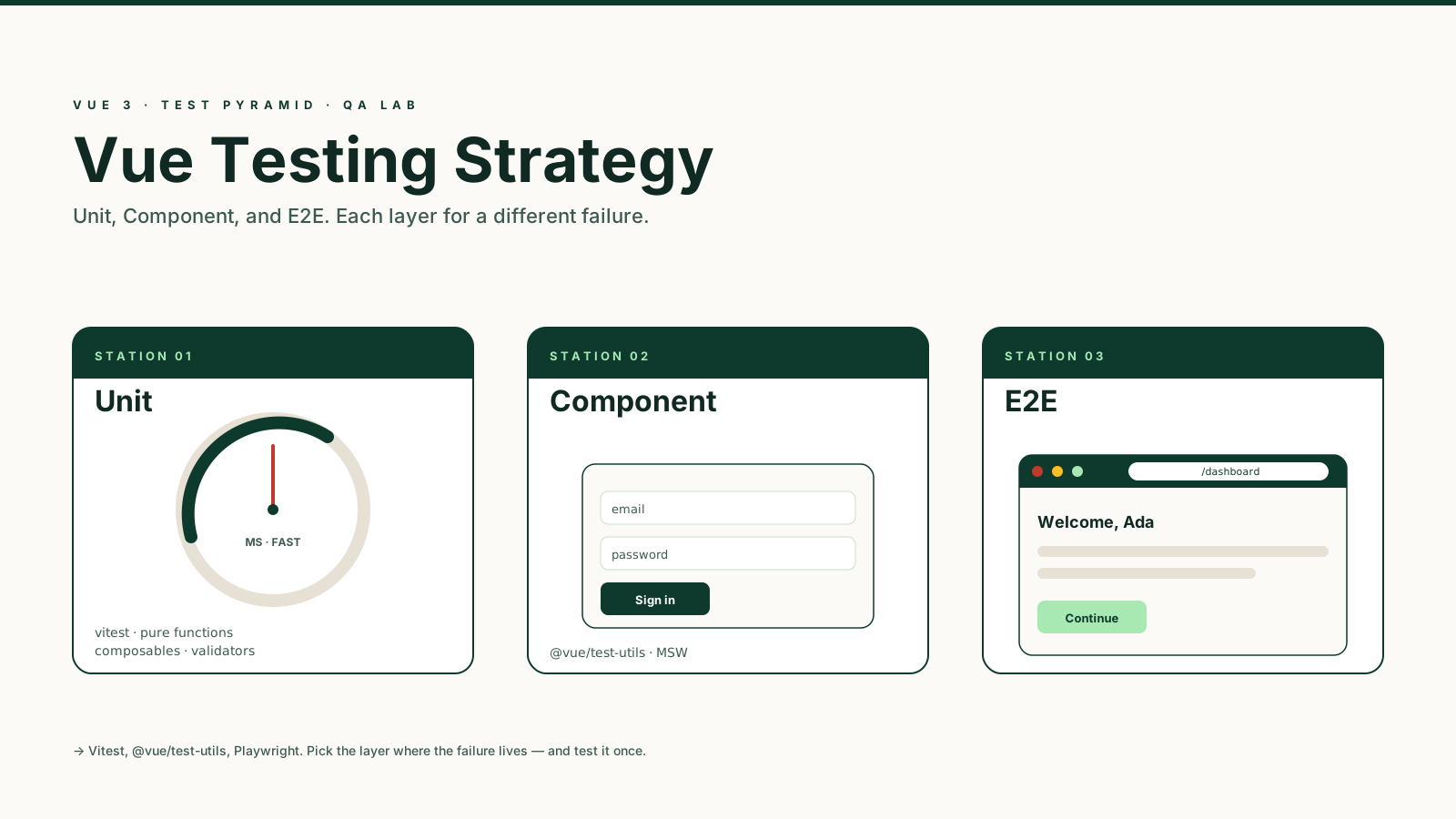
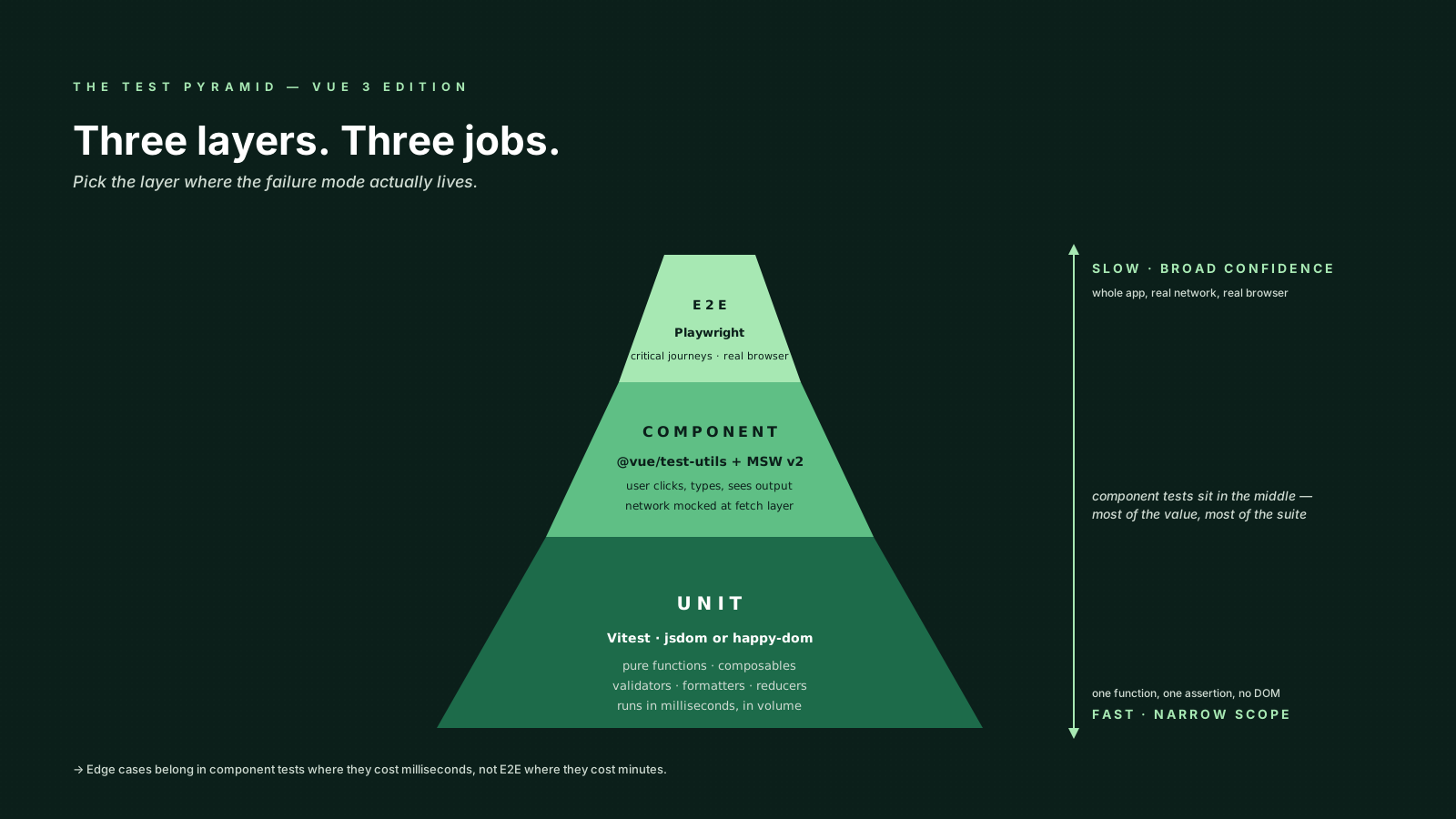
A real Vue codebase needs three layers, and they catch different failures. Unit tests check pure logic. Component tests check that the template, the props, the events, and the user interactions agree. End-to-end tests check that the actual application — routing, network, real browser — behaves the way users expect. Mix them up and you end up with tests that are slow as E2E and shallow as unit tests at the same time.
This article walks through how to split a Vue 3 test suite across those three layers, what tools make sense in 2025, and the patterns that keep the suite trustworthy as the app grows.
The Tools You Actually Need
For a Vue 3 project the boring, well-supported stack is:
- Vitest as the test runner. It uses Vite's transform pipeline, so your
<script setup>, path aliases, and CSS-modules config just work. - @vue/test-utils for mounting components in jsdom or happy-dom.
- Playwright for end-to-end tests in real browsers.
- MSW v2 (
msw/nodefor tests,msw/browserfor dev) to mock HTTP at the network layer instead of stubbing fetch in every test. - @testing-library/vue as a thin layer over
mountif you prefer "find by role" semantics for component tests. It pairs well with@testing-library/user-eventfor realistic interactions.
You do not need Cypress and Playwright. Pick one E2E runner and standardize. Playwright is the safer default in 2025 — faster, parallel by default, better trace viewer.
Unit Tests Are For Pure Functions And Composables
A unit test is fast, has no DOM, and asserts that some function or composable returns the right thing. The smell that you are doing it wrong is mounting a component to test what is essentially a formatPrice helper.
// src/utils/formatPrice.spec.ts
import { describe, it, expect } from 'vitest'
import { formatPrice } from './formatPrice'

describe('formatPrice', () => {
  it('formats integers with the currency symbol', () => {
    expect(formatPrice(1200, 'USD')).toBe('$1,200.00')
  })

  it('handles negative balances', () => {
    expect(formatPrice(-50, 'EUR')).toBe('-€50.00')
  })
})
Composables are the same shape. You test them by calling them inside a tiny synthetic component or with withSetup style helpers, and you assert against the refs they return.
// src/composables/useToggle.spec.ts
import { describe, it, expect } from 'vitest'
import { effectScope } from 'vue'
import { useToggle } from './useToggle'

describe('useToggle', () => {
  it('flips the value', () => {
    const scope = effectScope()
    scope.run(() => {
      const [state, toggle] = useToggle(false)
      expect(state.value).toBe(false)
      toggle()
      expect(state.value).toBe(true)
    })
    scope.stop()
  })
})
The point of unit tests is volume — hundreds of them, each running in milliseconds. They are where validation rules, formatters, parsers, reducers, and state machines belong.
Component Tests Are For Templates And Interaction
This is where most of the value lives in a Vue app. You mount a real component, give it props, simulate user interaction, and assert what they see.
// src/components/SignInForm.spec.ts
import { describe, it, expect, vi } from 'vitest'
import { mount } from '@vue/test-utils'
import SignInForm from './SignInForm.vue'

describe('SignInForm', () => {
  it('emits submit with the typed credentials', async () => {
    const wrapper = mount(SignInForm)

    await wrapper.get('input[name="email"]').setValue('ada@example.com')
    await wrapper.get('input[name="password"]').setValue('hunter2')
    await wrapper.get('form').trigger('submit.prevent')

    expect(wrapper.emitted('submit')).toEqual([
      [{ email: 'ada@example.com', password: 'hunter2' }],
    ])
  })

  it('shows a validation error when the email is empty', async () => {
    const wrapper = mount(SignInForm)
    await wrapper.get('form').trigger('submit.prevent')
    expect(wrapper.text()).toContain('Email is required')
  })
})
A few rules I follow at this layer:
- Query like a user. Prefer accessible queries (
getByRole,getByLabelText) overwrapper.find('.btn-primary'). Class names change; semantics do not. Note that those Testing-Library-style queries don't ship with bare@vue/test-utils— install@testing-library/vue(which wraps test-utils) when you want them, or fall back towrapper.get('input[name="email"]')/wrapper.find('button[type="submit"]')when you stay on plain test-utils. Playwright exposes the same accessible queries on itspageobject. - Assert what the user sees, not what was called.
expect(wrapper.text()).toContain(...)overexpect(spy).toHaveBeenCalled()whenever both are options. - Stub child components only when you have to. If a child does network work, stub the network with MSW, not the child.
For network calls inside components, use MSW v2 to intercept at the fetch layer. The setup file looks like this:
// src/test/server.ts
import { setupServer } from 'msw/node'
import { http, HttpResponse } from 'msw'

export const server = setupServer(
  http.get('/api/me', () =>
    HttpResponse.json({ id: 1, name: 'Ada' })
  ),
  http.post('/api/sign-in', async ({ request }) => {
    const body = await request.json() as { email: string }
    if (body.email === 'fail@example.com') {
      return HttpResponse.json({ error: 'invalid' }, { status: 401 })
    }
    return HttpResponse.json({ token: 'abc' })
  }),
)
Then in vitest.setup.ts you server.listen() before the suite, server.resetHandlers() between tests, and server.close() after. The component code calls fetch('/api/me') in production and in tests; only the network changes.
Note the http import from msw and HttpResponse for replies. The old rest.get(...) API from MSW v1 is gone in v2 — if you copy a tutorial and rest is undefined, you are reading an old post.
E2E Tests Are For The Critical Journeys
End-to-end tests run the deployed application in a real browser. They are slow, flaky-prone, and the most realistic. The mistake teams make is writing dozens of them, one per page. The right shape is a small set covering the journeys that would hurt the business if broken.
// e2e/sign-in.spec.ts
import { test, expect } from '@playwright/test'

test('user can sign in and reach the dashboard', async ({ page }) => {
  await page.goto('/sign-in')

  await page.getByLabel('Email').fill('ada@example.com')
  await page.getByLabel('Password').fill('hunter2')
  await page.getByRole('button', { name: 'Sign in' }).click()

  await expect(page).toHaveURL('/dashboard')
  await expect(page.getByRole('heading', { name: /welcome/i })).toBeVisible()
})

test('shows an error on invalid credentials', async ({ page }) => {
  await page.goto('/sign-in')

  await page.getByLabel('Email').fill('wrong@example.com')
  await page.getByLabel('Password').fill('nope')
  await page.getByRole('button', { name: 'Sign in' }).click()

  await expect(page.getByRole('alert')).toContainText('Invalid email or password')
})
Playwright's getByRole and getByLabel are the same accessibility queries as Testing Library. If a control is not findable by role or label in your E2E test, your component is probably hard for assistive tech to find too.
For E2E mocking I lean toward running against a real test backend whenever feasible — Docker-composed Postgres + your API, a fixture seed before each suite, real network. When that's not possible, Playwright's page.route() lets you intercept calls inline. Avoid putting MSW in the E2E layer; you want this tier to surface integration bugs that mocks would hide.
What Each Layer Should Not Do
The trap is each layer doing the other layer's job poorly:
- Unit tests asserting on the DOM. If you find yourself rendering a component to test a method, the method belongs in a separate function.
- Component tests hitting the real network. Slow, flaky, leaks state between tests. Always stub at the boundary.
- E2E tests asserting on every prop and edge case. Cover the paths, not the inputs. Edge cases belong in component tests, where they cost milliseconds, not minutes.
- Snapshots as a substitute for assertions.
toMatchSnapshoton a 200-line render makes failures unreviewable. Snapshot small, focused outputs only — a serialized API response, a normalized class string.
Speed Is A Feature
A test suite people will run constantly is one that gives them feedback in seconds. A few practical wins:
- Use
happy-domoverjsdomfor component tests when you can — typically 2-3x faster. - Run unit tests in
--watchduring development; only run E2E on the CI side. - Vitest parallelises by default. Configure with
--pool=threadsor--pool=forks(Vitest 2.0+ defaults toforksfor isolation). The legacy--threadsflag was removed in 2.0. - For Playwright, shard the E2E suite across CI workers. Even a 50-test suite drops from minutes to seconds.
If your component tests take longer than your unit tests by an order of magnitude, look at what's mounted in the global setup. A common culprit is a router or a Pinia store being instantiated for every test when most don't need either.
A One-Sentence Mental Model
Unit tests prove a function is right, component tests prove the user sees the right thing when they interact, and E2E tests prove the whole machine starts and the doors open — pick the layer where the failure mode lives, and write the test there once.