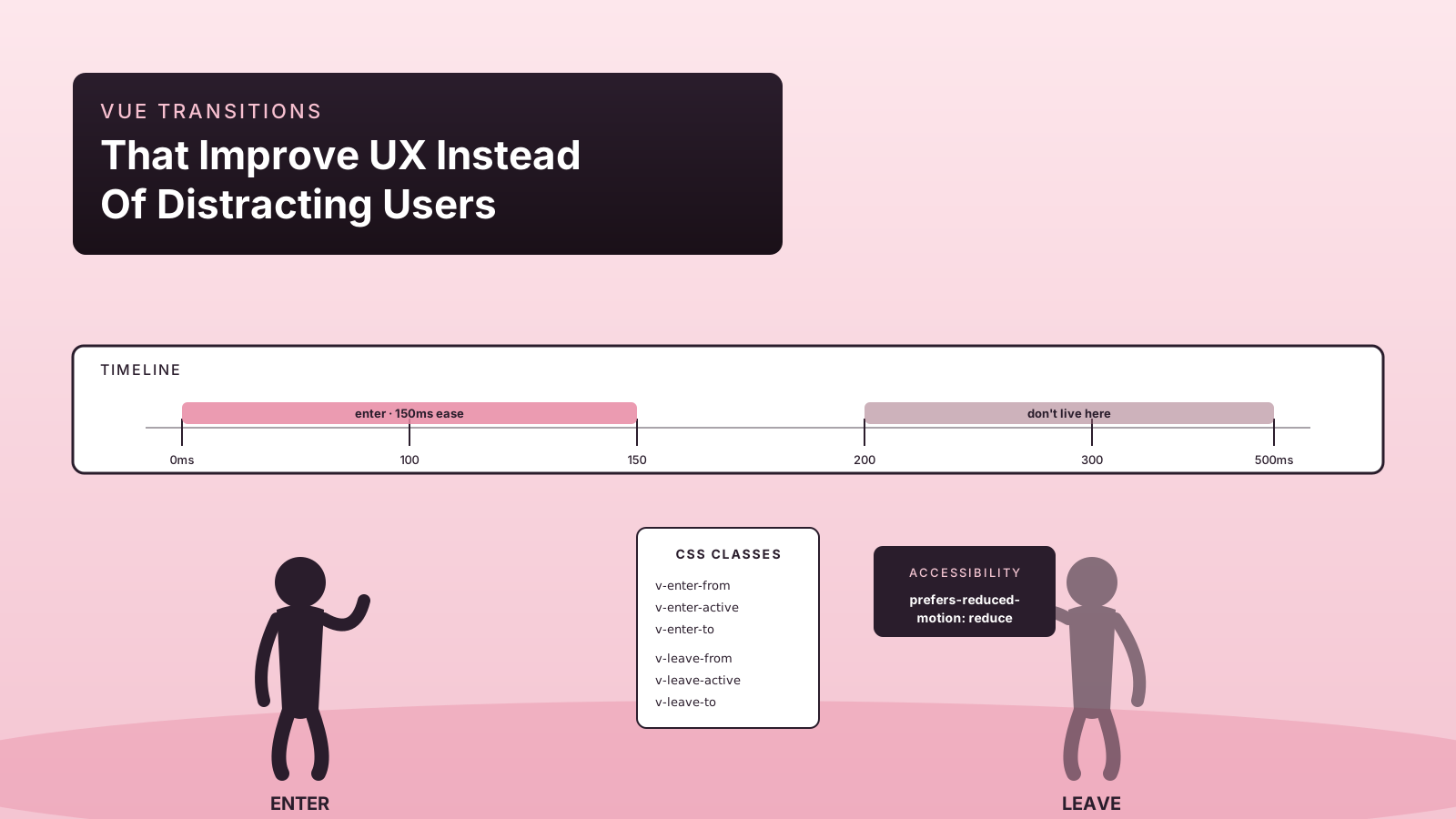
The difference between a good transition and an annoying one isn't really about taste. It's about whether the motion explains a state change or pads it. A 150ms fade between two states helps the user track what just happened. A 600ms slide-and-bounce-and-flourish on every menu open is the UI version of a coworker who clears their throat before every sentence.
Vue 3 ships a small, sharp set of transition primitives — <Transition>, <TransitionGroup>, the JavaScript hooks, and the auto-positioning trick that makes list reorders look smooth. The framework gives you everything you need for the 80% case. The remaining 20% (chained timelines, scroll-driven animation) belongs to a real animation library.
This piece is about getting the 80% right, because it's the one most teams skip past on the way to chasing 60fps confetti.
What Motion Is For
A short list of jobs motion does well, in roughly the order they earn their keep:
- Showing where a thing came from or went to. A modal scales out from the button that opened it. A list item slides in from the side it was added on. The user's eye doesn't have to search for the change.
- Softening discontinuities. Two pages with different layouts feel jarring with a hard cut. A 100ms cross-fade glues the seam.
- Confirming an action. A button that briefly changes color tells you the click registered before the network round-trip completes.
- Indicating direction. Forward navigation slides left; back navigation slides right. The motion tells the user which way they're moving through the app.
A short list of jobs motion does badly: signaling progress (use a spinner or a progress bar), hiding network latency (the user still waits, you just made the wait fancier), making a page feel "modern" (use typography and spacing instead). If the transition isn't communicating a specific state change, it's costing attention without paying for it.
<Transition>: The 80% Case
<Transition> wraps a single element or component that mounts/unmounts (or toggles via v-if/v-show/<component :is>) and applies six CSS classes during the transition: enter-from, enter-active, enter-to, leave-from, leave-active, leave-to. You define the start and end styles, the active class holds the transition shorthand, and Vue handles the timing.
<script setup lang="ts">
const open = ref(false)
</script>

<template>
  <Transition name="fade">
    <div v-if="open" class="panel">Settings panel content</div>
  </Transition>
</template>

<style scoped>
.fade-enter-active,
.fade-leave-active {
  transition: opacity 150ms ease;
}
.fade-enter-from,
.fade-leave-to {
  opacity: 0;
}
</style>
That's the whole API for most cases. A name prop means the classes are prefixed with that name; if you skip it, Vue uses v- (so v-enter-active, v-leave-to, etc.).
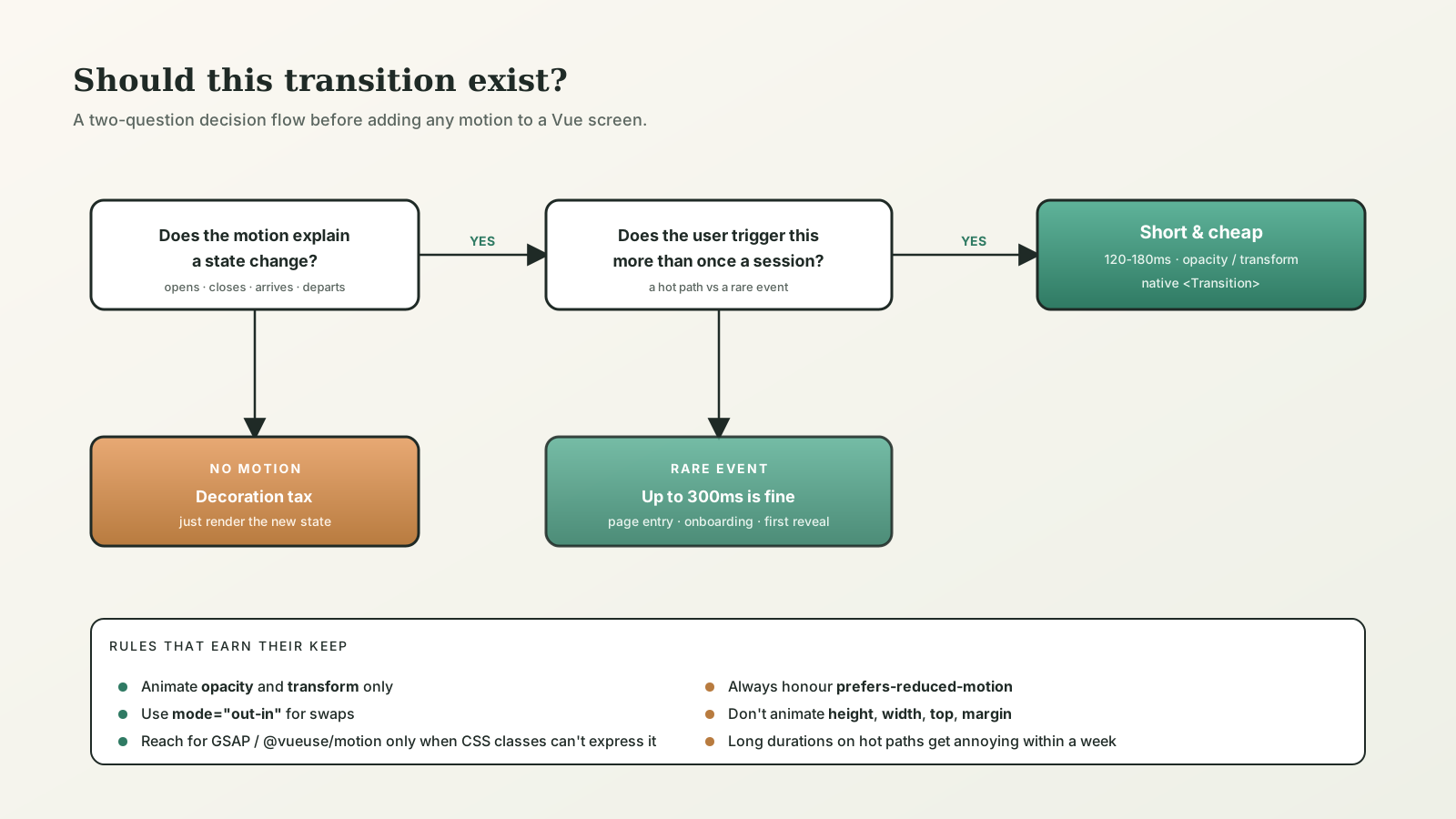
For tasteful UI motion, two rules earn their keep:
- Animate
opacityandtransform. Both are cheap because the browser can run them off the main thread. Animatingwidth,height,top, ormargintriggers layout, which is expensive and produces the dreaded juddery animation on slower devices. - Stay under 200ms for "this just happened." Reach for 250-300ms only when the transition has to communicate a longer move (a panel sliding across the viewport). Anything longer than that on a frequently-clicked control is annoying within a week.
The mode prop is the small detail people miss: mode="out-in" waits for the leaving element to finish before mounting the entering one. Without it, a route or component swap shows both elements stacked for a frame, which is rarely what you want.
<TransitionGroup> And FLIP For Free
<TransitionGroup> is the same idea for lists. Each child gets the enter/leave classes when it's added or removed. The bonus feature, and the reason it's worth knowing about: it implements the FLIP technique for items that move within the list. Reorder the array, and the items animate from their old positions to their new ones automatically.
<script setup lang="ts">
import { ref } from 'vue'

const items = ref([
  { id: 1, label: 'Tasks' },
  { id: 2, label: 'Inbox' },
  { id: 3, label: 'Reports' },
])

function shuffle() {
  items.value = [...items.value].sort(() => Math.random() - 0.5)
}
</script>

<template>
  <button @click="shuffle">Shuffle</button>
  <TransitionGroup name="list" tag="ul">
    <li v-for="item in items" :key="item.id" class="row">
      {{ item.label }}
    </li>
  </TransitionGroup>
</template>

<style scoped>
.list-move,
.list-enter-active,
.list-leave-active {
  transition: all 200ms ease;
}
.list-enter-from,
.list-leave-to {
  opacity: 0;
  transform: translateX(20px);
}
.list-leave-active {
  position: absolute;
}
</style>
The two non-obvious lines are the .list-move class (Vue applies it during the auto-positioning animation) and position: absolute on .list-leave-active, which removes the leaving item from layout flow so the remaining items can move into place without waiting for it.
This is the Vue feature that punches above its weight. Reorderable lists, kanban boards, drag-and-drop pickers — all of them get smooth motion almost for free.
prefers-reduced-motion Is Not Optional
Some users have vestibular disorders. Some users find motion distracting. Some users are on a system setting they don't even remember turning on. The web platform has a single CSS query that respects all of them:
@media (prefers-reduced-motion: reduce) {
  .fade-enter-active,
  .fade-leave-active,
  .list-move,
  .list-enter-active,
  .list-leave-active {
    transition: none;
  }
}
You can also branch in JavaScript via VueUse's useMediaQuery:
import { useMediaQuery } from '@vueuse/core'

const reduceMotion = useMediaQuery('(prefers-reduced-motion: reduce)')
const transitionName = computed(() => reduceMotion.value ? 'none' : 'fade')
The honest implementation is a global SCSS partial that wipes the active classes when reduced motion is requested, plus the JavaScript branch only where you have JS-driven animation. Set it up once, in the design system, and forget about it.
When To Reach For A Real Animation Library
The built-in transitions handle CSS-class-based motion, which covers fades, slides, scales, and FLIP list reorders. For anything more orchestrated, you want a real animation engine.
GSAP is the heavyweight. Timelines, eases, scroll-driven animation, complex sequencing, SVG morphing. It's what you reach for when the motion is part of the brand — landing pages, marketing sites, and the splash sequence for a new feature. Expensive in bundle size if you load the whole thing; tree-shakable if you import only what you use. Pair it with the JavaScript hooks on <Transition> (@enter, @leave) when you need timeline control inside a Vue lifecycle.
@vueuse/motion is the lighter choice for the cases where CSS classes are awkward but you don't need GSAP's timeline API. It's a declarative directive (v-motion) and a composable (useMotion) that animates between configured states. Smaller bundle, less power, often the right tradeoff for a dashboard.
The rule that has held up: if you're writing a setTimeout to coordinate two CSS transitions, switch to a real animation library. That code becomes unmaintainable around the third sequenced step.
Common Mistakes I See In Code Review
- Animating layout properties.
transition: height 300mson an expanding panel produces visible jank on a long list. Animatetransform: scaleY()or use theauto-heightpattern withgetBoundingClientRect()and animatemax-heightonly as a fallback. - Forgetting
mode="out-in". Two routes overlap during the swap because the entering view mounts before the leaving one unmounts. Setmode="out-in"on the route transition. - Long durations on frequent interactions. A 400ms transition on the dropdown that opens 200 times per session is rude. Cut it to 120ms.
- Animating during data load. A skeleton placeholder fading in, then fading out, then the real content fading in. Three transitions for one piece of data. Cross-fade once or skip the animation on cached responses.
- Skipping the leave transition. The
v-ifflips, the element disappears instantly. Usually means the wrapping<Transition>got removed during a refactor. Wrap a single element, not a fragment. - Animating by
display.display: nonetodisplay: blockdoesn't transition. Usev-showif you want CSS visibility, orv-ifinside<Transition>.
The Honest Summary
Vue's built-in transitions cover almost everything a normal application needs, and they're cheap to add. The hard work isn't writing them; it's deciding when to write them. A transition that doesn't communicate a state change is a tax on attention, and most apps would feel sharper with half their current motion turned off. Reach for <Transition> when state changes need explaining, <TransitionGroup> when lists reorder, GSAP or @vueuse/motion when the motion is the feature, and prefers-reduced-motion always.